


 本文介绍了如何在Vue项目中实现滑动图片验证功能。通过安装vue-monplasty-slide-verify库,然后引入并使用组件<slide-verify>,设置相关参数如长度、位置和回调函数,可以轻松集成滑动验证到登录过程。
预览

使用步骤:
1.安装 npm install --save vue-monplasty-slide-verify
2.使用方法:
import SlideVerify from “vue-monplasty-slide-verify”
Vue.use(SlideVerify);
<slide-verify :l=“42”
:r=“10”
:w=“310”
:h=“155”
:slider-text=“text”
@success=“onSuccess”
@fail=“onFail”
@refresh=“onRefresh”
{
{msg}}
export default { name: "App", data(){ return { msg: "", text: "向右滑" } }, methods:{ onSuccess(){ this.msg="login success" }, onFail(){ this.msg="" }, onRefresh(){ this.msg="" } } } 参数说明 props传参(均为可选) 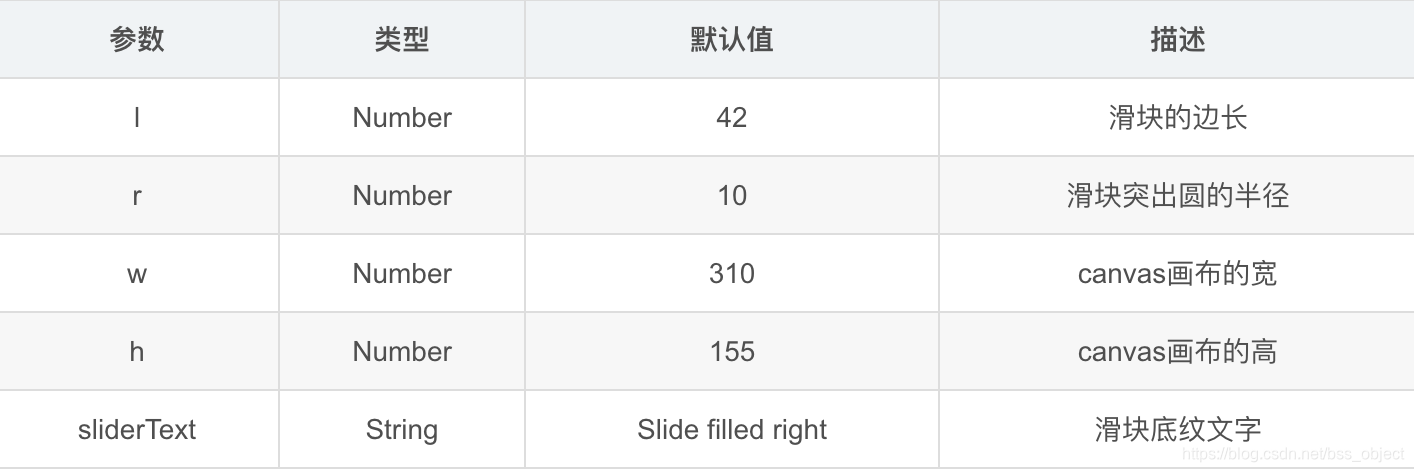 自定义回调函数  最低0.47元/天 解锁文章






 扫一扫
扫一扫


 1704
1704

 被折叠的 条评论
为什么被折叠?
被折叠的 条评论
为什么被折叠?
 到【灌水乐园】发言





