




更多有趣的代码示例,可参考【Programming】
1、功能描述
借助 opencv-python,用 SSD 人形检测模型和质心跟踪方法实现对人群的计数
基于质心的跟踪可以参考 【python】OpenCV—Tracking(10.4)—Centroid,本文不过多介绍
2、代码实现
工程目录
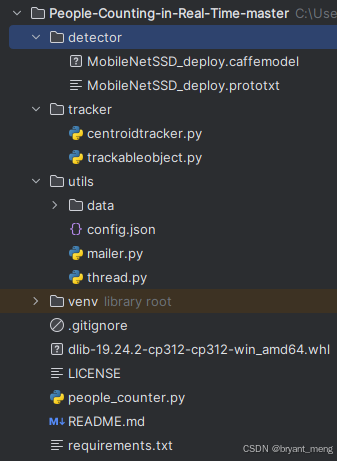
安装依赖库
requirements.txt
schedule==1.1.0
numpy==1.24.3
argparse==1.4.0
imutils==0.5.4
dlib==19.24.1
opencv-python==4.5.5.64
scipy==1.10.1
cmake==3.22.5
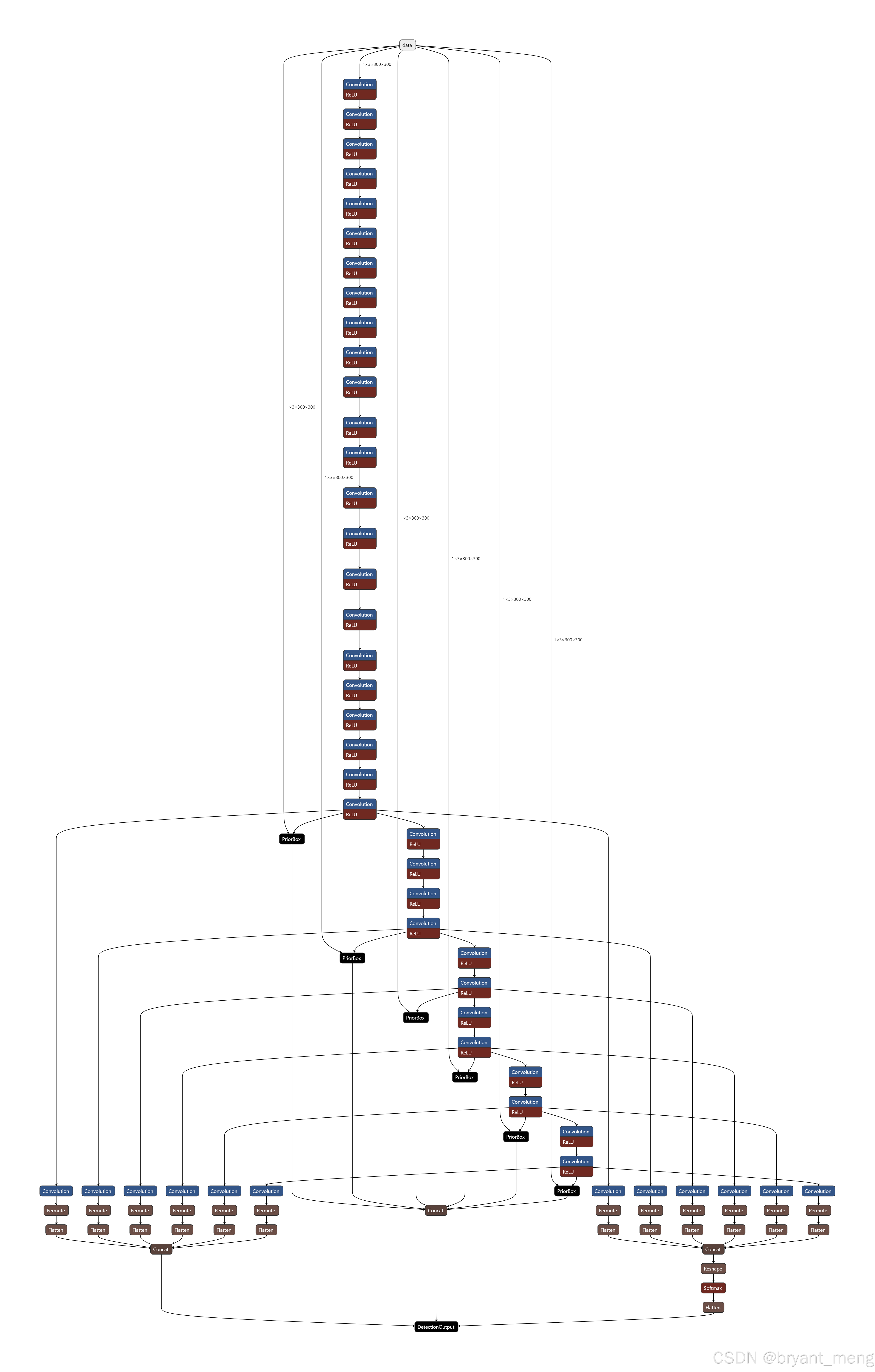
模型文件

网络输入大小 1x3x300x300
trackableobject.py
class TrackableObject:
	def __init__(self, objectID, centroid):
		# store the object ID, then initialize a list of centroids
		# using the current centroid
		self.objectID = objectID
		self.centroids = [centroid]

		# initialize a boolean used to indicate if the object has
		# already been counted or not
		self.counted = False
TrackableObject 构造函数接受 objectID + centroid 并存储它们。
centroids 变量是一个列表,因为它将包含对象的质心位置历史记录。
构造函数还将 counted 初始化为 False ,表示该对象还没有被计数。
people_counter.py
导入必要的库函数
from tracker.centroidtracker import CentroidTracker
from tracker.trackableobject import TrackableObject
from imutils.video import VideoStream
from itertools import zip_longest
from utils.mailer import Mailer
from imutils.video import FPS
from utils import thread
import numpy as np
import threading
import argparse
import datetime
import schedule
import logging
import imutils
import time
import dlib
import json
import csv
import cv2
dlib 库将用于其相关跟踪器实现
记录程序运行的时间,配置 log,初始化相关参数
# execution start time
start_time = time.time()
# setup logger
logging.basicConfig(level = logging.INFO, format = "[INFO] %(message)s")
logger = logging.getLogger(__name__)
# initiate features config.
with open("utils/config.json", "r") as file:
    config = json.load(file)
config.json 内容如下
{
    "Email_Send": "",
    "Email_Receive": "",
    "Email_Password": "",
    "url": "",
    "ALERT": false,
    "Threshold": 10,
    "Thread": false,
    "Log": false,
    "Scheduler": false,
    "Timer": false
}
参数传递
def parse_arguments():
	# function to parse the arguments
    ap = argparse.ArgumentParser()
    ap.add_argument("-p", "--prototxt", required=False, default="detector/MobileNetSSD_deploy.prototxt",
        help="path to Caffe 'deploy' prototxt file")
    ap.add_argument("-m", "--model", required=False, default="detector/MobileNetSSD_deploy.caffemodel",
        help="path to Caffe pre-trained model")
    ap.add_argument("-i", "--input", type=str, default="utils/data/tests/test_1.mp4",
        help="path to optional input video file")
    ap.add_argument("-o", "--output", type=str,
        help="path to optional output video file")
    # confidence default 0.4
    ap.add_argument("-c", "--confidence", type=float, default=0.4,
        help="minimum probability to filter weak detections")
    ap.add_argument("-s", "--skip-frames", type=int, default=30,
        help="# of skip frames between detections")
    args = vars(ap.parse_args())
    return args
- prototxt :Caffe 部署 prototxt 文件的路径。
- model :Caffe 预训练 CNN 模型的路径。
- input : 可选的输入视频文件路径。
- output :可选的输出视频路径。如果未指定路径,则不会录制视频。
- confidence :默认值为 0.4 ,这是有助于过滤掉弱检测的最小概率阈值。
- skip-frames :在跟踪对象上再次运行我们的 DNN 检测器之前要跳过的帧数。请记住,对象检测的计算成本很高,但它确实有助于我们的跟踪器重新评估帧中的对象。默认情况下,我们在使用 OpenCV DNN 模块和我们的 CNN 单次检测器模型检测对象之间跳过 30 帧。
保存 log,如果调用的话,会生成 counting_data.csv
def log_data(move_in, in_time, move_out, out_time):
	# function to log the counting data
	data = [move_in, in_time, move_out, out_time]
	# transpose the data to align the columns properly
	export_data = zip_longest(*data, fillvalue = '')

	with open('utils/data/logs/counting_data.csv', 'w', newline = '') as myfile:
		wr = csv.writer(myfile, quoting = csv.QUOTE_ALL)
		if myfile.tell() == 0: # check if header rows are already existing
			wr.writerow(("Move In", "In Time", "Move Out", "Out Time"))
			wr.writerows(export_data)
eg:
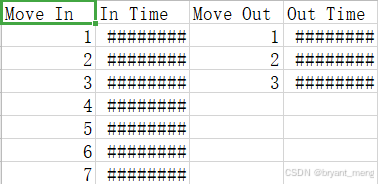
核心函数 people_counter(main function for people_counter.py),下面看看实现
首先定义好 MobileNet SSD 目标检测网络能预测的所有类别
	args = parse_arguments()
	# initialize the list of class labels MobileNet SSD was trained to detect
	CLASSES = ["background", "aeroplane", "bicycle", "bird", "boat",
		"bottle", "bus", "car", "cat", "chair", "cow", "diningtable",
		"dog", "horse", "motorbike", "person", "pottedplant", "sheep",
		"sofa", "train", "tvmonitor"]
载入 caffe 网络
	# load our serialized model from disk
	net = cv2.dnn.readNetFromCaffe(args["prototxt"], args["model"])
如果没有配置输入视频,则开启网页,网址在 config.json 中配置
	# if a video path was not supplied, grab a reference to the ip camera
	if not args.get("input", False):
		logger.info("Starting the live stream..")
		vs = VideoStream(config["url"]).start()
		time.sleep(2.0)

	# otherwise, grab a reference to the video file
	else:
		logger.info("Starting the video..")
		vs = cv2.VideoCapture(args["input"])
初始化一些参数配置
	# initialize the video writer (we'll instantiate later if need be)
	writer = None

	# initialize the frame dimensions (we'll set them as soon as we read
	# the first frame from the video)
	W = None
	H = None

	# instantiate our centroid tracker, then initialize a list to store
	# each of our dlib correlation trackers, followed by a dictionary to
	# map each unique object ID to a TrackableObject
	ct = CentroidTracker(maxDisappeared=40, maxDistance=50)
	trackers = []
	trackableObjects = {}

	# initialize the total number of frames processed thus far, along
	# with the total number of objects that have moved either up or down
	totalFrames = 0
	totalDown = 0
	totalUp = 0
	# initialize empty lists to store the counting data
	total = []
	move_out = []
	move_in =[]
	out_time = []
	in_time = []

	# start the frames per second throughput estimator
	fps = FPS().start()
- writer:我们的视频写入器。如果我们正在写入视频,我们稍后会实例化这个对象。
- W 和 H:我们的帧尺寸。我们需要将这些插入到 cv2.VideoWriter 中。
- ct:CentroidTracker。
- trackers :存储 dlib 相关跟踪器的列表。
- trackableObjects :将 objectID 映射到 TrackableObject 的字典。
- totalFrames :处理的帧总数。
- totalDown 和 totalUp :向下或向上移动的对象/人的总数。
- fps :我们用于基准测试的每秒帧数估计器。
遍历读取视频流中的每一帧图片
读取失败会退出
如果读取成功,存储好原始图片的长宽,把图片 resize 到宽固定长度为 500
如果要保存输出视频,则配置好 cv2.VideoWriter 中的视频相关参数
	# loop over frames from the video stream
	while True:
		# grab the next frame and handle if we are reading from either
		# VideoCapture or VideoStream
		frame = vs.read()
		frame = frame[1] if args.get("input", False) else frame

		# if we are viewing a video and we did not grab a frame then we
		# have reached the end of the video
		if args["input"] is not None and frame is None:
			break

		# resize the frame to have a maximum width of 500 pixels (the
		# less data we have, the faster we can process it), then convert
		# the frame from BGR to RGB for dlib
		frame = imutils.resize(frame, width = 500)
		rgb = cv2.cvtColor(frame, cv2.COLOR_BGR2RGB)

		# if the frame dimensions are empty, set them
		if W is None or H is None:
			(H, W) = frame.shape[:2]

		# if we are supposed to be writing a video to disk, initialize
		# the writer
		if args["output"] is not None and writer is None:
			fourcc = cv2.VideoWriter_fourcc(*"mp4v")
			writer = cv2.VideoWriter(args["output"], fourcc, 30,
				(W, H), True)
例子视频的尺寸为 (300, 402, 3)
第一帧

resize 后, 图片大小为 (373, 500, 3)
将状态初始化为 Waiting。可能的状态包括:
- Waiting:正在等待检测和跟踪人员。
- Detecting:正在使用 MobileNet SSD 检测人员。
- Tracking:人们在帧中被跟踪,正在计算 totalUp 和 totalDown 。
		# initialize the current status along with our list of bounding
		# box rectangles returned by either (1) our object detector or
		# (2) the correlation trackers
		status = "Waiting"
		rects = []

		# check to see if we should run a more computationally expensive
		# object detection method to aid our tracker
		if totalFrames % args["skip_frames"] == 0:
			# set the status and initialize our new set of object trackers
			status = "Detecting"
			trackers = []

			# convert the frame to a blob and pass the blob through the
			# network and obtain the detections
			blob = cv2.dnn.blobFromImage(frame, 0.007843, (W, H), 127.5)
			net.setInput(blob)
			detections = net.forward()
检测时隔 skip_frames 帧才进行一次的,因为检测开销会比跟踪开销大,中间帧只用跟踪来进行检测框的更新
配置好输入数据,前向网络
遍历检测到的所有目标
获取其类别得分
得分高于设定的阈值 confidence 检测框才进行后续的处理
如果检测的类别不是 person,也会跳过
			# loop over the detections
			for i in np.arange(0, detections.shape[2]):
				# extract the confidence (i.e., probability) associated
				# with the prediction
				confidence = detections[0, 0, i, 2]

				# filter out weak detections by requiring a minimum
				# confidence
				if confidence > args["confidence"]:
					# extract the index of the class label from the
					# detections list
					idx = int(detections[0, 0, i, 1])

					# if the class label is not a person, ignore it
					if CLASSES[idx] != "person":
						continue
第一帧网络预测结果 detections 的 shape 为 (1, 1, 100, 7)
7 的构成
array([ 0.        , 15.        ,  0.99846387,  0.34079546,  0.1428327 ,
        0.53464395,  0.5692927 ], dtype=float32)
第二个维度是 class,第三维度是 score,后面四个维度是 bbox 坐标
第一次检测到人的 bbox 为 array([170.39772868, 53.27659577, 267.32197404, 212.3461861 ])
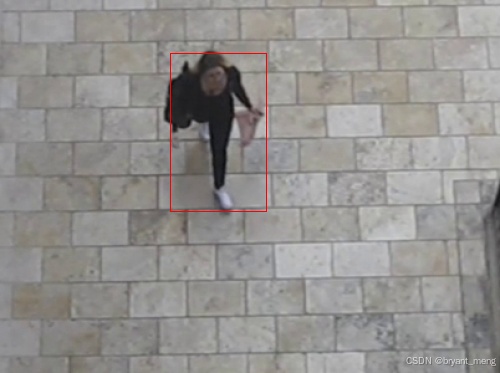
计算 box
实例化 dlib 相关跟踪器,将对象的边界框坐标传递给 dlib.rectangle,将结果存储为 rect。
开始跟踪,并将跟踪器附加到跟踪器列表 trackers 中
这是每 N 个跳帧执行的所有操作的封装
					# compute the (x, y)-coordinates of the bounding box
					# for the object
					box = detections[0, 0, i, 3:7] * np.array([W, H, W, H])
					(startX, startY, endX, endY) = box.astype("int")

					# construct a dlib rectangle object from the bounding
					# box coordinates and then start the dlib correlation
					# tracker
					tracker = dlib.correlation_tracker()
					rect = dlib.rectangle(startX, startY, endX, endY)
					tracker.start_track(rgb, rect)

					# add the tracker to our list of trackers so we can
					# utilize it during skip frames
					trackers.append(tracker)
注意,每 skip_frames 帧才判断一次是否检测到人,所以第一帧没有人的话,要等到 skip_frames 帧后才再次启用人形检测器
中间帧用跟踪器而不是目标检测器来定位矩形框
遍历可用跟踪器。
将状态更新为Tracking并获取对象位置。
提取位置坐标,然后在 rects 列表中填充信息。
		# otherwise, we should utilize our object *trackers* rather than
		# object *detectors* to obtain a higher frame processing throughput
		else:
			# loop over the trackers
			for tracker in trackers:
				# set the status of our system to be 'tracking' rather
				# than 'waiting' or 'detecting'
				status = "Tracking"

				# update the tracker and grab the updated position
				tracker.update(rgb)
				pos = tracker.get_position()

				# unpack the position object
				startX = int(pos.left())
				startY = int(pos.top())
				endX = int(pos.right())
				endY = int(pos.bottom())

				# add the bounding box coordinates to the rectangles list
				rects.append((startX, startY, endX, endY))
第一次跟踪后的 bbox 更新为 [(167, 55, 264, 215)]
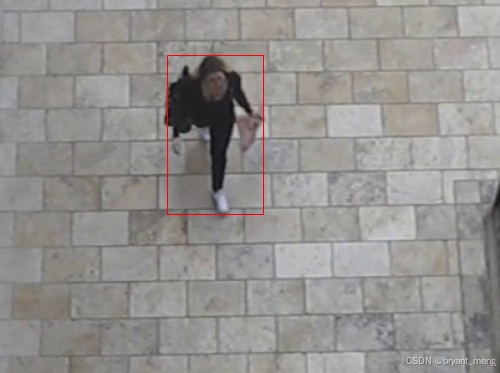
画一条水平可视化线(人们必须穿过它才能被跟踪)
		# draw a horizontal line in the center of the frame -- once an
		# object crosses this line we will determine whether they were
		# moving 'up' or 'down'
		cv2.line(frame, (0, H // 2), (W, H // 2), (0, 0, 0), 3)
		cv2.putText(frame, "-Prediction border - Entrance-", (10, H - ((i * 20) + 200)),
			cv2.FONT_HERSHEY_SIMPLEX, 0.5, (0, 0, 0), 1)
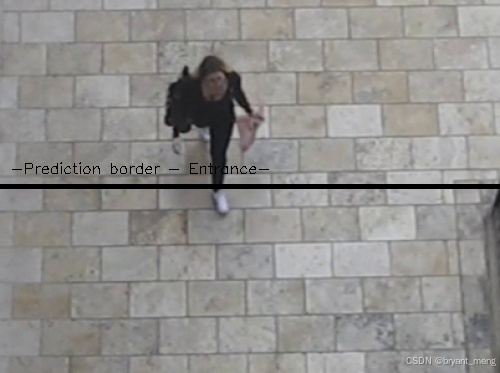
并使用质心跟踪器来更新我们的对象质心
		# use the centroid tracker to associate the (1) old object
		# centroids with (2) the newly computed object centroids
		objects = ct.update(rects)
此时 rects 为第一次跟踪后的 bbox,[(167, 55, 264, 215)], 质心 objects 的结果为OrderedDict({0: array([215, 135])}),用红色点可视化如下

遍历 ID 和质心
我们尝试为当前的 objectID 获取 TrackableObject。如果 objectID 的 TrackableObject 不存在,我们就创建一个。否则,已经存在一个 TrackableObject ,所以我们需要弄清楚对象(人)是向上还是向下移动。
to.centroids 当前帧和历史帧,同一个 id 的质心,eg 第二帧的时候 [array([215, 135]), array([218, 139])],第三帧的时候 [array([215, 135]), array([218, 139]), array([217, 144])]
获取给定对象之前所有质心位置的 y 坐标值。然后,通过取当前质心位置与之前所有质心位置的平均值之间的差来计算方向。
我们取均值的原因是为了确保我们的方向跟踪更稳定。如果我们只存储这个人之前的质心位置,我们就有可能出现错误的方向计数
通过取均值,我们可以让我们的人计算得更准确。
如果 TrackableObject 还没有被计数,我们需要确定它是否已经准备好被计数,通过:
- 检查 direction 是否为负(表示对象向上移动)并且质心在中心线上方。在这种情况下,我们增加 totalUp。
- 或者检查 direction 是否为正(表示物体正在向下移动)且质心在中心线以下。如果这是真的,我们增加totalDown。
最后,我们将 TrackableObject 存储在 trackableObjects 字典中,这样我们就可以在捕获下一帧时获取并更新它。
		# loop over the tracked objects
		for (objectID, centroid) in objects.items():
			# check to see if a trackable object exists for the current
			# object ID
			to = trackableObjects.get(objectID, None)

			# if there is no existing trackable object, create one
			if to is None:
				to = TrackableObject(objectID, centroid)

			# otherwise, there is a trackable object so we can utilize it
			# to determine direction
			else:
				# the difference between the y-coordinate of the *current*
				# centroid and the mean of *previous* centroids will tell
				# us in which direction the object is moving (negative for
				# 'up' and positive for 'down')
				y = [c[1] for c in to.centroids]  # 历史同 id 质心的 y 坐标
				direction = centroid[1] - np.mean(y)  # centroid 是当前帧的
				to.centroids.append(centroid)

				# check to see if the object has been counted or not
				if not to.counted:
					# if the direction is negative (indicating the object
					# is moving up) AND the centroid is above the center
					# line, count the object
					if direction < 0 and centroid[1] < H // 2:
						totalUp += 1
						date_time = datetime.datetime.now().strftime("%Y-%m-%d %H:%M")
						move_out.append(totalUp)
						out_time.append(date_time)
						to.counted = True

					# if the direction is positive (indicating the object
					# is moving down) AND the centroid is below the
					# center line, count the object
					elif direction > 0 and centroid[1] > H // 2:
						totalDown += 1
						date_time = datetime.datetime.now().strftime("%Y-%m-%d %H:%M")
						move_in.append(totalDown)
						in_time.append(date_time)
						# if the people limit exceeds over threshold, send an email alert
						if sum(total) >= config["Threshold"]:
							cv2.putText(frame, "-ALERT: People limit exceeded-", (10, frame.shape[0] - 80),
								cv2.FONT_HERSHEY_COMPLEX, 0.5, (0, 0, 255), 2)
							if config["ALERT"]:
								logger.info("Sending email alert..")
								email_thread = threading.Thread(target = send_mail)
								email_thread.daemon = True
								email_thread.start()
								logger.info("Alert sent!")
						to.counted = True
						# compute the sum of total people inside
						total = []
						total.append(len(move_in) - len(move_out))

			# store the trackable object in our dictionary
			trackableObjects[objectID] = to
画出质心,并向帧写入文本
			# draw both the ID of the object and the centroid of the
			# object on the output frame
			text = "ID {}".format(objectID)
			cv2.putText(frame, text, (centroid[0] - 10, centroid[1] - 10),
				cv2.FONT_HERSHEY_SIMPLEX, 0.5, (255, 255, 255), 2)
			cv2.circle(frame, (centroid[0], centroid[1]), 4, (255, 255, 255), -1)

		# construct a tuple of information we will be displaying on the frame
		info_status = [
		("Exit", totalUp),
		("Enter", totalDown),
		("Status", status),
		]

		info_total = [
		("Total people inside", ', '.join(map(str, total))),
		]

		# display the output
		for (i, (k, v)) in enumerate(info_status):
			text = "{}: {}".format(k, v)
			cv2.putText(frame, text, (10, H - ((i * 20) + 20)), cv2.FONT_HERSHEY_SIMPLEX, 0.6, (0, 0, 0), 2)

		for (i, (k, v)) in enumerate(info_total):
			text = "{}: {}".format(k, v)
			cv2.putText(frame, text, (265, H - ((i * 20) + 60)), cv2.FONT_HERSHEY_SIMPLEX, 0.6, (255, 255, 255), 2)
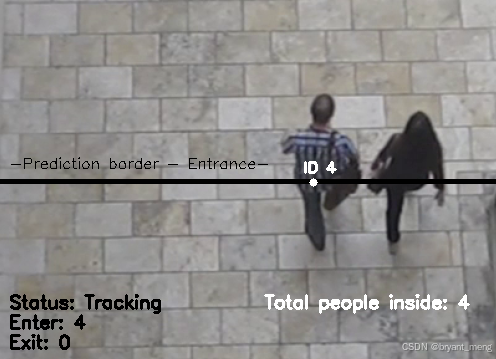
保存 log,可视化跟踪过程,结果写入视频,按键监控,触发 q 就退出
		# initiate a simple log to save the counting data
		if config["Log"]:
			log_data(move_in, in_time, move_out, out_time)

		# check to see if we should write the frame to disk
		if writer is not None:
			writer.write(frame)

		# show the output frame
		cv2.imshow("Real-Time Monitoring/Analysis Window", frame)
		key = cv2.waitKey(1) & 0xFF
		# if the `q` key was pressed, break from the loop
		if key == ord("q"):
			break
		# increment the total number of frames processed thus far and
		# then update the FPS counter
		totalFrames += 1
		fps.update()
时间统计,资源释放
		# initiate the timer
		if config["Timer"]:
			# automatic timer to stop the live stream (set to 8 hours/28800s)
			end_time = time.time()
			num_seconds = (end_time - start_time)
			if num_seconds > 28800:
				break

	# stop the timer and display FPS information
	fps.stop()
	logger.info("Elapsed time: {:.2f}".format(fps.elapsed()))
	logger.info("Approx. FPS: {:.2f}".format(fps.fps()))

	# release the camera device/resource (issue 15)
	if config["Thread"]:
		vs.release()

	# close any open windows
	cv2.destroyAllWindows()
3、效果展示
test_out
4、完整代码
-
链接: https://pan.baidu.com/s/14cBLhxVtsn6bNQQ5GqbPEg?pwd=x8md
-
提取码: x8md
核心代码 people_counter.py
from tracker.centroidtracker import CentroidTracker
from tracker.trackableobject import TrackableObject
from imutils.video import VideoStream
from itertools import zip_longest
from utils.mailer import Mailer
from imutils.video import FPS
from utils import thread
import numpy as np
import threading
import argparse
import datetime
import schedule
import logging
import imutils
import time
import dlib
import json
import csv
import cv2

# execution start time
start_time = time.time()
# setup logger
logging.basicConfig(level = logging.INFO, format = "[INFO] %(message)s")
logger = logging.getLogger(__name__)
# initiate features config.
with open("utils/config.json", "r") as file:
    config = json.load(file)

def parse_arguments():
	# function to parse the arguments
    ap = argparse.ArgumentParser()
    ap.add_argument("-p", "--prototxt", required=False, default="detector/MobileNetSSD_deploy.prototxt",
        help="path to Caffe 'deploy' prototxt file")
    ap.add_argument("-m", "--model", required=False, default="detector/MobileNetSSD_deploy.caffemodel",
        help="path to Caffe pre-trained model")
    ap.add_argument("-i", "--input", type=str, default="utils/data/tests/test_1.mp4",
        help="path to optional input video file")
    ap.add_argument("-o", "--output", type=str,
        help="path to optional output video file")
    # confidence default 0.4
    ap.add_argument("-c", "--confidence", type=float, default=0.4,
        help="minimum probability to filter weak detections")
    ap.add_argument("-s", "--skip-frames", type=int, default=30,
        help="# of skip frames between detections")
    args = vars(ap.parse_args())
    return args

"""
python people_counter.py --prototxt detector/MobileNetSSD_deploy.prototxt
--model detector/MobileNetSSD_deploy.caffemodel
--input utils/data/tests/test_1.mp4
"""

def send_mail():
	# function to send the email alerts
	Mailer().send(config["Email_Receive"])

def log_data(move_in, in_time, move_out, out_time):
	# function to log the counting data
	data = [move_in, in_time, move_out, out_time]
	# transpose the data to align the columns properly
	export_data = zip_longest(*data, fillvalue = '')

	with open('utils/data/logs/counting_data.csv', 'w', newline = '') as myfile:
		wr = csv.writer(myfile, quoting = csv.QUOTE_ALL)
		if myfile.tell() == 0: # check if header rows are already existing
			wr.writerow(("Move In", "In Time", "Move Out", "Out Time"))
			wr.writerows(export_data)

def people_counter():
	# main function for people_counter.py
	args = parse_arguments()
	# initialize the list of class labels MobileNet SSD was trained to detect
	CLASSES = ["background", "aeroplane", "bicycle", "bird", "boat",
		"bottle", "bus", "car", "cat", "chair", "cow", "diningtable",
		"dog", "horse", "motorbike", "person", "pottedplant", "sheep",
		"sofa", "train", "tvmonitor"]

	# load our serialized model from disk
	net = cv2.dnn.readNetFromCaffe(args["prototxt"], args["model"])

	# if a video path was not supplied, grab a reference to the ip camera
	if not args.get("input", False):
		logger.info("Starting the live stream..")
		vs = VideoStream(config["url"]).start()
		time.sleep(2.0)

	# otherwise, grab a reference to the video file
	else:
		logger.info("Starting the video..")
		vs = cv2.VideoCapture(args["input"])

	# initialize the video writer (we'll instantiate later if need be)
	writer = None

	# initialize the frame dimensions (we'll set them as soon as we read
	# the first frame from the video)
	W = None
	H = None

	# instantiate our centroid tracker, then initialize a list to store
	# each of our dlib correlation trackers, followed by a dictionary to
	# map each unique object ID to a TrackableObject
	ct = CentroidTracker(maxDisappeared=40, maxDistance=50)
	trackers = []
	trackableObjects = {}

	# initialize the total number of frames processed thus far, along
	# with the total number of objects that have moved either up or down
	totalFrames = 0
	totalDown = 0
	totalUp = 0
	# initialize empty lists to store the counting data
	total = []
	move_out = []
	move_in =[]
	out_time = []
	in_time = []

	# start the frames per second throughput estimator
	fps = FPS().start()

	if config["Thread"]:
		vs = thread.ThreadingClass(config["url"])

	# loop over frames from the video stream
	while True:
		# grab the next frame and handle if we are reading from either
		# VideoCapture or VideoStream
		frame = vs.read()
		frame = frame[1] if args.get("input", False) else frame

		# if we are viewing a video and we did not grab a frame then we
		# have reached the end of the video
		if args["input"] is not None and frame is None:
			break

		# resize the frame to have a maximum width of 500 pixels (the
		# less data we have, the faster we can process it), then convert
		# the frame from BGR to RGB for dlib
		frame = imutils.resize(frame, width=500)
		rgb = cv2.cvtColor(frame, cv2.COLOR_BGR2RGB)

		# if the frame dimensions are empty, set them
		if W is None or H is None:
			(H, W) = frame.shape[:2]

		# if we are supposed to be writing a video to disk, initialize
		# the writer
		if args["output"] is not None and writer is None:
			fourcc = cv2.VideoWriter_fourcc(*"mp4v")
			writer = cv2.VideoWriter(args["output"], fourcc, 30,
				(W, H), True)

		# initialize the current status along with our list of bounding
		# box rectangles returned by either (1) our object detector or
		# (2) the correlation trackers
		status = "Waiting"
		rects = []

		# check to see if we should run a more computationally expensive
		# object detection method to aid our tracker
		if totalFrames % args["skip_frames"] == 0:
			# set the status and initialize our new set of object trackers
			status = "Detecting"
			trackers = []

			# convert the frame to a blob and pass the blob through the
			# network and obtain the detections
			blob = cv2.dnn.blobFromImage(frame, 0.007843, (W, H), 127.5)
			net.setInput(blob)
			detections = net.forward()

			# loop over the detections
			for i in np.arange(0, detections.shape[2]):
				# extract the confidence (i.e., probability) associated
				# with the prediction
				confidence = detections[0, 0, i, 2]

				# filter out weak detections by requiring a minimum
				# confidence
				if confidence > args["confidence"]:
					# extract the index of the class label from the
					# detections list
					idx = int(detections[0, 0, i, 1])

					# if the class label is not a person, ignore it
					if CLASSES[idx] != "person":
						continue

					# compute the (x, y)-coordinates of the bounding box
					# for the object
					box = detections[0, 0, i, 3:7] * np.array([W, H, W, H])
					(startX, startY, endX, endY) = box.astype("int")

					# construct a dlib rectangle object from the bounding
					# box coordinates and then start the dlib correlation
					# tracker
					tracker = dlib.correlation_tracker()
					rect = dlib.rectangle(startX, startY, endX, endY)
					tracker.start_track(rgb, rect)

					# add the tracker to our list of trackers so we can
					# utilize it during skip frames
					trackers.append(tracker)

		# otherwise, we should utilize our object *trackers* rather than
		# object *detectors* to obtain a higher frame processing throughput
		else:
			# loop over the trackers
			for tracker in trackers:
				# set the status of our system to be 'tracking' rather
				# than 'waiting' or 'detecting'
				status = "Tracking"

				# update the tracker and grab the updated position
				tracker.update(rgb)
				pos = tracker.get_position()

				# unpack the position object
				startX = int(pos.left())
				startY = int(pos.top())
				endX = int(pos.right())
				endY = int(pos.bottom())

				# add the bounding box coordinates to the rectangles list
				rects.append((startX, startY, endX, endY))

		# draw a horizontal line in the center of the frame -- once an
		# object crosses this line we will determine whether they were
		# moving 'up' or 'down'
		cv2.line(frame, (0, H // 2), (W, H // 2), (0, 0, 0), 3)
		cv2.putText(frame, "-Prediction border - Entrance-", (10, H - ((i * 20) + 200)),
			cv2.FONT_HERSHEY_SIMPLEX, 0.5, (0, 0, 0), 1)

		# use the centroid tracker to associate the (1) old object
		# centroids with (2) the newly computed object centroids
		objects = ct.update(rects)

		# loop over the tracked objects
		for (objectID, centroid) in objects.items():
			# check to see if a trackable object exists for the current
			# object ID
			to = trackableObjects.get(objectID, None)

			# if there is no existing trackable object, create one
			if to is None:
				to = TrackableObject(objectID, centroid)

			# otherwise, there is a trackable object so we can utilize it
			# to determine direction
			else:
				# the difference between the y-coordinate of the *current*
				# centroid and the mean of *previous* centroids will tell
				# us in which direction the object is moving (negative for
				# 'up' and positive for 'down')
				y = [c[1] for c in to.centroids]
				direction = centroid[1] - np.mean(y)
				to.centroids.append(centroid)

				# check to see if the object has been counted or not
				if not to.counted:
					# if the direction is negative (indicating the object
					# is moving up) AND the centroid is above the center
					# line, count the object
					if direction < 0 and centroid[1] < H // 2:
						totalUp += 1
						date_time = datetime.datetime.now().strftime("%Y-%m-%d %H:%M")
						move_out.append(totalUp)
						out_time.append(date_time)
						to.counted = True

					# if the direction is positive (indicating the object
					# is moving down) AND the centroid is below the
					# center line, count the object
					elif direction > 0 and centroid[1] > H // 2:
						totalDown += 1
						date_time = datetime.datetime.now().strftime("%Y-%m-%d %H:%M")
						move_in.append(totalDown)
						in_time.append(date_time)
						# if the people limit exceeds over threshold, send an email alert
						if sum(total) >= config["Threshold"]:
							cv2.putText(frame, "-ALERT: People limit exceeded-", (10, frame.shape[0] - 80),
								cv2.FONT_HERSHEY_COMPLEX, 0.5, (0, 0, 255), 2)
							if config["ALERT"]:
								logger.info("Sending email alert..")
								email_thread = threading.Thread(target = send_mail)
								email_thread.daemon = True
								email_thread.start()
								logger.info("Alert sent!")
						to.counted = True
						# compute the sum of total people inside
						total = []
						total.append(len(move_in) - len(move_out))

			# store the trackable object in our dictionary
			trackableObjects[objectID] = to

			# draw both the ID of the object and the centroid of the
			# object on the output frame
			text = "ID {}".format(objectID)
			cv2.putText(frame, text, (centroid[0] - 10, centroid[1] - 10),
				cv2.FONT_HERSHEY_SIMPLEX, 0.5, (255, 255, 255), 2)
			cv2.circle(frame, (centroid[0], centroid[1]), 4, (255, 255, 255), -1)

		# construct a tuple of information we will be displaying on the frame
		info_status = [
		("Exit", totalUp),
		("Enter", totalDown),
		("Status", status),
		]

		info_total = [
		("Total people inside", ', '.join(map(str, total))),
		]

		# display the output
		for (i, (k, v)) in enumerate(info_status):
			text = "{}: {}".format(k, v)
			cv2.putText(frame, text, (10, H - ((i * 20) + 20)), cv2.FONT_HERSHEY_SIMPLEX, 0.6, (0, 0, 0), 2)

		for (i, (k, v)) in enumerate(info_total):
			text = "{}: {}".format(k, v)
			cv2.putText(frame, text, (265, H - ((i * 20) + 60)), cv2.FONT_HERSHEY_SIMPLEX, 0.6, (255, 255, 255), 2)

		# initiate a simple log to save the counting data
		if config["Log"]:
			log_data(move_in, in_time, move_out, out_time)

		# check to see if we should write the frame to disk
		if writer is not None:
			writer.write(frame)

		# show the output frame
		cv2.imshow("Real-Time Monitoring/Analysis Window", frame)
		key = cv2.waitKey(1) & 0xFF
		# if the `q` key was pressed, break from the loop
		if key == ord("q"):
			break
		# increment the total number of frames processed thus far and
		# then update the FPS counter
		totalFrames += 1
		fps.update()

		# initiate the timer
		if config["Timer"]:
			# automatic timer to stop the live stream (set to 8 hours/28800s)
			end_time = time.time()
			num_seconds = (end_time - start_time)
			if num_seconds > 28800:
				break

	# stop the timer and display FPS information
	fps.stop()
	logger.info("Elapsed time: {:.2f}".format(fps.elapsed()))
	logger.info("Approx. FPS: {:.2f}".format(fps.fps()))

	# release the camera device/resource (issue 15)
	if config["Thread"]:
		vs.release()

	# close any open windows
	cv2.destroyAllWindows()

# initiate the scheduler
if config["Scheduler"]:
	# runs at every day (09:00 am)
	schedule.every().day.at("09:00").do(people_counter)
	while True:
		schedule.run_pending()
else:
	people_counter()
运行命令
python people_counter.py --prototxt detector/MobileNetSSD_deploy.prototxt --model detector/MobileNetSSD_deploy.caffemodel --input utils/data/tests/test_1.mp4
我把很多参数传递都改为默认的了,直接运行也可以
5、涉及到的库函数
- schedule==1.1.0
- numpy==1.24.3
- argparse==1.4.0
- imutils==0.5.4
- dlib==19.24.1
- opencv-python==4.5.5.64
- scipy==1.10.1
- cmake==3.22.5
注意版本的兼容性,dlib 在线编译报错可以离线安装
6、参考来自
- https://github.com/saimj7/People-Counting-in-Real-Time
- 目标跟踪(6)OpenCV 人员计数器
- 【python】OpenCV—Tracking(10.4)—Centroid
- 【python】OpenCV—Tracking(10.5)—dlib
更多有趣的代码示例,可参考【Programming】





 扫一扫
扫一扫


 27万+
27万+

 被折叠的 条评论
为什么被折叠?
被折叠的 条评论
为什么被折叠?
 到【灌水乐园】发言





