


接触NODE-RED . OPCUA 看了B站视频操作了几个星期,都没成功,终于今天成功了,每次均在Invalid Endpoint此处错误
假期无事,打开调试C:\Users\xxx.node-red\node_modules\node-red-contrib-opcua\opcua
总是卡在这一步错误
        set_node_status_to("invalid certificate");
        verbose_warn("证书错误 ");
        let msg = {};
        msg.error = {};
        msg.error.message = "Certificate error: " + error1.message;
        msg.error.source = this;
        node.error("Certificate error", msg);
      }
      node.debug(chalk.yellow("Trusted folder:      ") + chalk.cyan(node.client.clientCertificateManager.trustedFolder));
      node.debug(chalk.yellow("Rejected folder:     ") + chalk.cyan(node.client.clientCertificateManager.rejectedFolder));
      node.debug(chalk.yellow("Crl folder:          ") + chalk.cyan(node.client.clientCertificateManager.crlFolder));
      node.debug(chalk.yellow("Issuers Cert folder: ") + chalk.cyan(node.client.clientCertificateManager.issuersCertFolder));
      node.debug(chalk.yellow("Issuers Crl folder:  ") + chalk.cyan(node.client.clientCertificateManager.issuersCrlFolder));

      try {
        verbose_log(chalk.green("2) Connecting using endpoint: ") + chalk.cyan(opcuaEndpoint.endpoint) +
          chalk.green(" securityMode: ") + chalk.cyan(connectionOption.securityMode) +
          chalk.green(" securityPolicy: ") + chalk.cyan(connectionOption.securityPolicy));
          verbose_warn("正式开始连接 ");
        await node.client.connect(opcuaEndpoint.endpoint);
        //总是在这一步报错,怀疑Client.CONNECT API错误,要不就是OPCUAEndPoint的选项与这个函数不匹配

      } catch (err) {
        verbose_warn("Case A: Endpoint does not contain, 1==None 2==Sign 3==Sign&Encrypt, using securityMode: " + stringify(connectionOption.securityMode));
        verbose_warn("        using securityPolicy: " + stringify(connectionOption.securityPolicy));
        verbose_warn("Case B: UserName & password does not match to server (needed by Sign or SignAndEncrypt), check username: " + userIdentity.userName + " and password: " + userIdentity.password);
        verbose_warn("Case C: With Sign you cannot use SecurityPolicy None!!");
        // verbose_error("Invalid endpoint parameters: ", err);
        node_error("Wrong endpoint parameters: " + JSON.stringify(opcuaEndpoint.toString()));
        set_node_status_to("invalid endpoint");
        let msg = {};
删除了所有NODE-RED,升级了NODEJS==>22.9版本都没用
删除了NODE-RED-CONTRIB-OPCUA 所有.node-red下内容,都没用
查网上资料说可能是证书加密错误。
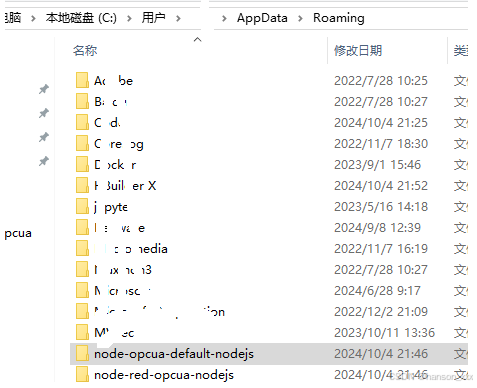
最终把这两个文件夹都删除,问题解决了,sh
4 Oct 20:48:53 - [info] Node-RED version: v4.0.3
4 Oct 20:48:53 - [info] Node.js  version: v22.9.0
4 Oct 20:48:53 - [info] Windows_NT 10.0.17763 x64 LE
4 Oct 20:48:53 - [info] Loading palette nodes
+-------------------------------------------------------------------------------------+
| Warning:                                                                            |
| node-opcua-client-crawler module has been deprecated and is not maintained anymore. |
| Please use '@sterfive/crawler' instead.                                             |
| '@sterfive/crawler' is available to the NodeOPCUA Subscription members              |
+-------------------------------------------------------------------------------------+
4 Oct 20:48:55 - [info] Settings file  : C:\Users\xxx\.node-red\settings.js
4 Oct 20:48:55 - [info] Context store  : 'default' [module=memory]
4 Oct 20:48:55 - [info] User directory : \Users\xxx\.node-red
4 Oct 20:48:55 - [warn] Projects disabled : editorTheme.projects.enabled=false
4 Oct 20:48:55 - [info] Flows file     : \Users\xxx\.node-red\flows.json
4 Oct 20:48:55 - [info] Server now running at http://127.0.0.1:1880/
4 Oct 20:48:55 - [warn]

---------------------------------------------------------------------
Your flow credentials file is encrypted using a system-generated key.

If the system-generated key is lost for any reason, your credentials
file will not be recoverable, you will have to delete it and re-enter
your credentials.

You should set your own key using the 'credentialSecret' option in
your settings file. Node-RED will then re-encrypt your credentials
file using your chosen key the next time you deploy a change.
---------------------------------------------------------------------

4 Oct 20:48:55 - [info] Starting flows
4 Oct 20:48:55 - [error] [OpcUa-Server:ecdcb38488031f5b] File: users.json not found! You can inject users to server or add file to current folder: C:\Users\xxx\.node-red\node_modules\node-red-contrib-opcua\opcua
4 Oct 20:48:55 - [warn] [OpcUa-Client:5c6b0222f76160e5] userIdentity is ANONYMOUS
4 Oct 20:48:55 - [info] Started flows
4 Oct 20:48:55 - [warn] [OpcUa-Client:5c6b0222f76160e5] Case A: Endpoint does not contain, 1==None 2==Sign 3==Sign&Encrypt, using securityMode: [1]
4 Oct 20:48:55 - [warn] [OpcUa-Client:5c6b0222f76160e5]         using securityPolicy: ["None"]
4 Oct 20:48:55 - [warn] [OpcUa-Client:5c6b0222f76160e5] Case B: UserName & password does not match to server (needed by Sign or SignAndEncrypt), check username: undefined and password: undefined
4 Oct 20:48:55 - [warn] [OpcUa-Client:5c6b0222f76160e5] Case C: With Sign you cannot use SecurityPolicy None!!
4 Oct 20:48:55 - [error] [OpcUa-Client:5c6b0222f76160e5] Client node error on 新加:  error: ["Wrong endpoint parameters: {\"id\":\"678c6a415680e2af\",\"type\":\"OpcUa-Endpoint\",\"_closeCallbacks\":[],\"_inputCallback\":null,\"_inputCallbacks\":null,\"_expectedDoneCount\":0,\"wires\":[],\"_wireCount\":0,\"credentials\":{},\"endpoint\":\"opc.tcp://localhost:53880/UA/Sim\",\"securityPolicy\":\"None\",\"securityMode\":\"None\",\"login\":false,\"none\":true,\"usercert\":false,\"userCertificate\":\"\",\"userPrivatekey\":\"\",\"user\":null,\"password\":null}"]
4 Oct 20:48:55 - [error] [OpcUa-Client:5c6b0222f76160e5] Invalid endpoint
4 Oct 20:53:47 - [info] Stopping flows
4 Oct 20:53:47 - [warn] [OpcUa-Client:5c6b0222f76160e5] closing opcua client true userIdentity {"type":0}
4 Oct 20:53:47 - [info] Stopped flows
增加代码执行中文调试
4 Oct 21:17:29 - [info] Starting flows
4 Oct 21:17:29 - [error] [OpcUa-Server:ecdcb38488031f5b] File: users.json not found! You can inject users to server or add file to current folder: C:\Users\adv\.node-red\node_modules\node-red-contrib-opcua\opcua
4 Oct 21:17:29 - [warn] [OpcUa-Client:5c6b0222f76160e5] userIdentity is ANONYMOUS
4 Oct 21:17:29 - [warn] [OpcUa-Client:5c6b0222f76160e5] 连接中:
4 Oct 21:17:29 - [info] Started flows
4 Oct 21:17:29 - [warn] [OpcUa-Client:5c6b0222f76160e5] 测试证书初始化:
4 Oct 21:17:29 - [warn] [OpcUa-Client:5c6b0222f76160e5] 正式开始连接
4 Oct 21:17:29 - [warn] [OpcUa-Client:5c6b0222f76160e5] Case A: Endpoint does not contain, 1==None 2==Sign 3==Sign&Encrypt, using securityMode: [1]
4 Oct 21:17:29 - [warn] [OpcUa-Client:5c6b0222f76160e5]         using securityPolicy: ["None"]
4 Oct 21:17:29 - [warn] [OpcUa-Client:5c6b0222f76160e5] Case B: UserName & password does not match to server (needed by Sign or SignAndEncrypt), check username: undefined and password: undefined
4 Oct 21:17:29 - [warn] [OpcUa-Client:5c6b0222f76160e5] Case C: With Sign you cannot use SecurityPolicy None!!
4 Oct 21:17:29 - [error] [OpcUa-Client:5c6b0222f76160e5] Client node error on 新加:  error: ["Wrong endpoint parameters: \"opc.tcp://localhost:53880/UA/Sim\""]
4 Oct 21:17:29 - [error] [OpcUa-Client:5c6b0222f76160e5] Invalid endpoint
删除文件后
4 Oct 21:46:10 - [info] Starting flows
4 Oct 21:46:10 - [error] [OpcUa-Server:ecdcb38488031f5b] File: users.json not found! You can inject users to server or add file to current folder: C:\Users\adv\.node-red\node_modules\node-red-contrib-opcua\opcua
4 Oct 21:46:10 - [warn] [OpcUa-Client:5c6b0222f76160e5] userIdentity is ANONYMOUS
4 Oct 21:46:10 - [warn] [OpcUa-Client:5c6b0222f76160e5] 连接中:
4 Oct 21:46:10 - [info] Started flows
4 Oct 21:46:10 - [warn] [OpcUa-Client:5c6b0222f76160e5] 测试证书初始化:
4 Oct 21:46:10 - [warn] [OpcUa-Client:5c6b0222f76160e5] 正式开始连接
13:46:10.269Z :*client_base_impl*              :586   Creating default certificate ... please wait
4 Oct 21:46:10 - [error] [OpcUa-Client:5c6b0222f76160e5] reconnect
4 Oct 21:46:15 - [warn] [OpcUa-Client:5c6b0222f76160e5] Create session with userIdentity node.client false userIdentity {"type":0}
多了这一步骤
13:46:10.269Z :client_base_impl :586 Creating default certificate … please wait
代码会自动生产证书
我认为可能之前几次安装的文件与加密文件不一致,没有更新一致导致的
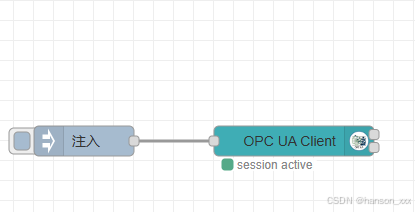
以下图片为成功后的





 扫一扫
扫一扫


 1844
1844

 被折叠的 条评论
为什么被折叠?
被折叠的 条评论
为什么被折叠?
 到【灌水乐园】发言





