 交换机与路由配置实验:VLAN、STP与RIP详解





组网技术(二)
1.交换机VLAN实验
1.1 交换机GVRP:VLAN注册协议,在VLAN增加、删除、调整时,自动发广播,保持全网所有的交换机VLAN信息是一致的。
GVRP把交换机分为3种注册模式:
① Normal模式:VLAN增删改,广播保持一致。
② Fixed模式:只传播手动配置的VLAN信息。
③ Forbidden模式:只传播VLAN1不传其他VLAN。
·交换机默认:透明模式,VLAN1,所有端口。
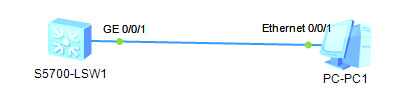
1.2 基于接口划分VLAN:静态VLAN。
<Huawei>sys									//进入交换机系统视图
Enter system view, return user view with Ctrl+Z.
[Huawei]sysname S1							//交换机命名为S1
[S1]
[S1]vlan batch 2								//批量方式建立VLAN2
Info: This operation may take a few seconds. Please wait for a moment...done.
[S1]interface g0/0/1							//进入交换机接口视图
[S1-GigabitEthernet0/0/1]port link-type access		//配置接口类型
[S1-GigabitEthernet0/0/1]port default vlan 2		//将接口加入VLAN2
[S1-GigabitEthernet0/0/1]
Dec 30 2020 10:41:48-08:00 S1 %%01IFNET/4/IF_STATE(l)[52]:Interface Vlanif1 has
turned into DOWN state.
[S1-GigabitEthernet0/0/1]quit
[S1]interface g0/0/2
[S1-GigabitEthernet0/0/2]port link-type trunk
[S1-GigabitEthernet0/0/2]port trunk allow-pass vlan 2
[S1-GigabitEthernet0/0/2]quit
[S1]
1.3 基于MAC划分VLAN:动态VLAN。
<Huawei>sys
Enter system view, return user view with Ctrl+Z.
[Huawei]sysname S2
<S2>sys
Enter system view, return user view with Ctrl+Z.
[S2]vlan batch 2
Info: This operation may take a few seconds. Please wait for a moment...done.
[S2]interface g0/0/1									//在接口视图配置上联结口
[S2-GigabitEthernet0/0/1]port link-type hybrid				//配置上联结口类型
[S2-GigabitEthernet0/0/1]port hybrid untagged vlan 2			//通过VLAN 2
[S2-GigabitEthernet0/0/1]quit
[S2]interface g0/0/2									//进入交换机接口视图
[S2-GigabitEthernet0/0/2]port link-type hybrid				//配置接口类型
[S2-GigabitEthernet0/0/2]port hybrid untagged vlan 2			//将接口接入vlan2
[S2-GigabitEthernet0/0/2]quit
[S2]vlan 2
[S2-vlan2]mac-vlan mac-address 22-22-22				//PC的MAC地址与VLALN2关联
[S2-vlan2]quit
[S2]interface g0/0/2
[S2-GigabitEthernet0/0/2]mac-vlan enable				//基于MAC地址启用接口
Info: This operation may take a few seconds. Please wait for a moment...done.
[S2-GigabitEthernet0/0/2]quit
[S2]
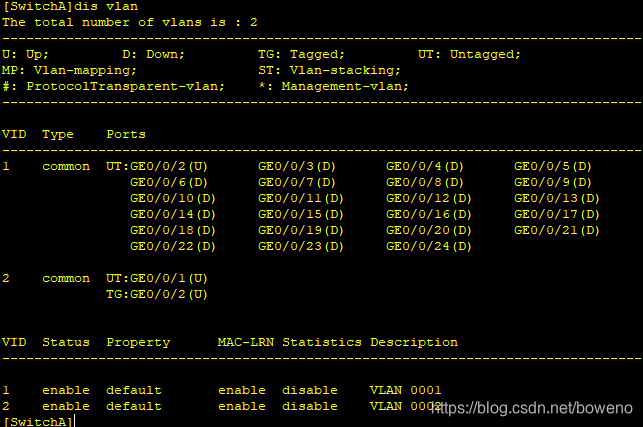
1.4 基于GVRP的VLAN配置实验:可在LSW1创建VLAN2,LSW2可以学到,ping通。
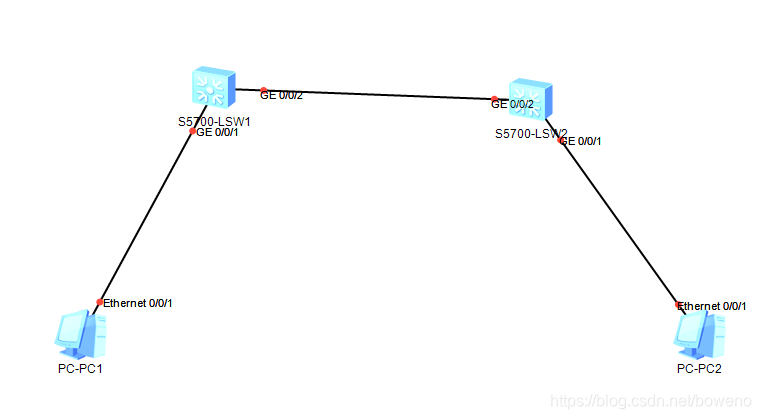
第一步:交换机LSW1基本配置:LSW2参考配置。
<Huawei>sys
Enter system view, return user view with Ctrl+Z.
[Huawei]un in en
Info: Information center is disabled.
[Huawei]sysname SwitchA
[SwitchA]gvrp
[SwitchA]vlan 2
[SwitchA-vlan2]int vlan 2
[SwitchA-Vlanif2]ip add 192.168.1.254 24
第二步:交换机LSW1端口配置:LSW2参考下。
[SwitchA]
[SwitchA]int g0/0/1
[SwitchA-GigabitEthernet0/0/1]port link-type access
[SwitchA-GigabitEthernet0/0/1]port default vlan 2
[SwitchA-GigabitEthernet0/0/1]
[SwitchA-GigabitEthernet0/0/1]quit
[SwitchA]
[SwitchA]int g0/0/2
[SwitchA-GigabitEthernet0/0/2]port link-type trunk
[SwitchA-GigabitEthernet0/0/2]port trunk allow-pass vlan all
[SwitchA-GigabitEthernet0/0/2]
第三步:交换机LSW1配置GVRP:LSW2参考如下。
[SwitchA]int g0/0/2
[SwitchA-GigabitEthernet0/0/2]gvrp
[SwitchA-GigabitEthernet0/0/2]
第四步:配置PC1的IP,ping验证:PC2参考。

2.交换机STP实验
2.1 交换机生成树协议STP配置:优先级。
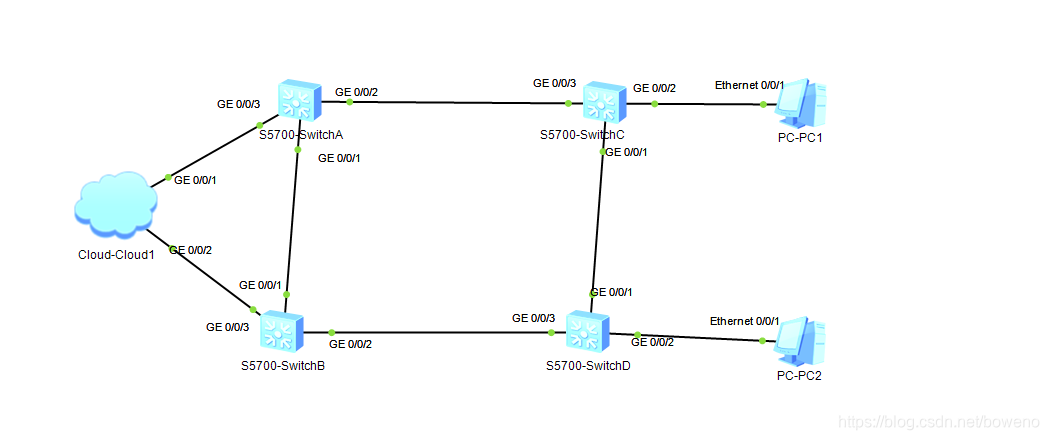
Cloud配置如下:
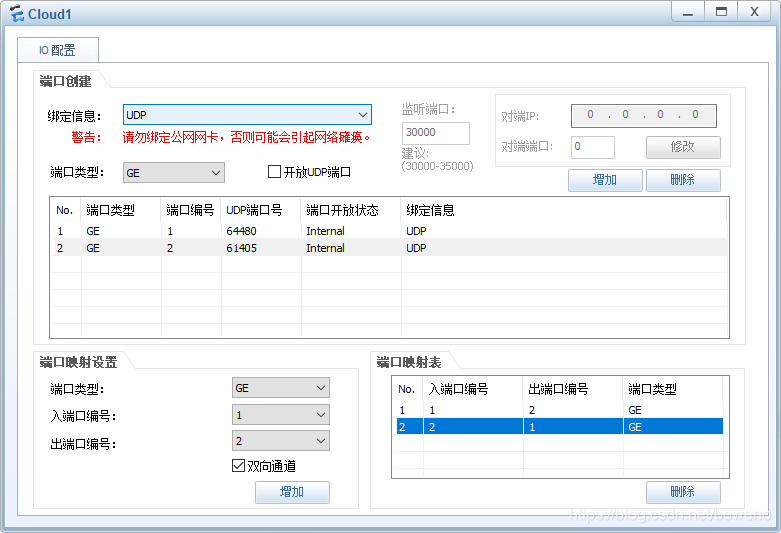
(1)配置STP基本功能
配置环网中的设备生成树协议工作在STP模式。
#配置SwitchA的STP工作模式,SwitchB、SwitchC、SwitchD的配置相同。
<Huawei>sys
Enter system view, return user view with Ctrl+Z.
[Huawei]
[Huawei]sysname SwitchA
[SwitchA]stp mode stp
Info: This operation may take a few seconds. Please wait for a moment...done.
配置根桥和备份根桥设备
#配置SwitchA为根桥
[SwitchA]stp root primary
#配置SwitchB为备份根桥
[SwitchB]stp root secondary
2.2 交换机生成树协议STP配置:路径值
#配置SwitchA的端口路径开销计算方法为华为计算方法,SwitchB、SwitchD配置方法相同。
[SwitchA]stp pathcost-standard legacy
#配置SwitchC端口GigabitEthernet0/0/1端口路径开销值为2000
<Huawei>sys
Enter system view, return user view with Ctrl+Z.
[Huawei]sysname SwitchC
[SwitchC]stp pathcost-standard legacy
[SwitchC]int g0/0/1
[SwitchC-GigabitEthernet0/0/1]stp cost 2000
[SwitchC-GigabitEthernet0/0/1]quit
[SwitchC]
#配置SwitchD端口GigabitEthernet0/0/2为边缘端口并启用段口的BPDU报文过滤功能
<Huawei>sys
Enter system view, return user view with Ctrl+Z.
[Huawei]
[Huawei]sysname SwitchD
[SwitchD]int g0/0/2
[SwitchD-GigabitEthernet0/0/2]stp edged-port enable
[SwitchD-GigabitEthernet0/0/2]stp bpdu-filter enable
[SwitchD-GigabitEthernet0/0/2]quit
[SwitchD]
#配置SwitchC端口GigabitEthernet0/0/2为边缘端口并启用段口的BPDU报文过滤功能
[SwitchC]int g0/0/2
[SwitchC-GigabitEthernet0/0/2]stp edged-port enable
[SwitchC-GigabitEthernet0/0/2]stp bpdu-filter enable
[SwitchC-GigabitEthernet0/0/2]
[SwitchC-GigabitEthernet0/0/2]quit
[SwitchC]
设备全局启用STP,所有设备配置相同。
3.动态路由RIP实验
3.1动态路由RIP:距离矢量,拓扑如下图。
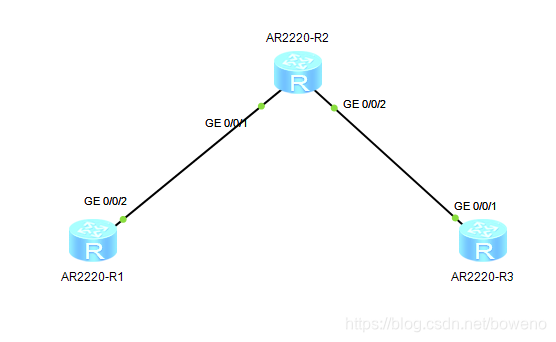
第一步:配置各接口IP:R1、R2、R3参考如下:
<Huawei>sys
Enter system view, return user view with Ctrl+Z.
[Huawei]sysname R1
[R1]un in en
Info: Information center is disabled.
[R1]int g0/0/2
[R1-GigabitEthernet0/0/2]ip add 192.168.1.1 24
[R1-GigabitEthernet0/0/2]
第二步:配置RIP协议:R1、R2、R3参考如下。
<R1>sys
Enter system view, return user view with Ctrl+Z.
[R1]un in en
[R1]rip
[R1-rip-1]network 192.168.1.0
[R1-rip-1]network 10.0.0.0
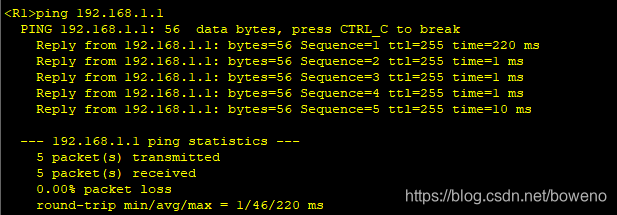
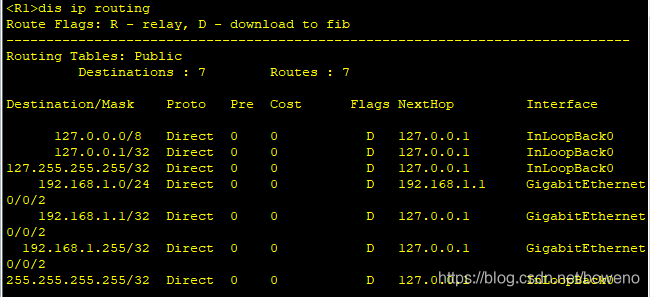
第三步:验证配置结果:dis ip routing、ping





 扫一扫
扫一扫


 679
679

 被折叠的 条评论
为什么被折叠?
被折叠的 条评论
为什么被折叠?
 到【灌水乐园】发言





