


学习这个模块时最好启动项目学习,这样会更直观,项目源码在我之前文章或者翻到最后
新书推荐页面
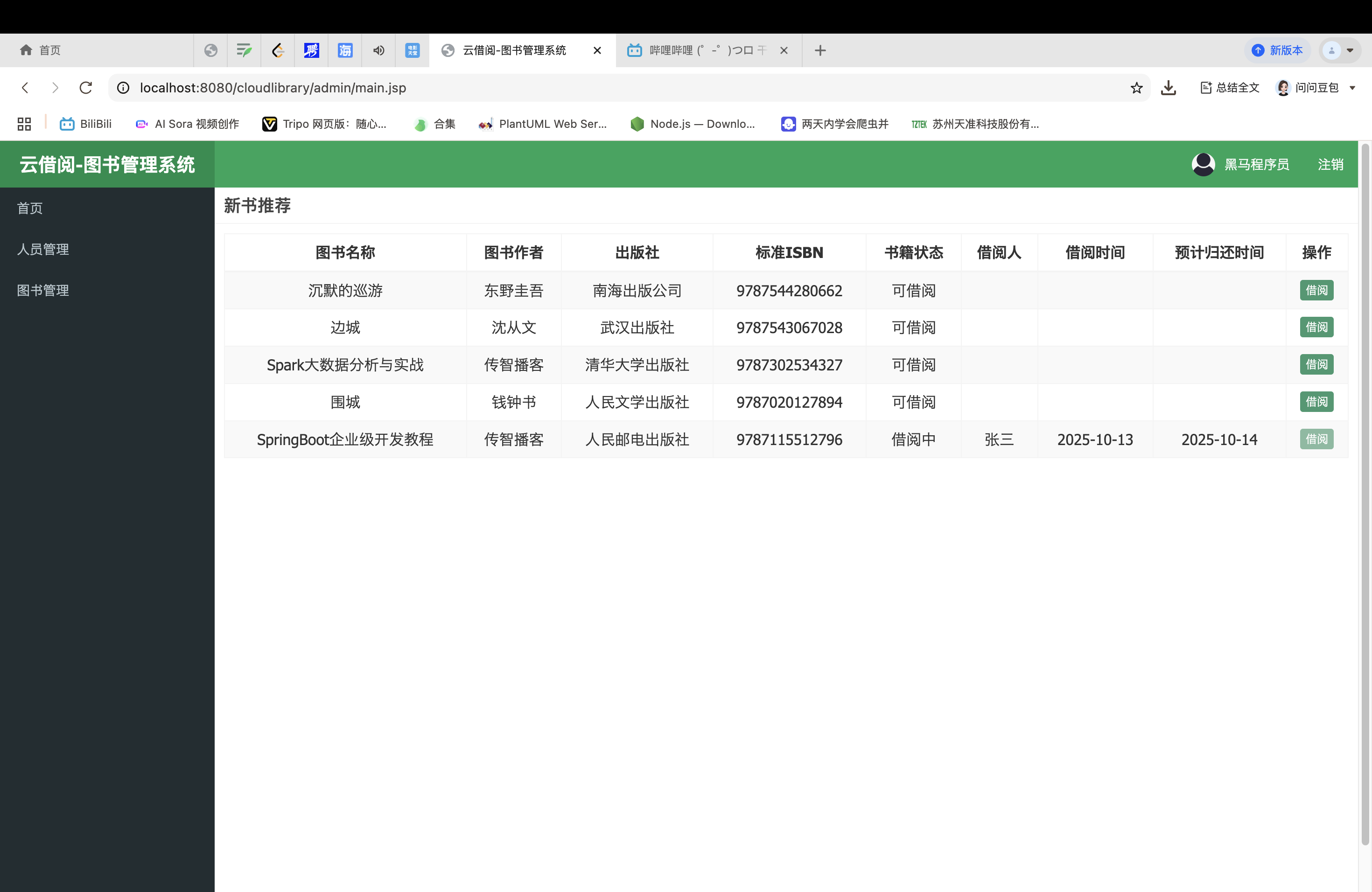
新书推荐逻辑:
新书推荐是把最新上架的5本书展示在页面中
抛出问题:这几本书是怎么出现的这个页面中的,先去找新书推荐的页面
<%@ page language="java" contentType="text/html; charset=UTF-8" pageEncoding="UTF-8" %>
<%@ taglib uri="http://java.sun.com/jsp/jstl/core" prefix="c" %>
<html>
<head>
    <meta charset="utf-8">
    <title>新书推荐</title>
    <link rel="stylesheet" href="${pageContext.request.contextPath}/css/bootstrap.css">
    <link rel="stylesheet" href="${pageContext.request.contextPath}/css/AdminLTE.css">
    <link rel="stylesheet" href="${pageContext.request.contextPath}/css/pagination.css">
    <script src="${pageContext.request.contextPath}/js/jquery.min.js"></script>
    <script src="${pageContext.request.contextPath}/js/bootstrap.js"></script>
    <script src="${pageContext.request.contextPath}/js/pagination.js"></script>
    <script src="${pageContext.request.contextPath}/js/my.js"></script>
</head>
<body class="hold-transition skin-red sidebar-mini">
<!--数据展示头部-->
<div class="box-header with-border">
    <h3 class="box-title">新书推荐</h3>
</div>
<!--数据展示头部-->
<!--数据展示内容区-->
<div class="box-body">
    <!-- 数据表格 -->
    <table id="dataList" class="table table-bordered table-striped table-hover dataTable text-center">
        <thead>
        <tr>
            <th class="sorting_asc">图书名称</th>
            <th class="sorting">图书作者</th>
            <th class="sorting">出版社</th>
            <th class="sorting">标准ISBN</th>
            <th class="sorting">书籍状态</th>
            <th class="sorting">借阅人</th>
            <th class="sorting">借阅时间</th>
            <th class="sorting">预计归还时间</th>
            <th class="text-center">操作</th>
        </tr>
        </thead>
        <tbody>
        <c:forEach items="${pageResult.rows}" var="book">
            <tr>
                <td> ${book.name}</td>
                <td>${book.author}</td>
                <td>${book.press}</td>
                <td>${book.isbn}</td>
                <td>
                    <c:if test="${book.status ==0}">可借阅</c:if>
                    <c:if test="${book.status ==1}">借阅中</c:if>
                    <c:if test="${book.status ==2}">归还中</c:if>
                </td>
                <td>${book.borrower}</td>
                <td>${book.borrowTime}</td>
                <td>${book.returnTime}</td>
                <td class="text-center">
                    <c:if test="${book.status ==0}">
                        <button type="button" class="btn bg-olive btn-xs" data-toggle="modal" data-target="#borrowModal"
                                onclick="findBookById(${book.id},'borrow')"> 借阅
                        </button>
                    </c:if>
                    <c:if test="${book.status ==1 ||book.status ==2}">
                        <button type="button" class="btn bg-olive btn-xs" disabled="true">借阅</button>
                    </c:if>
                </td>
            </tr>
        </c:forEach>
        </tbody>
    </table>
    <!-- 数据表格 /-->
</div>
<!-- 数据展示内容区/ -->
<%--引入存放模态窗口的页面--%>
<jsp:include page="/admin/book_modal.jsp"></jsp:include>
</body>
</html>
找到新书推荐的页面books_new.jsp,jsp页面通过EL表达式(第39行)items="${pageResult.rows}"从请求域中获取pageResult数据 但是这个jsp代码里没有看到发送获取新书推荐的请求,于是去登录之后的main.jsp管理员主页中找
<%@ page language="java" contentType="text/html; charset=UTF-8" pageEncoding="UTF-8" %>
<html>
<head>
    <meta charset="utf-8">
    <title>云借阅-图书管理系统</title>
    <link rel="stylesheet" href="${pageContext.request.contextPath}/css/bootstrap.css">
    <link rel="stylesheet" href="${pageContext.request.contextPath}/css/AdminLTE.css">
    <link rel="stylesheet" href="${pageContext.request.contextPath}/css/_all-skins.min.css">
    <script src="${pageContext.request.contextPath}/js/jquery.min.js"></script>
    <script src="${pageContext.request.contextPath}/js/bootstrap.js"></script>
    <script src="${pageContext.request.contextPath}/js/app.js"></script>
    <script type="text/javascript">
        function SetIFrameHeight() {
            var iframeid = document.getElementById("iframe");
            if (document.getElementById) {
                /*设置 内容展示区的高度等于页面可视区的高度*/
                iframeid.height = document.documentElement.clientHeight;
            }
        }
    </script>
</head>

<body class="hold-transition skin-green sidebar-mini">
<div class="wrapper">
    <!-- 页面头部 -->
    <header class="main-header">
        <!-- Logo -->
        <a href="${pageContext.request.contextPath}/admin/main.jsp" class="logo">
            <span class="logo-lg"><b>云借阅-图书管理系统</b></span>
        </a>
        <!-- 头部导航 -->
        <nav class="navbar navbar-static-top">
            <div class="navbar-custom-menu">
                <ul class="nav navbar-nav">
                    <li class="dropdown user user-menu">
                        <a>
                            <img src="${pageContext.request.contextPath}/img/user.jpg" class="user-image"
                                 alt="User Image">
                            <span class="hidden-xs">${USER_SESSION.name}</span>
                        </a>
                    </li>
                    <li class="dropdown user user-menu">
                        <a href="${pageContext.request.contextPath}/user/logout">
                            <span class="hidden-xs">注销</span>
                        </a>
                    </li>
                </ul>
            </div>
        </nav>
    </header>
    <!-- 页面头部 /-->

    <!-- 导航侧栏 -->
    <aside class="main-sidebar">
        <!-- sidebar: style can be found in sidebar.less -->
        <section class="sidebar">
            <!-- /.search form -->
            <!-- sidebar menu: : style can be found in sidebar.less -->
            <ul class="sidebar-menu">
                <li id="admin-index">
                    <a href="main.jsp">
                        <i class="fa fa-dashboard"></i> <span>首页</span>
                    </a>
                </li>
                <!-- 人员管理 -->
                <li id="admin-login">
                    <a href="${pageContext.request.contextPath}/user/search" target="iframe">
                        <i class="fa fa-circle-o"></i>人员管理
                    </a>
                </li>
                <!-- 图书管理 -->
                <li class="treeview">
                    <a href="#">
                        <i class="fa fa-folder"></i>
                        <span>图书管理</span>
                        <span class="pull-right-container">
                              <i class="fa fa-angle-left pull-right"></i>
                          </span>
                    </a>
                    <ul class="treeview-menu">
                        <li>
                            <a href="${pageContext.request.contextPath}/book/search" target="iframe">
                                <i class="fa fa-circle-o"></i>图书借阅
                            </a>
                        </li>
                        <li>
                            <a href="${pageContext.request.contextPath}/book/searchBorrowed" target="iframe">
                                <i class="fa fa-circle-o"></i>当前借阅
                            </a>
                        </li>
                        <li>
                            <a href="${pageContext.request.contextPath}/record/searchRecords" target="iframe">
                                <i class="fa fa-circle-o"></i>借阅记录
                            </a>
                        </li>
                    </ul>
                </li>
            </ul>
        </section>

        <!-- /.sidebar -->
    </aside>
    <!-- 导航侧栏 /-->
    <!-- 内容展示区域 -->
    <div class="content-wrapper">
        <iframe width="100%" id="iframe" name="iframe" onload="SetIFrameHeight()"
                frameborder="0" src="${pageContext.request.contextPath}/book/selectNewbooks"></iframe>
    </div>
</div>
</body>
</html>
找到了,在内容展示区域(104行)
<!-- 内容展示区域 -->
<div class="content-wrapper">
<iframe width="100%" id="iframe" name="iframe" οnlοad="SetIFrameHeight()"
frameborder="0" src="${pageContext.request.contextPath}/book/selectNewbooks"></iframe>
</div>
根据这个/book/selectNewbooks请求的URL找到BookController
@RequestMapping("/book")
public class BookController {
    //注入BookService对象
    @Autowired
    private BookService bookService;
    /**
     * 查询最新上架的图书
     */
    @RequestMapping("/selectNewbooks")
    public ModelAndView selectNewbooks() {
        //查询最新上架的5个的图书信息
        int pageNum = 1;
        int pageSize = 5;
        PageResult pageResult = bookService.selectNewBooks(pageNum, pageSize);
        ModelAndView modelAndView = new ModelAndView();
        modelAndView.setViewName("books_new");
        modelAndView.addObject("pageResult", pageResult);
        return modelAndView;
    }
里面使用了分页函数调用 bookService的selectNewBooks方法
PageResult pageResult = bookService.selectNewBooks(pageNum, pageSize);
MdelAndView是SpringMVC用于封装视图信息和业务数据的对象,实现数据传递和页面跳转的一体化操作。
ModelAndView modelAndView = new ModelAndView();创建了一个MdelAndView实例,作为视图+数据的载体;
modelAndView.setViewName("books_new");setViewName设置了跳转的视图名称books_new(books_new是通过视图解析器解析成真实的JSP路径,视图解析器之前的文章解释过);
modelAndView.addObject("pageResult", pageResult);addObject向model中添加业务数据"pageResult"是数据的键,JSP页面通过该键获取数据pageResult是数据的值,就是从下面业务逻辑层获得的分页结果对象;
最后return modelAndView;将封装了视图+数据的modelAndView返回給SpringMVC,把pageResult的数据存入请求域,books_new.jsp从请求域中获取数据
现在去找调用的业务逻辑层bookService
PageResult selectNewBooks(Integer pageNum, Integer pageSize);
这个是业务逻辑层bookService的selectNewBooks方法定义,现在去找它的方法实现
@Override
public PageResult selectNewBooks(Integer pageNum, Integer pageSize) {

    PageHelper.startPage(pageNum, pageSize);
    Page<Book> page=bookMapper.selectNewBooks();
    return new PageResult(page.getTotal(),page.getResult());
}
这个是方法的具体实现,PageHelper是Mybatis的第三方插件,通过startPage可以在后续的Mybatis查询前注入分页逻辑;
Page<Book> page=bookMapper.selectNewBooks();调用了bookMapper接口方法,由于第一步PageHelper启动分页逻辑,所以调用的bookMapper接口查询方法返回的值会被PageHelper自动拦截处理为分页查询,返回的Page对象不仅有图书数据,还有符合条件的总页数
@Select("SELECT * FROM book where book_status !='3' order by book_uploadtime DESC")
@Results(id = "bookMap",value = {
        //id字段默认为false,表示不是主键
        //column表示数据库表字段,property表示实体类属性名。
        @Result(id = true,column = "book_id",property = "id"),
        @Result(column = "book_name",property = "name"),
        @Result(column = "book_isbn",property = "isbn"),
        @Result(column = "book_press",property = "press"),
        @Result(column = "book_author",property = "author"),
        @Result(column = "book_pagination",property = "pagination"),
        @Result(column = "book_price",property = "price"),
        @Result(column = "book_uploadtime",property = "uploadTime"),
        @Result(column = "book_status",property = "status"),
        @Result(column = "book_borrower",property = "borrower"),
        @Result(column = "book_borrowtime",property = "borrowTime"),
        @Result(column = "book_returntime",property = "returnTime")
})
Page<Book> selectNewBooks();
这个是数据访问层Mapper接口,使用了查询注解@Select,所以就不需要借口的实现
总结:
通过页面发送URL请求,跟BookController的@RequestMapping匹配上,调用业务逻辑层的方法,再调用数据访问层的接口查询,把查询的结果以分页的形式存入Request请求域,前端books_new.jsp通过EL表达式${pageResult.rows}获取请求域中的数据,最后显示到页面中
图书借阅页面
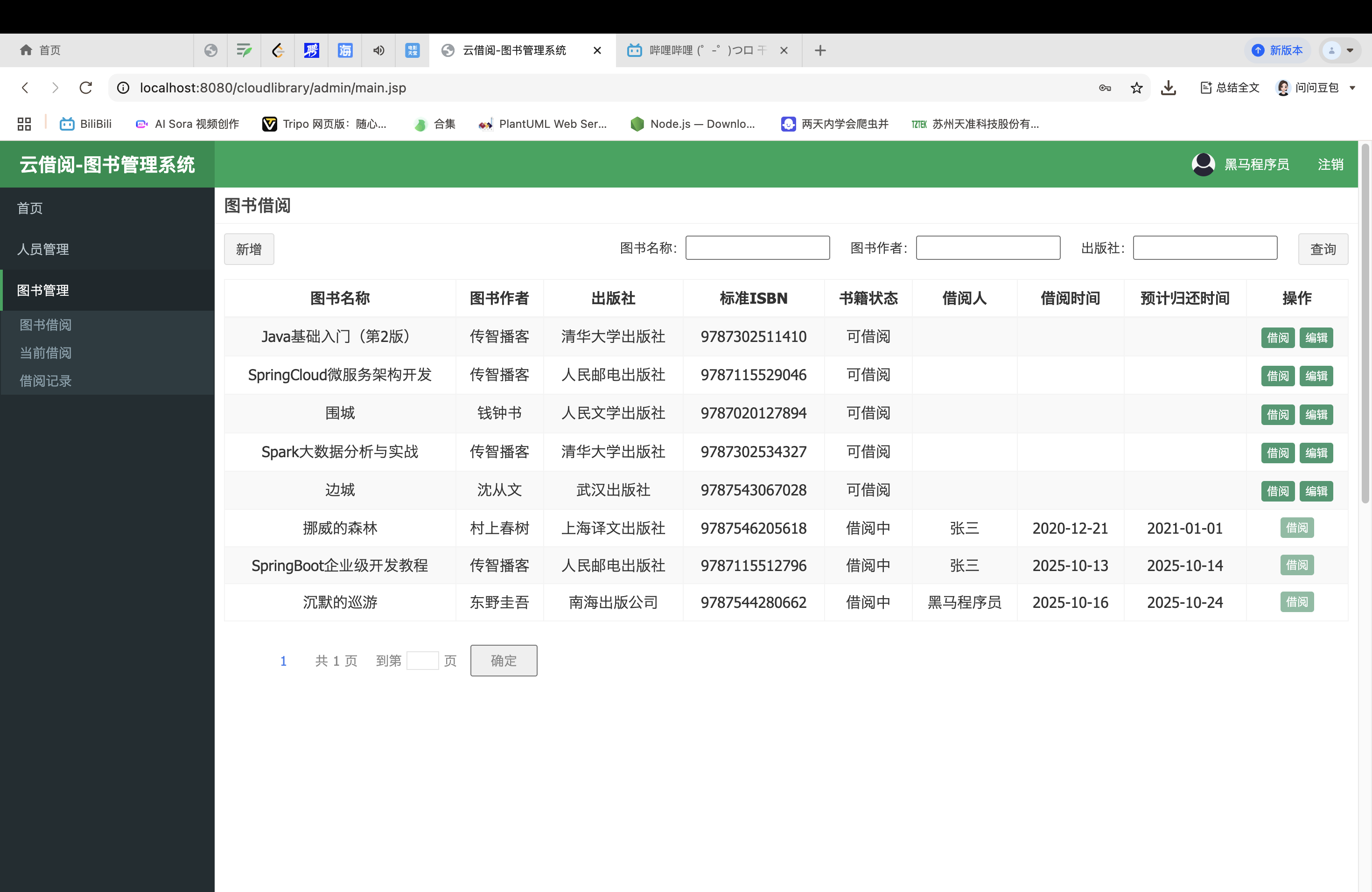
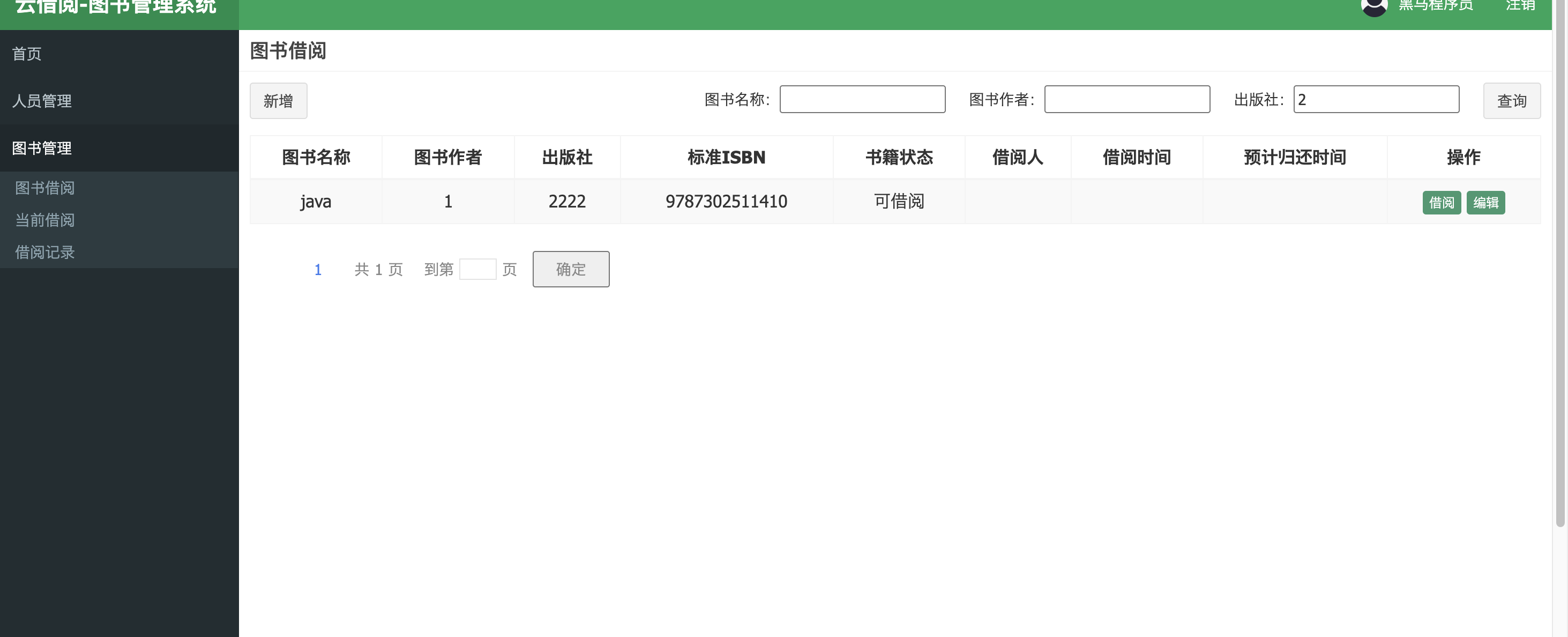
其中包括新增图书、借阅图书、编辑图书、查询图书
查询和借阅的功能是共有的,编辑新增的功能只有管理员有
新增图书的逻辑:
首先,我们去找图书借阅的页面,找到了books.jsp
<c:if test="${USER_SESSION.role =='ADMIN'}">
    <div class="pull-left">
        <div class="form-group form-inline">
            <div class="btn-group">
                <button type="button" class="btn btn-default" title="新建" data-toggle="modal"
                        data-target="#addOrEditModal" onclick="resetFrom()"> 新增
                </button>
            </div>
        </div>
    </div>
</c:if>
在 books.jsp中有这样的代码,<c:if test="${USER_SESSION.role =='ADMIN'}">
来判断用户是不是管理员,如果是管理员,那么页面展示新增按钮
点击这个按钮出现模态框,主要依靠Bootstrap框架自身的内置功能,

项目里的bootstrap.js是从外部引入的
books.jsp中οnclick="resetFrom()"如果点击就会触发my.js的这个逻辑,重置添加和编辑窗口中输入框的内容
//重置添加和编辑窗口中输入框的内容
function resetFrom() {
    $("#aoe").attr("disabled",true)
    var $vals=$("#addOrEditBook input");
    $vals.each(function(){
        $(this).attr("style","").val("")
    });
}
data-target="#addOrEditModal"addOrEditModal是具体模态框的ID
跟下面添加和编辑图书的模态窗口绑定
<!-- 添加和编辑图书的模态窗口 -->
<div class="modal fade" id="addOrEditModal" tabindex="-1" role="dialog" aria-labelledby="myModalLabel"
     aria-hidden="true">
    <div class="modal-dialog">
        <div class="modal-content">
            <div class="modal-header">
                <h3 id="myModalLabel">图书信息</h3>
            </div>
            <div class="modal-body">
                <form id="addOrEditBook">
                    <span><input type="hidden" id="ebid" name="id"></span>
                    <table id="addOrEditTab" class="table table-bordered table-striped" width="800px">
                        <%--图书的id,不展示在页面--%>
                        <tr>
                            <td>图书名称</td>
                            <td><input class="form-control" placeholder="图书名称" name="name" id="ebname"></td>
                            <td>标准ISBN</td>
                            <td><input class="form-control" placeholder="标准ISBN" name="isbn" id="ebisbn"></td>
                        </tr>
                        <tr>
                            <td>出版社</td>
                            <td><input class="form-control" placeholder="出版社" name="press" id="ebpress"></td>
                            <td>作者</td>
                            <td><input class="form-control" placeholder="作者" name="author" id="ebauthor"></td>
                        </tr>
                        <tr>
                            <td>书籍页数</td>
                            <td><input class="form-control" placeholder="书籍页数" name="pagination" id="ebpagination"></td>
                            <td>书籍价格<br/></td>
                            <td><input class="form-control" placeholder="书籍价格" name="price" id="ebprice"></td>
                        </tr>
                            <tr>
                                <td>上架状态</td>
                                <td>
                                    <select class="form-control" id="ebstatus" name="status" >
                                        <option value="0">上架</option>
                                        <option value="3">下架</option>
                                    </select>
                                </td>
                            </tr>
                    </table>
                </form>
            </div>
            <div class="modal-footer">
                <button class="btn btn-success" data-dismiss="modal" aria-hidden="true" id="aoe" disabled onclick="addOrEdit()">保存
                </button>
                <button class="btn btn-default" data-dismiss="modal" aria-hidden="true">关闭</button>
            </div>
        </div>
    </div>
</div>
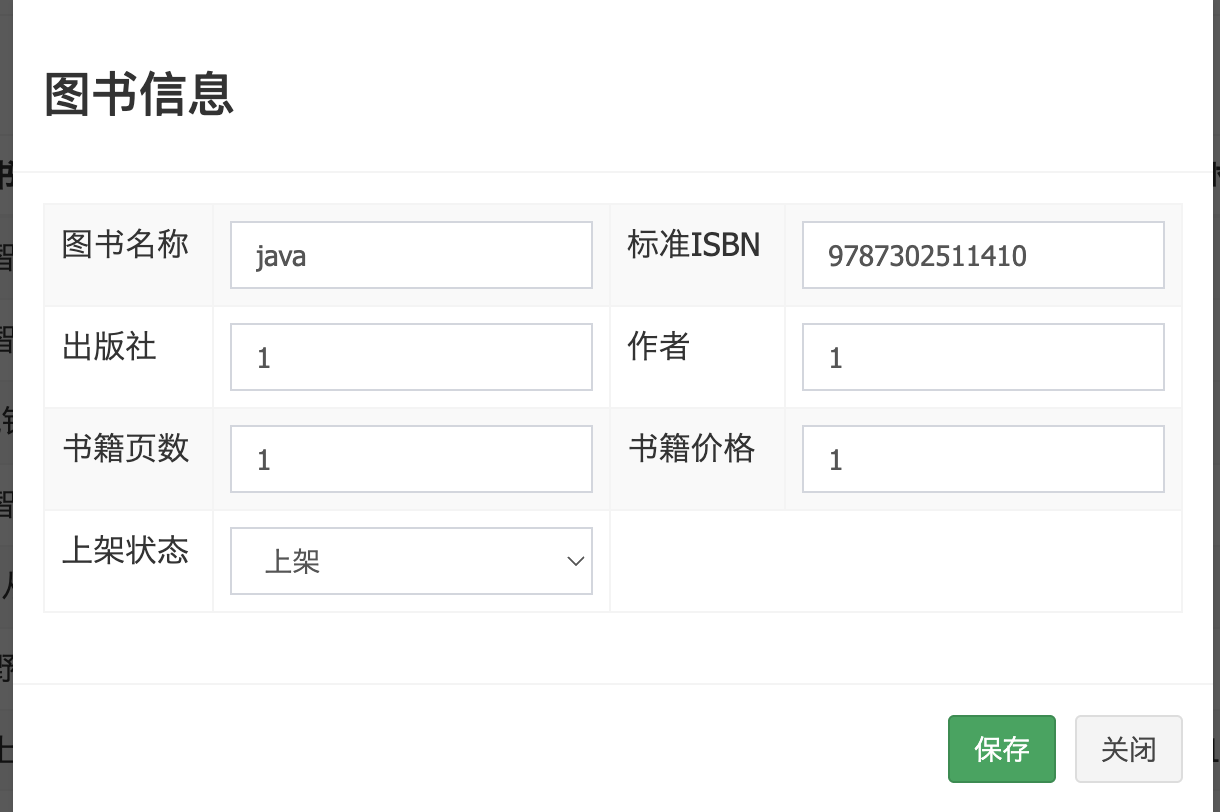
点击新增出现模态框
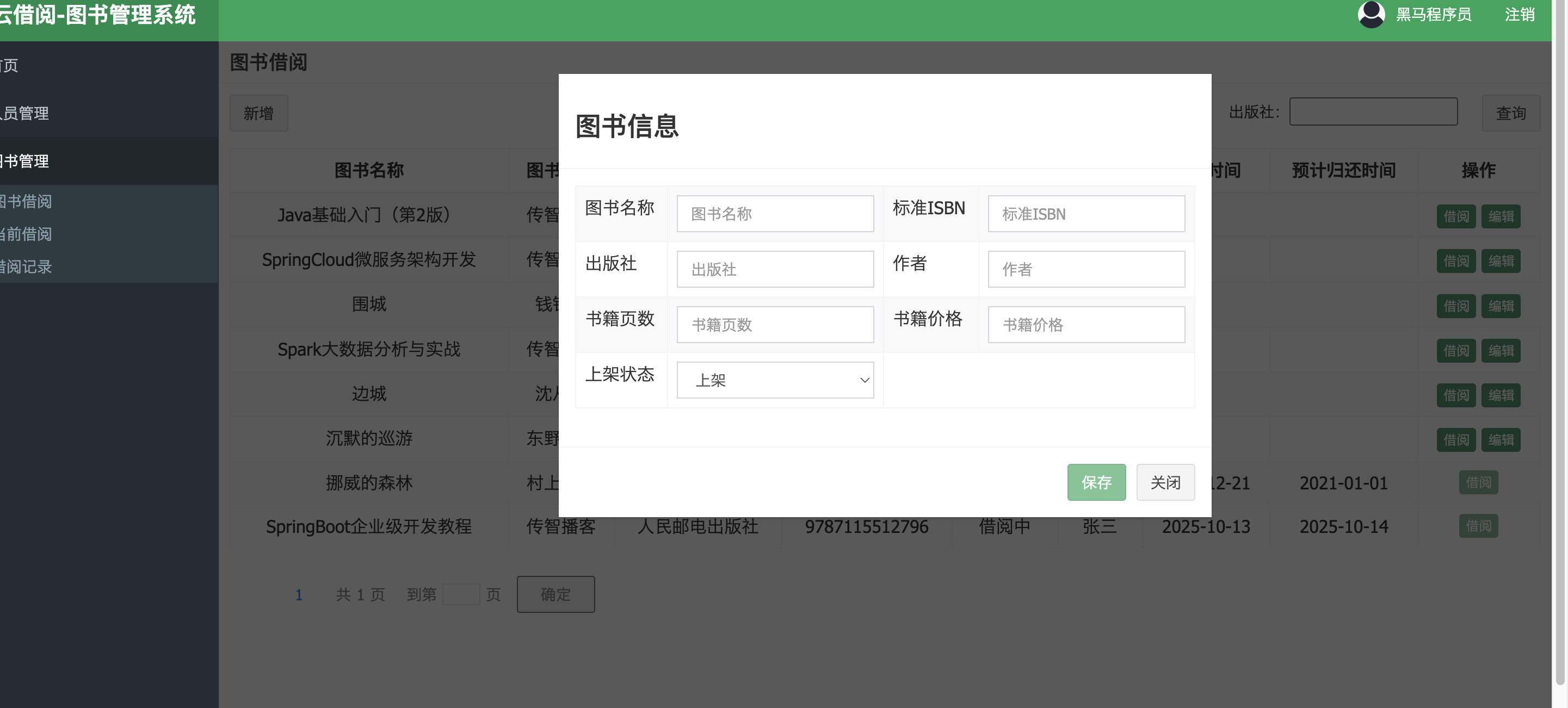
输入图书信息后点击保存,这个保存的逻辑就在模态框里的45行
<button class="btn btn-success" data-dismiss="modal" aria-hidden="true" id="aoe" disabled οnclick="addOrEdit()">保存
οnclick="addOrEdit()"通过这个找到my.js文件中的function addOrEdit() 方法,如下
function addOrEdit() {
    //获取表单中图书id的内容
    var ebid = $("#ebid").val();
    //如果表单中有图书id的内容,说明本次为编辑操作
    if (ebid > 0) {
        var url = getProjectPath()+"/book/editBook";
        $.post(url, $("#addOrEditBook").serialize(), function (response) {
            alert(response.message)
            if (response.success == true) {
                window.location.href = getProjectPath()+"/book/search";
            }
        })
    }
    //如果表单中没有图书id,说明本次为添加操作
    else {
        var url = getProjectPath()+"/book/addBook";
        $.post(url, $("#addOrEditBook").serialize(), function (response) {
            alert(response.message)
            if (response.success == true) {
                window.location.href = getProjectPath()+"/book/search";
            }
        })
    }
}
这个代码里用了if-else分支
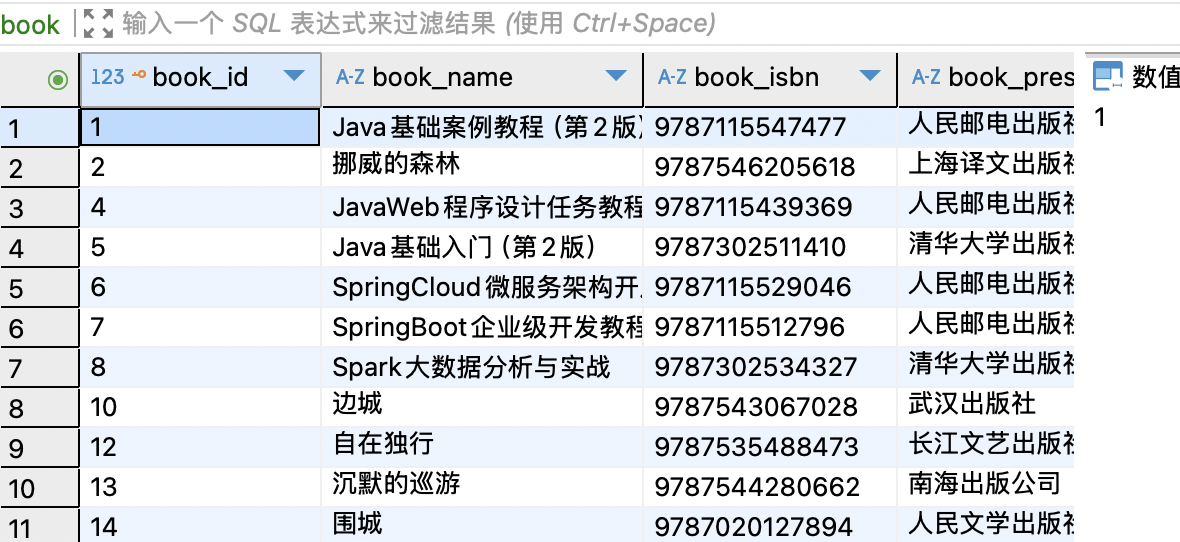
分支的判断条件是根据图书id,如果是一本已有的书存在图书id,就是编辑操作,如果是新书就没有图书id,会新增一个id
var ebid = $("#ebid").val();是获取图书id
假如没有图书id,输入图书信息后点击保存,就会构造请求地址var url = getProjectPath()+"/book/addBook";跟后端对应的Controller的@RequestMapping的URL匹配上
$.post(url, $("#addOrEditBook").serialize(), function (response)
这里是发送Post请求,把addOrEditBook模态框里的数据serialize序列化键值对的格式(例如字典)作为请求的参数体传入后端,也就是后端的入参 ;function (response) 是一个回调函数,后端处理好请求后,执行这个函数,response是后端返回的数据
alert(response.message)
if (response.success == true) {
window.location.href = getProjectPath()+"/book/search";
}
alert(response.message)弹出消息框,根据后端返回的数据显示提示信息
if (response.success == true) {如果后端返回的success为true,就会发送"/book/search请求到BookController的search,最后跳转到books.jsp(参考新书推荐)
现在根据var url = getProjectPath()+"/book/addBook";请求地址找到BookController中匹配的URL
@RequestMapping("/addBook")
public Result addBook(Book book) {
    try {
        Integer count=bookService.addBook(book);
        if(count!=1){
            return new Result(false, "新增图书失败!");
        }
        return new Result(true, "新增图书成功!");
    }catch (Exception e){
        e.printStackTrace();
        return new Result(false, "新增图书失败!");
    }
}
这里调用业务逻辑层bookService中的addBook,book是入参,是前端页面传来的数据
count是用来判断新增图书到数据库的操作是否成功的
现在去找业务逻辑层的代码
Integer addBook(Book book)
这是addBook方法的定义
public Integer addBook(Book book) {
    DateFormat dateFormat = new SimpleDateFormat("yyyy-MM-dd");
    //设置新增图书的上架时间
    book.setUploadTime(dateFormat.format(new Date()));
    return  bookMapper.addBook(book);
}
这是addBook方法的实现,设置了上架时间,book.setUploadTime把格式化后的日期字符串赋值給Book对象的upLoadTime属性
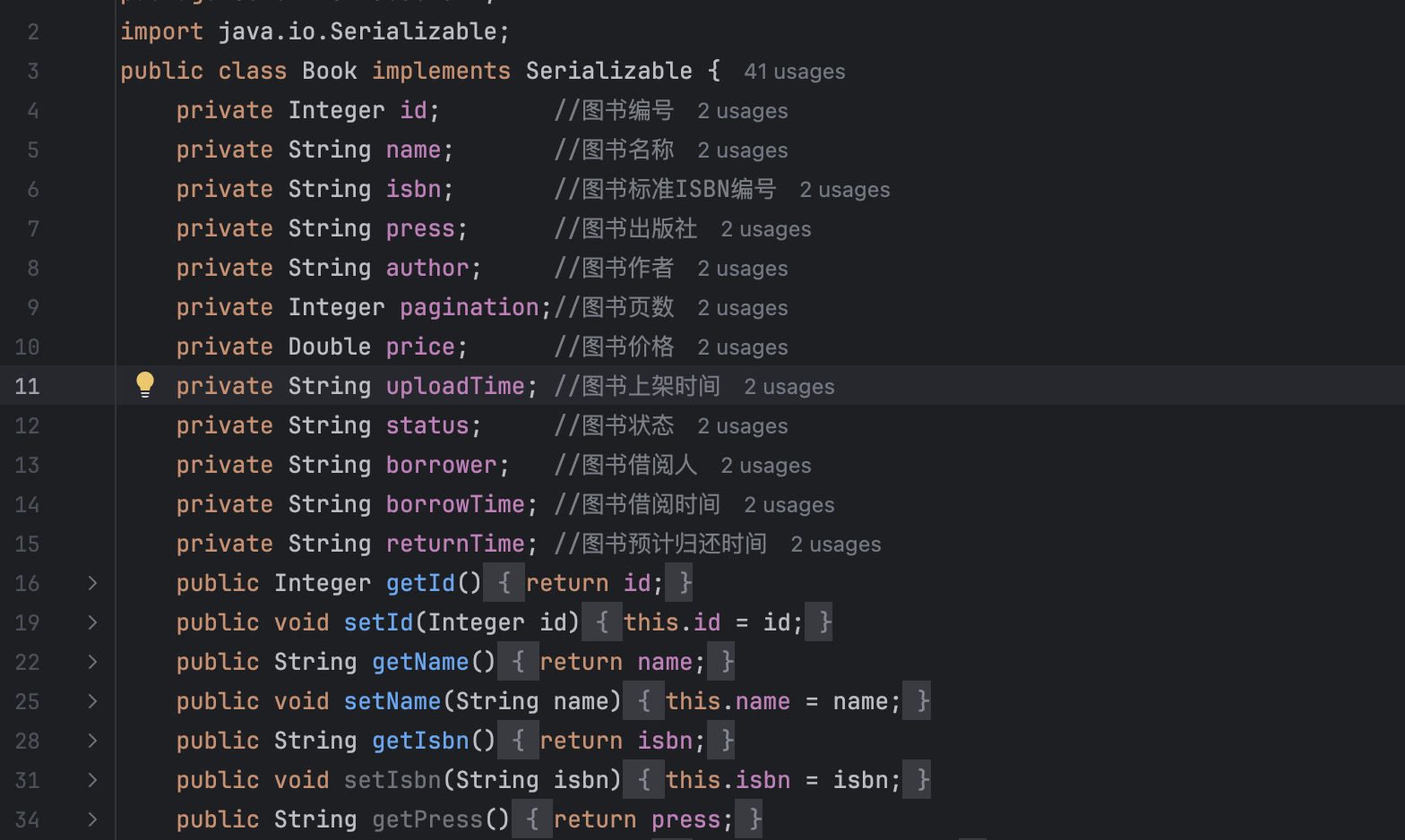
持久层的第11行定义了这个属性
return bookMapper.addBook(book);
就是把完整的book对象(包括上架时间)传给数据访问层Mapper,调用addBook方法
Integer addBook(Book book);
这个是数据访问层BookMapper接口addBook方法定义,Integer返回值接收的是数据库返回的受影响行数,
<!--新增图书-->
<insert id="addBook" parameterType="com.itheima.domain.Book">
    insert into book(book_id,book_name,book_isbn,book_press,book_author,book_pagination,book_price,book_uploadtime,book_status,book_borrower,book_borrowtime,book_returntime)
    values (#{id},#{name},#{isbn},#{press},#{author},#{pagination},#{price},#{uploadTime},#{status},#{borrower},#{borrowTime},#{returnTime})
</insert>
这个是接口的实现,根据sql语句,把book对象的属性值插入对应的数据库的book表,这个就跟BookController的addBook中的count对应上了
try {
Integer count=bookService.addBook(book);
if(count!=1){
return new Result(false, "新增图书失败!");
}
return new Result(true, "新增图书成功!");
}catch (Exception e){
e.printStackTrace();
return new Result(false, "新增图书失败!");
}
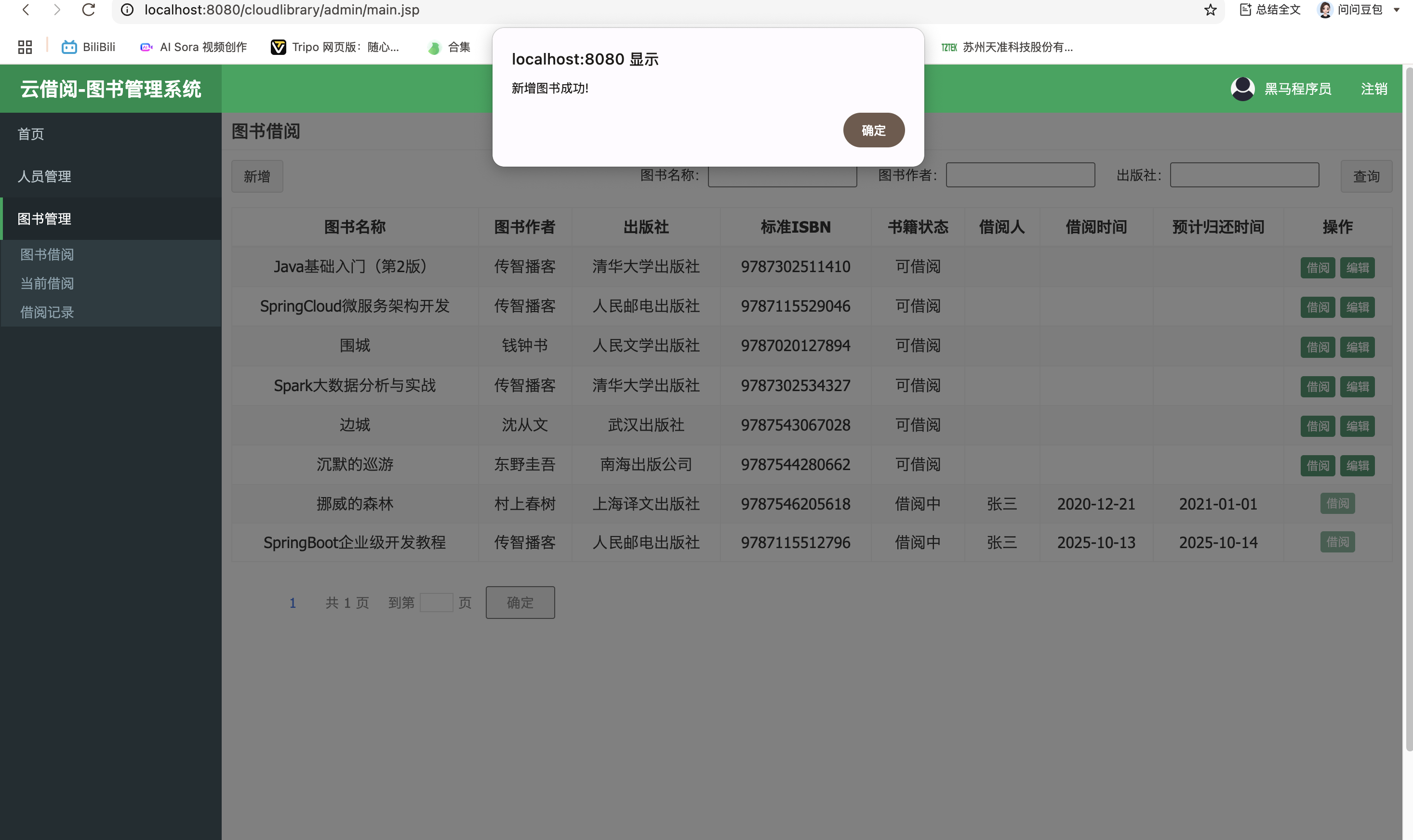
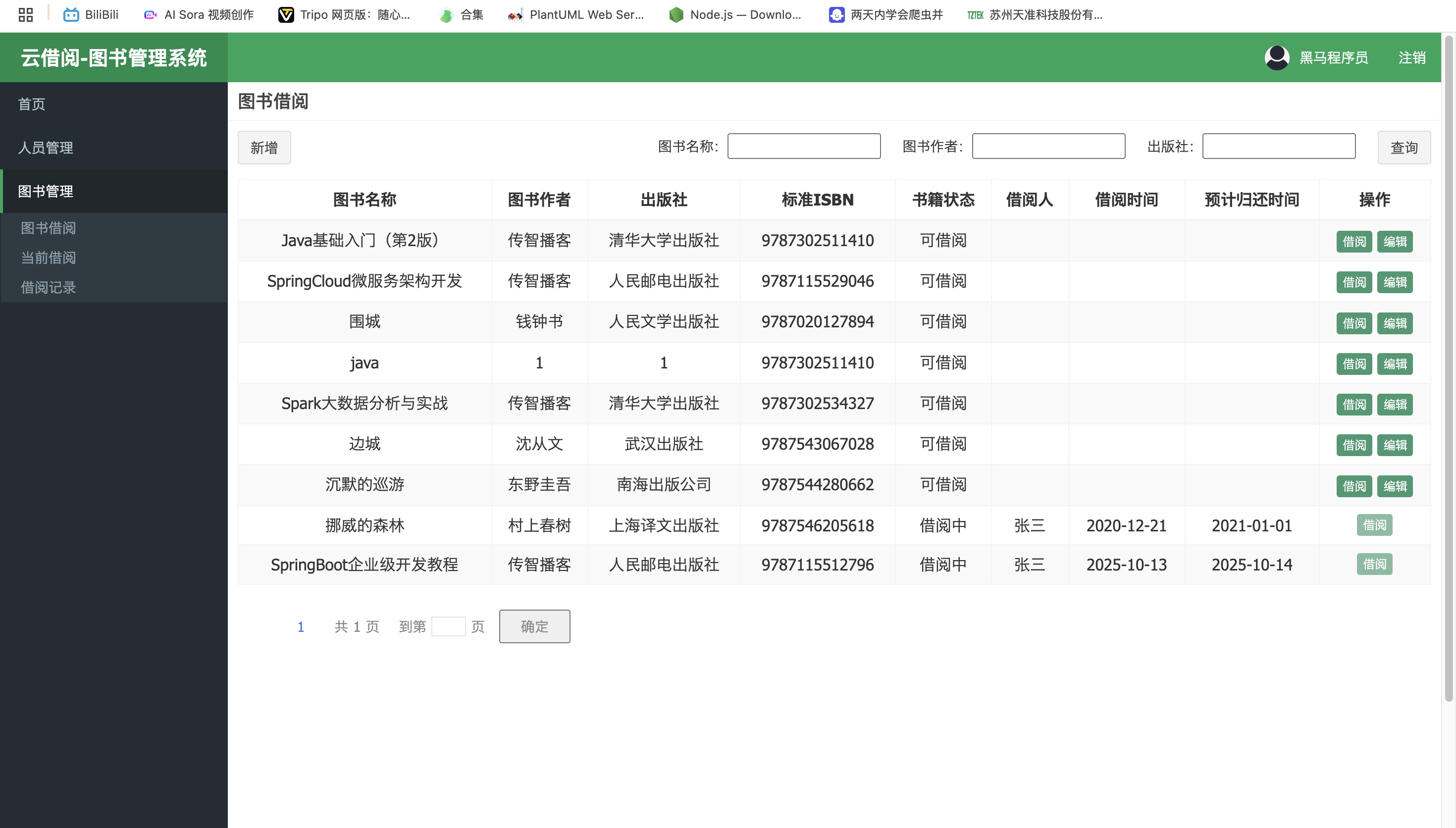
如果新增成功,返回true,和msg"新增图书成功!"
else {
        var url = getProjectPath()+"/book/addBook";
        $.post(url, $("#addOrEditBook").serialize(), function (response) {
            alert(response.message)
            if (response.success == true) {
                window.location.href = getProjectPath()+"/book/search";
            }
        })
    }
页面会调用接收后端传来的数据,通过my.js的逻辑在页面中显示"新增图书成功!",并跳转网页
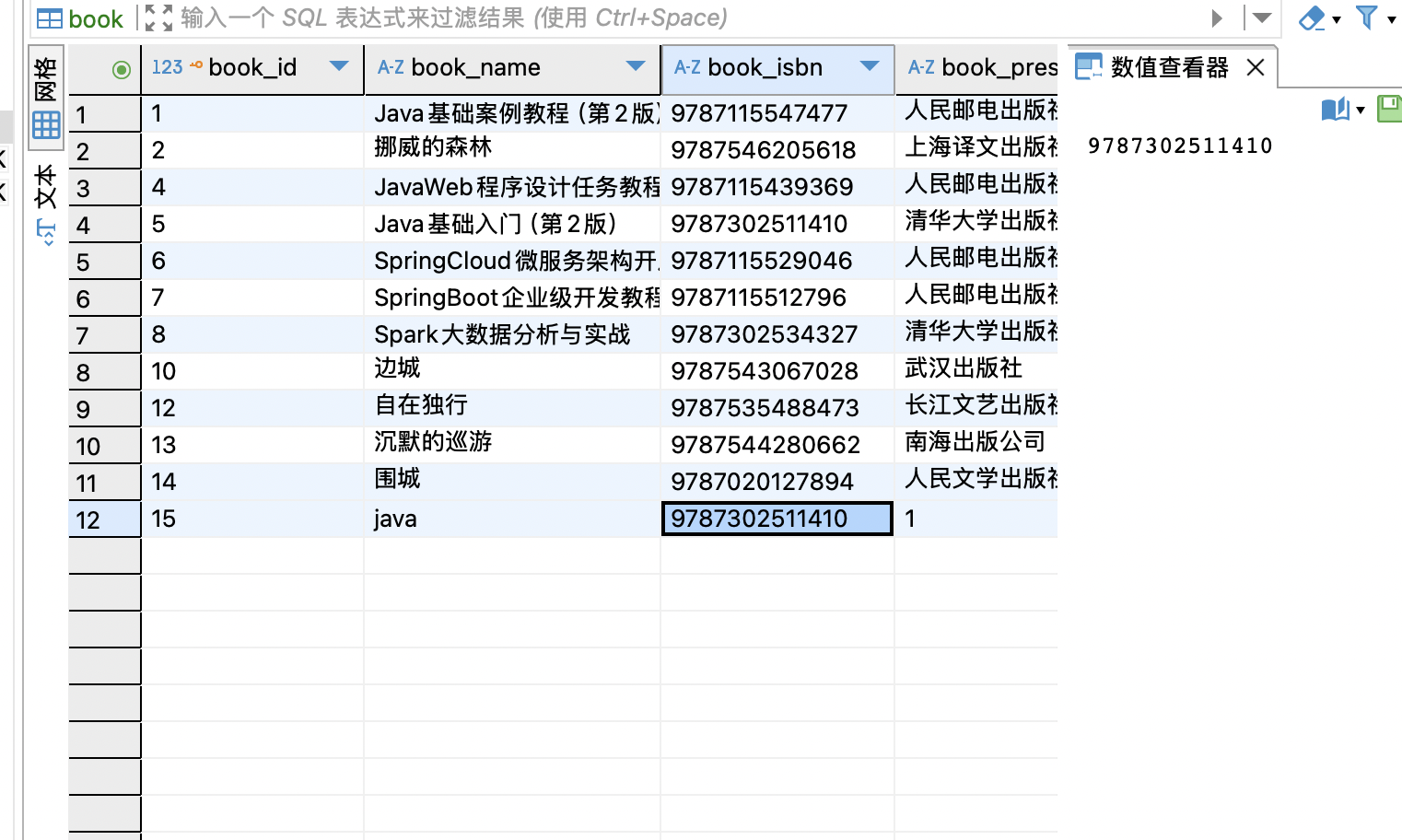
数据库中图书信息也成功录入
编辑图书的逻辑:
先看图书借阅的页面books.jsp, data-target="#addOrEditModal"说明模态框和新增图书是共用的
<c:if test="${USER_SESSION.role =='ADMIN'}">说明只有权限是管理员才能显示编辑
<c:if test="${USER_SESSION.role =='ADMIN'}">
    <button type="button" class="btn bg-olive btn-xs" data-toggle="modal"
            data-target="#addOrEditModal" onclick="findBookById(${book.id},'edit')"> 编辑
    </button>
</c:if>
οnclick="findBookById(${book.id},'edit')"找到my.js中的findBookById逻辑
function findBookById(id,doname) {
    resetStyle()
    var url = getProjectPath()+"/book/findById?id=" + id;
    $.get(url, function (response) {
        //如果是编辑图书,将获取的图书信息回显到编辑的窗口中
        if(doname=='edit'){
            $("#ebid").val(response.data.id);
            $("#ebname").val(response.data.name);
            $("#ebisbn").val(response.data.isbn);
            $("#ebpress").val(response.data.press);
            $("#ebauthor").val(response.data.author);
            $("#ebpagination").val(response.data.pagination);
            $("#ebprice").val(response.data.price);
            $("#ebstatus").val(response.data.status);
        }
        //如果是借阅图书,将获取的图书信息回显到借阅的窗口中
        if(doname=='borrow'){
            $("#savemsg").attr("disabled",true)
            $("#time").val("");
            $("#bid").val(response.data.id);
            $("#bname").val(response.data.name);
            $("#bisbn").val(response.data.isbn);
            $("#bpress").val(response.data.press);
            $("#bauthor").val(response.data.author);
            $("#bpagination").val(response.data.pagination);
        }
    })
}
这里写了一个根据获取的ID把图书信息返回,如图,这个返回的值也是发送请求与后端的URL匹配上,后端把从数据库获取的数据存放到请求域中,js方法从请求域中获取图书信息,例如response.data.name;
通过$("#bname")跟模态框中的
<td>图书名称</td>
<td><input class="form-control" placeholder="图书名称" name="name" id="ebname"></td>
id="ebname"绑定,页面展示图书名称
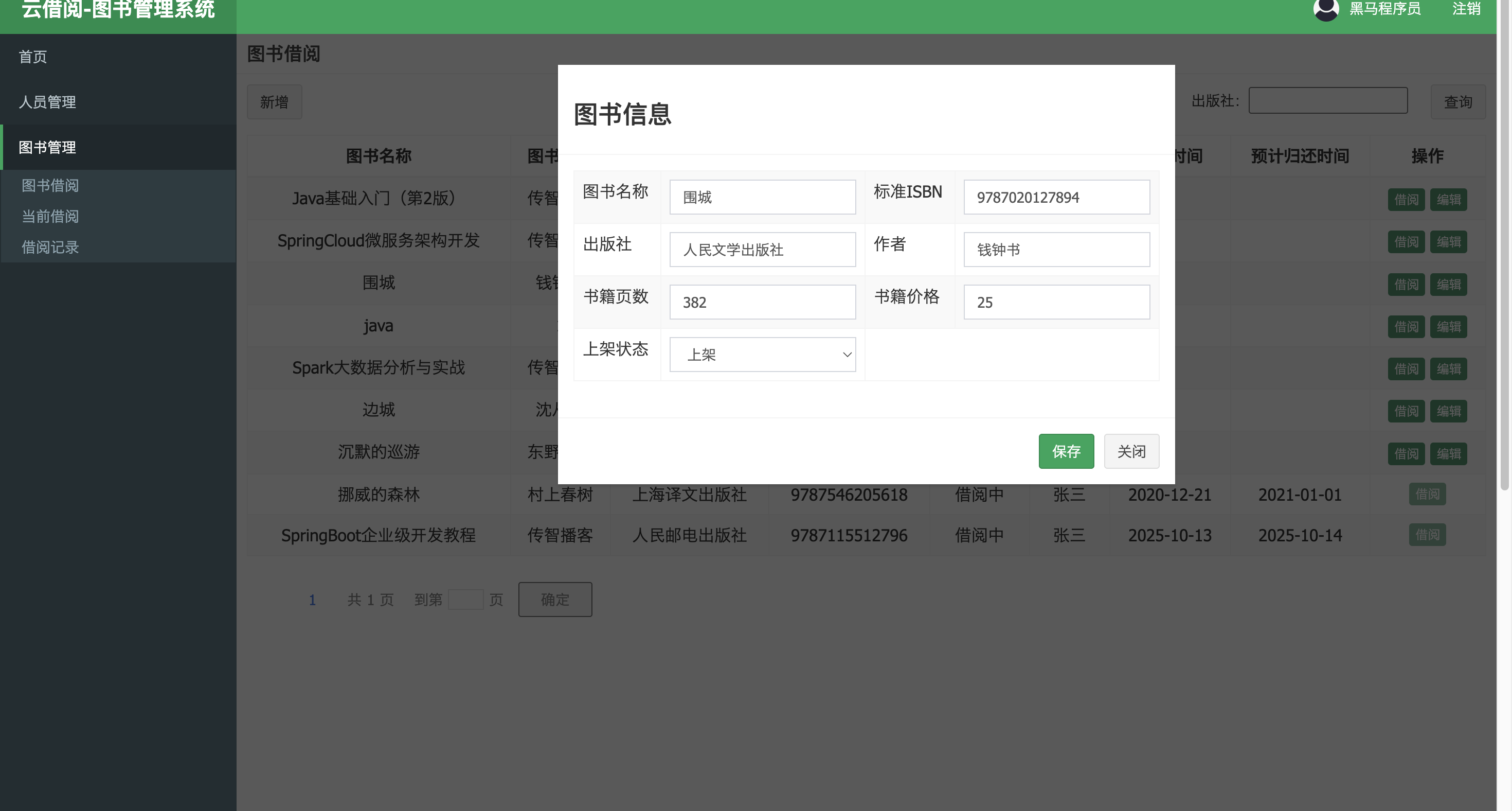
接下来跟新增图书差不多了,在模态框中οnclick="addOrEdit()">保存
addOrEdit是my.js中的方法
function addOrEdit() {
    //获取表单中图书id的内容
    var ebid = $("#ebid").val();
    //如果表单中有图书id的内容,说明本次为编辑操作
    if (ebid > 0) {
        var url = getProjectPath()+"/book/editBook";
        $.post(url, $("#addOrEditBook").serialize(), function (response) {
            alert(response.message)
            if (response.success == true) {
                window.location.href = getProjectPath()+"/book/search";
            }
        })
    }
    //如果表单中没有图书id,说明本次为添加操作
    else {
        var url = getProjectPath()+"/book/addBook";
        $.post(url, $("#addOrEditBook").serialize(), function (response) {
            alert(response.message)
            if (response.success == true) {
                window.location.href = getProjectPath()+"/book/search";
            }
        })
    }
}
获取图书id,然后进入编辑分支
$.post(url, $("#addOrEditBook").serialize(), function (response) 就是post请求跟后端URL匹配的同时携带addOrEditBook模态框里的数据通过serialize序列化键值对(如字典),之后执行function (response) 回调函数,获取后端的返回值,根据返回值显示页面信息和跳组网页
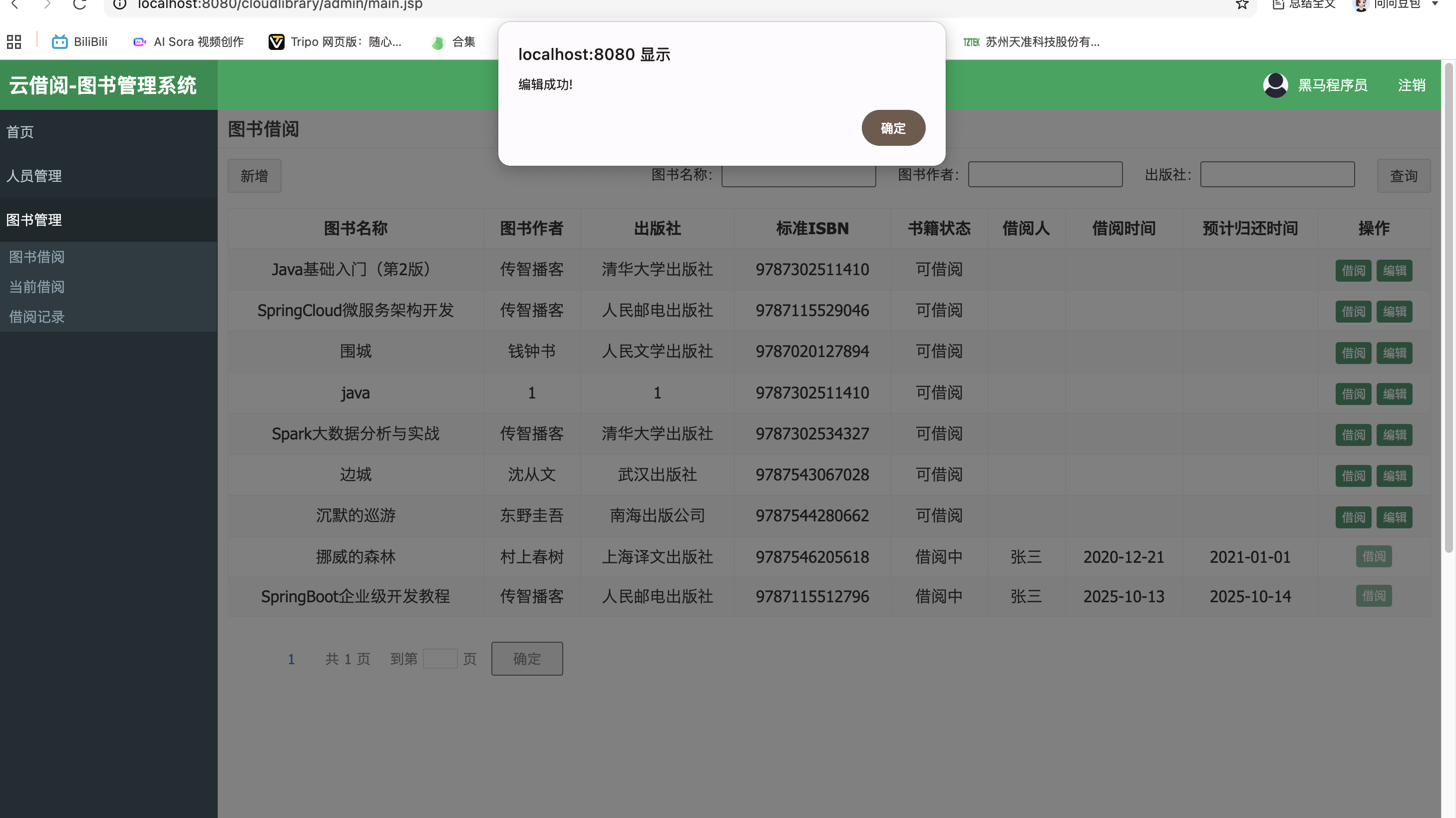
跳转网页
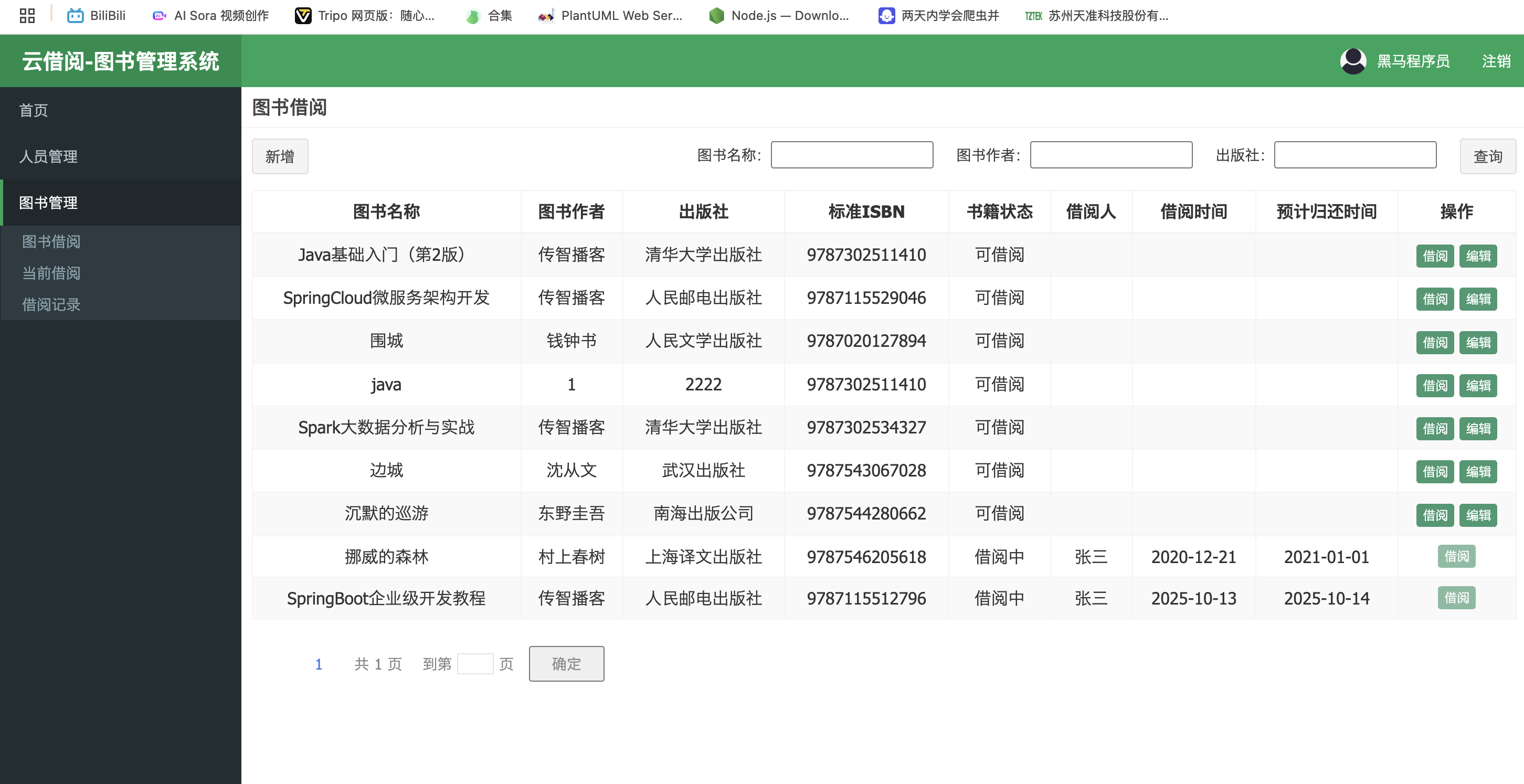
数据库也修改了

借阅图书的逻辑:
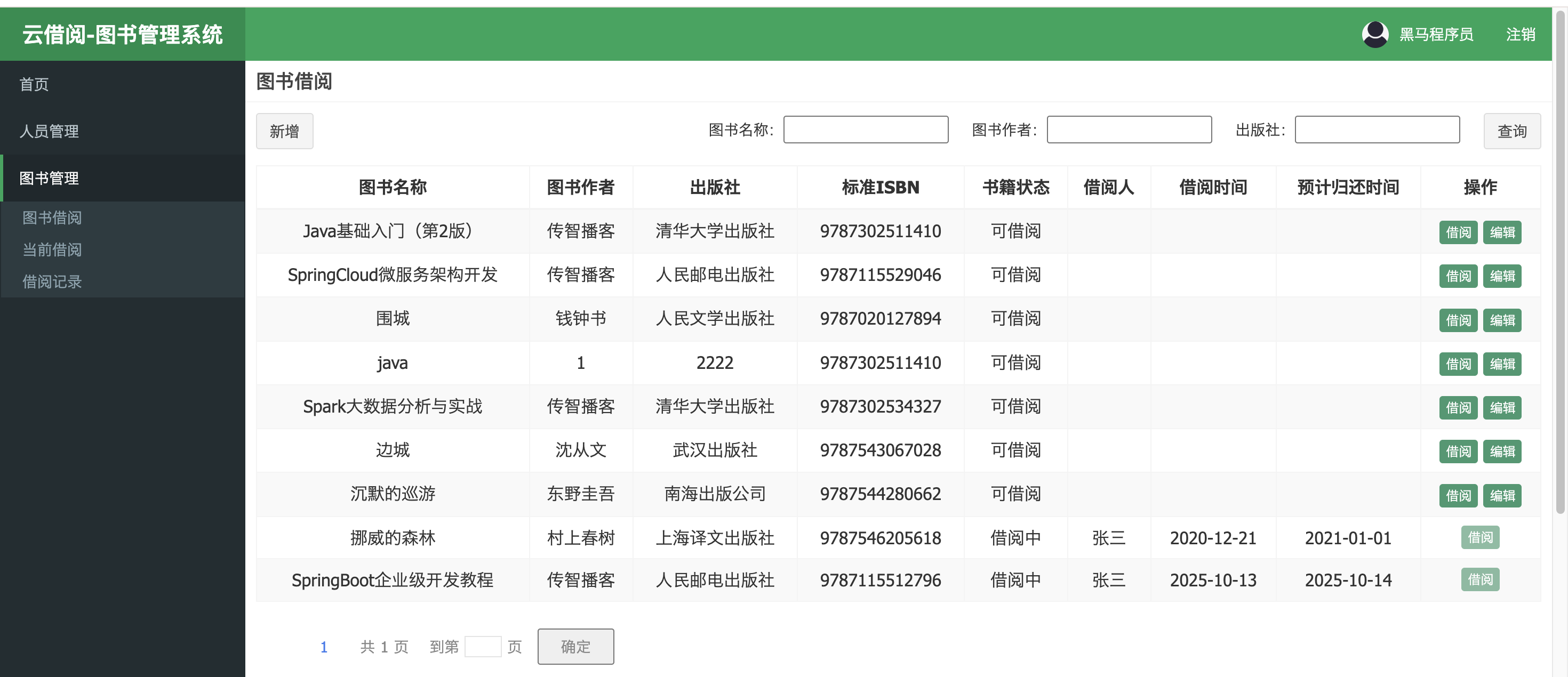
找到图书借阅页面的第90行借阅按钮
<%@ page language="java" contentType="text/html; charset=UTF-8" pageEncoding="UTF-8" %>
<%@ taglib uri="http://java.sun.com/jsp/jstl/core" prefix="c" %>
<html>
<head>
<meta charset="utf-8">
<title>图书管理</title>
<link rel="stylesheet" href="${pageContext.request.contextPath}/css/bootstrap.css">
<link rel="stylesheet" href="${pageContext.request.contextPath}/css/AdminLTE.css">
<link rel="stylesheet" href="${pageContext.request.contextPath}/css/pagination.css">
<script src="${pageContext.request.contextPath}/js/jquery.min.js"></script>
<script src="${pageContext.request.contextPath}/js/bootstrap.js"></script>
<script src="${pageContext.request.contextPath}/js/pagination.js"></script>
<script src="${pageContext.request.contextPath}/js/my.js"></script>
</head>
<body class="hold-transition skin-red sidebar-mini">
<!-- .box-body -->
<div class="box-header with-border">
<h3 class="box-title">图书借阅</h3>
</div>
<div class="box-body">
<%--新增按钮:如果当前登录用户是管理员,页面展示新增按钮--%>
<c:if test="${USER_SESSION.role =='ADMIN'}">
<div class="pull-left">
<div class="form-group form-inline">
<div class="btn-group">
<button type="button" class="btn btn-default" title="新建" data-toggle="modal"
data-target="#addOrEditModal" onclick="resetFrom()"> 新增
</button>
</div>
</div>
</div>
</c:if>
<%--新增按钮 /--%>
<!--工具栏 数据搜索 -->
<div class="box-tools pull-right">
<div class="has-feedback">
<form action="${pageContext.request.contextPath}/book/search" method="post">
图书名称:<input name="name" value="${search.name}">    
图书作者:<input name="author" value="${search.author}">    
出版社:<input name="press" value="${search.press}">    
<input class="btn btn-default" type="submit" value="查询">
</form>
</div>
</div>
<!--工具栏 数据搜索 /-->
<!-- 数据列表 -->
<div class="table-box">
<!-- 数据表格 -->
<table id="dataList" class="table table-bordered table-striped table-hover dataTable text-center">
<thead>
<tr>
<th class="sorting_asc">图书名称</th>
<th class="sorting">图书作者</th>
<th class="sorting">出版社</th>
<th class="sorting">标准ISBN</th>
<th class="sorting">书籍状态</th>
<th class="sorting">借阅人</th>
<th class="sorting">借阅时间</th>
<th class="sorting">预计归还时间</th>
<th class="text-center">操作</th>
</tr>
</thead>
<tbody>
<c:forEach items="${pageResult.rows}" var="book">
<tr>
<td> ${book.name}</td>
<td>${book.author}</td>
<td>${book.press}</td>
<td>${book.isbn}</td>
<td>
    <c:if test="${book.status ==0}">可借阅</c:if>
    <c:if test="${book.status ==1}">借阅中</c:if>
    <c:if test="${book.status ==2}">归还中</c:if>
</td>
<td>${book.borrower }</td>
<td>${book.borrowTime}</td>
<td>${book.returnTime}</td>
<td class="text-center">
<c:if test="${book.status ==0}">
    <button type="button" class="btn bg-olive btn-xs" data-toggle="modal"
            data-target="#borrowModal" onclick="findBookById(${book.id},'borrow')"> 借阅
    </button>
<c:if test="${USER_SESSION.role =='ADMIN'}">
<button type="button" class="btn bg-olive btn-xs" data-toggle="modal"
data-target="#addOrEditModal" onclick="findBookById(${book.id},'edit')"> 编辑
</button>
</c:if>
</c:if>
<c:if test="${book.status ==1 ||book.status ==2}">
<button type="button" class="btn bg-olive btn-xs" disabled="true">借阅</button>
</c:if>
</td>
</tr>
</c:forEach>
</tbody>
</table>
<!--数据表格/-->
<%--分页插件--%>
<div id="pagination" class="pagination"></div>
</div>
<!--数据列表/-->
</div>
<!-- /.box-body -->
<%--引入存放模态窗口的页面--%>
<jsp:include page="/admin/book_modal.jsp"></jsp:include>
<!-- 添加和编辑图书的模态窗口 -->
<div class="modal fade" id="addOrEditModal" tabindex="-1" role="dialog" aria-labelledby="myModalLabel"
aria-hidden="true">
<div class="modal-dialog">
<div class="modal-content">
<div class="modal-header">
<h3 id="myModalLabel">图书信息</h3>
</div>
<div class="modal-body">
<form id="addOrEditBook">
<span><input type="hidden" id="ebid" name="id"></span>
<table id="addOrEditTab" class="table table-bordered table-striped" width="800px">
<%--图书的id,不展示在页面--%>
<tr>
<td>图书名称</td>
<td><input class="form-control" placeholder="图书名称" name="name" id="ebname"></td>
<td>标准ISBN</td>
<td><input class="form-control" placeholder="标准ISBN" name="isbn" id="ebisbn"></td>
</tr>
<tr>
<td>出版社</td>
<td><input class="form-control" placeholder="出版社" name="press" id="ebpress"></td>
<td>作者</td>
<td><input class="form-control" placeholder="作者" name="author" id="ebauthor"></td>
</tr>
<tr>
<td>书籍页数</td>
<td><input class="form-control" placeholder="书籍页数" name="pagination" id="ebpagination"></td>
<td>书籍价格<br/></td>
<td><input class="form-control" placeholder="书籍价格" name="price" id="ebprice"></td>
</tr>
<tr>
<td>上架状态</td>
<td>
<select class="form-control" id="ebstatus" name="status" >
<option value="0">上架</option>
<option value="3">下架</option>
</select>
</td>
</tr>
</table>
</form>
</div>
<div class="modal-footer">
<button class="btn btn-success" data-dismiss="modal" aria-hidden="true" id="aoe" disabled onclick="addOrEdit()">保存
</button>
<button class="btn btn-default" data-dismiss="modal" aria-hidden="true">关闭</button>
</div>
</div>
</div>
</div>
</body>
<script>
/*分页插件展示的总页数*/
pageargs.total = Math.ceil(${pageResult.total}/pageargs.pagesize);
/*分页插件当前的页码*/
pageargs.cur = ${pageNum}
/*分页插件页码变化时将跳转到的服务器端的路径*/
pageargs.gourl = "${gourl}"
/*保存搜索框中的搜索条件,页码变化时携带之前的搜索条件*/
bookVO.name = "${search.name}"
bookVO.author = "${search.author}"
bookVO.press = "${search.press}"
/*分页效果*/
pagination(pageargs);
</script>
</html>
<c:if test="${book.status ==1 ||book.status ==2}">
<button type="button" class="btn bg-olive btn-xs" disabled="true">借阅</button>
</c:if>
test="${book.status ==1 ||book.status ==2}"这里有一个if判断,如果status等于1或者2,disabled="true"不显示借阅
<td>
<c:if test="${book.status ==0}">可借阅</c:if>
<c:if test="${book.status ==1}">借阅中</c:if>
<c:if test="${book.status ==2}">归还中</c:if>
</td>
第71行代码中可以看到只有status==0才能借阅
<c:if test="${book.status ==0}">
<button type="button" class="btn bg-olive btn-xs" data-toggle="modal"
data-target="#borrowModal" onclick="findBookById(${book.id},'borrow')"> 借阅
</button>
第80行代码跟编辑一样先获取图书id,模态框idborrowModal
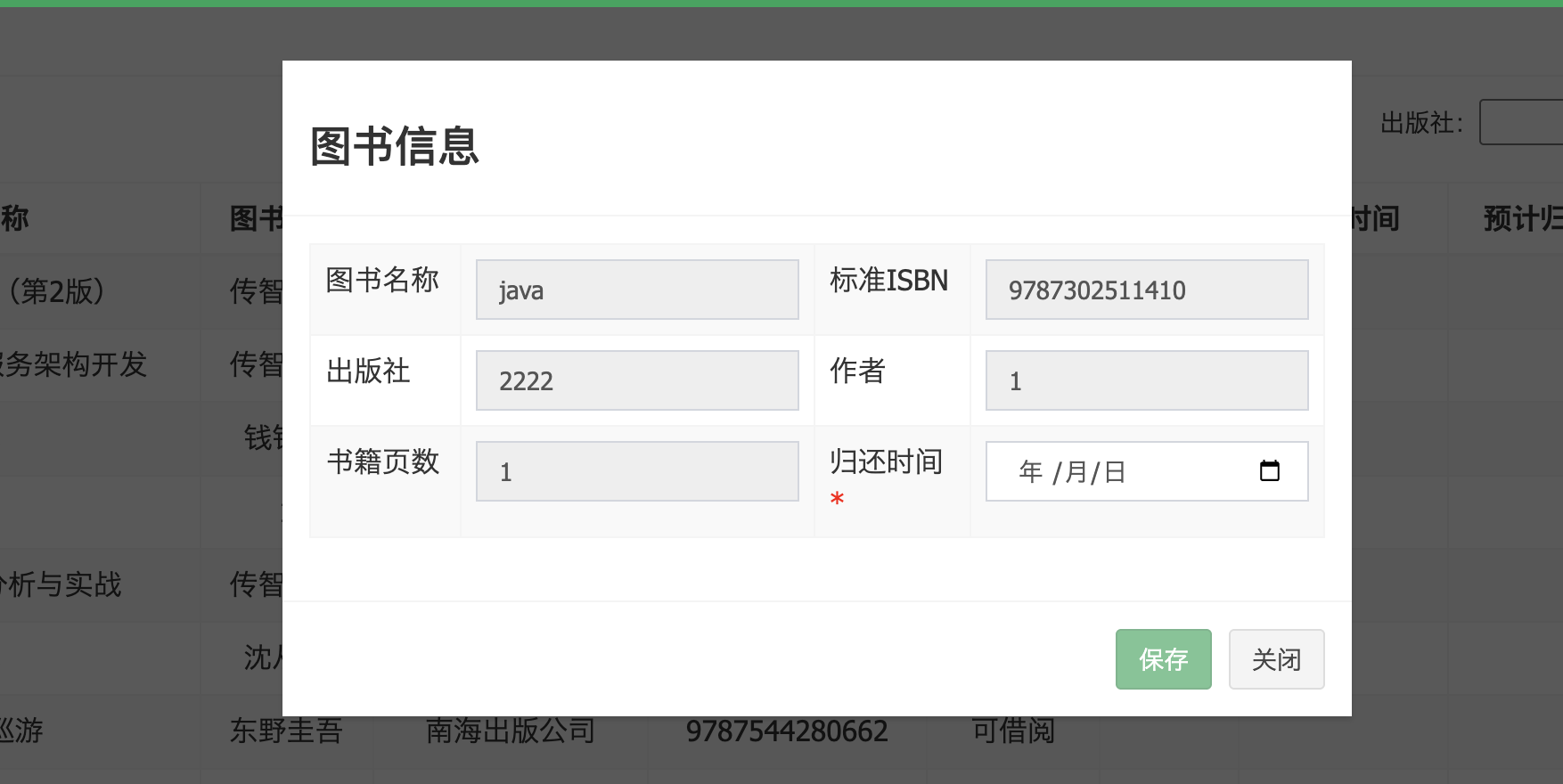
点击借阅按钮,出现模态框,这个模态框不在books.jsp中,在books_modal.jsp中
<%@ page language="java" contentType="text/html; charset=UTF-8" pageEncoding="UTF-8" %>
<!-- 图书借阅信息的模态窗口,默认是隐藏的 -->
<div class="modal fade" id="borrowModal" tabindex="-1" role="dialog" aria-labelledby="myModalLabel" aria-hidden="true">
    <div class="modal-dialog">
        <div class="modal-content">
            <div class="modal-header">
                <h3 id="myModalLabel">图书信息</h3>
            </div>
            <div class="modal-body">
                <form id="borrowBook">
                    <table class="table table-bordered table-striped" width="800px">
                        <%--图书的id,不展示在页面--%>
                        <span><input type="hidden" id="bid" name="id"></span>
                        <tr>
                            <td>图书名称</td>
                            <td><input class="form-control" readonly name="name" id="bname"></td>
                            <td>标准ISBN</td>
                            <td><input class="form-control" readonly name="isbn" id="bisbn"></td>
                        </tr>
                        <tr>
                            <td>出版社</td>
                            <td><input class="form-control" readonly name="press" id="bpress"></td>
                            <td>作者</td>
                            <td><input class="form-control" readonly name="author" id="bauthor"></td>
                        </tr>
                        <tr>
                            <td>书籍页数</td>
                            <td><input class="form-control" readonly name="pagination" id="bpagination"></td>
                            <td>归还时间<br/><span style="color: red">*</span></td>
                            <%--时间控件中的内容改变时,调用js文件中的cg()方法--%>
                            <td><input class="form-control" type="date" name="returnTime" id="time" onchange="cg()">
                            </td>
                        </tr>
                    </table>
                </form>
            </div>
            <div class="modal-footer">
                <%--点击保存按钮时,隐藏模态窗口并调用js文件中的borrow()方法--%>
                <button class="btn btn-success" data-dismiss="modal" aria-hidden="true" onclick="borrow()"
                        disabled="true" id="savemsg">保存
                </button>
                <button class="btn btn-default" data-dismiss="modal" aria-hidden="true">关闭</button>
            </div>
        </div>
    </div>
</div>
<div class="modal fade" id="borrowModal" tabindex="-1" role="dialog" aria-labelledby="myModalLabel" aria-hidden="true">
id="borrowModal" 模态框的id,点击借阅按钮通过data-target="#borrowModal" 触发弹窗
看这张图片图书信息除了归还时间,其他都不可修改,是因为borrowModal模态框代码里加入readonly属性如图书名称
<td>图书名称</td>
<td><input class="form-control" readonly name="name" id="bname"></td>
避免用户在借阅是篡改图书信息
<td>归还时间<br/><span style="color: red">*</span></td>
<td><input class="form-control" type="date" name="returnTime" id="time" οnchange="cg()">
</td>
<span style="color: red">*</span></td>这行代码标记归还时间为必填项
οnchange="cg()启用保存按钮,只有选择了归还时间,按钮才允许点击
<button class="btn btn-success" data-dismiss="modal" aria-hidden="true" onclick="borrow()"
        disabled="true" id="savemsg">保存
</button>
book_modal.jsp第39行
aria-hidden="true"点击按钮后关闭模态框,οnclick="borrow()"触发业务逻辑borrow
//点击借阅图书时执行
function borrow() {
    var url =getProjectPath()+ "/book/borrowBook";
    $.post(url, $("#borrowBook").serialize(), function (response) {
        alert(response.message)
        if (response.success == true) {
            window.location.href = getProjectPath()+"/book/search";
        }
    })
}
向后端发送post请求并携带数据
@ResponseBody
@RequestMapping("/borrowBook")
public Result borrowBook(Book book, HttpSession session) {
    //获取当前登录的用户姓名
    String pname = ((User) session.getAttribute("USER_SESSION")).getName();
    book.setBorrower(pname);
    try {
        //根据图书的id和用户进行图书借阅
        Integer count = bookService.borrowBook(book);
        if (count != 1) {
            return new Result(false, "借阅图书失败!");
        }
        return new Result(true, "借阅成功,请到行政中心取书!");
    } catch (Exception e) {
        e.printStackTrace();
        return new Result(false, "借阅图书失败!");
    }
}
再调用业务逻辑层bookService的borrowBook方法
Integer borrowBook(Book book);
找到方法的实现
@Override
public Integer borrowBook(Book book) {
    //根据id查询出需要借阅的完整图书信息
    Book b = this.findById(book.getId()+"");
    DateFormat dateFormat = new SimpleDateFormat("yyyy-MM-dd");
    //设置当天为借阅时间
    book.setBorrowTime(dateFormat.format(new Date()));
    //设置所借阅的图书状态为借阅中
    book.setStatus("1");
    //将图书的价格设置在book对象中
    book.setPrice(b.getPrice());
    //将图书的上架设置在book对象中
    book.setUploadTime(b.getUploadTime());
    return bookMapper.editBook(book);
}
return bookMapper.editBook(book);调用数据访问层bookMapper的editBook接口,editBook的类型是Integer返回的是受影响的行数
Integer editBook(Book book);
下面是接口的实现
<!--修改book信息-->
    <update id="editBook" >
        update book
        <trim prefix="set" suffixOverrides=",">
            <if test="name != null" >
                book_name = #{name},
            </if>
            <if test="isbn != null" >
                book_isbn = #{isbn},
            </if>
            <if test="press != null" >
                book_press = #{press},
            </if>
            <if test="author != null" >
                book_author = #{author},
            </if>
            <if test="pagination != null" >
                book_pagination = #{pagination},
            </if>
            <if test="price != null" >
                book_price = #{price},
            </if>
            <if test="uploadTime != null" >
                book_uploadtime = #{uploadTime},
            </if>
            <if test="status != null" >
                book_status = #{status},
            </if>
            <if test="borrower!= null" >
                book_borrower= #{borrower },
            </if>
            <if test="borrowTime != null" >
                book_borrowtime = #{borrowTime},
            </if>
            <if test="returnTime != null" >
                book_returntime = #{returnTime}
            </if>
        </trim>
        where book_id = #{id}
    </update>
</mapper>
修改数据库中图书借阅信息
修改成功后返回数据库修改的行数給BookCoutroller
try {
//根据图书的id和用户进行图书借阅
Integer count = bookService.borrowBook(book);
if (count != 1) {
return new Result(false, "借阅图书失败!");
}
return new Result(true, "借阅成功,请到行政中心取书!");
} catch (Exception e) {
e.printStackTrace();
return new Result(false, "借阅图书失败!");
}
通过前端js的回调函数unction (response),返回值給前端js
function borrow() {
    var url =getProjectPath()+ "/book/borrowBook";
    $.post(url, $("#borrowBook").serialize(), function (response) {
        alert(response.message)
        if (response.success == true) {
            window.location.href = getProjectPath()+"/book/search";
        }
    })
}
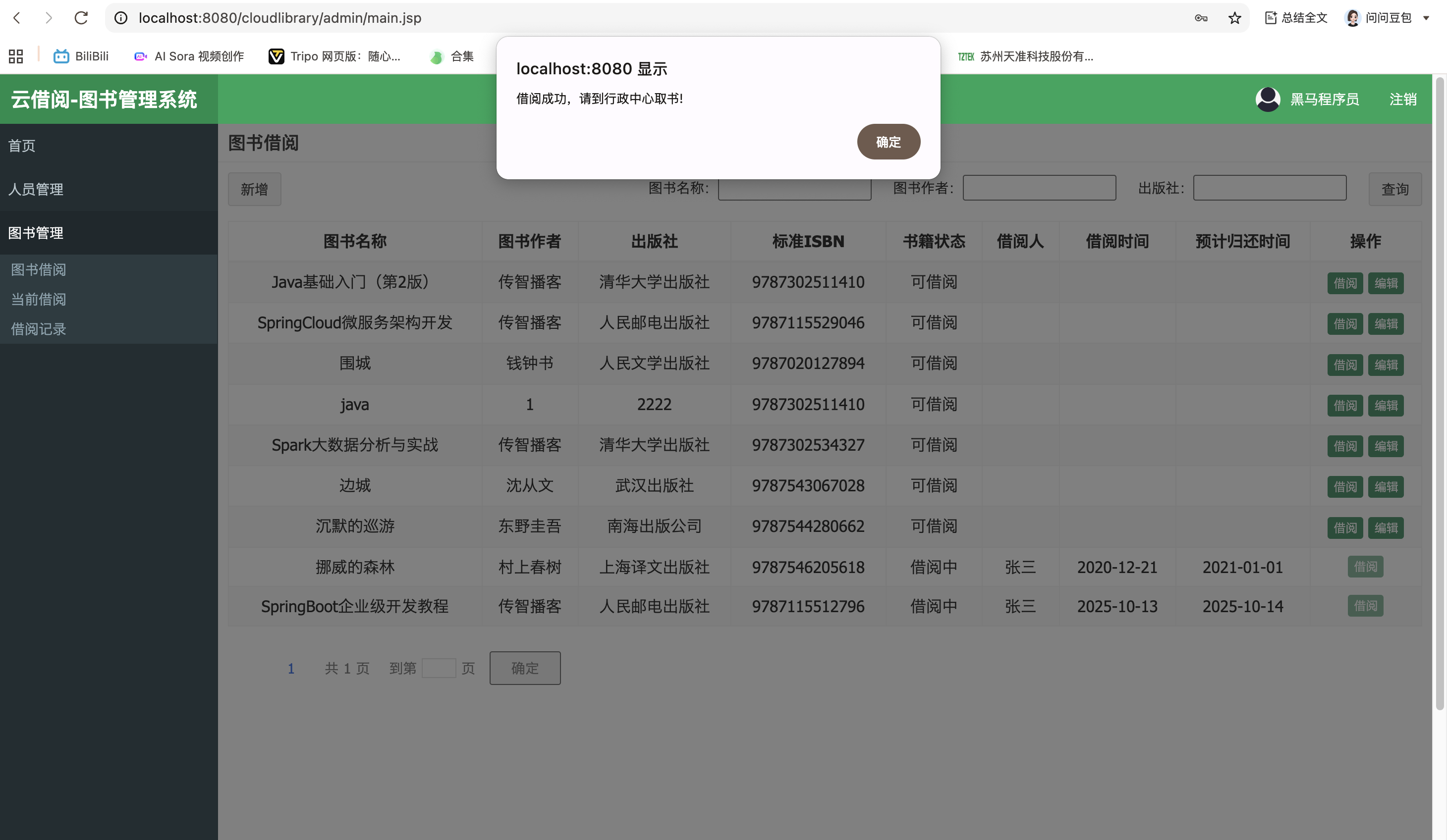
查询图书的逻辑:
找到books.jsp中的查询代码
<div class="has-feedback">
<form action="${pageContext.request.contextPath}/book/search" method="post">
图书名称:<input name="name" value="${search.name}">    
图书作者:<input name="author" value="${search.author}">    
出版社:<input name="press" value="${search.press}">    
<input class="btn btn-default" type="submit" value="查询">
</form>
</div>
form action="${pageContext.request.contextPath}/book/search构造请求地址跟后端控制类的URL匹配上
@RequestMapping("/searchBorrowed")
public ModelAndView searchBorrowed(Book book,Integer pageNum, Integer pageSize, HttpServletRequest request) {
    if (pageNum == null) {
        pageNum = 1;
    }
    if (pageSize == null) {
        pageSize = 10;
    }
    //获取当前登录的用户
    User user = (User) request.getSession().getAttribute("USER_SESSION");
    PageResult pageResult = bookService.searchBorrowed(book,user, pageNum, pageSize);
    ModelAndView modelAndView = new ModelAndView();
    modelAndView.setViewName("book_borrowed");
    //将查询到的数据存放在 ModelAndView的对象中
    modelAndView.addObject("pageResult", pageResult);
    //将查询的参数返回到页面,用于回显到查询的输入框中
    modelAndView.addObject("search", book);
    //将当前页码返回到页面,用于分页插件的分页显示
    modelAndView.addObject("pageNum", pageNum);
    //将当前查询的控制器路径返回到页面,页码变化时继续向该路径发送请求
    modelAndView.addObject("gourl", request.getRequestURI());
    return modelAndView;
}
Book book,Integer pageNum, Integer pageSize, HttpServletRequest request
这四个是入参,book是传入查询的条件,pageNum传入页码,pageSize传入每条页数,HttpServletRequest是请求对象,用于获取当前登录的用户和获取请求路径“gourl”
之后跟前面的逻辑差不多,就是调用业务逻辑层bookService的searchBorrowed方法,传入book,user, pageNum, pageSize这四个参数
PageResult searchBorrowed(Book book, User user, Integer pageNum, Integer pageSize);
这是方法的定义,找到方法的实现
@Override
public PageResult searchBorrowed(Book book, User user, Integer pageNum, Integer pageSize) {
    // 设置分页查询的参数,开始分页
    PageHelper.startPage(pageNum, pageSize);
    Page<Book> page;
    //将当前登录的用户放入查询条件中
    book.setBorrower(user.getName());

    if("ADMIN".equals(user.getRole())){
        page= bookMapper.selectBorrowed(book);
    }else {

        page= bookMapper.selectMyBorrowed(book);
    }
    return new PageResult(page.getTotal(),page.getResult());
}
在调用数据访问层bookMapper的selectBorrowed接口传入book查询条件
这里做了一个判断,如果是管理员,查询自己借阅但未归还的图书和所有待确认归还的图书,如果是普通用户,查询自己借阅但未归还的图书
@Select(
        {"<script>" +
                "SELECT * FROM book " +
                "where book_borrower=#{borrower}" +
                "AND book_status ='1'"+
                "<if test=\"name != null\"> AND  book_name  like  CONCAT('%',#{name},'%')</if>" +
                "<if test=\"press != null\"> AND book_press like  CONCAT('%', #{press},'%') </if>" +
                "<if test=\"author != null\"> AND book_author like  CONCAT('%', #{author},'%')</if>" +
                "or book_status ='2'"+
                "<if test=\"name != null\"> AND  book_name  like  CONCAT('%',#{name},'%')</if>" +
                "<if test=\"press != null\"> AND book_press like  CONCAT('%', #{press},'%') </if>" +
                "<if test=\"author != null\"> AND book_author like  CONCAT('%', #{author},'%')</if>" +
                "order by book_borrowtime" +
                "</script>"})
@ResultMap("bookMap")
//查询借阅但未归还的图书和待归还确认的图书
Page<Book> selectBorrowed(Book book);
这里通过注解Select直接吧接口的实现写出来了,就不需要额外再写实现
这段sql语句通过like CONCAT模糊查询
最后查询的效果图是这样
当前借阅页面
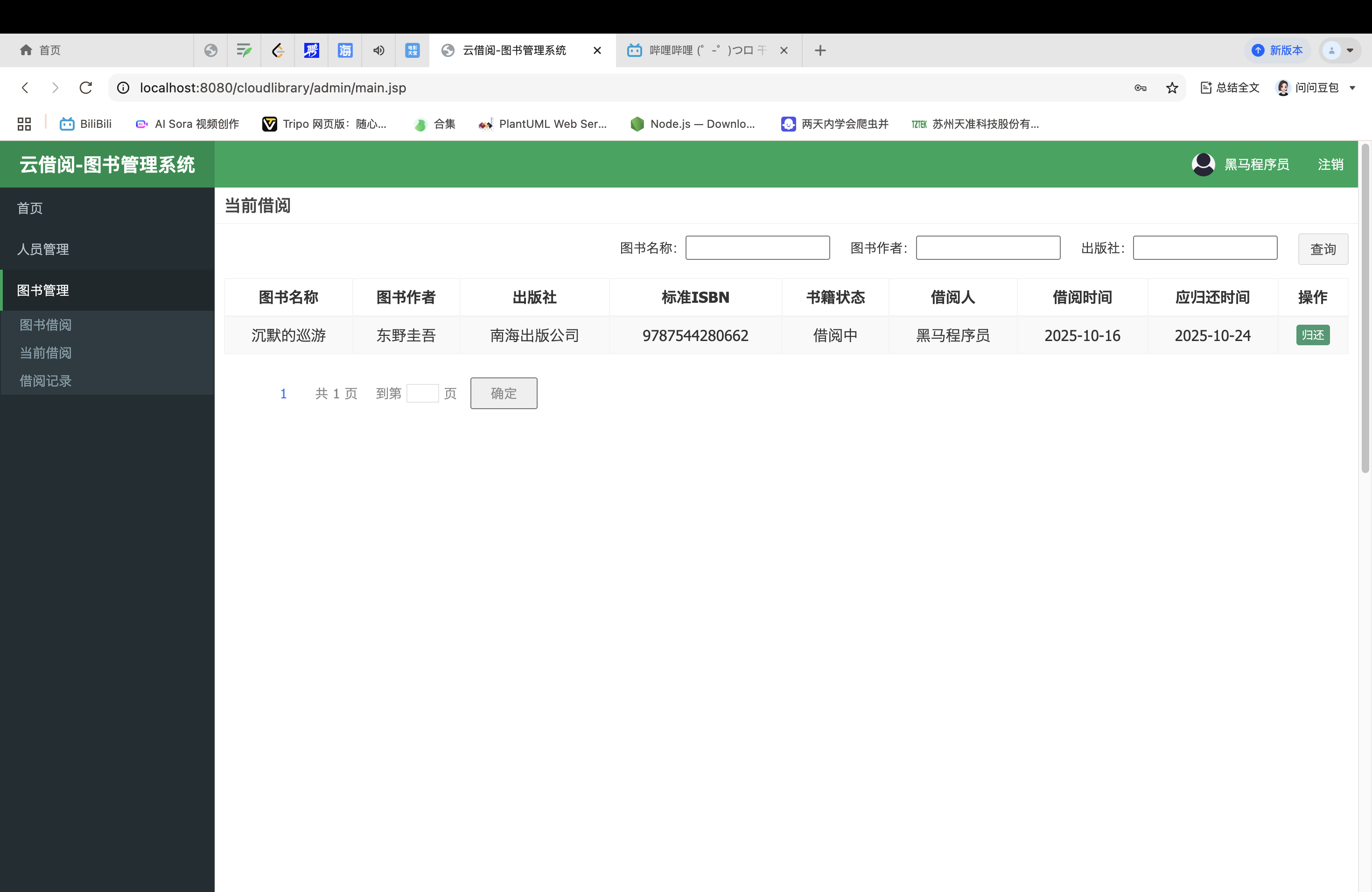
其中包括归还图书、查询当前借阅图书
查询的逻辑跟前面相似就不过多概述
归还图书的逻辑:
还是先找到页面中归还按钮的代码
<td>
    <c:if test="${book.status ==1}">借阅中</c:if>
    <c:if test="${book.status ==2}">归还中</c:if>
</td>
<td>${book.borrower}</td>
<td>${book.borrowTime}</td>
<td>${book.returnTime}</td>
<td class="text-center">
    <c:if test="${book.status ==1}">
        <button type="button" class="btn bg-olive btn-xs" onclick="returnBook(${book.id})">归还
        </button>
    </c:if>
    <c:if test="${book.status ==2}">
        <button type="button" class="btn bg-olive btn-xs" disabled="true">归还中</button>
        <c:if test="${USER_SESSION.role =='ADMIN'}">
            <button type="button" class="btn bg-olive btn-xs" onclick="returnConfirm(${book.id})">
                归还确认
            </button>
        </c:if>
    </c:if>
</td>
这段代码的逻辑是用户发起归还图书到管理员点击归还确认
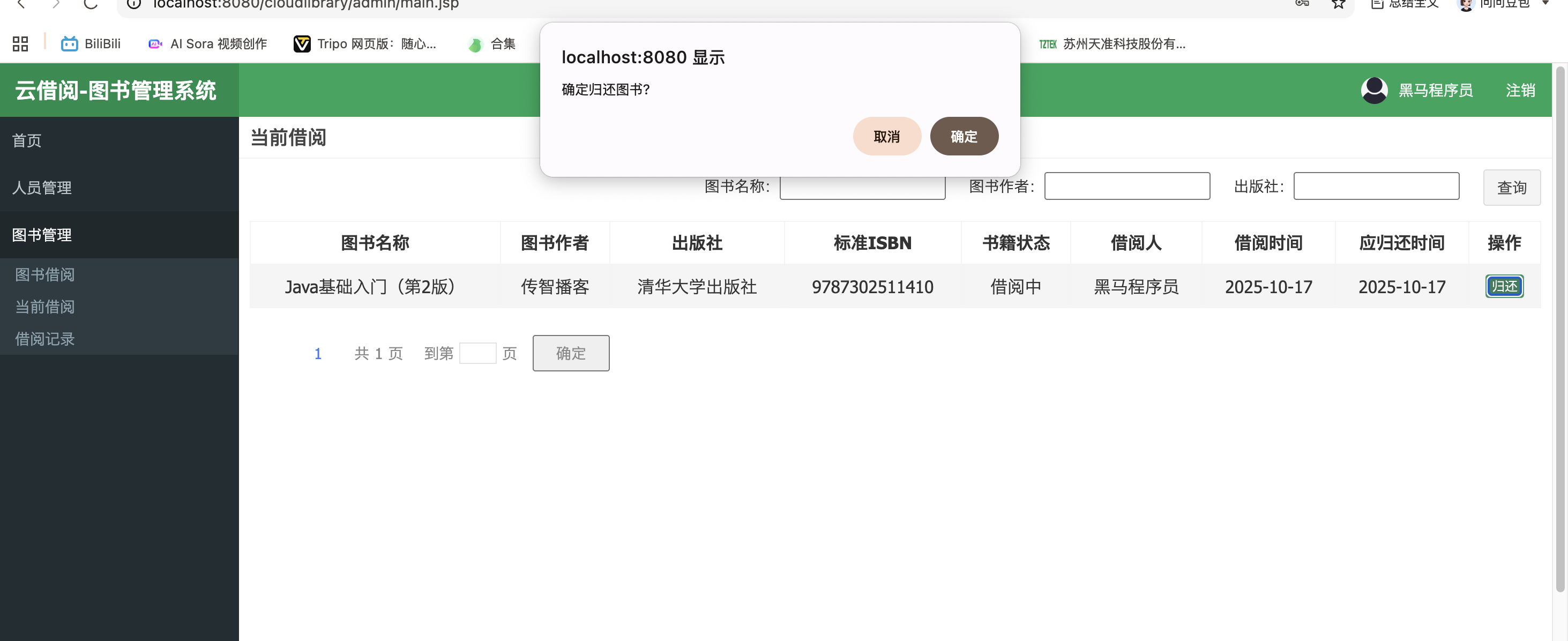
book.status为1时(借阅中),用户点击归还,调用returnBook方法
//归还图书时执行
function returnBook(bid) {
    var r = confirm("确定归还图书?");
    if (r) {
        var url = getProjectPath()+"/book/returnBook?id=" + bid;
        $.get(url, function (response) {
            alert(response.message)
            //还书成功时,刷新当前借阅的列表数据
            if (response.success == true) {
                window.location.href = getProjectPath()+"/book/searchBorrowed";
            }
        })
    }
}
弹出弹窗确定归还图书?,如果确定,向后端发送请求"/book/returnBook?id=" + bid,同时向后端传入图书id
@ResponseBody
@RequestMapping("/returnBook")
public Result returnBook(String id, HttpSession session) {
    //获取当前登录的用户信息
    User user = (User) session.getAttribute("USER_SESSION");
    try {
        boolean flag = bookService.returnBook(id, user);
        if (!flag) {
            return new Result(false, "还书失败!");
        }
        return new Result(true, "还书确认中,请先到行政中心还书!");
    }catch (Exception e){
        e.printStackTrace();
        return new Result(false, "还书失败!");
    }
}
可以看到,Controller接收前端传来的两个参数String id, HttpSession session
session是用于获取当前用户信息的
接着调用业务逻辑层bookService的returnBook方法,传入id, user
boolean returnBook(String id,User user);
找到具体实现
@Override
public boolean returnBook(String id,User user) {
    //根据图书id查询出图书的完整信息
    Book book = this.findById(id);
    //再次核验当前登录人员和图书借阅者是不是同一个人
    boolean rb=book.getBorrower().equals(user.getName());
    //如果是同一个人,允许归还
    if(rb){
        //将图书借阅状态修改为归还中
        book.setStatus("2");
        bookMapper.editBook(book);
    }
    return rb;
}
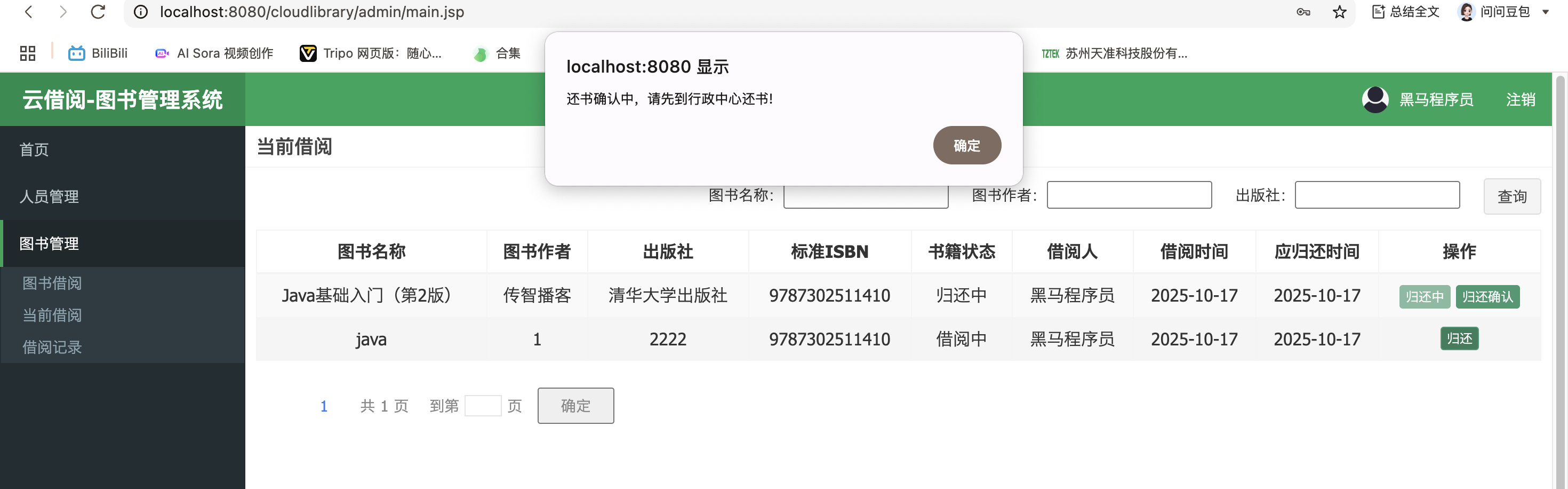
这里从数据库获取图书的信息,检查借书的人和还书的人是不是同一个人,如果是就调用Mapper接口将图书借阅状态修改为归还中;最后返回true給Controller
Controller中的flag接收true,返回前端数据(true, "还书确认中,请先到行政中心还书!");
function (response) {
alert(response.message)
//还书成功时,刷新当前借阅的列表数据
if (response.success == true) {
window.location.href = getProjectPath()+"/book/searchBorrowed";
}
my.js的回调函数,获取请求域的数据,在页面中显示“还书确认中,请先到行政中心还书!";并跳转页面
归还确认的逻辑:
找到归还确认的代码
<c:if test="${book.status ==2}">
    <button type="button" class="btn bg-olive btn-xs" disabled="true">归还中</button>
    <c:if test="${USER_SESSION.role =='ADMIN'}">
        <button type="button" class="btn bg-olive btn-xs" onclick="returnConfirm(${book.id})">
            归还确认
        </button>
    </c:if>
</c:if>
如果图书状态为2,则显示归还中并设置disabled="true",这样归还中就不可以交互
<c:if test="${USER_SESSION.role =='ADMIN'}">如果当前是管理员登录,显示归还确认按钮

οnclick="returnConfirm(${book.id})点击按钮触发my.js的returnConfirm逻辑并传入数据${book.id}
function returnConfirm(bid) {
    var r = confirm("确定图书已归还?");
    if (r) {
        var url = getProjectPath()+"/book/returnConfirm?id=" + bid;
        $.get(url, function (response) {
            alert(response.message)
            //还书确认成功时,刷新当前借阅的列表数据
            if (response.success == true) {
                window.location.href = getProjectPath()+"/book/searchBorrowed";
            }
        })
    }
}
先显示"确定图书已归还?"
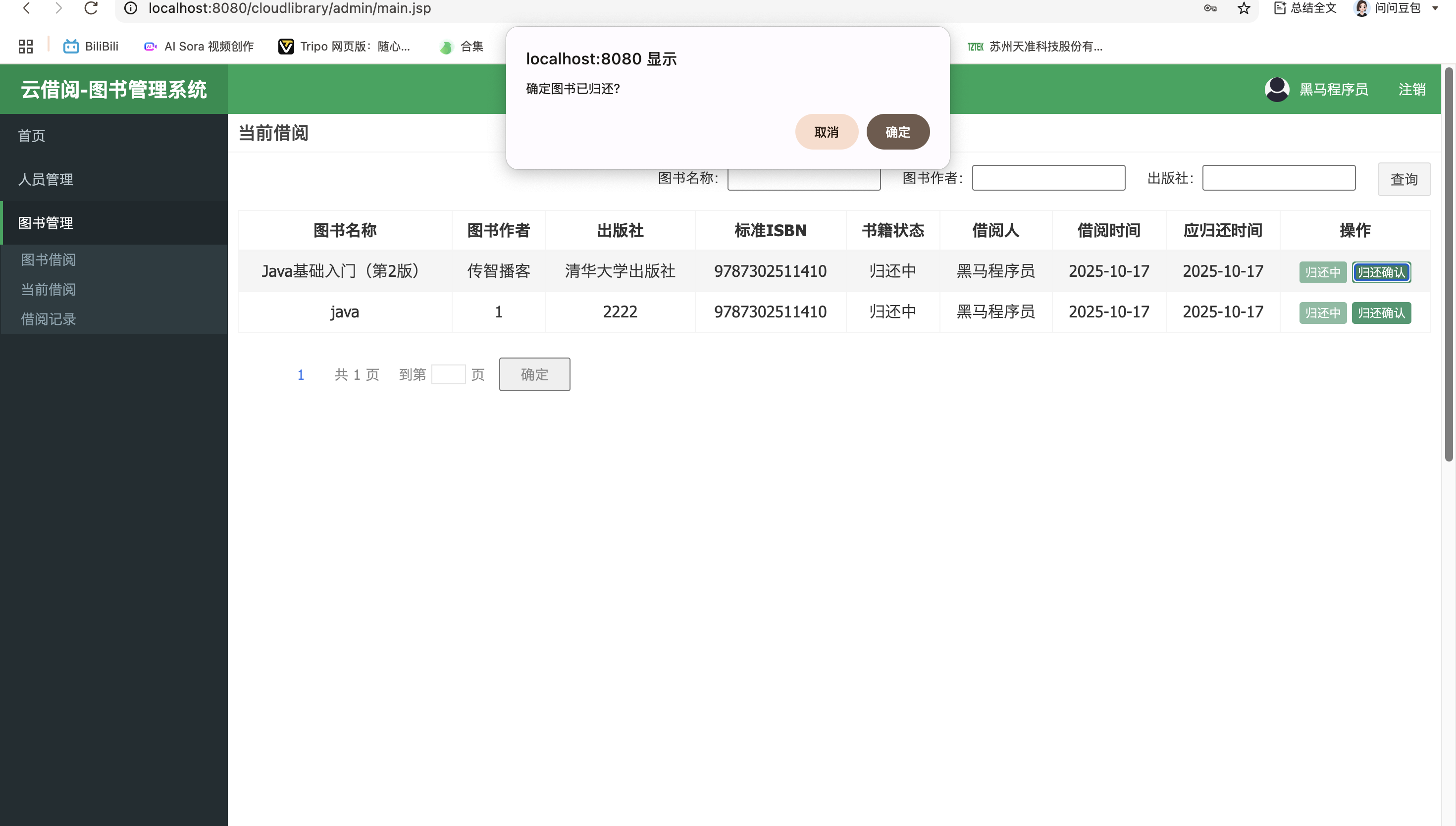
构造请求地址与后端URL匹配
@ResponseBody
@RequestMapping("/returnConfirm")
public Result returnConfirm(String id) {
    try {
        Integer count=bookService.returnConfirm(id);
        if(count!=1){
            return new Result(false, "确认失败!");
        }
        return new Result(true, "确认成功!");
    }catch (Exception e){
        e.printStackTrace();
        return new Result(false, "确认失败!");
    }
}
String id接收前端传来的参数,调用bookService的returnConfirm方法传入id
Integer returnConfirm(String id);
找到bookServiceImpl的returnConfirm具体实现
@Override
public Integer returnConfirm(String id) {
    //根据图书id查询图书的完整信息
    Book book = this.findById(id);
    //根据归还确认的图书信息,设置借阅记录
    Record record = this.setRecord(book);
    //将图书的借阅状态修改为可借阅
    book.setStatus("0");
    //清除当前图书的借阅人信息
    book.setBorrower("");
    //清除当前图书的借阅时间信息
    book.setBorrowTime("");
    //清除当亲图书的预计归还时间信息
    book.setReturnTime("");
    Integer count= bookMapper.editBook(book);
    //如果归还确认成功,则新增借阅记录
    if(count==1){
        return  recordService.addRecord(record);
    }
    return 0;
}
这里清除了图书的借阅信息还调用了recordService的addRecord,把未清除前的借阅信息record传给addRecord
Integer addRecord(Record record);
找到具体实现
@Override
public Integer addRecord(Record record) {
    return recordMapper.addRecord(record);
}
这里可以看到调用了数据访问层recordMapper的addRecord接口
Integer addRecord(Record record);
找到接口的实现
<insert id="addRecord">
    insert into record(record_id,record_bookname,record_bookisbn,record_borrower,record_borrowtime,record_remandtime)
    values (#{id},#{bookname},#{bookisbn},#{borrower},#{borrowTime},#{remandTime})
</insert>
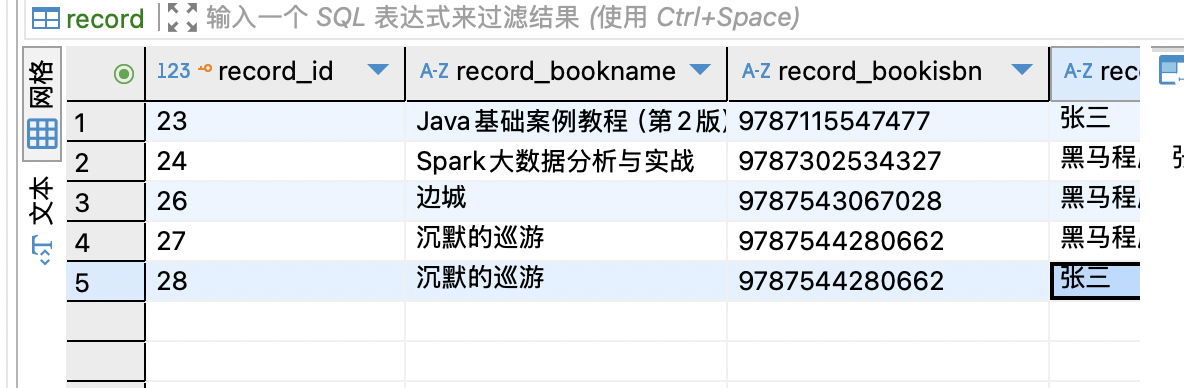
数据库record表数据增加,返回給受影响的行数1,count=1
Integer count=bookService.returnConfirm(id);
if(count!=1){
return new Result(false, "确认失败!");
}
return new Result(true, "确认成功!");
BookController的returnConfirm返回return new Result(true, "确认成功!");給前端js的回调函数
$.get(url, function (response) {
    alert(response.message)
    //还书确认成功时,刷新当前借阅的列表数据
    if (response.success == true) {
        window.location.href = getProjectPath()+"/book/searchBorrowed";
    }
})
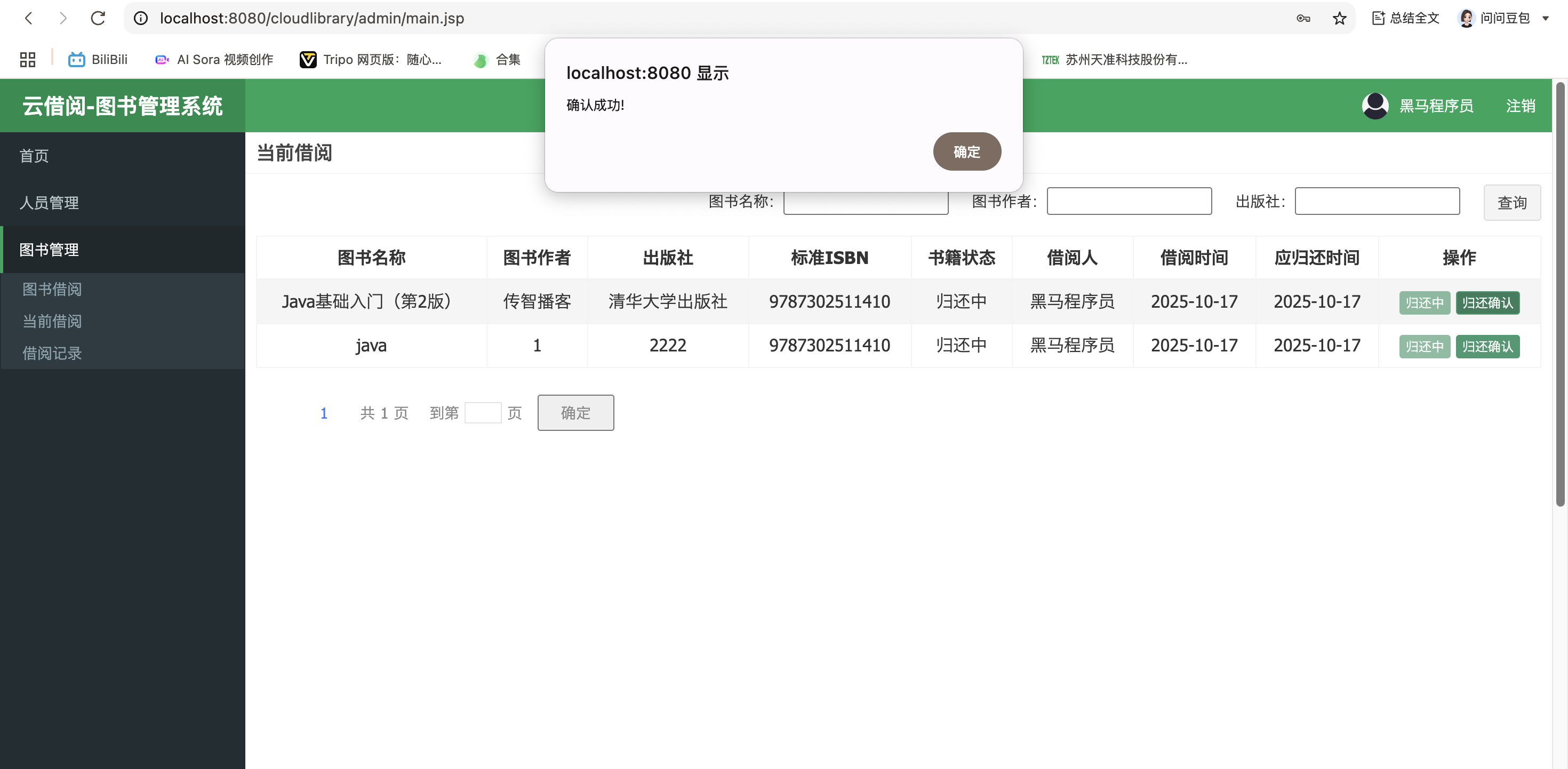
最后页面出现确认成功,并跳转页面
借阅记录模块
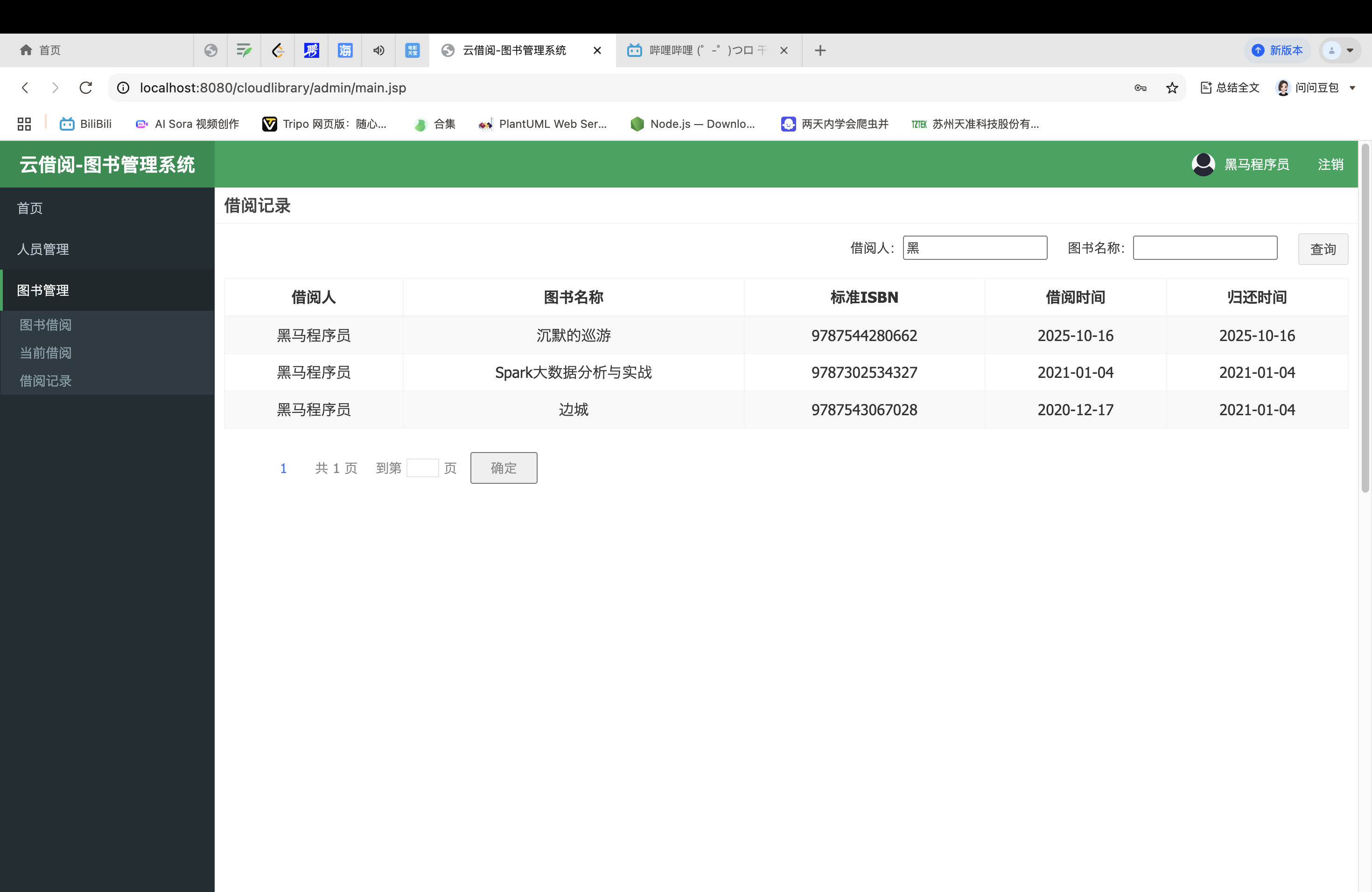
显示已归还图书、查询归还图书功能
已归还图书逻辑在归还确认的逻辑中讲过了
查询归还图书的逻辑可以参考查询图书的逻辑
个人感想
花了三天时间,终于把这个图书项目的逻辑全部理顺,理清楚
我学习项目的过程中收获颇多,结合我实习时的经验,实习时的师傅教我的一个技巧是抄,拿到客户的需求,客户要求开发一个界面的功能,公司的代码有很多的生词,最开始根本看不懂,我就观察这个项目里别人写的代码,找出其中可以复用的代码,学习理解后修修改改,最后交付任务
我想这个项目也是这样,里面的登录逻辑代码,注销逻辑代码几乎是通用;里面的增删改查的逻辑,我们理解之后就可以拿来使用,无非是修改里面的字段属性方法名,通过这些通用的代码我们可以省很多力气。
虽然这是一个很简单的项目,但是里面的逻辑很注重权限,避免越权的操作,保证了业务逻辑严谨性,这是很值得我们学习的。
最后
以上代码参考自黑马程序员编著的JavaEE企业级应用开发教程
本资源为个人学习笔记,仅包含《JavaEE企业级应用开发教程》中与本文讲解相关的代码片段,版权归黑马程序员所有。建议购买正版书籍获取完整内容。因为篇幅限制只放了部分代码部分
需要正版源码辅助学习的私信我,我给你发正版网址





 扫一扫
扫一扫


 被折叠的 条评论
为什么被折叠?
被折叠的 条评论
为什么被折叠?
 到【灌水乐园】发言





