


 本文介绍如何自定义CAS服务端登录页面,包括修改配置文件、复制并调整资源文件及更改登录页面样式等内容。
原理
cas的页面显示控制是集中在\WEB-INF\cas.properties中的cas.viewResolver.basename属性的,其默认值为default_views
所以cas会去classpath中寻找default_views.properties(它里面指定了登录登出页面等)
了解了处理逻辑,再想自定义服务端登录页的话,就方便多了,步骤如下
1、修改cas.properties文件:cas.viewResolver.basename=jadyer,再将default_views.properties拷贝一份为jadyer.properties
2、修改jadyer.properties文件:/WEB-INF/view/jsp/default改为/WEB-INF/view/jsp/jadyer
  其中`casLoginView.url`表示默认登录页,`casLoginGenericSuccessView.url`表示默认登录成功页
3、复制/WEB-INF/view/jsp/default/及其子目录所有文件到/WEB-INF/view/jsp/jadyer/里面
接下来就可以随意修改登录页面了
注意:\WEB-INF\view\jsp\jadyer\ui\includes\bottom.jsp页面中引用了googleapis的一些jquery库
可以换成百度CDN(http://cdn.code.baidu.com),比如http://apps.bdimg.com/libs/jqueryui/1.10.2/jquery-ui.min.js
或者Bootstrap中文网开源的免费CDN服务(http://www.bootcdn.cn),比如//cdn.bootcss.com/jqueryui/1.10.2/jquery-ui.min.js可以将casLoginView.jsp页面内容换成你想要的页面,
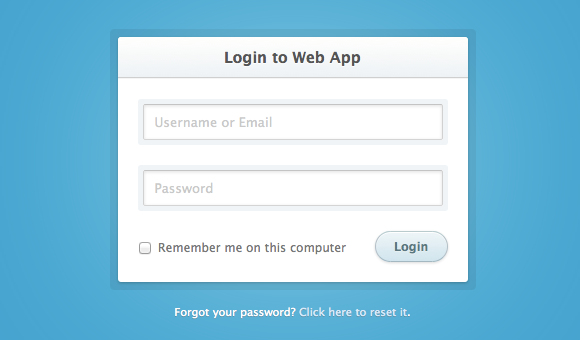
我的casLoginView.jsp页面内容如下
<%@ page pageEncoding="UTF-8"%>
<%@ taglib prefix="c" uri="http://java.sun.com/jsp/jstl/core"%>
<%@ taglib prefix="form" uri="http://www.springframework.org/tags/form"%>
<c:set var="ctx" value="${pageContext.request.contextPath}" scope="session"/>
<!DOCTYPE html>
<!--[if lt IE 7]> <html class="lt-ie9 lt-ie8 lt-ie7" lang="en"> <![endif]-->
<!--[if IE 7]> <html class="lt-ie9 lt-ie8" lang="en"> <![endif]-->
<!--[if IE 8]> <html class="lt-ie9" lang="en"> <![endif]-->
<!--[if gt IE 8]><!--> <html lang="en"> <!--<![endif]-->

<head>
  <meta charset="utf-8">
  <meta http-equiv="X-UA-Compatible" content="IE=edge,chrome=1">
  <title>CAS单点登录系统</title>
  <link rel="stylesheet" href="css/style.css">
  <!--[if lt IE 9]><script src="//html5shim.googlecode.com/svn/trunk/html5.js"></script><![endif]-->
</head>
<body>
  <section class="container">
    <div class="login">
      <h1>Login to Web App</h1>
     <%--  <form method="post" action="index.html"> --%>
     <form:form method="post" commandName="${commandName}" htmlEscape="true">

     <input type="hidden" name="lt" value="${loginTicket}"/>
     <input type="hidden" name="execution" value="${flowExecutionKey}"/>
     <input type="hidden" name="_eventId" value="submit"/>
<%--
      <c:if test="${not empty sessionScope.openIdLocalId}">
                    <strong>${sessionScope.openIdLocalId}</strong>
                    <input type="hidden" name="username" value="${sessionScope.openIdLocalId}"/>
                </c:if>
                <c:if test="${empty sessionScope.openIdLocalId}">
                    <form:input tabindex="1" path="username" placeholder="帐号" htmlEscape="true" maxlength="16" size="25"/>
       </c:if> --%>
         <p><input type="text" name="username" path="username" value="casuser" placeholder="Username or Email" htmlEscape="true" maxlength="16" size="25"></p>
        <p> <form:input type="password" name="password"  path="password" value="Mellon" placeholder="Password" htmlEscape="true" maxlength="16" size="25"/></p>

<%--
 <p><form:input path="captcha" class="captcha" type="text" htmlEscape="true" value="" placeholder="验证码" maxlength="4" size="15"/> <img style="cursor:pointer; vertical-align:middle;height: 42px;width: 66px;" src="captcha.jsp" onClick="this.src='captcha.jsp?time'+Math.random();"></p>
--%>
<form:errors path="*" id="msg" cssClass="errors" element="div" htmlEscape="false"/>
       <p class="remember_me">
          <label>
            <input type="checkbox" name="warn"value="true" id="remember_me">
            Remember me on this computer
          </label>
        </p>
        <p class="submit"><input type="submit" tabindex="3" value="Login"></p>
       </form:form>
    </div>

    <div class="login-help">
      <p>Forgot your password? <a href="index.html">Click here to reset it</a>.</p>
    </div>
  </section>
</body>
</html>
样式 style.css,放置位置如图,内容如下
html, body, div, span, applet, object, iframe,
h1, h2, h3, h4, h5, h6, p, blockquote, pre,
a, abbr, acronym, address, big, cite, code,
del, dfn, em, img, ins, kbd, q, s, samp,
small, strike, strong, sub, sup, tt, var,
b, u, i, center,
dl, dt, dd, ol, ul, li,
fieldset, form, label, legend,
table, caption, tbody, tfoot, thead, tr, th, td,
article, aside, canvas, details, embed,
figure, figcaption, footer, header, hgroup,
menu, nav, output, ruby, section, summary,
time, mark, audio, video {
  margin: 0;
  padding: 0;
  border: 0;
  font-size: 100%;
  font: inherit;
  vertical-align: baseline;
}

article, aside, details, figcaption, figure,
footer, header, hgroup, menu, nav, section {
  display: block;
}

body {
  line-height: 1;
}

ol, ul {
  list-style: none;
}

blockquote, q {
  quotes: none;
}

blockquote:before, blockquote:after,
q:before, q:after {
  content: '';
  content: none;
}

table {
  border-collapse: collapse;
  border-spacing: 0;
}

.about {
  margin: 70px auto 40px;
  padding: 8px;
  width: 260px;
  font: 10px/18px 'Lucida Grande', Arial, sans-serif;
  color: #666;
  text-align: center;
  text-shadow: 0 1px rgba(255, 255, 255, 0.25);
  background: #eee;
  background: rgba(250, 250, 250, 0.8);
  border-radius: 4px;
  background-image: -webkit-linear-gradient(top, rgba(0, 0, 0, 0), rgba(0, 0, 0, 0.1));
  background-image: -moz-linear-gradient(top, rgba(0, 0, 0, 0), rgba(0, 0, 0, 0.1));
  background-image: -o-linear-gradient(top, rgba(0, 0, 0, 0), rgba(0, 0, 0, 0.1));
  background-image: linear-gradient(to bottom, rgba(0, 0, 0, 0), rgba(0, 0, 0, 0.1));
  -webkit-box-shadow: inset 0 1px rgba(255, 255, 255, 0.3), inset 0 0 0 1px rgba(255, 255, 255, 0.1), 0 0 6px rgba(0, 0, 0, 0.2);
  box-shadow: inset 0 1px rgba(255, 255, 255, 0.3), inset 0 0 0 1px rgba(255, 255, 255, 0.1), 0 0 6px rgba(0, 0, 0, 0.2);
}
.about a {
  color: #333;
  text-decoration: none;
  border-radius: 2px;
  -webkit-transition: background 0.1s;
  -moz-transition: background 0.1s;
  -o-transition: background 0.1s;
  transition: background 0.1s;
}
.about a:hover {
  text-decoration: none;
  background: #fafafa;
  background: rgba(255, 255, 255, 0.7);
}

.about-links {
  height: 30px;
}
.about-links > a {
  float: left;
  width: 50%;
  line-height: 30px;
  font-size: 12px;
}

.about-author {
  margin-top: 5px;
}
.about-author > a {
  padding: 1px 3px;
  margin: 0 -1px;
}

/*
 * Copyright (c) 2012-2013 Thibaut Courouble
 * http://www.cssflow.com
 *
 * Licensed under the MIT License:
 * http://www.opensource.org/licenses/mit-license.php
 */
body {
  font: 13px/20px 'Lucida Grande', Tahoma, Verdana, sans-serif;
  color: #404040;
  background: #0ca3d2;
}

.container {
  margin: 245px auto;
  width: 640px;
}

.login {
  position: relative;
  margin: 0 auto;
  padding: 20px 20px 20px;
  width: 310px;
  background: white;
  border-radius: 3px;
  -webkit-box-shadow: 0 0 200px rgba(255, 255, 255, 0.5), 0 1px 2px rgba(0, 0, 0, 0.3);
  box-shadow: 0 0 200px rgba(255, 255, 255, 0.5), 0 1px 2px rgba(0, 0, 0, 0.3);
}
.login:before {
  content: '';
  position: absolute;
  top: -8px;
  right: -8px;
  bottom: -8px;
  left: -8px;
  z-index: -1;
  background: rgba(0, 0, 0, 0.08);
  border-radius: 4px;
}
.login h1 {
  margin: -20px -20px 21px;
  line-height: 40px;
  font-size: 15px;
  font-weight: bold;
  color: #555;
  text-align: center;
  text-shadow: 0 1px white;
  background: #f3f3f3;
  border-bottom: 1px solid #cfcfcf;
  border-radius: 3px 3px 0 0;
  background-image: -webkit-linear-gradient(top, whiteffd, #eef2f5);
  background-image: -moz-linear-gradient(top, whiteffd, #eef2f5);
  background-image: -o-linear-gradient(top, whiteffd, #eef2f5);
  background-image: linear-gradient(to bottom, whiteffd, #eef2f5);
  -webkit-box-shadow: 0 1px whitesmoke;
  box-shadow: 0 1px whitesmoke;
}
.login p {
  margin: 20px 0 0;
}
.login p:first-child {
  margin-top: 0;
}
.login input[type=text], .login input[type=password] {
  width: 278px;
}
.login .captcha{
  width: 206px!important;
}
.login p.remember_me {
  float: left;
  line-height: 31px;
}
.login p.remember_me label {
  font-size: 12px;
  color: #777;
  cursor: pointer;
}
.login p.remember_me input {
  position: relative;
  bottom: 1px;
  margin-right: 4px;
  vertical-align: middle;
}
.login p.submit {
  text-align: right;
}

.login-help {
  margin: 20px 0;
  font-size: 11px;
  color: white;
  text-align: center;
  text-shadow: 0 1px #2a85a1;
}
.login-help a {
  color: #cce7fa;
  text-decoration: none;
}
.login-help a:hover {
  text-decoration: underline;
}

:-moz-placeholder {
  color: #c9c9c9 !important;
  font-size: 13px;
}

::-webkit-input-placeholder {
  color: #ccc;
  font-size: 13px;
}

input {
  font-family: 'Lucida Grande', Tahoma, Verdana, sans-serif;
  font-size: 14px;
}

input[type=text], input[type=password] {
  margin: 5px;
  padding: 0 10px;
  width: 200px;
  height: 34px;
  color: #404040;
  background: white;
  border: 1px solid;
  border-color: #c4c4c4 #d1d1d1 #d4d4d4;
  border-radius: 2px;
  outline: 5px solid #eff4f7;
  -moz-outline-radius: 3px;
  -webkit-box-shadow: inset 0 1px 3px rgba(0, 0, 0, 0.12);
  box-shadow: inset 0 1px 3px rgba(0, 0, 0, 0.12);
}
input[type=text]:focus, input[type=password]:focus {
  border-color: #7dc9e2;
  outline-color: #dceefc;
  outline-offset: 0;
}

input[type=submit] {
  padding: 0 18px;
  height: 29px;
  font-size: 12px;
  font-weight: bold;
  color: #527881;
  text-shadow: 0 1px #e3f1f1;
  background: #cde5ef;
  border: 1px solid;
  border-color: #b4ccce #b3c0c8 #9eb9c2;
  border-radius: 16px;
  outline: 0;
  -webkit-box-sizing: content-box;
  -moz-box-sizing: content-box;
  box-sizing: content-box;
  background-image: -webkit-linear-gradient(top, #edf5f8, #cde5ef);
  background-image: -moz-linear-gradient(top, #edf5f8, #cde5ef);
  background-image: -o-linear-gradient(top, #edf5f8, #cde5ef);
  background-image: linear-gradient(to bottom, #edf5f8, #cde5ef);
  -webkit-box-shadow: inset 0 1px white, 0 1px 2px rgba(0, 0, 0, 0.15);
  box-shadow: inset 0 1px white, 0 1px 2px rgba(0, 0, 0, 0.15);
}
input[type=submit]:active {
  background: #cde5ef;
  border-color: #9eb9c2 #b3c0c8 #b4ccce;
  -webkit-box-shadow: inset 0 0 3px rgba(0, 0, 0, 0.2);
  box-shadow: inset 0 0 3px rgba(0, 0, 0, 0.2);
}

.lt-ie9 input[type=text], .lt-ie9 input[type=password] {
  line-height: 34px;
}
.errors{
	color:red;
	margin:0px 3px;
}
图片:preview.png 放置在根目录的images文件夹下





 扫一扫
扫一扫


 1224
1224

 被折叠的 条评论
为什么被折叠?
被折叠的 条评论
为什么被折叠?
 到【灌水乐园】发言





