



 在安装了npm最新版18.16后,尝试使用nrm并切换源时遇到错误,错误涉及nrm对open模块的require不支持。通过全局安装open@8.4.2或者注释掉nrm/cli.js中require(open)的代码可以解决此问题。
1.背景
新换电脑安装好npm最新版的18.16之后,安装nrm,切换源,结果刚一运行命令nrm ls就报错,看报错内容是nrm的open
E:\d\b_2023\node_modules\nrm\cli.js:9
const open = require('open');
             ^

Error [ERR_REQUIRE_ESM]: require() of ES Module
E:\d\web_2023\node_modules\open\index.js from E:\d\web_2023\node_modules\nrm\cli.js not supported.
Instead change the require of index.js in
 E:\d\web_2023\node_modules\nrm\cli.js to a dynamic import() which is available in all CommonJS modules.
    at Object.<anonymous> (E:\d\web_2023\node_modules\nrm\cli.js:9:14) {
  code: 'ERR_REQUIRE_ESM'
}
2.解决
E:\d\yweb_2023>npm install -g nrm open@8.4.2 --save
这是因为nrm依赖于一个名为open的包。
使用此命令可以修复此错误
npm install -g nrm open@8.4.2 --save
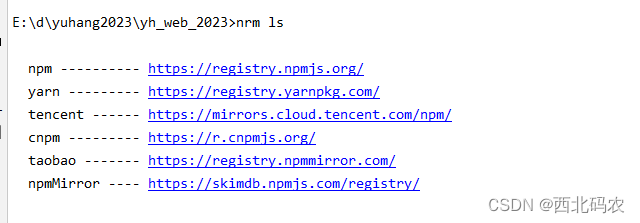
再运行命令
nrm ls
3.解决2
我的node版本是16.20 如果还是报错,就把E:\d\web_2023\node_modules\nrm\cli.js中的require open 这一行注释掉即可





 扫一扫
扫一扫


 3277
3277

 被折叠的 条评论
为什么被折叠?
被折叠的 条评论
为什么被折叠?
 到【灌水乐园】发言





