



 本文详细介绍了一个基于Java SpringBoot的生鲜电商平台购物车模块的开发过程,包括接口设计、业务流程、异常处理及常见错误避免。从购物车列表、商品添加、数量更新到商品删除,全面解析了购物车功能的实现细节。
Java-springboot生鲜电商项目(五)购物车模块
- 购物车功能
- 涉及到的接口,购物车模块(都是前台的)
- 业务流程
- 总结
- 常见错误
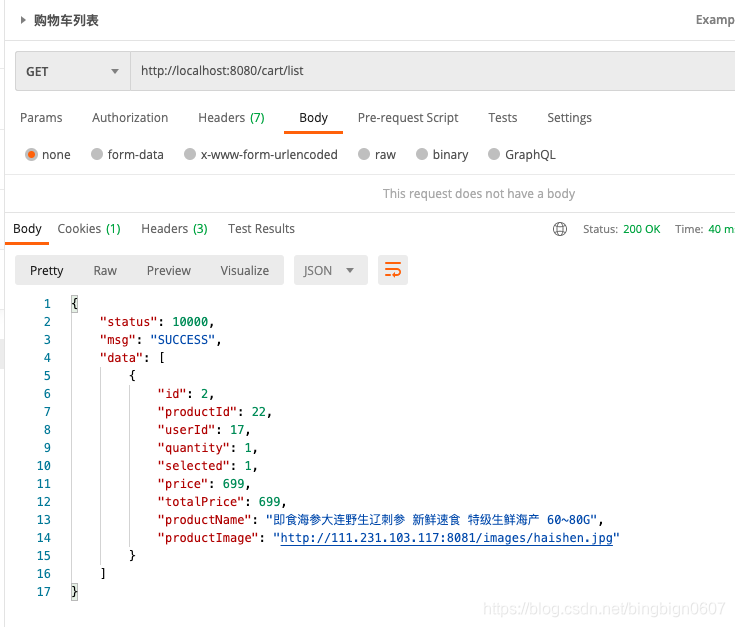
- (一)购物车列表
- dao
- mapper
- service
- (二)添加商品到购物车
- 对用户的过滤器开发:因为购物车的功能是用户的行为操作,所以在添加商品到购物车的时候,先判断是否是用户,可以借鉴管理员过滤器的开发
- filter包中创建UserFilter
- 对过滤器进行config配置
- coding到这里,我发现有个小小的笔误,我在controller中@PostMapping("")注解中,映射的地址开头有些有“/”有些没有,然后我进行统一处理,全加上了,重新测试接口,到没有发现出bug。
- 在MallExceptionEnum中加入异常处理
- 在common常量类中设置商品上下架以及购物车选中状态
- cartDAO
- cart mapper
- service
- controller
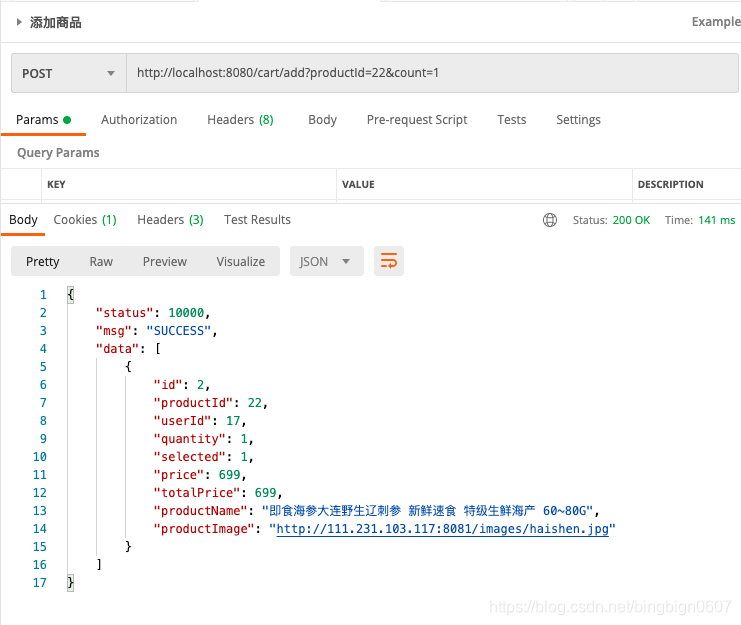
- 使用postman添加商品到购物车在查询商品列表
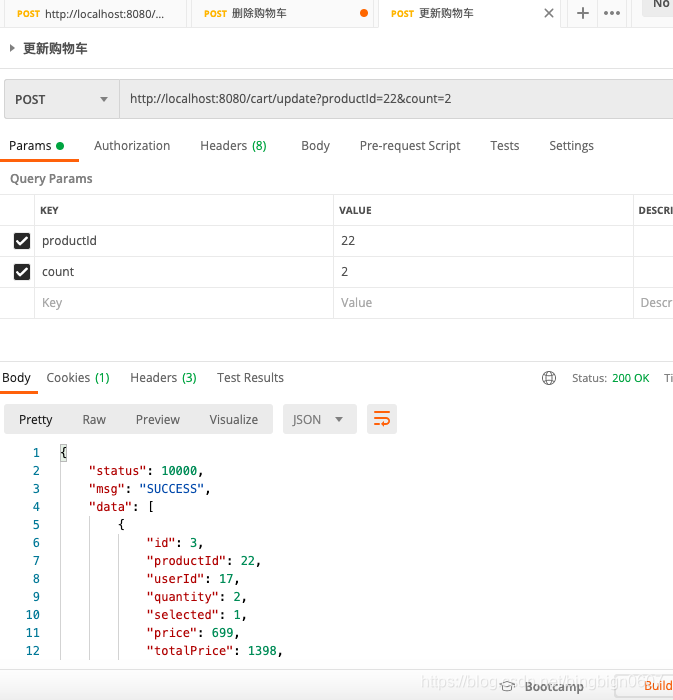
- (三)更新购物车接口
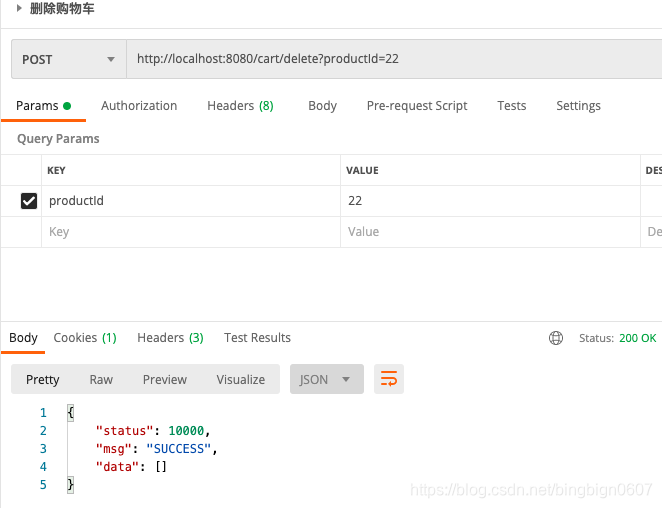
- (四)删除购物车接口
- (五)单选和反选购物车商品
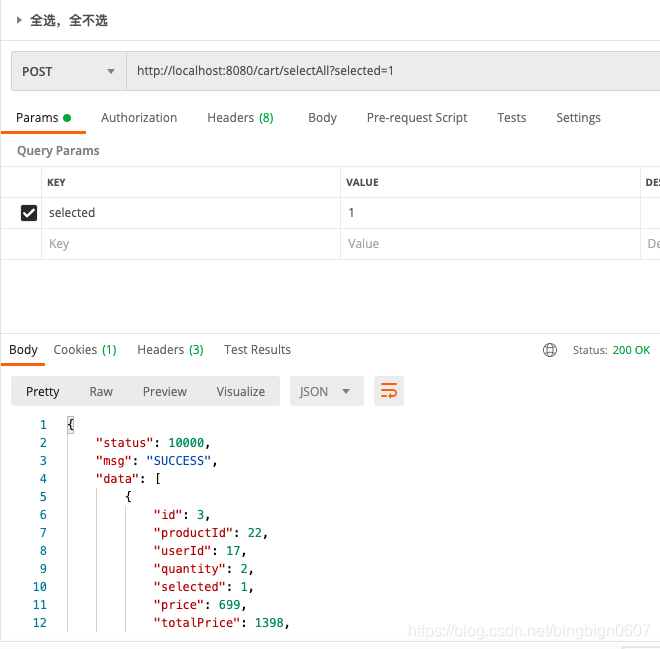
- (六)全选和全不选购物车商品
购物车功能
- 添加商品到购物车
- 全选和全不选
- 增加数量
涉及到的接口,购物车模块(都是前台的)
- 购物车列表
- 添加商品到购物车
- 更新购物车某个商品的数量
- 删除购物车的某个商品
- 选中/不选中购物车的某个商品
- 全选/全不选购物车的某个商品
业务流程
- 判断商品是否存在,提示用户
- 商品是否在购物车,添加商品和追加商品
总结
- mybatis返回非标准对象,后期计算单样商品的总价
- 添加商品到购物车时,根据是否已经存在该商品,有不同逻辑
常见错误
- 不做越权判断
(一)购物车列表
dao
List<CartVO> selectList(@Param("userId") Integer userId);
mapper
  <select id="selectList" resultType="com.hyb.mall.model.vo.CartVO" parameterType="java.lang.Integer">
    select
    c.id as id,
    p.id as productId,
    c.user_id as userId,
    c.quantity as quantity,
    c.selected as selected,
    p.price as price,
    p.name as productName,
    p.image as productImage
    from imooc_mall_cart c
    left join imooc_mall_product p on p.id = c.product_id
    where c.user_id =#{userId}
    and p.status = 1
  </select>
service
    @Override
    public List<CartVO> list(Integer userId) {
        List<CartVO> cartVOS = cartMapper.selectList(userId);
        //计算总价
        for (int i = 0; i < cartVOS.size(); i++) {
            CartVO cartVO = cartVOS.get(i);
            cartVO.setTotalPrice(cartVO.getPrice() * cartVO.getQuantity());
        }
        return cartVOS;
    }
(二)添加商品到购物车
对用户的过滤器开发:因为购物车的功能是用户的行为操作,所以在添加商品到购物车的时候,先判断是否是用户,可以借鉴管理员过滤器的开发
filter包中创建UserFilter
package com.hyb.mall.filter;
import com.hyb.mall.common.Constant;
import com.hyb.mall.model.pojo.User;
import com.hyb.mall.service.UserService;
import org.springframework.beans.factory.annotation.Autowired;

import javax.servlet.*;
import javax.servlet.http.HttpServletRequest;
import javax.servlet.http.HttpServletResponse;
import javax.servlet.http.HttpServletResponseWrapper;
import javax.servlet.http.HttpSession;
import java.io.IOException;
import java.io.PrintWriter;

/**
 * 描述:用户校验过滤器
 * 登录后做更深层的校验,可以拿到用户信息
 */
public class UserFilter implements Filter {
    //登录后,能将用户信息保存下来
    public static User currentUser;

    @Autowired
    private UserService userService;
    @Override
    public void init(FilterConfig filterConfig) throws ServletException {}

    @Override
    public void doFilter(ServletRequest servletRequest,
                         ServletResponse servletResponse,
                         FilterChain filterChain) throws IOException, ServletException {
        HttpServletRequest request = (HttpServletRequest) servletRequest;
        HttpSession session = request.getSession();
        //1.获取session中的用户
        currentUser = (User) session.getAttribute(Constant.HYB_MALL_USER);
        //2.判断当前用户是否为空,为空则需要登录
        if (currentUser == null) {
            PrintWriter out = new HttpServletResponseWrapper((HttpServletResponse)servletResponse).getWriter();
            out.write("{\n" +
                    "    \"status\": 10007,\n" +
                    "    \"msg\": \"NEED_LOGIN\",\n" +
                    "    \"data\": null\n" +
                    "}");
            out.flush();
            out.close();
            return;
        }
        //3.通过用户校验
        filterChain.doFilter(servletRequest,servletResponse);
    }

    @Override
    public void destroy() {}
}
对过滤器进行config配置
package com.hyb.mall.config;

import com.hyb.mall.filter.AdminFilter;
import com.hyb.mall.filter.UserFilter;
import org.springframework.boot.web.servlet.FilterRegistrationBean;
import org.springframework.context.annotation.Bean;
import org.springframework.context.annotation.Configuration;

/**
 * 描述:用户过滤器的配置
 */
@Configuration
public class UserFilterConfig {
    @Bean
    public UserFilter userFilter(){
        return new UserFilter();
    }

    //将整个filter放到整个链路中去
    @Bean(name = "userFilterConf") //设置的名字不能和类名一样不然会有冲突
    public FilterRegistrationBean adminFilterConfig(){
        FilterRegistrationBean filterRegistrationBean = new FilterRegistrationBean();
        filterRegistrationBean.setFilter(userFilter());
        //设置拦截的URL
        filterRegistrationBean.addUrlPatterns("/cart/*");
        filterRegistrationBean.addUrlPatterns("/order/*");
        //给过滤器配置设置名字,以便于区分不同的名字
        filterRegistrationBean.setName("UserFilterConfig");
        return filterRegistrationBean;
    }
}
coding到这里,我发现有个小小的笔误,我在controller中@PostMapping("")注解中,映射的地址开头有些有“/”有些没有,然后我进行统一处理,全加上了,重新测试接口,到没有发现出bug。
在MallExceptionEnum中加入异常处理
NOT_SALE(10016,"商品状态不可售"),
NOT_ENOUGH(10016,"商品库存不足"),
在common常量类中设置商品上下架以及购物车选中状态
    /**
     * 增加商品的上下架状态
     */
    public interface SaleStatus{
        int NOT_SALE = 0;//商品的下架状态
        int SALE = 1;//商品的上架状态
    }
        /**
     * 购物车是否选中状态
     */
    public interface Cart{
        int UN_CHCKED = 0;//购物车未选中
        int CHCKED = 1;//购物车选中
    }
cartDAO
Cart selectCartByUserIdAndProduct(@Param("userId") Integer userId,@Param("productId") Integer productId);
cart mapper
  <select id="selectCartByUserIdAndProduct" resultMap="BaseResultMap" parameterType="map">
    select
    <include refid="Base_Column_List"/>
    from imooc_mall_cart
    where user_id = #{userId}
    and product_id = #{productId}
  </select>
service
package com.hyb.mall.service.impl;

import com.hyb.mall.common.Constant;
import com.hyb.mall.exception.MallException;
import com.hyb.mall.exception.MallExceptionEnum;
import com.hyb.mall.model.dao.CartMapper;
import com.hyb.mall.model.dao.ProductMapper;
import com.hyb.mall.model.pojo.Cart;
import com.hyb.mall.model.pojo.Product;
import com.hyb.mall.model.vo.CartVO;
import com.hyb.mall.service.CartSrvice;
import io.swagger.models.auth.In;
import org.springframework.beans.factory.annotation.Autowired;
import org.springframework.stereotype.Service;

import java.util.List;


/**
 * 描述:购物车service实现类
 */
@Service
public class CartSrviceImpl implements CartSrvice {

    @Autowired
    ProductMapper productMapper;

    @Autowired
    CartMapper cartMapper;
    @Override
    public List<CartVO> add(Integer userId, Integer productId, Integer count){
        validProduct(productId,count);
        Cart cart = cartMapper.selectCartByUserIdAndProduct(userId, productId);
        //判断查出来的cart是不是为空
        if (cart == null) {
            //这个商品之前不再购物车,需要新增一个记录
            cart = new Cart();
            cart.setProductId(productId);
            cart.setUserId(userId);
            cart.setQuantity(count);
            cart.setSelected(Constant.Cart.CHCKED);
            cartMapper.insertSelective(cart);
        }else {
            //这个商品已经在购物车里了,则数量相加
            count = cart.getQuantity() +count;
            Cart cartNew = new Cart();
            cartNew.setQuantity(count);
            cartNew.setId(cart.getId());
            cartNew.setProductId(cart.getProductId());
            cartNew.setUserId(cart.getUserId());
            cartNew.setSelected(Constant.Cart.CHCKED);
            cartMapper.updateByPrimaryKeySelective(cartNew);
        }
        return this.list(userId);
    }


    //验证添加是不是合法的
    private void validProduct(Integer productId, Integer count) {
        Product product = productMapper.selectByPrimaryKey(productId);
        //判断商品是否存在,商品是否上架
        if (product == null  || product.getStatus().equals(Constant.SaleStatus.NOT_SALE)) {
            throw new MallException(MallExceptionEnum.NOT_SALE);
        }
        //判断商品库存
        if (count > product.getStock()){
            throw new MallException(MallExceptionEnum.NOT_ENOUGH);
        }
    }

}
controller
package com.hyb.mall.controller;

import com.hyb.mall.common.ApiRestResponse;
import com.hyb.mall.filter.UserFilter;
import com.hyb.mall.service.CartSrvice;
import io.swagger.annotations.ApiOperation;
import org.springframework.beans.factory.annotation.Autowired;
import org.springframework.web.bind.annotation.PostMapping;
import org.springframework.web.bind.annotation.RequestMapping;
import org.springframework.web.bind.annotation.RequestParam;
import org.springframework.web.bind.annotation.RestController;

/**
 * 描述:购物车controller
 */
@RestController
@RequestMapping("/cart")
public class CartController {
    @Autowired
    CartSrvice cartSrvice;

    @ApiOperation("添加商品到购物车")
    @PostMapping("/add")
    public ApiRestResponse add(@RequestParam Integer productId,
                               @RequestParam Integer count){
                List<CartVO> cartVOList = cartSrvice.add(UserFilter.currentUser.getId(), productId, count);
        return ApiRestResponse.success(cartVOList);
    }
}
使用postman添加商品到购物车在查询商品列表
(三)更新购物车接口
service
    //更新购物车
    @Override
    public List<CartVO> update(Integer userId, Integer productId, Integer count) {
        validProduct(productId, count);
        Cart cart = cartMapper.selectCartByUserIdAndProduct(userId, productId);
        //判断查出来的cart是不是为空
        if (cart == null) {
            //这个商品之前不再购物车,无法更新
            throw new MallException(MallExceptionEnum.UPDATE_FAILED);
        } else {
            //这个商品已经在购物车里了,则更新数量
            Cart cartNew = new Cart();
            cartNew.setQuantity(count);
            cartNew.setId(cart.getId());
            cartNew.setProductId(cart.getProductId());
            cartNew.setUserId(cart.getUserId());
            cartNew.setSelected(Constant.Cart.CHCKED);
            cartMapper.updateByPrimaryKeySelective(cartNew);
        }
        return this.list(userId);
    }
    @ApiOperation("更新购物车")
    @PostMapping("/update")
    public ApiRestResponse update(@RequestParam Integer productId,
                               @RequestParam Integer count) {
        List<CartVO> cartVOList = cartSrvice.update(UserFilter.currentUser.getId(), productId, count);
        return ApiRestResponse.success(cartVOList);
    }
(四)删除购物车接口
service
    //删除购物车商品
    @Override
    public List<CartVO> delete(Integer userId, Integer productId) {
        Cart cart = cartMapper.selectCartByUserIdAndProduct(userId, productId);
        //判断查出来的cart是不是为空
        if (cart == null) {
            //这个商品之前不再购物车,无法删除
            throw new MallException(MallExceptionEnum.DELETE_FAILE);
        } else {
            //这个商品已经在购物车里了,则可以删除
            cartMapper.deleteByPrimaryKey(cart.getId());
        }
        return this.list(userId);
    }
controller
    @ApiOperation("删除购物车")
    @PostMapping("/delete")
    public ApiRestResponse delete(@RequestParam Integer productId) {
        //不能传入userID和cartID,防止黑客攻击
        List<CartVO> cartVOList = cartSrvice.delete(UserFilter.currentUser.getId(), productId);
        return ApiRestResponse.success(cartVOList);
    }
postman测试
(五)单选和反选购物车商品
dao
    Integer selectOrNot(@Param("userId") Integer userId,
                        @Param("productId") Integer productId,
                        @Param("selected") Integer selected);
mapper
  <update id="selectOrNot" parameterType="map">
    update imooc_mall_cart
    set selected = #{selected}
    where user_id = #{userId}
    <if test="productId !=null">
      and product_id = #{productId}
    </if>
  </update>
service
    //单选和反选购物车的商品
    @Override
    public List<CartVO> selectOrNot(Integer userId, Integer productId, Integer selected){
        //将购物车查询出来
        Cart cart = cartMapper.selectCartByUserIdAndProduct(userId, productId);
        //判断查出来的cart是不是为空
        if (cart == null) {
            //这个商品之前不再购物车,无法更新
            throw new MallException(MallExceptionEnum.UPDATE_FAILED);
        } else {
            //这个商品已经在购物车里了,则可以删除
            cartMapper.selectOrNot(userId,productId,selected);
        }
        return this.list(userId);
    }
controller
    @ApiOperation("单选和反选购物车的某商品")
    @PostMapping("/select")
    public ApiRestResponse select(@RequestParam Integer productId,
                                  @RequestParam Integer selected) {
        //不能传入userID和cartID,防止黑客攻击
        List<CartVO> cartVOList = cartSrvice.selectOrNot(UserFilter.currentUser.getId(), productId,selected);
        return ApiRestResponse.success(cartVOList);
    }
(六)全选和全不选购物车商品
service:不用谢productId,这样就能将所有的购物车商品选中,将全部查询出来
    //全选和全不选购物车商品
    @Override
    public List<CartVO> selectAllOrNot(Integer userId, Integer selected) {
        //改变选中状态
        cartMapper.selectOrNot(userId, null, selected);
        return this.list(userId);
    }
controller
    @ApiOperation("全选和全不选购物车商品")
    @PostMapping("/selectAll")
    public ApiRestResponse selectAll(@RequestParam Integer productId,
                                  @RequestParam Integer selected) {
        //不能传入userID和cartID,防止黑客攻击
        List<CartVO> cartVOList = cartSrvice.selectAllOrNot(UserFilter.currentUser.getId(),selected);
        return ApiRestResponse.success(cartVOList);
    }
postman





 扫一扫
扫一扫


 1143
1143

 被折叠的 条评论
为什么被折叠?
被折叠的 条评论
为什么被折叠?
 到【灌水乐园】发言





