


自从去年在公司搭建了内部私有 Go module proxy[1]后,我们的私有代理工作得基本良好。按理说,这篇续篇本不该存在:)。
日子一天天过去,Go 团队逐渐壮大,空气中都充满了“Go 的香气”。
突然有一天,业务线考虑将目前在用的gerrit[2]换成gitlab[3]。最初使用 gerrit 的原因不得而知,但我猜是想使用 gerrit 强大且独特的 code review 机制和相应的工作流。不过由于业务需求变化太快,每个迭代的功能都很多,“+2”的 review 机制到后来就形同虚设了。
如果不用 gerrit review 工作流,那么 gerrit 还有什么存在的价值呢。从管理员那边反馈,gerrit 配置起来也是比较复杂的,尤其是权限。两者叠加就有了迁移到 gitlab 的想法。这样摆在 Go 团队面前的一个事情就是如何让我们内部私有 go module 代理适配 gitlab。
如果你还不清楚我们搭建私有 Go module 代理的原理,那么在进一步往下阅读前,请先阅读一下《小厂内部私有 Go module 拉取方案》[4]。
适配 gitlab
回顾一下我们的私有 Go module 代理的原理图:
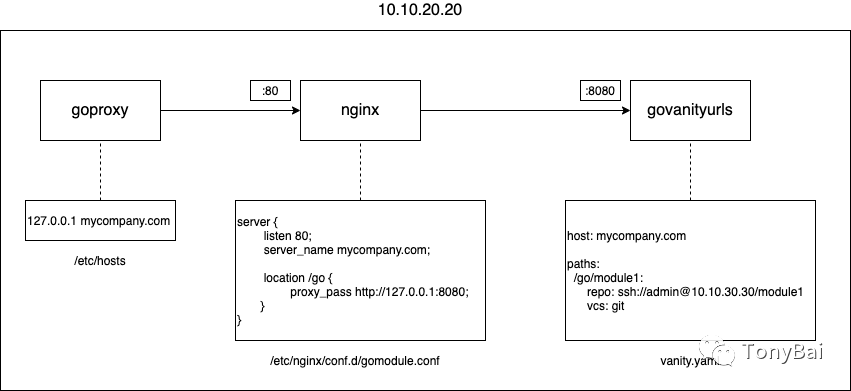
基于这张原理图,我们分析后得出结论:要适配 gitlab 仓库,其实很简单,只需修改 govanityurls 的配置文件中的各个 module 的真实 repo 地址即可,这也符合更换一个后端代码仓库服务理论上开发人员无感的原则。
下面我们在 gitlab 上创建一个 foo repo,其对应的 module path 为 mycompany.com/go/foo。我们使用 ssh 方式拉取 gitlab repo,先将 goproxy 所在主机的公钥添加到 gitlab ssh key 中。然后将 gitlab clone 按钮提示框中给出的 clone 地址:git@10.10.30.30:go/foo.git 填到 vanity.yaml 文件中:
//vanity.yaml
  ... ...
  /go/foo:
     repo: ssh://git@10.10.30.30:go/foo.git
     vcs: git
我门在一台开发机上建立测试程序,该程序导入 mycompany.com/go/foo,执行 go mod tidy 命令的结果如下:
$go mod tidy
go: finding module for package mycompany.com/go/foo
demo imports
    mycompany.com/go/foo: cannot find module providing package mycompany.com/go/foo: module mycompany.com/go/foo: reading http://10.10.20.20:10000/mycompany.com/go/foo/@v/list: 404 Not Found
    server response:
    go list -m -json -versions mycompany.com/go/foo@latest:
    go: mycompany.com/go/foo@latest: unrecognized import path "mycompany.com/go/foo": http://mycompany.com/go/foo?go-get=1: invalid repo root "ssh://git@10.10.30.30:go/foo.git": parse "ssh://git@10.10.30.30:go/foo.git": invalid port ":go" after host
从 goproxy 返回的 response 内容来看,似乎是 goproxy 使用的 go 命令无法识别:"ssh://git@10.10.30.30:go/foo.git",认为 10.10.30.30 后面的分号后面应该接一个端口,而不是 go。
我们将 repo 换成下面这样的格式:
/go/foo:
     repo: ssh://git@10.10.30.30:80/go/foo.git
     vcs: git
重启 govanityurls 并重新执行 go mod tidy,依旧报错:
$go mod tidy
go: finding module for package mycompany.com/go/foo
demo imports
    mycompany.com/go/foo: cannot find module providing package mycompany.com/go/foo: module mycompany.com/go/foo: reading http://10.10.20.20:10000/mycompany.com/go/foo/@v/list: 404 Not Found
    server response:
    go list -m -json -versions mycompany.com/go/foo@latest:
    go: module mycompany.com/go/foo: git ls-remote -q origin in /root/.bin/goproxycache/pkg/mod/cache/vcs/4d37c02c151342112bd2d7e6cf9c0508b31b8fe1cf27063da6774aa0f53d872f: exit status 128:
        kex_exchange_identification: Connection closed by remote host
        fatal: Could not read from remote repository.
直接在主机上通过 git clone git@10.10.30.30:80/go/foo.git 也是报错的!ssh 不行,我们再来试试 http 方式。使用 http 方式呢,每次 clone 都需要输入用户名密码,不适合 goproxy。是时候让 personal token 上阵了!在 gitlab 上分配好 personal token,然后在本地建立~/.netrc 如下:
# cat ~/.netrc
machine 10.10.30.30
login tonybai
password [your personal token]
然后我们将 vanity.yaml 中的 repo 改为如下形式:
// vanity.yaml

  /go/foo:
     repo: http://10.10.30.30/go/foo.git
     vcs: git
这样再执行 go mod tidy,foo 仓库就被顺利拉取了下来。
答疑
1. git clone 错误
在搭建 goproxy 时,我们通常会在 goproxy 服务器上手工验证一下是否可以通过 git 成功拉取私有仓库,如果 git clone 出现下面错误信息,是什么问题呢?
$ git clone ssh://tonybai@10.10.30.30:29418/go/common
Cloning into 'common'...
Unable to negotiate with 10.10.30.30 port 29418: no matching key exchange method found. Their offer: diffie-hellman-group14-sha1,diffie-hellman-group1-sha1
fatal: Could not read from remote repository.

Please make sure you have the correct access rights
and the repository exists.
这里的错误提示信息其实是很清楚明了的。git 服务器端支持 diffie-hellman-group1-sha1 和 diffie-hellman-group14-sha1 这两种密钥交换方法,而 git 客户端却默认一个都不支持。
怎么解决呢?我们需要在 goproxy 所在主机增加一个配置.ssh/config:
// ~/.ssh/config
Host 10.10.30.30
    HostName 10.10.30.30
    User tonybai
    Port 29418
    KexAlgorithms +diffie-hellman-group1-sha1

    IdentityFile ~/.ssh/id_rsa
有了这条配置后,我们就可以成功 clone。
2. 使用非安全连接
有些童鞋使用这个方案后会遇到下面问题:
$go get mycompany.com/go/common@latest
go: module mycompany.com/go/common: reading http://10.10.30.30:10000/mycompany.com/go/common/@v/list: 404 Not Found
    server response:
    go list -m -json -versions mycompany.com/go/common@latest:
    go list -m: mycompany.com/go/common@latest: unrecognized import path "mycompany.com/go/common": https fetch: Get "https://mycompany.com/go/common?go-get=1": dial tcp 127.0.0.1:443: connect: connection refused
首先,go get 得到的服务端响应信息中提示:无法连接 127.0.0.1:443,查看 goproxy 主机的 nginx access.log,也无日志。说明 goproxy 没有发起请求。也就是说问题出在 go list 命令这块,它为什么要去连 127.0.0.1:443?我们的代码服务器使用的可是 http 而非 https 方式访问。
这让我想起了 Go 1.14 中增加的 GOINSECURE,go 命令默认采用的是 secure 方式,即 https 去访问代码仓库的。如果不要求非得以 https 获取 module,或者即便使用 https,也不再对 server 证书进行校验,那么需要设置 GOINSECURE 环境变量,比如;
export GOINSECURE="mycompany.com"这样再获取 mycompany.com/...下面的 go module 时,就不会出现上面的错误了!
“Gopher 部落”知识星球[5]旨在打造一个精品 Go 学习和进阶社群!高品质首发 Go 技术文章,“三天”首发阅读权,每年两期 Go 语言发展现状分析,每天提前 1 小时阅读到新鲜的 Gopher 日报,网课、技术专栏、图书内容前瞻,六小时内必答保证等满足你关于 Go 语言生态的所有需求!2022 年,Gopher 部落全面改版,将持续分享 Go 语言与 Go 应用领域的知识、技巧与实践,并增加诸多互动形式。欢迎大家加入!


Gopher Daily(Gopher 每日新闻)归档仓库 - https://github.com/bigwhite/gopherdaily
我的联系方式:
微博:https://weibo.com/bigwhite20xx
博客:tonybai.com
github: https://github.com/bigwhite

商务合作方式:撰稿、出书、培训、在线课程、合伙创业、咨询、广告合作。
参考资料
[1]
搭建了内部私有 Go module proxy: https://tonybai.com/2021/09/03/the-approach-to-go-get-private-go-module-in-house
[2]gerrit: https://www.gerritcodereview.com
[3]gitlab: https://about.gitlab.com
[4]《小厂内部私有 Go module 拉取方案》: https://tonybai.com/2021/09/03/the-approach-to-go-get-private-go-module-in-house
[5]“Gopher 部落”知识星球: https://wx.zsxq.com/dweb2/index/group/51284458844544





 扫一扫
扫一扫


 5956
5956

 被折叠的 条评论
为什么被折叠?
被折叠的 条评论
为什么被折叠?
 到【灌水乐园】发言





