



 该博客介绍了如何配置pip以使用阿里云和清华大学的PyPI镜像作为全局下载地址,并将这两个源添加到信任名单中,以避免安装Python包时出现安全警告或错误。通过运行指定的pip配置命令,可以设置index-url并更新trusted-host,从而顺利进行包的安装。文章提供了详细的配置步骤和检查设置的命令。
pip config set global.index-url http://mirrors.aliyun.com/pypi/simple/
添加到信任名单中:pip config set global.trusted-host mirrors.aliyun.com,
注:如果此前已经设置过,可以直接打开 %APPDATA%\pip\pip.ini 这个文件进行修改,如果此前没有设置过,这个文件是不存在的,需要用命令设置:
清华:
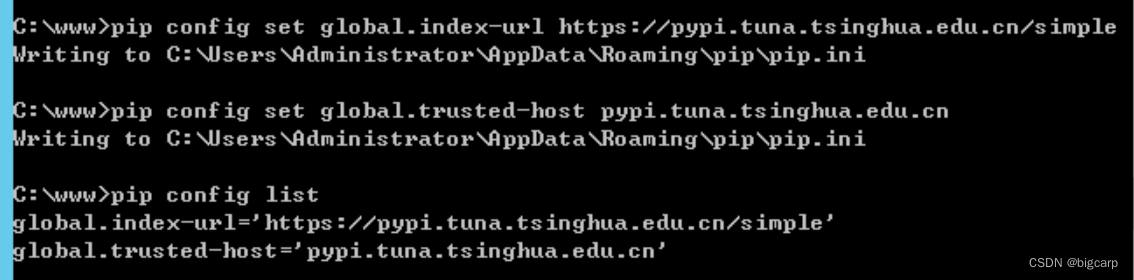
pip config set global.index-url https://pypi.tuna.tsinghua.edu.cn/simple

pip config set global.trusted-host pypi.tuna.tsinghua.edu.cn

pip config list
%APPDATA%\pip\pip.ini
[global]
index-url = http://pypi.mirrors.ustc.edu.cn/simple
trusted-host = pypi.mirrors.ustc.edu.cn
pip documentation
阿里云:
设置全局的下载地址:pip3 config set global.index-url http://mirrors.aliyun.com/pypi/simple/
添加到信任名单中:pip3 config set global.trusted-host mirrors.aliyun.com,要不然安装的时候会报错(
WARNING: The repository located at mirrors.aliyun.com is not a trusted or secure host and is being ignored. If this repository is available via HTTPS we recommend you use HTTPS instead, otherwise you may silence this warning and allow it anyway with ‘–trusted-host mirrors.aliyun.com’.
ERROR: Could not find a version that satisfies the requirement opencv-python
ERROR: No matching distribution found for opencv-python)
修改完查看一下:pip3 config list
原文链接:https://blog.youkuaiyun.com/huzing2524/article/details/115704208
原文链接:https://blog.youkuaiyun.com/qq_41375318/article/details/106895836






 扫一扫
扫一扫


 1428
1428

 被折叠的 条评论
为什么被折叠?
被折叠的 条评论
为什么被折叠?
 到【灌水乐园】发言





