debug1: expecting SSH2_MSG_KEX_ECDH_REPLY 解决SSH连接问题以及实现免密登录

文章讲述了作者在使用Wireguard连接两台Debian系统电脑时遇到SSH连接问题,通过排查发现是KexAlgorithms设置问题,最终通过生成并传输SSH秘钥、修改配置文件及重启服务解决了问题。

#经过Wiregurard连接的两台电脑无法进行SSH连接,困扰我几天,最终解决的过程#

主电脑:10.79.12.31  OS:Debian 11

被连接的电脑:10.79.12.32  OS: Debian 12

上面的 IP 请自行替换

1. 测试网络是否通畅

ping 10.79.12.32
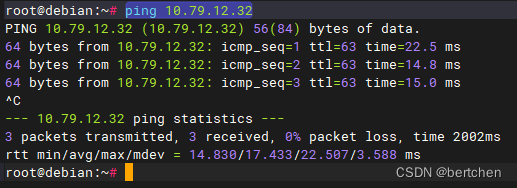
通过上面的测试,验证网络是正常的

2. 进行 SSH 连接

直接用 ssh 10.79.12.32 时,终端一直卡住不动, 通过详细日志查看连接的具体过程

ssh -vT 10.79.12.32
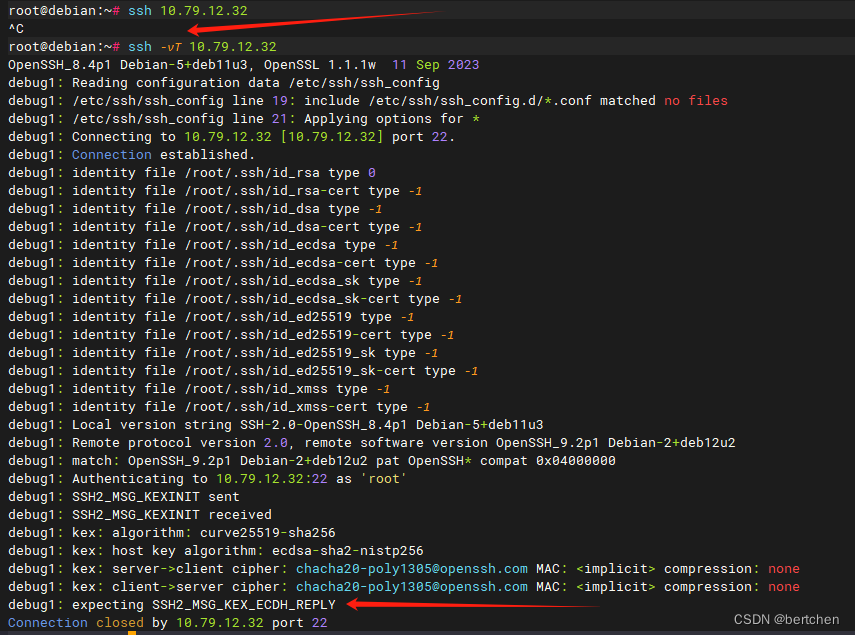
最终执行时,卡在 debug1: expecting SSH2_MSG_KEX_ECDH_REPLY

3. 解决问题

ssh -vT -o KexAlgorithms=ecdh-sha2-nistp521 root@10.79.12.32

输入连接目标电脑的秘密,不显示直接输入后回车
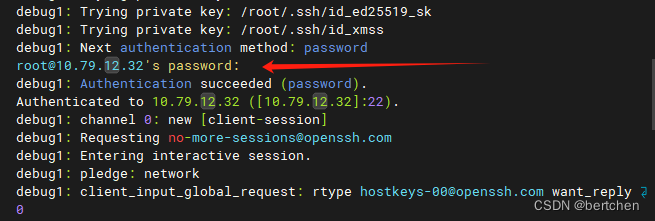
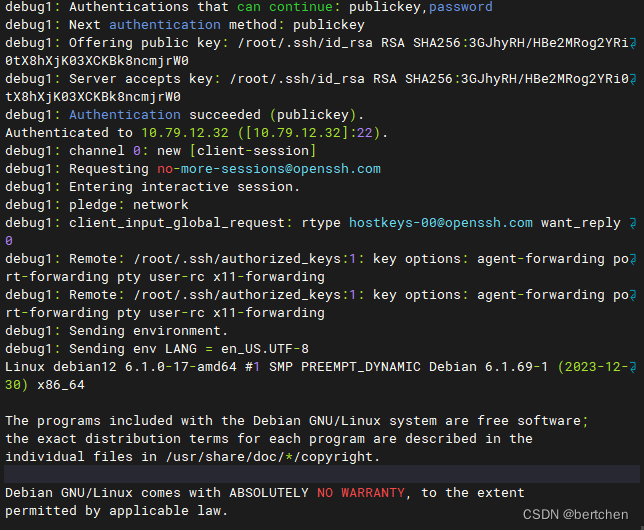
卡着时直接按 Ctrl + C

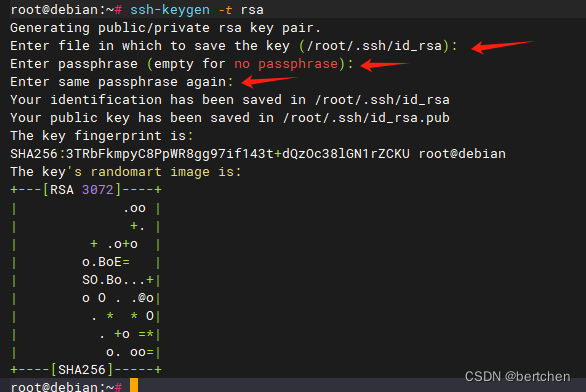
4. 生成秘钥

ssh-keygen -t rsa

回车三次,就可以生成秘钥
查看是否生成秘钥

cd ~/.ssh
ls -al
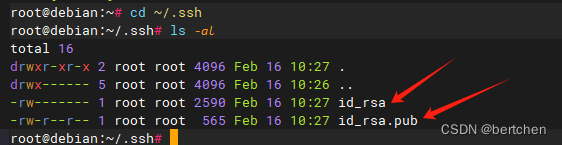
其中 id_rsa 是私钥;id_rsa.pub 是公钥

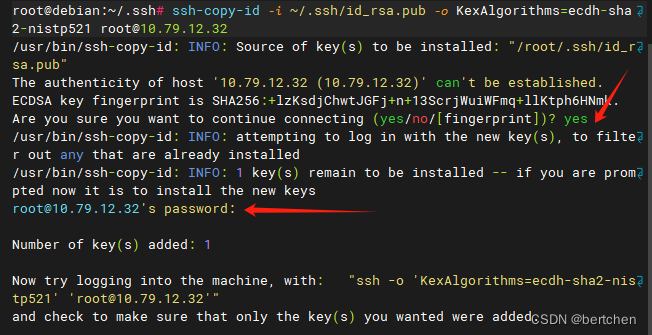
5. 把公钥传输到目标电脑

ssh-copy-id -i ~/.ssh/id_rsa.pub -o KexAlgorithms=ecdh-sha2-nistp521 root@10.79.12.32

按提示输入 yes 和 目标电脑的 root 用户密码
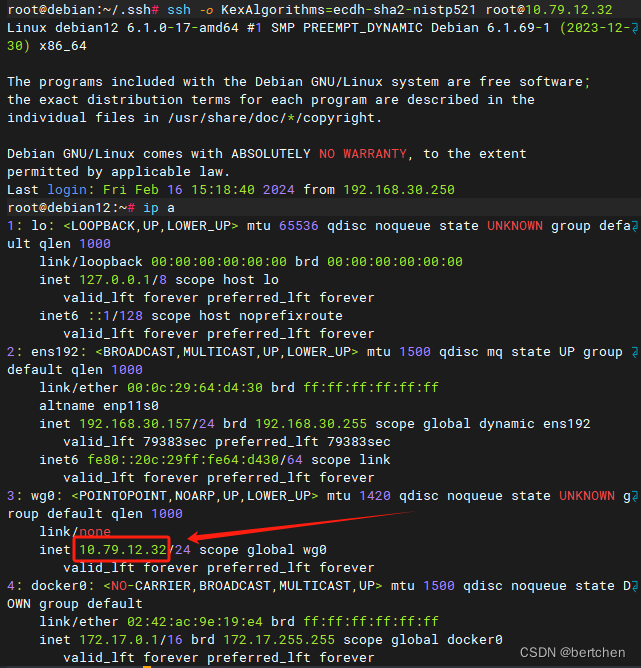
6. ssh 连接目标电脑

ssh -o KexAlgorithms=ecdh-sha2-nistp521 root@10.79.12.32
ip a

记得要增加参数 -o KexAlgorithms=ecdh-sha2-nistp521

连接成功后,我们可以验证
7. 把参数加到ssh配置文件中去

如果感觉每次都要带参数,比较麻烦,可以把参数写入配置文件中

vim ~/.ssh/config
cat ~/.ssh/config

按 i 后输入 KexAlgorithms=ecdh-sha2-nistp521

再按 ESC 输入 :wq
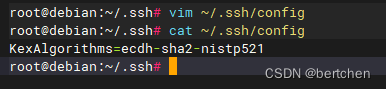
重启 ssh 服务

service ssh restart

连接测试

大功告成!欢迎收藏并点赞。

大家有问题欢迎加微信讨论!

xyc@xyc-virtual-machine:~$ ssh -Tv -p 29418 xiayuchen@gerrit-ce.tp-link.com OpenSSH_7.6p1 Ubuntu-4ubuntu0.7, OpenSSL 1.0.2n 7 Dec 2017 debug1: Reading configuration data /etc/ssh/ssh_config debug1: /etc/ssh/ssh_config line 19: Applying options for * debug1: Connecting to gerrit-ce.tp-link.com [10.176.69.107] port 29418. debug1: Connection established. debug1: key_load_public: No such file or directory debug1: identity file /home/xyc/.ssh/id_rsa type -1 debug1: key_load_public: No such file or directory debug1: identity file /home/xyc/.ssh/id_rsa-cert type -1 debug1: key_load_public: No such file or directory debug1: identity file /home/xyc/.ssh/id_dsa type -1 debug1: key_load_public: No such file or directory debug1: identity file /home/xyc/.ssh/id_dsa-cert type -1 debug1: key_load_public: No such file or directory debug1: identity file /home/xyc/.ssh/id_ecdsa type -1 debug1: key_load_public: No such file or directory debug1: identity file /home/xyc/.ssh/id_ecdsa-cert type -1 debug1: key_load_public: No such file or directory debug1: identity file /home/xyc/.ssh/id_ed25519 type -1 debug1: key_load_public: No such file or directory debug1: identity file /home/xyc/.ssh/id_ed25519-cert type -1 debug1: Local version string SSH-2.0-OpenSSH_7.6p1 Ubuntu-4ubuntu0.7 debug1: Remote protocol version 2.0, remote software version GerritCodeReview_3.3.3 (APACHE-SSHD-2.4.0) debug1: no match: GerritCodeReview_3.3.3 (APACHE-SSHD-2.4.0) debug1: Authenticating to gerrit-ce.tp-link.com:29418 as 'xiayuchen' debug1: SSH2_MSG_KEXINIT sent debug1: SSH2_MSG_KEXINIT received debug1: kex: algorithm: ecdh-sha2-nistp256 debug1: kex: host key algorithm: ecdsa-sha2-nistp256 debug1: kex: server->client cipher: aes128-ctr MAC: hmac-sha2-256-etm@openssh.com compression: none debug1: kex: client->server cipher: aes128-ctr MAC: hmac-sha2-256-etm@openssh.com compression: none debug1: sending SSH2_MSG_KEX_ECDH_INIT debug1: expecting SSH2_MSG_KEX_ECDH_REPLY debug1: Server host key: ecdsa-sha2-nistp256 SHA256:94zokm8g9MOxm56wKUpvlohudHHs+WfWn+YsZ1pWeDM debug1: Host '[gerrit-ce.tp-link.com]:29418' is known and matches the ECDSA host key. debug1: Found key in /home/xyc/.ssh/known_hosts:1 debug1: rekey after 4294967296 blocks debug1: SSH2_MSG_NEWKEYS sent debug1: expecting SSH2_MSG_NEWKEYS debug1: SSH2_MSG_NEWKEYS received debug1: rekey after 4294967296 blocks debug1: SSH2_MSG_SERVICE_ACCEPT received debug1: Authentications that can continue: publickey debug1: Next authentication method: publickey debug1: Trying private key: /home/xyc/.ssh/id_rsa debug1: Trying private key: /home/xyc/.ssh/id_dsa debug1: Trying private key: /home/xyc/.ssh/id_ecdsa debug1: Trying private key: /home/xyc/.ssh/id_ed25519 debug1: No more authentication methods to try. xiayuchen@gerrit-ce.tp-link.com: Permission denied (publickey). |这是什么问题
08-13
C:\Users\pc> ssh -R 13306:127.0.0.1:3306 -R 18088:127.0.0.1:8088 -i "C:\Users\pc\.ssh\My_Superset_Key.pem" ubuntu@43.153.66.149 -N -v OpenSSH_for_Windows_9.5p2, LibreSSL 3.8.2 debug1: Connecting to 43.153.66.149 [43.153.66.149] port 22. debug1: Connection established. debug1: identity file C:\\Users\\pc\\.ssh\\My_Superset_Key.pem type -1 debug1: identity file C:\\Users\\pc\\.ssh\\My_Superset_Key.pem-cert type -1 debug1: Local version string SSH-2.0-OpenSSH_for_Windows_9.5 debug1: Remote protocol version 2.0, remote software version OpenSSH_9.6p1 Ubuntu-3ubuntu13.14 debug1: compat_banner: match: OpenSSH_9.6p1 Ubuntu-3ubuntu13.14 pat OpenSSH* compat 0x04000000 debug1: Authenticating to 43.153.66.149:22 as 'ubuntu' debug1: load_hostkeys: fopen C:\\Users\\pc/.ssh/known_hosts2: No such file or directory debug1: load_hostkeys: fopen __PROGRAMDATA__\\ssh/ssh_known_hosts: No such file or directory debug1: load_hostkeys: fopen __PROGRAMDATA__\\ssh/ssh_known_hosts2: No such file or directory debug1: SSH2_MSG_KEXINIT sent debug1: SSH2_MSG_KEXINIT received debug1: kex: algorithm: curve25519-sha256 debug1: kex: host key algorithm: ssh-ed25519 debug1: kex: server->client cipher: chacha20-poly1305@openssh.com MAC: <implicit> compression: none debug1: kex: client->server cipher: chacha20-poly1305@openssh.com MAC: <implicit> compression: none debug1: expecting SSH2_MSG_KEX_ECDH_REPLY debug1: SSH2_MSG_KEX_ECDH_REPLY received debug1: Server host key: ssh-ed25519 SHA256:SCNCIXYAS8UyHXm9xBmwatnCfmtTo1JQSU6B6FLMhJE debug1: load_hostkeys: fopen C:\\Users\\pc/.ssh/known_hosts2: No such file or directory debug1: load_hostkeys: fopen __PROGRAMDATA__\\ssh/ssh_known_hosts: No such file or directory debug1: load_hostkeys: fopen __PROGRAMDATA__\\ssh/ssh_known_hosts2: No such file or directory debug1: Host '43.153.66.149' is known and matches the ED25519 host key. debug1: Found key in C:\\Users\\pc/.ssh/known_hosts:1 debug1: ssh_packet_send2_wrapped: resetting send seqnr 3 debug1: rekey out after 134217728 blocks debug1: SSH2_MSG_NEWKEYS sent debug1: expecting SSH2_MSG_NEWKEYS debug1: ssh_packet_read_poll2: resetting read seqnr 3 debug1: SSH2_MSG_NEWKEYS received debug1: rekey in after 134217728 blocks debug1: get_agent_identities: ssh_get_authentication_socket: No such file or directory debug1: Will attempt key: C:\\Users\\pc\\.ssh\\My_Superset_Key.pem explicit debug1: SSH2_MSG_EXT_INFO received debug1: kex_input_ext_info: server-sig-algs=<ssh-ed25519,ecdsa-sha2-nistp256,ecdsa-sha2-nistp384,ecdsa-sha2-nistp521,sk-ssh-ed25519@openssh.com,sk-ecdsa-sha2-nistp256@openssh.com,rsa-sha2-512,rsa-sha2-256> debug1: kex_ext_info_check_ver: publickey-hostbound@openssh.com=<0> debug1: kex_ext_info_check_ver: ping@openssh.com=<0> debug1: SSH2_MSG_SERVICE_ACCEPT received debug1: Authentications that can continue: publickey,password debug1: Next authentication method: publickey debug1: Trying private key: C:\\Users\\pc\\.ssh\\My_Superset_Key.pem debug1: Authentications that can continue: publickey,password debug1: Next authentication method: password ubuntu@43.153.66.149's password: Authenticated to 43.153.66.149 ([43.153.66.149]:22) using "password". debug1: Remote connections from LOCALHOST:13306 forwarded to local address 127.0.0.1:3306 debug1: Remote connections from LOCALHOST:18088 forwarded to local address 127.0.0.1:8088 debug1: ssh_init_forwarding: expecting replies for 1 forwards debug1: Requesting no-more-sessions@openssh.com debug1: Entering interactive session. debug1: pledge: filesystem debug1: client_input_global_request: rtype hostkeys-00@openssh.com want_reply 0 debug1: client_input_hostkeys: searching C:\\Users\\pc/.ssh/known_hosts for 43.153.66.149 / (none) debug1: client_input_hostkeys: searching C:\\Users\\pc/.ssh/known_hosts2 for 43.153.66.149 / (none) debug1: client_input_hostkeys: hostkeys file C:\\Users\\pc/.ssh/known_hosts2 does not exist debug1: client_input_hostkeys: no new or deprecated keys from server debug1: pledge: network debug1: Remote: Forwarding listen address "localhost" overridden by server GatewayPorts debug1: remote forward success for: listen 13306, connect 127.0.0.1:3306 debug1: forwarding_success: all expected forwarding replies received debug1: Remote: Forwarding listen address "localhost" overridden by server GatewayPorts debug1: remote forward success for: listen 18088, connect 127.0.0.1:8088
最新发布
11-29
[root@zzl12 ~]# ssh -v git@192.168.254.11 OpenSSH_7.4p1, OpenSSL 1.0.2k-fips 26 Jan 2017 debug1: Reading configuration data /etc/ssh/ssh_config debug1: /etc/ssh/ssh_config line 58: Applying options for * debug1: Connecting to 192.168.254.11 [192.168.254.11] port 22. debug1: Connection established. debug1: permanently_set_uid: 0/0 debug1: identity file /root/.ssh/id_rsa type 1 debug1: key_load_public: No such file or directory debug1: identity file /root/.ssh/id_rsa-cert type -1 debug1: key_load_public: No such file or directory debug1: identity file /root/.ssh/id_dsa type -1 debug1: key_load_public: No such file or directory debug1: identity file /root/.ssh/id_dsa-cert type -1 debug1: key_load_public: No such file or directory debug1: identity file /root/.ssh/id_ecdsa type -1 debug1: key_load_public: No such file or directory debug1: identity file /root/.ssh/id_ecdsa-cert type -1 debug1: key_load_public: No such file or directory debug1: identity file /root/.ssh/id_ed25519 type -1 debug1: key_load_public: No such file or directory debug1: identity file /root/.ssh/id_ed25519-cert type -1 debug1: Enabling compatibility mode for protocol 2.0 debug1: Local version string SSH-2.0-OpenSSH_7.4 debug1: Remote protocol version 2.0, remote software version OpenSSH_7.4 debug1: match: OpenSSH_7.4 pat OpenSSH* compat 0x04000000 debug1: Authenticating to 192.168.254.11:22 as 'git' debug1: SSH2_MSG_KEXINIT sent debug1: SSH2_MSG_KEXINIT received debug1: kex: algorithm: curve25519-sha256 debug1: kex: host key algorithm: ecdsa-sha2-nistp256 debug1: kex: server->client cipher: chacha20-poly1305@openssh.com MAC: <implicit> compression: none debug1: kex: client->server cipher: chacha20-poly1305@openssh.com MAC: <implicit> compression: none debug1: kex: curve25519-sha256 need=64 dh_need=64 debug1: kex: curve25519-sha256 need=64 dh_need=64 debug1: expecting SSH2_MSG_KEX_ECDH_REPLY debug1: Server host key: ecdsa-sha2-nistp256 SHA256:vRF7ghac3Nj/qGzKO099lGDi7OHTTxS4RQEszJxz0V4 debug1: Host '192.168.254.11' is known and matches the ECDSA host key. debug1: Found key in /root/.ssh/known_hosts:1 debug1: rekey after 134217728 blocks debug1: SSH2_MSG_NEWKEYS sent debug1: expecting SSH2_MSG_NEWKEYS debug1: SSH2_MSG_NEWKEYS received debug1: rekey after 134217728 blocks debug1: SSH2_MSG_EXT_INFO received debug1: kex_input_ext_info: server-sig-algs=<rsa-sha2-256,rsa-sha2-512> debug1: SSH2_MSG_SERVICE_ACCEPT received debug1: Authentications that can continue: publickey,gssapi-keyex,gssapi-with-mic,password debug1: Next authentication method: gssapi-keyex debug1: No valid Key exchange context debug1: Next authentication method: gssapi-with-mic debug1: Unspecified GSS failure. Minor code may provide more information No Kerberos credentials available (default cache: KEYRING:persistent:0) debug1: Unspecified GSS failure. Minor code may provide more information No Kerberos credentials available (default cache: KEYRING:persistent:0) debug1: Next authentication method: publickey debug1: Offering RSA public key: /root/.ssh/id_rsa debug1: Authentications that can continue: publickey,gssapi-keyex,gssapi-with-mic,password debug1: Trying private key: /root/.ssh/id_dsa debug1: Trying private key: /root/.ssh/id_ecdsa debug1: Trying private key: /root/.ssh/id_ed25519 debug1: Next authentication method: password git@192.168.254.11's password: debug1: Authentication succeeded (password). Authenticated to 192.168.254.11 ([192.168.254.11]:22). debug1: channel 0: new [client-session] debug1: Requesting no-more-sessions@openssh.com debug1: Entering interactive session. debug1: pledge: network debug1: client_input_global_request: rtype hostkeys-00@openssh.com want_reply 0 debug1: Sending environment. debug1: Sending env LANG = zh_CN.UTF-8 Last failed login: Sat Aug 23 13:21:45 CST 2025 from 192.168.254.12 on ssh:notty There were 11 failed login attempts since the last successful login. Last login: Fri Aug 22 22:59:12 2025 -sh-4.2$ -sh-4.2$ -sh-4.2$ exitdebug1: client_input_channel_req: channel 0 rtype exit-status reply 0 debug1: client_input_channel_req: channel 0 rtype eow@openssh.com reply 0
08-24
评论 1
成就一亿技术人!
拼手气红包6.0元
还能输入1000个字符
 
红包 添加红包
表情包 插入表情
 条评论被折叠 查看
添加红包

请填写红包祝福语或标题

红包个数最小为10个

红包金额最低5元

当前余额3.43前往充值 >
需支付:10.00
成就一亿技术人!
领取后你会自动成为博主和红包主的粉丝 规则
hope_wisdom
发出的红包
实付
使用余额支付
点击重新获取
扫码支付
钱包余额 0

抵扣说明:

1.余额是钱包充值的虚拟货币,按照1:1的比例进行支付金额的抵扣。
2.余额无法直接购买下载,可以购买VIP、付费专栏及课程。

余额充值