



 本文详细介绍了如何创建Spring Boot的多模块项目,包括父模块和子模块的创建,以及配置过程。在配置过程中,强调了父模块的pom配置如dependencyManagement、properties和modules的重要性,子模块的依赖管理和exclusions标签的使用。文章还列举了在创建过程中遇到的坑,如@ComponentScan的使用、mapper.xml文件打包问题以及SpringBoot配置错误,并提供了相应的解决方案。
1 参考的配置方法
文章链接:https://www.cnblogs.com/MaxElephant/p/8205234.html
最近在负责的是一个比较复杂项目,模块很多,代码中的二级模块就有9个,部分二级模块下面还分了多个模块。代码中的多模块是用maven管理的,每个模块都使用spring boot框架。之前有零零散散学过一些maven多模块配置的知识,但没自己从头到尾创建和配置过,也快忘得差不多了。这次正好对照着这个项目,动手实践一下,下面我们就开始吧。
maven多模块项目通常由一个父模块和若干个子模块构成,每个模块都对应着一个pom.xml。它们之间通过继承和聚合(也称作多模块)相互关联。多模块适用于一些比较大的项目,通过合理的模块拆分,实现代码的复用,便于维护和管理。
1 多模块项目创建
因为本系列的下一篇是《Spring Boot集成Dubbo》,所以本章就以创建多模块的dubbo项目作为示例。示例中的开发环境是Win 7,编辑器是Intellij IDEA,Java版本是1.8。
1.1 父模块创建
首先我们在IDEA中创建一个spring boot工程作为父项目。
一、在界面左上角选择File->New->Project后,选择Spring Initializr,默认使用的Java版本是1.8。
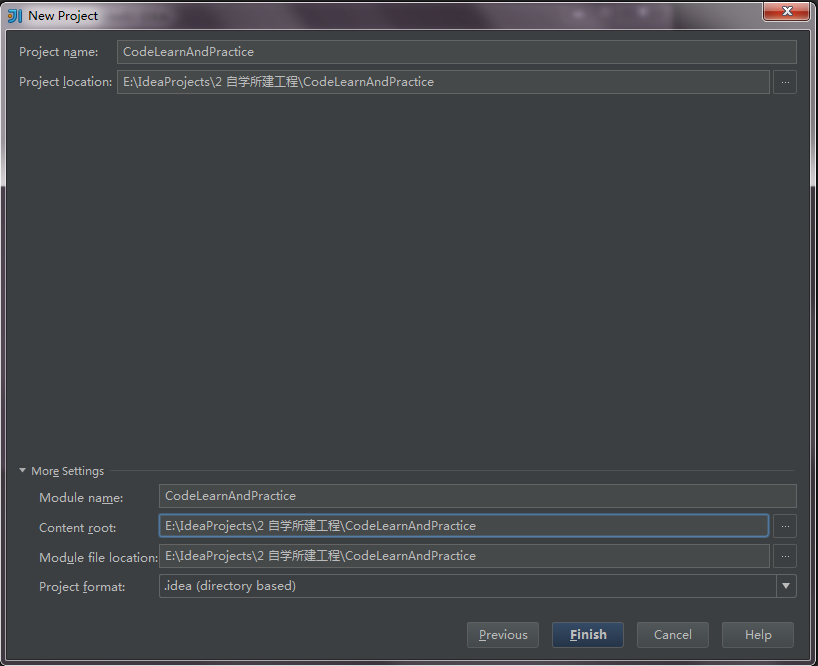
二、点击Next,进入下一步,可以设置项目的一些基本信息。
这里我们先来温习下groupId、artifactId、package这三个参数的一般填写规范。
groupId和artifactId统称为“坐标”,是为了保证项目唯一性而提出的。groupId是项目组织唯一的标识符,实际对应JAVA的包的结构,ArtifactID是项目的唯一的标识符,实际对应项目的名称,就是项目根目录的名称。groupId一般分为多个段,一般第一段为域,第二段为公司名称。举个apache公司的tomcat项目例子:这个项目的groupId是org.apache,它的域是org,公司名称是apache,artifactId是tomcat。包结构package最好是以groupId.artifactId打头的。
因为后续打算将“代码学习和实践”写成一个系列的文章,文中演示的工程都作为该工程的子模块,所以这里项目名Name就填写CodeLearnAndPractice。
这里是个人练习的项目,不涉及公司名,但groupId、artifactId、package参数的填写,还是尽量按照上面的规范来填写,这里package就直接用groupId.artifactId。如下所示:
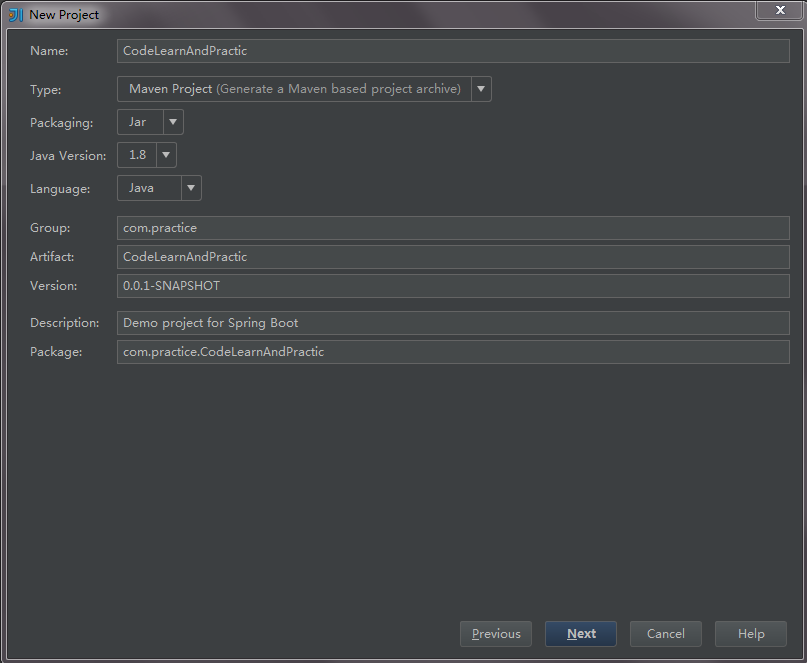
三、点击Next,进入下一个选择dependency的界面,作用是在pom中自动添加一些依赖,在项目开始时就下载。这里我们暂时不勾选任何依赖。
四、点击Next,进入下一个界面,填写工程名,并选择工程所在目录。填写完成后,点击Finish,即可创建一个spring boot项目。
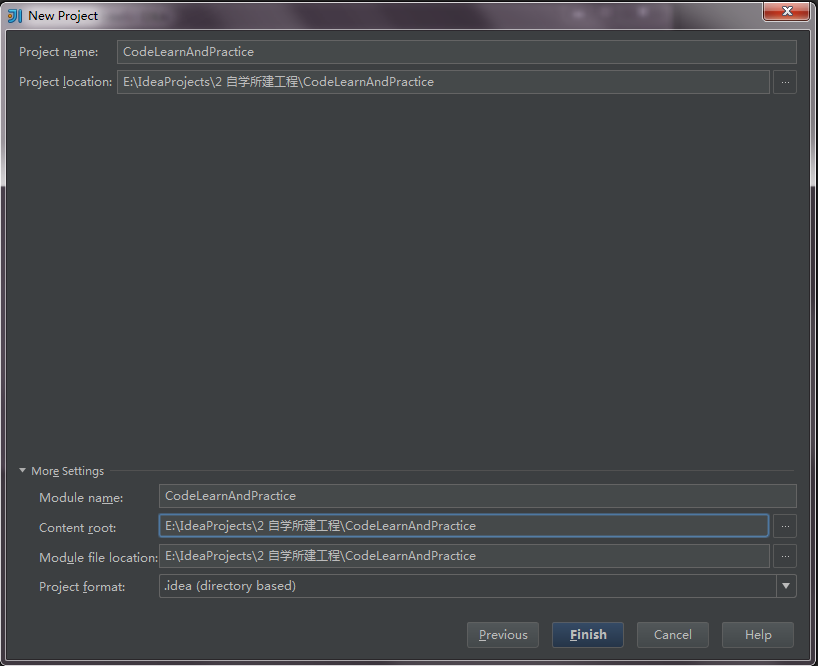
1.2 创建子模块
在上面创建好的CodeLearnAndPractice工程名上,点击右键,选择New–>Module,进入New Module页面。
该模块为dubbo服务的提供方,Name为springboot-dubbo-server,后面其他的参数都可参照父模块的参数设置。
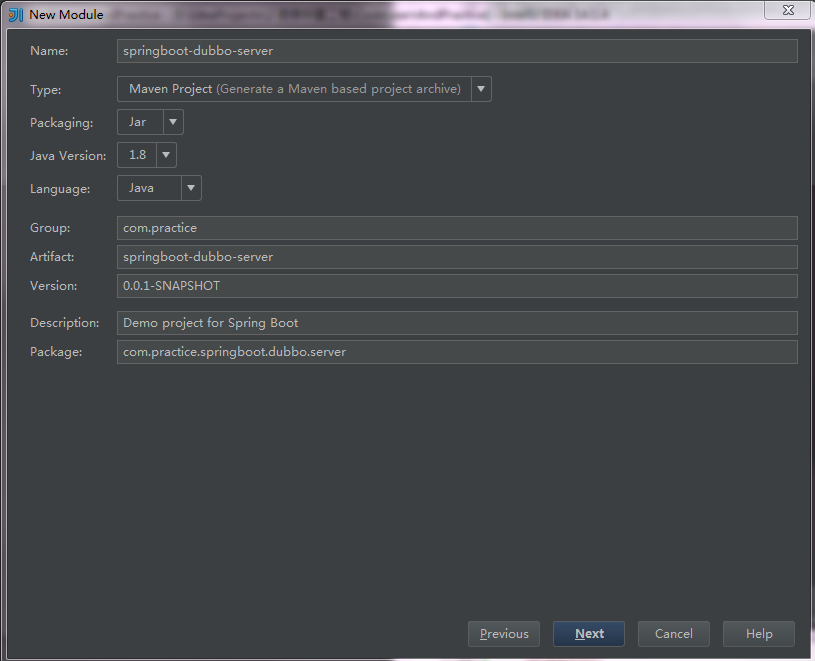
下面创建另一个Module,dubbo服务的调用方,Name为springboot-dubbo-client,其他参数设置参照上步。
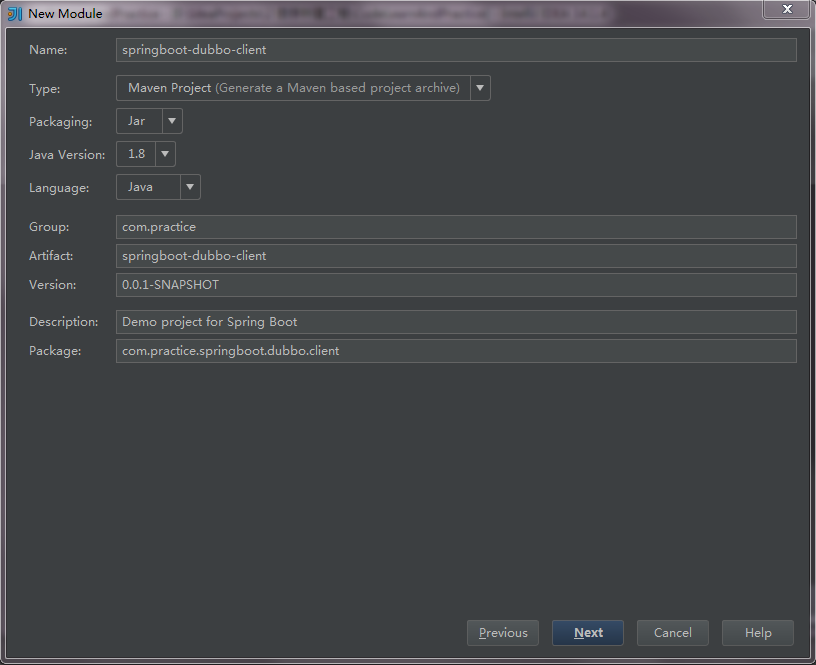
以上3个模块创建完成之后,整个项目的目录结构如下图所示。
我们把下图选中的无用的文件及文件夹删掉,包括三个模块的mvnw、mvnw.cmd文件及.mvn文件夹,还有父模块的src目录,因为此处的父模块只做依赖管理,不需要编写代码。
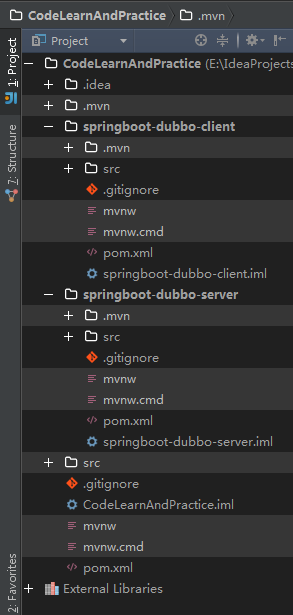
到这里,一个父模块和两个子模块都创建完成啦~~
2 多模块项目配置
2.1 父模块pom配置
父pom是为了抽取统一的配置信息和依赖版本控制,方便子pom直接引用,简化子pom的配置。
下面介绍下父pom的配置中需要注意的一些地方。我贴出的pom看起来会有点冗余,因为其中一些不需要的地方,我没有直接删掉而是注释掉,并加了说明,是为了后续查看的时候还能清楚删掉的原因。
1、父模块的打包类型
多模块项目中,父模块打包类型必须是pom,同时以给出所有的子模块,其中每个module,都是另外一个maven项目。
我们的项目中目前一共有两个子模块,springboot-dubbo-server和springboot-dubbo-client。后续新增的子模块也必须加到父pom的modules中。
2、继承设置
继承是maven中很强大的一种功能,继承可以使子pom获得parent中的各项配置,对子pom进行统一的配置和依赖管理。父pom中的大多数元素都能被子pom继承,想深入了解的同学可自行搜索学习~~
maven项目之间的继承关系通过表示。这里使用的开发框架是spring boot,默认继承spring-boot-starter-parent。
3、使用dependencyManagement管理依赖版本号
一般在项目最顶层的父pom中使用该元素,让所有子模块引用一个依赖而不用显式的列出版本号。maven会沿着父子层次向上走,直到找到一个拥有dependencyManagement元素的项目,然后它就会使用在这个dependencyManagement元素中指定的版本号。
4、使用properties控制依赖包的版本号,便于版本维护
在properties标签中,添加各依赖包的版本号,然后在dependency中直接引用该依赖版本号的值即可。
CodeLearnAndPractice/pom.xml
<?xml version="1.0" encoding="UTF-8"?>
<project xmlns="http://maven.apache.org/POM/4.0.0" xmlns:xsi="http://www.w3.org/2001/XMLSchema-instance"
         xsi:schemaLocation="http://maven.apache.org/POM/4.0.0 http://maven.apache.org/xsd/maven-4.0.0.xsd">
    <modelVersion>4.0.0</modelVersion>

    <groupId>com.practice</groupId>
    <artifactId>CodeLearnAndPractice</artifactId>
    <version>0.0.1-SNAPSHOT</version>
    <!--<packaging>jar</packaging>-->
    <packaging>pom</packaging>  <!--父模块打包类型必须为pom-->

    <modules>
        <module>springboot-dubbo-server</module>
        <module>springboot-dubbo-client</module>
    </modules>

    <name>CodeLearnAndPractice</name>
    <description>Practice the learned code</description>

    <!-- parent指明继承关系,给出被继承的父项目的具体信息-->
    <parent>
        <groupId>org.springframework.boot</groupId>
        <artifactId>spring-boot-starter-parent</artifactId>
        <version>1.5.8.RELEASE</version>
        <relativePath/>
        <!-- lookup parent from repository -->
    </parent>

    <properties>
        <project.build.sourceEncoding>UTF-8</project.build.sourceEncoding>
        <project.reporting.outputEncoding>UTF-8</project.reporting.outputEncoding>
        <java.version>1.8</java.version>

        <!-- 在properties中统一控制依赖包的版本,更清晰-->
        <dubbo.version>2.5.3</dubbo.version>
        <zkclient.version>0.10</zkclient.version>
    </properties>

    <dependencyManagement>   <!--dependencyManagement用于管理依赖版本号-->
        <dependencies>
            <!-- 删除spring-boot-starter和spring-boot-starter-test,
            因为parent中继承的祖先中已经有了,并且一般dependencyManagement管理的依赖都要写版本号 -->
            <!--<dependency>-->
                <!--<groupId>org.springframework.boot</groupId>-->
                <!--<artifactId>spring-boot-starter</artifactId>-->
            <!--</dependency>-->

            <!--<dependency>-->
                <!--<groupId>org.springframework.boot</groupId>-->
                <!--<artifactId>spring-boot-starter-test</artifactId>-->
                <!--<scope>test</scope>-->
            <!--</dependency>-->

            <!--新增后续dubbo项目中所需依赖,dubbo、zk-->
            <dependency>
                <groupId>com.alibaba</groupId>
                <artifactId>dubbo</artifactId>
                <!--<version>2.5.3</version>-->    <!--使用properties中配置的版本号-->
                <version>${dubbo.version}</version>
                <exclusions>
                    <exclusion>
                        <groupId>org.springframework</groupId>
                        <artifactId>spring</artifactId>
                    </exclusion>
                </exclusions>
            </dependency>

            <dependency>
                <groupId>com.101tec</groupId>
                <artifactId>zkclient</artifactId>
                <!--<version>0.10</version>-->    <!--使用properties中配置的版本号-->
                <version>${zkclient.version}</version>
            </dependency>
        </dependencies>

    </dependencyManagement>

    <!--该插件作用是打一个可运行的包,必须要写在需要打包的项目里。这里的父模块不需要打包运行,所以删掉该插件。-->
    <!--<build>-->
        <!--<plugins>-->
            <!--<plugin>-->
                <!--<groupId>org.springframework.boot</groupId>-->
                <!--<artifactId>spring-boot-maven-plugin</artifactId>-->
            <!--</plugin>-->
        <!--</plugins>-->
    <!--</build>-->

</project>
2.2 子模块pom配置
1、继承设置
子模块的parent要使用顶层的父模块.
2、依赖设置
父模块pom中使用dependencyManagement来管理的依赖,在子模块pom中就不需要再写版本号了,exclusion元素也不需要再写。
springboot-dubbo-server\pom.xml
<?xml version="1.0" encoding="UTF-8"?>
<project xmlns="http://maven.apache.org/POM/4.0.0" xmlns:xsi="http://www.w3.org/2001/XMLSchema-instance"
   xsi:schemaLocation="http://maven.apache.org/POM/4.0.0 http://maven.apache.org/xsd/maven-4.0.0.xsd">
   <modelVersion>4.0.0</modelVersion>

   <groupId>com.practice</groupId>
   <artifactId>springboot-dubbo-server</artifactId>
   <version>0.0.1-SNAPSHOT</version>
   <packaging>jar</packaging>

   <name>springboot-dubbo-server</name>
   <description>Demo project for Spring Boot</description>

   <!-- 子模块的parent要使用顶层的父模块-->
   <parent>
      <!--<groupId>org.springframework.boot</groupId>-->
      <!--<artifactId>spring-boot-starter-parent</artifactId>-->
      <!--<version>1.5.8.RELEASE</version>-->
      <!--<relativePath/>-->
      <groupId>com.practice</groupId>
      <artifactId>CodeLearnAndPractice</artifactId>
      <version>0.0.1-SNAPSHOT</version>
   </parent>

   <!-- properties可删掉,会继承父模块的-->
   <!--<properties>-->
      <!--<project.build.sourceEncoding>UTF-8</project.build.sourceEncoding>-->
      <!--<project.reporting.outputEncoding>UTF-8</project.reporting.outputEncoding>-->
      <!--<java.version>1.8</java.version>-->
   <!--</properties>-->

   <dependencies>
      <dependency>
         <groupId>org.springframework.boot</groupId>
         <artifactId>spring-boot-starter</artifactId>
      </dependency>

      <dependency>
         <groupId>org.springframework.boot</groupId>
         <artifactId>spring-boot-starter-test</artifactId>
         <scope>test</scope>
      </dependency>

      <!--新增后续dubbo项目中所需依赖,dubbo、zk。
         父模块pom中使用dependencyManagement来管理依赖版本号,子模块pom中不需要再写版本号,exclusion也不需要-->
      <dependency>
         <groupId>com.alibaba</groupId>
         <artifactId>dubbo</artifactId>
         <!--<version>2.5.3</version>-->
         <!--<exclusions>-->
            <!--<exclusion>-->
               <!--<groupId>org.springframework</groupId>-->
               <!--<artifactId>spring</artifactId>-->
            <!--</exclusion>-->
         <!--</exclusions>-->
      </dependency>

      <dependency>
         <groupId>com.101tec</groupId>
         <artifactId>zkclient</artifactId>
         <!--<version>0.10</version>-->
      </dependency>
   </dependencies>

   <build>
      <plugins>
         <plugin>
            <groupId>org.springframework.boot</groupId>
            <artifactId>spring-boot-maven-plugin</artifactId>
         </plugin>
      </plugins>
   </build>

</project>
springvoot-dubbo-client/pom.xml
<?xml version="1.0" encoding="UTF-8"?>
<project xmlns="http://maven.apache.org/POM/4.0.0" xmlns:xsi="http://www.w3.org/2001/XMLSchema-instance"
   xsi:schemaLocation="http://maven.apache.org/POM/4.0.0 http://maven.apache.org/xsd/maven-4.0.0.xsd">
   <modelVersion>4.0.0</modelVersion>

   <groupId>com.practice</groupId>
   <artifactId>springboot-dubbo-client</artifactId>
   <version>0.0.1-SNAPSHOT</version>
   <packaging>jar</packaging>

   <name>springboot-dubbo-client</name>
   <description>Demo project for Spring Boot</description>

   <!-- 子模块的parent要使用顶层的父模块-->
   <parent>
      <!--<groupId>org.springframework.boot</groupId>-->
      <!--<artifactId>spring-boot-starter-parent</artifactId>-->
      <!--<version>1.5.8.RELEASE</version>-->
      <!--<relativePath/>-->
      <groupId>com.practice</groupId>
      <artifactId>CodeLearnAndPractice</artifactId>
      <version>0.0.1-SNAPSHOT</version>
   </parent>

   <!-- properties可删掉,会继承父模块的-->
   <!--<properties>-->
      <!--<project.build.sourceEncoding>UTF-8</project.build.sourceEncoding>-->
      <!--<project.reporting.outputEncoding>UTF-8</project.reporting.outputEncoding>-->
      <!--<java.version>1.8</java.version>-->
   <!--</properties>-->

   <dependencies>
      <dependency>
         <groupId>org.springframework.boot</groupId>
         <artifactId>spring-boot-starter</artifactId>
      </dependency>

      <dependency>
         <groupId>org.springframework.boot</groupId>
         <artifactId>spring-boot-starter-test</artifactId>
         <scope>test</scope>
      </dependency>

      <!-- 该模块需要启动web服务,需要该依赖-->
      <dependency>
         <groupId>org.springframework.boot</groupId>
         <artifactId>spring-boot-starter-web</artifactId>
      </dependency>

      <!--新增后续dubbo项目中所需依赖,dubbo、zk
         父模块pom中使用dependencyManagement来管理依赖版本号,子模块pom中不需要再写版本号
         父模块pom中里有exclusion,子模块pom中不要写exclusion-->
      <dependency>
         <groupId>com.alibaba</groupId>
         <artifactId>dubbo</artifactId>
         <!--<version>2.5.3</version>-->
         <!--<exclusions>-->
            <!--<exclusion>-->
               <!--<groupId>org.springframework</groupId>-->
               <!--<artifactId>spring</artifactId>-->
            <!--</exclusion>-->
         <!--</exclusions>-->
      </dependency>

      <dependency>
         <groupId>com.101tec</groupId>
         <artifactId>zkclient</artifactId>
         <!--<version>0.10</version>-->
      </dependency>

      <!--client模块需要依赖server模块-->
      <dependency>
         <groupId>com.practice</groupId>
         <artifactId>springboot-dubbo-server</artifactId>
         <version>0.0.1-SNAPSHOT</version>
      </dependency>
   </dependencies>

   <build>
      <plugins>
         <plugin>
            <groupId>org.springframework.boot</groupId>
            <artifactId>spring-boot-maven-plugin</artifactId>
         </plugin>
      </plugins>
   </build>

</project>
3、关于exclusions标签
当dependency A自身的依赖B,与其他dependency存在冲突的时候(最常见的就是版本冲突),我们就需要把B排除掉,这时就需要使用exclusions元素。
那么我们怎么知道一个dependency自身包含哪些依赖呢?
1、通过mvn dependency:tree命令查看依赖树
2、使用IDEA或其他IDA查看依赖树
点击IDEA右侧的Maven Projects,在每个模块的Dependencies中即可查看每个dependency内部的依赖及版本号,从来识别哪些依赖需要被排除掉。
以dubbo为例,我们先删除配置,点开Maven Projects,可以看到2.5.3版本的dubbo中使用的spring版本是2.5.6,这是一个很老的版本,有一些方法是没有的,现在在用的spring版本一般都是4.*的,所以我们需要把它排除掉,避免后续报错。
要查看当前项目中使用的spring版本,可以按住左键,然后点击父pom中的值,进入更上一层pom,再重复上步操作,可以看到spring的版本是4.3.12。
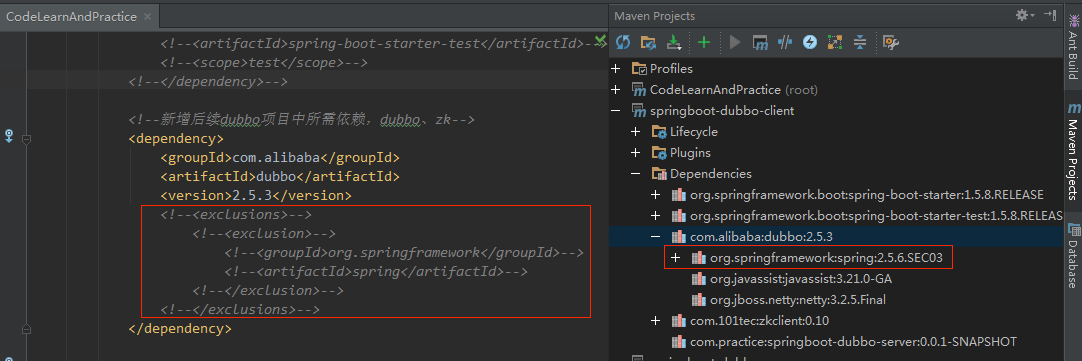
按住左键,然后点击父pom中的值,进入更上一层pom:
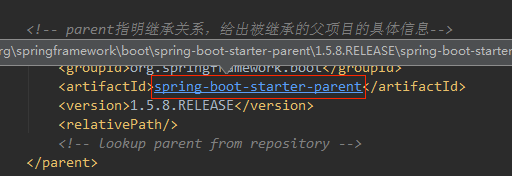
可以看到spring的版本是4.3.12:

3 测试
这里就先不写代码了,到下一章再写。直接编译一下,如果编译成功,说明pom文件的配置没有什么大问题。
点开右侧Maven Projects,双击父模块Lifecycle中的compile,进行代码编译,或者直接在Terminal中执行命令:mvn compile。
编译通过啦~~
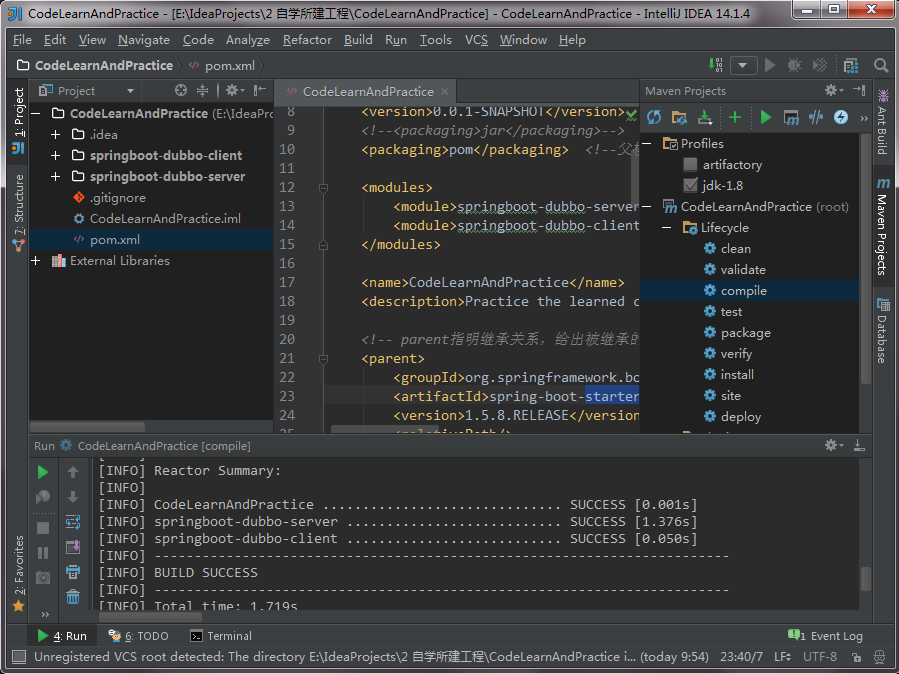
到这里,Spring Boot多模块项目创建与配置就介绍完啦。
2、自己的创建过程
我参考上面的操作自己建了springboot多模块,主要参考里面的Pom文件配置
项目结构
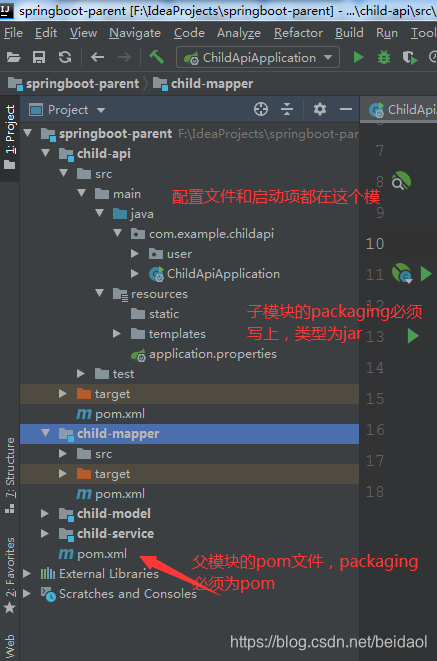
创建的过程
file---new --spring initializer---
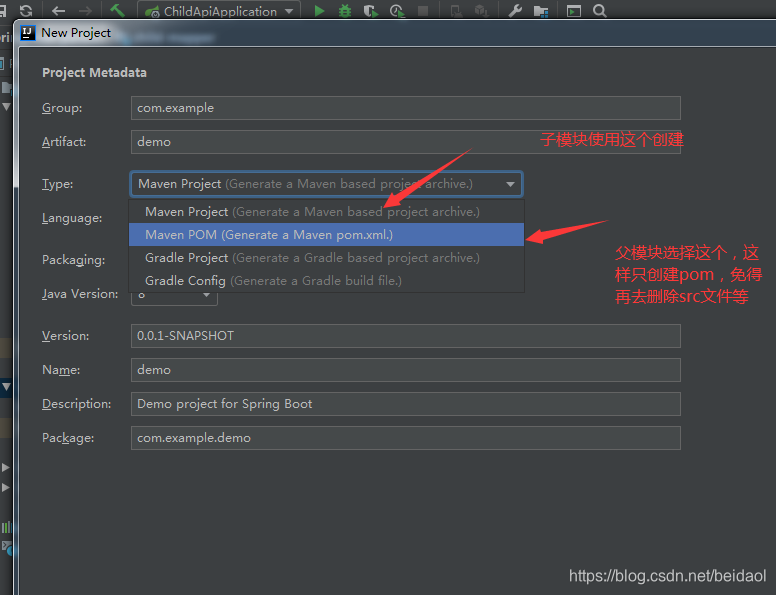
坑1

解决办法:添加@ComponentScan(basePackages = {"com.example"})
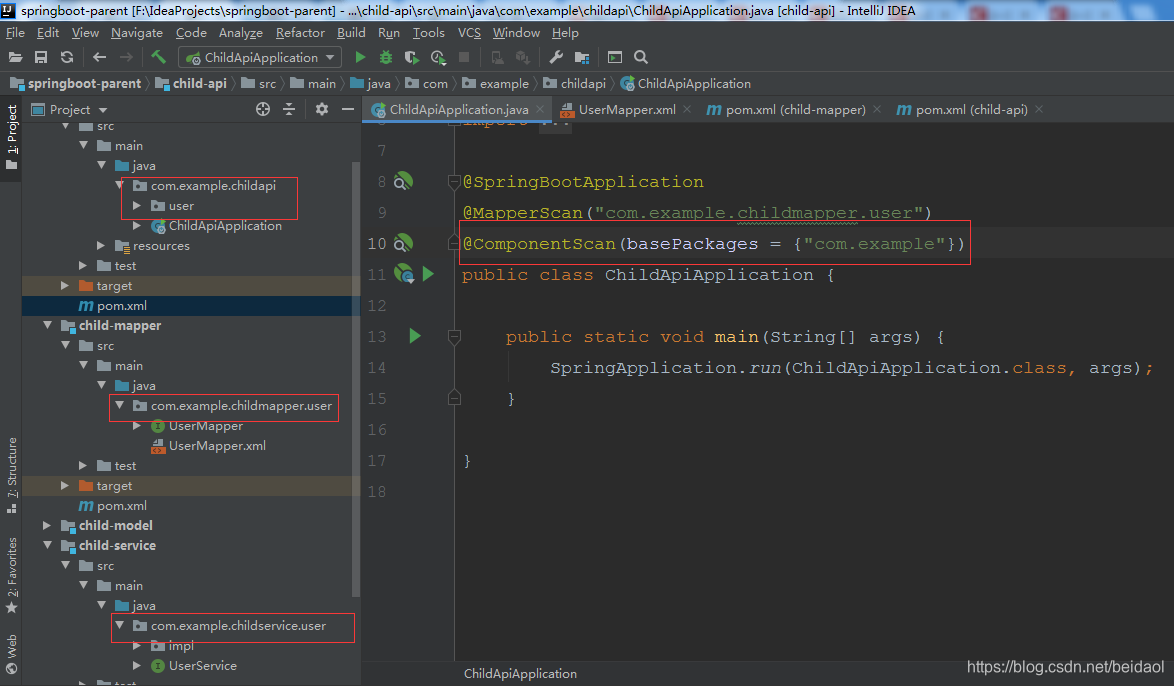
1,@ComponentScan注解是什么
其实很简单,@ComponentScan主要就是定义扫描的路径从中找出标识了需要装配的类自动装配到spring的bean容器中
2,@ComponentScan注解的详细使用
做过web开发的同学一定都有用过@Controller,@Service,@Repository注解,查看其源码你会发现,他们中有一个共同的注解@Component,没错@ComponentScan注解默认就会装配标识了@Controller,@Service,@Repository,@Component注解的类到spring容器中,
坑2
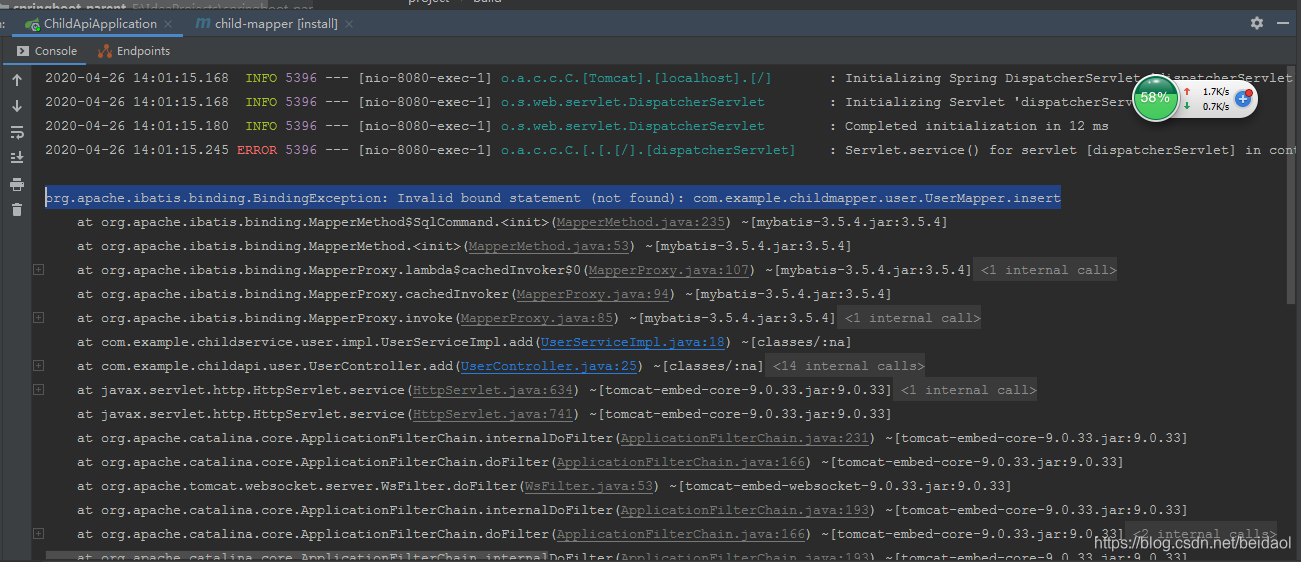
org.apache.ibatis.binding.BindingException: Invalid bound statement (not found): com.example.childmapper.user.UserMapper.insert
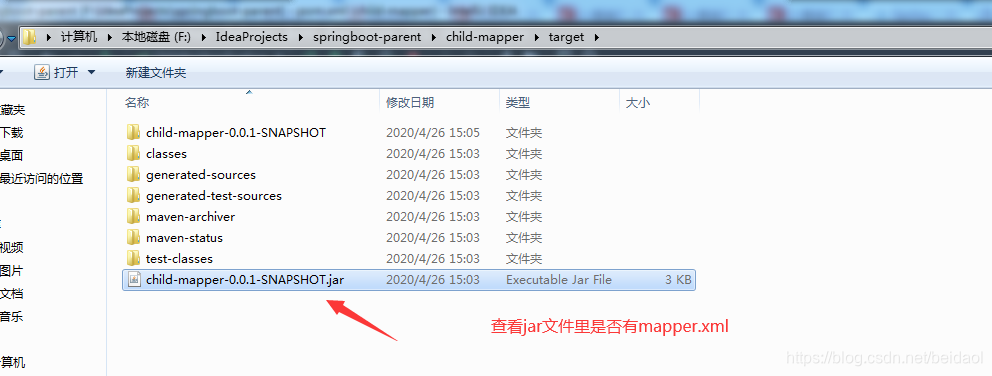
首先在在target文件夹下的jar包中看是否有mapper.xml
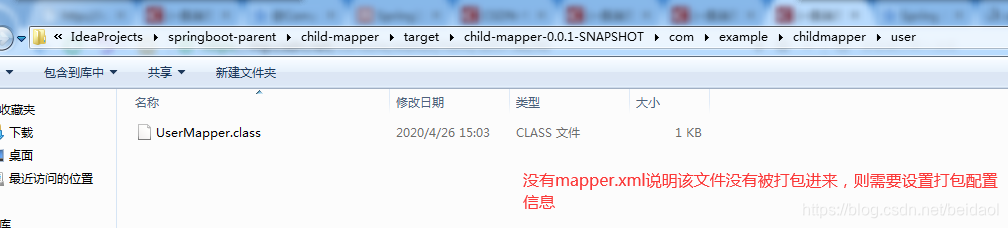
解压Jar后发现没有
解决办法:在maper模块的pom文件中添加
<resources>
            <resource>
                <directory>src/main/java</directory>
                <includes>
                    <include>**/*.xml</include>
                </includes>
            </resource>
            <resource>
                <directory>src/main/resources</directory>
                <includes>
                    <include>**/*</include>
                </includes>
</resource> 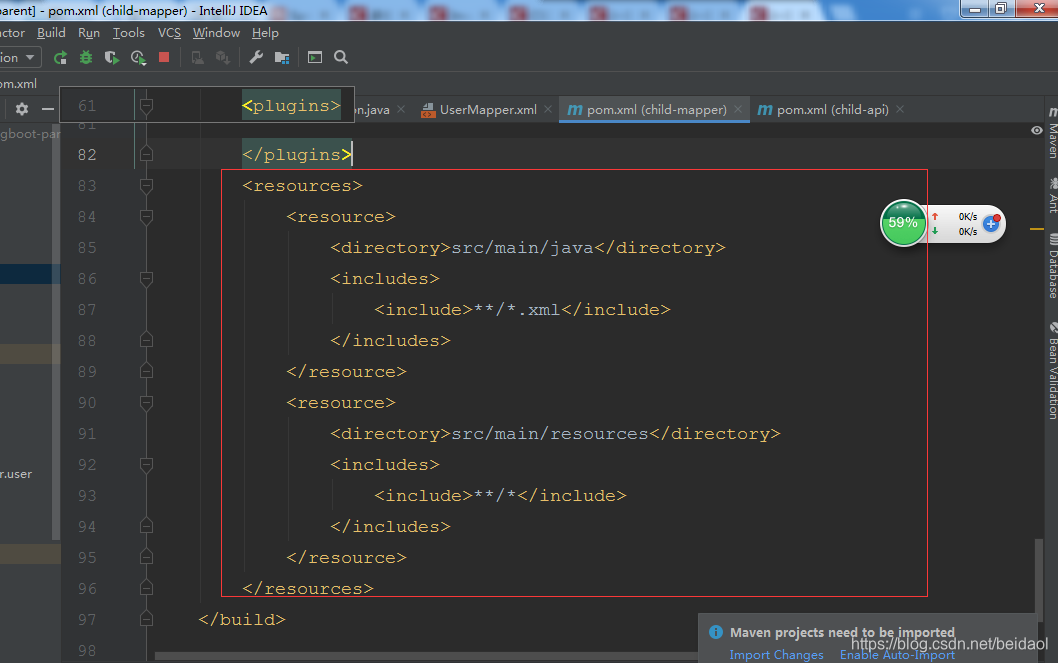
该配置的作用是采用maven打包时,将文件打包到jar
首先,来看下MAVENx项目标准的目录结构:
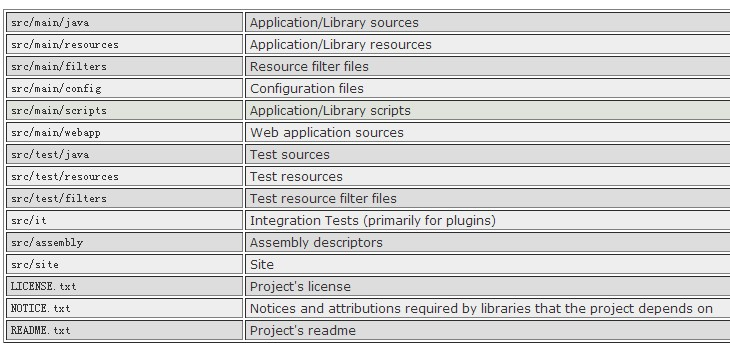
一般情况下,我们用到的资源文件(各种xml,properites,xsd文件等)都放在src/main/resources下面,利用maven打包时,maven能把这些资源文件打包到相应的jar或者war里。
有时候,比如mybatis的mapper.xml文件,我们习惯把它和Mapper.java放一起,都在src/main/java下面,这样利用maven打包时,就需要修改pom.xml文件,来把mapper.xml文件一起打包进jar或者war里了,否则,这些文件不会被打包的。(maven认为src/main/java只是java的源代码路径)。网络上有很多方法,我大概试了下,几种方法都可以,可以任选一种即可。
方法1,其中**/*这样的写法,是为了保证各级子目录下的资源文件被打包。
Xml代码
<build>
    <finalName>test</finalName>
    <!--
    这样也可以把所有的xml文件,打包到相应位置。
    <resources>
        <resource>
            <directory>src/main/resources</directory>
            <includes>
                <include>**/*.properties</include>
                <include>**/*.xml</include>
                <include>**/*.tld</include>
            </includes>
            <filtering>false</filtering>
        </resource>
        <resource>
            <directory>src/main/java</directory>
            <includes>
                <include>**/*.properties</include>
                <include>**/*.xml</include>
                <include>**/*.tld</include>
            </includes>
            <filtering>false</filtering>
        </resource>
    </resources>
</build>
方法2,利用build-helper-maven-plugin插件
Xml代码
<build>
    ...
    </plugins>
        ...
        <!--
        此plugin可以用
        利用此plugin,把源代码中的xml文件,
        打包到相应位置,这里主要是为了打包Mybatis的mapper.xml文件
        -->
        <plugin>
            <groupId>org.codehaus.mojo</groupId>
            <artifactId>build-helper-maven-plugin</artifactId>
            <version>1.8</version>
            <executions>
                <execution>
                    <id>add-resource</id>
                    <phase>generate-resources</phase>
                    <goals>
                        <goal>add-resource</goal>
                    </goals>
                    <configuration>
                        <resources>
                            <resource>
                                <directory>src/main/java</directory>
                                <includes>
                                    <include>**/*.xml</include>
                                </includes>
                            </resource>
                        </resources>
                    </configuration>
                </execution>
            </executions>
        </plugin>
        ...
    </plugins>
    ...
</build>
方法3,利用maven-resources-plugin插件
Xml代码
<build>
    ...
    </plugins>
        ...
        <!--
        此plugin可以用
        利用此plugin,把源代码中的xml文件,打包到相应位置,
        这里主要是为了打包Mybatis的mapper.xml文件
        -->
        <plugin>
            <artifactId>maven-resources-plugin</artifactId>
            <version>2.5</version>
            <executions>
                <execution>
                    <id>copy-xmls</id>
                    <phase>process-sources</phase>
                    <goals>
                        <goal>copy-resources</goal>
                    </goals>
                    <configuration>
                        <outputDirectory>${basedir}/target/classes</outputDirectory>
                        <resources>
                            <resource>
                                <directory>${basedir}/src/main/java</directory>
                                <includes>
                                    <include>**/*.xml</include>
                                </includes>
                            </resource>
                        </resources>
                    </configuration>
                </execution>
            </executions>
        </plugin>
        ...
    </plugins>
    ...
</build>
坑3
Errors:
ChildMapperApplicationTests » IllegalState Unable to find a @SpringBootConfigu...
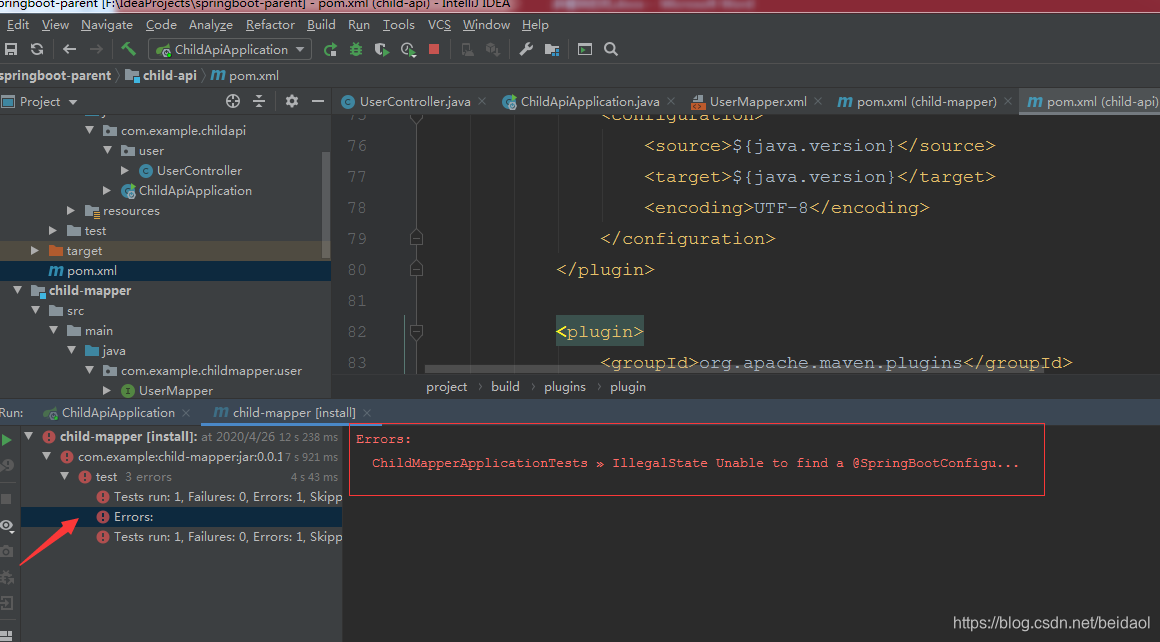
Tests run: 1, Failures: 0, Errors: 1, Skipped: 0, Time elapsed: 0.524 s <<< FAILURE! - in com.example.childmapper.ChildMapperApplicationTests
com.example.childmapper.ChildMapperApplicationTests Time elapsed: 0.521 s <<< ERROR!
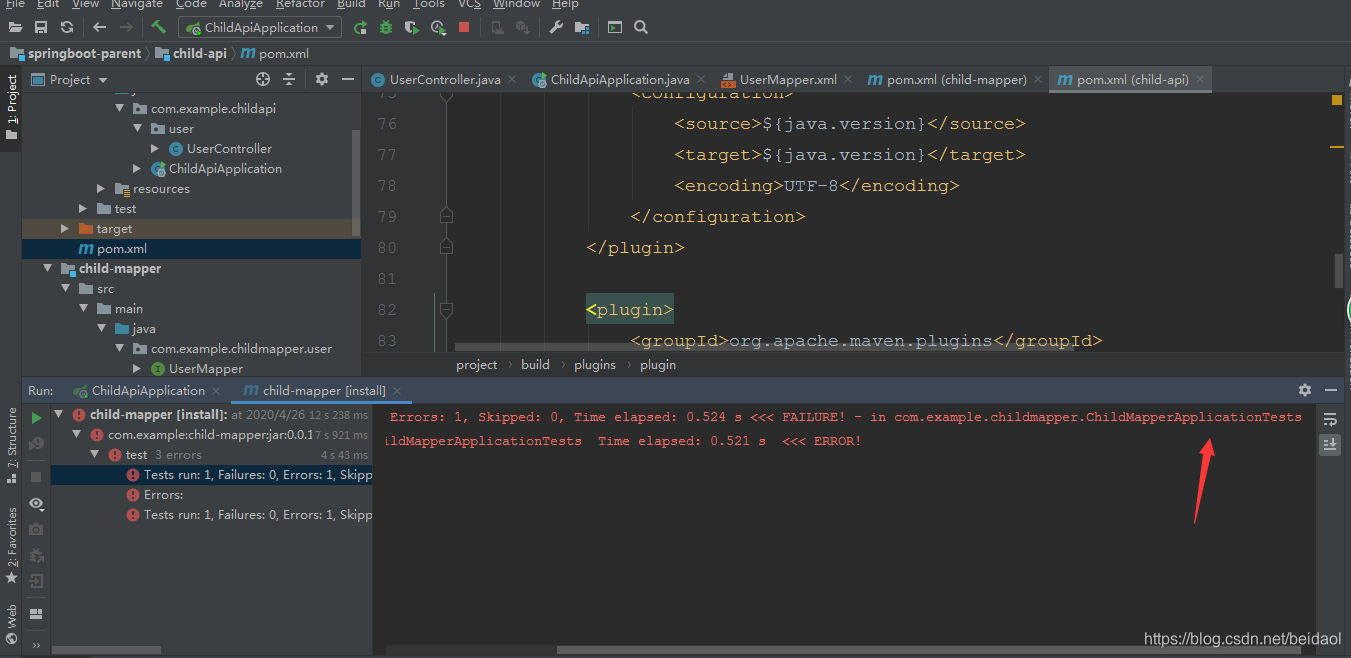
解决办法:添加
<plugin>
                <groupId>org.apache.maven.plugins</groupId>
                <artifactId>maven-surefire-plugin</artifactId>
                <configuration>
                    <skip>true</skip>
                </configuration>
            </plugin>
3、自己的代码
父模块pom.xml
<?xml version="1.0" encoding="UTF-8"?>
<project xmlns="http://maven.apache.org/POM/4.0.0" xmlns:xsi="http://www.w3.org/2001/XMLSchema-instance"
         xsi:schemaLocation="http://maven.apache.org/POM/4.0.0 https://maven.apache.org/xsd/maven-4.0.0.xsd">
    <modelVersion>4.0.0</modelVersion>

    <!-- parent指明继承关系,给出被继承的父项目的具体信息-->
    <parent>
        <groupId>org.springframework.boot</groupId>
        <artifactId>spring-boot-starter-parent</artifactId>
        <version>2.2.6.RELEASE</version>
        <relativePath/> <!-- lookup parent from repository -->
    </parent>

    <groupId>com.example</groupId>
    <artifactId>springboot-parent</artifactId>
    <version>0.0.1-SNAPSHOT</version>
    <packaging>pom</packaging>  <!--父模块打包类型必须为pom-->
    <name>springboot-parent</name>
    <description>Demo project for Spring Boot</description>

    <modules>
        <module>child-model</module>
        <module>child-mapper</module>
        <module>child-service</module>
        <module>child-api</module>
    </modules>

    <properties>
        <project.build.sourceEncoding>UTF-8</project.build.sourceEncoding>
        <project.reporting.outputEncoding>UTF-8</project.reporting.outputEncoding>
        <!-- 在properties中统一控制依赖包的版本,更清晰-->
        <java.version>1.8</java.version>
        <maven.compiler.source>1.8</maven.compiler.source>
        <maven.compiler.target>1.8</maven.compiler.target>
    </properties>


    <dependencyManagement>   <!--dependencyManagement用于管理依赖版本号-->
        <dependencies>

            <!-- 删除spring-boot-starter和spring-boot-starter-test,
            因为parent中继承的祖先中已经有了,并且一般dependencyManagement管理的依赖都要写版本号 -->
            <!--        <dependency>-->
            <!--            <groupId>org.springframework.boot</groupId>-->
            <!--            <artifactId>spring-boot-starter</artifactId>-->
            <!--        </dependency>-->

            <!--        <dependency>-->
            <!--            <groupId>org.springframework.boot</groupId>-->
            <!--            <artifactId>spring-boot-starter-test</artifactId>-->
            <!--            <scope>test</scope>-->
            <!--            <exclusions>-->
            <!--                <exclusion>-->
            <!--                    <groupId>org.junit.vintage</groupId>-->
            <!--                    <artifactId>junit-vintage-engine</artifactId>-->
            <!--                </exclusion>-->
            <!--            </exclusions>-->
            <!--        </dependency>-->


        </dependencies>
    </dependencyManagement>

    <!--该插件作用是打一个可运行的包,必须要写在需要打包的项目里。这里的父模块不需要打包运行,所以删掉该插件。-->
<!--    <build>-->
<!--        <plugins>-->
<!--            <plugin>-->
<!--                <groupId>org.springframework.boot</groupId>-->
<!--                <artifactId>spring-boot-maven-plugin</artifactId>-->
<!--            </plugin>-->
<!--        </plugins>-->
<!--    </build>-->

</project>
子模块child-model
1个类和1个pom.xml
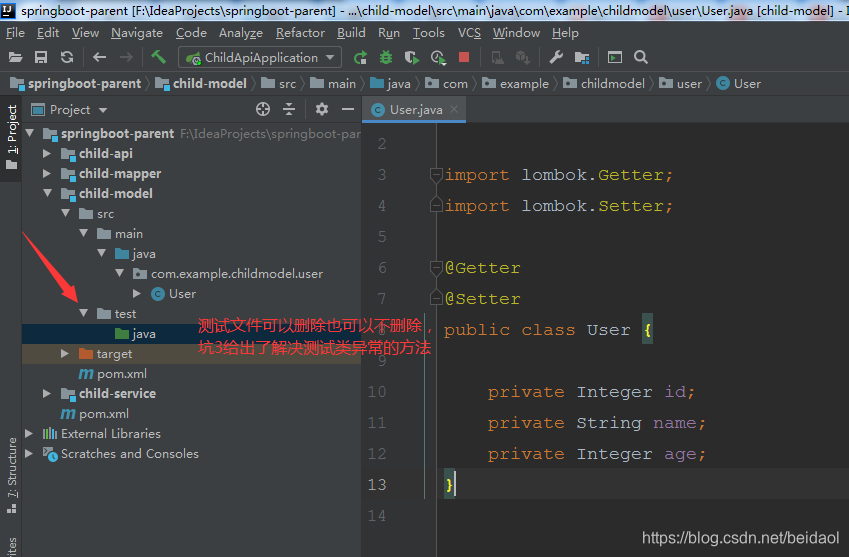
类
package com.example.childmodel.user;

import lombok.Getter;
import lombok.Setter;

@Getter
@Setter
public class User {

    private Integer id;
    private String name;
    private Integer age;
}
pom.xml
<?xml version="1.0" encoding="UTF-8"?>
<project xmlns="http://maven.apache.org/POM/4.0.0" xmlns:xsi="http://www.w3.org/2001/XMLSchema-instance"
xsi:schemaLocation="http://maven.apache.org/POM/4.0.0 https://maven.apache.org/xsd/maven-4.0.0.xsd">
<modelVersion>4.0.0</modelVersion>
<!-- 子模块的parent要使用顶层的父模块-->
<parent>
<!-- <groupId>org.springframework.boot</groupId>-->
<!-- <artifactId>spring-boot-starter-parent</artifactId>-->
<!-- <version>2.2.6.RELEASE</version>-->
<!-- <relativePath/> <!– lookup parent from repository –>-->
<groupId>com.example</groupId>
<artifactId>springboot-parent</artifactId>
<version>0.0.1-SNAPSHOT</version>
</parent>
<groupId>com.example</groupId>
<artifactId>child-model</artifactId>
<version>0.0.1-SNAPSHOT</version>
<packaging>jar</packaging>
<name>child-model</name>
<description>Demo project for Spring Boot</description>
<!-- properties可删掉,会继承父模块的-->
<!-- <properties>-->
<!-- <java.version>1.8</java.version>-->
<!-- </properties>-->
<dependencies>
<dependency>
<groupId>org.springframework.boot</groupId>
<artifactId>spring-boot-starter</artifactId>
</dependency>
<dependency>
<groupId>org.projectlombok</groupId>
<artifactId>lombok</artifactId>
<optional>true</optional>
</dependency>
<dependency>
<groupId>org.springframework.boot</groupId>
<artifactId>spring-boot-starter-test</artifactId>
<scope>test</scope>
<!-- <exclusions>-->
<!-- <exclusion>-->
<!-- <groupId>org.junit.vintage</groupId>-->
<!-- <artifactId>junit-vintage-engine</artifactId>-->
<!-- </exclusion>-->
<!-- </exclusions>-->
</dependency>
</dependencies>
<build>
<plugins>
<plugin>
<groupId>org.apache.maven.plugins</groupId>
<artifactId>maven-compiler-plugin</artifactId>
<configuration>
<source>${java.version}</source>
<target>${java.version}</target>
<encoding>UTF-8</encoding>
</configuration>
</plugin>
</plugins>
</build>
</project>
child-mapper模块
接口、xml文件、pom.xml文件
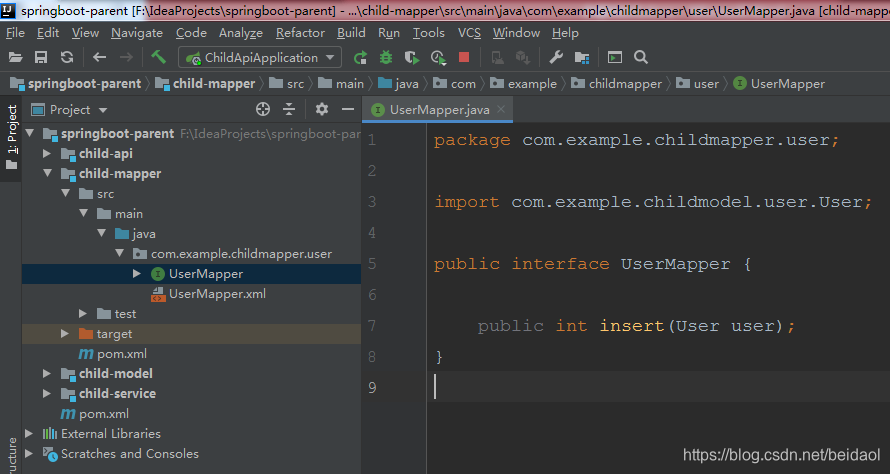
接口
package com.example.childmapper.user;

import com.example.childmodel.user.User;

public interface UserMapper {

    public int insert(User user);
}
xml文件
<?xml version="1.0" encoding="UTF-8"?>
<!DOCTYPE mapper PUBLIC "-//mybatis.org//DTD Mapper 3.0//EN" "http://mybatis.org/dtd/mybatis-3-mapper.dtd">

<mapper namespace="com.example.childmapper.user.UserMapper">

  <insert id="insert" parameterType="com.example.childmodel.user.User">
    insert into users (
      id,
      name,
      age
    )
    values (
      #{id,jdbcType=INTEGER},
      #{name,jdbcType=VARCHAR},
      #{age,jdbcType=INTEGER}
    )
  </insert>
</mapper>
pom.xml
<?xml version="1.0" encoding="UTF-8"?>
<project xmlns="http://maven.apache.org/POM/4.0.0" xmlns:xsi="http://www.w3.org/2001/XMLSchema-instance"
xsi:schemaLocation="http://maven.apache.org/POM/4.0.0 https://maven.apache.org/xsd/maven-4.0.0.xsd">
<modelVersion>4.0.0</modelVersion>
<!-- 子模块的parent要使用顶层的父模块-->
<parent>
<!-- <groupId>org.springframework.boot</groupId>-->
<!-- <artifactId>spring-boot-starter-parent</artifactId>-->
<!-- <version>2.2.6.RELEASE</version>-->
<!-- <relativePath/> <!– lookup parent from repository –>-->
<groupId>com.example</groupId>
<artifactId>springboot-parent</artifactId>
<version>0.0.1-SNAPSHOT</version>
</parent>
<groupId>com.example</groupId>
<artifactId>child-mapper</artifactId>
<version>0.0.1-SNAPSHOT</version>
<packaging>jar</packaging>
<name>child-mapper</name>
<description>Demo project for Spring Boot</description>
<!-- properties可删掉,会继承父模块的-->
<!--<properties>-->
<!--<project.build.sourceEncoding>UTF-8</project.build.sourceEncoding>-->
<!--<project.reporting.outputEncoding>UTF-8</project.reporting.outputEncoding>-->
<!--<java.version>1.8</java.version>-->
<!--</properties>-->
<dependencies>
<dependency>
<groupId>com.example</groupId>
<artifactId>child-model</artifactId>
<version>0.0.1-SNAPSHOT</version>
</dependency>
<dependency>
<groupId>org.springframework.boot</groupId>
<artifactId>spring-boot-starter</artifactId>
</dependency>
<dependency>
<groupId>org.springframework.boot</groupId>
<artifactId>spring-boot-starter-test</artifactId>
<scope>test</scope>
<exclusions>
<exclusion>
<groupId>org.junit.vintage</groupId>
<artifactId>junit-vintage-engine</artifactId>
</exclusion>
</exclusions>
</dependency>
</dependencies>
<build>
<plugins>
<plugin>
<groupId>org.apache.maven.plugins</groupId>
<artifactId>maven-compiler-plugin</artifactId>
<configuration>
<source>${java.version}</source>
<target>${java.version}</target>
<encoding>UTF-8</encoding>
</configuration>
</plugin>
<plugin>
<groupId>org.apache.maven.plugins</groupId>
<artifactId>maven-surefire-plugin</artifactId>
<configuration>
<skip>true</skip>
</configuration>
</plugin>
</plugins>
<resources>
<resource>
<directory>src/main/java</directory>
<includes>
<include>**/*.xml</include>
</includes>
</resource>
<resource>
<directory>src/main/resources</directory>
<includes>
<include>**/*</include>
</includes>
</resource>
</resources>
</build>
</project>
child-service子模块
接口、接口实现类、Pom.xml
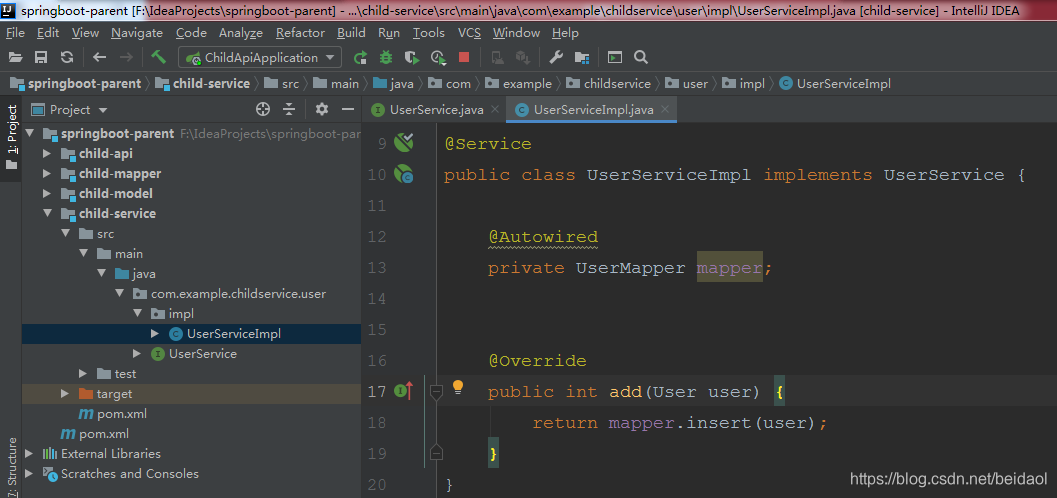
接口
package com.example.childservice.user;

import com.example.childmodel.user.User;

public interface UserService {

    public int add(User user);
}
接口实现类
package com.example.childservice.user.impl;

import com.example.childmapper.user.UserMapper;
import com.example.childmodel.user.User;
import com.example.childservice.user.UserService;
import org.springframework.beans.factory.annotation.Autowired;
import org.springframework.stereotype.Service;

@Service
public class UserServiceImpl implements UserService {

    @Autowired
    private UserMapper mapper;


    @Override
    public int add(User user) {
        return mapper.insert(user);
    }
}
pom.xml
<?xml version="1.0" encoding="UTF-8"?>
<project xmlns="http://maven.apache.org/POM/4.0.0" xmlns:xsi="http://www.w3.org/2001/XMLSchema-instance"
xsi:schemaLocation="http://maven.apache.org/POM/4.0.0 https://maven.apache.org/xsd/maven-4.0.0.xsd">
<modelVersion>4.0.0</modelVersion>
<!-- 子模块的parent要使用顶层的父模块-->
<parent>
<!-- <groupId>org.springframework.boot</groupId>-->
<!-- <artifactId>spring-boot-starter-parent</artifactId>-->
<!-- <version>2.2.6.RELEASE</version>-->
<!-- <relativePath/> <!– lookup parent from repository –>-->
<groupId>com.example</groupId>
<artifactId>springboot-parent</artifactId>
<version>0.0.1-SNAPSHOT</version>
</parent>
<groupId>com.example</groupId>
<artifactId>child-service</artifactId>
<version>0.0.1-SNAPSHOT</version>
<packaging>jar</packaging>
<name>child-service</name>
<description>Demo project for Spring Boot</description>
<!-- <properties>-->
<!-- <java.version>1.8</java.version>-->
<!-- </properties>-->
<dependencies>
<dependency>
<groupId>com.example</groupId>
<artifactId>child-mapper</artifactId>
<version>0.0.1-SNAPSHOT</version>
</dependency>
<dependency>
<groupId>org.springframework.boot</groupId>
<artifactId>spring-boot-starter</artifactId>
</dependency>
<dependency>
<groupId>org.springframework.boot</groupId>
<artifactId>spring-boot-starter-test</artifactId>
<scope>test</scope>
<exclusions>
<exclusion>
<groupId>org.junit.vintage</groupId>
<artifactId>junit-vintage-engine</artifactId>
</exclusion>
</exclusions>
</dependency>
</dependencies>
<build>
<plugins>
<plugin>
<groupId>org.apache.maven.plugins</groupId>
<artifactId>maven-compiler-plugin</artifactId>
<configuration>
<source>${java.version}</source>
<target>${java.version}</target>
<encoding>UTF-8</encoding>
</configuration>
</plugin>
<plugin>
<groupId>org.apache.maven.plugins</groupId>
<artifactId>maven-surefire-plugin</artifactId>
<configuration>
<skip>true</skip>
</configuration>
</plugin>
</plugins>
</build>
</project>
child-api子模块
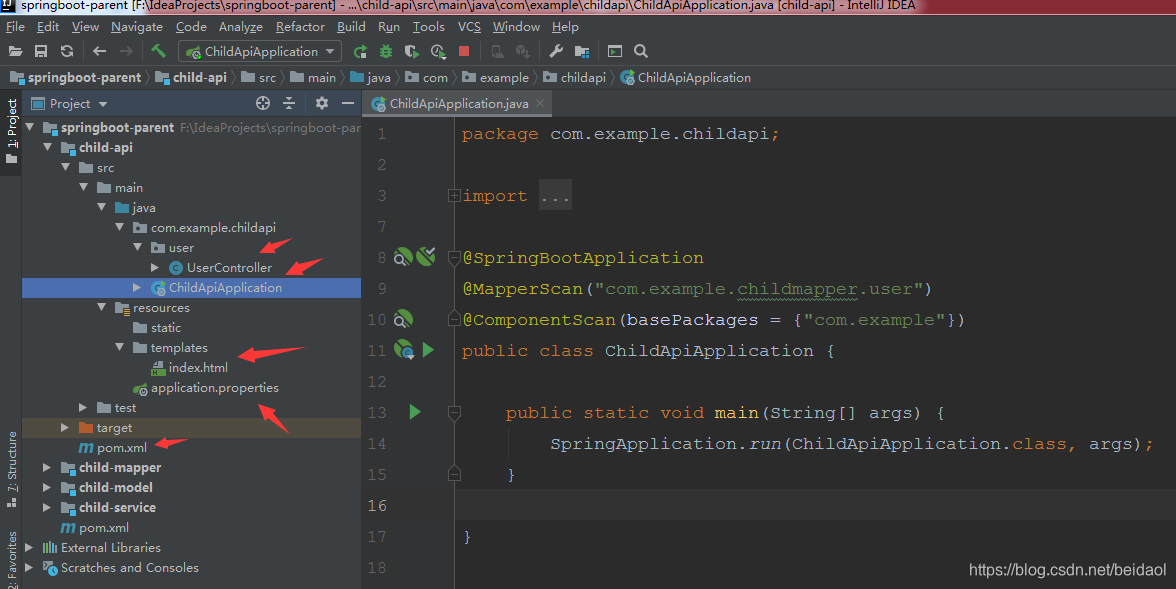
controller
package com.example.childapi.user;

import com.example.childmodel.user.User;
import com.example.childservice.user.UserService;
import org.springframework.beans.factory.annotation.Autowired;
import org.springframework.stereotype.Controller;
import org.springframework.web.bind.annotation.GetMapping;
import org.springframework.web.bind.annotation.ResponseBody;

import javax.annotation.Resource;

@Controller
public class UserController {

    @Autowired
    private UserService userService;

    @ResponseBody
    @GetMapping("/add")
    public User add(){
        User user = new User();
        user.setId(99);
        user.setName("dddd");
        user.setAge(19);
        userService.add(user);
        return user;
    }

}
启动文件
package com.example.childapi;

import org.mybatis.spring.annotation.MapperScan;
import org.springframework.boot.SpringApplication;
import org.springframework.boot.autoconfigure.SpringBootApplication;
import org.springframework.context.annotation.ComponentScan;

@SpringBootApplication
@MapperScan("com.example.childmapper.user")
@ComponentScan(basePackages = {"com.example"})
public class ChildApiApplication {

    public static void main(String[] args) {
        SpringApplication.run(ChildApiApplication.class, args);
    }

}
属性文件
spring.datasource.driverClassName=com.mysql.cj.jdbc.Driver
#  com.mysql.jdbc.Driver
spring.datasource.url=jdbc:mysql://localhost:3306/ssm?useUnicode=true&characterEncoding=UTF-8&useJDBCCompliantTimezoneShift=true&useLegacyDatetimeCode=false&serverTimezone=UTC
spring.datasource.username=root
spring.datasource.password=root

#开启驼峰命名转换
mybatis.configuration.map-underscore-to-camel-case=true
#实体类的别名
#mybatis.type-aliases-package=com.example.springboot.model

#mybatis.mapper-locations=classpath:*/com/example/childmapper/user/UserMapper/*.xml


#logging.level.com,后面的路径指的是mybatis对应的方法接口所在的包。并不是mapper.xml所在的包
#logging.level.com.example.springboot.mapper=debug
pom.xml
<?xml version="1.0" encoding="UTF-8"?>
<project xmlns="http://maven.apache.org/POM/4.0.0" xmlns:xsi="http://www.w3.org/2001/XMLSchema-instance"
xsi:schemaLocation="http://maven.apache.org/POM/4.0.0 https://maven.apache.org/xsd/maven-4.0.0.xsd">
<modelVersion>4.0.0</modelVersion>
<!-- 子模块的parent要使用顶层的父模块-->
<parent>
<!-- <groupId>org.springframework.boot</groupId>-->
<!-- <artifactId>spring-boot-starter-parent</artifactId>-->
<!-- <version>2.2.6.RELEASE</version>-->
<!-- <relativePath/> <!– lookup parent from repository –>-->
<groupId>com.example</groupId>
<artifactId>springboot-parent</artifactId>
<version>0.0.1-SNAPSHOT</version>
</parent>
<groupId>com.example</groupId>
<artifactId>child-api</artifactId>
<version>0.0.1-SNAPSHOT</version>
<packaging>jar</packaging>
<name>child-api</name>
<description>Demo project for Spring Boot</description>
<!-- <properties>-->
<!-- <java.version>1.8</java.version>-->
<!-- </properties>-->
<dependencies>
<dependency>
<groupId>com.example</groupId>
<artifactId>child-service</artifactId>
<version>0.0.1-SNAPSHOT</version>
</dependency>
<dependency>
<groupId>org.springframework.boot</groupId>
<artifactId>spring-boot-starter-thymeleaf</artifactId>
</dependency>
<dependency>
<groupId>org.springframework.boot</groupId>
<artifactId>spring-boot-starter-web</artifactId>
</dependency>
<dependency>
<groupId>org.mybatis.spring.boot</groupId>
<artifactId>mybatis-spring-boot-starter</artifactId>
<version>2.1.2</version>
</dependency>
<dependency>
<groupId>mysql</groupId>
<artifactId>mysql-connector-java</artifactId>
<scope>runtime</scope>
</dependency>
<dependency>
<groupId>org.springframework.boot</groupId>
<artifactId>spring-boot-starter-test</artifactId>
<scope>test</scope>
<exclusions>
<exclusion>
<groupId>org.junit.vintage</groupId>
<artifactId>junit-vintage-engine</artifactId>
</exclusion>
</exclusions>
</dependency>
</dependencies>
<build>
<plugins>
<plugin>
<groupId>org.apache.maven.plugins</groupId>
<artifactId>maven-compiler-plugin</artifactId>
<configuration>
<source>${java.version}</source>
<target>${java.version}</target>
<encoding>UTF-8</encoding>
</configuration>
</plugin>
<plugin>
<groupId>org.apache.maven.plugins</groupId>
<artifactId>maven-surefire-plugin</artifactId>
<configuration>
<skip>true</skip>
</configuration>
</plugin>
</plugins>
</build>
</project>





 扫一扫
扫一扫


 被折叠的 条评论
为什么被折叠?
被折叠的 条评论
为什么被折叠?
 到【灌水乐园】发言





