1.命名规范
1. 使用 Pascal casing 定义类型和方法名
public class SomeClass
{
public SomeMethod(){}
}
2. 使用 camel casing 定义局部变量名和方法参数
int number;
void MyMethod(int someNumber)
{}
3. 使用“I”前缀定义接口名
interface IMyInterface
{..}
4. 使用“m_”前缀定义私有成员变量
public class SomeClass
{
private int m_Number;
}
5. 属性类使用“Attribute”为后缀
6. 异常类使用“ Exception.”为后缀
7. 方法命名采用动词短语,例如ShowDialog()
8. 带返回值的方法应该在名字中描述返回值,例如 GetObjectState()
9. 一般地,命名参数的时候加上TYPE. 这将增加代码的易读性
//正确:
public class LinkedList<KeyType,DataType>
{…}
//避免:
public class LinkedList<K,T>
{…}
10. 保持严格的缩进
a) 使用3个空格缩进
b) 不要使用tab键或者不标准的缩进比如1、2或者4个空格.
11. 注释的缩进和注释描述的代码同级
12. 所有的注释要拼写正确,不正确的注释意味开发混乱.
13. 使用描述性的变量名.
a) 避免一个字符的变量名,例如“i”或者“t”。用“index”或者“temp”代替.
b) 避免使用匈牙利命名法定义“Public”或者“protected”成员.
c) 不要缩短单词(例如“num”代替“number”).
14. 所有的成员变量应该在顶部定义,用一个空行把它们和属性或者方法分开。
public class MyClass
{
int m_Number;
string m_Name;
public void SomeMethod1(){}
public void SomeMethod2(){}
}
15. 定义局部变量尽量靠近第一次使用的地方。
16. 使用有意思的命名空间,例如产品名、公司名等等
17. 避免使用类型的全称,用“using”声明代替.
18. 避免把“using”声明放在命名空间内.
19. 所有框架的命名空间在前面,自定义或者第三方的命名空间放在后面进行分组.
using System;
using System.Collections;
using System.ComponentModel;
using System.Data;
using MyCompmnay;
using MyControls;
20. 文件名应该反映它包含的类.
21. 总是把“{”放在新的一行.
22. 用匿名方法模拟正常方法的代码结构,排列匿名的代理
(With anonymous methods mimic the code layout of a regular method,
aligned with the anonymous delegate declaration.
a) Comply with placing an open curly brace in a new line)
2 Coding Practices
1. 使用C#预定义的类型胜于系统空间的别名
例如:
object 而不是 Object
string 而不是 String
int 而不是 Int32
2.避免多个类放在一个文件中.
3. 一个文件应该属于一个命名空间而不是多个.
4. 避免一个文件超过500行(不包括自动产生的代码).
5. 避免方法超过25行.
6. 一行不超过80个字符.
7. 不要改动自动产生的代码.
- 5 -
©2003 IDesign Inc. All rights reserved
8. If modifying machine generated code, modify the format and style to match this
coding standard.
a) Use partial classes if possible.
9. Avoid comments that explain the obvious.
10. Code should be self explanatory. Good code with readable variable and method
names should not require comments.
11. Document only operational assumptions, algorithm insights etc.
12. Avoid method-level documentation.
a) Use extensive external documentation for API documentation.
b) Use method-level comments only as tool tips for other developers.
13. Never hard-code a numeric value, always declare a constant instead.
14. Assert every assumption.
15. On average, every fifth line is an assertion.
using System.Diagnostics;
object GetObject()
{…}
object obj = GetObject();
Debug.Assert(obj != null);
16. Make only the most necessary types public, mark others as internal.
17. Always use zero-based arrays.
18. Avoid providing explicit values for enums.
19. Avoid specifying a type for an enum (like long).
20. Never use goto unless in a switch statement fall-through.
www.idesign.net August 2003
- 6 -
©2003 IDesign Inc. All rights reserved
21. Avoid function calls in Boolean conditional statements. Assign into local variables
and check on them:
bool IsEverythingOK()
{…}
//Avoid:
if(IsEverythingOK())
{…}
//Instead:
bool ok = IsEverythingOK();
if(ok)
{…}
22. Always explicitly initialize an array of reference types using a for loop.
public class MyClass
{}
MyClass[] array = new MyClass[100];
for(int index = 0; index < array.Length; index++)
{
array[index] = new MyClass();
}
23. Only catch exceptions for which you have explicit handling.
24. In a catch statement that throws an exception, always throw the original exception to
maintain stack location of original error.
catch(Exception exception)
{
MessageBox.Show(exception.Message);
throw; //Same as throw exception;
}
25. Avoid error code as methods return values.
26. Do not use the new inheritance qualifier. Use override instead.
27. Minimize code in application assemblies (EXE client assemblies), use class libraries
instead to contain business logic.
28. Never hardcode strings that will be presented to end users. Use resources instead.
29. Never hardcode strings that might change based on deployment such as connection
strings.
30. Never use unsafe code unless when using interop.
31. Always use interfaces.
a) See Chapters 1 and 3 in Programming .NET Components.
32. Avoid multiple Main() methods in a single assembly.
www.idesign.net August 2003
- 7 -
©2003 IDesign Inc. All rights reserved
33. Avoid explicit casting. Use the as operator to defensively cast to a type.
Dog dog = new GermanShepherd();
GermanShepherd shepherd = dog as GermanShepherd;
if(shepherd != null)
{…}
34. Never assume a type supports an interface. Defensively query for that interface.
SomeType obj1;
IMyInterface obj2;
/* Some code to initialize obj1, then: */
obj2 = obj1 as IMyInterface;
if(obj2 != null)
{
obj2.Method1();
}
else
{
//Handle error in expected interface
}
35. Do not provide public or protected member variables. Use properties instead.
36. Do not provide public event member variables. Use event accessors instead.
public class MySource
{
MyDelegate m_NumberChangedEvent;
public event MyDelegate NumberChangedEvent
{
add
{
m_NumberChangedEvent += value;
}
remove
{
m_NumberChangedEvent -= value;
}
}
}
37. Classes and interfaces should have at least 2:1 ratio of methods to properties.
38. Avoid interfaces with one member.
39. Strive to have 3-5 members per interface.
40. No more than 20 members per interface.
a) 12 is probably a practical limit.
41. Avoid events as interface members.
42. Avoid abstract methods, use interfaces instead.
43. Always prefer using C# generics in data structures.
44. Expose interfaces on class hierarchies.
a) See Chapter 3 in Programming .NET Components.
www.idesign.net August 2003
- 8 -
©2003 IDesign Inc. All rights reserved
45. Prefer using explicit interface implementation.
a) See Chapter 3 in Programming .NET Components.
46. Always mark public and protected methods as virtual in a non sealed class.
47. When building a long string, use StringBuilder, not string.
48. Always use a curly brace scope in an if statement, even if it conditions a single
statement.
49. With delegates as class members:
a) Copy a delegate to a local variable before publishing to avoid concurrency race
condition.
b) Always check a delegate for null before invoking it.
public class MySource
{
public event EventHandler MyEvent;
public void FireEvent()
{
EventHandler temp = MyEvent;
if(temp != null)
{
temp(this,EventArgs.Empty);
}
}
}
50. Always have a default case in a switch statement that asserts
int number = SomeMethod();
switch(number)
{
case 1:
Trace.WriteLine("Case 1:");
break;
case 2:
Trace.WriteLine("Case 2:");
break;
default:
Debug.Assert(false);
break;
}
51. Avoid providing methods on structures.
a) Parameterized constructors are encouraged.
b) Can overload operators.
52. Always provide a static constructor when providing static member variables.
53. Every line of code should be walked through in a “white box” testing manner.
54. Avoid code that relies on an assembly running from a particular location.
55. Do not use late-binding invocation when early-binding is possible.
www.idesign.net August 2003
- 9 -
©2003 IDesign Inc. All rights reserved
56. Avoid using the trinary conditional operator.
57. Do not use the this reference unless invoking another constructor from within a
constructor.
//Example of proper use of ’this’
public class MyClass
{
public MyClass(string message)
{}
public MyClass() : this("hello")
{}
}
58. Use the EventsHelper class defined in Programming .NET Components to
publish events defensively.
59. Use application logging and tracing.
60. Do not use the base word to access base class members unless you wish to resolve
a conflict with a subclasses member of the same name or when invoking a base class
constructor.
//Example of proper use of ’base’
public class Dog
{
public Dog(string name)
{}
virtual public void Bark(int howLong)
{}
}
public class GermanShepherd : Dog
{
public GermanShepherd(string name): base(name)
{}
override public void Bark(int howLong)
{
base.Bark(howLong);
}
}
61. Implement Dispose() and Finalize() methods based on the template in
Chapter 4 of Programming .NET Components.
62. Avoid casting to and from System.Object in code that uses generics.
63. Use the const directive only on natural constants such as the number of days of
week. Avoid using const on read only variables. For that, use the readonly
directive.
public class MyClass
{
public readonly int Number;
public MyClass(int someValue)
{
Number = someValue;
}
const int DaysInWeek = 7;
}
www.idesign.net August 2003
3 Project Settings and Project Structure
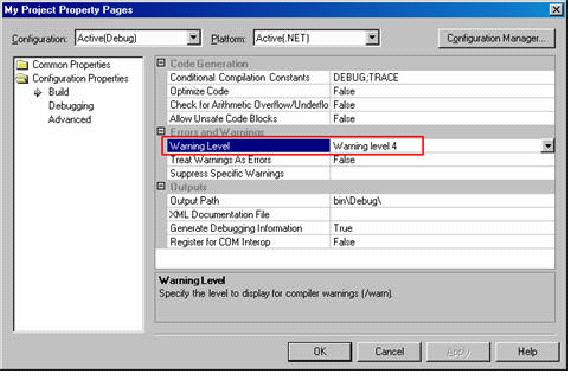
1. Always build your project with warning level 4
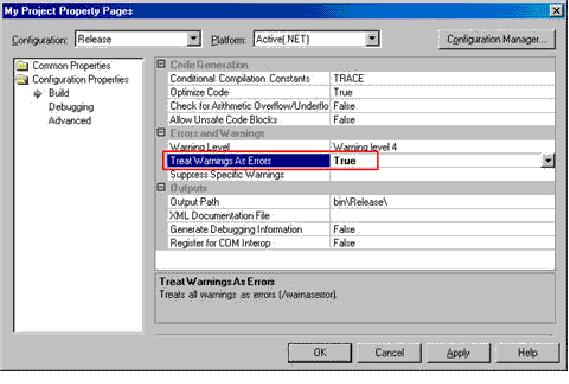
2. Treat warning as errors in Release build (note that this is not the default of VS.NET).
a) Although it is optional, this standard recommend treating warnings as errors in
debug builds as well.
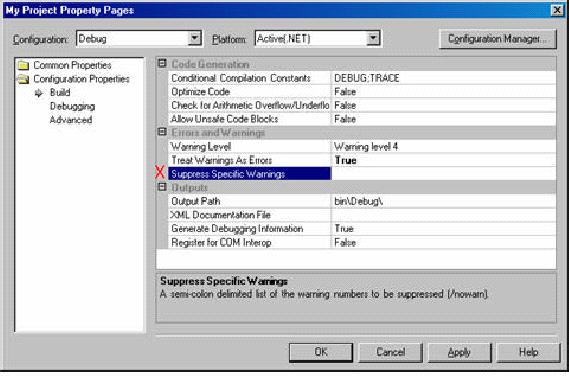
3. Never suppress specific compiler warnings.
- 11 -
©2003 IDesign Inc. All rights reserved
4. Always explicitly state your supported runtime versions in the application
configuration file. See Chapter 5 in Programming .NET Components.
<?xml version="1.0"?>
<configuration>
<startup>
<supportedRuntime version="v2.0.0.0"/>
<supportedRuntime version="v1.1.5000.0"/>
</startup>
</configuration>
5. Avoid explicit custom version redirection and binding to CLR assemblies.
6. Avoid explicit preprocessor definitions (#define). Use the project settings for
defining conditional compilation constants.
7. Do not put any logic inside AssemblyInfo.cs.
8. Do not put any assembly attributes in any file besides AssemblyInfo.cs.
9. Populate all fields in AssemblyInfo.cs such as company name, description, copyright
notice.
10. All assembly references should use relative path.
11. Disallow cyclic references between assemblies.
12. Avoid multi-module assemblies.
www.idesign.net August 2003
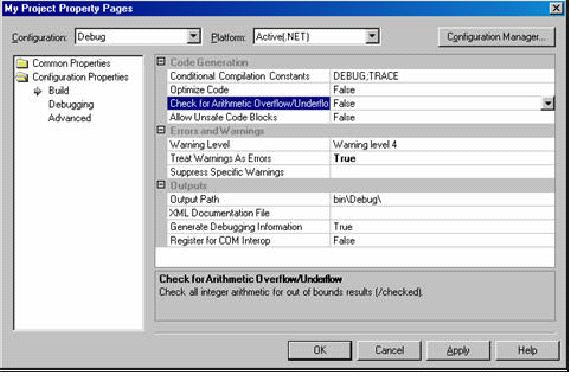
13. Always run code unchecked by default (for performance sake), but explic itly in
checked mode for prone operations.
- 12 -
©2003 IDesign Inc. All rights reserved
int CalcPower(int number,int power)
{
int result = 1;
for(int count = 1;count <= power;count++)
{
checked
{
result *= number;
}
}
return result;
}
14. Avoid tampering with exception handling using the Exception window
(Debug|Exceptions).
15. Strive to uniform version numbers on all assemblies and clients in same logical
application (typically a solution).
16. Name your VS.NET application configuration file as App.Config, and include it in
the project.
17. Avoid explicit code exclusion of method calls (#if…#endif). Use conditional
methods instead.
public class MyClass
{
[Conditional("MySpecialCondition")]
public void MyMethod()
{}
}
www.idesign.net August 2003
18. Modify VS.NET default project structure to your project standard layout, and apply
uniform structure for project folders and files.
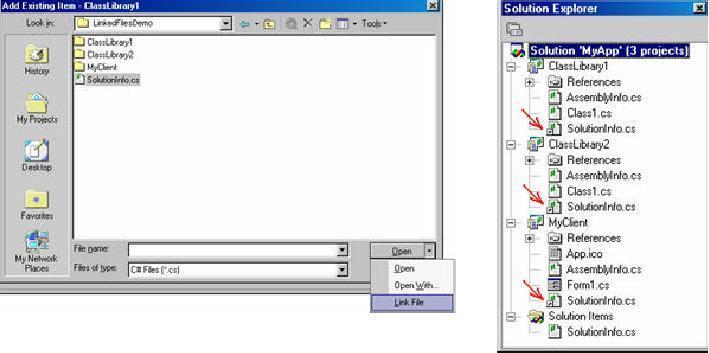
19. Link all solution-wide information to a global shared file:
- 13 -
©2003 IDesign Inc. All rights reserved
20. Insert spaces for tabs. Use 3 spaces instead of tabs
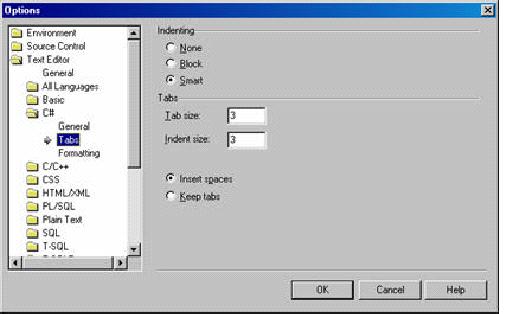
a) Tools|Options|Text Editor|C#|Tabs
www.idesign.net August 2003
- 14 -
©2003 IDesign Inc. All rights reserved
21. Release build should contain debug symbols.
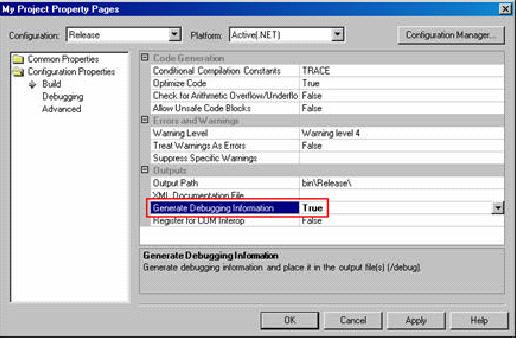
22. Always sign your assemblies, including the client applications.
23. Always sign interop assemblies with the project’s SNK file
 www.idesign.net August 2003
- 15 -
©2003 IDesign Inc. All rights reserved
4 Framework Specific Guidelines
4.1 Data Access
1. Always use type-safe data sets. Avoid raw ADO.NET.
2. Always use transactions when accessing a database.
3. Always use transaction isolation level set to Serializable.
a) Requires management decision to use anything else.
4. Do not use the Server Explorer to drop connections on windows forms, ASP.NET
forms or web services. Doing so couples the presentation tier to the data tier.
5. Avoid SQL Server authentication.
a) Use Windows authentication instead.
6. Run components accessing SQL Server under separate identity from that of the
calling client.
7. Always warp your stored procedures in a high level, type safe class. Only that class
invokes the stored procedures.
8. Avoid putting any logic inside a stored procedure.
a) If there is an IF inside a stored procedure, you are doing something wrong.
4.2 ASP.NET and Web Services
1. Avoid putting code in ASPX files of ASP.NET. All code should be in the codebehind
class.
2. Code in code behind class of ASP.NET should call other components rather than
contain direct busines s logic.
3. In both ASP.NET pages and web services, wrap a session variables in a local
property. Only that property is allowed to access the session variable, and the rest of
the code uses the property, not the session variable.
4. Avoid setting to True the Auto-Postback property of server controls in ASP.NET.
5. In transactional pages or web services, always store session in SQL server.
6. Turn on Smart Navigation for ASP.NET pages.
7. Strive to provide interfaces for web services
a) See Appendix A of Programming .NET Comp onents.
8. Always provide namespace and service description for web services.
9. Always provide a description for web methods.
10. When adding a web service reference, provide meaningful name for the location.
11. Always modify client-side web service wrapper class to support cookies.
a) You have no way of knowing whether the service uses Session state or not.
www.idesign.net August 2003
- 16 -
©2003 IDesign Inc. All rights reserved
4.3 Serialization
1. Always mark non-sealed classes as Serializable.
2. Always mark un-serializable member variables as non serializable.
3. Always mark delegates on a serialized class as non-serializable.
[Serializable]
public class MyClass
{
[field:NonSerialized]
public event MyDelegate Delegate;
}
4.4 Multithreading
1. Use Synchronization Domains. See Chapter 8 in Programming .NET Components.
a) Avoid manual synchronization, because they often lead to deadlocks and race
conditions.
2. Never call outside your synchronization domain.
3. Manage asynchronous call completion on a callback method.
a) Do not wait, poll, or block for completion.
4. Always name your threads.
a) Name is traces in the debugger Threads window, making a debug session more
productive.
Thread currentThread = Thread.CurrentThread;
string threadName = "Main UI Thread";
currentThread.Name = threadName;
5. Do not call Suspend() or Resume() on a thread.
6. Do not call Thread.Sleep().
a) Thread.Sleep(0) is acceptable optimization technique to force a context
switch.
b) Thread.Sleep() is acceptable in testing or simulation code.
7. Do not call Thread.SpinWait().
8. Do not call Thread.Abort() to terminate threads.
a) Use a synchronization object instead to signal the thread to terminate. See
Chapter 8 in Programming .NET Components.
9. Avoid explicitly setting thread priority to control execution.
a) Can set thread priority based on task semantic, such as bellow normal for a
screen saver.
10. Do not read the value of the thread state property.
a) Use Thread.IsAlive() to determine whether the thread is dead.
11. Do not rely on setting the thread type to background thread for application shutdown.
a) Use a watchdog or other monitoring entity to deterministically kill threads.
12. Do not use thread local storage unless thread affinity is guaranteed.
www.idesign.net August 2003
- 17 -
©2003 IDesign Inc. All rights reserved
13. Never call Thread.Join() without checking that you are not joining your own
thread.
void WaitForThreadToDie(Thread thread)
{
Debug.Assert(Thread.CurrentThread.GetHashCode() != tread.GetHashCode());
thread.Join();
}
14. Always use the lock() statement rather than explicit Monitor manipulation.
15. Always encapsulate the lock() statement inside the object it protects.
public class MyClass
{
public void DoSomething()
{
lock(this)
{
//Do Something
}
}
}
a) Can use synchronized methods instead of writing the lock() statement
yourself.
16. Avoid fragmented locking (see Chapter 8 of Programming .NET Components).
17. Avoid using a Monitor to wait or pulse objects. Use manual or auto-reset events
instead.
18. Always release a Mutex inside a finally statement to handle exceptions.
19. Do not use volatile variables. Lock your object or fields instead to guarantee
deterministic and thread-safe access.
4.5 Remoting
1. Prefer administrative configuration to programmatic configuration.
2. Always implement IDisposable on a single call objects.
3. Always prefer TCP channel and binary format when using remoting.
a) Unless a firewall is present.
4. Always provide a null lease for a singleton object.
public class MySingleton : MarshalByRefObject
{
public override object InitializeLifetimeService()
{
return null;
}
}
5. always provide a sponsor for a client activated object. Sponsor should return initial
lease timed.
a) See Chapter 10 of Programming .NET Components.
www.idesign.net August 2003
- 18 -
©2003 IDesign Inc. All rights reserved
6. Always unregister a sponsor on client application shutdown.
7. Always put remote objects in class libraries.
8. Avoid using SoapSuds.
9. Avoid hosting in IIS.
10. Avoid using uni-directional channels.
11. Always load a remoting configuration file in Main() even if the file is empty, and
the application does not use remoting.
a) Allow the option of remoting some types later on post deployment, and
changing the application topology.
static void Main()
{
RemotingConfiguration.Configure("MyApp.exe.config");
/* Rest of Main() */
}
12. Avoid using Activator.GetObject() and
Activator.CreateiInstance() for remote objects activation. Use new
instead.
13. Always register port 0 on the client side, to allow callbacks.
14. Always elevate type filtering to full on both client and host to allow callbacks.
Host Config file:
<channels>
<channel ref="tcp" port="8005">
<serverProviders>
<formatter ref="soap" typeFilterLevel="Full"/>
<formatter ref="binary" typeFilterLevel="Full"/>
</serverProviders>
</channel>
<channel ref="http" port="8006">
<serverProviders>
<formatter ref="soap" typeFilterLevel="Full"/>
<formatter ref="binary" typeFilterLevel="Full"/>
</serverProviders>
</channel>
</channels>
Client Config file:
<channels>
<channel ref="tcp" port="0">
<serverProviders>
<formatter ref="soap" typeFilterLevel="Full"/>
<formatter ref="binary" typeFilterLevel="Full"/>
</serverProviders>
</channel>
</channels>
www.idesign.net August 2003
- 19 -
©2003 IDesign Inc. All rights reserved
4.6 Security
1. Always demand your own strong name on assemblies and components that are
private to the application, but are public (so that only you can use them).
public class PublicKeys
{
public const string MyCompany = "1234567894800000940000000602000000240000"+
"52534131000400000100010007D1FA57C4AED9F0"+
"A32E84AA0FAEFD0DE9E8FD6AEC8F87FB03766C83"+
"4C99921EB23BE79AD9D5DCC1DD9AD23613210290"+
"0B723CF980957FC4E177108FC607774F29E8320E"+
"92EA05ECE4E821C0A5EFE8F1645C4C0C93C1AB99"+
"285D622CAA652C1DFAD63D745D6F2DE5F17E5EAF"+
"0FC4963D261C8A12436518206DC093344D5AD293";
}
[StrongNameIdentityPermission(SecurityAction.LinkDemand,
PublicKey = PublicKeys.MyCompany)]
public class MyClass
{…}
2. Apply encryption and security protection on application configuration files.
3. Assert unmanaged code permission, and demand appropriate permission instead.
4. On server machines deploy code-access security policy that grants only Microsoft,
ECMA and self (identified by strong name) full trust.
a) All other code is implicitly granted nothing.
5. On client machine, deploy a security policy which grants client application only the
permissions to call back the server and to potentially display user interface.
a) Client application identified by strong name.
6. Always refuse at the assembly level all permissions not required to perform task at
hand.
a) The counter a luring attack.
[assembly:UIPermission(SecurityAction.RequestRefuse,
Window=UIPermissionWindow.AllWindows)]
7. Always set the principal policy in every Main() method to Windows
public class MyClass
{
static void Main()
{
AppDomain currentDomain = Thread.GetDomain();
currentDomain.SetPrincipalPolicy(PrincipalPolicy.WindowsPrincipal);
}
//other methods
}
8. Never assert a permission without demanding a different permission in its place. See
Chapter 12 in Programming .NET Components.
www.idesign.net August 2003
4.7 Enterprise Services
1. Do not catch exceptions in a transactional method. Use the AutoComplete
attribute.
a) See COM and .NET Component Services.
2. Do not call SetComplete(), SetAbort(), and the like. Use the
AutoComplete attribute.
[Transaction]
public class MyComponent : ServicedComponent
{
[AutoComplete]
public void MyMethod(long objectIdentifier)
{
GetState(objectIdentifier);
DoWork();
SaveState(objectIdentifier);
}
}
3. Always override CanBePooled and return true (unless you have a good reason
not to return to pool)
public class MyComponent :ServicedComponent
{
protected override bool CanBePooled()
{
return true;
}
}
4. Always call Dispose() explicitly on a pooled objects unless the component is
configured to use JITA as well.
5. Set authentication level to privacy on all applications.
6. Use Enterprise Services whenever more than one object or more than one database is
involved in a single transaction.
7. Set impersonation level on client assemblies to Identity.
8. Always set ComponentAccessControl attribute on serviced components to true
a) The default is True
9. Always add to the Marshaler role the Everyone user
[assembly: SecurityRole("Marshaler",SetEveryoneAccess = true)]
10. Apply SecureMethod attribute to all classes requiring authentication.



 本文详细介绍了C#编程的命名规范,包括类、方法、变量的命名规则,以及代码组织、注释、异常处理、类型使用、文件命名、接口实现等方面的最佳实践。强调了使用有意义的命名、避免硬编码、使用接口、避免显式类型转换等原则,旨在提高代码的可读性和维护性。






 扫一扫
扫一扫


 3087
3087

 被折叠的 条评论
为什么被折叠?
被折叠的 条评论
为什么被折叠?
 到【灌水乐园】发言





