



今天为大家分享2048游戏的开发与制作。整个系统界面漂亮,有完整得源码,希望大家可以喜欢。喜欢的帮忙点赞和关注。一起编程、一起进步
开发环境
开发语言为Java,开发环境Eclipse或者IDEA都可以。运行主程序,或者执行打开JAR文件即可以运行本程序。
系统框架
利用JDK自带的SWING框架开发,不需要安装第三方JAR包。纯窗体模式,直接运行Main文件即可以。同时带有详细得设计文档
主要功能
游戏说明
2014年Gabriele Cirulli利用周末的时间写2048这个游戏的程序,仅仅只是好玩而已。他想用一种不同的视觉展现效果和更快速的动画来创造属于自己的游戏版本。
在制作2048的过程中,他决定把项目托管到Github [2] 上去,并且通过Github完成项目。完成了这个游戏之后,通过GithubPages发布,并发表在DesignerNews上。
游戏胜利判断
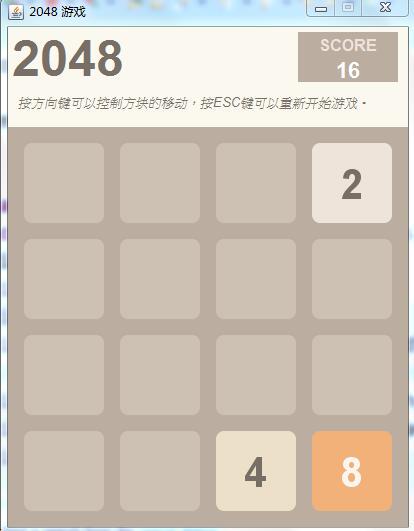
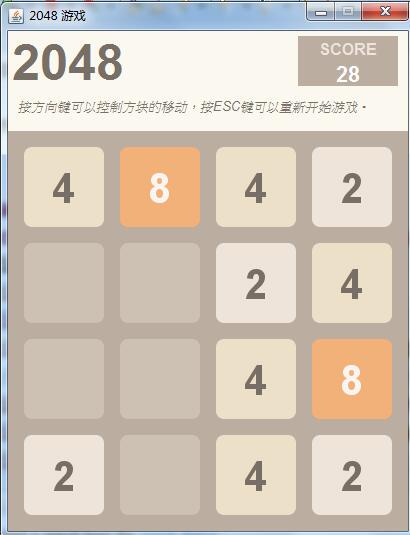
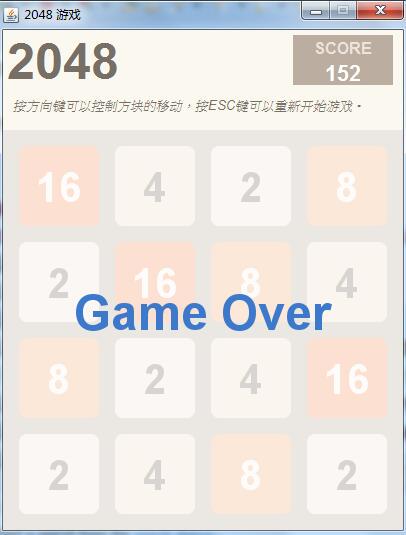
游戏面板有16个键盘,分4*4行。每次可以选择上下左右其中一个方向去滑动,每滑动一次,所有的数字方块都会往滑动的方向靠拢外,系统也会在空白的地方乱数出现一个数字方块,相同数字的方块在靠拢、相撞时会相加。不断的叠加最终拼凑出2048这个数字就算成功。
游戏技巧
最大数尽可能放在角落。
数字按顺序紧邻排列。
首先满足最大数和次大数在的那一列/行是满的。
时刻注意活动较大数(32以上)旁边要有相近的数。
以大数所在的一行为主要移动方向
不要急于“清理桌面”。
主要代码
package com.game.main;
import javax.sound.sampled.*;
import java.io.File;
import java.net.URISyntaxException;
import java.net.URL;
public class WaveThread extends Thread {
private String filename;
private final int EXTERNAL_BUFFER_SIZE = 524288; // 128Kb
public WaveThread(String wavfile) {
filename = wavfile;
}
public void run() {
AudioInputStream audioInputStream = null;
SourceDataLine auline = null;
//System.out.println("filaname"+filename);
URL url = Thread.currentThread().getContextClassLoader().getResource(filename);
try {
File soundFile = new File(url.toURI());
audioInputStream = AudioSystem.getAudioInputStream(soundFile);
AudioFormat format = audioInputStream.getFormat();
DataLine.Info info = new DataLine.Info(SourceDataLine.class, format);
auline = (SourceDataLine) AudioSystem.getLine(info);
auline.open(format);
auline.start();
int nBytesRead = 0;
byte[] abData = new byte[EXTERNAL_BUFFER_SIZE];
while (nBytesRead != -1) {
nBytesRead = audioInputStream.read(abData, 0, abData.length);
if (nBytesRead >= 0)
auline.write(abData, 0, nBytesRead);
}
} catch (Exception e) {
e.printStackTrace();
} finally {
if (auline != null) {
auline.drain();
auline.close();
}
}
}
}
package com.game.view;
import javax.swing.*;
import java.awt.*;
import java.awt.event.KeyEvent;
import java.awt.event.KeyListener;
import java.util.ArrayList;
import java.util.List;
import java.util.Random;
/**
* 这个版本没有音效和移动特效
*
* @author 锋宇
* @contact QQ群399643539
* @website http://www.wolfbe.com
* @copyright 版权归朗度云所有
*/
public class Window1 extends JFrame {
private static int score = 0; //分数
final Font[] fonts = {new Font("Helvetica Neue", Font.BOLD, 48)
, new Font("Helvetica Neue", Font.BOLD, 42)
, new Font("Helvetica Neue", Font.BOLD, 36)
, new Font("Helvetica Neue", Font.BOLD, 30)
, new Font("Helvetica Neue", Font.BOLD, 24)
};
private GameBoard gameBoard;
private JLabel ltitle;
private JLabel lsctip;
private JLabel lscore;
private JLabel lgatip;
public Window1() {
this.setLayout(null);
}
public void initView() {
ltitle = new JLabel("2048", JLabel.CENTER);
ltitle.setFont(new Font("", Font.BOLD, 50));
ltitle.setForeground(new Color(0x776e65));
ltitle.setBounds(0, 0, 120, 60);
lsctip = new JLabel("SCORE", JLabel.CENTER);
lsctip.setFont(new Font("", Font.BOLD, 16));
lsctip.setForeground(new Color(0xeee4da));
lsctip.setOpaque(true);//只有设置为true背景色才生效
lsctip.setBackground(new Color(0xbbada0));
lsctip.setBounds(290, 5, 100, 25);
lscore = new JLabel("0", JLabel.CENTER);
lscore.setFont(new Font("Helvetica Neue", Font.BOLD, 22));
lscore.setForeground(Color.WHITE);
lscore.setOpaque(true);
lscore.setBackground(new Color(0xbbada0));
lscore.setBounds(290, 30, 100, 25);
lgatip = new JLabel("按方向键可以控制方块的移动,按ESC键可以重新开始游戏。", JLabel.LEFT);
lgatip.setFont(new Font("Helvetica Neue", Font.ITALIC, 13));
lgatip.setForeground(new Color(0x776e65));
lgatip.setBounds(10, 60, 390, 30);
//游戏面板组件
gameBoard = new GameBoard();
gameBoard.setPreferredSize(new Dimension(400, 400));
gameBoard.setBackground(new Color(0xbbada0));
gameBoard.setBounds(0, 100, 400, 400);
gameBoard.setFocusable(true);
//把组件加入窗体
this.add(ltitle);
this.add(lsctip);
this.add(lscore);
this.add(lgatip);
this.add(gameBoard);
}
class GameBoard extends JPanel implements KeyListener {
private static final int GAP_TILE = 16; //瓦片之间间隙
private static final int ARC_TILE = 16; //瓦片圆角弧度
private static final int SIZE_TILE = 80;//瓦片的大小
private Tile[][] tiles = new Tile[4][4];
private boolean isOver;
private boolean isMove;
public GameBoard() {
initGame();
addKeyListener(this);
}
@Override
public void keyPressed(KeyEvent e) {
boolean moved = false;
switch (e.getKeyCode()) {
case KeyEvent.VK_ESCAPE:
initGame();
break;
case KeyEvent.VK_LEFT:
moved = moveLeft();
inovkeCreateTile();
checkGameOver(moved);
break;
case KeyEvent.VK_RIGHT:
moved = moveRight();
inovkeCreateTile();
checkGameOver(moved);
break;
case KeyEvent.VK_UP:
moved = moveUp();
inovkeCreateTile();
checkGameOver(moved);
break;
case KeyEvent.VK_DOWN:
moved = moveDown();
inovkeCreateTile();
checkGameOver(moved);
break;
}
repaint();
}
private void initGame() {
//初始化地图
for (int i = 0; i < 4; i++) {
for (int j = 0; j < 4; j++) {
tiles[i][j] = new Tile();
}
}
//生成两个瓦片
createTile();
createTile();
isMove = false;
isOver = false;
}
private void createTile() {
//获取当前空白的瓦片,并加入列表
List<Tile> list = getBlankTiles();
if (!list.isEmpty()) {
Random random = new Random();
int index = random.nextInt(list.size());
Tile tile = list.get(index);
//初始化新瓦片的值为2或4
tile.value = random.nextInt(100) > 50 ? 4 : 2;
}
}
/**
* 获取当前空白的瓦片,加入列表返回
*
* @return
*/
private List<Tile> getBlankTiles() {
List<Tile> list = new ArrayList<Tile>();
for (int i = 0; i < 4; i++) {
for (int j = 0; j < 4; j++) {
if (tiles[i][j].value == 0) {
list.add(tiles[i][j]);
}
}
}
return list;
}
private void inovkeCreateTile(){
if(isMove){
createTile();
isMove = false;
}
}
private void checkGameOver(boolean moved) {
lscore.setText(score + "");
if (!getBlankTiles().isEmpty()) {
return;
}
for (int i = 0; i < 3; i++) {
for (int j = 0; j < 3; j++) {
//判断是否存在可合并的两个瓦片
if (tiles[i][j].value == tiles[i][j + 1].value || tiles[i][j].value == tiles[i + 1][j].value) {
isOver = false;
return;
}
}
}
isOver = true;
}
private boolean moveLeft() {
isMove = false;
for (int i = 0; i < 4; i++) {
for (int j = 1; j < 4; j++) {
int k = j;
//当前移动瓦片不能到达边界,不能为空白瓦片,前方瓦片不能是合成瓦片
while (k > 0 && tiles[i][k].value != 0 && !tiles[i][k - 1].ismerge) {
if (tiles[i][k - 1].value == 0) {
doMove(tiles[i][k], tiles[i][k - 1]);
} else if (tiles[i][k - 1].value == tiles[i][k].value) {
doMerge(tiles[i][k], tiles[i][k - 1]);
break;
} else {
break;
}
k--;
}
}
}
return isMove;
}
private boolean moveRight() {
isMove = false;
for (int i = 0; i < 4; i++) {
for (int j = 2; j > -1; j--) {
int k = j;
//当前移动瓦片不能到达边界,不能为空白瓦片,前方瓦片不能是合成瓦片
while (k < 3 && tiles[i][k].value != 0 && !tiles[i][k + 1].ismerge) {
if (tiles[i][k + 1].value == 0) {
doMove(tiles[i][k], tiles[i][k + 1]);
} else if (tiles[i][k + 1].value == tiles[i][k].value) {
doMerge(tiles[i][k], tiles[i][k + 1]);
break;
} else {
break;
}
k++;
}
}
}
return isMove;
}
private boolean moveUp() {
isMove = false;
for (int j = 0; j < 4; j++) {
for (int i = 1; i < 4; i++) {
int k = i;
//当前移动瓦片不能到达边界,不能为空白瓦片,前方瓦片不能是合成瓦片
while (k > 0 && tiles[k][j].value != 0 && !tiles[k - 1][j].ismerge) {
if (tiles[k - 1][j].value == 0) {
doMove(tiles[k][j], tiles[k - 1][j]);
} else if (tiles[k - 1][j].value == tiles[k][j].value) {
doMerge(tiles[k][j], tiles[k - 1][j]);
break;
} else {
break;
}
k--;
}
}
}
return isMove;
}
private boolean moveDown() {
isMove = false;
for (int j = 0; j < 4; j++) {
for (int i = 2; i > -1; i--) {
int k = i;
//当前移动瓦片不能到达边界,不能为空白瓦片,前方瓦片不能是合成瓦片
while (k < 3 && tiles[k][j].value != 0 && !tiles[k + 1][j].ismerge) {
if (tiles[k + 1][j].value == 0) {
doMove(tiles[k][j], tiles[k + 1][j]);
} else if (tiles[k + 1][j].value == tiles[k][j].value) {
doMerge(tiles[k][j], tiles[k + 1][j]);
break;
} else {
break;
}
k++;
}
}
}
return isMove;
}
private void doMove(Tile src, Tile dst) {
dst.swap(src);
src.clear();
isMove = true;
}
private void doMerge(Tile src, Tile dst) {
dst.value = dst.value << 1;
dst.ismerge = true;
src.clear();
score += dst.value;
isMove = true;
}
@Override
public void paint(Graphics g) {
super.paint(g);
for (int i = 0; i < 4; i++) {
for (int j = 0; j < 4; j++) {
drawTile(g, i, j);
}
}
if (isOver) {
g.setColor(new Color(255, 255, 255, 180));
g.fillRect(0, 0, getWidth(), getHeight());
g.setColor(new Color(0x3d79ca));
g.setFont(fonts[0]);
FontMetrics fms = getFontMetrics(fonts[0]);
String value = "Game Over";
g.drawString(value, (getWidth() - fms.stringWidth(value)) / 2, getHeight() / 2);
}
}
private void drawTile(Graphics gg, int i, int j) {
Graphics2D g = (Graphics2D) gg;
g.setRenderingHint(RenderingHints.KEY_ANTIALIASING,
RenderingHints.VALUE_ANTIALIAS_ON);
g.setRenderingHint(RenderingHints.KEY_STROKE_CONTROL,
RenderingHints.VALUE_STROKE_NORMALIZE);
Tile tile = tiles[i][j];
//绘制瓦片背景
g.setColor(tile.getBackground());
//注意:横坐标用j计算,纵坐标用i计算
g.fillRoundRect(GAP_TILE + (GAP_TILE + SIZE_TILE) * j ,
GAP_TILE + (GAP_TILE + SIZE_TILE) * i ,
SIZE_TILE , SIZE_TILE , ARC_TILE, ARC_TILE);
//绘制瓦片文字
g.setColor(tile.getForeground());
Font font = tile.getTileFont();
g.setFont(font);
FontMetrics fms = getFontMetrics(font);
String value = String.valueOf(tile.value);
//注意:横坐标用j计算,纵坐标用i计算
g.drawString(value, GAP_TILE + (GAP_TILE + SIZE_TILE) * j
+ (SIZE_TILE - fms.stringWidth(value)) / 2
, GAP_TILE + (GAP_TILE + SIZE_TILE) * i
+ (SIZE_TILE - fms.getAscent() - fms.getDescent()) / 2
+ fms.getAscent());
tiles[i][j].ismerge = false;
}
@Override
public void keyTyped(KeyEvent e) {
}
@Override
public void keyReleased(KeyEvent e) {
}
}
class Tile {
public int value;//显示的数字
public boolean ismerge;//是否是合并的
public Tile() {
clear();
}
public void clear() {
value = 0;
ismerge = false;
}
public void swap(Tile tile) {
this.value = tile.value;
this.ismerge = tile.ismerge;
}
public Color getForeground() {
switch (value) {
case 0:
return new Color(0xcdc1b4);
case 2:
case 4:
return new Color(0x776e65);
default:
return new Color(0xf9f6f2);
}
}
public Color getBackground() {
switch (value) {
case 0:
return new Color(0xcdc1b4);
case 2:
return new Color(0xeee4da);
case 4:
return new Color(0xede0c8);
case 8:
return new Color(0xf2b179);
case 16:
return new Color(0xf59563);
case 32:
return new Color(0xf67c5f);
case 64:
return new Color(0xf65e3b);
case 128:
return new Color(0xedcf72);
case 256:
return new Color(0xedcc61);
case 512:
return new Color(0xedc850);
case 1024:
return new Color(0xedc53f);
case 2048:
return new Color(0xedc22e);
case 4096:
return new Color(0x65da92);
case 8192:
return new Color(0x5abc65);
case 16384:
return new Color(0x248c51);
default:
return new Color(0x248c51);
}
}
public Font getTileFont() {
int index = value < 100 ? 1 : value < 1000 ? 2 : value < 10000 ? 3 : 4;
return fonts[index];
}
}
}





 扫一扫
扫一扫


 3万+
3万+

 被折叠的 条评论
为什么被折叠?
被折叠的 条评论
为什么被折叠?
 到【灌水乐园】发言





