



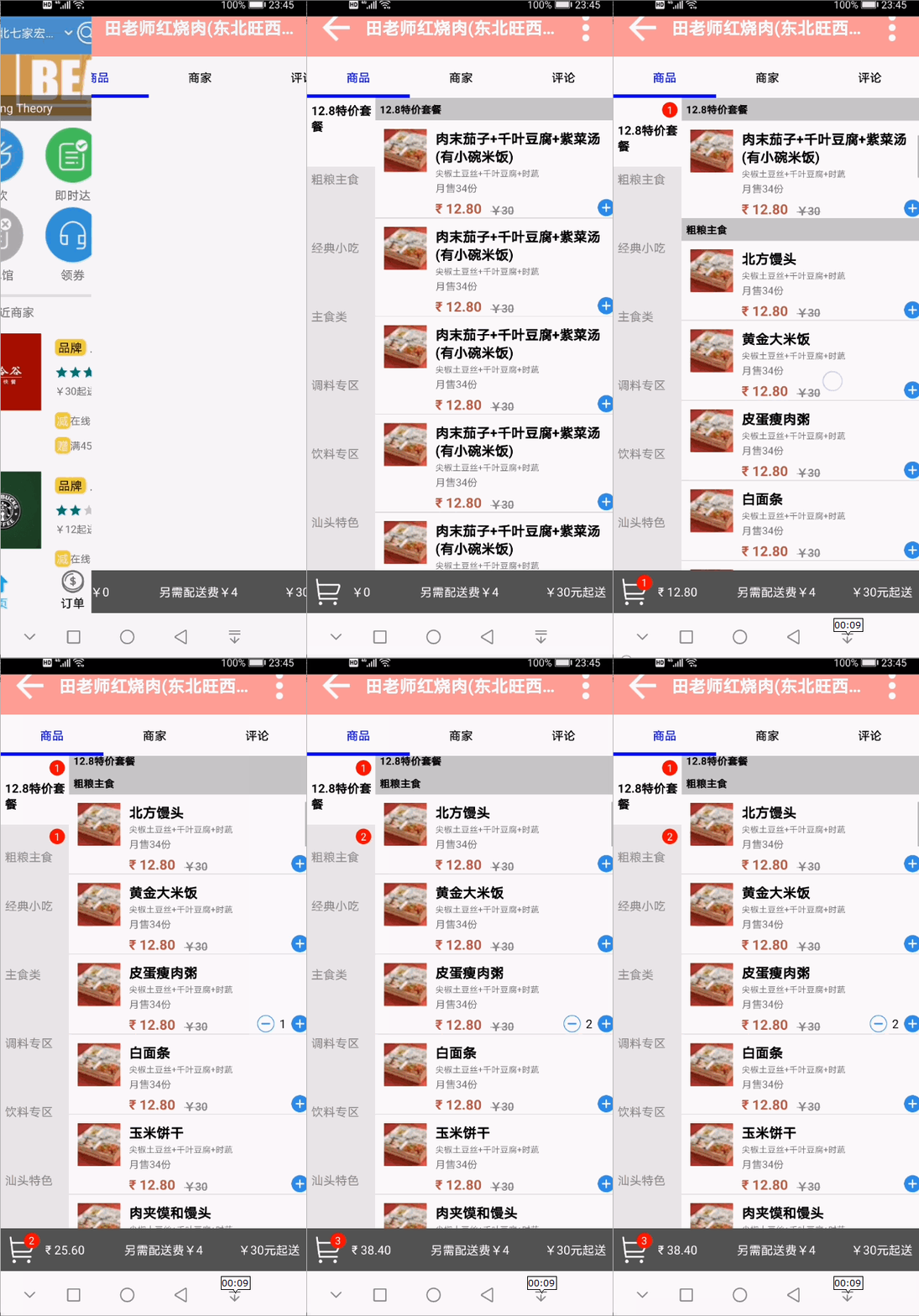
 博客主要围绕界面刷新展开,涉及BusinessActivity.kt界面的数字和小红点刷新,GoodsAdapter.kt点击事件后调用Activity刷新UI,以及GoodsFragmentPresenter.kt界面刷新业务逻辑的处理。
BusinessActivity.kt界面的刷新数字和小红点
package com.example.takeout.ui.activity

import android.content.Context
import android.os.Bundle
import android.util.TypedValue
import android.view.View
import android.widget.ImageButton
import androidx.appcompat.app.AppCompatActivity
import androidx.fragment.app.Fragment
import androidx.fragment.app.FragmentPagerAdapter
import com.example.takeout.R
import com.example.takeout.ui.fragment.CommentsFragment
import com.example.takeout.ui.fragment.GoodsFragment
import com.example.takeout.ui.fragment.SellerFragment
import com.example.takeout.utils.PriceFormater
import kotlinx.android.synthetic.main.activity_business.*

class BusinessActivity : AppCompatActivity() {

    override fun onCreate(savedInstanceState: Bundle?) {
        super.onCreate(savedInstanceState)
        setContentView(R.layout.activity_business)

        //微调底部的导航栏适配
        if (checkDeviceHasNavigationBar(this)) {
            fl_Container.setPadding(0, 0, 0, 48.dp2px())
        }

        vp.adapter = BusinessFragmentPagerAdapter()
        tabs.setupWithViewPager(vp)

    }

    val fragments = listOf<Fragment>(GoodsFragment(), SellerFragment(), CommentsFragment())
    val titles = listOf<String>("商品", "商家", "评论")

    /**
     * 把转化功能添加到Int类中作为扩展函数
     */
    fun Int.dp2px(): Int {
        return TypedValue.applyDimension(
            TypedValue.COMPLEX_UNIT_DIP,
            toFloat(), resources.displayMetrics
        ).toInt()

    }

    //获取是否存在NavigationBar
    fun checkDeviceHasNavigationBar(context: Context): Boolean {
        var hasNavigationBar = false
        val rs = context.getResources()
        val id = rs.getIdentifier("config_showNavigationBar", "bool", "android")
        if (id > 0) {
            hasNavigationBar = rs.getBoolean(id)
        }
        try {
            val systemPropertiesClass = Class.forName("android.os.SystemProperties")
            val m = systemPropertiesClass.getMethod("get", String::class.java)
            val navBarOverride = m.invoke(systemPropertiesClass, "qemu.hw.mainkeys") as String
            if ("1" == navBarOverride) {
                hasNavigationBar = false
            } else if ("0" == navBarOverride) {
                hasNavigationBar = true
            }
        } catch (e: Exception) {

        }

        return hasNavigationBar
    }

    inner class BusinessFragmentPagerAdapter : FragmentPagerAdapter(supportFragmentManager) {

        override fun getPageTitle(position: Int): CharSequence {
            return titles.get(position)
        }

        override fun getItem(position: Int): Fragment {
            return fragments.get(position)
        }

        override fun getCount(): Int {
            return titles.size
        }

    }

    /**
     * 增加的按钮
     */
    fun addImageButton(ib: ImageButton, width: Int, height: Int) {
        fl_Container.addView(ib, width, height)
    }

    fun getCartLocation(): IntArray {
        val destLocation = IntArray(2)
        imgCart.getLocationInWindow(destLocation)
        return destLocation
    }

    /**
     * 更新购物车
     */
    fun updateCartUi() {
        //更新数量,更新总价
        var count = 0
        var countPrice = 0.0f
        //哪些商品属于购物车?
        val goodsFragment: GoodsFragment = fragments.get(0) as GoodsFragment
        val cartList = goodsFragment.goodsFragmentPresenter.getCartList()
        for (i in 0 until cartList.size) {
            val goodsInfo = cartList.get(i)
            count += goodsInfo.count
            countPrice += goodsInfo.count * goodsInfo.newPrice.toFloat()
        }
        tvSelectNum.text = count.toString()
        if (count > 0) {
            tvSelectNum.visibility = View.VISIBLE
        } else {
            tvSelectNum.visibility = View.GONE
        }
        tvCountPrice.text = PriceFormater.format(countPrice)
    }
}
GoodsAdapter.kt点击事件以后调用Activity刷新UI
package com.example.takeout.ui.adapter

import android.graphics.Color
import android.graphics.Paint
import android.util.Log
import android.view.LayoutInflater
import android.view.View
import android.view.ViewGroup
import android.view.animation.*
import android.widget.BaseAdapter
import android.widget.ImageButton
import android.widget.ImageView
import android.widget.TextView
import androidx.fragment.app.FragmentActivity
import com.example.takeout.R
import com.example.takeout.model.beans.GoodsInfo
import com.example.takeout.ui.activity.BusinessActivity
import com.example.takeout.ui.fragment.GoodsFragment
import com.example.takeout.utils.PriceFormater
import com.example.takeout.utils.TakeoutApp
import com.squareup.picasso.Picasso
import org.jetbrains.anko.find
import se.emilsjolander.stickylistheaders.StickyListHeadersAdapter

class GoodsAdapter(val context: FragmentActivity?, val goodsFragment: GoodsFragment) : BaseAdapter(), StickyListHeadersAdapter {

    val host = "http://127.0.0.1:8090/image?name="
    val DURATION: Long = 1000 //持续时间


    var goodsList: List<GoodsInfo> = ArrayList()

    fun setDatas(goodsInfoList: List<GoodsInfo>) {
        this.goodsList = goodsInfoList
        notifyDataSetChanged()
    }

    inner class GoodsItemHolder(itemView: View) : View.OnClickListener {

        override fun onClick(v: View?) {
            var isAdd: Boolean = false
            when (v?.id) {
                R.id.ib_add -> {
                    isAdd = true
                    doAddOperation()
                }
                R.id.ib_minus -> doMinusOperation()
            }
            processRedDotCount(isAdd)
            (goodsFragment.activity as BusinessActivity).updateCartUi();
        }

        private fun processRedDotCount(isAdd: Boolean) {
            //找到此商品属于的类别
            val typeId = goodsInfo.typeId
            //找到此类别在左侧列表中的位置(遍历)
            val typePosition = goodsFragment.goodsFragmentPresenter.getTypePositionByTypeId(typeId)
            //最后找出tvRedDotCount
            val goodsTypeInfo = goodsFragment.goodsFragmentPresenter.goodstypeList.get(typePosition)
            var redDotCount = goodsTypeInfo.redDotCount
            if (isAdd) {
                redDotCount++
            } else {
                redDotCount--
            }
            goodsTypeInfo.redDotCount = redDotCount
            //刷新左侧列表
            goodsFragment.goodsTypeAdapter.notifyDataSetChanged()
        }

        private fun doMinusOperation() {
            //改变count值
            var count = goodsInfo.count
            if (count == 1) {
                //最后一次点击减号执行动画集
                val hideAnimationSet: AnimationSet = getHideAnimation()
                tvCount.startAnimation(hideAnimationSet)
                btnMinus.startAnimation(hideAnimationSet)
                //删除缓存
//                TakeoutApp.sInstance.deleteCacheSelectedInfo(goodsInfo.id)
            }else{
                //更新缓存
//                TakeoutApp.sInstance.updateCacheSelectedInfo(goodsInfo.id, Constants.MINUS)
            }
            count--
            //改变数据层
            goodsInfo.count = count
            notifyDataSetChanged()
        }

        private fun doAddOperation() {
            //改变count值
            var count = goodsInfo.count
            if (count == 0) {
                //第一次点击加号执行动画集
                val showAnimationSet: AnimationSet = getShowAnimation()
                tvCount.startAnimation(showAnimationSet)
                btnMinus.startAnimation(showAnimationSet)
                //添加缓存
//                TakeoutApp.sInstance.addCacheSelectedInfo(CacheSelectedInfo(goodsInfo.sellerId,goodsInfo.typeId,goodsInfo.id,1))
            }else{
                //更新缓存
//                TakeoutApp.sInstance.updateCacheSelectedInfo(goodsInfo.id, Constants.ADD)
            }
            count++
            //改变数据层
            goodsInfo.count = count
            notifyDataSetChanged()

            //抛物线

            //1.克隆+号,并且添加到acitivty上
            var ib = ImageButton(context)
            //大小,位置、背景全部相同
            ib.setBackgroundResource(R.mipmap.button_add)
//            btnAdd.width
            val srcLocation = IntArray(2)
            btnAdd.getLocationInWindow(srcLocation)
            Log.e("location", srcLocation[0].toString() + ":" + srcLocation[1])
            ib.x = srcLocation[0].toFloat()
            ib.y = srcLocation[1].toFloat()
            (goodsFragment.activity as BusinessActivity).addImageButton(ib, btnAdd.width, btnAdd.height)
            //2.执行抛物线动画(水平位移,垂直加速位移)
            val destLocation = (goodsFragment.activity as BusinessActivity).getCartLocation()
            val parabolaAnim: AnimationSet = getParabolaAnimation(ib, srcLocation, destLocation)
            ib.startAnimation(parabolaAnim)
            //3.动画完成后回收克隆的+号
        }

        /**
         * 抛物线动画
         */
        private fun getParabolaAnimation(ib: ImageButton, srcLocation: IntArray, destLocation: IntArray): AnimationSet {
            val parabolaAnim: AnimationSet = AnimationSet(false)
            parabolaAnim.duration = DURATION
            val translateX = TranslateAnimation(
                Animation.ABSOLUTE, 0f,
                Animation.ABSOLUTE, destLocation[0].toFloat() - srcLocation[0].toFloat(),
                Animation.ABSOLUTE, 0.0f,
                Animation.ABSOLUTE, 0.0f)
            translateX.duration = DURATION
            parabolaAnim.addAnimation(translateX)
            val translateY = TranslateAnimation(
                Animation.ABSOLUTE, 0F,
                Animation.ABSOLUTE, 0F,
                Animation.ABSOLUTE, 0f,
                Animation.ABSOLUTE, destLocation[1].toFloat() - srcLocation[1].toFloat())
            translateY.setInterpolator(AccelerateInterpolator())
            translateY.duration = DURATION
            parabolaAnim.addAnimation(translateY)
            parabolaAnim.setAnimationListener(object : Animation.AnimationListener {
                override fun onAnimationEnd(animation: Animation?) {
                    val viewParent = ib.parent
                    if (viewParent != null) {
                        (viewParent as ViewGroup).removeView(ib)
                    }
                }

                override fun onAnimationRepeat(animation: Animation?) {
                }

                override fun onAnimationStart(animation: Animation?) {

                }
            })
            return parabolaAnim
        }

        /**
         * 隐藏动画
         */
        private fun getHideAnimation(): AnimationSet {
            var animationSet: AnimationSet = AnimationSet(false)
            animationSet.duration = DURATION
            val alphaAnim: Animation = AlphaAnimation(1f, 0.0f)
            alphaAnim.duration = DURATION
            animationSet.addAnimation(alphaAnim)
            val rotateAnim: Animation = RotateAnimation(720.0f, 0.0f, Animation.RELATIVE_TO_SELF, 0.5f, Animation.RELATIVE_TO_SELF, 0.5f)
            rotateAnim.duration = DURATION
            animationSet.addAnimation(rotateAnim)
            val translateAnim: Animation = TranslateAnimation(
                Animation.RELATIVE_TO_SELF, 0.0f,
                Animation.RELATIVE_TO_SELF, 2.0f,
                Animation.RELATIVE_TO_SELF, 0.0f,
                Animation.RELATIVE_TO_SELF, 0.0f)
            translateAnim.duration = DURATION
            animationSet.addAnimation(translateAnim)
            return animationSet
        }

        /**
         * 动画
         */
        private fun getShowAnimation(): AnimationSet {
            var animationSet: AnimationSet = AnimationSet(false)
            animationSet.duration = DURATION
            //透明度
            val alphaAnim: Animation = AlphaAnimation(0.0f, 1.0f)
            alphaAnim.duration = DURATION
            animationSet.addAnimation(alphaAnim)
            //旋转
            val rotateAnim: Animation = RotateAnimation(0.0f, 720.0f, Animation.RELATIVE_TO_SELF, 0.5f, Animation.RELATIVE_TO_SELF, 0.5f)
            rotateAnim.duration = DURATION
            animationSet.addAnimation(rotateAnim)
            val translateAnim: Animation = TranslateAnimation(
                Animation.RELATIVE_TO_SELF, 2.0f,
                Animation.RELATIVE_TO_SELF, 0.0f,
                Animation.RELATIVE_TO_SELF, 0.0f,
                Animation.RELATIVE_TO_SELF, 0.0f)
            translateAnim.duration = DURATION
            animationSet.addAnimation(translateAnim)
            return animationSet
        }

        val ivIcon: ImageView
        val tvName: TextView
        val tvForm: TextView
        val tvMonthSale: TextView
        val tvNewPrice: TextView
        val tvOldPrice: TextView
        val btnAdd: ImageButton
        val btnMinus: ImageButton
        val tvCount: TextView
        lateinit var goodsInfo: GoodsInfo

        init {
            ivIcon = itemView.find(R.id.iv_icon)
            tvName = itemView.find(R.id.tv_name)
            tvForm = itemView.find(R.id.tv_form)
            tvMonthSale = itemView.find(R.id.tv_month_sale)
            tvNewPrice = itemView.find(R.id.tv_newprice)
            tvOldPrice = itemView.find(R.id.tv_oldprice)
            tvCount = itemView.find(R.id.tv_count)
            btnAdd = itemView.find(R.id.ib_add)
            btnMinus = itemView.find(R.id.ib_minus)
            btnAdd.setOnClickListener(this)
            btnMinus.setOnClickListener(this)
        }

        fun bindData(goodsInfo: GoodsInfo) {
            this.goodsInfo = goodsInfo
            //图片路径http://127.0.0.1:8090/image?name=takeout/businessimg/goods/0.jpg
            Picasso.with(context).load(host + goodsInfo.icon).into(ivIcon)
            tvName.text = goodsInfo.name
//            tvForm.text = goodsInfo.form
            tvMonthSale.text = "月售${goodsInfo.monthSaleNum}份"
            tvNewPrice.text = PriceFormater.format(goodsInfo.newPrice.toFloat())
//            tvNewPrice.text = "$${goodsInfo.newPrice}"
            tvOldPrice.text = "¥${goodsInfo.oldPrice}"
            tvOldPrice.paint.flags = Paint.STRIKE_THRU_TEXT_FLAG
            if (goodsInfo.oldPrice > 0) {
                tvOldPrice.visibility = View.VISIBLE
            } else {
                tvOldPrice.visibility = View.GONE
            }
            tvCount.text = goodsInfo.count.toString()
            if (goodsInfo.count > 0) {
                tvCount.visibility = View.VISIBLE
                btnMinus.visibility = View.VISIBLE
            } else {
                tvCount.visibility = View.INVISIBLE
                btnMinus.visibility = View.INVISIBLE
            }
        }
    }

    override fun getCount(): Int {
        return goodsList.size
    }

    override fun getItem(position: Int): Any {
        return goodsList.get(position)
    }

    override fun getItemId(position: Int): Long {
        return position.toLong()
    }

    override fun getView(position: Int, convertView: View?, parent: ViewGroup?): View {
        var itemView: View
        val goodsItemHolder: GoodsItemHolder
        if (convertView == null) {
            itemView = LayoutInflater.from(context).inflate(R.layout.item_goods, parent, false)
            goodsItemHolder = GoodsItemHolder(itemView)
            itemView.tag = goodsItemHolder
        } else {
            itemView = convertView
            goodsItemHolder = convertView.tag as GoodsItemHolder
        }
        goodsItemHolder.bindData(goodsList.get(position))
        return itemView
    }

    override fun getHeaderView(position: Int, convertView: View?, parent: ViewGroup?): View {
        val goodsInfo: GoodsInfo = goodsList.get(position)
        val typeName = goodsInfo.typeName
        val textView: TextView = LayoutInflater.from(context).inflate(R.layout.item_type_header, parent, false) as TextView
        textView.text = typeName
        textView.setTextColor(Color.BLACK)
        return textView
    }

    override fun getHeaderId(position: Int): Long {
        val goodsInfo: GoodsInfo = goodsList.get(position)
        return goodsInfo.typeId.toLong()
    }
}
GoodsFragmentPresenter.kt界面刷新的业务逻辑的处理
package com.example.takeout.presenter

import android.util.Log
import com.example.takeout.model.beans.GoodsInfo
import com.example.takeout.model.beans.GoodsTypeInfo
import com.example.takeout.ui.fragment.GoodsFragment
import com.google.gson.Gson
import com.google.gson.reflect.TypeToken
import org.json.JSONObject

class GoodsFragmentPresenter(val goodsFragment: GoodsFragment) : NetPresenter() {

    var goodstypeList: List<GoodsTypeInfo> = arrayListOf()
    val allTypeGoodsList: ArrayList<GoodsInfo> = arrayListOf()

    //连接服务器拿到此商家所有商品
    fun getBusinessInfo() {
        val businessCall = takeoutService.getBusinessInfo()
        businessCall.enqueue(callback)
    }


    override fun parserJson(json: String) {
        val gson = Gson()
        val jsoObj = JSONObject(json)
        val allStr = jsoObj.getString("list")
        //商品类型的集合
        goodstypeList = gson.fromJson(allStr, object : TypeToken<List<GoodsTypeInfo>>() {
        }.type)
        Log.e("business", "该商家一共有" + goodstypeList.size + "个类别商品")
        for (i in 0 until goodstypeList.size) {
            val goodsTypeInfo = goodstypeList.get(i)
            var aTypeCount = 0
            val aTypeList: List<GoodsInfo> = goodsTypeInfo.list
            for (j in 0 until aTypeList.size) {
                val goodsInfo = aTypeList.get(j)
                //建立双向绑定关系
                goodsInfo.typeName = goodsTypeInfo.name
                goodsInfo.typeId = goodsTypeInfo.id
            }
            allTypeGoodsList.addAll(goodsTypeInfo.list)
        }
        goodsFragment.onLoadBusinessSuccess(goodstypeList, allTypeGoodsList)
    }

    //根据商品类别id找到此类别第一个商品的位置
    fun getGoodsPositionByTypeId(typeId: Int): Int {
        var position = -1 //-1表示未找到
        for(j in 0 until  allTypeGoodsList.size){
            val goodsInfo = allTypeGoodsList.get(j)
            if(goodsInfo.typeId == typeId){
                position = j
                break;
            }
        }
        return position
    }

    //根据类别id找到其在左侧列表中的position,遍历左侧的列表
    fun getTypePositionByTypeId(newTypeId: Int):Int {
        var position = -1 //-1表示未找到
        for(i in 0 until  goodstypeList.size){
            val goodsTypeInfo = goodstypeList.get(i)
            if(goodsTypeInfo.id == newTypeId){
                position = i
                break;
            }
        }
        return position
    }

    fun getCartList() : ArrayList<GoodsInfo> {
        val cartList = arrayListOf<GoodsInfo>()
        //count >0的为购物车商品
        for(j in 0 until  allTypeGoodsList.size){
            val goodsInfo = allTypeGoodsList.get(j)
            if(goodsInfo.count>0){
                cartList.add(goodsInfo)
            }
        }
        return cartList
    }
}
效果如下:





 扫一扫
扫一扫


 2139
2139

 被折叠的 条评论
为什么被折叠?
被折叠的 条评论
为什么被折叠?
 到【灌水乐园】发言





