






 本教程全面介绍了SQL的基础知识和高级用法,包括数据检索、数据操作、聚合函数、连接、子查询等核心概念,适用于初学者及希望深化SQL技能的专业人士。
SQL Tutorial: Introduction
What is SQL?
- SQL is a language used to retrieve and manipulate data in a RDMS.
- SQL stands for Structured Query Language.
What is a Database?
- A database is a place to store data.
- A relational database system (RDMS) stores data in tables.
The definitive guide for data professional
Relational Database Tables
A relational database stores data in tables. Each table has a number of rows and columns.
The table below has 4 rows and 3 columns.
SQL and Relational Databases
A relational database contains tables which store data that is related in some way.
SQL is the language that allows retrieval and manipulation of table data in a relational database.
The database below has 2 tables: one with data on Users and another with data on Products.
Example database
This tutorial uses a database which is a modernized version of Microsoft’s Northwind database. Northwind is a fictitious store that sells specialty food products from all over the world. The database has 5 tables.
Below is an Entity Relationship Diagram (ERD) which shows the tables and their relationships.
Additional details of the data model are available on the Sample Database page.
You can also ‘play’ with the database directly from your browser using our SQL Sandbox.
SQL Syntax
- The syntax of a language describes the language elements.
- SQL statements are somewhat like simple English sentences.
- Keywords include SELECT, UPDATE, WHERE, ORDER BY, etc.
- ANSI Standard SQL is the lingua franca for relational databases.
The SQL Syntax
SQL was designed to be entered on a console and results would display back to a screen.
Today, SQL is mostly used by programmers who use SQL inside their language to build applications that access data in a database.
Four fundamental operations that apply to any database are:
- Read the data – SELECT
- Insert new data – INSERT
- Update existing data – UPDATE
- Remove data – DELETE
Collectively these are referred to as CRUD (Create, Read, Update, Delete).
The general form for each of these 4 operations in SQL is presented next.
The SQL SELECT general form
SELECT column-names
FROM table-name
WHERE condition
ORDER BY sort-order
Example:
SELECT FirstName, LastName, City, Country
FROM Customer
WHERE City = 'Paris'
ORDER BY LastName
The SQL INSERT general form
INSERT table-name (column-names)
VALUES (column-values)
Example:
INSERT Supplier (Name, ContactName, City, Country)
VALUES ('Oxford Trading', 'Ian Smith', 'Oxford', 'UK')
The SQL UPDATE general form
UPDATE table-nameSET column-name = column-value
WHERE condition
Example:
UPDATE OrderItemSET Quantity = 2
WHERE Id = 388
The SQL DELETE general form
DELETE table-nameWHERE condition
Example:
DELETE Customer
WHERE Email = 'alex@gmail.com'
SQL SELECT Statement
- The SELECT statement retrieves data from a database.
- The data is returned in a table-like structure called a result-set.
- SELECT is the most frequently used action on a database.
The SQL SELECT syntax
The general syntax is:
SELECT column-names
FROM table-name
To select all columns use *
SELECT *
FROM table-name
| CUSTOMER |
|---|
| Id |
| FirstName |
| LastName |
| City |
| Country |
| Phone |
SQL SELECT Examples
Problem: List all customers
SELECT * FROM Customer
Results: 91 records
| Id | FirstName | LastName | City | Country | Phone |
|---|---|---|---|---|---|
| 1 | Maria | Anders | Berlin | Germany | 030-0074321 |
| 2 | Ana | Trujillo | México D.F. | Mexico | (5) 555-4729 |
| 3 | Antonio | Moreno | México D.F. | Mexico | (5) 555-3932 |
| 4 | Thomas | Hardy | London | UK | (171) 555-7788 |
| 5 | Christina | Berglund | Luleå | Sweden | 0921-12 34 65 |
| CUSTOMER |
|---|
| Id |
| FirstName |
| LastName |
| City |
| Country |
| Phone |
Problem: List the first name, last name, and city of all customers
SELECT FirstName, LastName, City
FROM Customer
Results: 91 records
| FirstName | LastName | City |
|---|---|---|
| Maria | Anders | Berlin |
| Ana | Trujillo | México D.F. |
| Antonio | Moreno | México D.F. |
| Thomas | Hardy | London |
| Christina | Berglund | Luleå |
SQL WHERE Clause
- To limit the number of rows use the WHERE clause.
- The WHERE clause filters for rows that meet certain criteria.
- WHERE is followed by a condition that returns either true or false.
- WHERE is used with SELECT, UPDATE, and DELETE.
The SQL WHERE syntax
A WHERE clause with a SELECT statement:
SELECT column-names
FROM table-name
WHERE condition
A WHERE clause with an UPDATE statement:
UPDATE table-name
SET column-name = value
WHERE condition
A WHERE clause with a DELETE statement:
DELETE table-name
WHERE condition
| CUSTOMER |
|---|
| Id |
| FirstName |
| LastName |
| City |
| Country |
| Phone |
SQL WHERE Clause Examples
Problem: List the customers in Sweden
SELECT Id, FirstName, LastName, City, Country, Phone
FROM Customer
WHERE Country = 'Sweden'
Results: 2 records
| Id | FirstName | LastName | City | Country | Phone |
|---|---|---|---|---|---|
| 5 | Christina | Berglund | Luleå | Sweden | 0921-12 34 65 |
| 24 | Maria | Larsson | Bräcke | Sweden | 0695-34 67 21 |
| SUPPLIER |
|---|
| Id |
| CompanyName |
| ContactName |
| City |
| Country |
| Phone |
| Fax |
Problem: Update the city to Sydney for supplier Pavlova, Ltd.
UPDATE Supplier
SET City = 'Sydney'
WHERE Name = 'Pavlova, Ltd.'
Results: 1 record updated.
| PRODUCT |
|---|
| Id |
| ProductName |
| SupplierId |
| UnitPrice |
| Package |
| IsDiscontinued |
Problem: Delete all products with unit price higher than $50.
DELETE FROM Product
WHERE UnitPrice > 50
Results: 7 records deleted.
Note: Referential integrity may prevent this deletion.
A better approach may be to discontinue the product, that is, set IsDiscontinued to true.
SQL INSERT INTO Statement
- The INSERT INTO statement is used to add new data to a database.
- The INSERT INTO statement adds a new record to a table.
- INSERT INTO can contain values for some or all of its columns.
- INSERT INTO can be combined with a SELECT to insert records.
The SQL INSERT INTO syntax
The general syntax is:
INSERT INTO table-name (column-names)
VALUES (values)
| CUSTOMER |
|---|
| Id |
| FirstName |
| LastName |
| City |
| Country |
| Phone |
SQL INSERT INTO Examples
Problem: Add a record for a new customer
INSERT INTO Customer (FirstName, LastName, City, Country, Phone)
VALUES ('Craig', 'Smith', 'New York', 'USA', 1-01-993 2800)
Results: 1 new record inserted
| CUSTOMER |
|---|
| Id |
| FirstName |
| LastName |
| City |
| Country |
| Phone |
Problem: Add a new customer named Anita Coats to the database
INSERT INTO Customer (FirstName, LastName)
VALUES ('Anita', 'Coats')
Results: 1 new record inserted
The SQL INSERT combined with a SELECT
The general syntax is:
INSERT INTO table-name (column-names)
SELECT column-names
FROM table-name
WHERE condition
| SUPPLIER |
|---|
| Id |
| CompanyName |
| ContactName |
| City |
| Country |
| Phone |
| Fax |
| CUSTOMER |
|---|
| Id |
| FirstName |
| LastName |
| City |
| Country |
| Phone |
SQL INSERT INTO with SELECT Example
Problem: The Bigfoot Brewery supplier is also a customer.
Add a customer record with values from the supplier table.
INSERT INTO Customer (FirstName, LastName, City, Country, Phone)
SELECT LEFT(ContactName, CHARINDEX(' ',ContactName) - 1),SUBSTRING(ContactName, CHARINDEX(' ',ContactName) + 1, 100),City, Country, Phone
FROM Supplier
WHERE CompanyName = 'Bigfoot Breweries'
Note: ContactName is parsed into FirstName and LastName.
Parsing takes place with built-in functions: LEFT, SUBSTRING, and CHARINDEX.
Results: 1 new record inserted
SQL UPDATE Statement
- The UPDATE statement updates data values in a database.
- UPDATE can update one or more records in a table.
- Use the WHERE clause to UPDATE only specific records.
The SQL UPDATE syntax
The general syntax is:
UPDATE table-name
SET column-name = value, column-name = value, ...
To limit the number of records to UPDATE append a WHERE clause:
UPDATE table-name SET column-name = value, column-name = value, ... WHERE condition
| PRODUCT |
|---|
| Id |
| ProductName |
| SupplierId |
| UnitPrice |
| Package |
| IsDiscontinued |
SQL UPDATE Examples
Problem: discontinue all products in the database
UPDATE Product
SET IsDiscontinued = 1
Note: the value 1 denotes true.
Results: 77 records updated.
| PRODUCT |
|---|
| Id |
| ProductName |
| SupplierId |
| UnitPrice |
| Package |
| IsDiscontinued |
Problem: Discontinue products over $50.
UPDATE Product
SET IsDiscontinued = 1
WHERE UnitPrice > 50
Note: the value 1 denotes true.
Results: 7 records updated.
| PRODUCT |
|---|
| Id |
| ProductName |
| SupplierId |
| UnitPrice |
| Package |
| IsDiscontinued |
Problem: Discontinue product with Id = 46.
UPDATE Product
SET IsDiscontinued = 1
WHERE Id = 46
This is a more common scenario in which a single record is updated.
Note: the value 1 denotes true.
Results: 1 record updated.
| SUPPLIER |
|---|
| Id |
| CompanyName |
| ContactName |
| City |
| Country |
| Phone |
| Fax |
Problem: Supplier Norske Meierier (Id = 15) has moved: update their city, phone and fax.
UPDATE Supplier
SET City = 'Oslo', Phone = '(0)1-953530', Fax = '(0)1-953555'
WHERE Id = 15
This is a common scenario in which a single record is updated.
Results: 1 record updated.
SQL DELETE Statement
- DELETE permanently removes records from a table.
- DELETE can delete one or more records in a table.
- Use the WHERE clause to DELETE only specific records.
The SQL DELETE syntax
The general syntax is:
DELETE table-name
To delete specific records append a WHERE clause:
DELETE table-name
WHERE condition
| PRODUCT |
|---|
| Id |
| ProductName |
| SupplierId |
| UnitPrice |
| Package |
| IsDiscontinued |
SQL DELETE Examples
Problem: Delete all products.
DELETE Product
Results: 77 records deleted.
| PRODUCT |
|---|
| Id |
| ProductName |
| SupplierId |
| UnitPrice |
| Package |
| IsDiscontinued |
Problem: Delete products over $50.
DELETE Product
WHERE UnitPrice > 50
Results: 7 records deleted.
| CUSTOMER |
|---|
| Id |
| FirstName |
| LastName |
| City |
| Country |
| Phone |
Problem: Delete customer with Id = 21.
DELETE Customer
WHERE Id = 21
This is a more common scenario in which a single record is deleted.
Results: 1 record deleted.
SQL ORDER BY Clause
- SELECT returns records in no particular order.
- To ensure a specific order use the ORDER BY clause.
- ORDER BY allows sorting by one or more columns.
- Records can be returned in ascending or descending order.
The SQL ORDER BY syntax
The general syntax is:
SELECT column-names
FROM table-name
WHERE condition
ORDER BY column-names
| CUSTOMER |
|---|
| Id |
| FirstName |
| LastName |
| City |
| Country |
| Phone |
SQL ORDER BY Examples
Problem: List all suppliers in alphabetical order
SELECT CompanyName, ContactName, City, Country
FROM Supplier
ORDER BY CompanyName
The default sort order is ascending, that is, low-high or a-z.
Results: 29 records
| Id | CompanyName | ContactName | City | Country |
|---|---|---|---|---|
| 18 | Aux joyeux ecclésiastiques | Guylène Nodier | Paris | France |
| 16 | Bigfoot Breweries | Cheryl Saylor | Bend | USA |
| 5 | Cooperativa de Quesos ‘Las Cabras’ | Antonio del Valle Saavedra | Oviedo | Spain |
| 27 | Escargots Nouveaux | Marie Delamare | Montceau | France |
| 1 | Exotic Liquids | Charlotte Cooper | London | UK |
| CUSTOMER |
|---|
| Id |
| FirstName |
| LastName |
| City |
| Country |
| Phone |
Problem: List all suppliers in reverse alphabetical order
SELECT CompanyName, ContactName, City, Country
FROM Supplier
ORDER BY CompanyName DESC
The keyword DESC denotes descending, i.e., reverse order.
Results: 29 records
| Id | CompanyName | ContactName | City | Country |
|---|---|---|---|---|
| 22 | Zaanse Snoepfabriek | Dirk Luchte | Zaandam | Netherlands |
| 4 | Tokyo Traders | Yoshi Nagase | Tokyo | Japan |
| 17 | Svensk Sjöföda AB | Michael Björn | Stockholm | Sweden |
| 8 | Specialty Biscuits, Ltd. | Peter Wilson | Manchester | UK |
| 10 | Refrescos Americanas LTDA | Carlos Diaz | Sao Paulo | Brazil |
| CUSTOMER |
|---|
| Id |
| FirstName |
| LastName |
| City |
| Country |
| Phone |
Problem: List all customers ordered by country, then by city within each country
Ordering by one or more columns is possible.
SELECT FirstName, LastName, City, Country
FROM Customer
ORDER BY Country, City
Results: 91 records
| Id | FirstName | LastName | City | Country |
|---|---|---|---|---|
| 12 | Patricio | Simpson | Buenos Aires | Argentina |
| 54 | Yvonne | Moncada | Buenos Aires | Argentina |
| 64 | Sergio | Gutiérrez | Buenos Aires | Argentina |
| 20 | Roland | Mendel | Graz | Austria |
| 59 | Georg | Pipps | Salzburg | Austria |
| 50 | Catherine | Dewey | Bruxelles | Belgium |
| 76 | Pascale | Cartrain | Charleroi | Belgium |
| SUPPLIER |
|---|
| Id |
| CompanyName |
| ContactName |
| City |
| Country |
| Phone |
| Fax |
Problem: List all suppliers in the USA, Japan, and Germany, ordered by city,
then by company name in reverse order
SELECT Id, CompanyName, City, Country
FROM Supplier
WHERE Country IN ('USA', 'Japan', 'Germany')
ORDER BY Country ASC, CompanyName DESC
This shows that you can order by more than one column.
ASC denotes ascending, but is optional as it is the default sort order.
Results: 9 records
| Id | CompanyName | City | Country |
|---|---|---|---|
| 12 | Plutzer Lebensmittelgroßmärkte AG | Frankfurt | Germany |
| 13 | Nord-Ost-Fisch Handelsgesellschaft mbH | Cuxhaven | Germany |
| 11 | Heli Süßwaren GmbH & Co. KG | Berlin | Germany |
| 4 | Tokyo Traders | Tokyo | Japan |
| 6 | Mayumi’s | Osaka | Japan |
| 2 | New Orleans Cajun Delights | New Orleans | USA |
| 19 | New England Seafood Cannery | Boston | USA |
| 3 | Grandma Kelly’s Homestead | Ann Arbor | USA |
| 16 | Bigfoot Breweries | Bend | USA |
| ORDER |
|---|
| Id |
| OrderDate |
| OrderNumber |
| CustomerId |
| TotalAmount |
Problem: Show all orders, sorted by total amount, the largest first, within each year
SELECT Id, OrderDate, CustomerId, TotalAmount
FROM [Order]
ORDER BY YEAR(OrderDate) ASC, TotalAmount DESC
Note: DESC means descending, but is optional as it is the default sort order.
[Order] must be bracketed because it also is a keywork in SQL.
Results: 830 records.
| Id | OrderDate | CustomerId | TotalAmount |
|---|---|---|---|
| 125 | 2012-12-04 00:00:00.000 | 62 | 12281.20 |
| 106 | 2012-11-13 00:00:00.000 | 59 | 10741.60 |
| 113 | 2012-11-22 00:00:00.000 | 7 | 7390.20 |
|
| 144 | 2012-12-23 00:00:00.000 | 17 | 86.40 |
| 24 | 2012-08-01 00:00:00.000 | 75 | 48.00 |
| 177 | 2013-01-23 00:00:00.000 | 51 | 11493.20 |
| 170 | 2013-01-16 00:00:00.000 | 73 | 11283.20 |
| 560 | 2013-12-31 00:00:00.000 | 27 | 18.40 |
| 535 | 2013-12-17 00:00:00.000 | 12 | 12.50 |
| 618 | 2014-02-02 00:00:00.000 | 63 | 17250.00 |
| 783 | 2014-04-17 00:00:00.000 | 71 | 16321.90 |
Notice the year breakpoints: 2012 - 2013 and 2013 - 2014. Each year starts with the highest TotalAmounts.
This shows that other data types, such as numbers, dates, and bits can also be sorted.
Note: YEAR is a built-in function which returns the year from a date.
SQL SELECT TOP Statement
- The SELECT TOP statement returns a specified number of records.
- SELECT TOP is useful when working with very large datasets.
- Non SQL Server databases use keywords like LIMIT, OFFSET, and ROWNUM.
The SQL SELECT TOP syntax
The general syntax is:
SELECT TOP n column-names
FROM table-name
| PRODUCT |
|---|
| Id |
| ProductName |
| SupplierId |
| UnitPrice |
| Package |
| IsDiscontinued |
SQL SELECT TOP
Problem: List top 10 most expensive products
SELECT TOP 10 Id, ProductName, UnitPrice, Package
FROM Product
ORDER BY UnitPrice DESC
Results: 10 records.
| Id | ProductName | UnitPrice | Package |
|---|---|---|---|
| 38 | Côte de Blaye | 263.50 | 12 - 75 cl bottles |
| 29 | Thüringer Rostbratwurst | 123.79 | 50 bags x 30 sausgs. |
| 9 | Mishi Kobe Niku | 97.00 | 18 - 500 g pkgs. |
| 20 | Sir Rodney’s Marmalade | 81.00 | 30 gift boxes |
| 18 | Carnarvon Tigers | 62.50 | 16 kg pkg. |
| 59 | Raclette Courdavault | 55.00 | 5 kg pkg. |
| 51 | Manjimup Dried Apples | 53.00 | 50 - 300 g pkgs. |
| 62 | Tarte au sucre | 49.30 | 48 pies |
| 43 | Ipoh Coffee | 46.00 | 16 - 500 g tins |
| 28 | Rössle Sauerkraut | 45.60 | 25 - 825 g cans |
SQL OFFSET-FETCH Clause
- OFFSET excludes the first set of records.
- OFFSET can only be used with an ORDER BY clause.
- OFFSET with FETCH NEXT returns a defined window of records.
- OFFSET with FETCH NEXT is great for building pagination support.
The SQL ORDER BY OFFSET syntax
The general syntax to exclude first n records is:
SELECT column-names
FROM table-name
ORDER BY column-namesOFFSET n ROWS
To exclude first n records and return only the next m records:
SELECT column-names
FROM table-name
ORDER BY column-namesOFFSET n ROWS FETCH NEXT m ROWS ONLY
This will return only record (n + 1) to (n + 1 + m). See example below.
| PRODUCT |
|---|
| Id |
| ProductName |
| SupplierId |
| UnitPrice |
| Package |
| IsDiscontinued |
SQL OFFSET-FETCH Examples
Problem: Get all but the 10 most expensive products sorted by price
SELECT Id, ProductName, UnitPrice, Package
FROM Product
ORDER BY UnitPrice DESCOFFSET 10 ROWS
Results: 68 records.
| Id | ProductName | UnitPrice | Package |
|---|---|---|---|
| 27 | Schoggi Schokolade | 43.90 | 100 - 100 g pieces |
| 63 | Vegie-spread | 43.90 | 15 - 625 g jars |
| 8 | Northwoods Cranberry Sauce | 40.00 | 12 - 12 oz jars |
| 17 | Alice Mutton | 39.00 | 20 - 1 kg tins |
| 12 | Queso Manchego La Pastora | 38.00 | 10 - 500 g pkgs. |
| PRODUCT |
|---|
| Id |
| ProductName |
| SupplierId |
| UnitPrice |
| Package |
| IsDiscontinued |
Problem: Get the 10th to 15th most expensive products sorted by price
SELECT Id, ProductName, UnitPrice, PackageFROM Product
ORDER BY UnitPrice DESCOFFSET 10 ROWSFETCH NEXT 5 ROWS ONLY
Results: 5 records
| Id | ProductName | UnitPrice | Package |
|---|---|---|---|
| 27 | Schoggi Schokolade | 43.90 | 100 - 100 g pieces |
| 63 | Vegie-spread | 43.90 | 15 - 625 g jars |
| 8 | Northwoods Cranberry Sauce | 40.00 | 12 - 12 oz jars |
| 17 | Alice Mutton | 39.00 | 20 - 1 kg tins |
| 12 | Queso Manchego La Pastora | 38.00 | 10 - 500 g pkgs. |
SQL SELECT DISTINCT Statement
- SELECT DISTINCT returns only distinct (different) values.
- SELECT DISTINCT eliminates duplicate records from the results.
- DISTINCT can be used with aggregates: COUNT, AVG, MAX, etc.
- DISTINCT operates on a single column. DISTINCT for multiple columns is not supported.
The SQL SELECT DISTINCT syntax
The general syntax is:
SELECT DISTINCT column-name
FROM table-name
Can be used with COUNT and other aggregates
SELECT COUNT (DISTINCT column-name)
FROM table-name
| SUPPLIER |
|---|
| Id |
| CompanyName |
| ContactName |
| City |
| Country |
| Phone |
| Fax |
SQL SELECT Examples
Problem: List all supplier countries in alphabetical order.
SELECT DISTINCT Country
FROM Supplier
ORDER BY COUNTRY
Results: 16 rows
| Country |
|---|
| Australia |
| Brazil |
| Canada |
| Denmark |
| SUPPLIER |
|---|
| Id |
| CompanyName |
| ContactName |
| City |
| Country |
| Phone |
| Fax |
Problem: List the number of supplier countries
SELECT COUNT (DISTINCT Country)
FROM Supplier
Results:
| Count |
|---|
| 16 |
SQL SELECT MIN, MAX Statement
- SELECT MIN returns the minimum value for a column.
- SELECT MAX returns the maximum value for a column.
The SQL SELECT MIN and MAX syntax
The general MIN syntax is:
SELECT MIN(column-name)
FROM table-name
The general MAX syntax is:
SELECT MAX(column-name)
FROM table-name
| PRODUCT |
|---|
| Id |
| ProductName |
| SupplierId |
| UnitPrice |
| Package |
| IsDiscontinued |
Problem: Find the cheapest product
SELECT MIN(UnitPrice)
FROM Product
Results:
| UnitPrice |
|---|
| 2.50 |
| ORDER |
|---|
| Id |
| OrderDate |
| OrderNumber |
| CustomerId |
| TotalAmount |
SQL SELECT MAX and MIN Examples
Problem: Find the largest order placed in 2014
SELECT MAX(TotalAmount)
FROM [Order]
WHERE YEAR(OrderDate) = 2014
Results:
| TotalAmount |
|---|
| 17250.00 |
| ORDER |
|---|
| Id |
| OrderDate |
| OrderNumber |
| CustomerId |
| TotalAmount |
Problem: Find the last order date in 2013
SELECT MAX(OrderDate)
FROM [Order]
WHERE YEAR(OrderDate) = 2013
MIN and MAX can also be used with numeric and date types.
Results:
| OrderDate |
|---|
| 2013-12-31 00:00:00.000 |
SQL SELECT COUNT, SUM, AVG
- SELECT COUNT returns a count of the number of data values.
- SELECT SUM returns the sum of the data values.
- SELECT AVG returns the average of the data values.
The SQL SELECT COUNT, SUM, and AVG syntax
The general COUNT syntax is:
SELECT COUNT(column-name)
FROM table-name
The general SUM syntax is:
SELECT SUM(column-name)
FROM table-name
The general AVG syntax is:
SELECT AVG(column-name)
FROM table-name
| CUSTOMER |
|---|
| Id |
| FirstName |
| LastName |
| City |
| Country |
| Phone |
SQL SELECT COUNT, SUM, and AVG Examples
Problem: Find the number of customers
SELECT COUNT(Id)
FROM Customer
Results:
| Count |
|---|
| 91 |
| ORDER |
|---|
| Id |
| OrderDate |
| OrderNumber |
| CustomerId |
| TotalAmount |
Problem: Compute the total amount sold in 2013
SELECT SUM(TotalAmount)
FROM [Order]
WHERE YEAR(OrderDate) = 2013
Results:
| Sum |
|---|
| 658388.75 |
| ORDER |
|---|
| Id |
| OrderDate |
| OrderNumber |
| CustomerId |
| TotalAmount |
Problem: Compute the average size of all orders
SELECT AVG(TotalAmount)
FROM [Order]
Results:
| Average |
|---|
| 1631.877819 |
SQL WHERE AND, OR, NOT Clause
- WHERE conditions can be combined with AND, OR, and NOT.
- A WHERE clause with AND requires that two conditions are true.
- A WHERE clause with OR requires that one of two conditions is true.
- A WHERE clause with NOT negates the specified condition.
The WHERE with AND, OR, NOT syntax
A WHERE clause with AND:
SELECT column-names
FROM table-name
WHERE condition1 AND condition2
A WHERE clause with OR:
UPDATE table-name
SET column-name = value
WHERE condition1 OR condition2
A WHERE clause with NOT:
DELETE table-name
WHERE NOT condition
| CUSTOMER |
|---|
| Id |
| FirstName |
| LastName |
| City |
| Country |
| Phone |
SQL WHERE with AND, OR, and NOT Examples
Problem: Get customer named Thomas Hardy
SELECT Id, FirstName, LastName, City, Country
FROM Customer
WHERE FirstName = 'Thomas' AND LastName = 'Hardy'
Results: 1 record.
| Id | FirstName | LastName | City | Country |
|---|---|---|---|---|
| 4 | Thomas | Hardy | London | UK |
| CUSTOMER |
|---|
| Id |
| FirstName |
| LastName |
| City |
| Country |
| Phone |
Problem: List all customers from Spain or France
SELECT Id, FirstName, LastName, City, Country
FROM Customer
WHERE Country = 'Spain' OR Country = 'France'
Results: 16 records.
| Id | FirstName | LastName | City | Country |
|---|---|---|---|---|
| 7 | Frédérique | Citeaux | Strasbourg | France |
| 8 | Martín | Sommer | Madrid | Spain |
| 9 | Laurence | Lebihan | Marseille | France |
| 18 | Janine | Labrune | Nantes | France |
| 22 | Diego | Roel | Madrid | Spain |
| 23 | Martine | Rancé | Lille | France |
| CUSTOMER |
|---|
| Id |
| FirstName |
| LastName |
| City |
| Country |
| Phone |
Problem: List all customers that are not from the USA
SELECT Id, FirstName, LastName, City, Country
FROM Customer
WHERE NOT Country = 'USA'
Results: 78 records.
| Id | FirstName | LastName | City | Country |
|---|---|---|---|---|
| 1 | Maria | Anders | Berlin | Germany |
| 2 | Ana | Trujillo | México D.F. | Mexico |
| 3 | Antonio | Moreno | México D.F. | Mexico |
| 4 | Thomas | Hardy | London | UK |
| 5 | Christina | Berglund | Luleå | Sweden |
| 6 | Hanna | Moos | Mannheim | Germany |
| 7 | Frédérique | Citeaux | Strasbourg | France |
| ORDER |
|---|
| Id |
| OrderDate |
| OrderNumber |
| CustomerId |
| TotalAmount |
Problem: List all orders that not between $50 and $15000
SELECT Id, OrderDate, CustomerId, TotalAmount
FROM [Order]
WHERE NOT (TotalAmount >= 50 AND TotalAmount <= 15000)
ORDER BY TotalAmount DESC
Results: 16 records.
| Id | OrderDate | CustomerId | TotalAmount |
|---|---|---|---|
| 618 | 2/2/2014 12:00:00 AM | 63 | 17250.00 |
| 783 | 4/17/2014 12:00:00 AM | 71 | 16321.90 |
| 734 | 3/27/2014 12:00:00 AM | 34 | 15810.00 |
| 175 | 1/22/2013 12:00:00 AM | 27 | 49.80 |
| 24 | 8/1/2012 12:00:00 AM | 75 | 48.00 |
SQL WHERE BETWEEN Clause
- WHERE BETWEEN returns values that fall within a given range.
- WHERE BETWEEN is a shorthand for >= AND <=.
- BETWEEN operator is inclusive: begin and end values are included.
The SQL WHERE BETWEEN syntax
The general syntax is:
SELECT column-names
FROM table-name
WHERE column-name BETWEEN value1 AND value2
| PRODUCT |
|---|
| Id |
| ProductName |
| SupplierId |
| UnitPrice |
| Package |
| IsDiscontinued |
SQL WHERE BETWEEN Examples
Problem: List all products between $10 and $20
SELECT Id, ProductName, UnitPrice
FROM Product
WHERE UnitPrice BETWEEN 10 AND 20
ORDER BY UnitPrice
Results: 29 records.
| Id | ProductName | UnitPrice |
|---|---|---|
| 3 | Aniseed Syrup | 10.00 |
| 21 | Sir Rodney’s Scones | 10.00 |
| 74 | Longlife Tofu | 10.00 |
| 46 | Spegesild | 12.00 |
| 31 | Gorgonzola Telino | 12.50 |
| PRODUCT | ||
| Id | ||
| ProductName | ||
| SupplierId | ||
| UnitPrice | ||
| Package | ||
| IsDiscontinued |
Problem: List all products not between $10 and $100 sorted by price.
SELECT Id, ProductName, UnitPrice
FROM Product
WHERE UnitPrice NOT BETWEEN 5 AND 100
ORDER BY UnitPrice
Results: 4 records.
| Id | ProductName | UnitPrice |
|---|---|---|
| 33 | Geitost | 2.50 |
| 24 | Guaraná Fantástica | 4.50 |
| 29 | Thüringer Rostbratwurst | 123.79 |
| 38 | Côte de Blaye | 263.50 |
| PRODUCT |
|---|
| Id |
| ProductName |
| SupplierId |
| UnitPrice |
| Package |
| IsDiscontinued |
Problem: Get the number of orders and amount sold between Jan 1, 2013 and Jan 31, 2013.
SELECT COUNT(Id), SUM(TotalAmount)
FROM [Order]
WHERE OrderDate BETWEEN '1/1/2013' AND '1/31/2013'
Results:
| Count | TotalAmount |
|---|---|
| 33 | 66692.80 |
SQL WHERE IN Clause
- WHERE IN returns values that matches values in a list or subquery.
- WHERE IN is a shorthand for multiple OR conditions.
The SQL WHERE IN syntax
The general syntax is:
SELECT column-names
FROM table-name
WHERE column-name IN (values)
| PRODUCT |
|---|
| Id |
| ProductName |
| SupplierId |
| UnitPrice |
| Package |
| IsDiscontinued |
SQL WHERE IN Examples
Problem: List all suppliers from the USA, UK, OR Japan
SELECT Id, CompanyName, City, Country
FROM Supplier
WHERE Country IN ('USA', 'UK', 'Japan')
Results: 8 records.
| Id | CompanyName | City | Country |
|---|---|---|---|
| 1 | Exotic Liquids | London | UK |
| 2 | New Orleans Cajun Delights | New Orleans | USA |
| 3 | Grandma Kelly’s Homestead | Ann Arbor | USA |
| 4 | Tokyo Traders | Tokyo | Japan |
| 6 | Mayumi’s | Osaka | Japan |
| 8 | Specialty Biscuits, Ltd. | Manchester | UK |
| 16 | Bigfoot Breweries | Bend | USA |
| 19 | New England Seafood Cannery | Boston | USA |
| PRODUCT |
|---|
| Id |
| ProductName |
| SupplierId |
| UnitPrice |
| Package |
| IsDiscontinued |
Problem: List all products that are not exactly $10, $20, $30, $40, or $50
SELECT Id, ProductName, UnitPrice
FROM Product
WHERE UnitPrice NOT IN (10,20,30,40,50)
Results: 72 records.
| Id | ProductName | UnitPrice |
|---|---|---|
| 1 | Chai | 18.00 |
| 2 | Chang | 19.00 |
| 4 | Chef Anton’s Cajun Seasoning | 22.00 |
| 5 | Chef Anton’s Gumbo Mix | 21.35 |
| 6 | Grandma’s Boysenberry Spread | 25.00 |
| SUPPLIER |
|---|
| Id |
| CompanyName |
| ContactName |
| City |
| Country |
| Phone |
| Fax |
| CUSTOMER |
|---|
| Id |
| FirstName |
| LastName |
| City |
| Country |
| Phone |
Problem: List all customers that are from
the same countries as the suppliers.
SELECT Id, FirstName, LastName, Country
FROM Customer
WHERE Country IN(SELECT Country
                 FROM Supplier)
Rsults: 91 records.
| Id | FirstName | LastName | Country |
|---|---|---|---|
| 1 | Maria | Anders | Germany |
| 4 | Thomas | Hardy | UK |
| 5 | Christina | Berglund | Sweden |
| 6 | Hanna | Moos | Germany |
| 7 | Frédérique | Citeaux | France |
SQL WHERE LIKE Statement
- WHERE LIKE determines if a character string matches a pattern.
- Use WHERE LIKE when only a fragment of a text value is known.
- WHERE LIKE supports two wildcard match options: % and _.
The SQL WHERE LIKE syntax
The general syntax is:
SELECT column-names
FROM table-name
WHERE column-name LIKE value
Optional Wildcard characters allowed in ‘value’ are % (percent) and _ (underscore).
A % matches any string with zero or more characters.
An _ matches any single character.
| PRODUCT |
|---|
| Id |
| ProductName |
| SupplierId |
| UnitPrice |
| Package |
| IsDiscontinued |
SQL WHERE LIKE Examples
Problem: List all products with names that start with ‘Ca’
SELECT Id, ProductName, UnitPrice, Package
FROM Product
WHERE ProductName LIKE 'Ca%'
Results: 2 records.
| Id | ProductName | UnitPrice | Package |
|---|---|---|---|
| 18 | Carnarvon Tigers | 62.50 | 16 kg pkg. |
| 60 | Camembert Pierrot | 34.00 | 15-300 g rounds |
| PRODUCT |
|---|
| Id |
| ProductName |
| SupplierId |
| UnitPrice |
| Package |
| IsDiscontinued |
Problem: List all products that start with ‘Cha’ or ‘Chan’ and have one more character.
SELECT Id, ProductName, UnitPrice, Package
FROM Product
WHERE ProductName LIKE 'Cha_' OR ProductName LIKE 'Chan_'
Results: 2 records.
| Id | ProductName | UnitPrice | Package |
|---|---|---|---|
| 1 | Chai | 18.00 | 10 boxes x 20 bags |
| 2 | Chang | 19.00 | 24 - 12 oz bottles |
SQL IS NULL Clause
- NULL is a special value that signifies ‘no value’.
- Comparing a column to NULL using the = operator is undefined.
- Instead, use WHERE IS NULL or WHERE IS NOT NULL.
The SQL WHERE IS NULL syntax
The general syntax is:
SELECT column-names
FROM table-name
WHERE column-name IS NULL
The general not null syntax is:
SELECT column-names
FROM table-name
WHERE column-name IS NOT NULL
| SUPPLIER |
|---|
| Id |
| CompanyName |
| ContactName |
| City |
| Country |
| Phone |
| Fax |
SQL WHERE IS NULL Examples
Problem: List all suppliers that have no fax number
SELECT Id, CompanyName, Phone, Fax
FROM Supplier
WHERE Fax IS NULL
Results: 16 records
| Id | CompanyName | Phone | Fax |
|---|---|---|---|
| 1 | Exotic Liquids | (171) 555-2222 | NULL |
| 2 | New Orleans Cajun Delights | (100) 555-4822 | NULL |
| 4 | Tokyo Traders | (03) 3555-5011 | NULL |
| 5 | Cooperativa de Quesos ‘Las Cabras’ | (98) 598 76 54 | NULL |
| 6 | Mayumi’s | (06) 431-7877 | NULL |
| SUPPLIER |
|---|
| Id |
| CompanyName |
| ContactName |
| City |
| Country |
| Phone |
| Fax |
Problem: List all suppliers that do have a fax number
SELECT Id, CompanyName, Phone, Fax
FROM Supplier
WHERE Fax IS NOT NULL
Results: 13 records
| Id | CompanyName | Phone | Fax |
|---|---|---|---|
| 3 | Grandma Kelly’s Homestead | (313) 555-5735 | (313) 555-3349 |
| 7 | Pavlova, Ltd. | (03) 444-2343 | (03) 444-6588 |
| 9 | PB Knäckebröd AB | 031-987 65 43 | 031-987 65 91 |
| 13 | Nord-Ost-Fisch Handelsgesellschaft mbH | (04721) 8713 | (04721) 8714 |
| 14 | Formaggi Fortini s.r.l. | (0544) 60323 | (0544) 60603 |
| 18 | Aux joyeux ecclésiastiques | (1) 03.83.00.68 | (1) 03.83.00.62 |
| 19 | New England Seafood Cannery | (617) 555-3267 | (617) 555-3389 |
| 21 | Lyngbysild | 43844108 | 43844115 |
| 22 | Zaanse Snoepfabriek | (12345) 1212 | (12345) 1210 |
| 24 | G’day, Mate | (02) 555-5914 | (02) 555-4873 |
| 26 | Pasta Buttini s.r.l. | (089) 6547665 | (089) 6547667 |
| 28 | Gai pâturage | 38.76.98.06 | 38.76.98.58 |
| 29 | Forêts d’érables | (514) 555-2955 | (514) 555-2921 |
SQL GROUP BY Clause
- The GROUP BY clause groups records into summary rows.
- GROUP BY returns one records for each group.
- GROUP BY typically also involves aggregates: COUNT, MAX, SUM, AVG, etc.
- GROUP BY can group by one or more columns.
The SQL GROUP BY syntax
The general syntax is:
SELECT column-names
FROM table-name
WHERE condition GROUP BY column-names
The general syntax with ORDER BY is:
SELECT column-names
FROM table-name
WHERE condition GROUP BY column-names
ORDER BY column-names
| CUSTOMER |
|---|
| Id |
| FirstName |
| LastName |
| City |
| Country |
| Phone |
SQL GROUP BY Examples
Problem: List the number of customers in each country
SELECT COUNT(Id), Country
FROM Customer GROUP BY Country
Result: 21 records.
| Count | Country |
|---|---|
| 3 | Argentina |
| 2 | Austria |
| 2 | Belgium |
| 9 | Brazil |
| 3 | Canada |
| CUSTOMER |
|---|
| Id |
| FirstName |
| LastName |
| City |
| Country |
| Phone |
Problem: List the number of customers in each country sorted high to low
SELECT COUNT(Id), Country
FROM Customer GROUP BY Country
ORDER BY COUNT(Id) DESC
Results: 21 records.
| Count | Country |
|---|---|
| 13 | USA |
| 11 | France |
| 11 | Germany |
| 9 | Brazil |
| 7 | UK |
| CUSTOMER |
|---|
| Id |
| FirstName |
| LastName |
| City |
| Country |
| Phone |
| ORDER |
|---|
| Id |
| OrderDate |
| OrderNumber |
| CustomerId |
| TotalAmount |
Problem: List the total amount ordered for each customer
SELECT SUM(O.TotalPrice), C.FirstName, C.LastName
FROM [Order] O JOIN Customer C ON O.CustomerId = C.Id
GROUP BY C.FirstName, C.LastName
ORDER BY SUM(O.TotalPrice) DESC
This query uses a JOIN with Customer to obtain customer names
Results: 89 records.
| Sum | FirstName | LastName |
|---|---|---|
| 117483.39 | Horst | Kloss |
| 115673.39 | Jose | Pavarotti |
| 113236.68 | Roland | Mendel |
| 57317.39 | Patricia | McKenna |
| 52245.90 | Paula | Wilson |
| 34101.15 | Mario | Pontes |
| 32555.55 | Maria | Larsson |
SQL HAVING Clause
- HAVING filters records that work on summarized GROUP BY results.
- HAVING applies to summarized group records, whereas WHERE applies to individual records.
- Only the groups that meet the HAVING criteria will be returned.
- HAVING requires that a GROUP BY clause is present.
- WHERE and HAVING can be in the same query.
The SQL HAVING syntax
The general syntax is:
SELECT column-names
FROM table-name
WHERE condition GROUP BY column-namesHAVING condition
The general syntax with ORDER BY is:
SELECT column-names
FROM table-name
WHERE condition GROUP BY column-namesHAVING condition
ORDER BY column-names
| CUSTOMER |
|---|
| Id |
| FirstName |
| LastName |
| City |
| Country |
| Phone |
SQL GROUP BY Examples
Problem: List the number of customers in each country. Only include countries with more than 10 customers.
SELECT COUNT(Id), Country
FROM Customer GROUP BY CountryHAVING COUNT(Id) > 10
Results: 3 records
| Count | Country |
|---|---|
| 11 | France |
| 11 | Germany |
| 13 | USA |
| CUSTOMER |
|---|
| Id |
| FirstName |
| LastName |
| City |
| Country |
| Phone |
Problem: List the number of customers in each country, except the USA, sorted high to low.
Only include countries with 9 or more customers.
SELECT COUNT(Id), Country
FROM Customer
WHERE Country <> 'USA' GROUP BY CountryHAVING COUNT(Id) >= 9
ORDER BY COUNT(Id) DESC
Results: 3 records
| Count | Country |
|---|---|
| 11 | France |
| 11 | Germany |
| 9 | Brazil |
| ORDER |
|---|
| Id |
| OrderDate |
| OrderNumber |
| CustomerId |
| TotalAmount |
Problem: List all customer with average orders between $1000 and $1200.
SELECT AVG(TotalAmount), FirstName, LastName
FROM [Order] O JOIN Customer C ON O.CustomerId = C.Id GROUP BY FirstName, LastName
HAVING AVG(TotalAmount) BETWEEN 1000 AND 1200
Results: 10 records
| Average | FirstName | LastName |
|---|---|---|
| 1081.215000 | Miguel | Angel Paolino |
| 1063.420000 | Isabel | de Castro |
| 1008.440000 | Alexander | Feuer |
| 1062.038461 | Thomas | Hardy |
| 1107.806666 | Pirkko | Koskitalo |
| 1174.945454 | Janete | Limeira |
| 1073.621428 | Antonio | Moreno |
| 1065.385000 | Rita | Müller |
| 1183.010000 | José | Pedro Freyre |
| 1057.386666 | Carine | Schmitt |
SQL Alias
- An Alias is a shorthand for a table or column name.
- Aliases reduce the amount of typing required to enter a query.
- Complex queries with aliases are generally easier to read.
- Aliases are useful with JOINs and aggregates: SUM, COUNT, etc.
- An Alias only exists for the duration of the query.
The SQL Alias syntax
The general syntax is:
SELECT column-name AS alias-name
FROM table-name alias-name
WHERE condition
| CUSTOMER |
|---|
| Id |
| FirstName |
| LastName |
| City |
| Country |
| Phone |
SQL Alias Examples
Problem: List total customers in each country.
Display results with easy to understand column headers.
SELECT COUNT(C.Id) AS TotalCustomers, C.Country AS Nation
FROM Customer C GROUP BY C.Country
TotalCustomers and Nation are column aliases.
The table alias © in this example is not particularly useful.
Results: 21 records
| TotalCustomers | Nation |
|---|---|
| 3 | Argentina |
| 2 | Austria |
| 2 | Belgium |
| 9 | Brazil |
| 3 | Canada |
| CUSTOMER |
|---|
| Id |
| FirstName |
| LastName |
| City |
| Country |
| Phone |
| ORDER |
|---|
| Id |
| OrderDate |
| OrderNumber |
| CustomerId |
| TotalAmount |
Problem: List the total amount ordered by customer
with easy to read column headers
SELECT C.Id AS Identifier, C.LastName + ', ' + C.FirstName AS CustomerName, SUM(O.TotalAmount) AS TotalSpent
FROM [Order] O JOIN Customer C ON O.CustomerId = C.Id
GROUP BY C.Id, C.LastName + ', ' + C.FirstName
ORDER BY TotalSpent DESC
The aliases significantly simplify writing the JOIN and ORDER BY clauses.
The C alias in C.Id helps identify the Customer Id rather then the Order Id.
Results: 89 records
| Identifier | CustomerName | TotalSpent |
|---|---|---|
| 63 | Kloss, Horst | 117483.39 |
| 71 | Pavarotti, Jose | 115673.39 |
| 20 | Mendel, Roland | 113236.68 |
| 37 | McKenna, Patricia | 57317.39 |
| 65 | Wilson, Paula | 52245.90 |
SQL JOIN
- A SQL JOIN combines records from two tables.
- A JOIN locates related column values in the two tables.
- A query can contain zero, one, or multiple JOIN operations.
- INNER JOIN is the same as JOIN; the keyword INNER is optional.
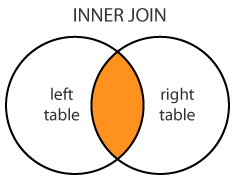
Different types of JOINs
- (INNER) JOIN: Select records that have matching values in both tables.
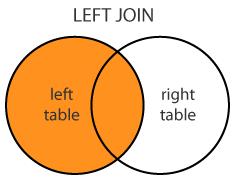
- LEFT (OUTER) JOIN: Select records from the first (left-most) table with matching right table records.
- RIGHT (OUTER) JOIN: Select records from the second (right-most) table with matching left table records.
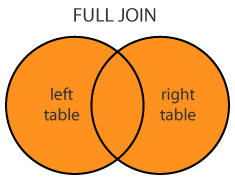
- FULL (OUTER) JOIN: Selects all records that match either left or right table records.
All INNER and OUTER keywords are optional.
Details about the differences between these JOINs are available in subsequent tutorial pages.
The SQL JOIN syntax
The general syntax is:
SELECT column-names
FROM table-name1 JOIN table-name2 ON column-name1 = column-name2
WHERE condition
The general syntax with INNER is:
SELECT column-names
FROM table-name1 INNER JOIN table-name2 ON column-name1 = column-name2
WHERE condition
Note: The INNER keyword is optional: it is the default as well as the most commmonly used JOIN operation.
| CUSTOMER |
|---|
| Id |
| FirstName |
| LastName |
| City |
| Country |
| Phone |
| ORDER |
|---|
| Id |
| OrderDate |
| OrderNumber |
| CustomerId |
| TotalAmount |
SQL JOIN Examples
Problem: List all orders with customer information
SELECT OrderNumber, TotalAmount, FirstName, LastName, City, Country
FROM [Order] JOIN Customer ON [Order].CustomerId = Customer.Id
In this example using table aliases for [Order] and Customer might have been useful.
Results: 830 records.
| OrderNumber | TotalAmount | FirstName | LastName | City | Country |
|---|---|---|---|---|---|
| 542378 | 440.00 | Paul | Henriot | Reims | France |
| 542379 | 1863.40 | Karin | Josephs | Münster | Germany |
| 542380 | 1813.00 | Mario | Pontes | Rio de Janeiro | Brazil |
| 542381 | 670.80 | Mary | Saveley | Lyon | France |
| 542382 | 3730.00 | Pascale | Cartrain | Charleroi | Belgium |
| 542383 | 1444.80 | Mario | Pontes | Rio de Janeiro | Brazil |
| 542384 | 625.20 | Yang | Wang | Bern | Switzerland |
| PRODUCT |
|---|
| Id |
| ProductName |
| SupplierId |
| UnitPrice |
| Package |
| IsDiscontinued |
| ORDERITEM |
|---|
| Id |
| OrderId |
| ProductId |
| UnitPrice |
| Quantity |
| ORDER |
|---|
| Id |
| OrderDate |
| OrderNumber |
| CustomerId |
| TotalAmount |
Problem: List all orders with
product names, quantities, and prices
SELECT O.OrderNumber, CONVERT(date,O.OrderDate) AS Date,P.ProductName, I.Quantity, I.UnitPrice
FROM [Order] O JOIN OrderItem I ON O.Id = I.OrderId
JOIN Product P ON P.Id = I.ProductId
ORDER BY O.OrderNumber
This query performs two JOIN operations with 3 tables.
The O, I, and P are table aliases. Date is a column alias.
Results: 2155 records
| OrderNumber | Date | ProductName | Quantity | UnitPrice |
|---|---|---|---|---|
| 542378 | 7/4/2012 12:00:00 AM | Queso Cabrales | 12 | 14.00 |
| 542378 | 7/4/2012 12:00:00 AM | Singaporean Hokkien Fried Mee | 10 | 9.80 |
| 542378 | 7/4/2012 12:00:00 AM | Mozzarella di Giovanni | 5 | 34.80 |
| 542379 | 7/5/2012 12:00:00 AM | Tofu | 9 | 18.60 |
| 542379 | 7/5/2012 12:00:00 AM | Manjimup Dried Apples | 40 | 42.40 |
| 542380 | 7/8/2012 12:00:00 AM | Jack’s New England Clam Chowder | 10 | 7.70 |
| 542380 | 7/8/2012 12:00:00 AM | Manjimup Dried Apples | 35 | 42.40 |
| 542380 | 7/8/2012 12:00:00 AM | Louisiana Fiery Hot Pepper Sauce | 15 | 16.80 |
| 542381 | 7/8/2012 12:00:00 AM | Gustaf’s Knäckebröd | 6 | 16.80 |
| 542381 | 7/8/2012 12:00:00 AM | Ravioli Angelo | 15 | 15.60 |
| 542381 | 7/8/2012 12:00:00 AM | Louisiana Fiery Hot Pepper Sauce | 20 | 16.80 |
| 542382 | 7/9/2012 12:00:00 AM | Sir Rodney’s Marmalade | 40 | 64.80 |
| 542382 | 7/9/2012 12:00:00 AM | Geitost | 25 | 2.00 |
 |
SQL LEFT JOIN
- LEFT JOIN performs a join starting with the first (left-most) table and then any matching second (right-most) table records.
- LEFT JOIN and LEFT OUTER JOIN are the same.
The SQL LEFT JOIN syntax
The general syntax is:
SELECT column-names
FROM table-name1 LEFT JOIN table-name2 ON column-name1 = column-name2
WHERE condition
The general LEFT OUTER JOIN syntax is:
SELECT OrderNumber, TotalAmount, FirstName, LastName, City, Country
FROM Customer C LEFT JOIN [Order] O ON O.CustomerId = C.Id
ORDER BY TotalAmount
This will list all customers, whether they placed any order or not.
The ORDER BY TotalAmount shows the customers without orders first (i.e. TotalMount is NULL).
Results: 832 records
| OrderNumber | TotalAmount | FirstName | LastName | City | Country |
|---|---|---|---|---|---|
| NULL | NULL | Diego | Roel | Madrid | Spain |
| NULL | NULL | Marie | Bertrand | Paris | France |
| 542912 | 12.50 | Patricio | Simpson | Buenos Aires | Argentina |
| 542937 | 18.40 | Paolo | Accorti | Torino | Italy |
| 542897 | 28.00 | Pascale | Cartrain | Charleroi | Belgium |
| 542716 | 28.00 | Maurizio | Moroni | Reggio Emilia | Italy |
| 543028 | 30.00 | Yvonne | Moncada | Buenos Aires | Argentina |
| 543013 | 36.00 | Fran | Wilson | Portland | USA |
|
SQL RIGHT JOIN
- RIGHT JOIN performs a join starting with the second (right-most) table and then any matching first (left-most) table records.
- RIGHT JOIN and RIGHT OUTER JOIN are the same.
The SQL RIGHT JOIN syntax
The general syntax is:
SELECT column-names
FROM table-name1 RIGHT JOIN table-name2 ON column-name1 = column-name2
WHERE condition
The general RIGHT OUTER JOIN syntax is:
SELECT column-names
FROM table-name1 RIGHT OUTER JOIN table-name2 ON column-name1 = column-name2
WHERE condition
| CUSTOMER |
|---|
| Id |
| FirstName |
| LastName |
| City |
| Country |
| Phone |
| ORDER |
|---|
| Id |
| OrderDate |
| OrderNumber |
| CustomerId |
| TotalAmount |
SQL RIGHT JOIN Example
Problem: List customers that have not placed orders
SELECT TotalAmount, FirstName, LastName, City, Country
FROM [Order] O RIGHT JOIN Customer C ON O.CustomerId = C.Id
WHERE TotalAmount IS NULL
This returns customers that, when joined, have no matching order.
Results: 2 records
| TotalAmount | FirstName | LastName | City | Country |
|---|---|---|---|---|
| NULL | Diego | Roel | Madrid | Spain |
| NULL | Marie | Bertrand | Paris | France |
SQL FULL JOIN Statement
- FULL JOIN returns all matching records from both tables whether the other table matches or not.
- FULL JOIN can potentially return very large datasets.
- FULL JOIN and FULL OUTER JOIN are the same.
The SQL FULL JOIN syntax
The general syntax is:
SELECT column-names
FROM table-name1 FULL JOIN table-name2 ON column-name1 = column-name2
WHERE condition
The general FULL OUTER JOIN syntax is:
SELECT column-names
FROM table-name1 FULL OUTER JOIN table-name2 ON column-name1 = column-name2
WHERE condition
| SUPPLIER |
|---|
| Id |
| CompanyName |
| ContactName |
| City |
| Country |
| Phone |
| Fax |
| CUSTOMER |
|---|
| Id |
| FirstName |
| LastName |
| City |
| Country |
| Phone |
SQL FULL JOIN Examples
Problem: Match all customers and suppliers by country
SELECT C.FirstName, C.LastName, C.Country AS CustomerCountry, S.Country AS SupplierCountry, S.CompanyName
FROM Customer C FULL JOIN Supplier S ON C.Country = S.Country
ORDER BY C.Country, S.Country
This returns suppliers that have no customers in their country,
and customers that have no suppliers in their country,
and customers and suppliers that are from the same country.
Results: 195 records
| FirstName | LastName | CustomerCountry | SupplierCountry | CompanyName |
|---|---|---|---|---|
| NULL | NULL | NULL | Australia | Pavlova, Ltd. |
| NULL | NULL | NULL | Australia | G’day, Mate |
| NULL | NULL | NULL | Japan | Tokyo Traders |
| NULL | NULL | NULL | Japan | Mayumi’s |
| NULL | NULL | NULL | Netherlands | Zaanse Snoepfabriek |
| NULL | NULL | NULL | Singapore | Leka Trading |
| Patricio | Simpson | Argentina | NULL | NULL |
| Yvonne | Moncada | Argentina | NULL | NULL |
| Sergio | Gutiérrez | Argentina | NULL | NULL |
| Georg | Pipps | Austria | NULL | NULL |
| Roland | Mendel | Austria | NULL | NULL |
| Pascale | Cartrain | Belgium | NULL | NULL |
| Catherine | Dewey | Belgium | NULL | NULL |
| Bernardo | Batista | Brazil | Brazil | Refrescos Americanas LTDA |
| Lúcia | Carvalho | Brazil | Brazil | Refrescos Americanas LTDA |
| Janete | Limeira | Brazil | Brazil | Refrescos Americanas LTDA |
| Aria | Cruz | Brazil | Brazil | Refrescos Americanas LTDA |
| André | Fonseca | Brazil | Brazil | Refrescos Americanas LTDA |
| Mario | Pontes | Brazil | Brazil | Refrescos Americanas LTDA |
| Pedro | Afonso | Brazil | Brazil | Refrescos Americanas LTDA |
| Paula | Parente | Brazil | Brazil | Refrescos Americanas LTDA |
| Anabela | Domingues | Brazil | Brazil | Refrescos Americanas LTDA |
| Elizabeth | Lincoln | Canada | Canada | Ma Maison |
| Elizabeth | Lincoln | Canada | Canada | Forêts d’érables |
| Yoshi | Tannamuri | Canada | Canada | Ma Maison |
| Yoshi | Tannamuri | Canada | Canada | Forêts d’érables |
| Jean | Fresnière | Canada | Canada | Ma Maison |
SQL Self JOIN
- A self JOIN occurs when a table takes a ‘selfie’.
- A self JOIN is a regular join but the table is joined with itself.
- This can be useful when modeling hierarchies.
- They are also useful for comparisons within a table.
The SQL Self JOIN syntax
The general syntax is:
SELECT column-names
FROM table-name T1 JOIN table-name T2
WHERE condition
T1 and T2 are different table aliases for the same table
| CUSTOMER |
|---|
| Id |
| FirstName |
| LastName |
| City |
| Country |
| Phone |
| CUSTOMER |
|---|
| Id |
| FirstName |
| LastName |
| City |
| Country |
| Phone |
SQL Self JOIN Examples
Problem: Match customers that are from the same city and country
SELECT B.FirstName AS FirstName1,
    B.LastName AS LastName1,
    A.FirstName AS FirstName2,
    A.LastName AS LastName2,
    B.City,
    B.Country
FROM Customer A, Customer B
WHERE A.Id <> B.Id
	AND A.City = B.City
	AND A.Country = B.Country
ORDER BY A.Country
A and B are aliases for the same Customer table.
Results: 88 records
| FirstName1 | LastName1 | FirstName2 | LastName2 | City | Country |
|---|---|---|---|---|---|
| Patricio | Simpson | Yvonne | Moncada | Buenos Aires | Argentina |
| Patricio | Simpson | Sergio | Gutiérrez | Buenos Aires | Argentina |
| Yvonne | Moncada | Patricio | Simpson | Buenos Aires | Argentina |
| Yvonne | Moncada | Sergio | Gutiérrez | Buenos Aires | Argentina |
| Sergio | Gutiérrez | Patricio | Simpson | Buenos Aires | Argentina |
| Sergio | Gutiérrez | Yvonne | Moncada | Buenos Aires | Argentina |
| Anabela | Domingues | Lúcia | Carvalho | Sao Paulo | Brazil |
| Anabela | Domingues | Aria | Cruz | Sao Paulo | Brazil |
| Anabela | Domingues | Pedro | Afonso | Sao Paulo | Brazil |
| Bernardo | Batista | Janete | Limeira | Rio de Janeiro | Brazil |
| Bernardo | Batista | Mario | Pontes | Rio de Janeiro | Brazil |
| Lúcia | Carvalho | Anabela | Domingues | Sao Paulo | Brazil |
| Lúcia | Carvalho | Aria | Cruz | Sao Paulo | Brazil |
| Lúcia | Carvalho | Pedro | Afonso | Sao Paulo | Brazil |
| Janete | Limeira | Bernardo | Batista | Rio de Janeiro | Brazil |
| Janete | Limeira | Mario | Pontes | Rio de Janeiro | Brazil |
| Aria | Cruz | Anabela | Domingues | Sao Paulo | Brazil |
| Aria | Cruz | Lúcia | Carvalho | Sao Paulo | Brazil |
| Aria | Cruz | Pedro | Afonso | Sao Paulo | Brazil |
| Mario | Pontes | Bernardo | Batista | Rio de Janeiro | Brazil |
| Mario | Pontes | Janete | Limeira | Rio de Janeiro | Brazil |
| Pedro | Afonso | Anabela | Domingues | Sao Paulo | Brazil |
| Pedro | Afonso | Lúcia | Carvalho | Sao Paulo | Brazil |
| Pedro | Afonso | Aria | Cruz | Sao Paulo | Brazil |
| Dominique | Perrier | Marie | Bertrand | Paris | France |
| Marie | Bertrand | Dominique | Perrier | Paris | France |
| Janine | Labrune | Carine | Schmitt | Nantes | France |
| Carine | Schmitt | Janine | Labrune | Nantes | France |
SQL UNION Clause
- UNION combines the result sets of two queries.
- Column data types in the two queries must match.
- UNION combines by column position rather than column name.
The SQL UNION syntax
The general syntax is:
SELECT column-names
FROM table-name UNIONSELECT column-names
FROM table-name
| SUPPLIER |
|---|
| Id |
| CompanyName |
| ContactName |
| City |
| Country |
| Phone |
| Fax |
| CUSTOMER |
|---|
| Id |
| FirstName |
| LastName |
| City |
| Country |
| Phone |
SQL UNION Examples
Problem: List all contacts, i.e., suppliers and customers.
SELECT 'Customer' As Type,FirstName + ' ' + LastName AS ContactName,City, Country, Phone
FROM CustomerUNIONSELECT 'Supplier',ContactName, City, Country, Phone
FROM Supplier
This is a simple example in which the table alias would be useful
Results:
| Type | ContactName | City | Country | Phone |
|---|---|---|---|---|
| Customer | Alejandra Camino | Madrid | Spain | (91) 745 6200 |
| Customer | Alexander Feuer | Leipzig | Germany | 0342-023176 |
| Customer | Ana Trujillo | México D.F. | Mexico | (5) 555-4729 |
| Customer | Anabela Domingues | Sao Paulo | Brazil | (11) 555-2167 |
| Supplier | Anne Heikkonen | Lappeenranta | Finland | (953) 10956 |
| Supplier | Antonio del Valle Saavedra | Oviedo | Spain | (98) 598 76 54 |
| Supplier | Beate Vileid | Sandvika | Norway | (0)2-953010 |
| Supplier | Carlos Diaz | Sao Paulo | Brazil | (11) 555 4640 |
| Supplier | Chandra Leka | Singapore | Singapore | 555-8787 |
| Supplier | Chantal Goulet | Ste-Hyacinthe | Canada | (514) 555-2955 |
| Supplier | Charlotte Cooper | London | UK | (171) 555-2222 |
SQL Subqueries
- A subquery is a SQL query within a query.
- Subqueries are nested queries that provide data to the enclosing query.
- Subqueries can return individual values or a list of records
- Subqueries must be enclosed with parenthesis
The SQL subquery syntax
There is no general syntax; subqueries are regular queries placed inside parenthesis.
Subqueries can be used in different ways and at different locations inside a query:
Here is an subquery with the IN operator
SELECT column-names
FROM table-name1
WHERE value IN (SELECT column-name
                FROM table-name2
                WHERE condition)
Subqueries can also assign column values for each record:
SELECT column1 = (SELECT column-name
                  FROM table-name
                  WHERE condition), column-names
FROM table-name
WEHRE condition
| ORDERITEM |
|---|
| Id |
| OrderId |
| ProductId |
| UnitPrice |
| Quantity |
| PRODUCT |
|---|
| Id |
| ProductName |
| SupplierId |
| UnitPrice |
| Package |
| IsDiscontinued |
SQL Subquery Examples
Problem: List products with order quantities greater than 100.
SELECT ProductName
FROM Product
WHERE Id IN (SELECT ProductId
             FROM OrderItem
             WHERE Quantity > 100)
Results: 12 records
| PoductName |
|---|
| Guaraná Fantástica |
| Schoggi Schokolade |
| Chartreuse verte |
| Jack’s New England Clam Chowder |
| Rogede sild |
| Manjimup Dried Apples |
| Perth Pasties |
| CUSTOMER |
|---|
| Id |
| FirstName |
| LastName |
| City |
| Country |
| Phone |
| ORDER |
|---|
| Id |
| OrderDate |
| OrderNumber |
| CustomerId |
| TotalAmount |
SQL Subquery Examples
Problem: List all customers with their total number of orders
SELECT FirstName, LastName,OrderCount = (SELECT COUNT(O.Id)
                                         FROM [Order] O
                                         WHERE O.CustomerId = C.Id)
                                         FROM Customer C
This is a correlated subquery because the subquery references the enclosing query (i.e. the C.Id in the WHERE clause).
Results: 91 records
| FirstName | LastName | OrderCount |
|---|---|---|
| Maria | Anders | 6 |
| Ana | Trujillo | 4 |
| Antonio | Moreno | 7 |
| Thomas | Hardy | 13 |
| Christina | Berglund | 18 |
| Hanna | Moos | 7 |
| Frédérique | Citeaux | 11 |
| Martín | Sommer | 3 |
|
SQL WHERE ANY, ALL Clause
- ANY and ALL keywords are used with a WHERE or HAVING clause.
- ANY and ALL operate on subqueries that return multiple values.
- ANY returns true if any of the subquery values meet the condition.
- ALL returns true if all of the subquery values meet the condition.
The SQL WHERE ANY and ALL syntax
The general ANY syntax is:
SELECT column-names
FROM table-name
WHERE column-name operator ANY (SELECT column-name
                                FROM table-name
                                WHERE condition)
The general ALL syntax is:
SELECT column-names
FROM table-name
WHERE column-name operator ALL(SELECT column-name
                               FROM table-name
                               WHERE condition)
| PRODUCT |
|---|
| Id |
| ProductName |
| SupplierId |
| UnitPrice |
| Package |
| IsDiscontinued |
| ORDERITEM |
|---|
| Id |
| OrderId |
| ProductId |
| UnitPrice |
| Quantity |
SQL ANY Example
Problem: Which products were sold by the unit (i.e. quantity = 1)
SELECT ProductName
FROM Product
WHERE Id = ANY(SELECT ProductId
               FROM OrderItem
               WHERE Quantity = 1)
Results: 17 records
| ProductName |
|---|
| Chef Anton’s Cajun Seasoning |
| Grandma’s Boysenberry Spread |
| Uncle Bob’s Organic Dried Pears |
| Ikura |
| Konbu |
| Tofu |
| Teatime Chocolate Biscuits |
| Sir Rodney’s Marmalade |
| CUSTOMER |
|---|
| Id |
| FirstName |
| LastName |
| City |
| Country |
| Phone |
| ORDER |
|---|
| Id |
| OrderDate |
| OrderNumber |
| CustomerId |
| TotalAmount |
SQL ALL Example
Problem: List customers who placed orders that are
larger than the average of each customer order
SELECT DISTINCT FirstName + ' ' + LastName as CustomerName
FROM Customer, [Order]
WHERE Customer.Id = [Order].CustomerId  AND TotalAmount > ALL(SELECT AVG(TotalAmount)
                                                              FROM [Order]
                                                              GROUP BY CustomerId)
Results: 22 records
| CustomerName |
|---|
| Art Braunschweiger |
| Christina Berglund |
| Elizabeth Lincoln |
| Frédérique Citeaux |
| Georg Pipps |
| Horst Kloss |
| Howard Snyder |
|
SQL WHERE EXISTS Statement
- WHERE EXISTS tests for the existence of any records in a subquery.
- EXISTS returns true if the subquery returns one or more records.
- EXISTS is commonly used with correlated subqueries.
The SQL EXISTS syntax
The general syntax is:
SELECT column-names
FROM table-name
WHERE EXISTS(SELECT column-name
             FROM table-name
             WHERE condition)
| SUPPLIER |
|---|
| Id |
| CompanyName |
| ContactName |
| City |
| Country |
| Phone |
| Fax |
| PRODUCT |
|---|
| Id |
| ProductName |
| SupplierId |
| UnitPrice |
| Package |
| IsDiscontinued |
SQL EXISTS Example
Problem: Find suppliers with products over $100.
SELECT CompanyName
FROM Supplier
WHERE EXISTS(SELECT ProductName
             FROM Product
             WHERE SupplierId = Supplier.Id
             AND UnitPrice > 100)
This is a correlated subquery because the subquery references the enclosing query (with Supplier.Id).
Results: 2 records
| CompanyName |
|---|
| Plutzer Lebensmittelgroßmärkte AG |
| Aux joyeux ecclésiastiques |
SQL SELECT INTO Statement
- SELECT INTO copies data from one table into a new table.
- SELECT INTO creates a new table located in the default filegroup.
The SQL SELECT INTO syntax
The general syntax is:
SELECT column-names  INTO new-table-name
FROM table-name
WHERE EXISTS(SELECT column-name
             FROM table-name
             WHERE condition)
The new table will have column names as specified in the query.
| SUPPLIER |
|---|
| Id |
| CompanyName |
| ContactName |
| City |
| Country |
| Phone |
| Fax |
SQL SELECT INTO Example
Problem: Copy all suppliers from USA to a new SupplierUSA table.
SELECT * INTO SupplierUSA
FROM Supplier
WHERE Country = 'USA'
Results: 4 rows affected
Here are the records in the newly created table SupplierUSA:
| Id | CompanyName | ContactName | City | Country | Phone | Fax |
|---|---|---|---|---|---|---|
| 2 | New Orleans Cajun Delights | Shelley Burke | New Orleans | USA | (100) 555-4822 | NULL |
| 3 | Grandma Kelly’s Homestead | Regina Murphy | Ann Arbor | USA | (313) 555-5735 | (313) 555-3349 |
| 16 | Bigfoot Breweries | Cheryl Saylor | Bend | USA | (100) 555-4822 | NULL |
| 19 | New England Seafood Cannery | Robb Merchant | Boston | USA | (617) 555-3267 | (617) 555-3389 |
SQL INSERT INTO SELECT Statement
- INSERT INTO SELECT copies data from one table to another table.
- INSERT INTO SELECT requires that data types in source and target tables match.
The SQL INSERT INTO SELECT syntax
The general syntax is:
INSERT INTO table-name (column-names)
SELECT column-names
FROM table-nameWHERE condition
| CUSTOMER |
|---|
| Id |
| FirstName |
| LastName |
| City |
| Country |
| Phone |
| SUPPLIER |
|---|
| Id |
| CompanyName |
| ContactName |
| City |
| Country |
| Phone |
| Fax |
SQL INSERT SELECT INTO
Problem: Copy all Canadian suppliers into the Customer table
INSERT INTO Customer (FirstName, LastName, City, Country, Phone)
SELECT LEFT(ContactName, CHARINDEX(' ',ContactName) - 1) AS FirstName,
	SUBSTRING(ContactName, CHARINDEX(' ',ContactName) + 1, 100) AS LastName,City, Country, Phone
FROM Supplier WHERE Country = 'Canada'
LEFT, CHARINDEX, and SUBSTRING are built-in functions.
Results: 2 rows affected.
These are the two new Customer records
| FirstName | LastName | City | Country | Phone |
|---|---|---|---|---|
| Jean-Guy | Lauzon | Montréal | Canada | (514) 555-9022 |
| Chantal | Goulet | Ste-Hyacinthe | Canada | (514) 555-2955 |
SQL Injection
- SQL Injection is a code injection technique.
- It is the placement of malicious code in SQL strings.
- SQL Injection is one of the most common web hacking techniques.
- These attacks only work with apps that internally use SQL.
SQL Keywords
- SQL Server uses reserved words for database operations.
- Reserved keywords are part of the SQL Server T-SQL grammar.
- SQL Server has claimed current and future reserved words.
- Keywords can be used as identifiers by placing them between [].
Current T-SQL Keywords
| ADD | EXCEPT | PERCENT |
|---|---|---|
| ALL | EXEC | PLAN |
| ALTER | EXECUTE | PRECISION |
| AND | EXISTS | PRIMARY |
| ANY | EXIT | |
| AS | FETCH | PROC |
| ASC | FILE | PROCEDURE |
| AUTHORIZATION | FILLFACTOR | PUBLIC |
| BACKUP | FOR | RAISERROR |
| BEGIN | FOREIGN | READ |
| BETWEEN | FREETEXT | READTEXT |
| BREAK | FREETEXTTABLE | RECONFIGURE |
| BROWSE | FROM | REFERENCES |
| BULK | FULL | REPLICATION |
| BY | FUNCTION | RESTORE |
| CASCADE | GOTO | RESTRICT |
| CASE | GRANT | RETURN |
| CHECK | GROUP | REVOKE |
| CHECKPOINT | HAVING | RIGHT |
| CLOSE | HOLDLOCK | ROLLBACK |
| CLUSTERED | IDENTITY | ROWCOUNT |
| COALESCE | IDENTITY_INSERT | ROWGUIDCOL |
| COLLATE | IDENTITYCOL | RULE |
| COLUMN | IF | SAVE |
| COMMIT | IN | SCHEMA |
| COMPUTE | INDEX | SELECT |
| CONSTRAINT | INNER | SESSION_USER |
| CONTAINS | INSERT | SET |
| CONTAINSTABLE | INTERSECT | SETUSER |
| CONTINUE | INTO | SHUTDOWN |
| CONVERT | IS | SOME |
| CREATE | JOIN | STATISTICS |
| CROSS | KEY | SYSTEM_USER |
| CURRENT | KILL | TABLE |
| CURRENT_DATE | LEFT | TEXTSIZE |
| CURRENT_TIME | LIKE | THEN |
| CURRENT_TIMESTAMP | LINENO | TO |
| CURRENT_USER | LOAD | TOP |
| CURSOR | NATIONAL | TRAN |
| DATABASE | NOCHECK | TRANSACTION |
| DBCC | NONCLUSTERED | TRIGGER |
| DEALLOCATE | NOT | TRUNCATE |
| DECLARE | NULL | TSEQUAL |
| DEFAULT | NULLIF | UNION |
| DELETE | OF | UNIQUE |
| DENY | OFF | UPDATE |
| DESC | OFFSETS | UPDATETEXT |
| DISK | ON | USE |
| DISTINCT | OPEN | USER |
| DISTRIBUTED | OPENDATASOURCE | VALUES |
| DOUBLE | OPENQUERY | VARYING |
| DROP | OPENROWSET | VIEW |
| DUMMY | OPENXML | WAITFOR |
| DUMP | OPTION | WHEN |
| ELSE | OR | WHERE |
| END | ORDER | WHILE |
| ERRLVL | OUTER | WITH |
| ESCAPE | OVER | WRITETEXT |
Future T-SQL Keywords
| ABSOLUTE | FOUND | PRESERVE |
|---|---|---|
| ACTION | FREE | PRIOR |
| ADMIN | GENERAL | PRIVILEGES |
| AFTER | GET | READS |
| AGGREGATE | GLOBAL | REAL |
| ALIAS | GO | RECURSIVE |
| ALLOCATE | GROUPING | REF |
| ARE | HOST | REFERENCING |
| ARRAY | HOUR | RELATIVE |
| ASSERTION | IGNORE | RESULT |
| AT | IMMEDIATE | RETURNS |
| BEFORE | INDICATOR | ROLE |
| BINARY | INITIALIZE | ROLLUP |
| BIT | INITIALLY | ROUTINE |
| BLOB | INOUT | ROW |
| BOOLEAN | INPUT | ROWS |
| BOTH | INT | SAVEPOINT |
| BREADTH | INTEGER | SCROLL |
| CALL | INTERVAL | SCOPE |
| CASCADED | ISOLATION | SEARCH |
| CAST | ITERATE | SECOND |
| CATALOG | LANGUAGE | SECTION |
| CHAR | LARGE | SEQUENCE |
| CHARACTER | LAST | SESSION |
| CLASS | LATERAL | SETS |
| CLOB | LEADING | SIZE |
| COLLATION | LESS | SMALLINT |
| COMPLETION | LEVEL | SPACE |
| CONNECT | LIMIT | SPECIFIC |
| CONNECTION | LOCAL | SPECIFICTYPE |
| CONSTRAINTS | LOCALTIME | SQL |
| CONSTRUCTOR | LOCALTIMESTAMP | SQLEXCEPTION |
| CORRESPONDING | LOCATOR | SQLSTATE |
| CUBE | MAP | SQLWARNING |
| CURRENT_PATH | MATCH | START |
| CURRENT_ROLE | MINUTE | STATE |
| CYCLE | MODIFIES | STATEMENT |
| DATA | MODIFY | STATIC |
| DATE | MODULE | STRUCTURE |
| DAY | MONTH | TEMPORARY |
| DEC | NAMES | TERMINATE |
| DECIMAL | NATURAL | THAN |
| DEFERRABLE | NCHAR | TIME |
| DEFERRED | NCLOB | TIMESTAMP |
| DEPTH | NEW | TIMEZONE_HOUR |
| DEREF | NEXT | TIMEZONE_MINUTE |
| DESCRIBE | NO | TRAILING |
| DESCRIPTOR | NONE | TRANSLATION |
| DESTROY | NUMERIC | TREAT |
| DESTRUCTOR | OBJECT | TRUE |
| DETERMINISTIC | OLD | UNDER |
| DICTIONARY | ONLY | UNKNOWN |
| DIAGNOSTICS | OPERATION | UNNEST |
| DISCONNECT | ORDINALITY | USAGE |
| DOMAIN | OUT | USING |
| DYNAMIC | OUTPUT | VALUE |
| EACH | PAD | VARCHAR |
| END-EXEC | PARAMETER | VARIABLE |
| EQUALS | PARAMETERS | WHENEVER |
| EVERY | PARTIAL | WITHOUT |
| EXCEPTION | PATH | WORK |
| EXTERNAL | POSTFIX | WRITE |
| FALSE | PREFIX | YEAR |
| FIRST | PREORDER | ZONE |
| FLOAT | PREPARE |





 扫一扫
扫一扫


 592
592

 被折叠的 条评论
为什么被折叠?
被折叠的 条评论
为什么被折叠?
 到【灌水乐园】发言





