


Spring Cloud 之Spring-Security
对于Spring-Security首先要明白这么几点:
1、什么是SpringSecurityurity
2、SpringSecurity应用场景
3、SpringBoot整合Security
4、Security formLogin 模式
5、Security httpBasic模式
6、Security 实现账号权限控制
7、Security 自定义登陆界面
8、RBAC权限控制模型
http://pig.pigx.top/#/admin/role
什么是SpringSecurityu
Spring Security是一个能够为基于Spring的企业应用系统提供声明式的安全访问控制解决方案的安全框架。它提供了一组可以在Spring应用上下文中配置的Bean,充分利用了Spring IoC,DI(控制反转Inversion of Control ,DI:Dependency Injection 依赖注入)和AOP(面向切面编程)功能,为应用系统提供声明式的安全访问控制功能,减少了为企业系统安全控制编写大量重复代码的工作。
参考百度百科:https://baike.baidu.com/item/spring%20security/8831652?fr=aladdin
SpringSecurity官网:https://spring.io/projects/spring-security
Spring整合SpringSecurityu
SpringBoot整合SpringSecurityu
微服务安全框架 SpringBootSecurity
Security应用场景
Security在很多企业中作为后台角色权限框架、授权认证oauth2.0 、安全防护(防止跨站点请求)、Session攻击、非常容易融合SpringMVC使用等
有两个账户
admin 账户 所有请求都有权限访问
userAdd账户 只能访问查询和添加订单权限
403 权限不足
401 没有授权
环境搭建:
admin账户 所有请求都有权限访问
userAdd账户 只能访问查询和添加订单
关于 formLogin模式 : 表单提交认证模式
httpBasic模式 :浏览器与服务器做认证授权
maven的依赖主要:
            <!-->spring-boot 整合security -->
        <dependency>
            <groupId>org.springframework.boot</groupId>
            <artifactId>spring-boot-starter-security</artifactId>
        </dependency>
关于HttpBasic模式:
在HTTP协议进行通信的过程中,HTTP协议定义了基本认证过程以允许HTTP服务器对WEB浏览器进行用户身份证的方法,当一个客户端向HTTP服务 器进行数据请求时,如果客户端未被认证,则HTTP服务器将通过基本认证过程对客户端的用户名及密码进行验证,以决定用户是否合法。客户端在接收到HTTP服务器的身份认证要求后,会提示用户输入用户名及密码,然后将用户名及密码以BASE64加密,加密后的密文将附加于请求信息中, 如当用户名为toov5,密码为:123456时,客户端将用户名和密码用“:”合并,并将合并后的字符串用BASE64加密为密文,并于每次请求数据 时,将密文附加于请求头(Request Header)中。HTTP服务器在每次收到请求包后,根据协议取得客户端附加的用户信息(BASE64加密的用户名和密码),解开请求包,对用户名及密码进行验证,如果用 户名及密码正确,则根据客户端请求,返回客户端所需要的数据;否则,返回错误代码或重新要求客户端提供用户名及密码。
maven:
<parent>
        <groupId>org.springframework.boot</groupId>
        <artifactId>spring-boot-starter-parent</artifactId>
        <version>2.0.1.RELEASE</version>
    </parent>
    <!-- 管理依赖 -->
    <dependencyManagement>
        <dependencies>
            <dependency>
                <groupId>org.springframework.cloud</groupId>
                <artifactId>spring-cloud-dependencies</artifactId>
                <version>Finchley.M7</version>
                <type>pom</type>
                <scope>import</scope>
            </dependency>
        </dependencies>
    </dependencyManagement>
    <dependencies>
        <!-- SpringBoot整合Web组件 -->
        <dependency>
            <groupId>org.springframework.boot</groupId>
            <artifactId>spring-boot-starter-web</artifactId>
        </dependency>
        <dependency>
            <groupId>org.projectlombok</groupId>
            <artifactId>lombok</artifactId>
        </dependency>

        <!-- springboot整合freemarker -->
        <dependency>
            <groupId>org.springframework.boot</groupId>
            <artifactId>spring-boot-starter-freemarker</artifactId>
        </dependency>

        <!-->spring-boot 整合security -->
        <dependency>
            <groupId>org.springframework.boot</groupId>
            <artifactId>spring-boot-starter-security</artifactId>
        </dependency>


    </dependencies>
    <!-- 注意: 这里必须要添加, 否者各种依赖有问题 -->
    <repositories>
        <repository>
            <id>spring-milestones</id>
            <name>Spring Milestones</name>
            <url>https://repo.spring.io/libs-milestone</url>
            <snapshots>
                <enabled>false</enabled>
            </snapshots>
        </repository>
    </repositories>
Controller:
import org.springframework.stereotype.Controller;
import org.springframework.web.bind.annotation.GetMapping;
import org.springframework.web.bind.annotation.RequestMapping;

@Controller
public class OrderController {
    // 首页
    @RequestMapping("/")
    public String index() {
        return "index";
    }

    // 查询订单
    @RequestMapping("/showOrder")
    public String showOrder() {
        return "showOrder";
    }

    // 添加订单
    @RequestMapping("/addOrder")
    public String addOrder() {
        return "addOrder";
    }

    // 修改订单
    @RequestMapping("/updateOrder")
    public String updateOrder() {
        return "updateOrder";
    }

    // 删除订单
    @RequestMapping("/deleteOrder")
    public String deleteOrder() {
        return "deleteOrder";
    }

    // 自定义登陆页面
    @GetMapping("/login")
    public String login() {
        return "login";
    }

}
对于403状态码的错误处理:
import org.springframework.stereotype.Controller;
import org.springframework.web.bind.annotation.RequestMapping;

@Controller
public class ErrorController {

    // 403权限不足页面
    @RequestMapping("/error/403")
    public String error() {
        return "/error/403";
    }

}
config:
权限的配置:
对于fromLogin登录页面的修改自定义 关闭csdrf 配置loginpage就OK了
import org.springframework.beans.factory.annotation.Autowired;
import org.springframework.context.annotation.Bean;
import org.springframework.security.config.annotation.authentication.builders.AuthenticationManagerBuilder;
import org.springframework.security.config.annotation.web.builders.HttpSecurity;
import org.springframework.security.config.annotation.web.configuration.EnableWebSecurity;
import org.springframework.security.config.annotation.web.configuration.WebSecurityConfigurerAdapter;
import org.springframework.security.crypto.password.NoOpPasswordEncoder;
import org.springframework.stereotype.Component;

import com.mayikt.handler.MyAuthenticationFailureHandler;
import com.mayikt.handler.MyAuthenticationSuccessHandler;

// Security 配置
@Component
@EnableWebSecurity                  //继承这个类
public class SecurityConfig extends WebSecurityConfigurerAdapter {
  @Autowired
  private MyAuthenticationFailureHandler failureHandler;
  @Autowired
  private MyAuthenticationSuccessHandler successHandler;
    // 配置认证用户信息和权限
    protected void configure(AuthenticationManagerBuilder auth) throws Exception {
        // 添加admin账号
        auth.inMemoryAuthentication().withUser("admin").password("123456").
        authorities("showOrder","addOrder","updateOrder","deleteOrder");
        // 添加userAdd账号
        auth.inMemoryAuthentication().withUser("userAdd").password("123456").authorities("showOrder","addOrder");
        // 如果想实现动态账号与数据库关联 在该地方改为查询数据库

    }

    // 配置拦截请求资源
    protected void configure(HttpSecurity http) throws Exception {
        // 如何权限控制 给每一个请求路径 分配一个权限名称 让后账号只要关联该名称,就可以有访问权限
        http.authorizeRequests()
        // 配置查询订单权限
        .antMatchers("/showOrder").hasAnyAuthority("showOrder")
        .antMatchers("/addOrder").hasAnyAuthority("addOrder")
        .antMatchers("/login").permitAll() //登录请求不可以拦截!
        .antMatchers("/updateOrder").hasAnyAuthority("updateOrder")
        .antMatchers("/deleteOrder").hasAnyAuthority("deleteOrder")
        .antMatchers("/**").fullyAuthenticated().and().formLogin().loginPage("/login").  //配置登录页面!!
        successHandler(successHandler).failureHandler(failureHandler)   //成功和失败的配置
        .and().csrf().disable();   //csrf跨站点攻击关闭 否则必须要传递token!!
    }

    @Bean
    public static NoOpPasswordEncoder passwordEncoder() {
        return (NoOpPasswordEncoder) NoOpPasswordEncoder.getInstance();
    }

}
权限相关页面配置:自定义web服务器参数
import org.springframework.boot.web.embedded.tomcat.TomcatServletWebServerFactory;
import org.springframework.boot.web.server.ErrorPage;
import org.springframework.boot.web.servlet.server.ConfigurableServletWebServerFactory;
import org.springframework.context.annotation.Bean;
import org.springframework.context.annotation.Configuration;
import org.springframework.http.HttpStatus;

@Configuration
public class WebServerAutoConfiguration {
    @Bean
    public ConfigurableServletWebServerFactory webServerFactory() {
        TomcatServletWebServerFactory factory = new TomcatServletWebServerFactory();
        ErrorPage errorPage400 = new ErrorPage(HttpStatus.BAD_REQUEST, "/error/400");
        ErrorPage errorPage401 = new ErrorPage(HttpStatus.UNAUTHORIZED, "/error/401");
        ErrorPage errorPage403 = new ErrorPage(HttpStatus.FORBIDDEN, "/error/403");
        ErrorPage errorPage404 = new ErrorPage(HttpStatus.NOT_FOUND, "/error/404");
        ErrorPage errorPage415 = new ErrorPage(HttpStatus.UNSUPPORTED_MEDIA_TYPE, "/error/415");
        ErrorPage errorPage500 = new ErrorPage(HttpStatus.INTERNAL_SERVER_ERROR, "/error/500");
        factory.addErrorPages(errorPage400, errorPage401, errorPage403, errorPage404, errorPage415, errorPage500);
        return factory;
    }
}
AuthenticationFailureHandler 认证失败接口
AuthenticationSuccessHandler 认证成功接口
成功和失败的处理:
失败:
import java.io.IOException;

import javax.servlet.ServletException;
import javax.servlet.http.HttpServletRequest;
import javax.servlet.http.HttpServletResponse;

import org.springframework.security.core.AuthenticationException;
import org.springframework.security.web.authentication.AuthenticationFailureHandler;
import org.springframework.stereotype.Component;

//认证失败
@Component
public class MyAuthenticationFailureHandler implements AuthenticationFailureHandler {

    public void onAuthenticationFailure(HttpServletRequest req, HttpServletResponse res, AuthenticationException auth)
            throws IOException, ServletException {
        System.out.println("登陆失败!");
        res.sendRedirect("http://baidu.com");

    }

}
成功:
import java.io.IOException;

import javax.servlet.ServletException;
import javax.servlet.http.HttpServletRequest;
import javax.servlet.http.HttpServletResponse;

import org.springframework.security.core.Authentication;
import org.springframework.security.web.authentication.AuthenticationSuccessHandler;
import org.springframework.stereotype.Component;

// 认证成功
@Component
public class MyAuthenticationSuccessHandler implements AuthenticationSuccessHandler {

    public void onAuthenticationSuccess(HttpServletRequest req, HttpServletResponse res, Authentication arg2)
            throws IOException, ServletException {
        System.out.println("用户认证成功");
        res.sendRedirect("/");
    }

}
启动类:
import org.springframework.boot.SpringApplication;
import org.springframework.boot.autoconfigure.SpringBootApplication;

@SpringBootApplication
public class AppSecurity {

    public static void main(String[] args) {
        SpringApplication.run(AppSecurity.class, args);
        // Security 两种模式 fromLogin 表单提交认证模式 httpBasic 浏览器与服务器做认证授权
    }

}
yml:
# 配置freemarker
spring:
  freemarker:
    # 设置模板后缀名
    suffix: .ftl
    # 设置文档类型
    content-type: text/html
    # 设置页面编码格式
    charset: UTF-8
    # 设置页面缓存
    cache: false
    # 设置ftl文件路径
    template-loader-path:
      - classpath:/templates
  # 设置静态文件路径,js,css等
  mvc:
    static-path-pattern: /static/**
页面:
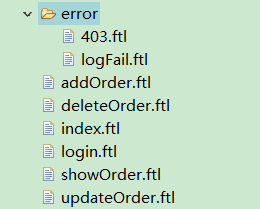
login.ftl:
<!DOCTYPE html PUBLIC "-//W3C//DTD HTML 4.01 Transitional//EN" "http://www.w3.org/TR/html4/loose.dtd">
<html>
<head>
<meta http-equiv="Content-Type" content="text/html; charset=ISO-8859-1">
<title>Insert title here</title>
</head>
<body>

    <h1>Toov5--权限控制登陆系统</h1>
    <form action="/login" method="post">
        <span>用户名称</span><input type="text" name="username" /> <br>
        <span>用户密码</span><input type="password" name="password" /> <br>
        <input type="submit" value="登陆">
    </form>
<#if RequestParameters['error']??>
用户名称或者密码错误
</#if>
</body>
</html>


 1267


 扫一扫


 被折叠的 条评论
为什么被折叠?
 到【灌水乐园】发言


