


四:设备驱动程序
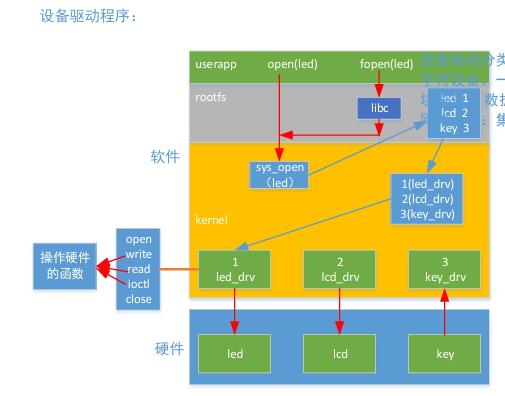
1. 图解–流程
- 实现供应用程序调用的接口(
open/write/read) 操作硬件的代码 - 向内核注册该驱动程序(以设备号的形式)
- 创建设备节点(一组绑定的设备名和设备号)
2.设备驱动分类
字符设备:一般以数据(字节)流的形式操作,数据访问有严格顺序
块设备:数据可以随机访问(eg:存储设备),以块的形式访问数据(类似数组,成块的字节操作)
网络设备:集成复杂的协议栈(eg:网卡) — 按名字维护
3.设备号
设备号:内核维护设备驱动程序的数字(每个设备都有唯一的设备号)
32位:
高12位:主设备号 //区分不同类别的设备
低20位:次设备号 //同类设备的不同设备
#define MKDEV(ma,mi) ((ma)<<8 | (mi))
cat /proc/devices //查看注册的设备号
4. ctags
sudo app ctags
ctags -R
    //追踪文件所属   ctrl + ]  vim界面下,和vscode查找差不多
    //ctrl + o  返回上次传送前的位置
    // <p
5.代码
#include <linux/init.h>
#include <linux/kernel.h>
#include <linux/module.h>
#include <linux/types.h>
#include <linux/fs.h>
#include <linux/cdev.h>
#include <linux/kdev_t.h>

#define MAJOR_NUM 255
#define MINOR_NUM 0
#define DEV_NAME "demo4"

static int open(struct inode * node,struct file * file)
{
    printk("demo4 open.....\n");
    return 0;
}

static ssize_t read(struct file * file,char __user * buf,size_t len,loff_t * offset)
{
    printk("demo4 read.....\n");
    return 0;
}

static ssize_t write(struct file * file,const char __user * buf,size_t len,loff_t * offset)
{
    printk("demo4 write.....\n");
    return 0;
}
static int close(struct inode * node,struct file * file)
{
    printk("demo4 close.....\n");
    return 0;
}

static dev_t dev_num;
static struct file_operations fops =
{
    .owner = THIS_MODULE,
    .open  = open,
    .read  = read,
    .write = write,
    .release = close
};

static struct cdev cdev;

static int __init demo_init(void)
{
    dev_num = MKDEV(MAJOR_NUM, MINOR_NUM);
    cdev_init(&cdev,&fops);
    cdev_add(&cdev,dev_num,1);
    register_chrdev_region(dev_num,1,DEV_NAME);

    printk("demo4_init ......\n");
    return 0;
}

static void __exit demo_exit(void)
{
    unregister_chrdev_region(dev_num,1);
    cdev_del(&cdev);
    printk("demo4_exit .......\n");
}

module_init(demo_init);
module_exit(demo_exit);
#include <linux/init.h>
#include <linux/kernel.h>
#include <linux/module.h>
#include <linux/types.h>
#include <linux/fs.h>
#include <linux/cdev.h>
#include <linux/kdev_t.h>
#include <asm/io.h>
#include <asm/uaccess.h>

#define MAJOR_NUM 253
#define MINOR_NUM 0
#define DEV_NAME "led4"
#define GPBCON 0x56000010 	//虚拟内存硬件不支持,硬件操作实际内存
#define GPBDAT 0x56000014
static volatile unsigned long * gpbcon;
static volatile unsigned long * gpbdat;

static void led2_init(void)
{
	*gpbcon &= ~(0x3 << 12);
	*gpbcon |= (0x1 << 12);
	*gpbdat |= (1 << 6);
}

static void led2_on(void)
{
	*gpbdat &= ~(1 << 6);
}

static void led2_off(void)
{
	*gpbdat |= (1 << 6);
}

//以下都是函数指针
static int open(struct inode * node, struct file * file)
{
	led2_init();
	printk("led4  open ...\n");	//内核打印
	return 0;
}

static ssize_t read(struct file * file, char __user * buf, size_t len, loff_t * offset)
{
	//copy_to_user();
	printk("led4 read ...\n");
	return 0;
}

static ssize_t write(struct file * file, const char __user * buf, size_t len, loff_t * offset)
{
	unsigned char data[10] = {0};
	unsigned int len_cp = (sizeof(data) < len) ? sizeof(data) : len;
	ssize_t ret = len_cp;

	//strcmp(buf,"ledon")
	//copy_to_user	用户访问
	copy_from_user(data, buf, len_cp);	//让代码不要在内核空间运行去访问,如果数据有问题,内核访问野指针,内核崩溃
	if(!strcmp(data, "ledon"))
		led2_on();
	else if(!strcmp(data, "ledoff"))
		led2_off();
	else
		ret = -EINVAL;	//EINVAL “-” 返回负,返回非正常值

	printk("led4 write ...\n");
	return ret;
}

static int close(struct inode * node, struct file * file)
{
	led2_off();
	printk("led4 close ...\n");
	return 0;
}

static dev_t dev_num;	//创建设备号
//操作方法
static struct file_operations fops =
{
	//结构体都是函数指针,上面函数指针都已经初始化了,
	//所以赋给对应的结构体中函数指针
	//gnu中,不像数据结构(windos)一个一个赋值,可以部分初始化
	.owner = THIS_MODULE,	//指向自己模块,默认
	.open = open,			//
	.read = read,
	.write = write,
	.release = close
};

static struct cdev cdev;	//设备的结构体 (要把设备号和操作方法放进去) 然后在给到内核

static int __init led_init(void)
{
	int ret = 0;
	dev_num = MKDEV(MAJOR_NUM, MINOR_NUM);

	cdev_init(&cdev, &fops);	//cdev_init 把操作方法放进cdev结构体

	ret = cdev_add(&cdev, dev_num, 1);	//添加几个设备?--和对应设备号放进cdev结构体
	if(ret < 0)	//判断int类型
		goto err_cdev;

	ret = register_chrdev_region(dev_num, 1, DEV_NAME);	//注册字符设备,注册几个设备号?,设备名字
	if(ret < 0)
		goto err_register;

	gpbcon = ioremap(GPBCON, 4);	//内存映射四个字节,接受对应的物理地址
	gpbdat = ioremap(GPBDAT, 4);

	printk("led4_init   ....\n");
	return ret;

err_register:
	unregister_chrdev_region(dev_num, 1);	//取消注册
	printk("register_chrdev_region  failed\n");

err_cdev:
	cdev_del(&cdev);	//销毁初始化的cdev结构体
	printk("cdev_add  failed\n");
	return ret;
}

static void __exit led_exit(void)
{
	iounmap(gpbdat);
	iounmap(gpbcon);
	unregister_chrdev_region(dev_num, 1);
	cdev_del(&cdev);
	printk("led4_exit   ....\n");
}

module_init(led_init);	//模块初始化 修饰对应的函数,然后执行对应函数
module_exit(led_exit);	//在操作系统注销时和卸载  -- 启动和注销
6.手动创建节点/
mknod  /dev/demo  c  255   0		//对应驱动程序

/dev/demo    设备节点名
c     字符设备
255   主设备号
0     次设备号
ls /dev
ls /dev -l
6.1创建应用程序
#include <stdio.h>
#include <sys/stat.h>
#include <sys/types.h>
#include <fcntl.h>
#include <unistd.h>
#include <stdlib.h>
#include <string.h>

int main(int argc, const char *argv[])
{
	int fd = open("/dev/led4",O_RDWR);	////打开对应内核文件
	if(fd < 0)
	{
		perror("open demo failed");
	}

	unsigned char buf[20] = {0};
	while(1)
	{
		write(fd,"ledon",strlen("ledon"));
		sleep(1);
		write(fd,"ledoff",strlen("ledoff"));
		sleep(1);
	}
	close(fd);

	return 0;
}
arm-linux-gcc demo_app.c //之后在内核运行
7.编译
arm-linux-gcc demo4_app.c

在开发板中(minicom) 中	./a.out
    //为了保护硬件





 扫一扫
扫一扫


 1906
1906

 被折叠的 条评论
为什么被折叠?
被折叠的 条评论
为什么被折叠?
 到【灌水乐园】发言





