



1.源码分析之——AMS启动流程
2.源码分析之——WMS启动流程
3.源码分析之——SharedPreferences
4.源码分析之——Retrofit
5.源码分析之——OKHttp
6.源码分析之——Android事件分发机制

前言
基于源码,简单分析下OKHttp工作流程。
流程图
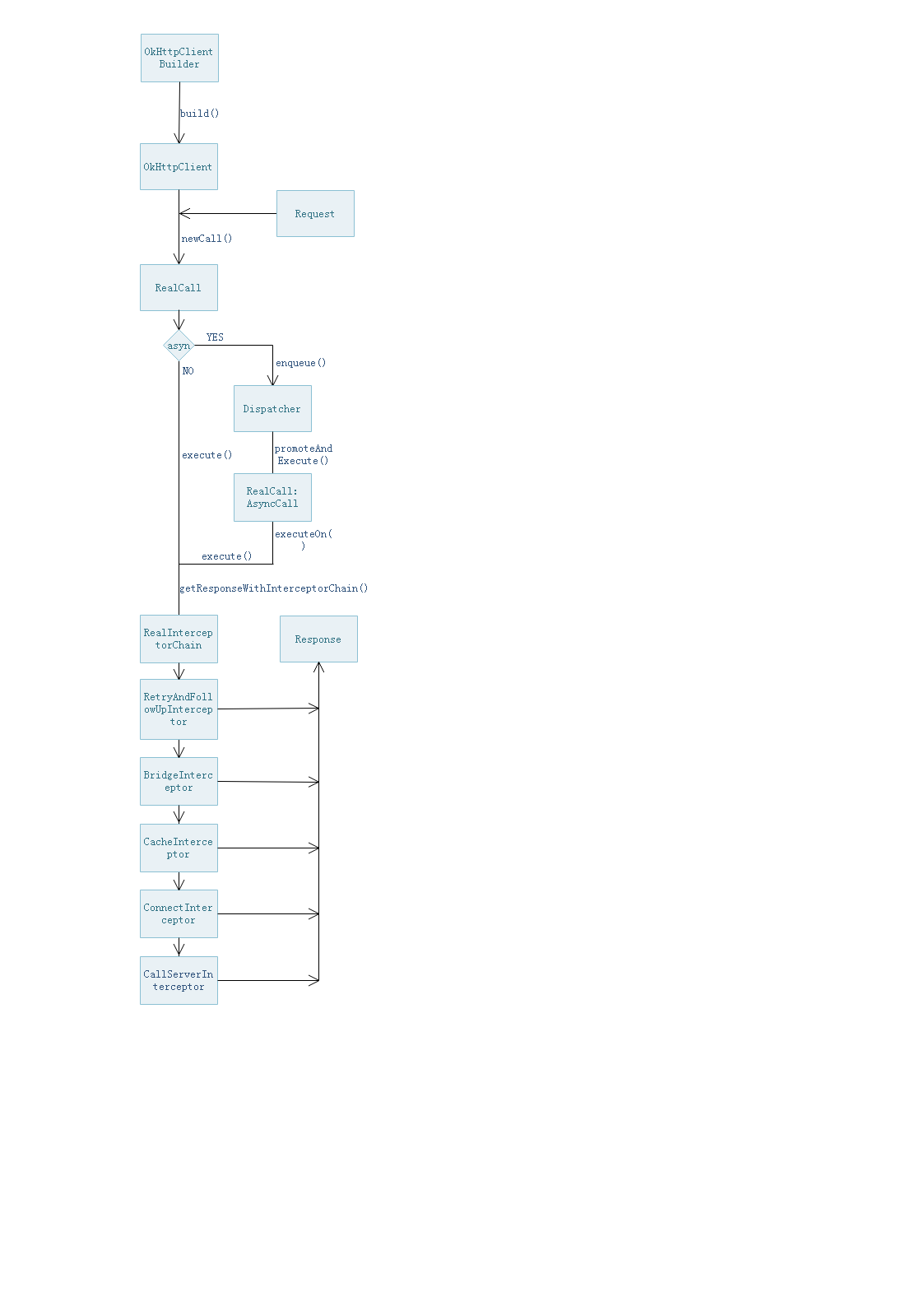
OKHttp基本使用
在 gradle 中添加依赖
implementation 'com.squareup.okhttp3:okhttp:3.14.9'
1.首先创建OkHttpClient对象
OkHttpClient client = new OkHttpClient();
2.构造Request对象
Request request = new Request.Builder()
                .get()
                .url("https://www.baidu.com")
                .build();
3.将Request封装为Call
Call call = client.newCall(request);
4.根据需要调用同步或者异步请求方法
//同步调用,返回Response,会抛出IO异常
Response response = call.execute();
//异步调用,并设置回调函数
call.enqueue(new Callback() {
            @Override
            public void onFailure(Call call, IOException e) {
            }

            @Override
            public void onResponse(Call call, Response response) throws IOException {
            }
        });
源码分析
下面将从源码角度对以上流程进行分析。OKHttp使用建造者模式进行创建,因此让我们从Builder开启源码分析之旅吧。注意:为了精简内容,部分不在分析之内的代码已省略,如果想深入学习的同学请查看详细源码,本文基于OKHttp3.14.9版本。
OKHttp源码
  public OkHttpClient() {
    this(new Builder());
  }
这里使用建造者模式,我们直接看Builder即可
    public Builder() {
      dispatcher = new Dispatcher();
      protocols = DEFAULT_PROTOCOLS;
      ...
      readTimeout = 10_000;
      writeTimeout = 10_000;
      pingInterval = 0;
    }
这里直接初始化若干参数,直接跳过
 public OkHttpClient build() {
      return new OkHttpClient(this);
    }
到这里OkHttpClient已经创建成功。下面是先创建一个Request对象,这个我们就不看了,我们来看下newCall方法。
  @Override
  public Call newCall(Request request) {
    return RealCall.newRealCall(this, request, false /* for web socket */);
  }
很明显这不是真正的实现方法,继续往下看
  static RealCall newRealCall(OkHttpClient client, Request originalRequest, boolean forWebSocket) {
    // Safely publish the Call instance to the EventListener.
    RealCall call = new RealCall(client, originalRequest, forWebSocket);
    call.transmitter = new Transmitter(client, call);
    return call;
  }
看来这边创建了一个真实的RealCall对象并return该对象。获取到RealCall对象后,可以根据需求调用同步execute()或者异步enqueue(),前者比较简单在此不做分析,我们主要讨论下异步enqueue()的后续实现。
  @Override
    public void enqueue(Callback responseCallback) {
        synchronized (this) {
            if (executed) throw new IllegalStateException("Already Executed");
            executed = true;
        }
        transmitter.callStart();
        client.dispatcher().enqueue(new AsyncCall(responseCallback));
    }
原来调用了Dispatcher下的enqueue()方法,跟踪下去看下。
    void enqueue(AsyncCall call) {
        synchronized (this) {
            readyAsyncCalls.add(call);

            // Mutate the AsyncCall so that it shares the AtomicInteger of an existing running call to
            // the same host.
            if (!call.get().forWebSocket) {
                AsyncCall existingCall = findExistingCallWithHost(call.host());
                if (existingCall != null) call.reuseCallsPerHostFrom(existingCall);
            }
        }
        promoteAndExecute();
    }
先将call添加至待执行对象中,然后跳转至promoteAndExecute()
    private boolean promoteAndExecute() {
        assert (!Thread.holdsLock(this));

        List<AsyncCall> executableCalls = new ArrayList<>();
        boolean isRunning;
        synchronized (this) {
            for (Iterator<AsyncCall> i = readyAsyncCalls.iterator(); i.hasNext(); ) {
                AsyncCall asyncCall = i.next();

                if (runningAsyncCalls.size() >= maxRequests) break; // Max capacity.
                if (asyncCall.callsPerHost().get() >= maxRequestsPerHost) continue; // Host max capacity.

                i.remove();
                asyncCall.callsPerHost().incrementAndGet();
                executableCalls.add(asyncCall);
                runningAsyncCalls.add(asyncCall);
            }
            isRunning = runningCallsCount() > 0;
        }

        for (int i = 0, size = executableCalls.size(); i < size; i++) {
            AsyncCall asyncCall = executableCalls.get(i);
            asyncCall.executeOn(executorService());
        }

        return isRunning;
    }
可以看到该方法表示正在执行了,先将call添加到running队列中,然后for循环挨个执行asyncCall.executeOn(),注意这边执行是异步放在线程池中的。
 void executeOn(ExecutorService executorService) {
            assert (!Thread.holdsLock(client.dispatcher()));
            boolean success = false;
            try {
                executorService.execute(this);
                success = true;
            } catch (RejectedExecutionException e) {
                InterruptedIOException ioException = new InterruptedIOException("executor rejected");
                ioException.initCause(e);
                transmitter.noMoreExchanges(ioException);
                responseCallback.onFailure(RealCall.this, ioException);
            } finally {
                if (!success) {
                    client.dispatcher().finished(this); // This call is no longer running!
                }
            }
        }
注意看executorService.execute(this),貌似一看这啥意思啊,突然冒出来这么一句。。。不急,保存冷静。
final class AsyncCall extends NamedRunnable {
}

public abstract class NamedRunnable implements Runnable {
  protected final String name;

  public NamedRunnable(String format, Object... args) {
    this.name = Util.format(format, args);
  }

  @Override public final void run() {
    String oldName = Thread.currentThread().getName();
    Thread.currentThread().setName(name);
    try {
      execute();
    } finally {
      Thread.currentThread().setName(oldName);
    }
  }

  protected abstract void execute();
}
奥奥,一下子眼前一亮,原来是继承了NamedRunnable ,最终还是走到了execute()。至此,Request部分已经讲完了,下面就看Response了。
@Override
        protected void execute() {
            boolean signalledCallback = false;
            transmitter.timeoutEnter();
            try {
                Response response = getResponseWithInterceptorChain();
                signalledCallback = true;
                responseCallback.onResponse(RealCall.this, response);
            } catch (IOException e) {
                if (signalledCallback) {
                    // Do not signal the callback twice!
                    Platform.get().log(INFO, "Callback failure for " + toLoggableString(), e);
                } else {
                    responseCallback.onFailure(RealCall.this, e);
                }
            } catch (Throwable t) {
                cancel();
                if (!signalledCallback) {
                    IOException canceledException = new IOException("canceled due to " + t);
                    canceledException.addSuppressed(t);
                    responseCallback.onFailure(RealCall.this, canceledException);
                }
                throw t;
            } finally {
                client.dispatcher().finished(this);
            }
        }
获取Response为getResponseWithInterceptorChain()方法,跟踪下去看
Response getResponseWithInterceptorChain() throws IOException {
        // Build a full stack of interceptors.
        List<Interceptor> interceptors = new ArrayList<>();
        interceptors.addAll(client.interceptors());
        interceptors.add(new RetryAndFollowUpInterceptor(client));
        interceptors.add(new BridgeInterceptor(client.cookieJar()));
        interceptors.add(new CacheInterceptor(client.internalCache()));
        interceptors.add(new ConnectInterceptor(client));
        if (!forWebSocket) {
            interceptors.addAll(client.networkInterceptors());
        }
        interceptors.add(new CallServerInterceptor(forWebSocket));

        Interceptor.Chain chain = new RealInterceptorChain(interceptors, transmitter, null, 0,
                originalRequest, this, client.connectTimeoutMillis(),
                client.readTimeoutMillis(), client.writeTimeoutMillis());

        boolean calledNoMoreExchanges = false;
        try {
            Response response = chain.proceed(originalRequest);
            if (transmitter.isCanceled()) {
                closeQuietly(response);
                throw new IOException("Canceled");
            }
            return response;
        } catch (IOException e) {
            calledNoMoreExchanges = true;
            throw transmitter.noMoreExchanges(e);
        } finally {
            if (!calledNoMoreExchanges) {
                transmitter.noMoreExchanges(null);
            }
        }
    }
先添加了若干个拦截器,然后调用chain.proceed(originalRequest)。
 public Response proceed(Request request, Transmitter transmitter, @Nullable Exchange exchange)
      throws IOException {
    if (index >= interceptors.size()) throw new AssertionError();

    calls++;
    ...
    // Call the next interceptor in the chain.
    RealInterceptorChain next = new RealInterceptorChain(interceptors, transmitter, exchange,
        index + 1, request, call, connectTimeout, readTimeout, writeTimeout);
    Interceptor interceptor = interceptors.get(index);
    Response response = interceptor.intercept(next);
    ...
    return response;
  }
然后看一下interceptor.intercept(next)是怎么实现的
 @Override
    public Response intercept(Chain chain) throws IOException {
        RealInterceptorChain realChain = (RealInterceptorChain) chain;
        Request request = realChain.request();
        Transmitter transmitter = realChain.transmitter();

        // We need the network to satisfy this request. Possibly for validating a conditional GET.
        boolean doExtensiveHealthChecks = !request.method().equals("GET");
        Exchange exchange = transmitter.newExchange(chain, doExtensiveHealthChecks);

        return realChain.proceed(request, transmitter, exchange);
    }
可以看到方法里面又调用realChain.proceed(),然后每次calls++,index+1,不断new一个RealInterceptorChain的next对象,这不是在使用递归嘛,通过递归的思想将所有拦截器执行完毕,最终返回一个response.。这里利用递归循环,也被称为责任链模式
到这里OkHttp的流程基本上分析完了,记录学习心得,感谢留言交流,共同学习。






 扫一扫
扫一扫


 2152
2152


 到【灌水乐园】发言



