


 本文档详细介绍了在使用Flutter进行项目开发时遇到的多种构建问题及其解决方案,包括项目创建卡顿、Gradle配置、内存分配不足等问题,并提供了具体的修改步骤和参数调整建议。
1.参考
https://blog.youkuaiyun.com/qq_37199105/article/details/81007683
2.一直卡在creating flutter project
在Android Studio安装目录bin文件夹下找到 idea.properties在最后加入disable.android.first.run=true
3.一直卡在gradle
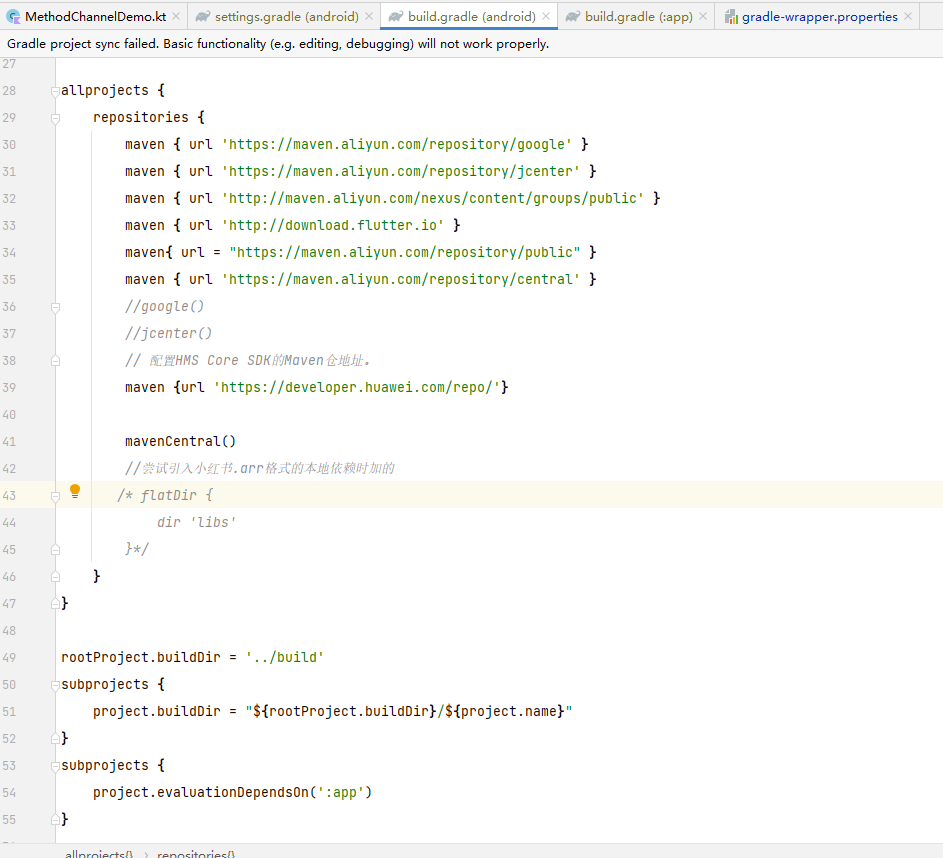
配置Android文件夹下build.gradle代码
    maven { url 'https://maven.aliyun.com/repository/google' }
    maven { url 'https://maven.aliyun.com/repository/jcenter' }
    maven { url 'http://maven.aliyun.com/nexus/content/groups/public' }

如果还是一直通不过gardle,那就再修改flutter.gradle中代码(文件路径E:\androidflutter\flutter\packages\flutter_tools\gradle)
// google()
// jcenter()
maven{
url ‘https://maven.aliyun.com/repository/google’
}
maven{
url ‘https://maven.aliyun.com/repository/jcenter’
}
maven{
url ‘http://maven.aliyun.com/nexus/content/groups/public’
}

3.1 如果Runing错误日志为
Flutter assets will be downloaded from https://storage.flutter-io.cn. Make sure you trust this source!
Launching lib\main.dart on TNY AL00 in debug mode...
Running Gradle task 'assembleDebug'...
这表示仓库不安全,不被信任
可以在仓库中添加配置 allowInsecureProtocol = true
maven {
            allowInsecureProtocol = true
            url 'https://maven.aliyun.com/repository/google'
        }
        maven {
            allowInsecureProtocol = true
            url 'https://maven.aliyun.com/nexus/content/groups/public'
        }
        maven {
            allowInsecureProtocol = true
            url 'https://maven.aliyun.com/repository/jcenter'
        }
        maven {
            allowInsecureProtocol = true
            url 'https://download.flutter.io'
        }
4.内存不足无法分配虚拟器
部分错误内容:
Unable to start the daemon process.
This problem might be caused by incorrect configuration of the daemon.
For example, an unrecognized jvm option is used.
Please refer to the user guide chapter on the daemon at https://docs.gradle.org/4.10.2/userguide/gradle_daemon.html
Please read the following process output to find out more:
Error occurred during initialization of VM
Could not reserve enough space for 2097152KB object heap
解决方式:新建环境变量:_JAVA_OPTIONS:-Xmx512M (我用AS2.3中设置阈值的方式在AS3.2设置无效,不知何故)
(关于Error occurred during initialization of VM Could not reserve enough space for 2097152KB object heap问题,其实就是内存分配不足,上边的方法是在实在没有办法时用的单独分配内存)
*Error running Gradle:
ProcessException: Process “G:\androidflutter_workspace\test_fu\android\gradlew.bat” exited abnormally:
Starting a Gradle Daemon, 1 stopped Daemon could not be reused, use --status for details
FAILURE: Build failed with an exception.
- What went wrong:
Unable to start the daemon process.
This problem might be caused by incorrect configuration of the daemon.
For example, an unrecognized jvm option is used.
Please refer to the user guide chapter on the daemon at https://docs.gradle.org/4.4/userguide/gradle_daemon.html
Please read the following process output to find out more:
Error occurred during initialization of VM
Could not reserve enough space for 1572864KB object heap
- Try:
Run with --stacktrace option to get the stack trace. Run with --info or --debug option to get more log output. Run with --scan to get full insights. - Get more help at https://help.gradle.org
Command: G:\androidflutter_workspace\test_fu\android\gradlew.bat app:properties
Finished with error: Please review your Gradle project setup in the android/ folder.*
解决方法:
在Android目录下的gradle.properties文件中将1536改成512或你想分配的值,一定要小于这个值(1572864KB➗1024=1536 ),当时没去除一下,我也很无奈,如果报守护进程无法开启,就在用户目录下的.gradle目录下新建个gradle.properties文件
并在项目中Android的gradle中添加 org.gradle.daemon=false

更多的仓库配置:
maven{ url = "https://maven.aliyun.com/repository/public" }
        maven { url 'https://maven.aliyun.com/repository/gradle-plugin' }

        maven { url 'https://maven.aliyun.com/repository/google' }
        maven { url 'https://maven.aliyun.com/repository/jcenter' }
        maven { url 'http://maven.aliyun.com/nexus/content/groups/public' }
        maven { url 'http://download.flutter.io' }
        maven { url 'https://maven.aliyun.com/repository/central' }
        // 配置HMS Core SDK的Maven仓地址。
        maven {url 'https://developer.huawei.com/repo/'}





 扫一扫
扫一扫


 3万+
3万+


 到【灌水乐园】发言



