



MySQL的常见sql语句
- 1.首先选择数据库,并删除多余的表:
use lik;
drop table account, log, tb_brand;
- 2.创建表:学生表、课程表、以及每个学生选的课程表
create table student(
    id   int auto_increment comment '主键ID' primary key,
    name varchar(10) null comment '姓名',
    no   varchar(10) null comment '学号'
)comment '学生表';


create table course(
    id int auto_increment comment '主键ID' primary key,
    name varchar(10) null comment '课程名称'
)comment '课程表';


create table student_course(
    id int auto_increment comment '主键' primary key,
    studentid int not null comment '学生ID',
    courseid  int not null comment '课程ID',
    constraint fk_courseid foreign key (courseid) references course (id),
    constraint fk_studentid foreign key (studentid) references student (id)
)comment '学生课程中间表';
初级增删改查
- 1.增:给对应的表插入数据
#插入学生信息
INSERT INTO student (name, no) VALUES ('黛绮丝', '2000100101');
INSERT INTO student (name, no) VALUES ('谢逊', '2000100102');
INSERT INTO student (name, no) VALUES ('殷天正', '2000100103');
INSERT INTO student (name, no) VALUES ('韦一笑', '2000100104');

#插入课程
INSERT INTO course (name) VALUES ('Java');
INSERT INTO course (name) VALUES ('PHP');
INSERT INTO course (name) VALUES ('MySQL');
INSERT INTO course (name) VALUES ('Hadoop');

#插入学生所选课程
INSERT INTO student_course (studentid, courseid) VALUES (1, 1);
INSERT INTO student_course (studentid, courseid) VALUES (1, 2);
INSERT INTO student_course (studentid, courseid) VALUES (1, 3);
INSERT INTO student_course (studentid, courseid) VALUES (2, 2);
INSERT INTO student_course (studentid, courseid) VALUES (2, 3);
INSERT INTO student_course (studentid, courseid) VALUES (3, 4);
- 2.删:删除某个学生,以及该学生对应选的课程信息
begin; #start transaction;
delete from student  where id = 4;
delete from student_course where studentid = 4;
commit;
- 3.改:
update student set name = '张无忌' where id = 1;
- 4.查:多表联查
select brand_name, description from tb_brand where id = 1;select s.name name, c.name course from student s, course c, student_course sc where s.id = sc.studentid and c.id = sc.courseid;
进阶
大数据量情况下:
- 1.批量插入:
insert into student values (null, '赵敏', 13411555), (null, '小昭', 2344144),(null, '张三丰', 13412414);
- 2.分段式批量插入:一次插入5000~10000适当,可以分段批量插入
start transcation;
insert into student values(null, '赵敏', 13411555), (null, '小昭', 2344144),(null, '张三丰', 13412414);
insert into student values(null, '赵敏', 13411555), (null, '小昭', 2344144),(null, '张三丰', 13412414);
insert into student values(null, '赵敏', 13411555), (null, '小昭', 2344144),(null, '张三丰', 13412414);
commit;
-
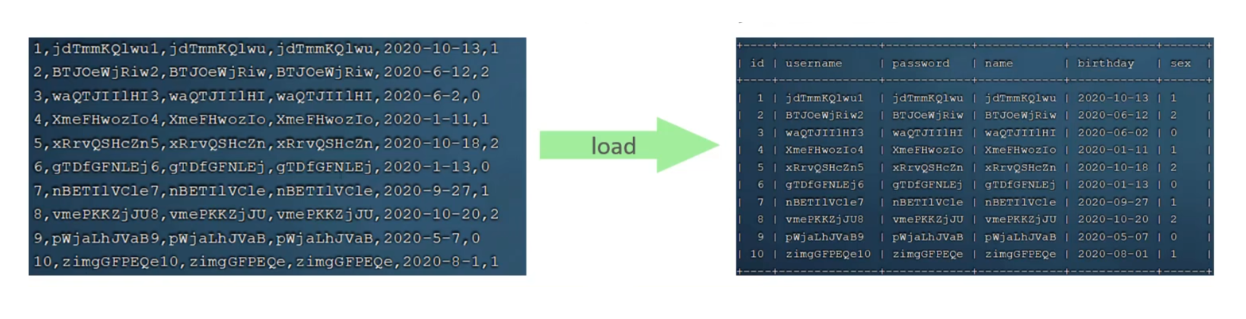
3.文件导入式插入:
一次需要插入上百万条数据时,使用insert语句插入性能较低,此时可以使用MySQL提供的load指令进行插入。- 1.连接MySQL服务端时,加上参数:
--local-infile
mysql -- local-infile -u root -p - 2.设置全局参数local_infile为1,开启从本地加载文件导入数据的开关:
set global local_infile = 1; - 3.执行load指定将准备好的数据文件中的数据加载到表结构中:
- 1.连接MySQL服务端时,加上参数:
load data local infile '/root/sql.log' into table `student` fields terminated by ',' lines terminated by '\n';
- 其中文件的数据要与表字段顺序一致,并且中间用逗号或者空格隔开,像上面的sql语句就是表示将数据以
'\n'作为换行,','作为分隔符进行读取:





 扫一扫
扫一扫


 4652
4652

 被折叠的 条评论
为什么被折叠?
被折叠的 条评论
为什么被折叠?
 到【灌水乐园】发言





