



 本文探讨了密码强度的概念及其衡量标准,包括密码的长度、复杂性和随机性。文章还介绍了如何估算密码抵抗暴力破解所需的时间,并提供了选择强密码的指导原则。
From Wikipedia, the free encyclopedia
However, other attacks on passwords can succeed without a brute search of every possible password. For instance, knowledge about a user may suggest possible passwords (such as pet names, children's names, etc). Hence estimates of password strength must also take into account resistance to other attacks as well.
Using strong passwords lowers overall risk of a security breach, but strong passwords do not replace the need for other effective security controls . The effectiveness of a password of a given strength is strongly determined by the design and implementation of the authentication system software, particularly how frequently password guesses can be tested by an attacker and how securely information on user passwords is stored and transmitted. Risks are also posed by several means of breaching computer security which are unrelated to password strength. Such means include wiretapping , phishing , keystroke logging , social engineering , dumpster diving , side-channel attacks , and software vulnerabilities .
Contents |
Determining password strength
There are two primary ways passwords are created, automatically (using randomizing equipment) or by a human. The strength of randomly chosen passwords against brute force attack can be calculated with precision. Strength against other kinds of attacks is less precisely estimated.
Commonly, passwords are generated by asking a human to choose a password, typically guided (or restricted) by a set of rules or suggestions; an example is at account creation time for computer systems. In this case, only estimates of strength are possible, since humans tend to follow patterns in such tasks, and those patterns may assist an attacker.[ 2] In addition, lists of commonly chosen passwords are widely available for use by password guessing programs; in a strong sense, any of the numerous online dictionaries is such a list. All items in such lists are considered weak, as are passwords that are simple modifications of them. Either can be quickly tried. For some decades, investigations of passwords on multi-user computer systems have shown that 40% or more are readily guessed using only computer programs, and more can be found when information about a particular user is taken into account during the attack.
Automatic password generation, if properly done, can avoid as much as possible, any connection between a password and its user. For example, one's pet's name is quite unlikely to be generated by such a system. A randomly chosen password is the maximally likely to take the most time to discover using brute force search. For a password chosen from a sufficiently large 'password space' brute force search time can be made so long as to be infeasible. There are two problems with truly random passwords: we don't know how to generate them (only ones we think for various reasons are random) and they tend to be very hard for real people to remember and so to use sensibly.
Entropy, or bit strength
It is usual in the computer industry to estimate password strength in terms of information entropy , a concept from information theory . Instead of the number of guesses needed to find the password, the base-2 logarithm of that number is taken to be the equivalent of the number of "entropy bits" in a password. A password with, say, 42 bits of strength calculated in this way would be as strong as a string of 42 random (ie, maximum entropy) bits. Put another way, a password with 42 bits of strength would require 242 attempts to exhaust all possibilities during a brute force search . Thus, adding a bit of entropy (or its equivalent) to a password doubles the number of guesses required, which makes an attacker's task more difficult. On average, an attacker will have to try half the possible passwords before finding the correct one.[ 2]
Random passwords
Random passwords consist of a string of symbols of specified length taken from some set of symbols using a random selection process in which each symbol is equally likely to be selected. The symbols can be individual characters from a character set (eg, the ASCII character set), syllables designed to form pronounceable passwords, or even words from a word list (thus forming a passphrase ).
The strength of random passwords depends on the actual entropy of the underlying number generator; these are essentially always not truly random, but pseudo random. The reason this is so is due to deep and fundamental problems with identifying randomness . See Random password generator#Stronger methods .
For passwords generated by a process that randomly selects a number, N , of symbols from a set of possible symbols, the number of possible passwords can be found by raising the number of symbols to the power of N . Random passwords (or to be accurate, pseudo-random ones) are generally produced using a computer program. Such a program can be, and usually is, customized to ensure that the resulting password complies with a local password policy; perhaps, for instance, by always producing a mix of letters, numbers and special characters.
The strength of a random password can be calculated by computing the information entropy . If each symbol in the password is produced independently, a password's information entropy is given by the formula
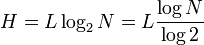
where N is the number of possible symbols and L is the number of symbols in the password. The function log2 is the base-2 logarithm . H is measured in bits .[ 2] [ 3]
-
Symbol set N Entropy/symbol Digits only (0-9) (e.g. PIN ) 10 3.32 bits Single case letters (a-z) 26 4.7 bits Single case letters and digits (a-z, 0-9) 36 5.17 bits Mixed case letters and digits (a-z, A-Z, 0-9) 62 5.95 bits All standard ASCII keyboard characters 94 6.55 bits
Thus an eight character password of single case letters and digits would have 41 bits of entropy (8 x 5.17). The same length password selected at random from all printable ASCII characters would have 52 bit entropy; however such a password would be harder to memorize and likely more difficult to enter on a keyboard configured for another language. A ten character password of single case letters and digits would have essentially the same strength (51.7 bits).
Human generated passwords
People are notoriously remiss at achieving sufficient entropy to produce satisfactory passwords. Some stage magicians exploit this inability for amusement, in a minor way, by divining supposed random choices (of numbers, say) made by audience members.
Thus, in one analysis of over 3 million eight-character passwords, the letter "e" was used over 1.5 million times, while the letter "f" was only used 250,000 times. A uniform distribution would have had each character being used about 900,000 times. The most common number used is "1", whereas the most common letters are a, e, o, and r.[ 4]
NIST suggests the following scheme to estimate password entropy (i.e., randomness):[ 2]
- the entropy of the first character is four bits;
- the entropy of the next seven characters are two bits per character
- the ninth through the twentieth character has 1.5 bits of entropy per character;
- characters 21 and above have one bit of entropy per character;
This suggests that, in the absence of a sensible password policy, an eight-character password has about 18 bit of entropy. This can be easily improved by a password policy which requires at least one digit, one non-alpha-numeric character, mixed case, and also disallows common words findable in a dictionary; such an eight character password will have an estimated 30 bits of entropy, a worthwhile increase.
Bit strength threshold
As a practical matter, passwords must be both reasonable and functional for the end user as well as strong enough for the intended purpose. Passwords that are too difficult to remember may be forgotten and so are more likely to be written on paper, which some consider a security risk.[ 5] In contrast, others argue that forcing users to remember passwords without assistance can only accommodate weak passwords, and thus poses a greater security risk. According to Bruce Schneier , most people are good at securing their wallets or purses, which is a "great place" to store a written password.[ 6]
Some basic benchmarks have been established for brute force searches in the context of attempting to find keys used in encryption. The problem is not the same since these approaches involve astronomical numbers of trials, but the results are suggestive for password choice. In 1999, an Electronic Frontier Foundation project broke 56-bit DES encryption in less than a day using specially designed hardware.[ 7] In 2002, distributed.net cracked a 64-bit key in 4 years, 9 months, and 23 days.[ 8] Currently, distributed.net estimates that cracking a 72-bit key using current hardware will take about 403,784.9 days or 1,105.5 years .[ 9] No currently expected increase in computer power will be sufficient to break 128-bit or 256-bit key encryption using a brute-force attack. Due to currently understood limitations from fundamental physics, there is no expectation that any digital computer (or combination) will be capable of breaking 128-bit or 256-bit encryption via a brute-force attack.[ 10] [citation needed ] Whether or not quantum computers will be able to do so in practice is still unknown, though theoretical analysis suggests such possibilities.[citation needed ]
As a result, there can be no exact answer to the somewhat different problem of the password strength required to resist brute force attack in practice. NIST recommends 80-bits for the most secure passwords, which can nearly be achieved with a 95-character choice (e.g., the original ASCII character set) with a 12-character random password (12 x 6.5 bits = 78).[ 2]
Character selection and length
For a password of a given length, the number of permitted symbols determines its maximum possible strength. (See table above.) For example, the printable characters in the ASCII character set (roughly those on a standard U.S. English keyboard) include 26 letters (in two case variants), 10 digits, and 33 non-alphanumeric symbols (i.e., punctuation, grouping, space, etc.), for a total of 95 symbols. Because national keyboard implementations vary, there are perhaps 88 printable characters which can be used nearly everywhere. See keyboard layout . If the allowed characters are only single case alphabetic, an eight-character password will have 268 possible values (about 38 bits worth). With 88 allowed characters, a password of the same length will have 888 possible values (about 52 bits), a much larger number, requiring (on average) 16,000 times more work for a successful brute force attack . A single case randomly chosen alphabetic password of comparable strength would require 11 characters.
Authentication programs (eg, that which determines access to a computer system) vary in which characters they allow in passwords. Some do not recognize case differences (e.g., the upper-case "E" is considered equivalent to the lower-case "e"), others prohibit some of the other symbols. In the past few decades, systems have slowly permitted more characters in passwords, but limitations still exist. Many hand held devices, such as PDAs and smart phones , require complex shift sequences to enter special characters. Systems also vary in the maximum length of passwords allowed, with some older systems limited to eight characters, or in some cases even fewer.
Users rarely make full use of larger characters sets in forming passwords. For example, hacking results obtained from a MySpace phishing scheme in 2006 revealed 34,000 passwords, of which only 8.3% used mixed case, numbers, and symbols.[ 11]
Guidelines for strong passwords
Common guidelines for choosing good passwords are designed to make passwords less easily discovered by intelligent guessing:[ 12] [ 13] [ 14] [ 15]
- Include numbers, symbols, upper and lowercase letters in passwords
- Password length should be around 12 to 14 characters
- Avoid any password based on repetition, dictionary words, letter or number sequences, usernames, relative or pet names, or biographical information (eg, dates, ID numbers, ancestors names or dates, ...).
Examples of weak passwords
As with any security measure, passwords vary in effectiveness (i.e., strength); some are weaker than others. For example, the difference in weakness between a dictionary word and a word with obfuscation (i.e., letters in the password are substituted by, say, numbers -- a common approach) may cost a password cracking device a few more seconds. The examples below illustrate various ways weak passwords might be constructed, all of which are based on simple patterns which result in extremely low entropy:[ 4]
- Default passwords (as supplied by the system vendor and meant to be changed at installation time): password , default , admin , guest , etc.
- Dictionary words: chameleon , RedSox , sandbags ,bunnyhop! IntenseCrabtree etc
- Words with number substitutions: password1 , deer2000 , john1234 , etc
- Words with simple obfuscation: p@ssw0rd , l33th4x0r , g0ldf1sh , etc
- Doubled words: crabcrab , stopstop , treetree , etc
- Common sequences: qwerty , 12345678 , mnbvcxz , etc
- Numeric sequences based on well known numbers such as 911 (9-1-1 ,9/11 ) , 314159.. (pi ) , or 27182.. (e ) , etc
- Identifiers: jsmith123 , 1/1/1970 , 555-1234 , "your username", etc
- Anything personally related to you: license plate number, Social Security number, current or past telephone number, student ID, address, birthday, relatives' or pets' names/nicknames/birthdays/initials, etc.
There are many other ways a password can be weak[ 16] , corresponding to the strengths of various attack schemes; the core principle is that a password should have high entropy (usually taken to be equivalent to randomness) and not be readily derivable by any "clever" pattern, nor should passwords be mixed with information identifying the user.
Examples that follow guidelines
The passwords below are examples that follow some of the published guidelines for strong passwords. But note carefully that, since these example passwords have been published in this article, they should never be used as real passwords.
- 4pRte!ai@3 — mixes uppercase, lowercase, numbers, and punctuation (evidence there is a large character set), increasing an attacker's work factor
- Tp4tci2s4U2g! — built from a phrase that a user can memorize: "T he p assword for (4 ) t his c omputer i s too (2 ) s trong for you to (4U2 ) g uess! " — mixes types of character. If the phrase is not 'well-known' (eg, published in a quotation compendium), this password should have high entropy for an attacker, and be easier to remember than many passwords.
- BBslwys90! — loosely based on a phrase that a user might memorize: "B ig B rother is alw ays right (right angle = 90 °)! " — mixes character classes
- tDI"60Hs7Q — characters selected from two poetry stanzas by different methods from a page selected using an honest die . But likely to be hard to memorize.
- l52@36291QBs( - the serial number of a US currency bill with added elements (which should be random, eg chosen via the honest die mentioned above). The bill and its serial number are likely to be hard to connect to the user and so will have high entropy to an attacker. Note that some currency may use predictable serial numbers (eg, adding check digits , padding, type codes and the like, often covertly) and, if so, will have less entropy than visibly suggested.
Password policy
A password policy is a guide to choosing satisfactory passwords. Some are controversial. They are usually intended to:
- assist users in choosing strong passwords
- ensure the passwords are suited to the target population
- recommendations to users with regard to the handling of their passwords
- a requirement to change any password which has been lost or compromised, and perhaps that no password be used longer than a limited time
- some policies prescribe the pattern of characters which passwords must contain
For example, password expiration is often covered by password policies. Password expiration serves two purposes:[ 17]
- if the time to crack a password is estimated to be 100 days, password expiration times fewer than 100 days may help ensure insufficient time for an attacker.
- if a password has been compromised, requiring it to be changed regularly should limit the access time for the attacker
Some argue, however, that password expirations have become obsolete,[ 18] since:
- asking users to frequently change passwords encourages simple, weak, passwords.
- if one has a truly strong password, there is little point in changing it, since the existing password is already strong. Changing passwords which are already strong merely introduce risk that the new password may be less strong. However, since any compromised password is weak, essentially by definition, the possibility of compromise must be considered in estimating password strength.
Handling passwords
Among the hardest passwords to crack are long, high entropy character strings; they resist brute force attacks (i.e., many characters) and guessing attacks (i.e., high entropy). However, such passwords are often also the hardest to remember in practice. The imposition of a requirement for such passwords in a password policy may encourage users to write them down, store them in PDAs or cellphones, or share them with others as a safeguard against memory failure. Some people consider each of these user resorts to increase security risks. In practice, others suggest recognizing the reality of multiple complex passwords. Security expert Bruce Schneier recommends writing down your password :
Simply, people can no longer remember passwords good enough to reliably defend against dictionary attacks, and are much more secure if they choose a password too complicated to remember and then write it down. We're all good at securing small pieces of paper. I recommend that people write their passwords down on a small piece of paper, and keep it with their other valuable small pieces of paper: in their wallet.
— Bruce Schneier 2005
The following measures may increase acceptance of strong password requirements, if carefully used:
- a training program. Also, updated training for those who fail to follow the password policy (lost passwords, inadequate passwords, etc).
- reward strong password users by reducing the rate, or eliminating altogether, the need for password changes (password expiration). The strength of user-chosen passwords can be estimated by automatic programs which inspect and evaluate proposed passwords, when setting or changing a password.
- mandate a thorough and rapid account closure process for departing users and/or a process to display to each user the last login date and time in the hope that the user may notice unauthorized access, suggesting a compromised password
- allow users to reset their passwords via an automatic system. This should also reduce Helpdesk call volume. However, some such systems are themselves insecure; for instance, weak (or easily guessed, or insufficiently frequently changed) password reset keys bypass the advantages of a strong password system.
- use administrator automatically and randomly generated passwords, send them to the user's e-mail and not allowing the users to change this password.
Memory techniques
Password policies sometimes suggest memory techniques to assist remembering passwords:
- mnemonic passwords: Some users develop mnemonic phrases and use them to generate high entropy (more or less, random) passwords which are nevertheless relatively easy for the user to remember. For instance, the first letter of each word in a memorable phrase. Another way to make random-appearing passwords more memorable is to use random words (see diceware ) or syllables instead of randomly chosen letters.
- password patterns: Any pattern in a password makes guessing (automated or not) easier and reduces an attacker's work factor. An example is from the UK. As of October 2005, employees of the UK Government are advised to use passwords of the following form: consonant, vowel, consonant, consonant, vowel, consonant, number, number (for example pinray45 ). This pattern is called an Environ password[citation needed ] and is case-insensitive. The pattern of alternating vowel and consonant characters is intended to make passwords more likely to be pronounceable, and thus more memorable. Unfortunately, such patterns severely reduce the password's information entropy , making brute force password attacks considerably more efficient.
Protecting passwords
Computer users are generally advised to "never write down a password anywhere, no matter what" and "never use the same password for more than one account." However, an ordinary computer user may have dozens of password-protected accounts. Users with multiple accounts (and passwords) often give up and use the same password for every account. When varied password complexity requirements prevent use of the same (memorable) scheme for producing high strength passwords, overly simplified passwords will often be created to satisfy irritating and conflicting password requirements. An expert from Microsoft was quoted as saying, at a 2005 security conference: "I claim that password policy should say you should write down your password. I have 68 different passwords. If I am not allowed to write any of them down, guess what I am going to do? I am going to use the same password on every one of them."[ 19]
If passwords are written down, they should never be kept in obvious places such as address books, Rolodex files, under drawers or keyboards or behind pictures. Perhaps the worst, but all too common, location is a Post-It note on the computer monitor. Better locations are a safe deposit box or a locked file approved for information of sensitivity comparable to that protected by the password; most locks on office file cabinets are far from adequate. Software is available for popular hand-held computers that can store passwords for numerous accounts in encrypted form. Another approach is to use a single password for low-security accounts and select separate, strong passwords for a smaller number of high-value applications such as online banking .
Time needed for password searches
One way to judge the strength of a password is to estimate the time and computing power required for cracking. The time to crack a password is related to bit strength (see above), which is a function of the password's information entropy. Most methods of password cracking require the computer to produce many candidate passwords, each of which is checked. Brute force cracking, in which a computer tries every possible key or password until it succeeds, is the lowest common denominator of password cracking. More common methods of password cracking, such as dictionary attacks, pattern checking, word list substitution, etc., attempt to reduce the number of trials required and will usually be attempted before brute force.
The ability to crack passwords using computer programs is a function of the number of possible passwords per second which can be checked. If a hash of the target password is available to the attacker, this number can be quite large. If not, the rate depends on whether the authentication software limits how often a password can be tried, either by time delays, CAPTCHAs , or forced lockouts after some number of failed attempts.
Individual desktop computers can test anywhere between one million to fifteen million passwords per second against a password hash for weaker algorithms, such as DES or LanManager.John the Ripper benchmarks A user-selected eight-character password with numbers, mixed case, and symbols, reaches an estimated 30-bit strength, according to NIST. 230 is only one billion permutations and would take an average of 16 minutes to crack.[ 2] When ordinary desktop computers are combined in a cracking effort, as can be done with botnets , the capabilities of password cracking are considerably extended. In 2002, distributed.net successfully found a 64-bit RC5 key in four years, in an effort which included over 300,000 different computers at various times, and which generated an average of over 12 billion keys per second.[ 8]
Despite their capabilities, desktop CPUs are slower at cracking passwords than purpose-built password breaking machines. In 1998, the Electronic Frontier Foundation (EFF) built a dedicated password cracker using FPGAs , as opposed to general purpose CPUs. Their machine, Deep Crack , broke a DES 56-bit key in 56 hours, testing over 90 billion keys per second.[ 7] The hashes widely used for storing passwords, such as MD5 and the SHA family, are designed for efficient implementation in hardware. Using key stretching algorithms, such as PBKDF2 , to form password hashes can significantly reduce the rate at which passwords can be tested.
Perhaps the fastest way to crack passwords is through the use of pre-computed rainbow tables . These encode the hashes of common passwords based on the most widely used hash functions and can crack passwords in a matter of seconds. However they are only effective on systems that do not use salt , such as Windows LAN Manager and some application programs.





 扫一扫
扫一扫


 1639
1639

 被折叠的 条评论
为什么被折叠?
被折叠的 条评论
为什么被折叠?
 到【灌水乐园】发言





