



 本文分享了一个详细的前端注册页面实现过程,包括HTML结构布局、CSS样式设计及表单元素的应用,强调了通过实践掌握前端技术的重要性。
效果图
(尽力了,太难了~~~~)
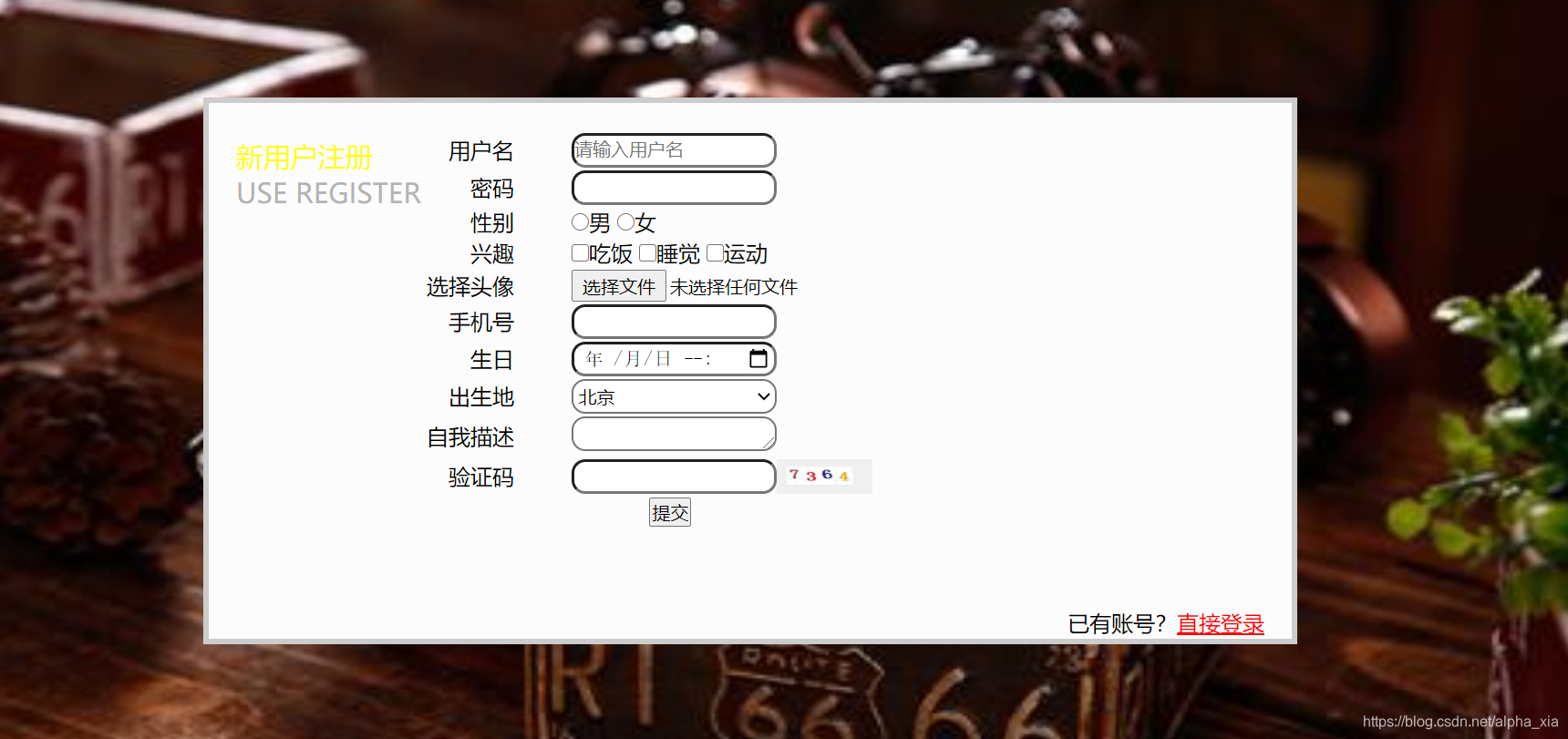
代码
<!DOCTYPE html>
<html lang="en">
<head>
    <meta charset="UTF-8">
    <title>Title</title>
    <style>
        body{
           background: url("复古.jpg") no-repeat center ;
          background-size: 100% 100%;
        }
        .div0{
            width: 800px;
            height: 400px;
            /*margin: auto;*/
            /*上右下左*/
            margin: 100px 100px 100px 250px;
            padding: 20px;
            /*margin-top: 20px;*/
            border: 4px #cccccc solid;
            background-color: #fcfcfc;
        }
        *{
            margin: 0px;
            padding: 0px;
              box-sizing: border-box;
        }
        .div1{
           /*border: 1px solid;*/
            float: left;
             margin-top: 5px;
        }
        .div2{
           /*margin: 125px;*/
           /* margin: 100px 100px 100px 100px;*/
            width: 500px;
            height: 350px;
            /*border: 2px solid;*/
            /*margin: auto;*/
        }
        .div3{
            margin-bottom: 200px;
            float: right;

        }
        .td_left{
            width: 200px;
            height: 15px;
            text-align: right;
        }
        .td_right{
            text-align: left;
          padding-left: 40px;
        }

        .div3 p >a{
            color: red;
        }
        .div1 #left1{
            font-size: 20px;
            color: yellow;
        }
       .div1 #left2{
            font-size: 20px;
            color: #b3b3b3;
        }
        #username,#phone,#describe,#birthday,#password,#checkphoto,#place{
        border-radius: 10px;
            width: 150px;
            height: 25px;
        }
    #checkimg{
        height: 25px;
        vertical-align:middle;
    }
    </style>
</head>
<body>
<div class="div0">
    <div class="div1" >
        <p id="left1">新用户注册</p>
        <p id="left2">USE REGISTER</p>
    </div>
    <div class="div2">
        <form >
            <table  align="center">
                <tr>
                    <td class="td_left"><label for="username" >用户名</label></td>
                    <td class="td_right"><input type="text" id="username" name="username" placeholder="请输入用户名"></td>
                </tr>
                <tr>
                    <td class="td_left"><label for="password" >密码</label></td>
                    <td class="td_right"><input type="password" id="password" ></td>
                </tr>
                <tr>
                    <td class="td_left">性别</td>
                    <!--        单选-->
                    <td class="td_right"><input type="radio" name="gender" value="male">男
                        <input type="radio" id="gender" value="female" id="gender">女</td>
                </tr>
                <tr>
                    <td class="td_left">兴趣</td>
                    <!--        多选-->
                    <td class="td_right"><input type="checkbox" id="hobby">吃饭
                        <input type="checkbox" name="hobby">睡觉
                        <input type="checkbox" name="hobby">运动
                    </td>
                </tr>
                <tr>
                    <td class="td_left">选择头像</td>
                    <td class="td_right"><input id="img" type="file"></td>
                </tr>
                <tr>
                    <td class="td_left">手机号</td>
                    <td class="td_right" ><input id="phone" type="text" name="phonenum"></td>
                </tr>
                <tr>
                    <td class="td_left">生日</td>
                    <td class="td_right" ><input type="datetime-local" id="birthday"></td>
                </tr>
                <tr>
                    <td class="td_left">出生地</td>
                    <td class="td_right" ><select name="province" id="place">
                        <option value="1">北京</option>
                        <option value="2">上海</option>
                        <option value="3">深圳</option>
                    </select></td>
                </tr>
                <td class="td_left">自我描述</td>
                <td class="td_right" ><textarea id="describe" name="describe" cols="20" rows="5"></textarea></td>
                </tr>
                <tr>
                    <td class="td_left">验证码</td>
                    <td class="td_right" ><input id="checkphoto" type="text"><img src="../material/验证码.jpg" width="70" height="30" id="checkimg"></td>
                </tr>
                <tr>
                    <td colspan="2" align="center"><input type="submit" values="登录"></td>

                </tr>
            </table>

        </form>
    </div>
    <div class="div3">
       <p>已有账号?<a href="#">直接登录</a></p>
    </div>
</div>

</body>
</html>
总结
个人觉得前端这部分就是要练,标签属性都很多,一个标签可以实现很多功能,一个功能也能有很多标签来实现;除了熟能生巧,实在不知道还有什么办法记住这么多标签。





 扫一扫
扫一扫


 315
315

 被折叠的 条评论
为什么被折叠?
被折叠的 条评论
为什么被折叠?
 到【灌水乐园】发言





