


In this example we are going to demonstrate how to use Java Swing TableCellRenderer interface to customize cell rendering. When a JTable object is created, several default renderers are also created. Those renderers are capable of rendering Boolean choices, dates, image icons, numbers, and objects (as strings). If you do not explicitly attach a custom render to a column, a table component chooses a default renderer on your behalf. However, If you discover that a table component’s default renderers do not meet your needs. At that time, you will want to develop a custom renderer via an implementation of TableCellRenderer. So, we will show TableCellRenderer implementation in a real business case.
Let’s suppose that we need to create an application which monitor the stock market shares prices, it shows which share goes down and up. So, we need to show these share attributes (Symbol, Company Name,Price, Change, % Change, Volume). In addition, we also need to color each share price Change and % Change in Green when it goes up and in Red when it goes down.
To accomplish that task, we should do two things. First, we create a class that implements the TableCellRenderer interface and overrides that interface’s getTableCellRendererComponent(JTable table, Object value, boolean isSelected, boolean hasFocus, int row, int column) method to return a Component reference to an object that performs the actual rendering. Second, we create an object from your class and call JTable’s setDefaultRenderer(Class<?> columnClass, TableCellRenderer renderer) method to establish that object as a cell renderer.
1. Custom Table Cell Renderer
We create PriceChangeColorRenderer.java class to play as a custom price cell renderer where it renders the Change and % Change cells text color using setForeground(Color c) based on the Change cell value, if it’s greater than zero, the color will be Green. However, if it’s less than zero, the color will be Red.
Also, we apply the zebra style on the JTable rows using setBackground(Color c) as the following:
| 1 2 3 4 5 6 |
|
PriceChangeColorRenderer.java
| 01 02 03 04 05 06 07 08 09 10 11 12 13 14 15 16 17 18 19 20 21 22 23 24 25 26 27 28 29 30 31 32 33 34 35 36 37 38 39 40 41 42 43 44 45 46 47 48 49 50 |
|
2. Stock Market Price Data Simulator
We create TableDataFeeder.java class to simulate the stock market prices live feed with only ten stocks and load it into the Stocks Market Data table. Also, we simulate the price changes by selecting a random stock then decrease or increase its price by a random price delta on every call for the feedData(JTable table).
ADVERTISEMENT
TableDataFeeder.java
| 01 02 03 04 05 06 07 08 09 10 11 12 13 14 15 16 17 18 19 20 21 22 23 24 25 26 27 28 29 30 31 32 33 34 35 36 37 38 39 40 41 42 43 44 45 46 47 48 49 50 51 52 53 54 55 56 57 58 59 60 61 62 63 64 65 66 67 68 69 70 71 72 73 74 75 76 77 78 79 80 81 |
|
Also, we have a supplementary class Constants.java which contains our constants.
Constants.java
| 01 02 03 04 05 06 07 08 09 10 11 12 13 14 15 16 17 18 19 20 21 22 23 24 25 26 27 28 29 30 31 32 33 34 35 36 37 38 39 40 41 42 43 44 45 46 47 48 49 50 51 52 53 54 |
|
3. Test Table Cell Renderer
We create TableCellRendererDemo.java class to test our example where we instantiate a table object of JTable class and another new object colorRenderer of PriceChangeColorRenderer class, then we call setDefaultRenderer(Class<?> columnClass, TableCellRenderer renderer) on the table object to play as table cell renderer.
TableCellRendererDemo.java
| 01 02 03 04 05 06 07 08 09 10 11 12 13 14 15 16 17 18 19 20 21 22 23 24 25 26 27 28 29 30 31 32 33 34 35 36 37 38 39 40 41 42 43 44 45 46 47 48 49 50 51 52 53 54 55 56 57 58 59 60 61 62 63 64 65 66 67 68 69 70 71 72 73 74 75 76 77 78 79 80 81 82 83 |
|
Output:
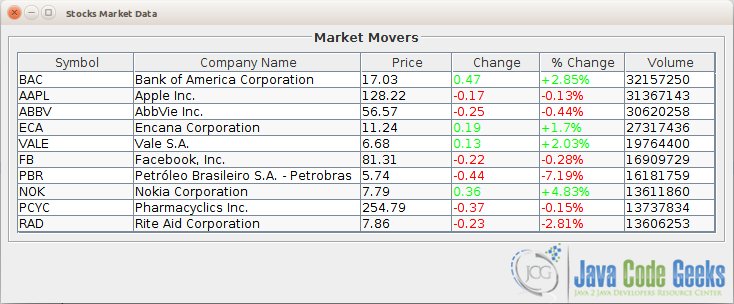
Figure 1: Stocks Market Data
4. Download the Eclipse Project
This was an example on how to draw Swing JTable rows with different colors using TableCellRenderer interface.
Download
You can download the full source code of this example here: TableCellRendererExampleCode.zip





 扫一扫
扫一扫


 被折叠的 条评论
为什么被折叠?
被折叠的 条评论
为什么被折叠?
 到【灌水乐园】发言





