



 本文介绍如何使用Maven安装Aspose.Words库,并通过示例代码展示如何利用Aspose.Words处理Word文档,包括多线程操作、正则表达式匹配文档路径和转换文档为图片。
1、maven jar文件的产生
mvn install:install-file -Dfile=C:\aspose-words-18.5.jar -DgroupId=com.steven -DartifactId=aspose-words -Dversion=1.0.0 -Dpackaging=jar
pom.xml
        <dependency>
            <groupId>com.steven</groupId>
            <artifactId>aspose-words</artifactId>
            <version>1.0.0</version>
        </dependency>
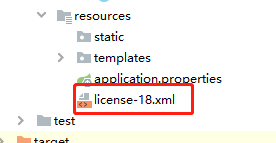
2、license-18.xml放在resources下
3、参考代码
package com.example.demo;

import com.aspose.words.*;
import lombok.SneakyThrows;

import java.io.File;
import java.io.InputStream;
import java.util.concurrent.CompletableFuture;
import java.util.concurrent.Executor;
import java.util.regex.Matcher;
import java.util.regex.Pattern;

import static java.util.regex.Pattern.compile;

public class HoughWords {
    public static void main(String[] args) {

    }

    /**
     * 多线程处理 executor 可不传入,则默认最多20个线程
     *
     * @Title: handle
     * @param: [operate]
     * @return: java.util.concurrent.CompletableFuture<java.lang.Void>
     * @throws:
     */
    private CompletableFuture<Void> handle(File operate, Executor executor) {

        //捕捉异常,不会导致整个流程中断
        return CompletableFuture.runAsync(() -> {
            long old = System.currentTimeMillis();
            String wsmc = operate.toString();
            Pattern pattern = compile("\\.*\\d{18}\\.*");
            Matcher matcher = pattern.matcher(wsmc);
            String ahdm = "";
            if (matcher.find()) {
                ahdm = matcher.group();
            } else {
                //15位案号代码
                Pattern pattern2 = compile("\\.*\\d{15}\\.*");
                Matcher matcher2 = pattern2.matcher(wsmc);
                if (matcher2.find()) {
                    ahdm = matcher2.group();
                }
            }
            createDirectory("E:\\ysjys\\jpg\\" + ahdm + "\\");
            doc2pic(wsmc, "E:\\ysjys\\jpg\\" + ahdm + "\\");
            long now = System.currentTimeMillis();
            System.out.println("线程[" + Thread.currentThread().getName() + "] 共耗时:" + ((now - old) / 1000.0) + "秒");
        }, executor).exceptionally(throwable -> {
            System.out.println("线程[{" + Thread.currentThread().getName() + "}]发生了异常, 继续执行其他线程,错误详情[{" + throwable.getMessage() + "}]");
            return null;
        });
    }

    public static void createDirectory(String... args) {
        if (args != null && args.length > 0) {
            for (String pathName : args) {
                File file = new File(pathName);
                if (!file.exists()) {
                    file.mkdirs();
                }
            }
        }
    }

    /**
     * 通行证
     *
     * @Title: getLicense
     * @param: []
     * @return: boolean
     * @throws:
     */
    public static boolean getLicense() {
        boolean result = false;
        try {
            InputStream is = ConvertUtil.class.getResourceAsStream("/license-18.xml");
            License aposeLic = new License();
            aposeLic.setLicense(is);
            result = true;
        } catch (Exception e) {
            e.printStackTrace();
        }
        return result;
    }

    @SneakyThrows
    public static void doc2pic(String inPath, String outPath) {
        if (!getLicense()) {
            return;
        }
        Document doc = new Document(inPath);
        ImageSaveOptions iso = new ImageSaveOptions(SaveFormat.JPEG);
        iso.setResolution(128f);
        iso.setPrettyFormat(true);
        iso.setUseAntiAliasing(true);
        for (int i = 0; i < doc.getPageCount(); i++) {
            iso.setPageIndex(i);
            doc.save(outPath + i + ".jpg", iso);
        }
    }
}





 扫一扫
扫一扫


 4159
4159

 被折叠的 条评论
为什么被折叠?
被折叠的 条评论
为什么被折叠?
 到【灌水乐园】发言





