


 在使用Nios II进行板上程序下载时,可能会遇到错误:1) 不能综合当前设计,原因是顶层文件设置错误,解决方法是确认并设置正确的顶层模块。2) 编译时出现RAM满的问题,这可能是因为C++库过大,解决策略是更改库设置为Small C。3) 硬件仿真时的Quartus II安装问题,通常由下载线未正确配置USB-Blaster引起,需要在工程设置中指定USB-Blaster。
1.Error: Can't synthesize current design -- Top partition does not contain any logic
中文:不能综合当前设计,顶层文件没有任何逻辑
原因:顶层文件设置错了,双击top level 就会发现模块内没有代码
解决:重新找到顶层模块,设置为顶层模块。
2.Nios ii ide 编译时出现了错误:region RAM is full
中文:ram不足
原因:工程右键:system Library Properties->c/c+build 中Support C++库太大了。
解决:工程右键:system Library Properties->c/c+build 去掉Support C++,选small c library
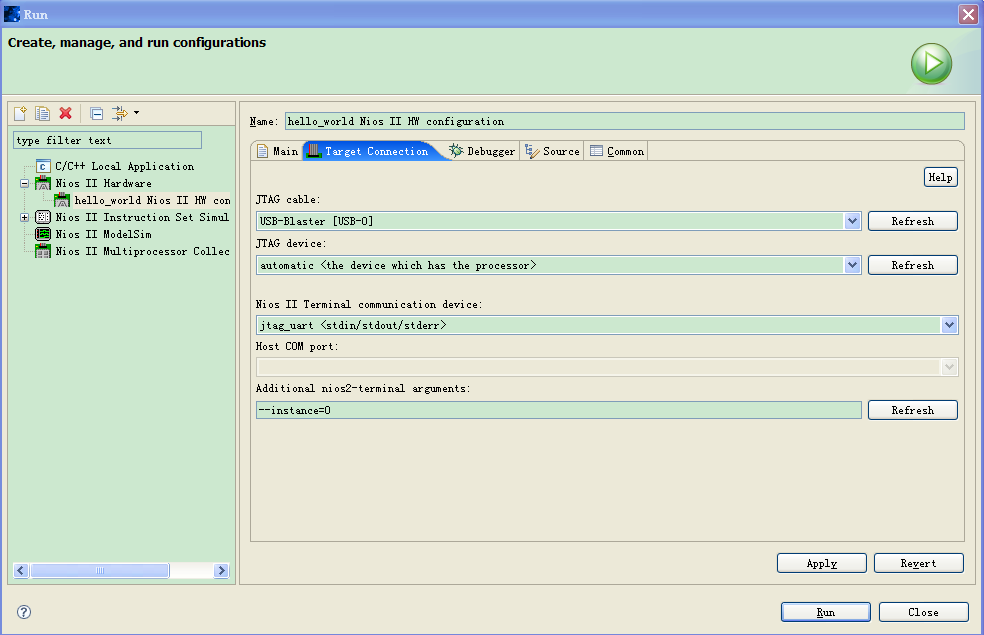
3.Nios ii ide 硬件仿真时出现了错误:There is a problem with the Quartus II installation on your computer.
Please use `jtagconfig` for further diagnosis.
原因:我选用的是usb-blaster,下载线没有设定usb-blaster
解决:run->run...->工程名 Nios_HW configuration->Target Connection/JTAG Cable项选择USB-Blaster






 扫一扫
扫一扫


 1万+
1万+

 被折叠的 条评论
为什么被折叠?
被折叠的 条评论
为什么被折叠?
 到【灌水乐园】发言





