cssText批量修改样式

本文介绍了一种使用JavaScript改进CSS样式的高效方法,通过利用cssText属性来减少代码量,并讨论了兼容性和性能优化的问题。

一般情况下我们用js设置元素对象的样式会使用这样的形式:
var element= document.getElementById(“id”);
element.style.width=”20px”;
element.style.height=”20px”;
element.style.border=”solid 1px red”;
样式一多,代码就很多;而且通过JS来覆写对象的样式是比较典型的一种销毁原样式并重建的过程,这种销毁和重建,都会增加浏览器的开销。

js中有一个cssText的方法:
obj.style.cssText=”样式”;
上面的代码我们可以修改成:
element.style.cssText=”width:20px;height:20px;border:solid 1px red;”;
这样就可以尽量避免页面reflow,提高页面性能。

但是,这样会有一个问题,会把原有的cssText清掉,比如原来的style中有’display:none;’,那么执行完上面的JS后,display就被删掉了。
为了解决这个问题,可以采用cssText累加的方法:
Element.style.cssText += ’width:100px;height:100px;top:100px;left:100px;’
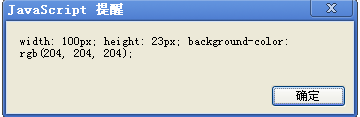
但是,cssText在IE8-中最后一个分号会被删掉,比较BT….
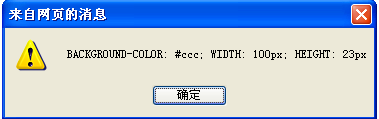
(ie8)

(google chrome)
因此,上面cssText累加的方法在IE中是无效的。

最后,可以在前面添加一个分号来解决这个问题:
Element.style.cssText += ’;width:100px;height:100px;top:100px;left:100px;’

(请关注引号中空格和;)

转载于:https://www.cnblogs.com/webDevelop/archive/2012/03/28/2421071.html

以下是根据前面的分析,**完全修复并整理后的批量打印功能代码**。主要修改点包括: --- ### ✅ 修复核心问题: - `processTableForMultiPage` 改为 **纯函数**:不再直接修改原始 DOM,而是返回一个新的分页容器。 - 确保只对 `cloneNode(true)` 后的副本进行操作,避免污染原始模板。 - 水印统一处理(可在外部添加,避免重复创建)。 - 防止多次点击打印按钮。 --- ### ✅ 最终完整代码如下(Vue 方法片段) ```js // 批量打印功能(已修复) print() { const elements = this.$refs.printContent; if (!elements || elements.length === 0) { this.$message.warning('没有可打印的内容'); return; } // 防止重复点击 const printBtn = event?.target; if (printBtn) { printBtn.disabled = true; setTimeout(() => { printBtn.disabled = false; }, 3000); } // 创建打印容器 const printContainer = document.createElement('div'); printContainer.className = 'batch-print-container'; printContainer.style.cssText = ` width: 100%; font-family: Arial, sans-serif; `; // 逐个处理每个打印项 for (let kk = 0; kk < elements.length; kk++) { const el = elements[kk]; // 克隆元素用于打印 const clonedElement = el.cloneNode(true); // 查找需要分页的表格(第3个 table) const tables = clonedElement.querySelectorAll('table'); if (tables.length >= 3) { const table3 = tables[2]; const newTableContainer = this.processTableForMultiPage(table3); // 返回新结构 if (newTableContainer) { table3.parentNode.replaceChild(newTableContainer, table3); // 只替换克隆体中的节点 } } // 创建单个项目容器 const itemContainer = document.createElement('div'); itemContainer.className = 'print-item'; itemContainer.style.cssText = ` width: 100%; min-height: 297mm; page-break-after: always; position: relative; box-sizing: border-box; `; // 添加水印 this.addWatermarkToPrintItem(itemContainer); // 将处理后的内容插入 itemContainer.appendChild(clonedElement); printContainer.appendChild(itemContainer); } // 移除最后一个项目的分页符 const lastItem = printContainer.lastElementChild; if (lastItem) { lastItem.style.pageBreakAfter = 'auto'; } // 执行打印 this.executeBatchPrint(printContainer, elements.length); }, // 为每个打印项添加水印 addWatermarkToPrintItem(container) { const watermarkLayer = document.createElement('div'); watermarkLayer.className = 'watermark-layer'; watermarkLayer.style.cssText = ` position: absolute; top: 0; left: 0; width: 100%; height: 100%; pointer-events: none; z-index: 1; opacity: 0.1; overflow: hidden; `; for (let i = -3; i <= 3; i++) { for (let j = -4; j <= 4; j++) { const item = document.createElement('div'); item.innerHTML = '报告存档<br>         修改无效'; item.style.cssText = ` position: absolute; top: ${50 + i * 15}%; left: ${50 + j * 20}%; transform: translate(-50%, -50%) rotate(-30deg); font-size: 16px; font-weight: 700; color: #000; white-space: nowrap; opacity: 0.15; `; watermarkLayer.appendChild(item); } } container.insertBefore(watermarkLayer, container.firstChild); }, // 处理表格实现跨页分页(纯函数,不修改原表) processTableForMultiPage(originalTable) { if (!originalTable) return null; const allRows = Array.from(originalTable.rows); if (allRows.length === 0) return null; const headers = ["试样名称", "序号", "委检项目", " ", " ", "测定方法", "压缩(拉伸)率", "介质", "温度,℃", "时间,h", "试验结果", "单位", "备注"]; let dataRows = []; let headerRowIndex = -1; // 查找表头行 for (let i = 0; i < allRows.length; i++) { const rowText = allRows[i].textContent; let matchCount = headers.filter(h => h !== " " && rowText.includes(h)).length; if (matchCount > 5) { // 匹配超过一半列名 headerRowIndex = i; break; } } dataRows = headerRowIndex !== -1 ? allRows.slice(headerRowIndex + 1) : allRows; const pageConfig = { firstPage: 21, otherPages: 31 }; const totalPages = this.calculateTotalPages(dataRows.length, pageConfig); const container = document.createElement('div'); let currentIndex = 0; let pageNumber = 0; while (currentIndex < dataRows.length && pageNumber < totalPages) { const rowsThisPage = pageNumber === 0 ? pageConfig.firstPage : pageConfig.otherPages; const endIndex = Math.min(currentIndex + rowsThisPage, dataRows.length); const actualCount = endIndex - currentIndex; if (actualCount <= 0) break; const hasMoreData = endIndex < dataRows.length; const pageDiv = document.createElement('div'); pageDiv.style.cssText = `page-break-after: ${hasMoreData ? 'always' : 'auto'}; position: relative;`; // 添加水印层(可选:也可统一在 item 上加) const watermark = this.createWatermarkDiv(); pageDiv.appendChild(watermark); const wrapper = document.createElement('div'); wrapper.style.cssText = 'position: relative; z-index: 2;'; const table = this.createPagedTable(headers, dataRows, currentIndex, endIndex, pageNumber); wrapper.appendChild(table); const footer = this.createFooter(pageNumber + 1, totalPages); wrapper.appendChild(footer); pageDiv.appendChild(wrapper); container.appendChild(pageDiv); currentIndex = endIndex; pageNumber++; } return container; }, // 计算总页数 calculateTotalPages(dataLength, config) { if (dataLength === 0) return 0; if (dataLength <= config.firstPage) return 1; return 1 + Math.ceil((dataLength - config.firstPage) / config.otherPages); }, // 创建水印 div createWatermarkDiv() { const layer = document.createElement('div'); layer.className = 'watermark-layer'; layer.style.cssText = ` position: absolute; top: 0; left: 0; width: 100%; height: 100%; pointer-events: none; z-index: 1; opacity: 0.1; overflow: hidden; `; for (let i = -3; i <= 3; i++) { for (let j = -4; j <= 4; j++) { const w = document.createElement('div'); w.innerHTML = '报告存档<br>         修改无效'; w.style.cssText = ` position: absolute; top: ${50 + i * 15}%; left: ${50 + j * 20}%; transform: translate(-50%, -50%) rotate(-30deg); font-size: 16px; font-weight: 700; color: #000; white-space: nowrap; opacity: 0.15; `; layer.appendChild(w); } } return layer; }, // 创建分页表格 createPagedTable(headers, dataRows, startIndex, endIndex, pageNumber) { const resultColIndex = headers.indexOf("试验结果"); const table = document.createElement('table'); table.style.cssText = ` border-collapse: collapse; width: 100%; font-size: 12px; margin-bottom: 5px; border: none; background: transparent; `; // 表头 const thead = document.createElement('thead'); const tr = document.createElement('tr'); headers.forEach(text => { const th = document.createElement('th'); th.textContent = text; th.style.cssText = ` font-weight: bold; padding: 6px 4px; font-style: italic; text-align: center; border: none; border-bottom: 2px solid #000; background-color: rgba(255,255,255,0.9); `; if (text === '试验结果') th.style.textAlign = 'right'; tr.appendChild(th); }); thead.appendChild(tr); table.appendChild(thead); // 数据体 const tbody = document.createElement('tbody'); let prevSample = null; let seqNum = 1; for (let i = startIndex; i < endIndex; i++) { const cells = Array.from(dataRows[i].cells).map(c => c.textContent.trim()); const currentSample = cells[0] || ''; const tr = document.createElement('tr'); for (let col = 0; col < headers.length; col++) { const td = document.createElement('td'); td.style.cssText = ` padding: 3px; text-align: center; vertical-align: middle; font-size: 12px; border: none; background-color: rgba(255,255,255,0.7); `; if (col === resultColIndex) td.style.textAlign = 'right'; if (col === 0) { td.textContent = currentSample === prevSample ? '' : currentSample; } else if (col === 1) { if (currentSample !== prevSample) seqNum = 1; td.textContent = seqNum++; } else { td.textContent = col < cells.length ? cells[col] : ''; } tr.appendChild(td); } if (currentSample !== prevSample && prevSample !== null) { tr.style.borderTop = '1px solid #666'; } if (i === endIndex - 1) { tr.style.borderBottom = '1px solid #666'; } tbody.appendChild(tr); prevSample = currentSample; } // 填充空行 const fillCount = (pageNumber === 0 ? 21 : 31) - (endIndex - startIndex); for (let i = 0; i < fillCount; i++) { const tr = document.createElement('tr'); headers.forEach(() => { const td = document.createElement('td'); td.style.height = '16px'; td.style.backgroundColor = 'rgba(255,255,255,0.5)'; tr.appendChild(td); }); tbody.appendChild(tr); } table.appendChild(tbody); return table; }, // 创建页脚 createFooter(pageNum, total) { const footer = document.createElement('div'); footer.style.cssText = ` text-align: center; font-size: 12px; margin-top: 10px; font-style: italic; color: #555; `; footer.textContent = `第 ${pageNum} 页 共 ${total} 页`; return footer; }, // 执行批量打印 executeBatchPrint(printContainer, totalCount) { const printStyles = ` <style> @media print { body { margin: 0 !important; background: white !important; } .batch-print-container { width: 100% !important; } .print-item { width: 100% !important; height: 297mm !important; min-height: 297mm !important; padding: 10mm !important; page-break-after: always !important; position: relative !important; } .print-item:last-child { page-break-after: auto !important; } table { page-break-inside: auto !important; width: 100% !important; } tr { page-break-inside: avoid !important; } th, td { font-size: 14px !important; padding: 3px !important; } thead { display: table-header-group !important; } tfoot { display: table-footer-group !important; } .watermark-layer { opacity: 0.1 !important; } .no-print { display: none !important; } } @media screen { .batch-print-container { display: block; width: 210mm; margin: 0 auto; background: white; } .print-item { width: 210mm; height: 297mm; margin-bottom: 20px; border: 1px solid #ddd; background: white; } } </style> `; const printContent = printContainer.outerHTML + printStyles; this.printWithIframe(printContent, totalCount); }, // 使用 iframe 打印 printWithIframe(printContent, totalCount) { const iframe = document.createElement('IFRAME'); document.body.appendChild(iframe); iframe.setAttribute('style', 'position:absolute;width:0px;height:0px;left:-500px;top:-500px;'); iframe.contentWindow.focus(); const doc = iframe.contentWindow.document; const _this = this; iframe.onload = function () { const oldTitle = document.title; document.title = "国资监管系统 - 批量打印"; iframe.contentWindow.onafterprint = function () { document.title = oldTitle; const data = { printTitle: _this.fullName || document.title.split('-')[0], printNum: totalCount, printId: _this.id }; request({ url: `/api/system/printLog/save`, method: "post", data }).then(() => console.log('打印日志保存成功')) .catch(err => console.error('打印日志保存失败:', err)); setTimeout(() => document.body.removeChild(iframe), 100); }; iframe.contentWindow.print(); }; doc.open(); doc.write(`<html><head><title>打印</title></head><body>${printContent}</body></html>`); doc.close(); } ``` --- ## ✅ 总结改进点 | 改进项 | 说明 | |-------|------| | ✔️ `processTableForMultiPage` 返回新 DOM | 不再修改原始结构,避免状态污染 | | ✔️ 只对 `clonedElement` 操作 | 安全,不影响页面原始数据 | | ✔️ 分离逻辑函数 | 提高可读性和维护性 | | ✔️ 防止重复提交 | 加了按钮禁用机制 | | ✔️ 统一水印和样式管理 | 减少冗余代码 | ---
评论
添加红包

请填写红包祝福语或标题

红包个数最小为10个

红包金额最低5元

当前余额3.43前往充值 >
需支付:10.00
成就一亿技术人!
领取后你会自动成为博主和红包主的粉丝 规则
hope_wisdom
发出的红包
实付
使用余额支付
点击重新获取
扫码支付
钱包余额 0

抵扣说明:

1.余额是钱包充值的虚拟货币,按照1:1的比例进行支付金额的抵扣。
2.余额无法直接购买下载,可以购买VIP、付费专栏及课程。

余额充值