



出现场景
将build.gradle中的compileSdkVersion改为35以后
android {
    compileSdkVersion 35
    ....
}
编译运行出现以下错误提示
FAILURE: Build failed with an exception.

* What went wrong:
Execution failed for task ':app:processDebugResources'.
> A failure occurred while executing com.android.build.gradle.internal.res.LinkApplicationAndroidResourcesTask$TaskAction
   > Android resource linking failed
     aapt2 E 07-03 14:08:43 41237 1847020 LoadedArsc.cpp:94] RES_TABLE_TYPE_TYPE entry offsets overlap actual entry data.
     aapt2 E 07-03 14:08:43 41237 1847020 ApkAssets.cpp:152] Failed to load resources table in APK '/Users/ado/Library/Android/sdk/platforms/android-35/android.jar'.
     error: failed to load include path /Users/ado/Library/Android/sdk/platforms/android-35/android.jar.


* Try:
> Run with --stacktrace option to get the stack trace.
> Run with --info or --debug option to get more log output.
> Run with --scan to get full insights.
> Get more help at https://help.gradle.org.

BUILD FAILED in 13s
Error: Gradle task assembleDebug failed with exit code 1
解决方案
根据Flutter源码工具中提示
gradle_errors.dart
final GradleHandledError incompatibleCompileSdk35AndAgpVersionHandler = GradleHandledError(
test:
(String line) => line.contains('RES_TABLE_TYPE_TYPE entry offsets overlap actual entry data'),
handler: ({
required String line,
required FlutterProject project,
required bool usesAndroidX,
}) async {
globals.printBox(
'${globals.logger.terminal.warningMark} Using compileSdk 35 requires Android Gradle Plugin (AGP) 8.1.0 or higher.'
' \n Please upgrade to a newer AGP version.${_getAgpLocation(project)}\n\n Finally, if you have a'
' strong reason to avoid upgrading AGP, you can temporarily lower the compileSdk version in the following file:\n${project.android.appGradleFile.path}',
title: _boxTitle,
);
return GradleBuildStatus.exit;
},
eventLabel: 'incompatible-compile-sdk-and-agp',
);
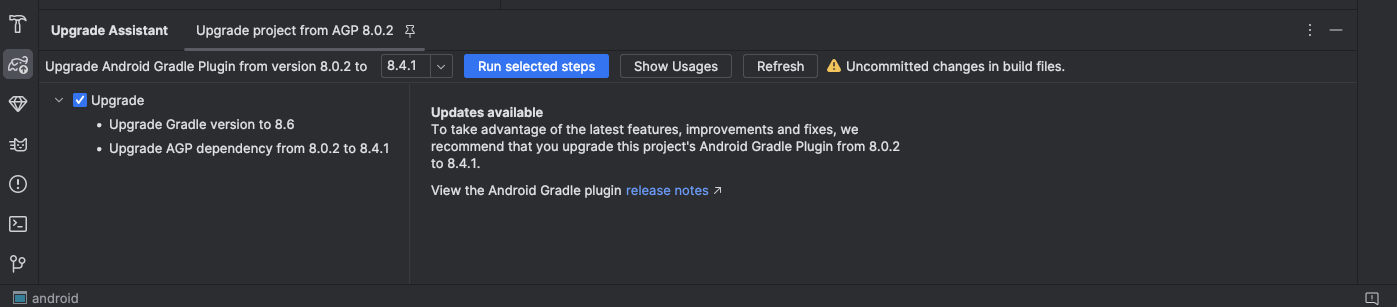
更新AGP到8.1.0以上即可解决问题。
使用AGP upgrade assistant进行升级。





 扫一扫
扫一扫


 1193
1193

 被折叠的 条评论
为什么被折叠?
被折叠的 条评论
为什么被折叠?
 到【灌水乐园】发言





