


传递UI

语法
@BuilderParam 名称1: () => void = this.名称2 // 名称1 和 名称2 进行绑定
@BuilderParam ()里面理解成传参 传参是否有组件
@Builder 默认(无传入组件) 构建在括号后 名称2
build 传入组件 构建在括号前 名称1
模块代码新增
@Component struct c_ui{
  @State img : ResourceStr = ''
  @State str1 : string = '默认内容1'
  @State str2 : string = '默认内容2'

  //  @BuilderParam ()里面理解成传参  传参是否有组件
  //  @Builder 默认(无传入组件) 构建在括号后
  //  build 传入组件  构建在括号前
  @BuilderParam ctbd : () => void = this.dfbd //  把df 绑定到 ct
  @Builder dfbd(){  //  不传组件执行
    Column(){
      Image(this.img).width('12%')
      Text(this.str1)
      Text(this.str2)
    }
  }

  build() { //  传组件执行
    this.ctbd()
  }
}
页面代码新增
//  顶 众筹
      Column(){
        Row(){
          Text(`小米有品众筹`)
          Blank()
          Text(`了解更多众筹 >`)
        }.width(`100%`)
        Row(){
          com.c_ui(){
            Column(){
              Row(){
                Column(){
                  Text(`腰带`)
                  Text(`¥499`)
                }.margin({right: '5%' })
                Blank()
                Image($r('app.media.ic_public_car')).width('15%')
              }
              Text(){
                Span('1107').fontColor('#f00');
                Span(`人支持`);
                Span(`  完成 `);
                Span(`100%`).fontColor('#f00')
              }.fontSize(12)
            }
          }
          //  只要不传入组件 就是默认构建 @Builder
          com.c_ui({img:$r('app.media.ic_public_scan'),str1:'顶级工学',str2:'¥1799'})
          com.c_ui({img:$r('app.media.ic_public_scan'),str1:'龙年飞船',str2:'¥13800'})
        }.width('100%').justifyContent(FlexAlign.SpaceEvenly)
      }
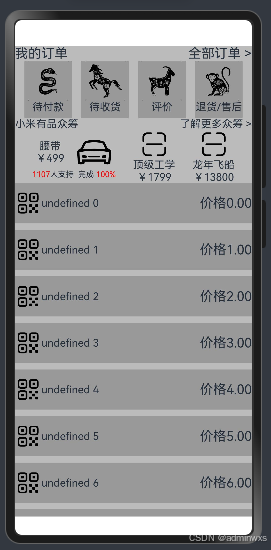
完整代码
模块代码
@Component struct c_ui{
@State img : ResourceStr = ''
@State str1 : string = '默认内容1'
@State str2 : string = '默认内容2'
// @BuilderParam ()里面理解成传参 传参是否有组件
// @Builder 默认(无传入组件) 构建在括号后
// build 传入组件 构建在括号前
@BuilderParam ctbd : () => void = this.dfbd // 把df 绑定到 ct
@Builder dfbd(){
// 不传组件执行
Column(){
Image(this.img).width('12%')
Text(this.str1)
Text(this.str2)
}
}
build() {
// 传组件执行
this.ctbd()
}
}
@Component struct com_top_img{
@BuilderParam ctbd : () => void
@State img : ResourceStr = ``
@State txt : string = ''
build() {
Column(){
Image(this.img).width(60)
Text(this 最低0.47元/天 解锁文章






 扫一扫
扫一扫


 9923
9923

 被折叠的 条评论
为什么被折叠?
被折叠的 条评论
为什么被折叠?
 到【灌水乐园】发言





