



转载参考:
- https://github.com/RingoTangs/LearningNote/blob/master/MySQL/MySQL.md
- https://blog.youkuaiyun.com/qq_21579045/article/details/99702766
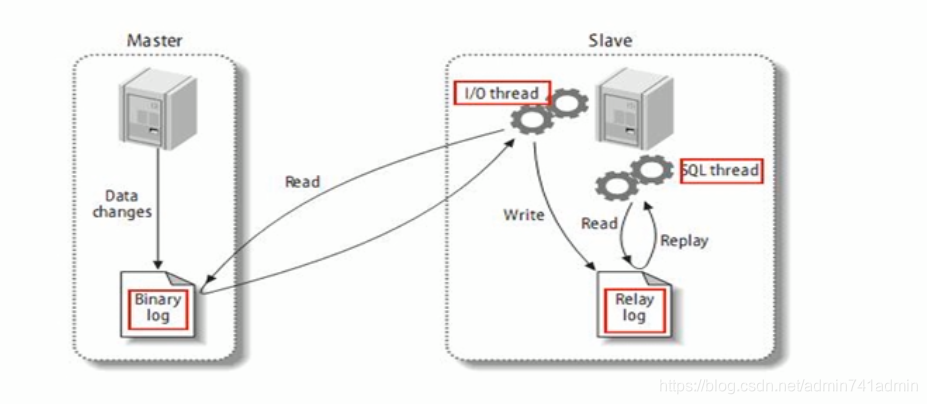
复制的基本原理
-
MySQL复制过程分为三步:
- Master将改变记录到二进制日志(Binary Log)。这些记录过程叫做二进制日志事件,Binary Log Events;
- Slave将Master的Binary Log Events拷贝到它的中继日志(Replay Log);
- Slave重做中继日志中的事件,将改变应用到自己的数据库中。MySQL复制是异步且串行化的。
复制的基本原则
- 每个Slave只有一个Master。
- 每个Slave只能有一个唯一的服务器ID。
- 每个Master可以有多个Salve。
一主一从常见配置
建议先各自备份一遍data文件夹
- 主从配置都是配在[mysqld]节点下,都是小写
# Master配置
[mysqld]
server-id=1 # 必须
log-bin=/var/lib/mysql/mysql-bin # 必须
read-only=0
binlog-ignore-db=mysql
# Slave配置
[mysqld]
server-id=2 # 必须
log-bin=/var/lib/mysql/mysql-bin
- Master主机命令
# 1、GRANT REPLICATION SLAVE ON *.* TO 'username'@'从机IP地址' IDENTIFIED BY 'password';
mysql> GRANT REPLICATION SLAVE ON *.* TO 'zgc'@'192.168.56.1' IDENTIFIED BY '123456';
Query OK, 0 rows affected, 1 warning (0.08 sec)

# 2、刷新命令
mysql> FLUSH PRIVILEGES;
Query OK, 0 rows affected (0.01 sec)

# 3、记录下File和Position
# 每次配从机的时候都要SHOW MASTER STATUS;查看最新的File和Position
mysql> SHOW MASTER STATUS;
+------------------+----------+--------------+------------------+-------------------+
| File             | Position | Binlog_Do_DB | Binlog_Ignore_DB | Executed_Gtid_Set |
+------------------+----------+--------------+------------------+-------------------+
| mysql-bin.000001 |     1045 |              | mysql            |                   |
+------------------+----------+--------------+------------------+-------------------+
1 row in set (0.00 sec)
- Slave从机命令
# 1、使用用户名密码登录进Master
mysql> CHANGE MASTER TO MASTER_HOST='192.168.56.10',
    -> MASTER_USER='zgc',
    -> MASTER_PASSWORD='123456',
    -> MASTER_LOG_FILE='mysql-bin.000001',
    -> MASTER_LOG_POS=1045;
Query OK, 0 rows affected, 1 warning (0.20 sec)

mysql> START SLAVE;
Query OK, 0 rows affected (0.02 sec)

# 3、查看Slave状态
# Slave_IO_Running 和 Slave_SQL_Running 必须同时为Yes 说明主从复制配置成功!
mysql>  SHOW SLAVE STATUS\G
*************************** 1. row ***************************
               Slave_IO_State: Waiting for master to send event
                  Master_Host: 192.168.56.10
                  Master_User: zgc
                  Master_Port: 3306
                Connect_Retry: 60
              Master_Log_File: mysql-bin.000001
          Read_Master_Log_Pos: 1045
               Relay_Log_File: DESKTOP-OC56A03-relay-bin.000002
                Relay_Log_Pos: 320
        Relay_Master_Log_File: mysql-bin.000001
             Slave_IO_Running: Yes
            Slave_SQL_Running: Yes
              Replicate_Do_DB:
          Replicate_Ignore_DB:
           Replicate_Do_Table:
       Replicate_Ignore_Table:
      Replicate_Wild_Do_Table:
  Replicate_Wild_Ignore_Table:
                   Last_Errno: 0
                   Last_Error:
                 Skip_Counter: 0
          Exec_Master_Log_Pos: 1045
              Relay_Log_Space: 537
              Until_Condition: None
               Until_Log_File:
                Until_Log_Pos: 0
           Master_SSL_Allowed: No
           Master_SSL_CA_File:
           Master_SSL_CA_Path:
              Master_SSL_Cert:
            Master_SSL_Cipher:
               Master_SSL_Key:
        Seconds_Behind_Master: 0
Master_SSL_Verify_Server_Cert: No
                Last_IO_Errno: 0
                Last_IO_Error:
               Last_SQL_Errno: 0
               Last_SQL_Error:
  Replicate_Ignore_Server_Ids:
             Master_Server_Id: 1
                  Master_UUID: cb63c151-6098-11eb-a844-0242ac110002
             Master_Info_File: F:\mysql\data\master.info
                    SQL_Delay: 0
          SQL_Remaining_Delay: NULL
      Slave_SQL_Running_State: Slave has read all relay log; waiting for more updates
           Master_Retry_Count: 86400
                  Master_Bind:
      Last_IO_Error_Timestamp:
     Last_SQL_Error_Timestamp:
               Master_SSL_Crl:
           Master_SSL_Crlpath:
           Retrieved_Gtid_Set:
            Executed_Gtid_Set:
                Auto_Position: 0
         Replicate_Rewrite_DB:
                 Channel_Name:
           Master_TLS_Version:
1 row in set (0.00 sec)

mysql>
- 测试主从复制
# 主机新建数据库
mysql>  create database test_replication;
Query OK, 1 row affected (0.12 sec)

# 从机存在这数据库
- 停止主从复制功能
mysql> STOP SLAVE;
Query OK, 0 rows affected (0.09 sec)
关于Slave_IO_Running: Connecting
- 检查主机的error文件:
# docker logs mysql
2021-08-20T13:11:58.206938Z 15 [Note] Access denied for user 'zgc'@'192.168.56.1' (using password: YES)





 扫一扫
扫一扫


 732
732

 被折叠的 条评论
为什么被折叠?
被折叠的 条评论
为什么被折叠?
 到【灌水乐园】发言





