


 本文介绍了如何使用ESP32和Micropython配合DHT11温湿度传感器,通过SSD1306OLED显示屏显示实时的温度和湿度数据。展示了接线方式、代码实现以及部分功能测试。
oled7脚+esp32+micropython温湿度显示到显示屏上
一、接线
1.温湿度传感器:
GND-----------GND
5V------------VCC
P12-----------DATA
2.显示屏(7脚显示屏,ssd1306驱动)
GND-----------GND
3V3/5V--------VCC
P18-----------D0
P23-----------D1
P15-----------RES
P2------------DC
P4------------CS
二、代码
只显示了简单的字,并不是显示温湿度,字模还没搞,做个笔记
import dht
from machine import Pin,SoftSPI
from ssd1306 import SSD1306_SPI
import utime
import time

# 设置oled引脚
dc=Pin(2,Pin.OUT)
res=Pin(15,Pin.OUT)
cs=Pin(4,Pin.OUT)

# 设置DHT传感器连接的引脚
dht_pin = Pin(12, Pin.IN, Pin.PULL_UP)
# 创建DHT对象
dht_sensor = dht.DHT11(dht_pin)

#波特率;输出极性;相位,此处没用到,0和1都可;sck时钟同步信号线D0;mosi主机发送引脚D1;mosi主机接收引脚,此处用不到
spi=SoftSPI(baudrate=100000,polarity=1,phase=0,sck=Pin(18),mosi=Pin(23),miso=Pin(19))
oled=SSD1306_SPI(128,64,spi,dc,res,cs)  #创建oled对象

class Chine:
    chine = [
        0x20,0x20,0x22,0x22,0x22,0xE2,0x22,0x22,0x22,0xE2,0x22,0x22,0x22,0x20,0x20,0x00,
        0x80,0x40,0x20,0x10,0x0C,0x03,0x00,0x00,0x00,0x3F,0x40,0x40,0x40,0x40,0x78,0x00, # 元,0

        0x00,0x00,0x00,0xFE,0x42,0x42,0x42,0x42,0x42,0x42,0x42,0xFE,0x00,0x00,0x00,0x00,
        0x40,0x40,0x40,0x4F,0x48,0x48,0x48,0x48,0x48,0x48,0x48,0x4F,0x40,0x40,0x40,0x00, # 旦,1

        0x00,0xE0,0x00,0xFF,0x10,0x20,0x08,0x08,0x08,0xFF,0x08,0x08,0xF8,0x00,0x00,0x00,
        0x01,0x00,0x00,0xFF,0x00,0x81,0x41,0x31,0x0D,0x03,0x0D,0x31,0x41,0x81,0x81,0x00, # 快,2

        0x00,0x00,0xE0,0x9C,0x84,0x84,0x84,0xF4,0x82,0x82,0x83,0x82,0x80,0x80,0x00,0x00,
        0x00,0x20,0x10,0x08,0x06,0x40,0x80,0x7F,0x00,0x00,0x02,0x04,0x08,0x30,0x00,0x00, # 乐,3
    ]

def ByteOpera16x16(num, dat):
    byte = [0x01, 0x02, 0x04, 0x08, 0x10, 0x20, 0x40, 0x80]
    if dat & byte[num]:
        return 1
    else:
        return 0

def LcdShowCh_32x32(n, x_axis, y_axis):
    for i in range(2):         # 行的显示,改为4会有异常
        for a in range(16):    # 列的显示,改为8显示左半个字
            for b in range(8): # 像素点显示,8显示完整,数字小像素显示少
                index = n * 32 + i * 16 + a
                if index < len(Chine.chine) and ByteOpera16x16(b, Chine.chine[index]):
                    oled.pixel(x_axis + a, y_axis + i * 8 + b, 1)
                else:
                    oled.pixel(x_axis + a, y_axis + i * 8 + b, 0)

def main():
    while True:
        try:
            # 读取温湿度数据
            dht_sensor.measure()
            temperature = dht_sensor.temperature()
            humidity = dht_sensor.humidity()

            # 获取当前时间
            current_time = utime.localtime()
            formatted_time = "{}/{:02d}/{:02d}".format(
                current_time[0],  # 年
                current_time[1],  # 月
                current_time[2],  # 日
                current_time[3],  # 时
                current_time[4],  # 分
                current_time[5],  # 秒
            )
            formatted_time1 = "{:02d}:{:02d}:{:02d}".format(
                current_time[3],  # 时
                current_time[4],  # 分
                current_time[5],  # 秒
            )


            print("温度 {:.2f} C".format(temperature))
            print("湿度 {:.2f} %".format(humidity))
            print("当前时间:", formatted_time)

            oled.fill(0)  # 清屏
            LcdShowCh_32x32(0, 0, 16)  # 显示“元”
            LcdShowCh_32x32(1, 0, 32)  # 显示“旦”

            # 显示当前时间
            oled.text(formatted_time, 0, 0, 1)
            oled.text(formatted_time1, 0, 8, 1)

            oled.text(":{:.2f} C".format(temperature), 16, 24, 1)  # 显示摄氏度
            oled.text(":{:.2f} %".format(humidity), 16, 40, 1)  # 显示湿度
            oled.show()  # 显示

            time.sleep(1)

        except Exception as e:
            print("Error: {}".format(e))


if __name__ == "__main__":
    main()
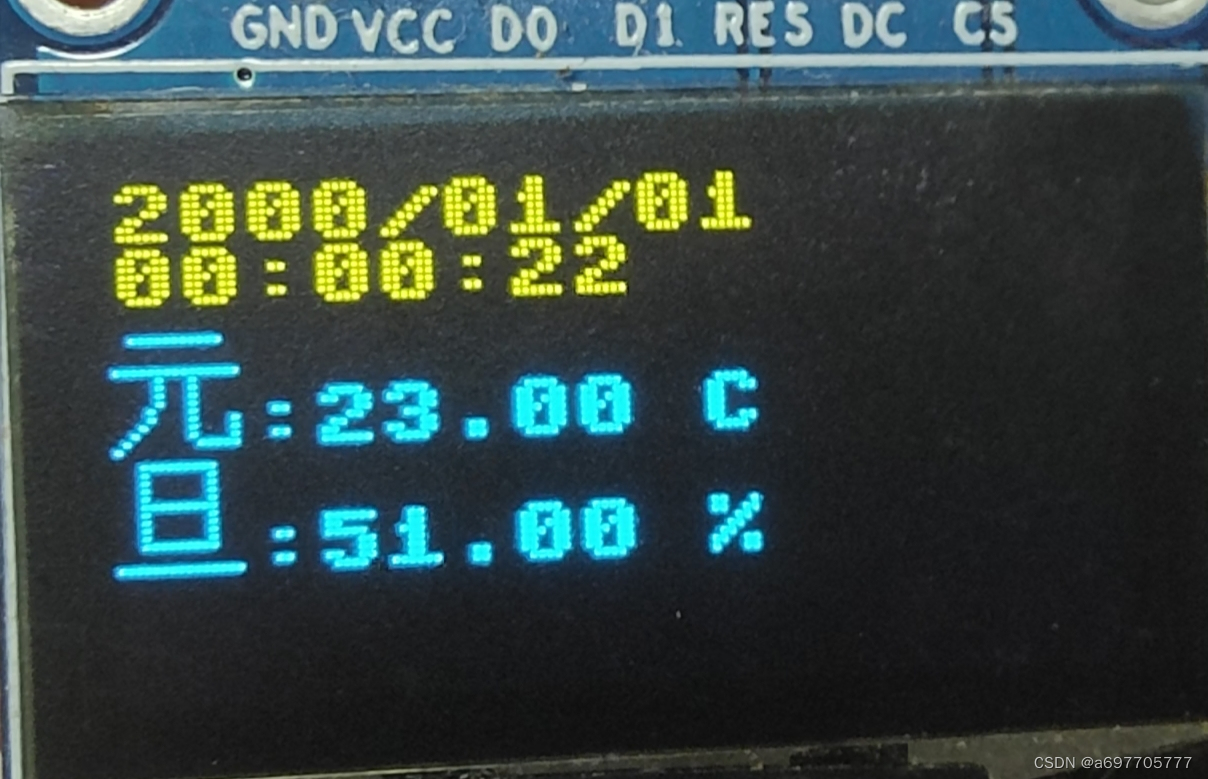
三、效果如图
你可以把元旦这两个字替换掉,这个时间没有联网的默认是2000/01/01开始的







 扫一扫
扫一扫


 2630
2630

 被折叠的 条评论
为什么被折叠?
被折叠的 条评论
为什么被折叠?
 到【灌水乐园】发言





