


 本文介绍了如何使用Python脚本来查找并处理NAS系统上的重复图片,特别是针对MTPhotosDocker应用。首先,通过MTPhotos获取重复文件信息并保存,然后运行Python脚本将信息转存到Excel表格,最后生成Shell脚本进行批量删除。这种方法对于大量重复图片的管理非常有效。

提示:文章写完后,目录可以自动生成,如何生成可参考右边的帮助文档
文章目录
前言
除了群晖,其他NAS系统的相册应用实在是难以忍受。所以发现了MT Photos,这是在NAS里面一个非常好用的docker相册应用。
但是我们从网上下了大量的图片过后,也会有很多很多重复的图片。
这里说的重复图片,是指大小、尺寸等一摸一样的文件。
如果重复的图片有成千上万张,那么手动删起来是非常有损手腕健康的。
所以写了这个python脚本,用于生成批量删除的shell脚本。
提示:以下是本篇文章正文内容,下面案例可供参考
一、获取重复文件信息
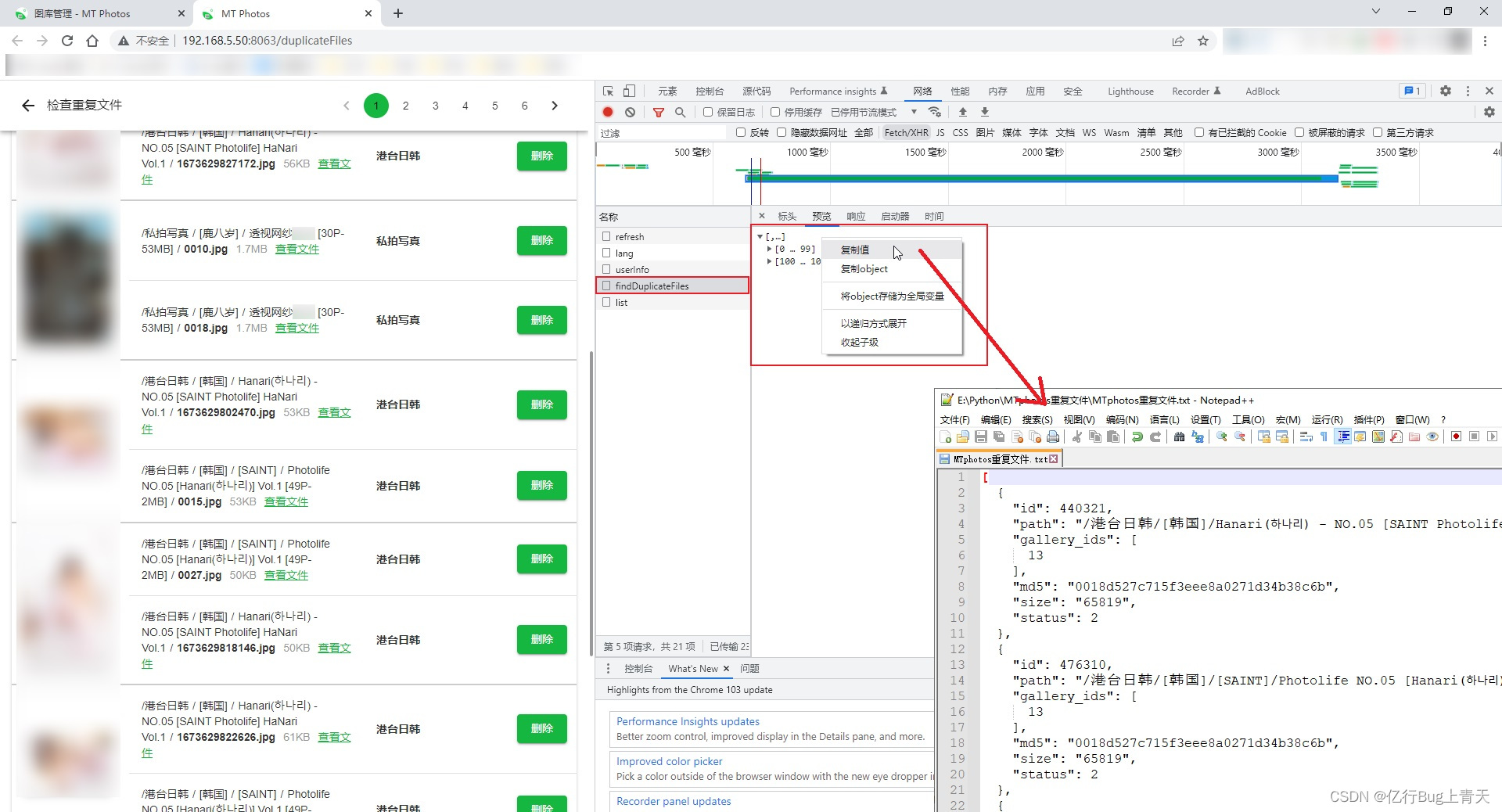
步骤:
1、到MTPhotos的重复文件查找界面,按F12打开前端调试;
2、再按F5刷新界面,已重新获取重复文件信息:findDuplicateFiles;
3、按照图中这样,将findDuplicateFiles信息保存到文件"MTphotos重复文件.txt"中。
注意:这里要求固定文件名是"MTphotos重复文件.txt"
二、使用步骤
1. 运行“MTphotos重复文件(生成excel).py”
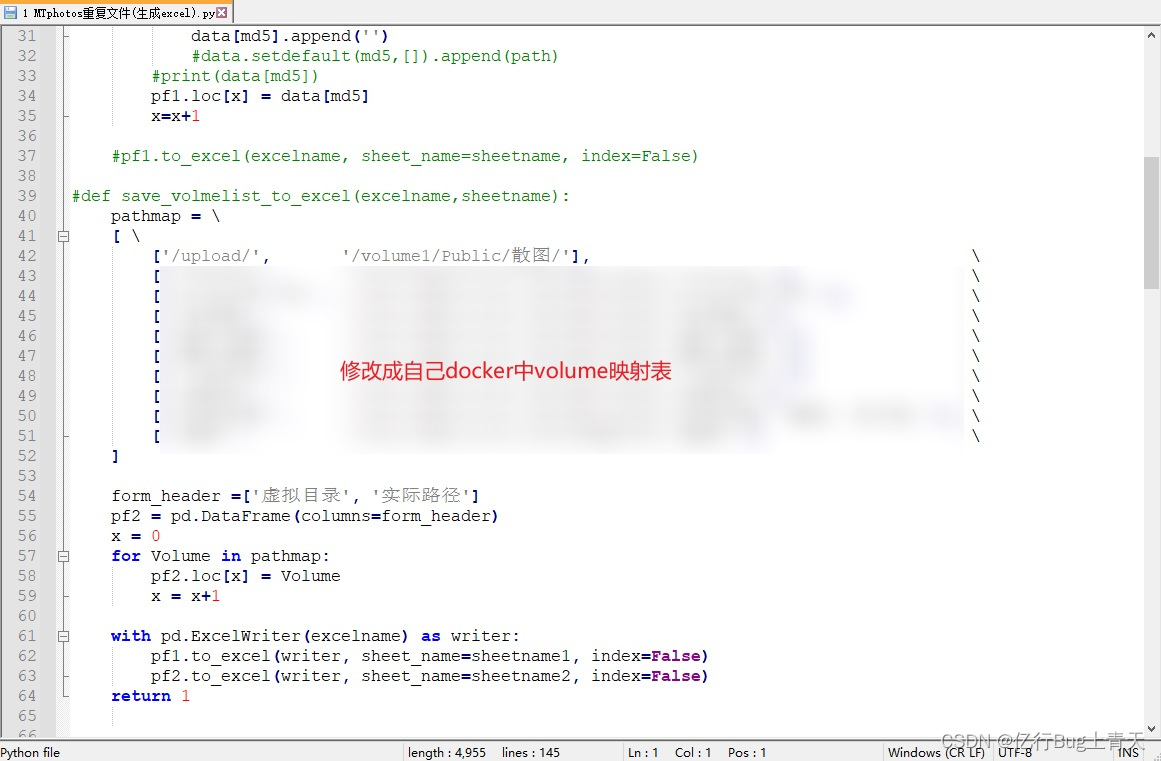
代码如下:
import platform
import os
import re
import pandas as pd

OS = platform.system()

file=open('MTphotos重复文件.txt', 'r',encoding='UTF-8')

same_file = {}

file_info_list = []
line_num = 1

def save_filelist_to_excel(data,excelname):
    sheetname1 = '重复列表'
    sheetname2 = 'Volume映射'

    form_header =['主']
    for i in range(in_group_same_max):
        if i>=1:
            form_header.append('删%d'%i)
    pf1 = pd.DataFrame(columns=form_header)

    x = 0
    for md5 in data:
        n=len(data[md5])
        n = in_group_same_max - n
        for i in range(n):  #要求与标题数量匹配,所以不够的补一下
            data[md5].append('')
        pf1.loc[x] = data[md5]
        x=x+1

    #填入docker中的volume映射设置,以便生成shell时,自动替换虚拟路径
    pathmap = \
    [ \
        ['/upload/',       '/volume1/Public/散图/'],                                      \
        ['/COSPLAY/',      '/share/MyArchive1/PRIVATE/PHOTO/[COSPLAY]/'],                 \
        ['/XiuRen秀人网/', '/share/MyArchive1/PRIVATE/PHOTO/[XiuRen秀人网]/'],            \
        ['/非成套/',       '/share/MyArchive1/PRIVATE/PHOTO/[非成套]/'],                  \
        ['/港台日韩/',     '/share/MyArchive1/PRIVATE/PHOTO/[港台日韩]/'],                \
        ['/套图/',         '/share/MyArchive1/PRIVATE/PHOTO/[套图]/']                     \
    ]

    form_header =['虚拟目录', '实际路径']
    pf2 = pd.DataFrame(columns=form_header)
    x = 0
    for Volume in pathmap:
        pf2.loc[x] = Volume
        x = x+1

    with pd.ExcelWriter(excelname) as writer:
        pf1.to_excel(writer, sheet_name=sheetname1, index=False)
        pf2.to_excel(writer, sheet_name=sheetname2, index=False)
    return 1


def sort_path_filename(data):
    num = len(data)
    group = []
    for fullpath in data:
        (filepath, filename) = os.path.split(fullpath)  ##分离文件路径与文件名
        (name, suffix) = os.path.splitext(filename) #分离文件名和扩展名
        group.append([filepath,name,suffix])

    #如果是一个目录下的,就判断文件名
    #因为"file (1).jpg"和"file.jpg"判断结果是,"file (1).jpg"是小的
    #而我觉得"file.jpg"才是小的,所以判一下文件名
    group.sort()
    for i in range(num):
        if OS == 'Windows':     #在windows下生成linux的路几个
            data[i] = (group[i][0] + '/' + group[i][1] + group[i][2])
        else:
            data[i] = os.path.join(group[i][0], group[i][1] + group[i][2])
    return 1

for line in file:
    string = line.strip()
    str_pat = re.compile(r'\"(.*?)\"')  #正则表达式,取两个双引号之间的字符串 part1

    if string == '{':
        pass
    if "\"id\"" in string:
        splitext = string.split(':')
        ID = re.sub(r'[^0-9]', '', splitext[1]) #正则表达式,取全部的数字
    if "\"path\"" in string:
        splitext = string.split(':')
        PATH = str_pat.findall(splitext[1])[0] #正则表达式,取两个双引号之间的字符串 part2
    if "\"md5\"" in string:
        splitext = string.split(':')
        MD5  = str_pat.findall(splitext[1])[0]
    if "\"size\"" in string:
        splitext = string.split(':')
        SIZE = str_pat.findall(splitext[1])[0]
        SIZE = int(SIZE,10)
    if string == '},' or string == '}':
        same_file.setdefault(MD5,[]).append(PATH)
    line_num = line_num + 1
file.close()

num = len(same_file)
print(num)
in_group_same_max=2 #每组重复文件的最大个数
n=0

print('[', end='')
for md5 in same_file:
    l=len(same_file[md5])
    in_group_same_max = max(l,in_group_same_max)
    sort_path_filename(same_file[md5])
    n = n+1
    if n%int(num/10) == 0:
        print('■', end='')
print(']', end='')
print('')

save_filelist_to_excel(same_file,'重复文件列表.xlsx')
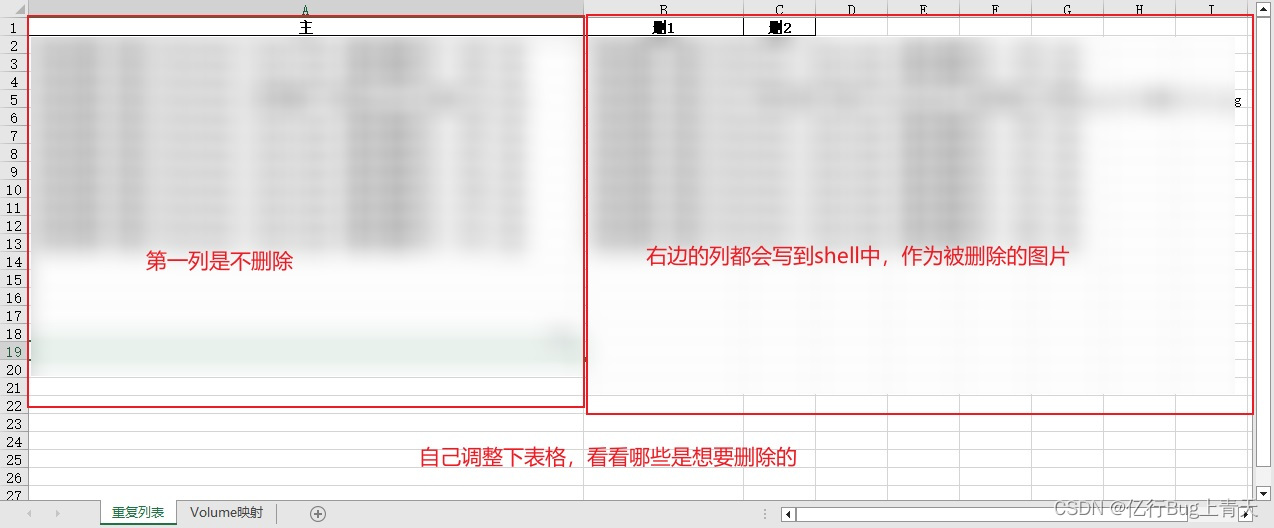
2.运行“2 生成shell脚本(按调整后的excel生成shell).py”
代码如下(示例):
#!/usr/bin/env python3
import pandas as pd
import os
import struct
#import platform
#pip install openpyxl
#pip install pandas

def get_file_list(excel_data):
    del_num = 1
    list_info = []
    for row in excel_data.index.values: #读全部行
        line = excel_data.iloc[row]
        #print(line)
        for column in line:
            if list(line).index(column) != 0 and column != '':
                list_info.append(column)
                del_num = del_num+1
    return list_info

def get_real_path(excel_data, volume):
    if volume in excel_data['虚拟目录'].values:
        path = excel_data.loc[excel_data['虚拟目录'] == volume, ['实际路径']].values[0][0]
        #print(path)
        return path
    else:
        print('没找到\"%s\"'%volume)
        return ''

def path_replace(mtphoto_out_path):
    mtphoto_out_path = '/'+file.split('/')[1]+'/'
    path = get_real_path(df22, mtphoto_out_path)
    if(path != ''):
        return file.replace(mtphoto_out_path, path, 1)
    else:
        return mtphoto_out_path

#OS = platform.system()
CurrPath = os.getcwd()

#读取工作簿和工作簿中的工作表
FileName = "重复文件列表.xlsx"
sheetname1 = '重复列表'
sheetname2 = 'Volume映射'
FilePath = os.path.join(CurrPath, FileName)

pd.set_option('display.unicode.east_asian_width', True)
#df=pd.read_excel(FilePath) #默认第一个
df11=pd.read_excel(FilePath, sheet_name='重复列表',keep_default_na=False)
df22=pd.read_excel(FilePath, sheet_name='Volume映射',keep_default_na=False)
#print(df.head())    #打印前5行

#因为是给linux用,不能有windows的\r换行
#所以采用二进制写入
saveshell = open('same_photo.sh', 'wb')
file_list = get_file_list(df11)
for file in file_list:
    new_path = path_replace(file)
    cmd = 'rm -f \"%s\"\n'%new_path
    #cmd = cmd.encode('utf-8')
    cmd = bytes(cmd, encoding='UTF-8')
    saveshell.write(cmd)
saveshell.close()
file_list.clear()
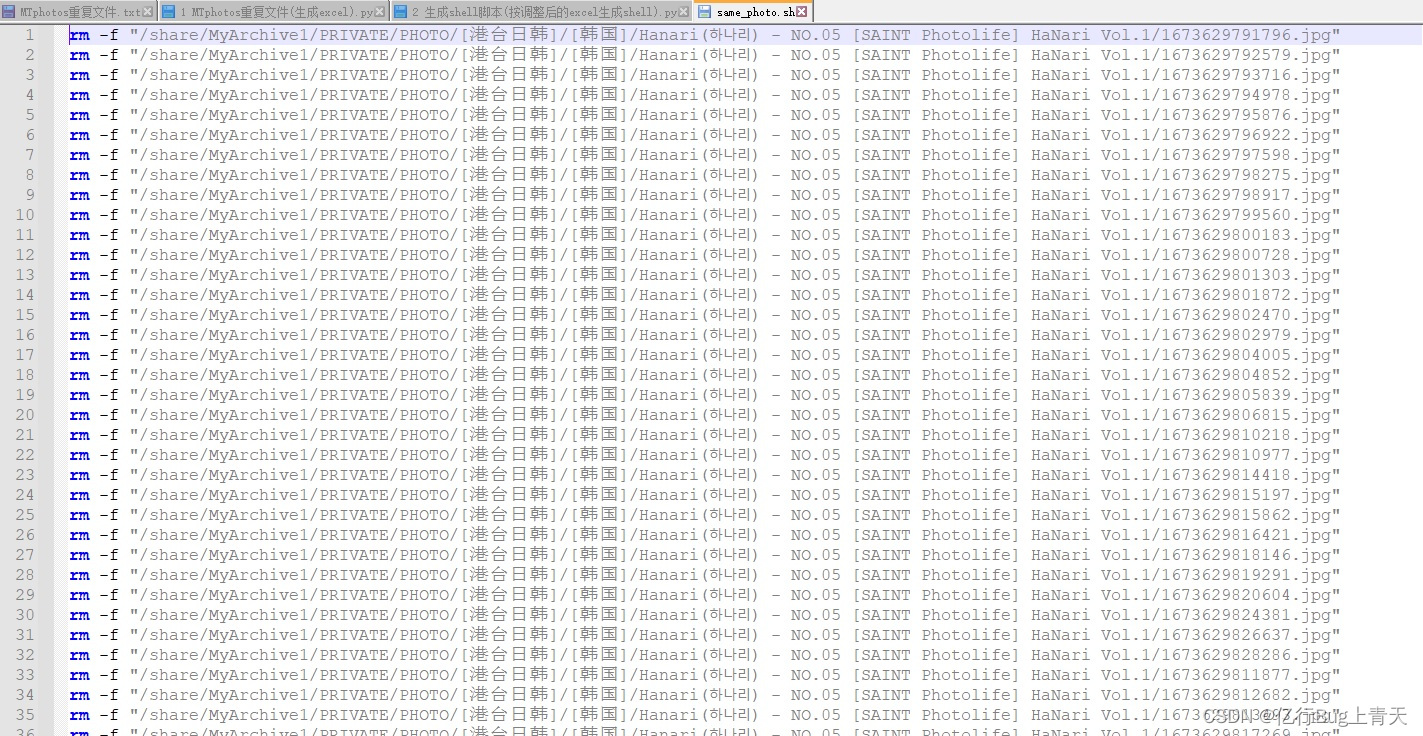
最终输出文件
总结
本文使用了pandas,对excel进行了简单的处理。





 扫一扫
扫一扫


 1730
1730

 被折叠的 条评论
为什么被折叠?
被折叠的 条评论
为什么被折叠?
 到【灌水乐园】发言





