

pycharm + selenium + python 提示 Unresolved reference 'webdriver' 解决办法

本文解决在PyCharm中使用Selenium进行自动化测试时遇到的常见问题。详细介绍了如何在虚拟环境中正确安装Selenium模块,避免Unresolved reference错误。步骤包括激活虚拟环境及使用pip命令安装。

尝试使用python + selenium + pycharm 做自动化测试,

命令行pip install selenium 安装了selenium。但是使用pycharm 新建一个测试项目后并新建一个test01.py 文件

在文件中导入selenium 包,from selenium import webdriver 提示报错 Unresolved reference 'webdriver'。就是pycharm 找不到selenium模块导致的。


分析查找原因:

pycharm 新建test 项目,pycharm自动设置了运行环境为虚拟环境。虽然操作系统中安装了selenium。但是虚拟环境中并没有安装selenium 模块,所以有这个错误提示
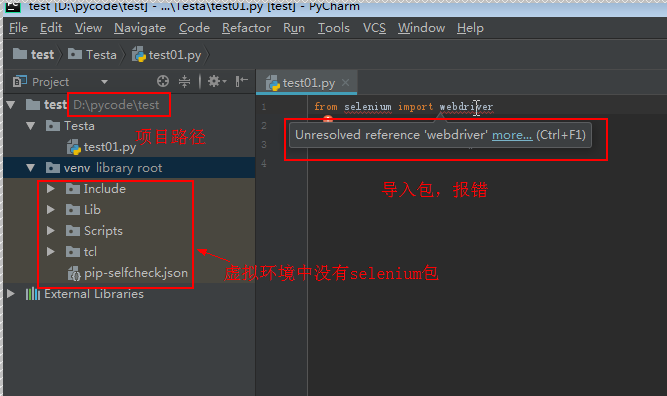
 

 解决办法:

1、命令行进入项目目录的虚拟环境:cd D:\pycode\test\venv

2、进入python虚拟环境:Scripts\activate
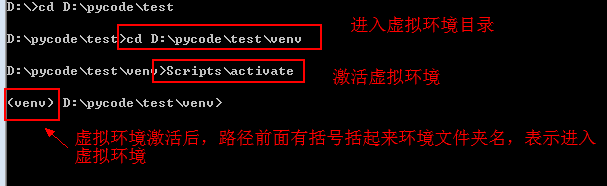
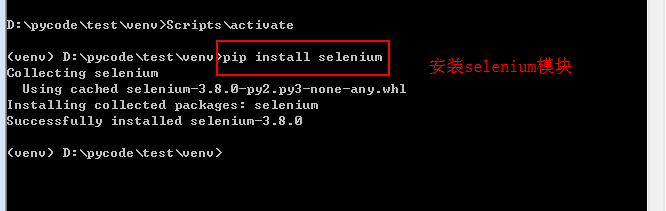
3、执行pip install selenium ,安装selenium模块
 

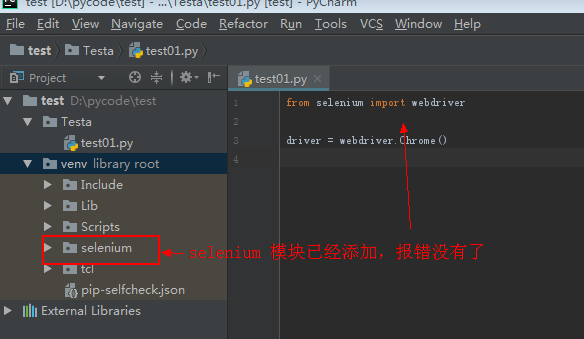
4、再在pycharm页面,selenium包已经安装,报错也没有了
C:\Users\17844\.conda\envs\pythonProject2\python.exe "D:\pycharm data\pythonProject2\lib\B站文本抓取.py" Traceback (most recent call last): File "D:\pycharm data\pythonProject2\lib\B站文本抓取.py", line 316, in <module> main() File "D:\pycharm data\pythonProject2\lib\B站文本抓取.py", line 264, in main driver = create_stealth_driver() File "D:\pycharm data\pythonProject2\lib\B站文本抓取.py", line 46, in create_stealth_driver driver = webdriver.Edge(service=service, options=edge_options) File "C:\Users\17844\.conda\envs\pythonProject2\lib\site-packages\selenium\webdriver\edge\webdriver.py", line 45, in __init__ super().__init__( File "C:\Users\17844\.conda\envs\pythonProject2\lib\site-packages\selenium\webdriver\chromium\webdriver.py", line 66, in __init__ super().__init__(command_executor=executor, options=options) File "C:\Users\17844\.conda\envs\pythonProject2\lib\site-packages\selenium\webdriver\remote\webdriver.py", line 241, in __init__ self.start_session(capabilities) File "C:\Users\17844\.conda\envs\pythonProject2\lib\site-packages\selenium\webdriver\remote\webdriver.py", line 329, in start_session response = self.execute(Command.NEW_SESSION, caps)["value"] File "C:\Users\17844\.conda\envs\pythonProject2\lib\site-packages\selenium\webdriver\remote\webdriver.py", line 384, in execute self.error_handler.check_response(response) File "C:\Users\17844\.conda\envs\pythonProject2\lib\site-packages\selenium\webdriver\remote\errorhandler.py", line 232, in check_response raise exception_class(message, screen, stacktrace) selenium.common.exceptions.SessionNotCreatedException: Message: session not created: Chrome instance exited. Examine ChromeDriver verbose log to determine the cause. Stacktrace: Symbols not available. Dumping unresolved backtrace: 0x7ff7e177a715 0x7ff7e177a774 0x7ff7e192c558 0x7ff7e1522bb9 0x7ff7e151ee83 0x7ff7e155e89e 0x7ff7e155e210 0x7ff7e152a8aa 0x7ff7e1529bd1 0x7ff7e152a6d3 0x7ff7e15e81f4 0x7ff7e15e4717 0x7ff7e17a7375 0x7ff7e17957d1 0x7ff7e179dc79 0x7ff7e1781c64 0x7ff7e1781db3 0x7ff7e176fae6 0x7ffaf7dce8d7 0x7ffaf8e4c53c 进程已结束,退出代码为 1 这里我跳出来是edge的网站,并没有在b站上为什么
最新发布
11-27
我在使用Python+Selenium做UI登陆界面自动化测试的时候,在我经过了对输入用户名及输入密码两个测试用例的Debug之后,发现能够正常通过,且能够达到预期的运行效果,但是在收到生成的测试报告后,看到里面对这两个测试用例Status是出于Error的状态,其中报错内容如下,请结合报错内容给出解决方案: NoSuchElementException: Message: no such element: Unable to locate element: {"method":"css selector","selector":"[id="normal_login_userName"]"} (Session info: chrome=142.0.7444.176); For documentation on this error, please visit: https://www.selenium.dev/documentation/webdriver/troubleshooting/errors#nosuchelementexception Stacktrace: Symbols not available. Dumping unresolved backtrace: 0x7ff6e6187a35 0x7ff6e6187a90 0x7ff6e5f016ad 0x7ff6e5f5a13e 0x7ff6e5f5a44c 0x7ff6e5faebe7 0x7ff6e5fab8fb 0x7ff6e5f4b068 0x7ff6e5f4be93 0x7ff6e64429d0 0x7ff6e643ce50 0x7ff6e645cc45 0x7ff6e61a30ce 0x7ff6e61aadbf 0x7ff6e6190c14 0x7ff6e6190dcf 0x7ff6e6176828 0x7ffedf99e8d7 0x7ffee03fc34c Traceback (most recent call last): File "D:\Application\PyCharm2024\MKRTestProject\testCases\testLogin.py", line 126, in test_input_user_name login_page.input_username(username) File "D:\Application\PyCharm2024\MKRTestProject\pages\loginPage.py", line 22, in input_username self.input_text(self.username_locator, username) File "D:\Application\PyCharm2024\MKRTestProject\pages\basePage.py", line 29, in input_text self.findElement(locator).send_keys(text) ^^^^^^^^^^^^^^^^^^^^^^^^^ File "D:\Application\PyCharm2024\MKRTestProject\pages\basePage.py", line 20, in findElement find_element_object = self.driver.find_element(locator[0], locator[1]) ^^^^^^^^^^^^^^^^^^^^^^^^^^^^^^^^^^^^^^^^^^^^^^^^ File "D:\Application\PyCharm2024\MKRTestProject\.venv\Lib\site-packages\selenium\webdriver\remote\webdriver.py", line 926, in find_element return self.execute(Command.FIND_ELEMENT, {"using": by, "value": value})["value"] ^^^^^^^^^^^^^^^^^^^^^^^^^^^^^^^^^^^^^^^^^^^^^^^^^^^^^^^^^^^^^^^^^ File "D:\Application\PyCharm2024\MKRTestProject\.venv\Lib\site-packages\selenium\webdriver\remote\webdriver.py", line 458, in execute self.error_handler.check_response(response) File "D:\Application\PyCharm2024\MKRTestProject\.venv\Lib\site-packages\selenium\webdriver\remote\errorhandler.py", line 233, in check_response raise exception_class(message, screen, stacktrace) selenium.common.exceptions.NoSuchElementException: Message: no such element: Unable to locate element: {"method":"css selector","selector":"[id="normal_login_userName"]"} (Session info: chrome=142.0.7444.176); For documentation on this error, please visit: https://www.selenium.dev/documentation/webdriver/troubleshooting/errors#nosuchelementexception Stacktrace: Symbols not available. Dumping unresolved backtrace: 0x7ff6e6187a35 0x7ff6e6187a90 0x7ff6e5f016ad 0x7ff6e5f5a13e 0x7ff6e5f5a44c 0x7ff6e5faebe7 0x7ff6e5fab8fb 0x7ff6e5f4b068 0x7ff6e5f4be93 0x7ff6e64429d0 0x7ff6e643ce50 0x7ff6e645cc45 0x7ff6e61a30ce 0x7ff6e61aadbf 0x7ff6e6190c14 0x7ff6e6190dcf 0x7ff6e6176828 0x7ffedf99e8d7 0x7ffee03fc34c 2025-11-24 13:23:37,258 - testCases.baseTest - INFO - ============================================================ 2025-11-24 13:23:37,258 - testCases.baseTest - INFO - Let's Begin To Start Running The Test Case.
11-25
评论
成就一亿技术人!
拼手气红包6.0元
还能输入1000个字符
 
红包 添加红包
表情包 插入表情
 条评论被折叠 查看
添加红包

请填写红包祝福语或标题

红包个数最小为10个

红包金额最低5元

当前余额3.43前往充值 >
需支付:10.00
成就一亿技术人!
领取后你会自动成为博主和红包主的粉丝 规则
hope_wisdom
发出的红包
实付
使用余额支付
点击重新获取
扫码支付
钱包余额 0

抵扣说明:

1.余额是钱包充值的虚拟货币,按照1:1的比例进行支付金额的抵扣。
2.余额无法直接购买下载,可以购买VIP、付费专栏及课程。

余额充值


