运行appium时,提示Could not find ‘aapt.exe‘ in 的解决方法

在使用appium时遇到selenium WebDriverException,提示找不到'aapt.exe'。解决方法包括从指定网站下载aapt,然后将其复制到Android SDK的platform-tools和tools目录下。

1、问题

selenium.common.exceptions.WebDriverException: Message: An unknown server-side error occurred while processing the command. Original error: Could not find 'aapt.exe' in ["D:\\ruanjiananz\\android sdk\\platform-tools\\aapt.exe","D:\\ruanjiananz\\android sdk\\emulator\\aapt.exe","D:\\ruanjiananz\\android sdk\\tools\\aapt.exe","D:\\ruanjiananz\\android sdk\\tools\\bin\\aapt.exe"]. Do you have Android Build Tools installed at 'D:\ruanjiananz\android sdk'?

2、解决方法:

1)下载aapt

下载地址:  https://androidaapt.com/

2)下载
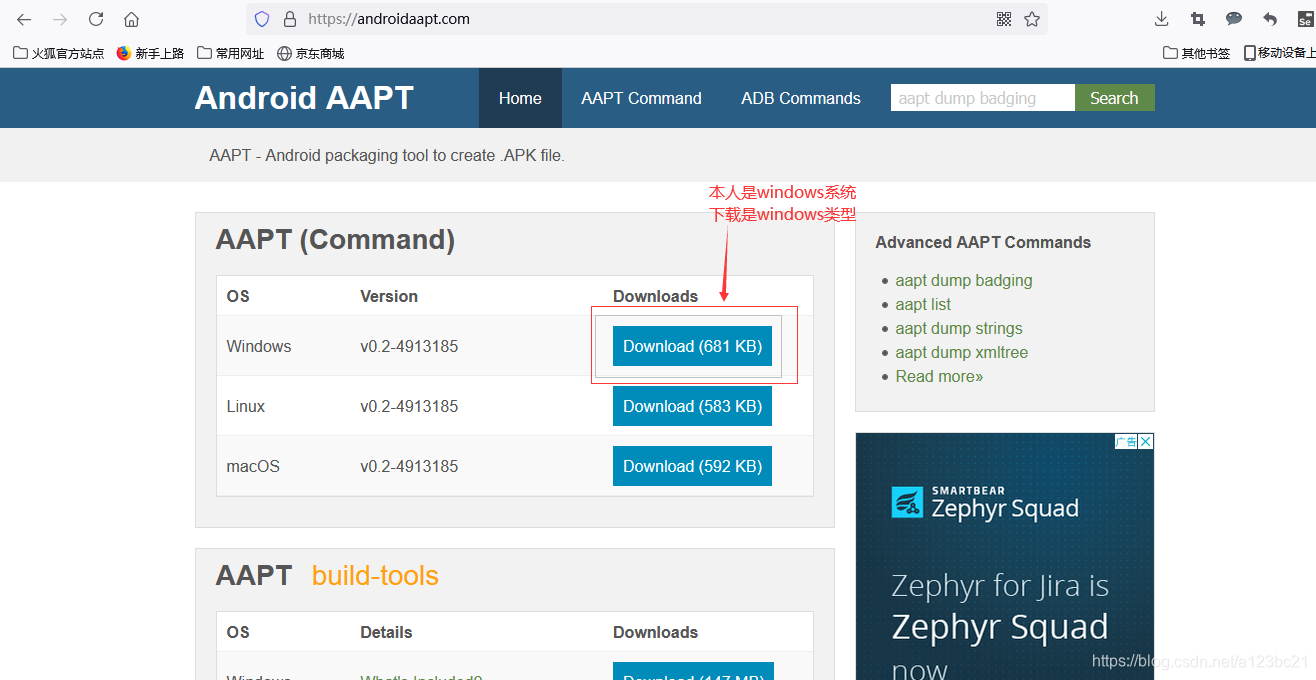
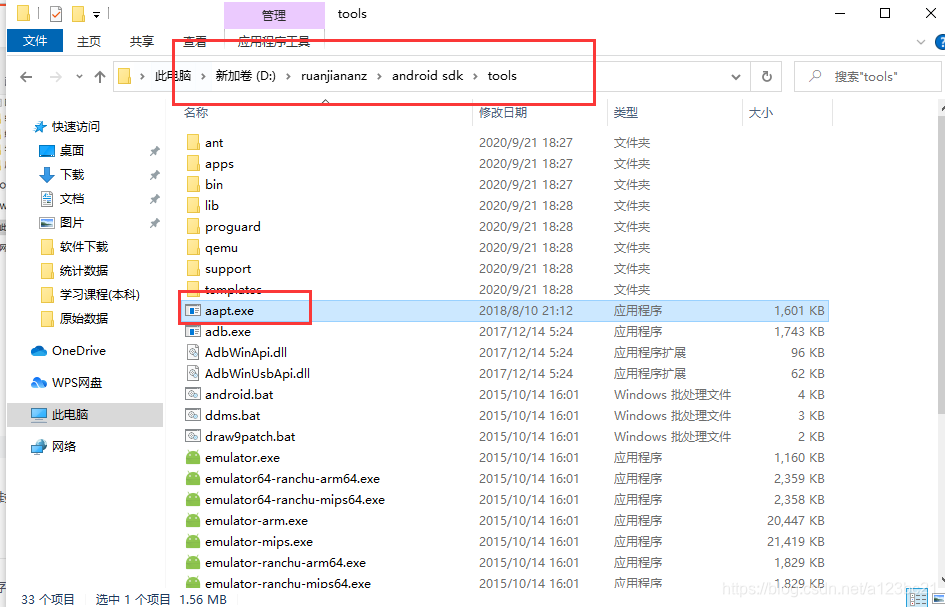
3)下载完成之后把aapt拷贝到platform-tools的目录下,同时也拷贝到tools目录下
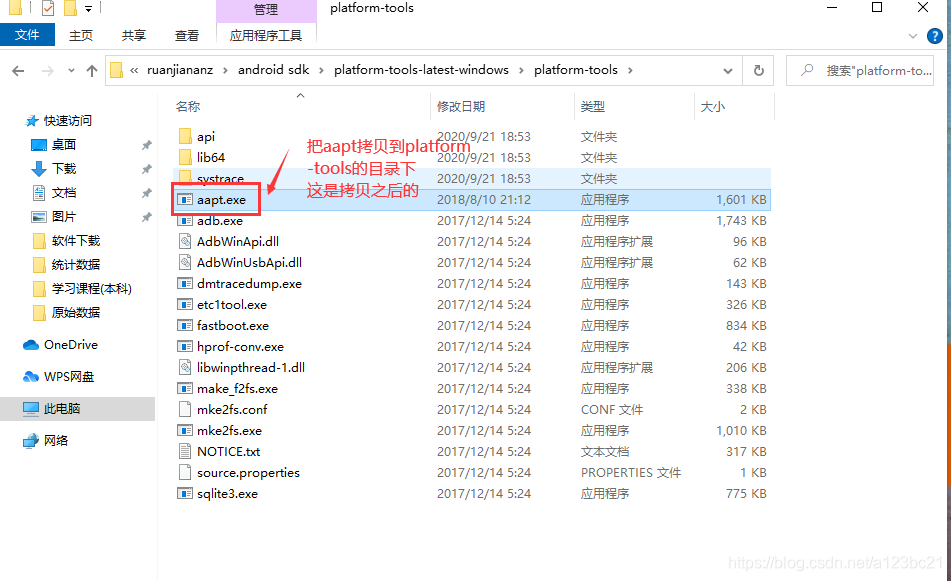


 这个样子这个问题就解决了


尝试连接Appium服务器... Appium会话初始化失败: Message: The requested resource could not be found, or a request was received using an HTTP method that is not supported by the mapped resource import unittest import time from appium import webdriver from appium.options.android import UiAutomator2Options from appium.webdriver.common.appiumby import AppiumBy from selenium.webdriver.support.ui import WebDriverWait from selenium.webdriver.support import expected_conditions as EC from selenium.common.exceptions import TimeoutException, WebDriverException class SimpleAndroidTest(unittest.TestCase): def setUp(self): print("初始化测试环境...") options = UiAutomator2Options() options.platform_name = "android" options.automation_name = "UiAutomator2" options.device_name = "MuMu" options.udid = "127.0.0.1:16384" options.app_package = "com.youba.calculate" options.app_activity = ".MainActivity" options.new_command_timeout = 600 options.no_reset = True try: print("尝试连接Appium服务器...") self.driver = webdriver.Remote("http://127.0.0.1:4723/", options=options) print("成功连接到Appium服务器") # 添加启动后等待间,确保应用完全启动 time.sleep(3) except WebDriverException as e: print(f"Appium会话初始化失败: {e}") # 添加更多错误信息,便于调试 print("请确保:") print("1. Appium服务器正在运行") print("2. 设备已通过ADB连接 (运行 'adb devices' 验证)") print("3. 应用包名和Activity名称正确") raise def tearDown(self): print("清理测试环境...") if hasattr(self, "driver") and self.driver: try: self.driver.quit() print("Appium驱动已成功关闭") except Exception as e: print(f"关闭Appium驱动出错: {e}") def find_element(self, by, value, timeout=10): """封装元素查找方法,提供更好的错误处理""" try: return WebDriverWait(self.driver, timeout).until( EC.visibility_of_element_located((by, value)) ) except TimeoutException: self.fail(f"在 {timeout} 秒内未能找到元素: {by}={value}") def test_addition(self): print("开始执行加法测试...") # 点击数字 1 按钮 num1 = self.find_element(AppiumBy.ID, "com.youba.calculate:id/btn_one") num1.click() print("点击了数字 1") # 点击加号按钮 plus = self.find_element(AppiumBy.ID, "com.youba.calculate:id/btn_plus") plus.click() print("点击了加号") # 点击数字 7 按钮 num7 = self.find_element(AppiumBy.ID, "com.youba.calculate:id/btn_seven") num7.click() print("点击了数字 7") # 点击等号按钮 equals = self.find_element( AppiumBy.XPATH, '//android.widget.ImageView[@resource-id="com.youba.calculate:id/btn_equal"]', ) equals.click() print("点击了等号") # 获取计算结果并验证 result_element = self.find_element( AppiumBy.CLASS_NAME, "android.widget.EditText" ) result = result_element.text print(f"获取到计算结果: {result}") clean_result = result.replace(",", "") try: assert int(clean_result) == 8, f"预期结果是 8,但实际得到 {clean_result}" print("测试通过: 1 + 7 = 8") except AssertionError as e: # 截图保存失败情况 if hasattr(self, "driver") and self.driver: self.driver.get_screenshot_as_file("calculator_test_failure.png") raise if __name__ == "__main__": suite = unittest.TestLoader().loadTestsFromTestCase(SimpleAndroidTest) unittest.TextTestRunner(verbosity=2).run(suite) 代码有什么问题
05-25
评论 3
成就一亿技术人!
拼手气红包6.0元
还能输入1000个字符
 
红包 添加红包
表情包 插入表情
 条评论被折叠 查看
添加红包

请填写红包祝福语或标题

红包个数最小为10个

红包金额最低5元

当前余额3.43前往充值 >
需支付:10.00
成就一亿技术人!
领取后你会自动成为博主和红包主的粉丝 规则
hope_wisdom
发出的红包

打赏作者

美丽的说说

感谢你的支持与鼓励,每一份打赏

¥1 ¥2 ¥4 ¥6 ¥10 ¥20
扫码支付:¥1
获取中
扫码支付

您的余额不足,请更换扫码支付或充值

打赏作者

实付
使用余额支付
点击重新获取
扫码支付
钱包余额 0

抵扣说明:

1.余额是钱包充值的虚拟货币,按照1:1的比例进行支付金额的抵扣。
2.余额无法直接购买下载,可以购买VIP、付费专栏及课程。

余额充值