

<Zhuuu_ZZ>Hive之别名&执行顺序&聚合函数(distinct )问题

本文探讨了在MySQL和Hive中关于别名的使用规则,特别是在`where`、`group by`和`order by`子句中的差异。在Hive中,别名不能在`where`和`group by`中直接使用,但可以在`order by`中使用。同时,介绍了Hive中聚合函数如`distinct`与`count`的使用规则,强调了`count(distinct 字段)`与其他字段配合时需`group by`,而`count(字段/1/*)`则可能不需要。

一、在mysql中

group by中可以使用别名;where中不能使用别名;order by中可以使用别名。

二、在hive中:

1)where/group by/having子句中只能直接使用栏位或者常量,而不能使用栏位的别名,除非这个别名来自子查询之中,如:select .... from (select col1 ccc from table) where ccc > 1;
2)而order by 则可以直接使用别名,如select col1 ccc from table order by ccc;

  • 这和sql 的执行顺序是有关的:from获取数据 -> join on ->where执行 -> 如果有group by,接着执行group by -> select中的函数计算、别名指定再运行-> having ->order by ->limit

  • 因此,字段、表达式的别名在where子句和group by子句都是不能使用的,而在order by中不仅可以使用别名,甚至可以直接使用栏位的下标来进行排序,如:order by 1 desc,2 asc

  • 然而即使在同一个sql语句中,即使窗口函数不在子句中,存在窗口函数的话,即使窗口函数是最后执行的,其里面的order by后面却不能跟别名。

三、聚合函数(distinct 字段)

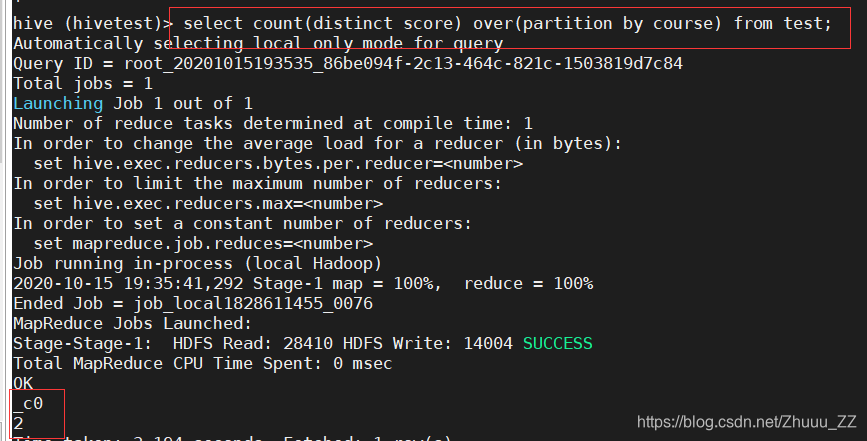
  • 聚合函数(distinct 字段) 只要count前面要查其他字段就必须要有group by
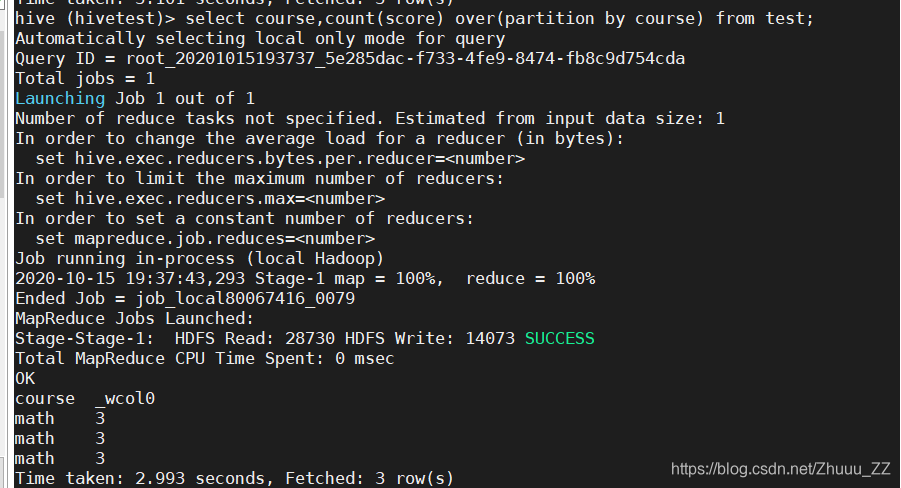
  • 聚合函数(字段/1/*) 即使有count前面有其它字段也不一定需要group by可以是窗口函数
  • 使用count举例
  • 实例:
select course,count(distinct score) over(partition by course) from test;

在这里插入图片描述

select count(distinct score) over(partition by course) from test;
在这里插入图片描述

select course,count(score) over(partition by course) from test;
在这里插入图片描述

select course,count(score) from test; 

在这里插入图片描述

<?xml version="1.0" encoding="UTF-8" standalone="no"?> <?xml-stylesheet type="text/xsl" href="configuration.xsl"?> <configuration> <!-- 指定Hive元数据要访问的地址 --> <property> <name>hive.metastore.uris</name> <value>thrift://master:9083</value> <description>Thrift URI for the remote metastore. Used by metastore client to connect to remote metastore.</description> </property> <property> <name>javax.jdo.option.ConnectionDriverName</name> <value>com.mysql.jdbc.Driver</value> </property> <property> <name>javax.jdo.option.ConnectionURL</name> <value>jdbc:mysql://master:3306/hive?createDatabaseIfNotExist=true&useSSL=false&useUnicode=true&characterEncoding=UTF-8</value> </property> <property> <name>javax.jdo.option.ConnectionUserName</name> <value>hive</value> </property> <property> <name>javax.jdo.option.ConnectionPassword</name> <value>hive</value> </property> <property> <name>hive.metastore.warehouse.dir</name> <value>/user/hive/warehouse</value> </property> <property> <name>hive.exec.local.scratchdir</name> <value>/usr/local/src/hive</value> </property> <property> <name>hive.exec.scratchdir</name> <value>/tmp/hive</value> </property> <property> <name>hive.downloaded.resources.dir</name> <value>/usr/local/src/hive</value> </property> <property> <name>hive.querylog.location</name> <value>/usr/local/src/hive</value> </property> <property> <name>hive.server2.logging.operation.log.location</name> <value>/usr/local/src/hive</value> </property> <property> <name>hive.server2.thrift.bind.host</name> <value>master</value> </property> <property> <name>hive.metastore.enent.db.notification.api.auth</name> <value>false</value> </property> <property> <name>hive.cli.print.header</name> <value>true</value> </property> <property> <name>hive.cli.encoding</name> <value>UTF-8</value> <description>Character-set encoding for various CLI output data such as console output, logs, reports.</description> </property> <property> <name>hive.charset</name> <value>utf8</value> <description>The character set encoding to use for data read/write operations.</description> </property> </configuration>
最新发布
07-16
评论
成就一亿技术人!
拼手气红包6.0元
还能输入1000个字符
 
红包 添加红包
表情包 插入表情
 条评论被折叠 查看
添加红包

请填写红包祝福语或标题

红包个数最小为10个

红包金额最低5元

当前余额3.43前往充值 >
需支付:10.00
成就一亿技术人!
领取后你会自动成为博主和红包主的粉丝 规则
hope_wisdom
发出的红包
实付
使用余额支付
点击重新获取
扫码支付
钱包余额 0

抵扣说明:

1.余额是钱包充值的虚拟货币,按照1:1的比例进行支付金额的抵扣。
2.余额无法直接购买下载,可以购买VIP、付费专栏及课程。

余额充值


