


 本文介绍了如何在Java中实现随机生成不重复的IP地址,并在HTTP请求中携带自定义IP地址的功能。通过测试,生成300000个唯一IP仅需200毫秒。同时,文章还展示了获取用户请求IP地址的方法,以及如何利用工具类进行自定义IP设置。此外,进行了嵌套测试,确保自定义IP在请求过程中正确传递。
随机ip地址工具类
import java.util.Random;
/**
 * @author zzx
 */
public class IpRandom {

    private static final int[][] RANGE_IP = {
            {607649792, 608174079}, // 36.56.0.0-36.63.255.255
            {1038614528, 1039007743}, // 61.232.0.0-61.237.255.255
            {1783627776, 1784676351}, // 106.80.0.0-106.95.255.255
            {2035023872, 2035154943}, // 121.76.0.0-121.77.255.255
            {2078801920, 2079064063}, // 123.232.0.0-123.235.255.255
            {-1950089216, -1948778497}, // 139.196.0.0-139.215.255.255
            {-1425539072, -1425014785}, // 171.8.0.0-171.15.255.255
            {-1236271104, -1235419137}, // 182.80.0.0-182.92.255.255
            {-770113536, -768606209}, // 210.25.0.0-210.47.255.255
            {-569376768, -564133889}, // 222.16.0.0-222.95.255.255
    };
    private static final String DOT = ".";
    /**
     * 获取一个随机IP
     */
    public static String getRandomIp() {
        Random random = new Random();
        int index = random.nextInt(10);
        return num2ip(RANGE_IP[index][0] + random.nextInt(RANGE_IP[index][1] - RANGE_IP[index][0]));
    }
    /*
     * 将十进制转换成IP地址
     */
    private static String num2ip(int ip) {
        int[] b = new int[4];
        b[0] = (ip >> 24) & 0xff;
        b[1] = (ip >> 16) & 0xff;
        b[2] = (ip >> 8) & 0xff;
        b[3] = ip & 0xff;
        // 拼接 IP
        return b[0] + DOT + b[1] + DOT + b[2] + DOT + b[3];
    }
}
测试,生成100个不重复的ip地址
实测,生成300000个不重复的ip地址只要200毫秒不到
public static void main(String[] args) {
    Set<String> set = new HashSet<>();
    int count = 100;
    while (set.size()<count){
        set.add(IpRandom.getRandomIp());
   }
}
http请求携带自定义ip地址
如果获取用户请求ip地址的方法
主要看 getIpStr() 方法
/**
 * @author zzx
 * @date 2022/8/19
 * 用于组装用户的全部请求参数
 */
@Data
@AllArgsConstructor
@NoArgsConstructor
public class Request {

    /**
     * 用户请求参数
     */
    private String url;
    private String uri;
    private String ip;
    private String scheme;
    private String domain;
    private String appName;
    private String method;
    private Map<String,String> headers;
    private JSONObject body;
    private JSONObject form;

    /**
     * 构造
     * @param request 当前请求
     * @param body 请求体
     * @param form 表单
     */
    private Request(HttpServletRequest request,JSONObject body,JSONObject form){
        this.url = request.getRequestURL().toString();
        this.uri = request.getRequestURI();
        this.scheme = request.getScheme();
        this.domain = request.getServerName();
        this.appName = request.getContextPath();
        this.method = request.getMethod();
        this.body = body;
        this.form = form;
        parsHeaders(request);
        getIpStr(request);
    }

    public static Request instance(HttpServletRequest request,JSONObject body,JSONObject form){
        return new Request(request,body,form);
    }

    public static Request instance(HttpServletRequest request){
        return new Request(request,null,null);
    }

    public Request body(JSONObject body){
        this.body = body;
        return this;
    }

    public Request form(JSONObject form){
        this.form = form;
        return this;
    }

    /**
     * 获取header中的所有数据
     * @param request 当前请求
     */
    private void parsHeaders(HttpServletRequest request) {
        Enumeration<String> headerNames = request.getHeaderNames();
        headers = new HashMap<>(32){{
            while (headerNames.hasMoreElements()){
                String name = headerNames.nextElement();
                put(name,request.getHeader(name));
            }
        }};
    }

    /**
     * 根据请求获取 请求携带的IP地址
     * 对于通过多个代理的情况,第一个IP为客户端真实IP,多个IP按照','分割
     * @return "192.168.0.0,192.168.0.1,127.0.0.1"
     */
    private void getIpStr(HttpServletRequest request) {
        ip = request.getHeader("x-forwarded-for");
        if (ip == null || ip.length() == 0 || "unknown".equalsIgnoreCase(ip)) {
            ip = request.getHeader("Proxy-Client-IP");
        }
        if (ip == null || ip.length() == 0 || "unknown".equalsIgnoreCase(ip)) {
            ip = request.getHeader("WL-Proxy-Client-IP");
        }
        if (ip == null || ip.length() == 0 || "unknown".equalsIgnoreCase(ip)) {
            ip = request.getHeader("HTTP_CLIENT_IP");
        }
        if (ip == null || ip.length() == 0 || "unknown".equalsIgnoreCase(ip)) {
            ip = request.getHeader("HTTP_X_FORWARDED_FOR");
        }
        if (ip == null || ip.length() == 0 || "unknown".equalsIgnoreCase(ip)) {
            ip = request.getRemoteAddr();
        }
    }
}
自定义ip地址 这边使用HuTool工具类
可以根据开发者自己的需求使用http工具
String url = "http://localhost:10010/test/tt";
String result = HttpRequest.of(url).
       header("x-forwarded-for",ip).
       header("Proxy-Client-IP",ip).
       header("WL-Proxy-Client-IP",ip).
       header("HTTP_CLIENT_IP",ip).
       header("HTTP_X_FORWARDED_FOR",ip).
       execute().body();
嵌套测试
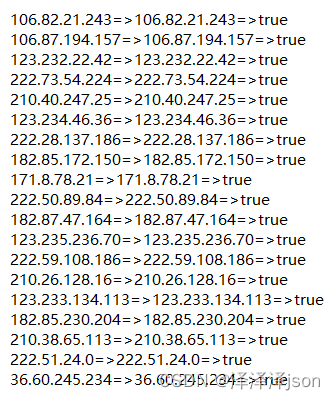
1、启动一个接受请求的web服务,创建一个测试接口,用于打印获取到ip地址
2、测试方法生成100个不重复的ip地址
3、请求测试接口,查看最终打印的ip和发送的ip是否对应
@RestController
@RequestMapping("/test")
public class TestController {

    @RequestMapping("/tt")
    public Object test(HttpServletRequest request){
        Request request1 = Request.instance(request);
        System.out.println(request1.toJsonStr());
        return request1.getIp();
    }
}
@Test
public void test(){
    HashSet<String> set = new HashSet<>();
    int count = 100;
    while (set.size()<count){
        set.add(IpRandom.getRandomIp());
    }
    for (String ip : set) {
        String result = send(ip);
        //比对返回结果
        System.out.printf("%s=>%s=>%s",ip,result,ip.equals(result));
    }
}
public String send(String ip){
    String url = "http://localhost:10010/test/tt";
    String result = HttpRequest.of(url).
            header("x-forwarded-for",ip).
            header("Proxy-Client-IP",ip).
            header("WL-Proxy-Client-IP",ip).
            header("HTTP_CLIENT_IP",ip).
            header("HTTP_X_FORWARDED_FOR",ip).
            execute().body();
    return result;
}
测试结果
附加 [根据ip地址获取物理位置]
淘宝API:http://ip.taobao.com/service/getIpInfo.php?ip={ip}
新浪API:http://int.dpool.sina.com.cn/iplookup/iplookup.php?format=json&ip={ip}
pconline API:http://whois.pconline.com.cn/
百度API:http://api.map.baidu.com/location/ip?ip={ip}
        https://qifu-api.baidubce.com/ip/geo/v1/district?ip={ip}





 扫一扫
扫一扫


 3730
3730

 被折叠的 条评论
为什么被折叠?
被折叠的 条评论
为什么被折叠?
 到【灌水乐园】发言





