Console 用户界面配置(console用户就是通过串口连接的用户)
华为(VRP)配置
| [LSW1] user-interface console 0 | |
|---|
| [LSW1-ui-console0] authentication-mode password | 模式选择password |
| [LSW1-ui-console0] set authenticaiton password cipher Huawei123 | 设置密文显示,密码为Huawei123 |
| [LSW1-ui-console0] idle-timeout 40 | 如果用console进入后未操作有40分钟则默认退出。 |
| 设置完成后,再次用console线连接设备时,会提示输入密码。 | |
| |
Cisco 配置
| SW1(config)# line console 0 | 进入console设置 |
|---|
| SW1(config-line) # password cisco | 设置密码,不需要设置模式 |
| SW1(config-line) # login | 启用设置的密码进行认证 |
| SW1(config-line) # exec-timeout 20 (30) | 超时配置,设置为20分钟或者20分30 s |
| |
| |
VTY配置
VRP
| [LSW3] user-interface vty 0 4 | 进入VTY用户视图(线路0-4) |
|---|
| [LSW3-ui-vty0-4] protocol inbound telnet | 配置接入类型为Telnet |
| [LSW3-ui-vty0-4] authentication-mode password | 配置验证方式为密码 |
| [LSW3-ui-vty0-4] set authentication password simple Huawei123 | 配置密码为Huawe123,且密码明文显示在配置文件中,如需要密文,将该命令中的simple关键字换成cipher. |
| [LSW3-ui-vty0-4] user privilege level 15 | 配置VTY用户的权限为15级(默认为0级) |
| [LSW3-ui-vty0-4] idle-timeout 30 40 | 默认10分钟,设置超时为30分40秒,两个参数都为0时,则永不超时 |
| 为了VYY访问对设备的权限:VRP - 设置了权限 Cisco - 设置了使能密码 | |
| |
cisco
| sw1(config) line vty 0 4 | 进入vty线路的配置 |
|---|
| sw1(config-line)# transport input telnet | 选择访问VTP线路的协议 |
| sw1(config-line)# password class | 设置密码为class |
| sw1(config-line)# login | 启用认证 |
| sw1(config-line)# exec-timeout 20 | 设置超时时间 |
| 配置完成后,用PC机命令行 telnet访问设备的IP | |
| PC0> telnet 192.168.0.1 | 访问,通过密码进入 |
| |
通过以上配置,PCtelnet访问设备,权限不足,无法进入特权模式及之后的模式。所以可以在设备上配置一个使能密码,再通过使能密码即可进入。
| sw1(config) enable secret cisco | 将使能密码设置为cisco,在配置文件中以密文显示。(secret 为密文 ,改为password 为明文) |
|---|
| 现在再次通过telnet访问设备的vty线路时,输入console密码后,再输入使能面即可进入设备的特权模式。 | PC0> telnet 192.168.0.1 Password: class SW1>enable Password:cisco SW1# |
| |
| |
配置文件
| [LSW1] display current-configuration | 显示当前配置文件 |
|---|
| 由于配置太多,可用回车或空格继续往下查看 |
| save | 在用户视图 下,保存。 |
| [LSW1] dispaly saved-configuration | 显示保存的配置文件 |
| |
| |
SSH配置
Telnet访问与SSH访问无太大差别。
- Telnet传输时的密码为明文(有风险)
- SSH 传输时 为加密(更加安全)
VRP
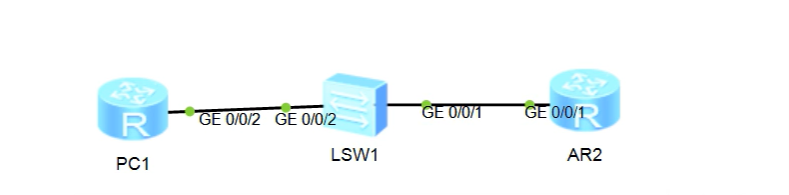
| [AR2] rsa local-key-pair create | 创建密钥 |
|---|
| Input the bits in the modulus(default = 512) : 1024 | 设置公钥长度,默认 512,与设备计算能力有关(即性能) |
| [AR2] stelnet server enable | 开启SSH服务 |
| [AR2] user-interface vty 0 4 | 远程访问(即设置VTY线路),注意要对所有的VTY线路进行配置(记得查看设备的VTY线路) |
| [AR2-ui-vty0-4] authentiaction-mode aaa | 验证模式设置为aaa |
| [AR2-ui-vty0-4] protocol inbound ssh | 设置连接协议 |
| [AR2-ui-vty0-4] quit | |
| [AR2] aaa | 进入aaa视图 |
| [AR2-aaa] local-user sziit password cipher sziiit | 创建用户(可以针对不同用户设置不同的权限) |
| [AR2-aaa] local-user sziit service-type ssh | 设置 sziit 用户 用于 SSH 服务 |
| [AR2-aaa] local-user sziit privilege level 15 | 设置用户权限为15(最高权限为15) |
| [AR2-aaa] quit | |
| [AR2] ssh user sziit authenticaion-type password | 绑定SSH 用户 验证时使用密码认证 |
| |
| [PC1] stelnet 192.168.0.2 | 用路由器仿真的PC1访问AR2 |
| Errot: Failed to verify the server’s public key. Pelase run the command "ssh client " | PC1SSH访问失败,提示运行 ssh client first-time enable |
| [PC1] ssh client first-time enable | 开启第一次功能(路由器上需要输入本命令) |
| [PC1] stelnet 192.168.0.2 | 再次尝试访问 |
| [PC1] please input the username : sziit | |
| [PC1] y | 提示这台(PC1)服务器还未认证,是否继续 |
| [PC1] y | 提示:是否需要保存公钥 |
| [PC1] Enter password :sziit | 输入密码 |
| < AR2 > | 成功进入 |
SSH配置
- 生成密钥
- 开启SSH服务
- 设置VTY用户界面
- 选择aaa
- 建立用户
- 用户名、密码
- 用户所要应用的服务
- 设置用户的权限
- 在设备的系统视图下绑定用户和密码
- [AR2] ssh user sziit authenticaion-type password 绑定SSH 用户 验证时使用密码认证
Cisco
| S5(config)# ip domain-name SZIIT | 设置域名为SZIIT:生成密钥(华为生成密钥只需要主机名,而Cisco还需要域名) |
|---|
| S5(config)# cyrpto key generare rsa | 创建密钥 |
| S5(config)# ip ssh authenticaion-retries 2 | 允许SSH认证几次 |
| S5(config)# ip ssh time-out 30 | 设置超时时间 |
| S5(config)# ip ssh version 2 | 设置SSH服务版本(版本2 要求密钥长度为768 bits 以上) 默认为512 |
| S5(config)# crypto key zeroize rsa | 删除刚刚创建的密钥 |
| S5(config)# cyrpto key generare rsa | 在提示下重新设置密钥长度 |
| S5(config)# line vty 0 4 | 配置VTY线路 |
| S5(config-line)# transport input ssh | 设置登录协议 |
| S5(config-line)# login local | 本地用户认证:只能在当前设备上使用的用户 |
| S5(config)# username sziit password sziit | 创建本地用户 |
| |
| C:\ > ssh -l sziit 10.0.0.5 | 在PC15上SSH访问S5 (-l 这不是数字是 英文L小写) |
| Open Password : sziit | 输入密码登录至S5 |
| S5 > en %No password set | 与telnet登录类似,没有权限,想进入特权模式需要使能密码 |
| |
| S5(config)# enable secret class | 回到S5设备,设置使能密码为 class |
| |
| S5 > en | 再回到PC远程访问时,可通过使能密码登录特权模式 |



 本文详细介绍了华为和Cisco网络设备的Console与VTY用户界面配置方法,包括密码设置、超时配置、权限设置等,并对比了Telnet与SSH两种访问方式的安全性与配置流程。






 扫一扫
扫一扫


 2081
2081

 被折叠的 条评论
为什么被折叠?
被折叠的 条评论
为什么被折叠?
 到【灌水乐园】发言





