



 本文详细介绍了Elasticsearch的索引操作,包括创建、删除、关闭和打开索引,以及如何使用索引别名。在生产环境中,索引别名尤其重要,可以避免数据丢失和异常。创建索引使用PUT请求,删除使用DELETE,关闭和打开索引能管理和保护数据。别名可用于组合查询和替换索引,确保系统的灵活性。
关于Elastic Search安装可以参考《Elastic Search 8.6.2集群安装部署》及Kibana安装可以参考《Elastic Search 8.6.2简单操作》。相关命令将在Kibana工具的Console平台上执行。

Elastic Search索引操作主要包含:创建、删除、关闭和打开索引,以及索引别名的操作。其中,索引别名的操作在生产环境中使用比较广泛,可以和关闭或删除索引配合使用。在生产环境中使用索引时,都应该特别注意操作不当引起数据丢失或异常的问题。
1.创建索引
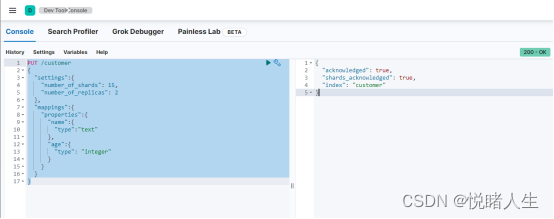
使用Elastic Search构建搜索引擎的第一步就是创建索引。创建索引以PUT方式发起请求,命令 PUT /indexName
| PUT /customer { "settings":{ "number_of_shards": 5, "number_of_replicas": 2 }, "mappings":{ "properties":{ "name":{ "type":"text" }, "age":{ "type": "integer" } } } } |
| { "acknowledged": true, "shards_acknowledged": true, "index": "customer" } |
2.删除索引
删除索引使用 DELETE /indexName
| DELETE /customer |
| { "acknowledged": true } |
3.关闭索引
有些索引可能在暂时不使用,但未来可能还会使用时,就可以关闭该索引。索引关闭时,只能使用Elastic Search的Api或者监控工具来查看该索引的信息。此时对索引的读写操作都会报错:索引关闭异常。
| POST /customer/_close |
| { "acknowledged": true, "shards_acknowledged": true, "indices": { "customer": { "closed": true } } } |
4.打开索引
索引关闭了,想重新使用可以再次打开索引。
| POST /customer/_open |
| { "acknowledged": true, "shards_acknowledged": true } |
5.索引别名
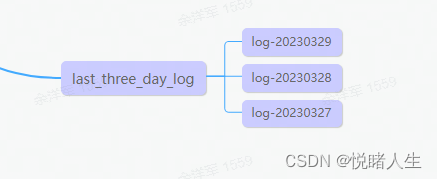
索引别名一般是通过一个别名关联一个或多个索引,让别名与索引之间建立逻辑关系,以地区、时间等划分索引的场景会使用到。例如日志场景:
| PUT /log-20230329 { "mappings": { "properties": { "title": { "type": "text" }, "content": { "type": "text" }, "code": { "type": "keyword" }, "info": { "type": "text" } } } } |
| POST /log-20230329/_doc/001 { "title": "日志29", "content":"内容29", "code": "0001", "info":"操作失败" } |
| PUT /log-20230328 |
| POST /log-20230328/_doc/001 { "title": "日志28", "content":"内容28", "code": "0000", "info":"操作成功" } |
| PUT /log-20230327 |
| POST /log-20230327/_doc/001 { "title": "日志27", "content":"内容27", "code": "0000", "info":"操作成功" } |
创建索引别名
| POST /_aliases { "actions": [ { "add":{ "index": "log-20230329", "alias": "last_three_day_log" } },{ "add":{ "index": "log-20230328", "alias": "last_three_day_log" } },{ "add":{ "index": "log-20230327", "alias": "last_three_day_log" } } ] } |
| { "acknowledged": true } |
这个时候查询last_three_day_log就会查询到关联的三个索引:
| GET /last_three_day_log/_search { "query":{ "match":{ "title":"日志" } } } |
| { "took": 6, "timed_out": false, "_shards": { "total": 3, "successful": 3, "skipped": 0, "failed": 0 }, "hits": { "total": { "value": 3, "relation": "eq" }, "max_score": 0.5753642, "hits": [ { "_index": "log-20230327", "_id": "001", "_score": 0.5753642, "_source": { "title": "日志27", "content": "内容27", "code": "0000", "info": "操作成功" } }, { "_index": "log-20230328", "_id": "001", "_score": 0.5753642, "_source": { "title": "日志28", "content": "内容28", "code": "0000", "info": "操作成功" } }, { "_index": "log-20230329", "_id": "001", "_score": 0.5753642, "_source": { "title": "日志29", "content": "内容29", "code": "0001", "info": "操作失败" } } ] } } |
数据是不能直接写到别名的索引,如果需要写入数据则需要在创建别名时添加参数 is_write_index。
别名除了关联多个索引实现组合查询外,还可以用来替换索引。实现原理很简单,例如:当天的日志已经生成了,现在近三天日志,应该将log-20230327删除,重新添加log-20230330的索引,就实现了替换索引,先创建log-20230330索引:
| PUT /log-20230330 { "mappings": { "properties": { "title": { "type": "text" }, "content": { "type": "text" }, "code": { "type": "keyword" }, "info": { "type": "text" } } } } |
| POST /log-20230330/_doc/001 { "title": "日志30", "content":"内容30", "code": "0000", "info":"操作成功" } |
再重新定义索引别名
| POST /_aliases { "actions": [ { "add":{ "index": "log-20230330", "alias": "last_three_day_log" } },{ "add":{ "index": "log-20230329", "alias": "last_three_day_log" } },{ "add":{ "index": "log-20230328", "alias": "last_three_day_log" } },{ "remove":{ "index": "log-20230327", "alias": "last_three_day_log" } } ] } |
| { "acknowledged": true } |
重新查询last_three_day_log就会发现没有log-20230327索引的内容了:
| GET /last_three_day_log/_search { "query":{ "match":{ "title":"日志" } } } |
| { "took": 11, "timed_out": false, "_shards": { "total": 3, "successful": 3, "skipped": 0, "failed": 0 }, "hits": { "total": { "value": 3, "relation": "eq" }, "max_score": 0.5753642, "hits": [ { "_index": "log-20230328", "_id": "001", "_score": 0.5753642, "_source": { "title": "日志28", "content": "内容28", "code": "0000", "info": "操作成功" } }, { "_index": "log-20230329", "_id": "001", "_score": 0.5753642, "_source": { "title": "日志29", "content": "内容29", "code": "0001", "info": "操作失败" } }, { "_index": "log-20230330", "_id": "001", "_score": 0.5753642, "_source": { "title": "日志30", "content": "内容30", "code": "0000", "info": "操作成功" } } ] } } |





 扫一扫
扫一扫


 534
534

 被折叠的 条评论
为什么被折叠?
被折叠的 条评论
为什么被折叠?
 到【灌水乐园】发言





