



 本文详细介绍了CSS背景属性,包括背景颜色、半透明、图片、裁切、平铺、图片位置、固定、尺寸、复合写法及渐变色。重点讲解了线性渐变、径向渐变和背景图像固定的实现,适用于前端开发人员提升CSS技能。
CSS背景
1.背景颜色
background-color: transparent透明色(默认)|color
div {
    width: 200px;
    height: 200px;
    background-color: transparent;
    background-color: pink;
}
2.背景色半透明
CSS3提供背景色半透明(IE9+版本浏览器支持)
background: rgba(red, green, blue, alpha)
- alpha:(全透明)0~1(不透明)
- 背景半透明指盒子背景半透明,但盒子里面内容不受影响
div {
    width: 300px;
    height: 300px;
    background: rgba(0, 0, 0, 0.3);
}
3.背景图片
实际开发常见于logo/一些装饰性的小图片/超大的背景图片,优点是非常便于控制位置。(精灵图也是一种运用场景)
background-image: url(xxx) | none
div {
    width: 300px;
    height: 300px;
    background-image: url(imgs/logo.jpg);
    background-image: none;
}
多图:
使用逗号,隔开
article {
    height: 500px;
    border: dashed 10px black;
    background-image: url(1.JPG), url(head.png);
    background-size: 50%, auto;
    background-position: top left, center;
    background-repeat: no-repeat;
}
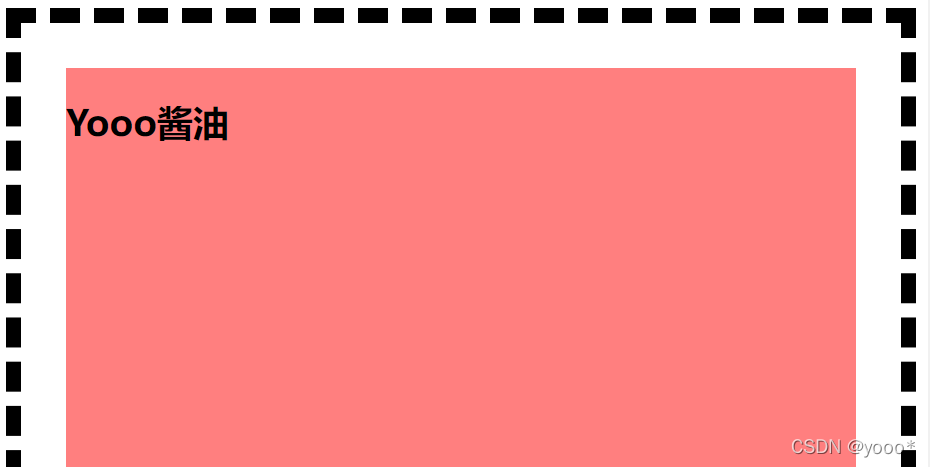
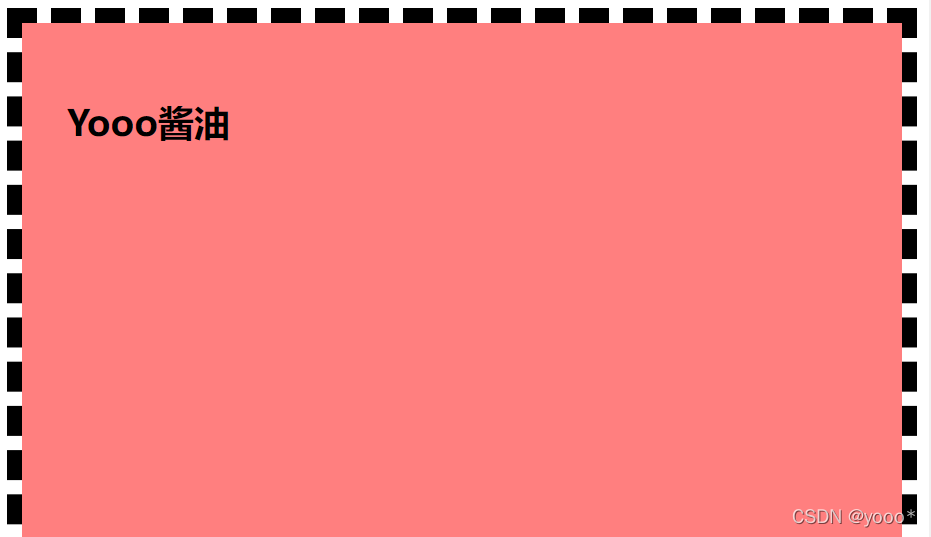
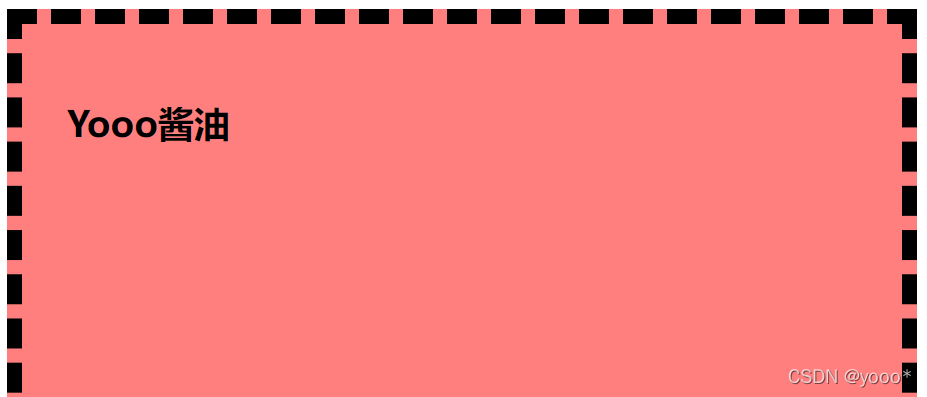
4.背景裁切
background-clip: content-box | padding-box | border-box
article {
    padding: 30px;
    border: dashed 10px black;
    background-color: rgba(255, 0, 0, 0.5);
    height: 500px;
    /* 背景裁切 */
    /* 内容区域 */
    background-clip: content-box;
    /* 延伸到内边距区域 */
    background-clip: padding-box;
    /* 延伸到边框区域(默认) */
    background-clip: border-box;
}
5.背景平铺
background-repeat: repeat | no-repeat | repeat-x | repeat-y | space
div {
    width: 300px;
    height: 300px;
    background-image: url(imgs/logo.jpg);
    /* 不平铺重复 */
    background-repeat: no-repeat;
    /* 平铺重复(默认) */
    background-repeat: repeat;
    /* 平均分配重复:图片不会不完整 */
    background-repeat: space;
    /* 沿着x轴平铺 */
    background-repeat: repeat-x;
    /* 沿着y轴平铺 */
    background-repeat: repeat-y;
}
6.背景图片位置
background-position: x y
xy可以使用方位名词或精确单位
-
方位名词
(top|center|bottom|left|right)- 如果指定的两个值都是方位名词,则顺序无关(left top和top left效果一致)
- 如果只指定了一个方位名词,另一个值省略,则第二个值默认居中对齐
div {
    width: 600px;
    height: 600px;
    background-color: pink;
    background-image: url(imgs/logo2.webp);
    background-repeat: no-repeat;
    /* 让图片居中(水平)靠上(垂直) 顺序随意 */
    /* background-position: center top; */
    /* background-position: right; */
    background-position: top;
}

h3 {
    width: 118px;
    height: 40px;
    background-color: pink;
    font-size: 14px;
    font-weight: 400;
    line-height: 40px;
    background-image: url(imgs/icon.png);
    background-repeat: no-repeat;
    background-position: left;
    text-indent: 1.5em;
}

body {
    background-image: url(imgs/bg.jpg);
    background-repeat: no-repeat;
    background-position: center top;
}
- 精确单位(百分数|由浮点数字和单位标识符组成的长度值)
- 如果指定的两个值都是精确单位,则第一个是x,第二个是y
- 如果只指定了一个精确单位,那该数值一定是x坐标,则y默认居中对齐
div {
    width: 600px;
    height: 600px;
    background-color: pink;
    background-image: url(imgs/logo2.webp);
    background-repeat: no-repeat;
    /* 一定是 x轴20px y轴50px */
    /* background-position: 20px 50px; */
    /* 一定是 x轴20px y轴垂直居中 */
    background-position: 20px;
}
- 混合单位
- 如果指定的两个值是精确单位和方位名词混合使用,则第一个是x,第二个是y
div {
    width: 600px;
    height: 600px;
    background-color: pink;
    background-image: url(imgs/logo2.webp);
    background-repeat: no-repeat;
    /* x为right y为50px */
    background-position: right 50px;
}
7.背景图像固定(背景附着、滚动)
设置背景图像是否固定或者随着页面的其余部分滚动(可以制作视差滚动效果)
background-attachment: scroll滚动(默认)|fixed固定
body {
    background-image: url(imgs/bg.jpg);
    background-repeat: no-repeat;
    background-position: top;
    /* 把背景图片固定住 */
    background-attachment: fixed;
    /* background-attachment: scroll; */
    color: #fff;
    font-style: 20px;
}
8.背景尺寸
background-size: width height | cover | contain
article {
    height: 500px;
    border: dashed 10px black;
    overflow: auto;
    background-image: url(1.JPG);
    background-repeat: no-repeat;
    background-size: 300px 500px;
    background-size: 300px auto;
    /* 保证图片覆盖在容器里,随着页面缩放而缩放 */
    background-size: cover;
    /* 保证图片完全显示出来 */
    background-size: contain;
}
9.背景复合写法(实际开发提倡)
没有特定书写顺序,一般约定顺序为:
background:背景颜色 背景图片地址 背景平铺 背景图像滚动 背景图片位置
body {
    background: black url(imgs/bg.jpg) no-repeat fixed center top;
    color: #fff;
    font-style: 20px;
}
10.背景渐变色
(1)线性渐变
background: linear-gradient(渐变角度/方向 颜色)
nav {
    height: 30px;
    /* 渐变角度/方向(默认垂直) 颜色 */
    background: linear-gradient(90deg, red, orange, yellow);
    background: linear-gradient(to bottom left, red, orange, yellow);
}
(2)径向渐变
background: radial-gradient(径向宽高 颜色)
article {
    height: 500px;
    width: 500px;
    /* 径向宽高 颜色 */
    background: radial-gradient(200px 100px, red, orange, yellow);
    background: radial-gradient(at bottom right, red, orange, yellow);
    background: radial-gradient(at 50% 0, red, orange, yellow);
}
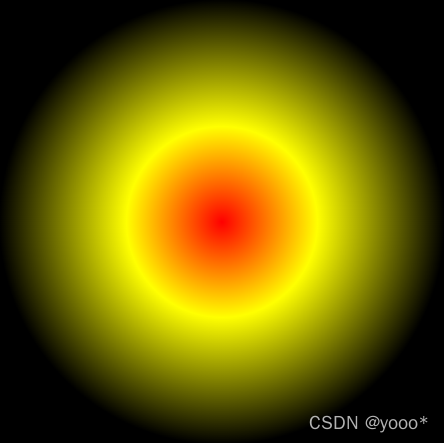
(3)标识位
当未设定标识位时,颜色平均分布;可以设定标识位来划定渐变的范围(百分数)。
article {
    height: 300px;
    width: 300px;
    /* 渐变范围:50%~60% */
    background: linear-gradient(90deg, red 50%, green 60%);
    /* 黄黑渐变范围:30%~70% */
    background: radial-gradient(red, yellow 30%, black 70%);
}
(4)渐变中点
百分数,设置渐变区域的中点,写在颜色之间。
article {
    height: 150px;
    background: linear-gradient(90deg, red 20%, 30%, green 80%);
}
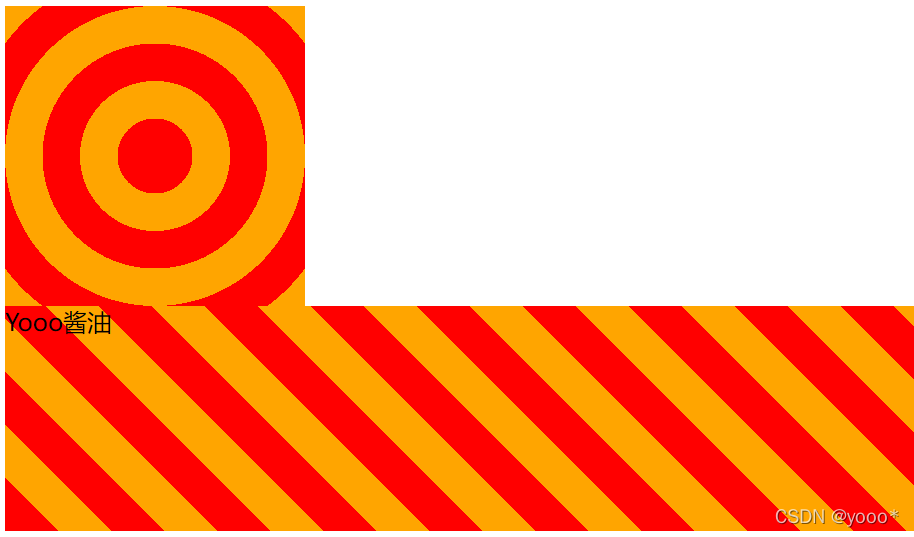
(5)重复渐变
background: repeating-linear-gradient() | repeating-radial-gradient()
设定一个单位的渐变效果进行重复。
article {
    height: 150px;
    /* 想要ac硬色,中间插一个颜色b,让ab之间全是a,bc之间全是c */
    background: repeating-linear-gradient(45deg, red 0, 25px, yellow 25px, 25px, orange 50px);
}

aside {
    height: 200px;
    width: 200px;
    background: repeating-radial-gradient(100px 100px, red 0, 25px, yellow 25px, 25px, orange 50px);
}





 扫一扫
扫一扫


 256
256

 被折叠的 条评论
为什么被折叠?
被折叠的 条评论
为什么被折叠?
 到【灌水乐园】发言





