



 本文详细介绍如何使用Sphinx工具生成API文档,包括安装配置、生成rst文件、修改标题节点及生成PDF文档的全过程。
# sphinx模块生成api文档的方式是对 /source/conf.py 文件的编写
1: 安装texlive
安装方法:https://blog.youkuaiyun.com/qq_38386316/article/details/80272396
下载texlive的iso文件后解压,在解压后文件夹中双击install-tl-advanced.bat文件进行安装, 可以设置安装位置。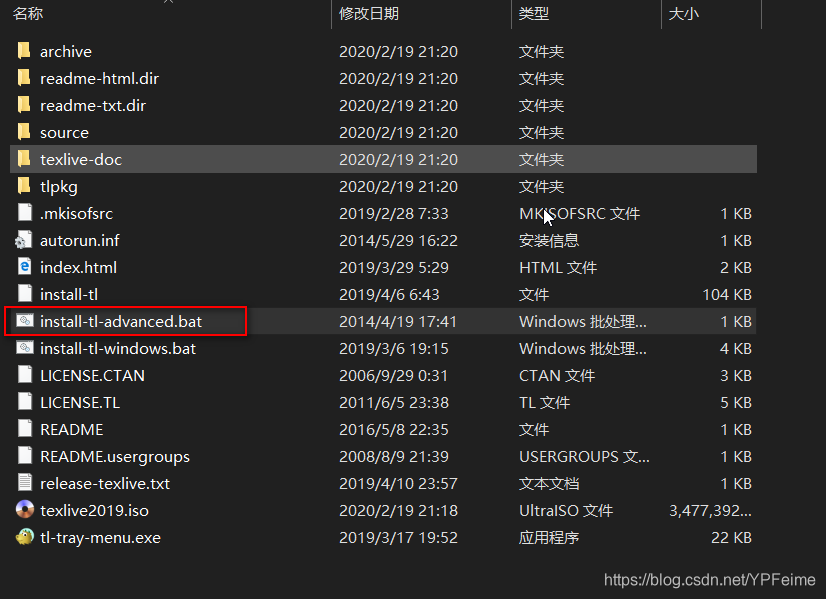
texlive下载:https://mirrors.tuna.tsinghua.edu.cn/CTAN/systems/texlive/Images/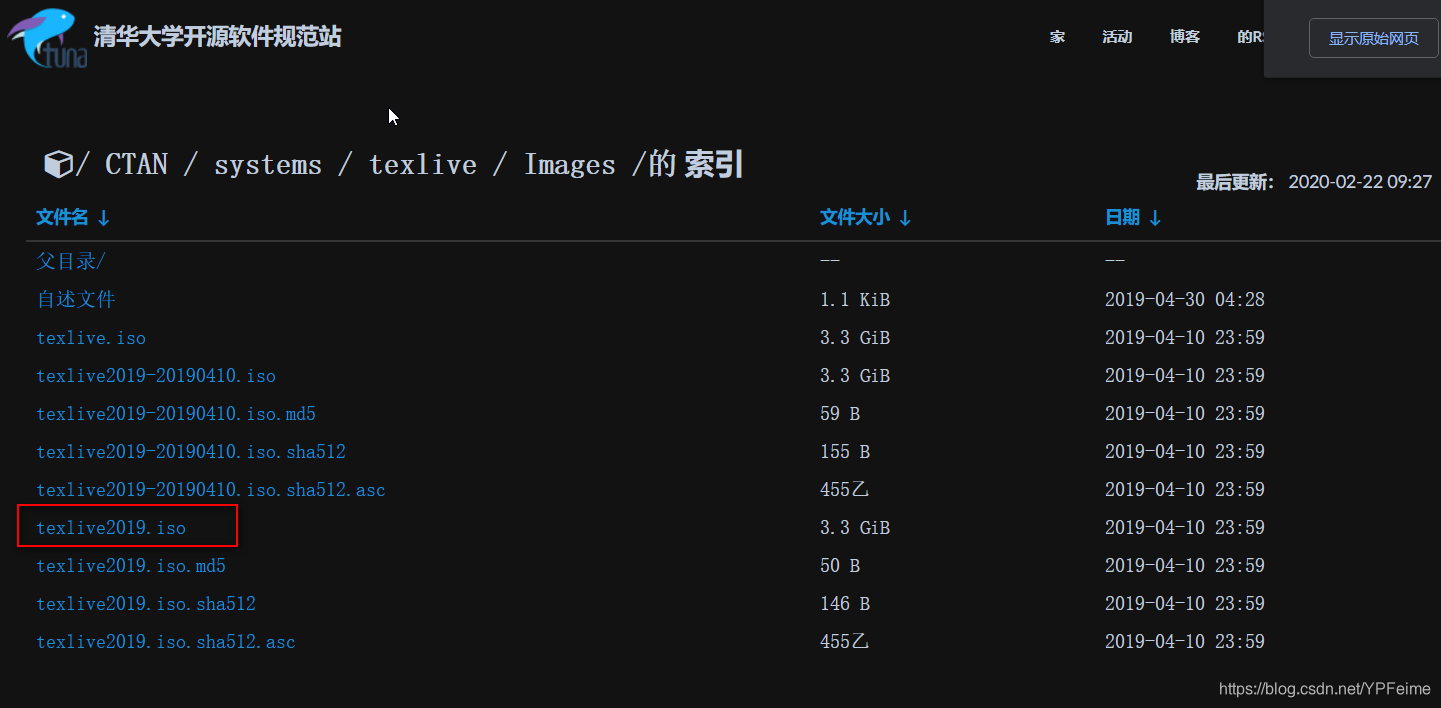
2:将要项目放到一个新建的文件夹中,在dos窗口中cd到这个目录下。
3:执行命令:
sphinx-quickstart


"""

启动后一次输入如下:

选择y
输入项目名
输入作者名
输入版本号
输入zh_CN

"""
具体这篇有介绍:https://blog.youkuaiyun.com/YPFeime/article/details/92319685
4:配置 ./source/conf.py文件
增加如下配置:
# Custom sidebar templates, must be a dictionary that maps document names
# to template names.
#
# The default sidebars (for documents that don't match any pattern) are
# defined by theme itself.  Builtin themes are using these templates by
# default: ``['localtoc.html', 'relations.html', 'sourcelink.html',
# 'searchbox.html']``.
#
# html_sidebars = {}


# -- Options for HTMLHelp output ---------------------------------------------

# Output file base name for HTML help builder.
htmlhelp_basename = 'PYTHON doc'


# -- Options for LaTeX output ------------------------------------------------

latex_elements = {
# The paper size ('letterpaper' or 'a4paper').
#'papersize': 'letterpaper',

# The font size ('10pt', '11pt' or '12pt').
#'pointsize': '10pt',

# Additional stuff for the LaTeX preamble.
'preamble': '''
\\hypersetup{unicode=true}
\\usepackage{CJKutf8}
\\AtBeginDocument{\\begin{CJK}{UTF8}{gbsn}}
\\AtEndDocument{\\end{CJK}}
''',
}

# Grouping the document tree into LaTeX files. List of tuples
# (source start file, target name, title,
#  author, documentclass [howto, manual, or own class]).
# title可以设置为项目名称
# target name是以“.tex”为结尾的文件名, 这个名字就是pdf文件的文件名。此名字不可以“Python”开头,否则会报错:Latexmk: Could not find file 'Python'
latex_documents = [
    (master_doc, 'MyPro.tex', 'PYTHON Documentation',
     'xxxx', 'manual'),
]


# -- Options for manual page output ------------------------------------------

# One entry per manual page. List of tuples
# (source start file, name, description, authors, manual section).
man_pages = [
    (master_doc, 'PYTHON', 'PYTHON ',
     [author], 1)
]


# -- Options for Texinfo output ----------------------------------------------

# Grouping the document tree into Texinfo files. List of tuples
# (source start file, target name, title, author,
#  dir menu entry, description, category)
texinfo_documents = [
    (master_doc, 'PYTHON', 'PYTHON',
     author, 'PYTHON', 'One line description of project.',
     'Miscellaneous'),
]


# -- Extension configuration -------------------------------------------------

# -- Options for todo extension ----------------------------------------------

# If true, `todo` and `todoList` produce output, else they produce nothing.
todo_include_todos = True
配置后完整的conf.py内容为,示例如下:
# Configuration file for the Sphinx documentation builder.
#
# This file only contains a selection of the most common options. For a full
# list see the documentation:
# https://www.sphinx-doc.org/en/master/usage/configuration.html

# -- Path setup --------------------------------------------------------------

# If extensions (or modules to document with autodoc) are in another directory,
# add these directories to sys.path here. If the directory is relative to the
# documentation root, use os.path.abspath to make it absolute, like shown here.
#
import os
import sys
# sys.path.insert(0, os.path.abspath('.'))
# pro_import_path是项目导包的根路径,一般是项目目录的绝对路径
pro_import_path = 'C:\\Users\\myWin10\\Desktop\\pyzo\\pyzo'
sys.path.append(pro_import_path)
sys.path.insert(0, os.path.abspath(os.path.dirname(os.path.dirname(__file__))))


# -- Project information -----------------------------------------------------

project = 'pyzo'
copyright = '2020, pyzo'
author = 'pyzo'

# The full version, including alpha/beta/rc tags
release = 'v1.0'


# -- General configuration ---------------------------------------------------

# If your documentation needs a minimal Sphinx version, state it here.
#
# needs_sphinx = '1.0'

# Add any Sphinx extension module names here, as strings. They can be
# extensions coming with Sphinx (named 'sphinx.ext.*') or your custom
# ones.
extensions = [
    'sphinx.ext.autodoc',
    'sphinx.ext.autosummary',
    'sphinx.ext.todo',
    'sphinx.ext.autosectionlabel',
]

# Add any paths that contain templates here, relative to this directory.
templates_path = ['_templates']

# The suffix(es) of source filenames.
# You can specify multiple suffix as a list of string:
#
# source_suffix = ['.rst', '.md']
source_suffix = '.rst'

# The master toctree document.
master_doc = 'index'

# The language for content autogenerated by Sphinx. Refer to documentation
# for a list of supported languages.
#
# This is also used if you do content translation via gettext catalogs.
# Usually you set "language" from the command line for these cases.
language = None

# List of patterns, relative to source directory, that match files and
# directories to ignore when looking for source files.
# This pattern also affects html_static_path and html_extra_path .
exclude_patterns = []

# The name of the Pygments (syntax highlighting) style to use.
pygments_style = 'sphinx'


# -- Options for HTML output -------------------------------------------------

# The theme to use for HTML and HTML Help pages.  See the documentation for
# a list of builtin themes.
# nature
#html_theme = 'alabaster'
html_theme = 'sphinx_rtd_theme'

# Theme options are theme-specific and customize the look and feel of a theme
# further.  For a list of options available for each theme, see the
# documentation.
#
# html_theme_options = {}

# Add any paths that contain custom static files (such as style sheets) here,
# relative to this directory. They are copied after the builtin static files,
# so a file named "default.css" will overwrite the builtin "default.css".
html_static_path = ['_static']

# Custom sidebar templates, must be a dictionary that maps document names
# to template names.
#
# The default sidebars (for documents that don't match any pattern) are
# defined by theme itself.  Builtin themes are using these templates by
# default: ``['localtoc.html', 'relations.html', 'sourcelink.html',
# 'searchbox.html']``.
#
# html_sidebars = {}


# -- Options for HTMLHelp output ---------------------------------------------

# Output file base name for HTML help builder.
htmlhelp_basename = 'PYTHON doc'


# -- Options for LaTeX output ------------------------------------------------

latex_elements = {
# The paper size ('letterpaper' or 'a4paper').
#'papersize': 'letterpaper',

# The font size ('10pt', '11pt' or '12pt').
#'pointsize': '10pt',

# Additional stuff for the LaTeX preamble.
'preamble': '''
\\hypersetup{unicode=true}
\\usepackage{CJKutf8}
\\AtBeginDocument{\\begin{CJK}{UTF8}{gbsn}}
\\AtEndDocument{\\end{CJK}}
''',
}

# Grouping the document tree into LaTeX files. List of tuples
# (source start file, target name, title,
#  author, documentclass [howto, manual, or own class]).
# title可以设置为项目名称
# target name是以“.tex”为结尾的文件名, 这个名字就是pdf文件的文件名。此名字不可以“Python”开头,否则会报错:Latexmk: Could not find file 'Python'
latex_documents = [
    (master_doc, 'MyPro.tex', 'PYTHON Documentation',
     'xxxx', 'manual'),
]


# -- Options for manual page output ------------------------------------------

# One entry per manual page. List of tuples
# (source start file, name, description, authors, manual section).
man_pages = [
    (master_doc, 'PYTHON', 'PYTHON ',
     [author], 1)
]


# -- Options for Texinfo output ----------------------------------------------

# Grouping the document tree into Texinfo files. List of tuples
# (source start file, target name, title, author,
#  dir menu entry, description, category)
texinfo_documents = [
    (master_doc, 'PYTHON', 'PYTHON',
     author, 'PYTHON', 'One line description of project.',
     'Miscellaneous'),
]


# -- Extension configuration -------------------------------------------------

# -- Options for todo extension ----------------------------------------------

# If true, `todo` and `todoList` produce output, else they produce nothing.
todo_include_todos = True
5: 执行命令:在指定的 “./source” 下生成rst文件, 然后将module.rst添加到index.rst文件中。
sphinx-apidoc -o ./source 项目目录绝对路径并将 maxdepth项改为10, 然后在module.rst文件中的此项也改为10
.. GQZLTestTool documentation master file, created by
   sphinx-quickstart on Fri Feb 21 02:16:54 2020.
   You can adapt this file completely to your liking, but it should at least
   contain the root `toctree` directive.

Welcome to GQZLTestTool's documentation!
========================================

.. toctree::
   :maxdepth: 10
   :caption: Contents:

   modules.rst

Indices and tables
==================

* :ref:`genindex`
* :ref:`modindex`
* :ref:`search`
6: 执行以下程序,清除rst文件中的Submodules、Subpackages、Module contents节点
import os
import re


def modify_doc_title_dir(abspath_rstfiles_dir):
    """
    rst文件中:有‘========’和‘----------’行的表示其行上一行的文字是标题,
    ‘=’和‘-’要大于等于标题的长度。
    使用sphinx-apidoc -o ./source/rst_files /home/myubuntu/pro/mypro命令将
    生成rst文件放在./source/rst_files目录下, 执行sphinx-quickstart命令生成的
    index.rst不用放到这个目录中。 或在source目录下新建
    rst_files目录然后将rst文件剪切到这个目录下,修改后再剪切出来
    生成rst文件后将rst_files/modules.rst文件中的标题去掉,并修改maxdepth字段。
    删除和修改使用sphinx-apidoc -o 命令的生成的rst文件中的标题


    :param abspath_rstfiles_dir: rst文件所在的文件夹的绝对路径
    :return:
    """
    rst_files = os.listdir(abspath_rstfiles_dir)
    # 要删除的节点(标题目录的节点)
    del_nodes = ['Submodules', 'Module contents', 'Subpackages']
    # 要删除的标题中的字符串
    del_str = [' module', ' package']
    for rst_file in rst_files:
        f = open(os.path.join(abspath_rstfiles_dir, rst_file), 'r')
        file_lines = f.readlines()
        f.close()
        write_con = []
        flag = 0
        for file_line in file_lines:
            if file_line.strip() in del_nodes:
                flag = 1
                continue
            if flag:
                flag = 0
                continue
            if re.search(del_str[0], file_line):
                modify_line = file_line.split('.')[-1].replace(del_str[0], '.py')
                write_con.append(modify_line)
                continue
            if re.search(del_str[1], file_line):
                modify_line = file_line.split('.')[-1].replace(del_str[1], '')
                write_con.append(modify_line)
                continue
            write_con.append(file_line)
        f = open(os.path.join(abspath_rstfiles_dir, rst_file), 'w')
        f.writelines(write_con)
        f.close()

if __name__ == '__main__':
    modify_doc_title_dir('C:\\Users\\myWin10\\Desktop\\pyzo\\pyzo')
6: cd项目目录的上一层目录执行命令:执行过程中会产生一些warnning提示, 只要不是太大的问题,可以忽略
make latex7: cd项目目录的上一层目录执行命令:执行过程中会产生一些warnning提示, 只要不是太大的问题,可以忽略
make latexpdf8:生成pyf文件在 ./build/latex/ 目录下
如图:
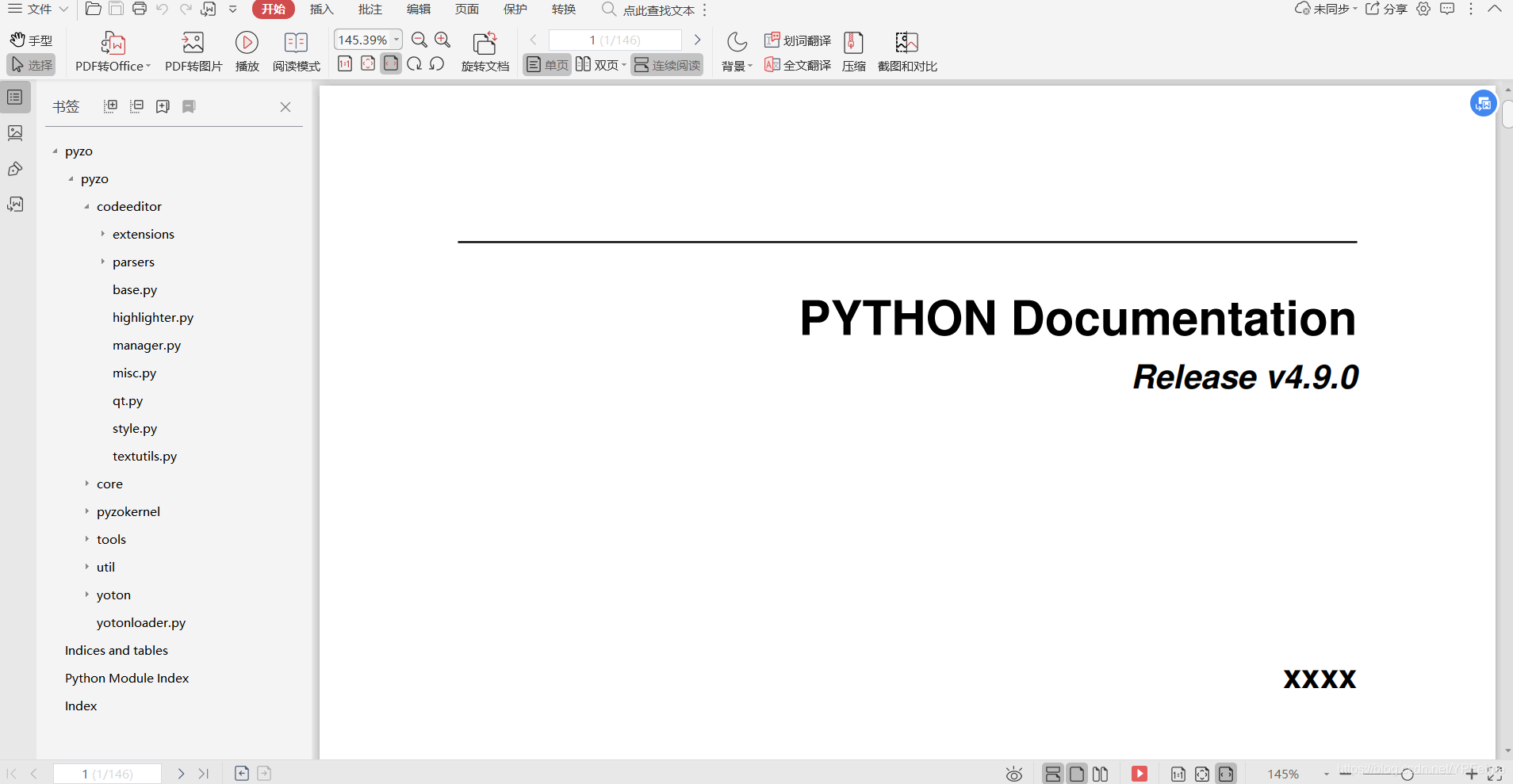
参考:https://blog.youkuaiyun.com/u012605477/article/details/87790273
练习:
https://download.youkuaiyun.com/download/YPFeime/12181573
https://download.youkuaiyun.com/download/YPFeime/12181599





 扫一扫
扫一扫


 54
54

 被折叠的 条评论
为什么被折叠?
被折叠的 条评论
为什么被折叠?
 到【灌水乐园】发言





