



 本文深入讲解Java中的IO流概念,包括字节流和字符流的使用,如FileInputStream、FileOutputStream、FileReader和FileWriter等。同时,通过实例演示了如何进行文件的读写操作,以及如何利用属性集(Properties)进行键值对的存储和读取。
IO流
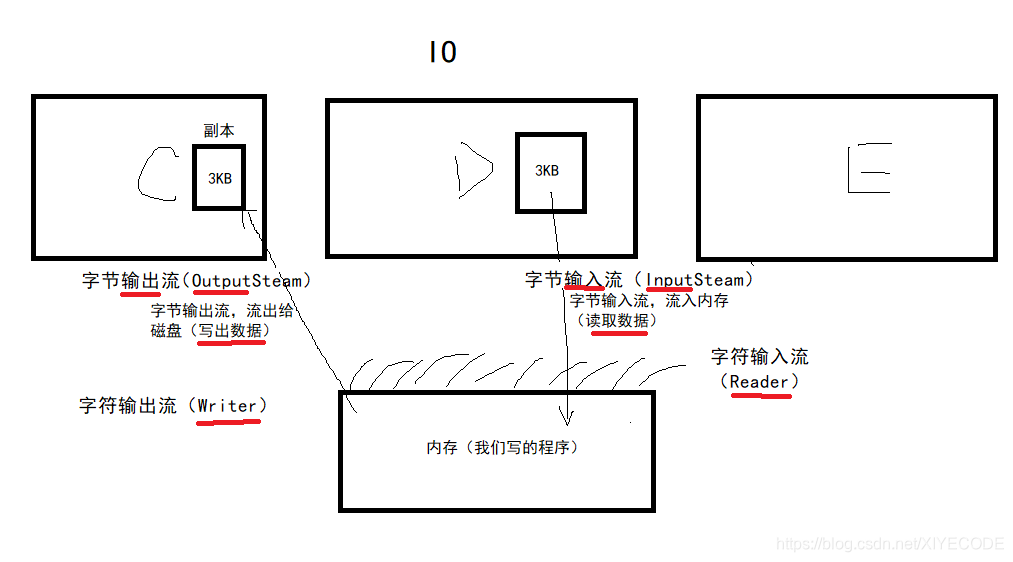
字节流
import java.io.*;

/**
 * Create by xiye on 2019/12/4 11:54
 */
public class Demo1_IO流 {
    /*IO流
    *   内存获取硬盘文件是输入流,内存写回硬盘是输出流
    *       输入流:字节输入流(InputStream)、字符输入流(Reader)
    *       输出流:字节输出流(OutputStream)、字符输出流(Writer)
    *       以上四个都是抽象类
    *
    *   文件的读写一般是字节流,如果需要读取中文,适合用字符流
    *
    * */
    public static void main(String[] args) throws IOException {
        //fileOutput();

        method11();

        method12();
    }

    /*
    * 多字节读取
    * */
    private static void method12() throws IOException {
        File file = new File("D:/file_test/int.txt");
        FileInputStream fis = new FileInputStream(file);

        byte[] bytes = new byte[2];
        int len;
        while ((len = fis.read(bytes)) != -1) {
            System.out.print(new String(bytes, 0, len));
        }

        fis.close();
    }

    /*
    * 单一字节读取
    * */
    private static void method11() throws IOException {
        File file = new File("D:/file_test/bytes.txt");
        FileInputStream fis = new FileInputStream(file);

        int b;
        while ((b = fis.read()) != -1) {
            System.out.println(b);
        }

        fis.close();
    }

    private static void fileOutput() throws IOException {
        method1();
        method2();
        mrthod3();
        method4();
    }

    /*
    * 追加写入
    * */
    private static void method4() throws IOException {
        File file = new File("D:/file_test/writeAppend.txt");
        byte[] bytes = {97, 98, 101, 106, 113, 122};
        FileOutputStream fos = new FileOutputStream(file, true);
        fos.write(bytes);
        fos.close();
    }

    /*
    * 写入字节数组,指明起止位置和长度
    * */
    private static void mrthod3() throws IOException {
        File file = new File("D:/file_test/bytesWithOffAndLen.txt");
        byte[] bytes = {97, 98, 101, 106, 113, 122};
        FileOutputStream fos = new FileOutputStream(file);
        fos.write(bytes, 2, 3);
        fos.close();
    }

    /*
    * 写入字节数组
    * */
    private static void method2() throws IOException {
        File file = new File("D:/file_test/bytes.txt");

        FileOutputStream fos = new FileOutputStream(file);
        fos.write("写入字节数组".getBytes());
        fos.close();
    }

    /*
    * 写入Ascii码
    * */
    private static void method1() throws IOException {
        File file = new File("D:/file_test/int.txt");

        FileOutputStream fos = new FileOutputStream(file);

        fos.write(64);
        fos.write(120);
        fos.write(105);
        fos.write(121);
        fos.write(101);

        fos.close();
    }
}
示例
import java.io.*;

/**
 * Create by xiye on 2019/12/4 15:41
 */
public class Demo2_IO示例 {
    public static void main(String[] args) throws IOException {
        FileInputStream fis = new FileInputStream(new File("D:/file_test/test.png"));	// 源文件位置
        FileOutputStream fos = new FileOutputStream(new File("D:/file_test/copy/test_copy.png"));	// 目标文件位置

        int b;
        while ((b = fis.read()) != -1) {
            fos.write(b);
        }

        // 关闭遵循就近原则,即最新创建的资源最先关闭
        fos.close();
        fis.close();
    }
}
扩展
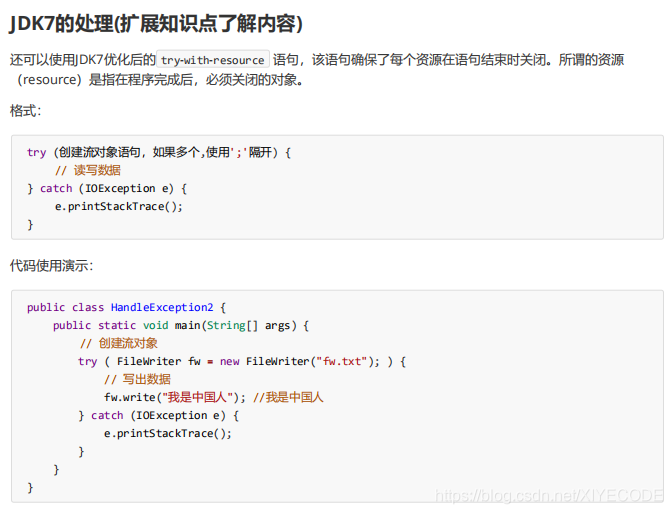
字符流
import java.io.File;
import java.io.FileReader;
import java.io.FileWriter;
import java.io.IOException;

/**
 * Create by xiye on 2019/12/4 16:22
 */
public class Demo3_字符流 {
    /*
    *   字符流中,写入的数据先保存在缓冲区,如果没有关闭(close)或刷新(flush),数据是无法保存到硬盘的
    *   注:字节流中的刷新(flush)是无效的,根据源代码可得知,父类没有内容。子类又没有重写。
    *
    * */
    public static void main(String[] args) throws IOException {
        //fileReader();


        method11();
    }

    private static void method11() throws IOException {
        File file = new File("D:/file_test/writer.txt");
        FileWriter fw = new FileWriter(file);

        fw.write("可以写入字符串");
        fw.write('C');
        fw.write(5000);

        fw.flush();
        fw.close();
    }

    private static void fileReader() throws IOException {
        method1();
        method2();
    }

    private static void method2() throws IOException {
        File file = new File("D:/file_test/bytes.txt");
        FileReader fr = new FileReader(file);

        char[] chars = new char[4];
        int len;
        while ((len = fr.read(chars)) != -1) {
            System.out.println(new String(chars, 0, len));
        }

        fr.close();
    }

    private static void method1() throws IOException {
        File file = new File("D:/file_test/bytes.txt");
        FileReader fr = new FileReader(file);

        int b;
        while ((b = fr.read()) != -1) {
            System.out.println(b+ ":" + (char)b);
        }

        fr.close();
    }
}
属性集
import java.io.FileInputStream;
import java.io.IOException;
import java.util.Properties;
import java.util.Set;

/**
 * Create by xiye on 2019/12/4 17:12
 */
public class Demo4_属性集 {
    /*属性集:Properties
    *   setProperty()设置一对键值,键值类型都是字符串
    *   getProperty()根据键获取值
    *   stringPropertyNames()获取所有键
    *   load()加载流
    * */
    public static void main(String[] args) throws IOException {
        Properties properties = new Properties();
        // 加载文件
        properties.load(new FileInputStream("Day18/resources/info.properties"));
        // 添加一对键值
        properties.setProperty("properties", "info");
        // 获取所有键
        Set<String> keys = properties.stringPropertyNames();

        for (String k : keys) {
            System.out.println(k + " --> " + properties.getProperty(k));
        }

		// 将属性集的内容写到指定文件,如下是写回原文件(会覆盖),并在文件开头加上注释信息“new info”
		// properties.store(new FileOutputStream("Day18/resources/info.properties"), "new info");
    }
}
示例info.properties
username=root
password=123456
url=localhost://mysql:3326...






 扫一扫
扫一扫


 317
317

 被折叠的 条评论
为什么被折叠?
被折叠的 条评论
为什么被折叠?
 到【灌水乐园】发言





