基于bootstrap,vue,jquery的前端列表、表格<tr><td>展示

本文介绍了如何结合bootstrap、vue.js和jquery来实现一个前端列表和表格的展示。通过引入vue和jquery支持,实现了数据驱动的列表刷新,并利用bootstrap实现了多终端自适应布局。内容包括html、css和js代码示例,以及不同设备的界面展示。

目录:html部分:

  css部分:

  js部分:


前几天帮朋友开发一个基于javaweb的图书管理系统,由于没有很好用的列表、表格<tr><td>,因此自己动手写了一个满足自己使用,基于bootstrap,vue,jquery的前端列表展示bootstrap可以多终端自适应,vue是基于数据端刷新js,jquery在主要运用Ajax,jquery在此功能中未使用。

html代码:

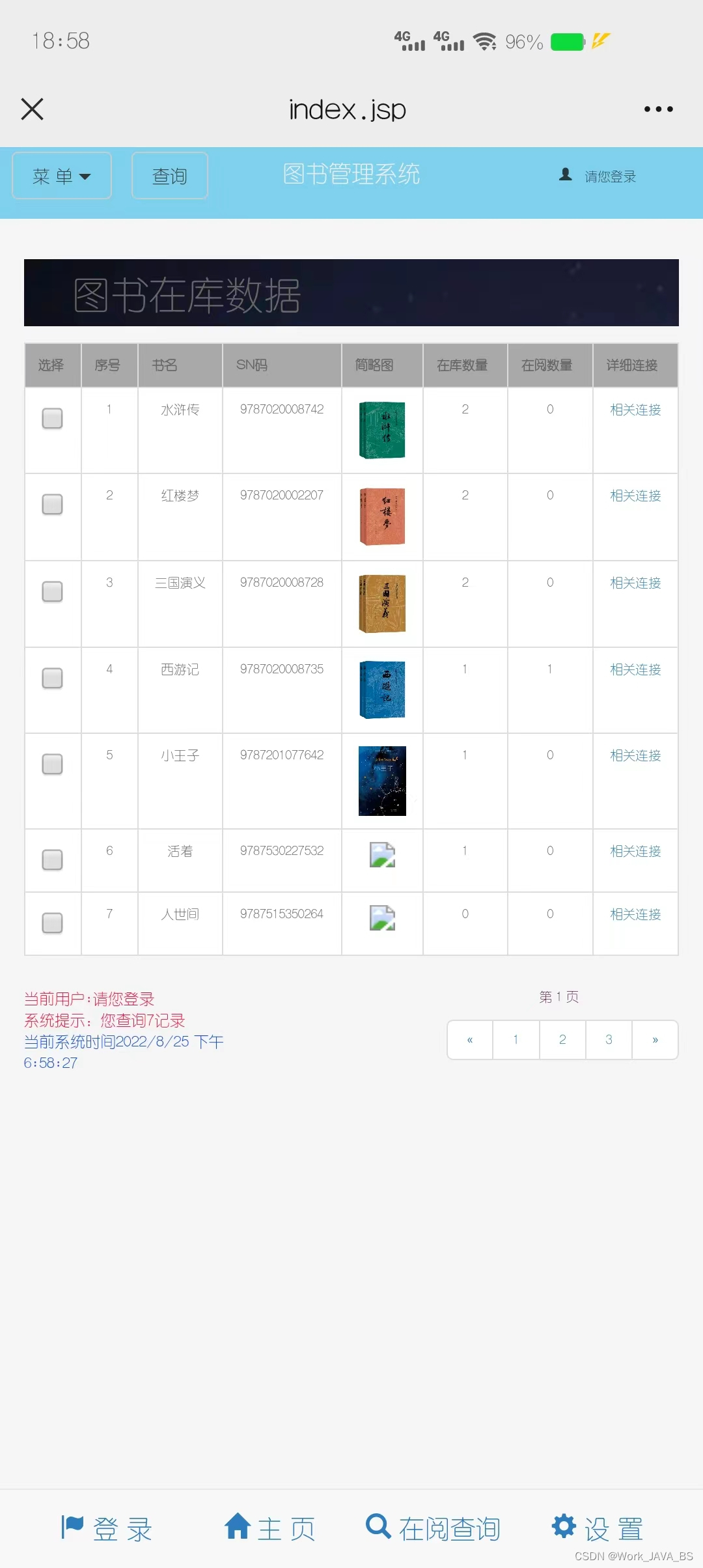
1.效果图:如下展示:调试界面展示。

PC端界面展示。

手机端展示。 

 2.代码:

 2.1 html头文件引入:

1>.添加vue支持:    <script src="https://cdn.jsdelivr.net/npm/vue@2.6.14/dist/vue.js"></script>;

2>.添加JQuery支持:    <script src="https://code.jquery.com/jquery-3.2.1.min.js"></script>;

3>.添加Bootstrap 支持:    <link rel="stylesheet" href="https://stackpath.bootstrapcdn.com/bootstrap/3.4.1/css/bootstrap.min.css" integrity="sha384-HSMxcRTRxnN+Bdg0JdbxYKrThecOKuH5zCYotlSAcp1+c8xmyTe9GYg1l9a69psu" crossorigin="anonymous">;

<!-- 最新的 Bootstrap 核心 JavaScript 文件 -->
    <script src="https://stackpath.bootstrapcdn.com/bootstrap/3.4.1/js/bootstrap.min.js" integrity="sha384-aJ21OjlMXNL5UyIl/XNwTMqvzeRMZH2w8c5cRVpzpU8Y5bApTppSuUkhZXN0VxHd" crossorigin="anonymous"></script><meta http-equiv="keywords" content="keyword1,keyword2,keyword3">;
    

<head>
    <title>booksDetail.html</title>
    <!--添加Vue支持-->
    <script src="https://cdn.jsdelivr.net/npm/vue@2.6.14/dist/vue.js"></script>
    <!--添加JQuery支持-->
    <script src="https://code.jquery.com/jquery-3.2.1.min.js"></script>
    <!-- 最新版本的 Bootstrap 核心 CSS 文件 -->
    <link rel="stylesheet" href="https://stackpath.bootstrapcdn.com/bootstrap/3.4.1/css/bootstrap.min.css" integrity="sha384-HSMxcRTRxnN+Bdg0JdbxYKrThecOKuH5zCYotlSAcp1+c8xmyTe9GYg1l9a69psu" crossorigin="anonymous">
    <!-- 最新的 Bootstrap 核心 JavaScript 文件 -->
    <script src="https://stackpath.bootstrapcdn.com/bootstrap/3.4.1/js/bootstrap.min.js" integrity="sha384-aJ21OjlMXNL5UyIl/XNwTMqvzeRMZH2w8c5cRVpzpU8Y5bApTppSuUkhZXN0VxHd" crossorigin="anonymous"></script><meta http-equiv="keywords" content="keyword1,keyword2,keyword3">
    <meta http-equiv="description" content="this is my page">
    <meta http-equiv="content-type" content="text/html; charset=UTF-8">
    <meta name="viewport" content="width=device-width, initial-scale=1">
    <link rel="stylesheet" href="../css/booksDetail.css" />
</head>

2.2 html中body代码:

<!--center-->
<div class="center" id="center" >
    <table bgcolor="black" cellspacing="1" width=""  class="table table-bordered  table-hover" >
        <caption class="h2">
            <h2 >图书在库数据</h2>
        </caption>

        <tr bgcolor="#a9a9a9">
            <th>选择</th>
            <th>序号</th>
            <th>书名</th>
            <th>SN码</th>
            <th>简略图</th>
            <th>在库数量</th>
            <th>在阅数量</th>
            <th>详细连接</th>
        </tr>
        <tr bgcolor="white" align="center" class="tr"   v-for="n of centers_page">
            <td><input type="checkbox"></td>
            <td>{{n.n }}</td>
            <td>{{n.book_name }}</td>
            <td align="left">{{ n.book_sn }}</td>
            <td align="left"><img :src="n.book_picture"></td>
            <td>{{n.house_number }}</td>
            <td>{{n.read_number }}</td>
            <td><a :href = "n.alink" >相关连接</a>
            </td>
        </tr>
    </table>
</div>

3 css代码:

body,div,dl,dt,dd,ul,ol,li,h1,h2,h3,h4,h5,h6,pro,code,form,fieldset,legend,input,textarea,p,blockquote,th,td{margin: 0;padding: 0;}
a{text-decoration: none;}
body{
    font-size: 1rem;
    font-family: Arial,"Lucida Grande",Verdana,"Microsoft YaHei",sans-serif;
    color: #666;
    background-color: #f5f5f5;
}
.center{
    padding-bottom: 0em;
    padding-top: 5em;
}
.center .h2{
    background-image: url("https://gimg2.baidu.com/image_search/src=http%3A%2F%2Fimg.jj20.com%2Fup%2Fallimg%2Ftp09%2F210F2130512J47-0-lp.jpg&refer=http%3A%2F%2Fimg.jj20.com&app=2002&size=f9999,10000&q=a80&n=0&g=0n&fmt=auto?sec=1658503726&t=ccabccbed26ba192710e8cfa39bc5e60");
    padding-left: 1em;
}
.center img{
    width: 3em;
}

4 js代码:

var center = new Vue({
    el:'#center',
    data:{
        centers:[
        centers_page:[
            {n:"1",book_name:"A",book_sn:"B",book_picture:"10",house_number:"10",read_number:"10",alink:"http://baidu.com"},
            {n:"1",book_name:"A",book_sn:"B",book_picture:"10",house_number:"10",read_number:"10",alink:"http://baidu.com"},
            {n:"1",book_name:"A",book_sn:"B",book_picture:"10",house_number:"10",read_number:"10",alink:"http://baidu.com"},
        ]
    }
});

5 最后别忘引入css文件和js文件,并确保css放在body之前,js放在body之后。有问题的朋友可以随时交流!!!加关注,不迷路。博主会持续更新javaweb前端、后端相关知识。注意:需要链接互联网,因为引入的VUE,JQuery,Bootstrap需要联网获取。

6 完整代码:可直接运行。

<!DOCTYPE html>
<html>
<head>
    <title>booksDetail.html</title>
    <!--添加Vue支持-->
    <script src="https://cdn.jsdelivr.net/npm/vue@2.6.14/dist/vue.js"></script>
    <!--添加JQuery支持-->
    <script src="https://code.jquery.com/jquery-3.2.1.min.js"></script>
    <!-- 最新版本的 Bootstrap 核心 CSS 文件 -->
    <link rel="stylesheet" href="https://stackpath.bootstrapcdn.com/bootstrap/3.4.1/css/bootstrap.min.css" integrity="sha384-HSMxcRTRxnN+Bdg0JdbxYKrThecOKuH5zCYotlSAcp1+c8xmyTe9GYg1l9a69psu" crossorigin="anonymous">
    <!-- 最新的 Bootstrap 核心 JavaScript 文件 -->
    <script src="https://stackpath.bootstrapcdn.com/bootstrap/3.4.1/js/bootstrap.min.js" integrity="sha384-aJ21OjlMXNL5UyIl/XNwTMqvzeRMZH2w8c5cRVpzpU8Y5bApTppSuUkhZXN0VxHd" crossorigin="anonymous"></script><meta http-equiv="keywords" content="keyword1,keyword2,keyword3">
    <meta http-equiv="description" content="this is my page">
    <meta http-equiv="content-type" content="text/html; charset=UTF-8">
    <meta name="viewport" content="width=device-width, initial-scale=1">
</head>
<style>
	.center{
	    padding-bottom: 0em;
	    padding-top: 5em;
	}
	.center .h2{
	    background-image: url("https://gimg2.baidu.com/image_search/src=http%3A%2F%2Fimg.jj20.com%2Fup%2Fallimg%2Ftp09%2F210F2130512J47-0-lp.jpg&refer=http%3A%2F%2Fimg.jj20.com&app=2002&size=f9999,10000&q=a80&n=0&g=0n&fmt=auto?sec=1658503726&t=ccabccbed26ba192710e8cfa39bc5e60");
	    padding-left: 1em;
	}
	.center img{
	    width: 3em;
	}
</style>
<!--center-->
<div class="center" id="center" >
    <table bgcolor="black" cellspacing="1" width=""  class="table table-bordered  table-hover" >
        <caption class="h2">
            <h2 >图书在库数据</h2>
        </caption>

        <tr bgcolor="#a9a9a9">
            <th>选择</th>
            <th>序号</th>
            <th>书名</th>
            <th>SN码</th>
            <th>简略图</th>
            <th>在库数量</th>
            <th>在阅数量</th>
            <th>详细连接</th>
        </tr>
        <tr bgcolor="white" align="center" class="tr"   v-for="n of centers_page">
            <td><input type="checkbox"></td>
            <td>{{n.n }}</td>
            <td>{{n.book_name }}</td>
            <td align="left">{{ n.book_sn }}</td>
            <td align="left"><img :src="n.book_picture"></td>
            <td>{{n.house_number }}</td>
            <td>{{n.read_number }}</td>
            <td><a :href = "n.alink" >相关连接</a>
            </td>
        </tr>
    </table>
</div>
<script>
	var center = new Vue({
	    el:'#center',
	    data:{
	        centers_page:[
	            {n:"1",book_name:"A",book_sn:"B",book_picture:"10",house_number:"10",read_number:"10",alink:"http://baidu.com"},
	            {n:"1",book_name:"A",book_sn:"B",book_picture:"10",house_number:"10",read_number:"10",alink:"http://baidu.com"},
	            {n:"1",book_name:"A",book_sn:"B",book_picture:"10",house_number:"10",read_number:"10",alink:"http://baidu.com"},
	        ]
	    }
	});
</script>
</body>
</html>

<head> <meta name="viewport" content="width=device-width, initial-scale=1.0" /> <link href="css/bootstrap.css" rel="stylesheet"> </head> <body> <div > <div class="card"><!-- 标题区域 --> <div class="card-header">学习计划表</div><!-- 提交区域 --> <div class="card-body"> <form> <div class="row g-4"><!-- 学习科目 --> <div class="col-auto"> <div class="input-group mb-3"><span class="input-group-text" id="basic-addon1">学习科目</span><input type="text" class="form-control" placeholder="请输入学习科目"></div> </div><!-- 学习任务 --> <div class="col-auto"> <div class="input-group mb-3"><span class="input-group-text" id="basic-addon1">学习内容</span><textarea class="form-control" placeholder="请输入学习内容" style="height: 32px;"></textarea></div> </div><!-- 学习地点 --> <div class="col-auto"> <div class="input-group mb-3"><span class="input-group-text" id="basic-addon1">学习地点</span><select class="form-select form-select-sm"> <option value="自习室">自习室</option> <option value="图书馆">图书馆</option> <option value="宿舍">宿舍</option> </select></div> </div><!-- 添加按钮 --> <div class="col-auto"><button type="submit" class="btn btn-primary">添加</button></div> </div> </form> </div> </div> <table class="table table-striped table-hover table-bordered"> <thead> <tr> <th scope="col">序号</th> <th scope="col">学习科目</th> <th scope="col">学习内容</th> <th scope="col">学习地点</th> <th scope="col">完成状态</th> <th scope="col">操作</th> </tr> </thead> <tbody> <tr> <td>1</td> <td>Vue.js前端实战开发</td> <td>学习指令,例如v-if、v-for、v-model等</td> <td>自习室</td> <td> <div class="form-check form-switch"><input class="form-check-input" type="checkbox" role="switch" id="cb1"><label class="form-check-label" for="cb1">未完成</label></div> </td> <td><a href="javascript:;">删除</a></td> </tr> <tr> <td>2</td> <td>1</td> <td></td> <td>自习室</td> <td> <div class="form-check form-switch"><input class="form-check-input" type="checkbox" role="switch" id="cb2"><label class="form-check-label" for="cb2">未完成</label></div> </td> <td><a href="javascript:;">删除</a></td> </tr> </tbody> </table> </div> </body>
05-11
<!DOCTYPE html> <html lang="en"> <head> <meta charset="UTF-8"> <meta name="viewport" content="width=device-width, initial-scale=1.0"> <title>University Professor Dashboard</title> <style> * { margin: 0; padding: 0; box-sizing: border-box; font-family: 'Segoe UI', Tahoma, Geneva, Verdana, sans-serif; } body { background-color: #f5f7fa; padding: 20px; color: #333; } .dashboard-container { max-width: 1200px; margin: 0 auto; } .dashboard-header { display: flex; justify-content: space-between; align-items: center; margin-bottom: 20px; padding-bottom: 15px; border-bottom: 1px solid #ddd; } .dashboard-title { font-size: 24px; font-weight: 600; color: #2c3e50; } .filters { display: flex; gap: 15px; } .filter-item { padding: 8px 12px; border: 1px solid #ddd; border-radius: 4px; background: white; cursor: pointer; } .dashboard-grid { display: grid; grid-template-columns: 1fr 1fr; grid-template-rows: auto auto; gap: 20px; } .dashboard-card { background: white; border-radius: 8px; box-shadow: 0 2px 10px rgba(0, 0, 0, 0.05); padding: 20px; display: flex; flex-direction: column; } .card-header { display: flex; justify-content: space-between; align-items: center; margin-bottom: 15px; padding-bottom: 10px; border-bottom: 1px solid #eee; } .card-title { font-size: 18px; font-weight: 600; color: #2c3e50; } .card-more { color: #3498db; cursor: pointer; font-size: 14px; } .card-content { flex: 1; display: flex; flex-direction: column; gap: 15px; } .chart-container { height: 200px; background: #f8f9fa; border-radius: 4px; display: flex; align-items: center; justify-content: center; color: #7f8c8d; margin-bottom: 10px; } .data-table { width: 100%; border-collapse: collapse; } .data-table th, .data-table td { padding: 10px; text-align: left; border-bottom: 1px solid #eee; } .data-table th { font-weight: 600; color: #7f8c8d; font-size: 14px; } .status-indicator { display: inline-block; width: 10px; height: 10px; border-radius: 50%; margin-right: 5px; } .status-good { background-color: #2ecc71; } .status-warning { background-color: #f39c12; } .status-bad { background-color: #e74c3c; } .task-list { list-style-type: none; } .task-item { padding: 10px 0; border-bottom: 1px solid #eee; display: flex; align-items: center; } .task-item:last-child { border-bottom: none; } .task-checkbox { margin-right: 10px; } .task-text { flex: 1; } .task-date { color: #7f8c8d; font-size: 14px; } .calendar-view { display: grid; grid-template-columns: repeat(7, 1fr); gap: 5px; } .calendar-day { height: 30px; display: flex; align-items: center; justify-content: center; border-radius: 4px; font-size: 14px; } .calendar-day.header { font-weight: 600; color: #7f8c8d; background: none; } .calendar-day.event { background: #e3f2fd; color: #1976d2; } .calendar-day.today { background: #1976d2; color: white; } .gauge-container { display: flex; justify-content: space-around; margin: 15px 0; } .gauge { text-align: center; } .gauge-circle { width: 80px; height: 40px; border-radius: 80px 80px 0 0; background: #e0e0e0; position: relative; overflow: hidden; margin: 0 auto 10px; } .gauge-fill { position: absolute; bottom: 0; width: 100%; background: #3498db; transition: height 0.5s; } .gauge-label { font-size: 14px; color: #7f8c8d; } @media (max-width: 768px) { .dashboard-grid { grid-template-columns: 1fr; } } </style> </head> <body> <div class="dashboard-container"> <div class="dashboard-header"> <div class="dashboard-title">Professor Dashboard</div> <div class="filters"> <div class="filter-item">This Semester</div> <div class="filter-item">This Month</div> <div class="filter-item">This Week</div> </div> </div> <div class="dashboard-grid"> <!-- Teaching Module --> <div class="dashboard-card"> <div class="card-header"> <div class="card-title">Teaching</div> <div class="card-more">View Details</div> </div> <div class="card-content"> <div class="chart-container"> Average Grades by Course (Bar Chart) </div> <div class="gauge-container"> <div class="gauge"> <div class="gauge-circle"> <div class="gauge-fill" style="height: 75%"></div> </div> <div class="gauge-label">Student Satisfaction</div> </div> <div class="gauge"> <div class="gauge-circle"> <div class="gauge-fill" style="height: 60%"></div> </div> <div class="gauge-label">Course Completion</div> </div> </div> <div> <h4>This Week's Classes</h4> <table class="data-table"> <tr> <th>Course</th> <th>Date/Time</th> <th>Location</th> </tr> <tr> <td>CS 101</td> <td>Mon, 10:00 AM</td> <td>Room 302</td> </tr> <tr> <td>DS 205</td> <td>Wed, 2:00 PM</td> <td>Lab 115</td> </tr> <tr> <td>CS 301</td> <td>Fri, 11:00 AM</td> <td>Room 410</td> </tr> </table> </div> </div> </div> <!-- Research Module --> <div class="dashboard-card"> <div class="card-header"> <div class="card-title">Research</div> <div class="card-more">View Details</div> </div> <div class="card-content"> <div class="chart-container"> Project Progress (Pie Chart) </div> <div class="chart-container" style="height: 150px;"> Research Funding Usage (Bar Chart) </div> <div> <h4>Recent Publications</h4> <table class="data-table"> <tr> <th>Paper Title</th> <th>Journal/Conference</th> <th>Status</th> </tr> <tr> <td>AI in Education</td> <td>Journal of EdTech</td> <td><span class="status-indicator status-good"></span>Published</td> </tr> <tr> <td>Data Visualization Methods</td> <td>Viz Conference</td> <td><span class="status-indicator status-warning"></span>Under Review</td> </tr> <tr> <td>Learning Analytics</td> <td>LAK Conference</td> <td><span class="status-indicator status-bad"></span>Revisions Needed</td> </tr> </table> </div> </div> </div> <!-- Student Supervision Module --> <div class="dashboard-card"> <div class="card-header"> <div class="card-title">Student Supervision</div> <div class="card-more">View Details</div> </div> <div class="card-content"> <div> <h4>Graduate Student Progress</h4> <table class="data-table"> <tr> <th>Student</th> <th>Thesis Topic</th> <th>Progress</th> <th>Status</th> </tr> <tr> <td>Alex Johnson</td> <td>ML in Healthcare</td> <td>85%</td> <td><span class="status-indicator status-good"></span>On Track</td> </tr> <tr> <td>Sam Davis</td> <td>Data Privacy</td> <td>60%</td> <td><span class="status-indicator status-warning"></span>Needs Attention</td> </tr> <tr> <td>Taylor Kim</td> <td>EdTech Tools</td> <td>45%</td> <td><span class="status-indicator status-bad"></span>Behind Schedule</td> </tr> </table> </div> <div> <h4>Upcoming Meetings</h4> <table class="data-table"> <tr> <th>Student</th> <th>Date/Time</th> <th>Purpose</th> </tr> <tr> <td>Alex Johnson</td> <td>Oct 15, 2:00 PM</td> <td>Thesis Draft Review</td> </tr> <tr> <td>Sam Davis</td> <td>Oct 16, 10:00 AM</td> <td>Research Problems</td> </tr> </table> </div> </div> </div> <!-- Administrative Module --> <div class="dashboard-card"> <div class="card-header"> <div class="card-title">Administrative</div> <div class="card-more">View Details</div> </div> <div class="card-content"> <div> <h4>Tasks To Do</h4> <ul class="task-list"> <li class="task-item"> <input type="checkbox" class="task-checkbox"> <div class="task-text">Submit grades for CS 101</div> <div class="task-date">Oct 20</div> </li> <li class="task-item"> <input type="checkbox" class="task-checkbox"> <div class="task-text">Review department budget</div> <div class="task-date">Oct 22</div> </li> <li class="task-item"> <input type="checkbox" class="task-checkbox"> <div class="task-text">Prepare faculty meeting presentation</div> <div class="task-date">Oct 25</div> </li> <li class="task-item"> <input type="checkbox" class="task-checkbox"> <div class="task-text">Submit research grant proposal</div> <div class="task-date">Nov 1</div> </li> </ul> </div> <div> <h4>Upcoming Meetings & Events</h4> <div class="calendar-view"> <div class="calendar-day header">S</div> <div class="calendar-day header">M</div> <div class="calendar-day header">T</div> <div class="calendar-day header">W</div> <div class="calendar-day header">T</div> <div class="calendar-day header">F</div> <div class="calendar-day header">S</div> <div class="calendar-day">1</div> <div class="calendar-day">2</div> <div class="calendar-day">3</div> <div class="calendar-day">4</div> <div class="calendar-day">5</div> <div class="calendar-day">6</div> <div class="calendar-day">7</div> <div class="calendar-day">8</div> <div class="calendar-day">9</div> <div class="calendar-day">10</div> <div class="calendar-day">11</div> <div class="calendar-day event">12</div> <div class="calendar-day">13</div> <div class="calendar-day">14</div> <div class="calendar-day">15</div> <div class="calendar-day event">16</div> <div class="calendar-day">17</div> <div class="calendar-day today">18</div> <div class="calendar-day">19</div> <div class="calendar-day event">20</div> <div class="calendar-day">21</div> </div> </div> </div> </div> </div> </div> </body> </html>
10-24
评论
添加红包

请填写红包祝福语或标题

红包个数最小为10个

红包金额最低5元

当前余额3.43前往充值 >
需支付:10.00
成就一亿技术人!
领取后你会自动成为博主和红包主的粉丝 规则
hope_wisdom
发出的红包
实付
使用余额支付
点击重新获取
扫码支付
钱包余额 0

抵扣说明:

1.余额是钱包充值的虚拟货币,按照1:1的比例进行支付金额的抵扣。
2.余额无法直接购买下载,可以购买VIP、付费专栏及课程。

余额充值