


Java使用Opencv + spire.ocr 识别表格
最近有做到需要表格图片识别的需求,开始直接用的百度云API,但是要收费,而且需求不算复杂,只要是截图或保存的Excel生成的图片即可,不涉及复杂的表格,有需要的可以了解一下。使用到三方库opencv(视觉库)+ spire.ocr (免费好用的OCR识别文字)
直接看效果:
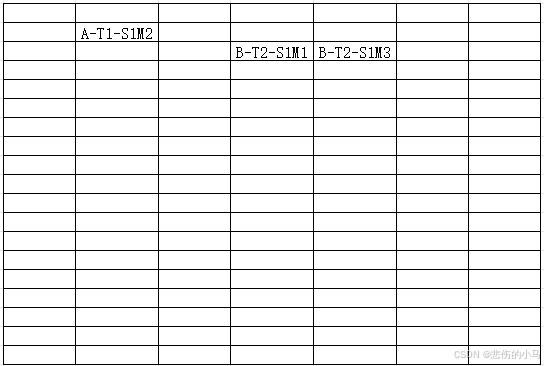
19行7列的表格,返回数据:
{“msg”:“操作成功”,“code”:200,“data”:[{“word”:“”,“row”:1,“cal”:1},{“word”:“”,“row”:1,“cal”:2},{“word”:“”,“row”:1,“cal”:3},{“word”:“”,“row”:1,“cal”:4},{“word”:“”,“row”:1,“cal”:5},{“word”:“”,“row”:1,“cal”:6},{“word”:“”,“row”:1,“cal”:7},{“word”:“”,“row”:2,“cal”:1},{“word”:“A-T1-S1M2”,“row”:2,“cal”:2},{“word”:“”,“row”:2,“cal”:3},{“word”:“”,“row”:2,“cal”:4},{“word”:“”,“row”:2,“cal”:5},{“word”:“”,“row”:2,“cal”:6},{“word”:“”,“row”:2,“cal”:7},{“word”:“”,“row”:3,“cal”:1},{“word”:“”,“row”:3,“cal”:2},{“word”:“”,“row”:3,“cal”:3},{“word”:“B-T2-S1M1”,“row”:3,“cal”:4},{“word”:“A-T1-S1M2”,“row”:3,“cal”:5},{“word”:“”,“row”:3,“cal”:6},{“word”:“”,“row”:3,“cal”:7},{“word”:“”,“row”:4,“cal”:1},{“word”:“”,“row”:4,“cal”:2},{“word”:“”,“row”:4,“cal”:3},{“word”:“”,“row”:4,“cal”:4},{“word”:“”,“row”:4,“cal”:5},{“word”:“”,“row”:4,“cal”:6},{“word”:“”,“row”:4,“cal”:7},{“word”:“”,“row”:5,“cal”:1},{“word”:“”,“row”:5,“cal”:2},{“word”:“”,“row”:5,“cal”:3},{“word”:“”,“row”:5,“cal”:4},{“word”:“”,“row”:5,“cal”:5},{“word”:“”,“row”:5,“cal”:6},{“word”:“”,“row”:5,“cal”:7},{“word”:“”,“row”:6,“cal”:1},{“word”:“”,“row”:6,“cal”:2},{“word”:“”,“row”:6,“cal”:3},{“word”:“”,“row”:6,“cal”:4},{“word”:“”,“row”:6,“cal”:5},{“word”:“”,“row”:6,“cal”:6},{“word”:“”,“row”:6,“cal”:7},{“word”:“”,“row”:7,“cal”:1},{“word”:“”,“row”:7,“cal”:2},{“word”:“”,“row”:7,“cal”:3},{“word”:“”,“row”:7,“cal”:4},{“word”:“”,“row”:7,“cal”:5},{“word”:“”,“row”:7,“cal”:6},{“word”:“”,“row”:7,“cal”:7},{“word”:“”,“row”:8,“cal”:1},{“word”:“”,“row”:8,“cal”:2},{“word”:“”,“row”:8,“cal”:3},{“word”:“”,“row”:8,“cal”:4},{“word”:“”,“row”:8,“cal”:5},{“word”:“”,“row”:8,“cal”:6},{“word”:“”,“row”:8,“cal”:7},{“word”:“”,“row”:9,“cal”:1},{“word”:“”,“row”:9,“cal”:2},{“word”:“”,“row”:9,“cal”:3},{“word”:“”,“row”:9,“cal”:4},{“word”:“”,“row”:9,“cal”:5},{“word”:“”,“row”:9,“cal”:6},{“word”:“”,“row”:9,“cal”:7},{“word”:“”,“row”:10,“cal”:1},{“word”:“”,“row”:10,“cal”:2},{“word”:“”,“row”:10,“cal”:3},{“word”:“”,“row”:10,“cal”:4},{“word”:“”,“row”:10,“cal”:5},{“word”:“”,“row”:10,“cal”:6},{“word”:“”,“row”:10,“cal”:7},{“word”:“”,“row”:11,“cal”:1},{“word”:“”,“row”:11,“cal”:2},{“word”:“”,“row”:11,“cal”:3},{“word”:“”,“row”:11,“cal”:4},{“word”:“”,“row”:11,“cal”:5},{“word”:“”,“row”:11,“cal”:6},{“word”:“”,“row”:11,“cal”:7},{“word”:“”,“row”:12,“cal”:1},{“word”:“”,“row”:12,“cal”:2},{“word”:“”,“row”:12,“cal”:3},{“word”:“”,“row”:12,“cal”:4},{“word”:“”,“row”:12,“cal”:5},{“word”:“”,“row”:12,“cal”:6},{“word”:“”,“row”:12,“cal”:7},{“word”:“”,“row”:13,“cal”:1},{“word”:“”,“row”:13,“cal”:2},{“word”:“”,“row”:13,“cal”:3},{“word”:“”,“row”:13,“cal”:4},{“word”:“”,“row”:13,“cal”:5},{“word”:“”,“row”:13,“cal”:6},{“word”:“”,“row”:13,“cal”:7},{“word”:“”,“row”:14,“cal”:1},{“word”:“”,“row”:14,“cal”:2},{“word”:“”,“row”:14,“cal”:3},{“word”:“”,“row”:14,“cal”:4},{“word”:“”,“row”:14,“cal”:5},{“word”:“”,“row”:14,“cal”:6},{“word”:“”,“row”:14,“cal”:7},{“word”:“”,“row”:15,“cal”:1},{“word”:“”,“row”:15,“cal”:2},{“word”:“”,“row”:15,“cal”:3},{“word”:“”,“row”:15,“cal”:4},{“word”:“”,“row”:15,“cal”:5},{“word”:“”,“row”:15,“cal”:6},{“word”:“”,“row”:15,“cal”:7},{“word”:“”,“row”:16,“cal”:1},{“word”:“”,“row”:16,“cal”:2},{“word”:“”,“row”:16,“cal”:3},{“word”:“”,“row”:16,“cal”:4},{“word”:“”,“row”:16,“cal”:5},{“word”:“”,“row”:16,“cal”:6},{“word”:“”,“row”:16,“cal”:7},{“word”:“”,“row”:17,“cal”:1},{“word”:“”,“row”:17,“cal”:2},{“word”:“”,“row”:17,“cal”:3},{“word”:“”,“row”:17,“cal”:4},{“word”:“”,“row”:17,“cal”:5},{“word”:“”,“row”:17,“cal”:6},{“word”:“”,“row”:17,“cal”:7},{“word”:“”,“row”:18,“cal”:1},{“word”:“”,“row”:18,“cal”:2},{“word”:“”,“row”:18,“cal”:3},{“word”:“”,“row”:18,“cal”:4},{“word”:“”,“row”:18,“cal”:5},{“word”:“”,“row”:18,“cal”:6},{“word”:“”,“row”:18,“cal”:7},{“word”:“”,“row”:19,“cal”:1},{“word”:“”,“row”:19,“cal”:2},{“word”:“”,“row”:19,“cal”:3},{“word”:“”,“row”:19,“cal”:4},{“word”:“”,“row”:19,“cal”:5},{“word”:“”,“row”:19,“cal”:6},{“word”:“”,“row”:19,“cal”:7}]}
当然无边框的也可以的,但是要注意,最好把数据设定为适合的行高和列宽,居中对齐,从excel中截图可以使用微信来截图,或者用Snipaste这个小工具,好了,让我们现在开始。
集成spire.ocr进行图片文字识别
使用 OCR 技术扫描识别是获取图片上文字的主要方式。Spire.OCR for Java 能够帮助开发者在 Java 项目中快速批量识别并提取图片上的文字,实现高效的文字提取功能。
由于开源的 tesseract 识别效果不是很好,就采用该OCR工具来识别图片,使用起来效果还是感觉不错的。
官方地址:
https://www.e-iceblue.cn/spire_ocr_java/how-to-scan-and-recognize-text-from-images-in-java-projects.html
pom引入Spire.OCR的依赖,我用的最新版本
<!--ocr图片识别文字-->
<dependency>
    <groupId>e-iceblue</groupId>
    <artifactId>spire.ocr</artifactId>
    <version>${spire.ocr.version}</version>
</dependency>
在application.yml中配置相关参数,主要是必要模型的地址,注意需要换成自己的地址,需要相关文件的可以私信,或者在上面的官网地址下载即可
ocr-scanner:
  language: 'Chinese'
  model-path-linux: '/root/sunpro/ocr'
  model-path-windows: 'E:\spireocr'
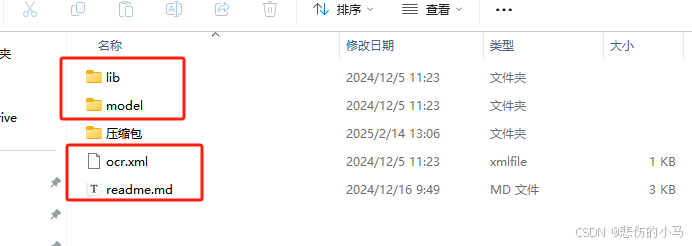
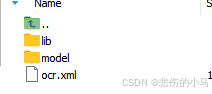
配置一下扫描类,加入到Spring容器
package com.ruoyi.ocr.config;

import com.spire.ocr.ConfigureOptions;
import com.spire.ocr.OcrException;
import com.spire.ocr.OcrScanner;
import org.springframework.beans.factory.annotation.Value;
import org.springframework.context.annotation.Bean;
import org.springframework.context.annotation.Configuration;

/**
 * @ClassName:OcrScannerConfig
 * @Author: mjg
 * @Date: 2025/2/12 14:06
 * @Description: ocr 扫描器配置类
 */
@Configuration
public class OcrScannerConfig {

    @Value("${ocr-scanner.model-path-linux}")
    public String modelPathLinux;

    @Value("${ocr-scanner.model-path-windows}")
    public String modelPathWindows;


    @Value("${ocr-scanner.language}")
    public String language;

    @Bean
    public OcrScanner ocrScanner() throws OcrException {
        OcrScanner scanner = new OcrScanner();
        ConfigureOptions configureOptions = new ConfigureOptions();
        // 设置许可证密钥(如有需要)
        // LicenseProvider.setLicenseKey("your-license-key");
        // 创建并配置扫描器
        configureOptions.setLanguage(language);
        if(System.getProperty("os.name").toLowerCase().contains("windows")) {
            configureOptions.setModelPath(modelPathWindows);
        }else{
            configureOptions.setModelPath(modelPathLinux);
        }
        scanner.ConfigureDependencies(configureOptions);
        return scanner;
    }


}
最后编写个Service方法,供Controller接口调用
/**
 * Spire OCR 图片文字识别,限于白底黑字才能识别效果好
 * @param path 图片路径
 **/
@Override
public String ocrWordBySpireString(String path) {

    ocrScanner.scan(path);
    String scannedText = null;
    try {
        scannedText = ocrScanner.getText().toString();
    } catch (OcrException e) {
        LOGGER.error("识别出错:{}",e.getMessage());
        return "";
    }
    if(org.springframework.util.StringUtils.isEmpty(scannedText)){
        return "";
    }
    return scannedText.replaceAll("Evaluation Warning : The version can be used only for evaluation purpose...", "")
            .replaceAll("\\r", "")
            .replaceAll("\n","");

}
@RestController
@RequestMapping("ocr/v2")
public class Ocr2Controller {


    @Resource
    private OcrService ocrService;


    @PostMapping(value = "/recognize", consumes = MediaType.MULTIPART_FORM_DATA_VALUE)
    public AjaxResult recognizeText(@RequestParam("file") MultipartFile file) throws OcrException {
        // 创建临时文件
        File tempFile = null;
        try {
            // 生成临时文件,使用原始文件名和后缀(避免格式问题)
            String originalFilename = file.getOriginalFilename();
            String suffix = originalFilename != null ? originalFilename.substring(originalFilename.lastIndexOf('.')) : ".tmp";
            tempFile = File.createTempFile("spireocr-", suffix);

            // 将上传的文件内容写入临时文件
            file.transferTo(tempFile);
            return AjaxResult.success( ocrService.ocrWordBySpireString(tempFile.getAbsolutePath())); // 返回识别结果
        } catch (IOException e) {
            throw new OcrException("文件处理失败", e);
        } finally {
            // 确保删除临时文件
            if (tempFile != null && tempFile.exists()) {
                try {
                    tempFile.delete();
                } catch (SecurityException e) {
                    System.err.println("无法删除临时文件: " + tempFile.getAbsolutePath());
                }
            }
        }
    }

}
看的人还是挺多的,所以立刻更新了,接着上面,完成了OCR识别文字的接口,让我们试试效果
测试图片
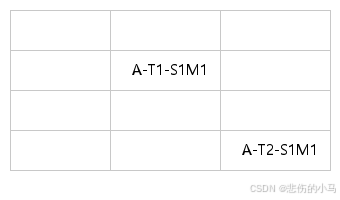
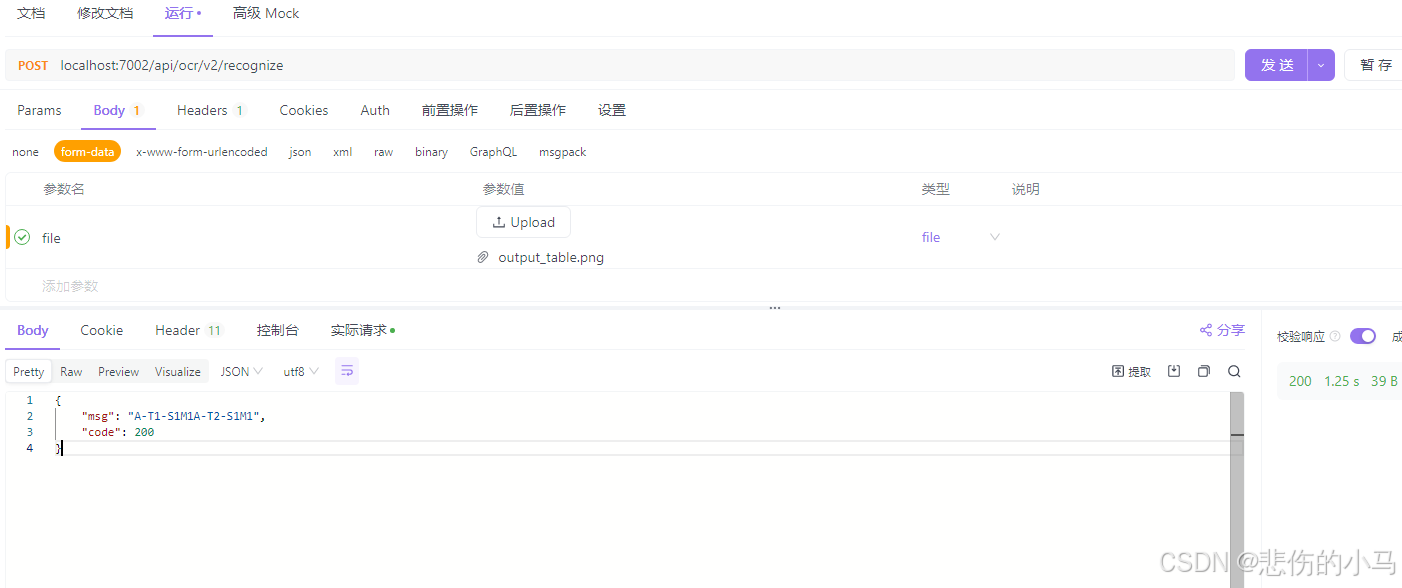
可以看到效果非常好,1秒接口就有响应结果。
通过opencv处理表格图片,边缘检测
导入opencv的依赖,版本我用的4.5.5-1
    <!--opencv视觉库-->
    <dependency>
        <groupId>org.openpnp</groupId>
        <artifactId>opencv</artifactId>
        <version>${opencv.version}</version>
    </dependency>
opencv的配置,application.yml:
opencv:
  model-path-linux: '/root/sunpro/opencv/libopencv_java454.so'
  model-path-windows: 'E:\BaiduNetdiskDownload\opencv\build\java\x64\opencv_java453.dll'
  widows-temp-upload: 'E:\BaiduNetdiskDownload\opencv\build\java\x64\temp'
  linux-temp-upload: '/root/sunpro/opencv/temp'
由于使用opencv视觉库也是需要对应的模型,也就是dll文件(linux部署需要so文件),这些都可以在opencv官网进行下载https://opencv.org/,如有需要私信联系博主也可以提供,我使用的是临时文件的方式去识别表格,所以配置了两个不同的临时文件位置,以及模型的位置。配置好后,就可以用opencv提供的api,对上传的图片进行二值化、灰度化、边缘检测等操作,识别表格每一个格子,最后拿来ocr识别文字即可,废话不多说,直接上代码:
Controller:
package com.ruoyi.ocr.controller;

import com.ruoyi.common.core.domain.AjaxResult;
import com.ruoyi.ocr.opencv.IOpencvService;
import org.springframework.http.MediaType;
import org.springframework.web.bind.annotation.PostMapping;
import org.springframework.web.bind.annotation.RequestMapping;
import org.springframework.web.bind.annotation.RequestParam;
import org.springframework.web.bind.annotation.RestController;
import org.springframework.web.multipart.MultipartFile;

import javax.annotation.Resource;
import java.io.File;
import java.io.IOException;

/**
 * @ClassName:FormRecognitionController
 * @Author: mjg
 * @Date: 2025/2/13 14:33
 * @Description: 表格识别控制器 识别Excel表格所转成图片
 */
@RestController
@RequestMapping("formRecognition")
public class FormRecognitionController {

    @Resource
    private IOpencvService opencvService;
    /**
     *  上传图片并识别
     **/
    @PostMapping(value = "/identify",consumes = MediaType.MULTIPART_FORM_DATA_VALUE)
    public AjaxResult identify(@RequestParam("file") MultipartFile file){
        // 创建临时文件
        File tempFile = null;
        try {
            //检查文件为空或不为图片格式时返回错误
            if (file == null || file.isEmpty()) {
                return AjaxResult.error("上传文件为空");
            }
            if (!file.getContentType().contains("image")) {
                return AjaxResult.error("上传文件类型不正确,上传文件类型" + file.getContentType() + ",允许类型:image");
            }

            // 生成临时文件,使用原始文件名和后缀(避免格式问题)
            String originalFilename = file.getOriginalFilename();
            String suffix = originalFilename != null ? originalFilename.substring(originalFilename.lastIndexOf('.')) : ".tmp";
            tempFile = File.createTempFile("spireocr-", suffix);

            // 将上传的文件内容写入临时文件
            file.transferTo(tempFile);

            // 使用临时文件路径进行识别
            return   AjaxResult.success(opencvService.readTableByEdgeDetection(tempFile.getAbsolutePath()));

        } catch (IOException e) {
            throw new RuntimeException("文件处理失败", e);
        } finally {
            // 确保删除临时文件
            if (tempFile != null && tempFile.exists()) {
                try {
                    tempFile.delete();
                } catch (SecurityException e) {
                    System.err.println("无法删除临时文件: " + tempFile.getAbsolutePath());
                }
            }
        }
    }


}
服务层接口:
/**
 * @ClassName:IOpencvService
 * @Author: mjg
 * @Date: 2025/2/14 12:31
 * @Description: opencv服务层
 * @Version 1.0
 * @Since JDK 1.8
 */
public interface IOpencvService {

    /**
     * opencv 识别表格 根据边缘检测
     * @param path 路径
    **/
    public List<FormRecognitionVo> readTableByEdgeDetection(String path);
}
服务层实现(主要)
package com.ruoyi.ocr.opencv;

import com.ruoyi.ocr.entity.FormRecognitionVo;
import com.ruoyi.ocr.entity.TableVo;
import com.ruoyi.ocr.service.OcrService;
import com.spire.ocr.OcrException;
import org.opencv.core.*;
import org.opencv.imgcodecs.Imgcodecs;
import org.opencv.imgproc.Imgproc;
import org.springframework.beans.factory.annotation.Value;
import org.springframework.stereotype.Service;

import javax.annotation.PostConstruct;
import javax.annotation.Resource;
import java.io.File;
import java.util.*;
import java.util.concurrent.*;

/**
 * @ClassName:OpencvService
 * @Author: mjg
 * @Date: 2025/2/13 14:37
 * @Description: opencv服务层
 */
@Service
public class OpencvServiceImpl  implements IOpencvService{

    private static final org.slf4j.Logger LOG = org.slf4j.LoggerFactory.getLogger(OpencvServiceImpl.class);

    @Value("${opencv.model-path-linux}")
    private String modelPathLinux;

    @Value("${opencv.model-path-windows}")
    private String modelPathWindows;

    @Value("${opencv.widows-temp-upload}")
    private String windowsTempUpload;

    @Value("${opencv.linux-temp-upload}")
    private String linuxTempUpload;


    @Resource
    private ThreadPoolExecutor threadPoolExecutor;


    @Resource
    private OcrService ocrService;


    /*
     * 加载动态库
     *
     * 第一种方式 --------------System.loadLibrary(Core.NATIVE_LIBRARY_NAME);
     * loadLibrary(Core.NATIVE_LIBRARY_NAME); //使用这种方式加载,需要在 IDE 中配置参数.
     * Eclipse 配置:http://opencv-java-tutorials.readthedocs.io/en/latest/01-installing-opencv-for-java.html#set-up-opencv-for-java-in-eclipse
     * IDEA 配置 :http://opencv-java-tutorials.readthedocs.io/en/latest/01-installing-opencv-for-java.html#set-up-opencv-for-java-in-other-ides-experimental
     *
     * 第二种方式 --------------System.load(path of lib);
     * System.load(your path of lib) ,方式比较灵活,可根据环境的系统,位数,决定加载内容
     * //加载动态链接库时,不使用System.loadLibrary(xxx);。 而是使用 绝对路径加载:System.load(xxx);
     */
    @PostConstruct
    public void loadLibraries() {
        try {
            String osName = System.getProperty("os.name");
            String opencvpath = System.getProperty("user.dir");

            //windows
            if (osName.startsWith("Windows")) {
                opencvpath = modelPathWindows;

            } else {
                opencvpath = modelPathLinux;
            }
            System.load(opencvpath);
        } catch (Exception e) {
            throw new RuntimeException("Failed to load opencv native library", e);
        }
        LOG.info("opencv视觉库加载完成");
    }


    @Override
    public List<FormRecognitionVo> readTableByEdgeDetection(String path) {
        List<FormRecognitionVo> list = new ArrayList<>();
        Mat source_image = Imgcodecs.imread(path);
        //灰度处理
        Mat gray_image = new Mat(source_image.height(), source_image.width(), CvType.CV_8UC1);
        Imgproc.cvtColor(source_image, gray_image, Imgproc.COLOR_RGB2GRAY);

        //二值化
        Mat thresh_image = new Mat(source_image.height(), source_image.width(), CvType.CV_8UC1);

        // C 负数,取反色,超过阈值的为黑色,其他为白色
        Imgproc.adaptiveThreshold(gray_image, thresh_image, 255,
                Imgproc.ADAPTIVE_THRESH_MEAN_C,
                Imgproc.THRESH_BINARY,
                3,
                2);


        Mat edges = new Mat();

        Imgproc.Canny(thresh_image, edges, 50, 150);

        //边缘检测
        LinkedList<TableVo> tables = extractCells(edges, source_image);

        Map<Integer,Integer> rowMap = new HashMap<>();
        Map<Integer,Integer> colMap = new HashMap<>();

        int rowBegin = 0;
        int colBegin = 0;

        CountDownLatch latch = new CountDownLatch(tables.size());

        for (int i = 0; i < tables.size(); i++) {
            TableVo tableVo = tables.get(i);


            if(!rowMap.containsKey(tableVo.getY())){
                rowMap.put(tableVo.getY(), ++rowBegin);
            }
            if(!colMap.containsKey(tableVo.getX())){
                colMap.put(tableVo.getX(), ++colBegin);
            }

            int row = rowMap.get(tableVo.getY());

            int col = colMap.get(tableVo.getX());

            Mat blankImage = new Mat(tableVo.getMat().size(), tableVo.getMat().type(), Scalar.all(255)); // 创建一张空白图像
            Mat diffImage = new Mat();
            Core.absdiff(tableVo.getMat(), blankImage, diffImage);
            Scalar meanDiff = Core.mean(diffImage);
            if (meanDiff.val[0] >= 1) { // 阈值可以根据实际情况调整
                //有文字再去识别
                tableVo.setOcr(true);
            }

            threadPoolExecutor.execute(() -> {
                //生成临时文件
                String tempImageName = UUID.randomUUID() + ".png";

                saveImage(tempImageName, tableVo.getMat());
                String s = "";
                if (tableVo.isOcr()) {
                    s = ocrService.ocrWordBySpireString(getUploadPath() + File.separator + tempImageName);
                }
                FormRecognitionVo recognitionVo = new FormRecognitionVo(s, row, col);
                list.add(recognitionVo);
                threadPoolExecutor.execute(() -> this.removeImage(tempImageName));
                latch.countDown();
            });

        }
        try {
            latch.await(5, TimeUnit.SECONDS);
        } catch (InterruptedException e) {
            e.printStackTrace();
        }
        Collections.sort(list);
        return list;
    }


    /**
     * 表格边缘检测
     * @param edges 处理后的图片检查轮廓
     * @param source 原始图片
    **/
    public static LinkedList<TableVo> extractCells(Mat edges,Mat source) {
        // 寻找轮廓
        List<MatOfPoint> contours = new ArrayList<>();
        Mat hierarchy = new Mat();
        Imgproc.findContours(edges, contours, hierarchy, Imgproc.RETR_LIST, Imgproc.CHAIN_APPROX_SIMPLE);
        LinkedList<TableVo> tables = new LinkedList<TableVo>();
        for (MatOfPoint contour : contours) {
            // 限制单元格的最小和最大尺寸
            if (Imgproc.contourArea(contour) > 1000 && Imgproc.contourArea(contour)<10000) {
                // 获取边界矩形,提取单元格
                Rect rect = Imgproc.boundingRect(contour);
                Mat cell = new Mat(source, rect);
                int x = rect.x;
                int y = rect.y;
                tables.addFirst(new TableVo(cell,x,y));
            }
        }
        return tables;
    }


    public String getUploadPath() {
        if (System.getProperty("os.name").toLowerCase().contains("windows")) {
            return windowsTempUpload;
        } else {
            return linuxTempUpload;
        }
    }

    private void saveImage(String path, Mat image) {

        String outPath = getUploadPath() + File.separator + path;

        File file = new File(outPath);
        //目录是否存在
        this.dirIsExist(file.getParent());

        Imgcodecs.imwrite(outPath, image);

    }


    private void removeImage(String path) {

        String outPath = getUploadPath() + File.separator + path;

        File file = new File(outPath);
        if (file.exists()) {
            file.delete();
        }
    }


    private void dirIsExist(String dirPath) {
        File dir = new File(dirPath);
        if (!dir.exists()) {
            dir.mkdirs();
        }
    }


}
最后封装的实体类:
package com.ruoyi.ocr.entity;

import com.alibaba.fastjson.JSON;
import com.alibaba.fastjson.serializer.SerializerFeature;

import java.io.Serializable;

/**
 * @ClassName:FormRecognitionVo
 * @Author: mjg
 * @Date: 2025/2/13 14:51
 * @Description: 表格识别VO
 */
public class FormRecognitionVo implements Serializable, Comparable<FormRecognitionVo> {

    private static final long serialVersionUID = 1L;

    /**
     * 识别文字
     **/
    private String word;

    /**
     * 识别行
     **/
    private Integer row;

    /**
     * 识别列
     **/
    private Integer cal;


    public FormRecognitionVo(String word, Integer row, Integer cal) {
        this.word = word;
        this.row = row;
        this.cal = cal;
    }

    public String getWord() {
        return word;
    }

    public void setWord(String word) {
        this.word = word;
    }

    public Integer getRow() {
        return row;
    }

    public void setRow(Integer row) {
        this.row = row;
    }

    public Integer getCal() {
        return cal;
    }

    public void setCal(Integer cal) {
        this.cal = cal;
    }

    @Override
    public String toString() {
        return JSON.toJSONString(this, SerializerFeature.WriteMapNullValue);
    }


    @Override
    public int compareTo(FormRecognitionVo o) {
        // 首先比较 row
        int rowCompare = this.row.compareTo(o.row);
        if (rowCompare != 0) {
            return rowCompare; // 如果 row 不相等,直接返回比较
        }
        // 如果 row 相等,再比较 col
        return this.cal.compareTo(o.cal);
    }
}
TableVO
package com.ruoyi.ocr.entity;

import org.opencv.core.Mat;

/**
 * @ClassName:TableVo
 * @Author: mjg
 * @Date: 2025/2/13 11:39
 * @Description: 必须描述类做什么事情, 实现什么功能
 */
public class TableVo {

    private Mat mat;

    private int x;

    private int y;


    private boolean isOcr = false;


    public TableVo(Mat mat, int x, int y) {
        this.mat = mat;
        this.x = x;
        this.y = y;
    }


    public boolean isOcr() {
        return isOcr;
    }

    public void setOcr(boolean ocr) {
        isOcr = ocr;
    }

    public Mat getMat() {
        return mat;
    }

    public void setMat(Mat mat) {
        this.mat = mat;
    }

    public int getX() {
        return x;
    }

    public void setX(int x) {
        this.x = x;
    }

    public int getY() {
        return y;
    }

    public void setY(int y) {
        this.y = y;
    }

    @Override
    public String toString() {
        return "TableVo{" +
                "mat=" + mat +
                ", x=" + x +
                ", y=" + y +
                '}';
    }
}
ok,试下效果:
上传图片:

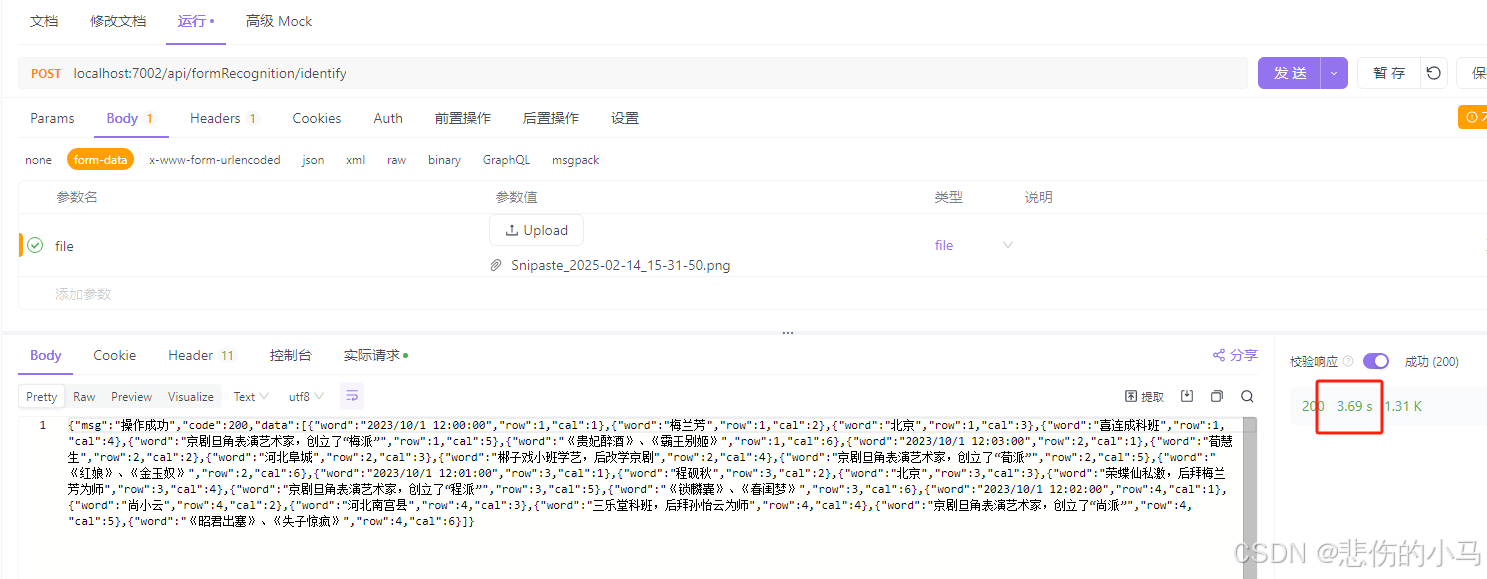
实际执行3秒多,因为ocr识别文字是非常耗时的,代码内部已经开了多个线程去跑,这个时间也可以接受,换张格子多数据少的图片再试下:
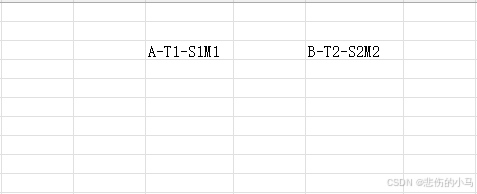
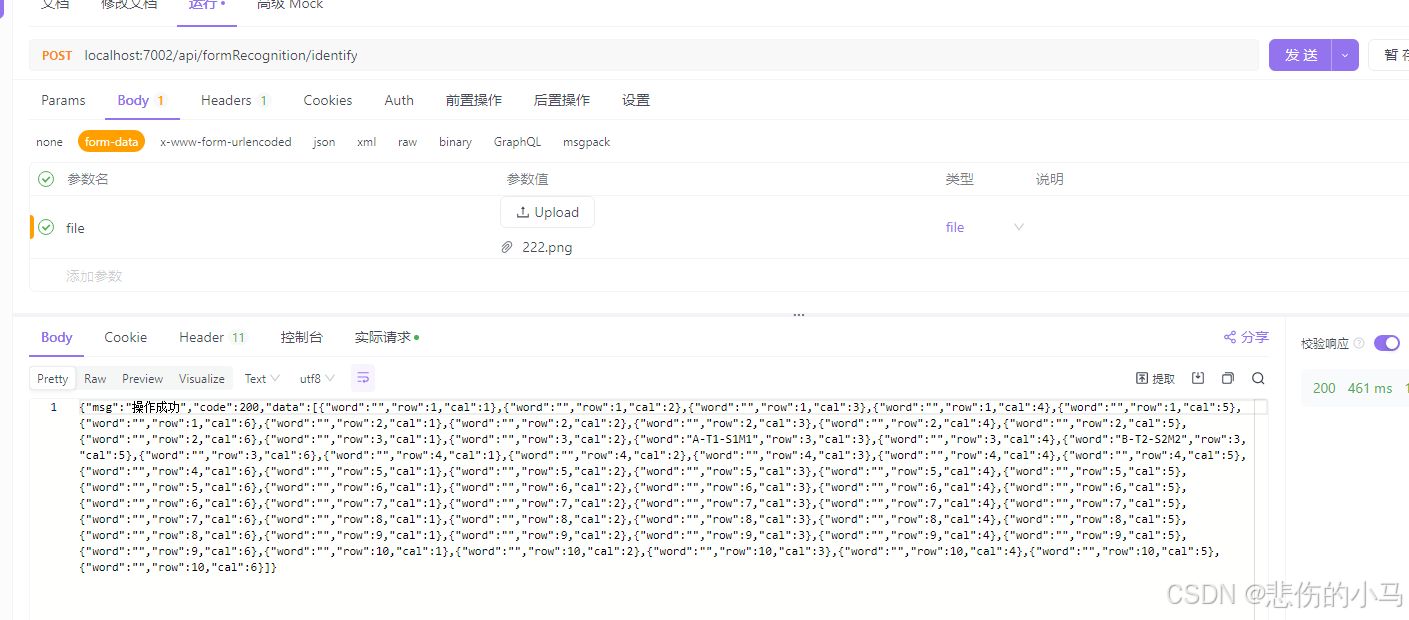
0.4S出结果,至此完成了 java调用opencv+ocr来识别表格图片。原创不易,如果对您有帮助请点个赞吧!





 扫一扫
扫一扫


 1万+
1万+

 被折叠的 条评论
为什么被折叠?
被折叠的 条评论
为什么被折叠?
 到【灌水乐园】发言





