FileBeat系列: logging.to_files 没有日志输出

本文详细介绍了Filebeat日志配置的最佳实践,包括避免在启动过程中使用-e参数,以及如何设置日志级别、日志文件路径、文件名称、保留文件数量和权限等参数,帮助读者理解并掌握Filebeat的日志管理。


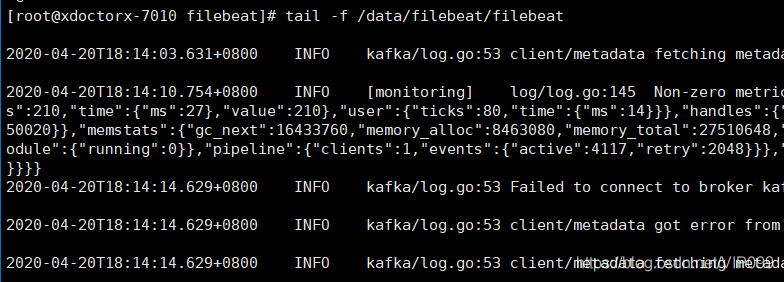
启动过程中不要使用-e参数,-e是强制输出到syslog


扩展

logging.level: info
logging.to_files: true
logging.files:
  path: /var/log/filebeat
  name: filebeat
  keepfiles: 7
  permissions: 0644


logging.files.keepfiles

保留在磁盘上的最新轮换日志文件数。在日志轮换期间删除旧文件。默认值为7.

filebeat日志: Sep 12 15:49:46 localhost filebeat[14915]: {"log.level":"info","@timestamp":"2025-09-12T15:49:46.981+0800","log.logger":"publisher_pipeline_output","log.origin":{"function":"github.com/elastic/beats/v7/libbeat/publisher/pipeline.(*netClientWorker).run","file.name":"pipeline/client_worker.go","file.line":140},"message":"Attempting to reconnect to backoff(elasticsearch(http://192.168.128.32:9200)) with 5 reconnect attempt(s)","service.name":"filebeat","ecs.version":"1.6.0"} Sep 12 15:49:46 localhost filebeat[14915]: {"log.level":"info","@timestamp":"2025-09-12T15:49:46.984+0800","log.logger":"elasticsearch.esclientleg","log.origin":{"function":"github.com/elastic/beats/v7/libbeat/esleg/eslegclient.(*Connection).Ping","file.name":"eslegclient/connection.go","file.line":324},"message":"Attempting to connect to Elasticsearch version 9.1.1 (default)","service.name":"filebeat","ecs.version":"1.6.0"} Sep 12 15:49:48 localhost filebeat[14915]: {"log.level":"warn","@timestamp":"2025-09-12T15:49:48.568+0800","log.logger":"input.scanner","log.origin":{"function":"github.com/elastic/beats/v7/filebeat/input/filestream.(*fileScanner).GetFiles","file.name":"filestream/fswatch.go","file.line":421},"message":"11 files are too small to be ingested, files need to be at least 1024 in size for ingestion to start. To change this behaviour set 'prospector.scanner.fingerprint.length' and 'prospector.scanner.fingerprint.offset'. Enable debug logging to see all file names.","service.name":"filebeat","filestream_id":"my-filestream-id","ecs.version":"1.6.0"}
最新发布
09-13
2025-06-05T04:35:48.666Z INFO [beat] instance/beat.go:1059 Process info {"system_info": {"process": {"capabilities": {"inheritable":null,"permitted":null,"effective":null,"bounding":["chown","dac_override","fowner","fsetid","kill","setgid","setuid","setpcap","net_bind_service","net_raw","sys_chroot","mknod","audit_write","setfcap"],"ambient":null}, "cwd": "/usr/share/filebeat", "exe": "/usr/share/filebeat/filebeat", "name": "filebeat", "pid": 7, "ppid": 1, "seccomp": {"mode":"filter","no_new_privs":true}, "start_time": "2025-06-05T04:35:47.720Z"}}} 2025-06-05T04:35:48.666Z INFO instance/beat.go:309 Setup Beat: filebeat; Version: 7.14.1 2025-06-05T04:35:48.667Z INFO [esclientleg] eslegclient/connection.go:100 elasticsearch url: http://101.201.64.180:9200 2025-06-05T04:35:48.667Z INFO [publisher] pipeline/module.go:113 Beat name: d29843b8745b 2025-06-05T04:35:48.668Z INFO [monitoring] log/log.go:118 Starting metrics logging every 30s 2025-06-05T04:35:48.668Z INFO instance/beat.go:473 filebeat start running. 2025-06-05T04:35:48.669Z INFO memlog/store.go:119 Loading data file of '/usr/share/filebeat/data/registry/filebeat' succeeded. Active transaction id=0 2025-06-05T04:35:48.669Z INFO memlog/store.go:124 Finished loading transaction log file for '/usr/share/filebeat/data/registry/filebeat'. Active transaction id=0 2025-06-05T04:35:48.669Z INFO [registrar] registrar/registrar.go:109 States Loaded from registrar: 0 2025-06-05T04:35:48.669Z INFO [crawler] beater/crawler.go:71 Loading Inputs: 1 2025-06-05T04:35:48.670Z INFO [input] log/input.go:164 Configured paths: [/home/bsta/project/oms/logs/*.log /home/bsta/project/oms/logs/*.log.*] {"input_id": "52bf6e82-1152-40b0-b258-6ca233b7d325"} 2025-06-05T04:35:48.670Z INFO [crawler] beater/crawler.go:141 Starting input (ID: 11996131784029043638) 2025-06-05T04:35:48.670Z INFO [crawler] beater/crawler.go:108 Loading and starting Inputs completed. Enabled inputs: 1 root@iZ2ze70gcqx8x6asj2pidjZ:/home/bsta/install/filebeat/config#
06-06
评论
添加红包

请填写红包祝福语或标题

红包个数最小为10个

红包金额最低5元

当前余额3.43前往充值 >
需支付:10.00
成就一亿技术人!
领取后你会自动成为博主和红包主的粉丝 规则
hope_wisdom
发出的红包

打赏作者

NIO4444

如果对您有帮助,欢迎打赏支持!

¥1 ¥2 ¥4 ¥6 ¥10 ¥20
扫码支付:¥1
获取中
扫码支付

您的余额不足,请更换扫码支付或充值

打赏作者

实付
使用余额支付
点击重新获取
扫码支付
钱包余额 0

抵扣说明:

1.余额是钱包充值的虚拟货币,按照1:1的比例进行支付金额的抵扣。
2.余额无法直接购买下载,可以购买VIP、付费专栏及课程。

余额充值



