


程序代码:
import os
import sys
import subprocess
import glob
from textual.app import App
from textual.widgets import Header, Footer, TextArea, Button, Input, OptionList, Tabs, Tab, Tree
from textual.containers import Container, Horizontal, Vertical
from textual.screen import Screen
from textual.widgets import Label
from textual.css.query import NoMatches
from textual.message import Message
from textual.reactive import var
from textual.widgets.text_area import TextAreaTheme
# Import obfuscation function
from obfuscate_cpp import obfuscate_cpp_code
# C++ keywords for syntax highlighting
CPP_KEYWORDS = {
'alignas', 'alignof', 'and', 'and_eq', 'asm', 'atomic_cancel', 'atomic_commit', 'atomic_noexcept',
'auto', 'bitand', 'bitor', 'bool', 'break', 'case', 'catch', 'char', 'char8_t', 'char16_t', 'char32_t',
'class', 'compl', 'concept', 'const', 'consteval', 'constexpr', 'constinit', 'const_cast', 'continue',
'co_await', 'co_return', 'co_yield', 'decltype', 'default', 'delete', 'do', 'double', 'dynamic_cast',
'else', 'enum', 'explicit', 'export', 'extern', 'false', 'float', 'for', 'friend', 'goto', 'if',
'inline', 'int', 'long', 'mutable', 'namespace', 'new', 'noexcept', 'not', 'not_eq', 'nullptr', 'operator',
'or', 'or_eq', 'private', 'protected', 'public', 'reflexpr', 'register', 'reinterpret_cast', 'requires',
'return', 'short', 'signed', 'sizeof', 'static', 'static_assert', 'static_cast', 'struct', 'switch',
'synchronized', 'template', 'this', 'thread_local', 'throw', 'true', 'try', 'typedef', 'typeid',
'typename', 'union', 'unsigned', 'using', 'virtual', 'void', 'volatile', 'wchar_t', 'while', 'xor', 'xor_eq'
}
class FileSelectionScreen(Screen):
def __init__(self, callback, cpp_files):
super().__init__()
self.callback = callback
self.cpp_files = cpp_files
def compose(self):
yield Label("Select a C++ file to open:")
option_list = OptionList(id="file_list")
for file in self.cpp_files:
option_list.add_option(file)
yield option_list
with Horizontal():
yield Button("Open", id="open_confirm", variant="primary")
yield Button("Cancel", id="open_cancel", variant="error")
def on_button_pressed(self, event):
if event.button.id == "open_confirm":
option_list = self.query_one("#file_list", OptionList)
if option_list.highlighted is not None:
filename = self.cpp_files[option_list.highlighted]
self.callback(filename)
self.app.pop_screen()
elif event.button.id == "open_cancel":
self.app.pop_screen()
def on_option_list_selected(self, event):
if event.option_list.id == "file_list":
filename = self.cpp_files[event.option_list.highlighted]
self.callback(filename)
self.app.pop_screen()
class FileInputScreen(Screen):
def __init__(self, callback):
super().__init__()
self.callback = callback
def compose(self):
yield Label("Enter file name to open:")
yield Input(placeholder="file.cpp", id="filename_input")
def on_button_pressed(self, event):
if event.button.id == "open_confirm":
filename = self.query_one("#filename_input", Input).value
if filename:
self.callback(filename)
self.app.pop_screen()
elif event.button.id == "open_cancel":
self.app.pop_screen()
def on_input_submitted(self, event):
if event.input.id == "filename_input":
filename = event.input.value
if filename:
self.callback(filename)
self.app.pop_screen()
class SaveFileInputScreen(Screen):
def __init__(self, callback):
super().__init__()
self.callback = callback
def compose(self):
yield Label("Enter file name to save:")
yield Input(placeholder="file.cpp", id="filename_input")
def on_button_pressed(self, event):
if event.button.id == "save_confirm":
filename = self.query_one("#filename_input", Input).value
if filename:
self.callback(filename)
self.app.pop_screen()
elif event.button.id == "save_cancel":
self.app.pop_screen()
def on_input_submitted(self, event):
if event.input.id == "filename_input":
filename = event.input.value
if filename:
self.callback(filename)
self.app.pop_screen()
class FindScreen(Screen):
def __init__(self, callback):
super().__init__()
self.callback = callback
def compose(self):
yield Label("Find text:")
yield Input(placeholder="Enter text to find", id="find_input")
with Horizontal():
yield Button("Find", id="find_btn", variant="primary")
yield Button("Cancel", id="cancel_btn", variant="error")
def on_button_pressed(self, event):
if event.button.id == "find_btn":
find_text = self.query_one("#find_input", Input).value
if find_text:
self.callback(find_text)
self.app.pop_screen()
elif event.button.id == "cancel_btn":
self.app.pop_screen()
def on_input_submitted(self, event):
if event.input.id == "find_input":
find_text = event.input.value
if find_text:
self.callback(find_text)
self.app.pop_screen()
class ReplaceScreen(Screen):
def __init__(self, callback):
super().__init__()
self.callback = callback
def compose(self):
yield Label("Find text:")
yield Input(placeholder="Enter text to find", id="find_input")
yield Label("Replace with:")
yield Input(placeholder="Enter replacement text", id="replace_input")
with Horizontal():
yield Button("Replace", id="replace_btn", variant="primary")
yield Button("Replace All", id="replace_all_btn", variant="primary")
yield Button("Cancel", id="cancel_btn", variant="error")
def on_button_pressed(self, event):
find_text = self.query_one("#find_input", Input).value
replace_text = self.query_one("#replace_input", Input).value
if event.button.id == "replace_btn":
if find_text:
self.callback(find_text, replace_text, False) # False for single replace
self.app.pop_screen()
elif event.button.id == "replace_all_btn":
if find_text:
self.callback(find_text, replace_text, True) # True for replace all
self.app.pop_screen()
elif event.button.id == "cancel_btn":
self.app.pop_screen()
def on_input_submitted(self, event):
# Submit on the second input (replace_input)
if event.input.id == "replace_input":
find_text = self.query_one("#find_input", Input).value
replace_text = event.input.value
if find_text:
self.callback(find_text, replace_text, False) # False for single replace
self.app.pop_screen()
class CodeEditorApp(App):
BINDINGS = [
("ctrl+s", "save_file", "Save"),
("ctrl+o", "open_file", "Open"),
("ctrl+q", "quit_app", "Quit"),
("ctrl+r", "obfuscate_code", "Obfuscate"),
("ctrl+b", "compile_code", "Compile"),
("ctrl+w", "close_tab", "Close Tab"),
# ("ctrl+shift+f", "find_text", "Find"),
("ctrl+h", "replace_text", "Replace"),
("ctrl+shift+f", "format_code", "Format")
]
def __init__(self):
super().__init__()
# Create a custom theme for C++ syntax highlighting
from rich.text import Text
from rich.style import Style
# Create a custom theme with blue for keywords
try:
# Register a custom theme with keyword highlighting
custom_theme = TextAreaTheme(
name="custom_cpp",
syntax_styles={
# Use regular expression or specific patterns to highlight keywords
},
ui_styles={
"text": Style(color="default"),
"background": Style(bgcolor="default"),
}
)
TextArea.register_theme(custom_theme)
except:
# If theme registration fails, continue without it
pass
def highlight_cpp_keywords(self, text):
"""Apply simple blue color to C++ keywords"""
import re
# Create a copy of the text to work with
highlighted_text = text
# Sort keywords by length (descending) to avoid partial matches
sorted_keywords = sorted(CPP_KEYWORDS, key=len, reverse=True)
# Apply highlighting to each keyword using Rich markup
for keyword in sorted_keywords:
# Use word boundaries to match whole words only
pattern = r'\b' + re.escape(keyword) + r'\b'
# Replace with blue colored version
highlighted_text = re.sub(pattern, f'[blue]{keyword}[/blue]', highlighted_text)
return highlighted_text
CSS = """
.editor {
height: 90%;
border: heavy green;
}
#tabs {
height: 1;
}
Footer {
dock: bottom;
height: 2;
}
#sidebar {
width: 25%;
height: 100%;
background: $surface-darken-1;
border-right: solid $primary;
padding: 1;
}
#file-tree {
width: 100%;
height: 90%;
}
#main-content {
width: 75%;
}
"""
def compose(self):
yield Header()
with Horizontal():
with Vertical(id="sidebar"):
yield Label("File Tree", id="file-info")
self.file_tree = Tree(".", id="file-tree")
yield self.file_tree
with Vertical(id="main-content"):
yield Tabs(id="tabs")
yield TextArea.code_editor("", id="editor", language="cpp", classes="editor")
yield Footer()
def on_mount(self):
self.title = "C++ Code Obfuscator"
self.sub_title = "Editor"
self.current_file = None
self.open_files = {} # Dictionary to store open files: {tab_id: (filename, content)}
self.current_tab = None
self.last_search = "" # Store last search term for repeated searches
# Build file tree on mount
self.build_file_tree()
# Try to set the theme for the editor
try:
editor = self.query_one("#editor", TextArea)
editor.theme = "monokai" # Try to use a built-in theme first
except:
pass
def highlight_cpp_code(self, code):
"""Use Rich library to highlight C++ code"""
try:
from rich.syntax import Syntax
from rich.console import Console
from rich.text import Text
from io import StringIO
import re
# Create a console that outputs to a string
console = Console(file=StringIO(), force_terminal=False)
# Use Rich's Syntax highlighter for C++
syntax = Syntax(code, "cpp", theme="monokai", line_numbers=False)
console.print(syntax)
# Get the highlighted text
highlighted = console.file.getvalue()
return highlighted
except Exception as e:
# If highlighting fails, return the original code
return code
def build_file_tree(self):
"""Build the file tree for the current directory"""
try:
# Clear the tree
self.file_tree.clear()
# Add root node
root = self.file_tree.root
# Get all items in the current directory
items = os.listdir('.')
items.sort()
# Add directories first, then files
directories = [item for item in items if os.path.isdir(item)]
files = [item for item in items if os.path.isfile(item)]
# Add directories
for directory in directories:
dir_node = root.add(directory, expand=False)
# Add a placeholder child to show expand icon
dir_node.add("Loading...")
# Add files
for file in files:
root.add_leaf(file)
except Exception as e:
self.notify(f"Error building file tree: {e}", severity="error")
def on_tree_node_expanded(self, event):
"""Handle tree node expansion"""
node = event.node
if node.data is None:
# This is a directory that hasn't been expanded yet
self.populate_directory_node(node)
def populate_directory_node(self, node):
"""Populate a directory node with its contents"""
try:
# Remove the placeholder child
if node.children:
node.remove_children()
# Get directory path
dir_path = str(node.label) # Convert to string
# For nested directories, we would need to track the full path
# For now, we'll just use the directory name
# Get items in the directory
items = os.listdir(dir_path)
items.sort()
# Add directories first, then files
directories = [item for item in items if os.path.isdir(os.path.join(dir_path, item))]
files = [item for item in items if os.path.isfile(os.path.join(dir_path, item))]
# Add directories
for directory in directories:
full_path = os.path.join(dir_path, directory)
dir_node = node.add(directory, expand=False)
# Add a placeholder child to show expand icon
dir_node.add("Loading...")
# Add files
for file in files:
node.add_leaf(file)
except Exception as e:
self.notify(f"Error populating directory: {e}", severity="error")
def on_tree_node_selected(self, event):
"""Handle tree node selection"""
node = event.node
# Check if this is a file (leaf node)
if not node.children:
# This is a file, try to open it
filename = str(node.label)
self.load_file(filename)
def action_save_file(self):
# Show file input screen for saving
self.push_screen(SaveFileInputScreen(self.save_file))
def save_file(self, filename):
try:
# Get code from editor
editor = self.query_one("#editor", TextArea)
code = editor.text
# Save to file
with open(filename, "w", encoding="utf-8") as f:
f.write(code)
# Update current file name
self.current_file = filename
# Update tab title if needed
if self.current_tab:
tabs = self.query_one("#tabs", Tabs)
# Find the tab and update its label
for tab in tabs.children:
if hasattr(tab, 'id') and tab.id == self.current_tab:
tab.label = filename
break
# Show success message
self.notify(f"File saved as {filename}")
# Rebuild file tree
self.build_file_tree()
except Exception as e:
self.notify(f"Error saving file: {e}", severity="error")
def action_open_file(self):
# Find all .cpp files in the current directory
cpp_files = glob.glob("*.cpp")
if cpp_files:
# Show file selection screen
self.push_screen(FileSelectionScreen(self.load_file, cpp_files))
else:
# Show file input screen if no .cpp files found
self.push_screen(FileInputScreen(self.load_file))
def action_format_code(self):
# Format the current file if one is open
if self.current_file and self.current_file.endswith('.cpp'):
try:
# Create .orig filename
orig_file = self.current_file + ".orig"
# Use subprocess instead of os.system for better control
result = subprocess.run(["astyle", self.current_file],
capture_output=True, text=True)
if result.returncode == 0:
# Remove the .orig file if it exists
if os.path.exists(orig_file):
os.remove(orig_file)
# Reload the formatted file
self.load_file(self.current_file)
self.notify("File formatted successfully with astyle!")
else:
self.notify(f"Error formatting file: {result.stderr}", severity="error")
except FileNotFoundError:
self.notify("astyle not found. Please install astyle.", severity="error")
except Exception as e:
self.notify(f"Error formatting file: {e}", severity="error")
else:
self.notify("No C++ file is currently open to format.", severity="warning")
def load_file(self, filename):
try:
with open(filename, "r", encoding="utf-8") as f:
content = f.read()
# Check if file is already open
for tab_id, (tab_filename, tab_content) in self.open_files.items():
if tab_filename == filename:
# Switch to existing tab
tabs = self.query_one("#tabs", Tabs)
tabs.active = tab_id
self.switch_to_tab(tab_id)
return
# Create new tab
editor = self.query_one("#editor", TextArea)
editor.text = content
# Add new tab
tabs = self.query_one("#tabs", Tabs)
tab_id = f"tab_{len(self.open_files)}"
# Use Tab widget directly
new_tab = Tab(filename, id=tab_id)
tabs.add_tab(new_tab)
tabs.active = tab_id
# Store file info
self.open_files[tab_id] = (filename, content)
self.current_file = filename
self.current_tab = tab_id
self.notify(f"Loaded {filename}")
except Exception as e:
self.notify(f"Error loading file: {e}", severity="error")
def switch_to_tab(self, tab_id):
"""Switch to the specified tab"""
if tab_id in self.open_files:
filename, content = self.open_files[tab_id]
editor = self.query_one("#editor", TextArea)
editor.text = content
self.current_file = filename
self.current_tab = tab_id
def on_tabs_tab_activated(self, event):
"""Handle tab switching"""
self.switch_to_tab(event.tab.id)
def action_close_tab(self):
"""Close the current tab"""
if self.current_tab and self.current_tab in self.open_files:
tabs = self.query_one("#tabs", Tabs)
tab_id = self.current_tab
# Remove the tab
tabs.remove_tab(tab_id)
del self.open_files[tab_id]
# Switch to another tab if available
if self.open_files:
new_tab_id = list(self.open_files.keys())[0]
tabs.active = new_tab_id
self.switch_to_tab(new_tab_id)
else:
# No more tabs, clear editor
editor = self.query_one("#editor", TextArea)
editor.text = ""
self.current_file = None
self.current_tab = None
def action_quit_app(self):
self.exit()
def action_obfuscate_code(self):
# Get code from editor
editor = self.query_one("#editor", TextArea)
code = editor.text
try:
# Call obfuscation function directly without temporary files
obfuscated_code = obfuscate_cpp_code(code)
editor.text = obfuscated_code
self.notify("Code obfuscated successfully!")
# Update the content in open_files
if self.current_tab and self.current_tab in self.open_files:
filename, _ = self.open_files[self.current_tab]
self.open_files[self.current_tab] = (filename, obfuscated_code)
except Exception as e:
self.notify(f"Error obfuscating code: {e}", severity="error")
def action_compile_code(self):
# Get code from editor
editor = self.query_one("#editor", TextArea)
code = editor.text
# Determine output filename
if self.current_file:
base_name = os.path.splitext(self.current_file)[0]
output_exe = f"{base_name}.exe"
temp_file = self.current_file
else:
output_exe = "output.exe"
temp_file = "temp_compile.cpp"
# Save to temporary file
with open(temp_file, "w", encoding="utf-8") as f:
f.write(code)
try:
# Compile code using g++
result = subprocess.run(["g++", "-o", output_exe, temp_file],
capture_output=True, text=True, check=True)
# Clean up temporary file if it's a temporary file
if temp_file == "temp_compile.cpp":
os.remove(temp_file)
self.notify(f"Compilation successful! Executable created as {output_exe}", severity="information")
except subprocess.CalledProcessError as e:
# Clean up temporary file if it's a temporary file
if temp_file == "temp_compile.cpp" and os.path.exists(temp_file):
os.remove(temp_file)
self.notify(f"Compilation failed: {e.stderr}", severity="error")
except FileNotFoundError:
# Clean up temporary file if it's a temporary file
if temp_file == "temp_compile.cpp" and os.path.exists(temp_file):
os.remove(temp_file)
self.notify("g++ compiler not found. Please install MinGW or GCC.", severity="error")
except Exception as e:
# Clean up temporary file if it's a temporary file
if temp_file == "temp_compile.cpp" and os.path.exists(temp_file):
os.remove(temp_file)
self.notify(f"Error during compilation: {e}", severity="error")
def on_button_pressed(self, event):
if event.button.id == "open_btn":
self.action_open_file()
elif event.button.id == "save_btn":
self.action_save_file()
elif event.button.id == "obfuscate_btn":
self.action_obfuscate_code()
elif event.button.id == "compile_btn":
self.action_compile_code()
# def action_find_text(self):
# """Open find dialog"""
# self.push_screen(FindScreen(self.find_callback))
# def find_callback(self, find_text):
# """Callback for find functionality"""
# self.last_search = find_text
# editor = self.query_one("#editor", TextArea)
# text = editor.text
# # Find the text
# start_pos = editor.selection.end if editor.selection is not None else 0
# pos = text.find(find_text, start_pos)
# if pos != -1:
# # Found, select the text
# editor.select_range(pos, pos + len(find_text))
# self.notify(f"Found '{find_text}'")
# else:
# # Try from the beginning
# pos = text.find(find_text, 0)
# if pos != -1:
# editor.select_range(pos, pos + len(find_text))
# self.notify(f"Found '{find_text}'")
# else:
# self.notify(f"'{find_text}' not found", severity="warning")
def replace_callback(self, find_text, replace_text, replace_all=False):
"""Callback for replace functionality"""
editor = self.query_one("#editor", TextArea)
text = editor.text
if replace_all:
# Replace all occurrences
new_text = text.replace(find_text, replace_text)
editor.text = new_text
# Update the content in open_files
if self.current_tab and self.current_tab in self.open_files:
filename, _ = self.open_files[self.current_tab]
self.open_files[self.current_tab] = (filename, new_text)
count = text.count(find_text)
self.notify(f"Replaced {count} occurrences of '{find_text}'")
else:
# Replace single occurrence
# Find the text
start_pos = editor.selection.end if editor.selection else 0
pos = text.find(find_text, start_pos)
if pos != -1:
# Found, replace it
new_text = text[:pos] + replace_text + text[pos + len(find_text):]
editor.text = new_text
# Update the content in open_files
if self.current_tab and self.current_tab in self.open_files:
filename, _ = self.open_files[self.current_tab]
self.open_files[self.current_tab] = (filename, new_text)
# Select the replacement text
editor.select_range(pos, pos + len(replace_text))
self.notify(f"Replaced '{find_text}' with '{replace_text}'")
else:
# Try from the beginning
pos = text.find(find_text, 0)
if pos != -1:
# Found, replace it
new_text = text[:pos] + replace_text + text[pos + len(find_text):]
editor.text = new_text
# Update the content in open_files
if self.current_tab and self.current_tab in self.open_files:
filename, _ = self.open_files[self.current_tab]
self.open_files[self.current_tab] = (filename, new_text)
# Select the replacement text
editor.select_range(pos, pos + len(replace_text))
self.notify(f"Replaced '{find_text}' with '{replace_text}'")
else:
self.notify(f"'{find_text}' not found", severity="warning")
if __name__ == "__main__":
app = CodeEditorApp()
app.run()
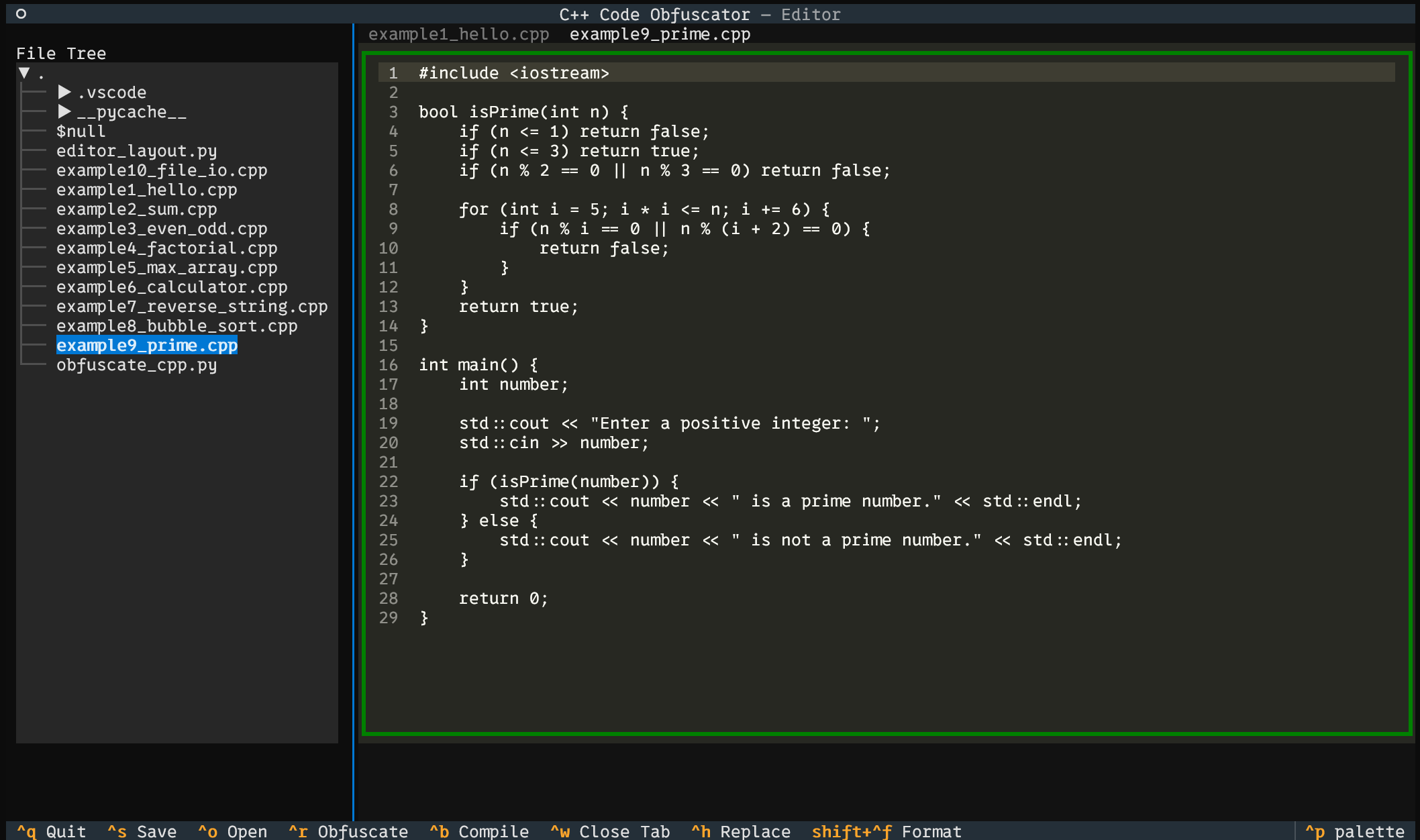
运行结果:






 扫一扫
扫一扫


 1238
1238

 被折叠的 条评论
为什么被折叠?
被折叠的 条评论
为什么被折叠?
 到【灌水乐园】发言





