


 本文列举了在PostgreSQL数据库中进行表查询、会话管理和数据导入导出的一系列实用SQL命令。包括查询指定模式下的所有表、表名及字段信息,查找包含特定字段的表,以及查看会话等。同时提供了数据库、模式以及表的导入导出示例,如pg_dump和psql命令。此外,还展示了COPY命令用于数据的导入和导出。
一、查询表、模式及字段信息
1、查询指定模式下的所有表
select tablename,*
from pg_tables
where schemaname = 'ods';
2、查询指定模式下的表名及字段
SELECT
	C.relname,
	A.attname AS NAME,
	format_type ( A.atttypid, A.atttypmod ) AS TYPE,
	col_description ( A.attrelid, A.attnum ) AS COMMENT
FROM
	pg_class AS C,
	pg_attribute AS A,
	pg_tables AS B
WHERE A.attrelid = C.oid
  and C.relname=B.tablename
  AND A.attnum > 0
  AND B.schemaname = 'ods'
  AND B.tablename NOT SIMILAR TO '[a-z,_]+_2022[0-9]+';
3、查询包含指定字段的表
SELECT DISTINCT
	C.relname
FROM
	pg_class AS C,
	pg_attribute AS A,
	pg_tables AS B
WHERE A.attrelid = C.oid
  and C.relname=B.tablename
  AND A.attnum > 0
  AND B.schemaname = 'ods'
  AND B.tablename NOT SIMILAR TO '[a-z,_]+_2022[0-9]+'
  AND A.attname ='dt';
4、查询指定表的字典(表名、字段名、备注、类型)
select
  c.relname as 表名,
  obj_description(relfilenode, 'pg_class')::varchar as 表注释,
  d.description as 字段备注,
  a.attname as 字段名,
  concat_ws ('', t.typname,SUBSTRING (format_type (a.atttypid,a.atttypmod) from'\(.*\)')) as 字段类型
from
  pg_class c,
  pg_attribute a,
  pg_type t,
  pg_description d
where a.attnum > 0
	and a.attrelid = c.oid
	and a.atttypid = t.oid
	and d.objoid = a.attrelid
	and d.objsubid = a.attnum
	and c.relname in (select tablename from pg_tables where schemaname = 'ap')
	and c.relname = 'fact_ito'
查询非分区表:and position ('_2' in tablename) = 0
二、会话及锁信息
1、查询所有会话
SELECT sa.* FROM pg_catalog.pg_stat_activity sa三、导入导出命令
1、数据库导入导出
(1)从源数据库导出结构
pg_dump --host=172.16.6.219 --port=5432 --username=postgres --dbname=bigdata --if-exists --clean --no-privileges --no-owner --schema-only --file=bigdata_20220815.sql(2)从源数据库导出结构和数据
sudo pg_dump --host=172.16.6.219 --port=5432 --username=postgres --dbname=kettle --if-exists --clean --no-privileges --no-owner --file=kettle_20221110.sql(3)从文件导入目标数据库
sudo psql --host=localhost --port=5432 --username=postgres --file=kettle_20221110.sql --dbname=kettle2、模式导入导出
(1)导出模式结构
sudo pg_dump --host=172.16.6.219 --port=5432 --username=postgres --dbname=bigdata --schema=ods --if-exists --clean --no-privileges --no-owner --schema-only --file=schema_bigdata_ods_20221110.sql(2)导出模式结构和数据
sudo pg_dump --host=172.16.6.219 --port=5432 --username=postgres --dbname=bigdata --schema=ods --if-exists --clean --no-privileges --no-owner --file=bigdata_ods_20221110.sql(3)从文件导入模式
sudo psql --host=172.16.6.219 --port=5432 --username=postgres --file=bigdata_ods_20221110.sql --dbname=bigdata3、表导入导出
(1)导出源表结构
pg_dump --username=postgres --host=172.16.5.66 --port=5432 --dbname=bigdata --if-exists --clean --schema-only --no-privileges --no-owner --file=dim_area_value.sql --table=ap.dim_area_value(2)导出源表数据和结构
pg_dump --username=postgres --host=172.16.5.66 --port=5432 --dbname=bigdata --if-exists --clean --no-privileges --no-owner --file=dim_area_value.sql --table=ap.dim_area_value(3)从文件导入至目标表
psql --host=112.94.20.4 --port=5432 --username=postgres --file=dim_area_value.sql --dbname=bigdata4、免密配置
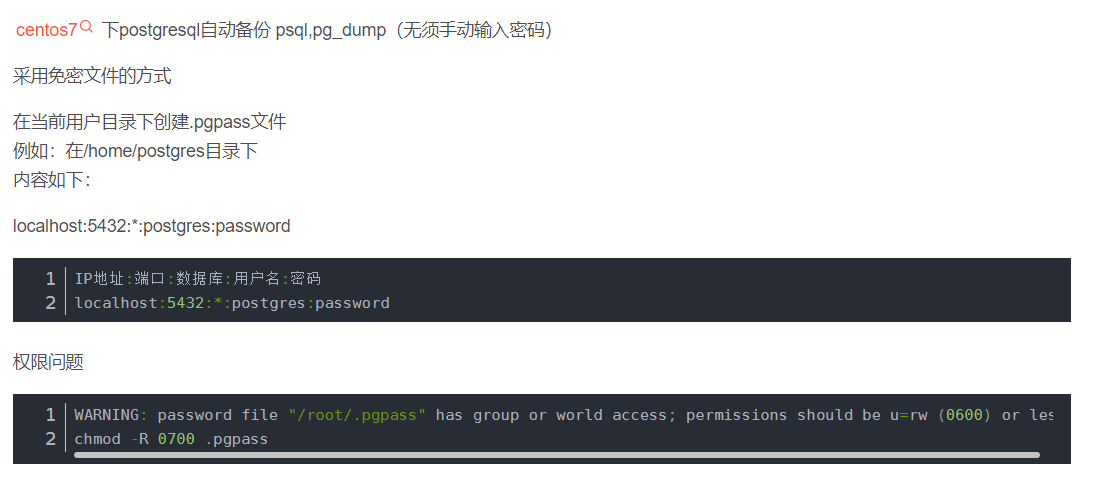
5、实际执行的命令
(1)导入
COPY ap.analysis_operating_expenses_details (amount, level_one_name,
                                             level_two_name, level_three_name,
                                             level_four_name, name, date,
                                             organization_name, organization_name_short,
                                             dim_customer_name, customer_type, cus_industry,
                                             staff_name, cus_manage_code) FROM stdin;
(2)导出
COPY ap.fact_ship_20221031 (order_no, order_line_no, produce_no,
                            ship_no, cus_code, product_code,
                            sales_area_code, sales_organize_code,
                            sales_scene, ship_quantity, receipt_quantity,
                            receipt_baseline, receipt_baseline_days,
                            forecast_receipt_date, forecast_income_date,
                            ship_date, production_cost_baseline, price,
                            receipt_overdue_flag, receipt_overdue_level,
                            income_rule, dt, warehouse_code, staff_code,
                            contract_type, confirm_rule, material_cost_baseline,
                            artificial_cost_baseline, manufacture_cost_baseline,
                            cus_biz_no, not_tax_price, not_tax_authorize_price,
                            ship_row) TO stdout;





 扫一扫
扫一扫


 1690
1690

 被折叠的 条评论
为什么被折叠?
被折叠的 条评论
为什么被折叠?
 到【灌水乐园】发言





