


Config
srs 流媒体服务配置官方文档已经很详细了,本文仅记录部分配置过程
srs.conf同级目录下 新建 self.conf
仿照srs.conf 添加基础配置
1 rtmp
RTMP是直播的事实标准,这么多年以来一直是使用最广泛的直播协议。
然而Adobe公司没有一直更新RTMP协议,也没有提交给标准组织比如RFC,因此很多新功能都没有支持,比如HEVC或Opus。 直到2023.03,终于Enhanced RTMP项目建立,开始支持了HEVC和AV1, SRS和OBS已经支持了基于Enhanced RTMP的HEVC编码。
在流的制作方面,最近几年,SRT、WebRTC和SRT增长迅速,很多设备都支持了SRT和RIST协议。你也可以用WebRTC做直播。
在流的分发上,HLS是使用最广泛的协议,所有CDN和设备都支持,比如PC,iOS,Android或平板电脑。当然HLS延迟比较大(3~5s+), 你可以选择HTTP-FLV,HTTP-TS或者WebRTC,如果需要降低延迟。
至今为止,在内容制作领域,RTMP还是使用最广泛的协议。比如你可以用OBS推流到B站、视频号或快手。如果要对接一个广播设备, 或者推流到某个平台,那么RTMP是最好的选择,几乎都会支持。
full config
vhost __defaultVhost__ {
# whether enable min delay mode for vhost.
# for min latency mode:
# 1. disable the publish.mr for vhost.
# 2. use timeout for cond wait for consumer queue.
# @see https://github.com/ossrs/srs/issues/257
# default: off (for RTMP/HTTP-FLV)
# default: on (for WebRTC)
min_latency off;# whether enable the TCP_NODELAY
# if on, set the nodelay of fd by setsockopt
# Overwrite by env SRS_VHOST_TCP_NODELAY for all vhosts.
# default: off
tcp_nodelay off;# the default chunk size is 128, max is 65536,
# some client does not support chunk size change,
# vhost chunk size will override the global value.
# Overwrite by env SRS_VHOST_CHUNK_SIZE for all vhosts.
# default: global chunk size.
chunk_size 128;
# The input ack size, 0 to not set.
# Generally, it's set by the message from peer,
# but for some peer(encoder), it never send message but use a different ack size.
# We can chnage the default ack size in server-side, to send acknowledge message,
# or the encoder maybe blocked after publishing for some time.
# Overwrite by env SRS_VHOST_IN_ACK_SIZE for all vhosts.
# Default: 0
in_ack_size 0;
# The output ack size, 0 to not set.
# This is used to notify the peer(player) to send acknowledge to server.
# Overwrite by env SRS_VHOST_OUT_ACK_SIZE for all vhosts.
# Default: 2500000
out_ack_size 2500000;
# the config for FMLE/Flash publisher, which push RTMP to SRS.
publish {
# about MR, read https://github.com/ossrs/srs/issues/241
# when enabled the mr, SRS will read as large as possible.
# Overwrite by env SRS_VHOST_PUBLISH_MR for all vhosts.
# default: off
mr off;
# the latency in ms for MR(merged-read),
# the performance+ when latency+, and memory+,
# memory(buffer) = latency * kbps / 8
# for example, latency=500ms, kbps=3000kbps, each publish connection will consume
# memory = 500 * 3000 / 8 = 187500B = 183KB
# when there are 2500 publisher, the total memory of SRS at least:
# 183KB * 2500 = 446MB
# the recommended value is [300, 2000]
# Overwrite by env SRS_VHOST_PUBLISH_MR_LATENCY for all vhosts.
# default: 350
mr_latency 350;# the 1st packet timeout in ms for encoder.
# Overwrite by env SRS_VHOST_PUBLISH_FIRSTPKT_TIMEOUT for all vhosts.
# default: 20000
firstpkt_timeout 20000;
# the normal packet timeout in ms for encoder.
# Overwrite by env SRS_VHOST_PUBLISH_NORMAL_TIMEOUT for all vhosts.
# default: 5000
normal_timeout 7000;
# whether parse the sps when publish stream.
# we can got the resolution of video for stat api.
# but we may failed to cause publish failed.
# @remark If disabled, HLS might never update the sps/pps, it depends on this.
# Overwrite by env SRS_VHOST_PUBLISH_PARSE_SPS for all vhosts.
# default: on
parse_sps on;
# When parsing SPS/PPS, whether try ANNEXB first. If not, try IBMF first, then ANNEXB.
# Overwrite by env SRS_VHOST_PUBLISH_TRY_ANNEXB_FIRST for all vhosts.
# default: on
try_annexb_first on;
# The timeout in seconds to disconnect publisher when idle, which means no players.
# Note that 0 means no timeout or this feature is disabled.
# Note that this feature conflicts with forward, because it disconnect the publisher stream.
# Overwrite by env SRS_VHOST_PUBLISH_KICKOFF_FOR_IDLE for all vhosts.
# default: 0
kickoff_for_idle 0;
}
# for play client, both RTMP and other stream clients,
# for instance, the HTTP FLV stream clients.
play {
# whether cache the last gop.
# if on, cache the last gop and dispatch to client,
# to enabled fast startup for client, client play immediately.
# if off, send the latest media data to client,
# client need to wait for the next Iframe to decode and show the video.
# set to off if requires min delay;
# set to on if requires client fast startup.
# Overwrite by env SRS_VHOST_PLAY_GOP_CACHE for all vhosts.
# default: on
gop_cache off;# Limit the max frames in gop cache. It might cause OOM if video stream has no IDR frame, so we limit to N
# frames by default. Note that it's the size of gop cache, including videos, audios and other messages.
# Overwrite by env SRS_VHOST_PLAY_GOP_CACHE_MAX_FRAMES for all vhosts.
# default: 2500
gop_cache_max_frames 2500;# the max live queue length in seconds.
# if the messages in the queue exceed the max length,
# drop the old whole gop.
# Overwrite by env SRS_VHOST_PLAY_QUEUE_LENGTH for all vhosts.
# default: 30
queue_length 10;# about the stream monotonically increasing:
# 1. video timestamp is monotonically increasing,
# 2. audio timestamp is monotonically increasing,
# 3. video and audio timestamp is interleaved/mixed monotonically increasing.
# it's specified by RTMP specification, @see 3. Byte Order, Alignment, and Time Format
# however, some encoder cannot provides this feature, please set this to off to ignore time jitter.
# the time jitter algorithm:
# 1. full, to ensure stream start at zero, and ensure stream monotonically increasing.
# 2. zero, only ensure stream start at zero, ignore timestamp jitter.
# 3. off, disable the time jitter algorithm, like atc.
# @remark for full, correct timestamp only when |delta| > 250ms.
# @remark disabled when atc is on.
# Overwrite by env SRS_VHOST_PLAY_TIME_JITTER for all vhosts.
# default: full
time_jitter full;
# vhost for atc for hls/hds/rtmp backup.
# generally, atc default to off, server delivery rtmp stream to client(flash) timestamp from 0.
# when atc is on, server delivery rtmp stream by absolute time.
# atc is used, for instance, encoder will copy stream to master and slave server,
# server use atc to delivery stream to edge/client, where stream time from master/slave server
# is always the same, client/tools can slice RTMP stream to HLS according to the same time,
# if the time not the same, the HLS stream cannot slice to support system backup.
#
# @see http://www.adobe.com/cn/devnet/adobe-media-server/articles/varnish-sample-for-failover.html
# @see http://www.baidu.com/#wd=hds%20hls%20atc
#
# @remark when atc is on, auto off the time_jitter
# Overwrite by env SRS_VHOST_PLAY_ATC for all vhosts.
# default: off
atc off;
# whether use the interleaved/mixed algorithm to correct the timestamp.
# if on, always ensure the timestamp of audio+video is interleaved/mixed monotonically increase.
# if off, use time_jitter to correct the timestamp if required.
# @remark to use mix_correct, atc should on(or time_jitter should off).
# Overwrite by env SRS_VHOST_PLAY_MIX_CORRECT for all vhosts.
# default: off
mix_correct off;# whether enable the auto atc,
# if enabled, detect the bravo_atc="true" in onMetaData packet,
# set atc to on if matched.
# always ignore the onMetaData if atc_auto is off.
# Overwrite by env SRS_VHOST_PLAY_ATC_AUTO for all vhosts.
# default: off
atc_auto off;# set the MW(merged-write) latency in ms.
# SRS always set mw on, so we just set the latency value.
# the latency of stream >= mw_latency + mr_latency
# the value recomment is [300, 1800]
# @remark For WebRTC, we enable pass-by-timestamp mode, so we ignore this config.
# default: 350 (For RTMP/HTTP-FLV)
# Overwrite by env SRS_VHOST_PLAY_MW_LATENCY for all vhosts.
# default: 0 (For WebRTC)
mw_latency 350;# Set the MW(merged-write) min messages.
# default: 0 (For Real-Time, min_latency on)
# default: 1 (For WebRTC, min_latency off)
# default: 8 (For RTMP/HTTP-FLV, min_latency off).
# Overwrite by env SRS_VHOST_PLAY_MW_MSGS for all vhosts.
mw_msgs 8;# the minimal packets send interval in ms,
# used to control the ndiff of stream by srs_rtmp_dump,
# for example, some device can only accept some stream which
# delivery packets in constant interval(not cbr).
# @remark 0 to disable the minimal interval.
# @remark >0 to make the srs to send message one by one.
# @remark user can get the right packets interval in ms by srs_rtmp_dump.
# Overwrite by env SRS_VHOST_PLAY_SEND_MIN_INTERVAL for all vhosts.
# default: 0
send_min_interval 10.0;
# whether reduce the sequence header,
# for some client which cannot got duplicated sequence header,
# while the sequence header is not changed yet.
# Overwrite by env SRS_VHOST_PLAY_REDUCE_SEQUENCE_HEADER for all vhosts.
# default: off
reduce_sequence_header on;
}
}
listen              1935;
max_connections     1000;
#srs_log_tank        file;
#srs_log_file        ./objs/srs.log;
daemon              on;
2 http-server
SRS内嵌了一个web服务器,支持api和简单的文件分发。
部署和使用SRS的内嵌http服务器,参考:Usage: HTTP
SRS的内置HTTP服务器已经参考GO的HTTP模块重写,满足商用要求,可以当作web服务器使用。参考:#277
备注:SRS只支持源站HTTP分发,边缘还是需要用Web服务器比如NGINX、SQUID或ATS等。
Use Scenario
它的定位很简单:智能手机上的摄像头。
Nginx/Apache/lighthttpd等众多HTTP server大佬就是专业的单反,老长老长镜头了。 难道有了单反智能手机上就不能有摄像头?不会吧!而且必须有。所以不是要和nginx拼个你死我活, 定位不一样,就像fms内嵌apache一样(不过fms嵌得很烂),真的有必要而且方便。
为何srs不内嵌一个nginx呢?智能手机上能内嵌一个单反长镜头么?我去,那是怪物吧。 nginx14万行代码,巨大无比,srs才2万行,如何能内嵌呢?最核心的原因是:srs需要提供http的api, 方便外部管理和调用;这点往往都毫无异议,但是提到srs要内嵌web服务器,就都炸开锅啦。 OK,其实就是http的api稍微扩展点,支持读文件后发送给客户端。
srs会一如既往的保持最简单,http的代码不会有多少行,功能不会有几个,就支持简单的文件分发就足够了。可以:
- 只需要部署一个服务器就可以分发RTMP和HLS。
- SRS对于HLS/HDS/DASH的支持会更完善。
- SRS可以支持点播,动态转封装等。
- SRS依然可以用nginx作为反向代理,或者禁用这个选项,使用nginx分发。
实际上,RTMP协议本身比HTTP复杂很多,所以st来做http分发,没有任何不可以的地方,更何况只是做部分。所以,淡定~
full config
# embeded http server in srs.
# the http streaming config, for HLS/HDS/DASH/HTTPProgressive
# global config for http streaming, user must config the http section for each vhost.
# the embed http server used to substitute nginx in ./objs/nginx,
# for example, srs runing in arm, can provides RTMP and HTTP service, only with srs installed.
# user can access the http server pages, generally:
# curl http://192.168.1.170:80/srs.html
# which will show srs version and welcome to srs.
# @remeark, the http embeded stream need to config the vhost, for instance, the __defaultVhost__
# need to open the feature http of vhost.
http_server {
# whether http streaming service is enabled.
# Overwrite by env SRS_HTTP_SERVER_ENABLED
# default: off
enabled on;
# the http streaming listen entry is <[ip:]port>
# for example, 192.168.1.100:8080
# where the ip is optional, default to 0.0.0.0, that is 8080 equals to 0.0.0.0:8080
# @remark, if use lower port, for instance 80, user must start srs by root.
# Overwrite by env SRS_HTTP_SERVER_LISTEN
# default: 8080
listen 8080;
# the default dir for http root.
# Overwrite by env SRS_HTTP_SERVER_DIR
# default: ./objs/nginx/html
dir ./objs/nginx/html;
# whether enable crossdomain request.
# for both http static and stream server and apply on all vhosts.
# Overwrite by env SRS_HTTP_SERVER_CROSSDOMAIN
# default: on
crossdomain on;
# For https_server or HTTPS Streaming.
https {
# Whether enable HTTPS Streaming.
# Overwrite by env SRS_HTTP_SERVER_HTTPS_ENABLED
# default: off
enabled on;
# The listen endpoint for HTTPS Streaming.
# Overwrite by env SRS_HTTP_SERVER_HTTPS_LISTEN
# default: 8088
listen 8088;
# The SSL private key file, generated by:
# openssl genrsa -out server.key 2048
# Overwrite by env SRS_HTTP_SERVER_HTTPS_KEY
# default: ./conf/server.key
key ./conf/server.key;
# The SSL public cert file, generated by:
# openssl req -new -x509 -key server.key -out server.crt -days 3650 -subj "/C=CN/ST=Beijing/L=Beijing/O=Me/OU=Me/CN=ossrs.net"
# Overwrite by env SRS_HTTP_SERVER_HTTPS_CERT
# default: ./conf/server.crt
cert ./conf/server.crt;
}
}
这里只引入部分
http_api {
    enabled         on;
    listen          1985;
}
http_server {
    enabled         on;
    listen          8080;
    dir             ./objs/nginx/html;
}
3 webrtc
如果需要支持webrtc 需要配置 否则不需要加入rtc部分
full 配置
rtc_server {
    # Whether enable WebRTC server.
    # Overwrite by env SRS_RTC_SERVER_ENABLED
    # default: off
    enabled on;
    # The udp listen port, we will reuse it for connections.
    # Overwrite by env SRS_RTC_SERVER_LISTEN
    # default: 8000
    listen 8000;
    # For WebRTC over TCP directly, not TURN, see https://github.com/ossrs/srs/issues/2852
    # Some network does not support UDP, or not very well, so we use TCP like HTTP/80 port for firewall traversing.
    tcp {
        # Whether enable WebRTC over TCP.
        # Overwrite by env SRS_RTC_SERVER_TCP_ENABLED
        # Default: off
        enabled off;
        # The TCP listen port for WebRTC. Highly recommend is some normally used ports, such as TCP/80, TCP/443,
        # TCP/8000, TCP/8080 etc. However SRS default to TCP/8000 corresponding to UDP/8000.
        # Overwrite by env SRS_RTC_SERVER_TCP_LISTEN
        # Default: 8000
        listen 8000;
    }
    # The protocol for candidate to use, it can be:
    #       udp         Generate UDP candidates. Note that UDP server is always enabled for WebRTC.
    #       tcp         Generate TCP candidates. Fail if rtc_server.tcp(WebRTC over TCP) is disabled.
    #       all         Generate UDP+TCP candidates. Ignore if rtc_server.tcp(WebRTC over TCP) is disabled.
    # Note that if both are connected, we will use the first connected(DTLS done) one.
    # Overwrite by env SRS_RTC_SERVER_PROTOCOL
    # Default: udp
    protocol udp;
    # The exposed candidate IPs, response in SDP candidate line. It can be:
    #       *           Retrieve server IP automatically, from all network interfaces.
    #       $CANDIDATE  Read the IP from ENV variable, use * if not set.
    #       x.x.x.x     A specified IP address or DNS name, use * if 0.0.0.0.
    # @remark For Firefox, the candidate MUST be IP, MUST NOT be DNS name, see https://bugzilla.mozilla.org/show_bug.cgi?id=1239006
    # @see https://ossrs.net/lts/zh-cn/docs/v4/doc/webrtc#config-candidate
    # Overwrite by env SRS_RTC_SERVER_CANDIDATE
    # default: *
    candidate *;
}

vhost rtc.vhost.srs.com {
    rtc {
        # Whether enable WebRTC server.
        # Overwrite by env SRS_VHOST_RTC_ENABLED for all vhosts.
        # default: off
        enabled on;
        # Whether support NACK.
        # default: on
        nack on;
        # Whether support TWCC.
        # default: on
        twcc on;
        # The timeout in seconds for session timeout.
        # Client will send ping(STUN binding request) to server, we use it as heartbeat.
        # default: 30
        stun_timeout 30;
        # The role of dtls when peer is actpass: passive or active
        # default: passive
        dtls_role passive;
        # Whether enable transmuxing RTMP to RTC.
        # If enabled, transcode aac to opus.
        # Overwrite by env SRS_VHOST_RTC_RTMP_TO_RTC for all vhosts.
        # default: off
        rtmp_to_rtc off;
        # Whether enable transmuxing RTC to RTMP.
        # Overwrite by env SRS_VHOST_RTC_RTC_TO_RTMP for all vhosts.
        # Default: off
        rtc_to_rtmp off;
    }
}
这里只引入部分
rtc_server {
    enabled on;
    listen 8000; # UDP port
    # @see https://ossrs.net/lts/zh-cn/docs/v4/doc/webrtc#config-candidate
   # candidate $CANDIDATE;
    candidate 192.168.1.116;
}

vhost __defaultVhost__ {
    ...
    rtc {
        enabled     on;
        # @see https://ossrs.net/lts/zh-cn/docs/v4/doc/webrtc#rtmp-to-rtc
        rtmp_to_rtc on;
        # @see https://ossrs.net/lts/zh-cn/docs/v4/doc/webrtc#rtc-to-rtmp
        rtc_to_rtmp off;
    }
   ...
}
关于candidate 开启rtmp_to_rtc on 不进行推流 当前candiata $CANDIDATE配置可不用更改
(webrtc localhost播放流 )
推流弹框https
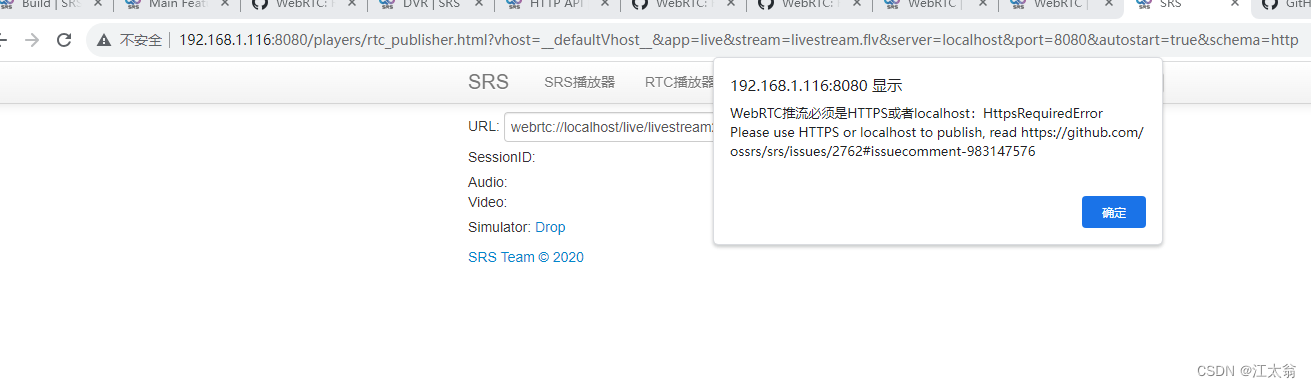
配置浏览器https支持,由于webrtc需要https,本地测试配置证书又很麻烦,需要修改下浏览器配置。
在谷歌浏览器地址栏输入:chrome://flags/#unsafely-treat-insecure-origin-as-secure
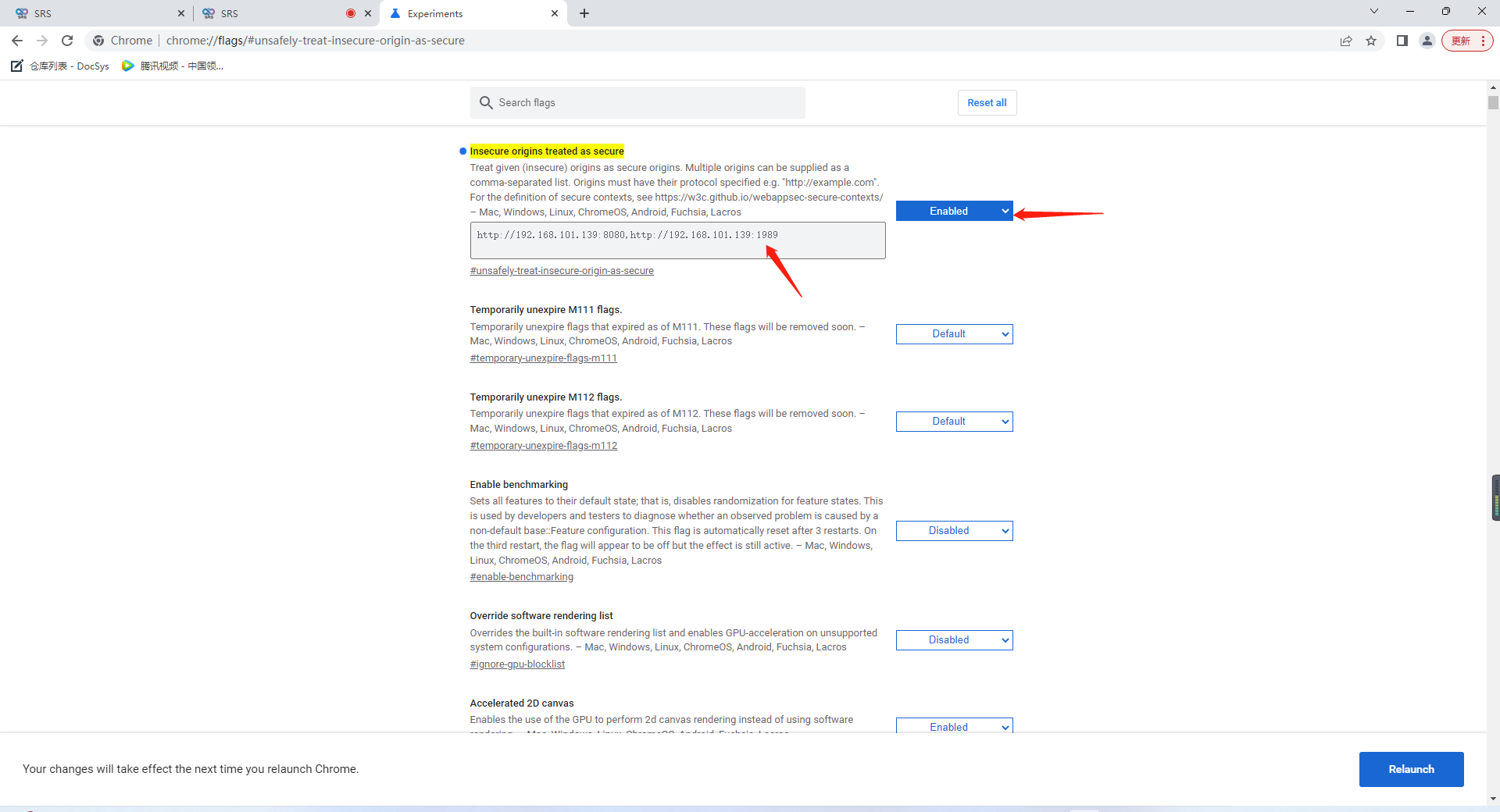
启用功能,输入框中输入你对应的地址 http://192.168.1.116:8080,多个用英文逗号隔开。在这里配置后。浏览器会在访问这个地址的时候,会以https的方式去访问http网站。
webrtc 推流
需要 配置好candidate 192.168.1.116
通过srs工具或者obs推流
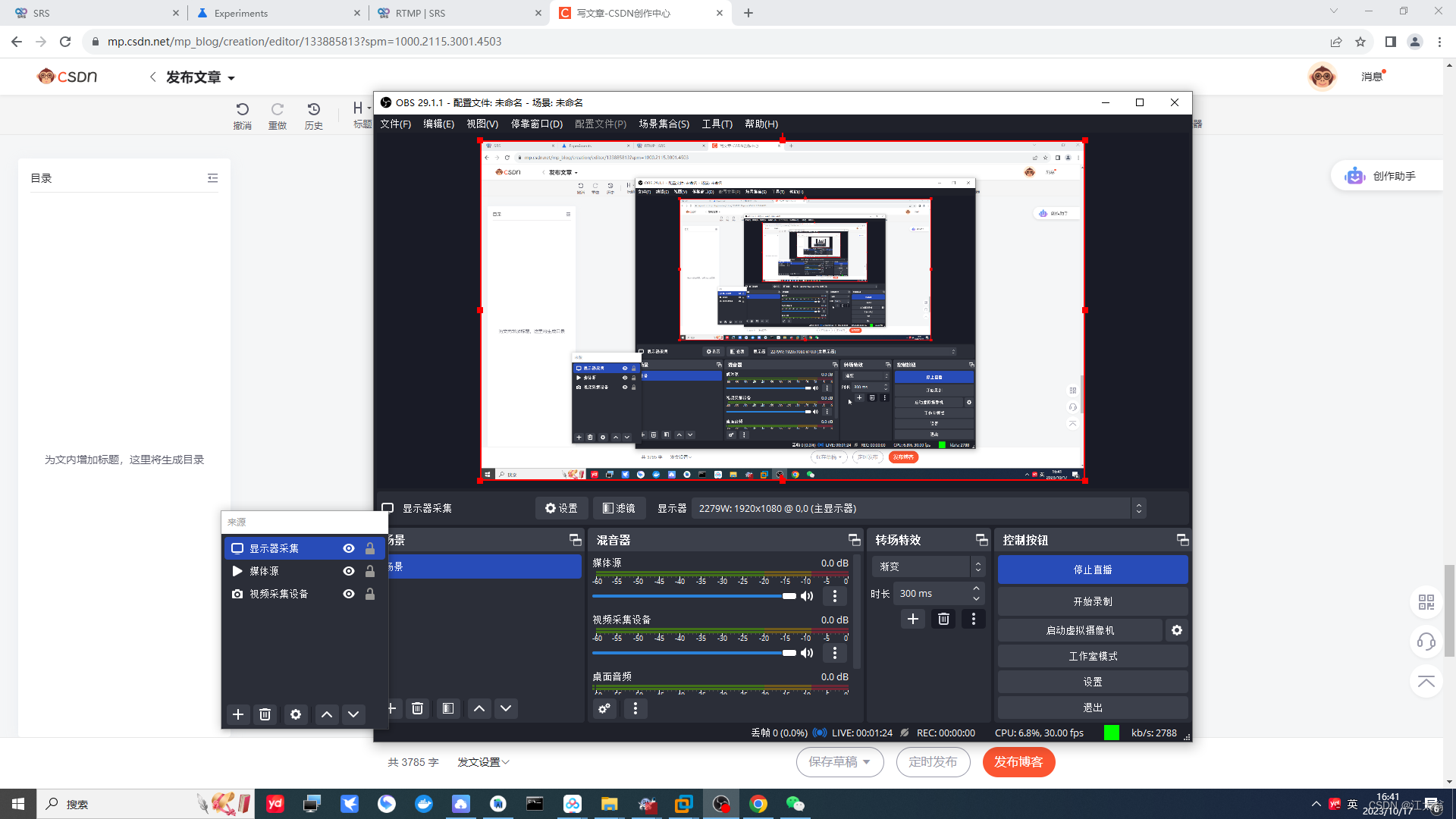
obs 推流
1 设置推流地址
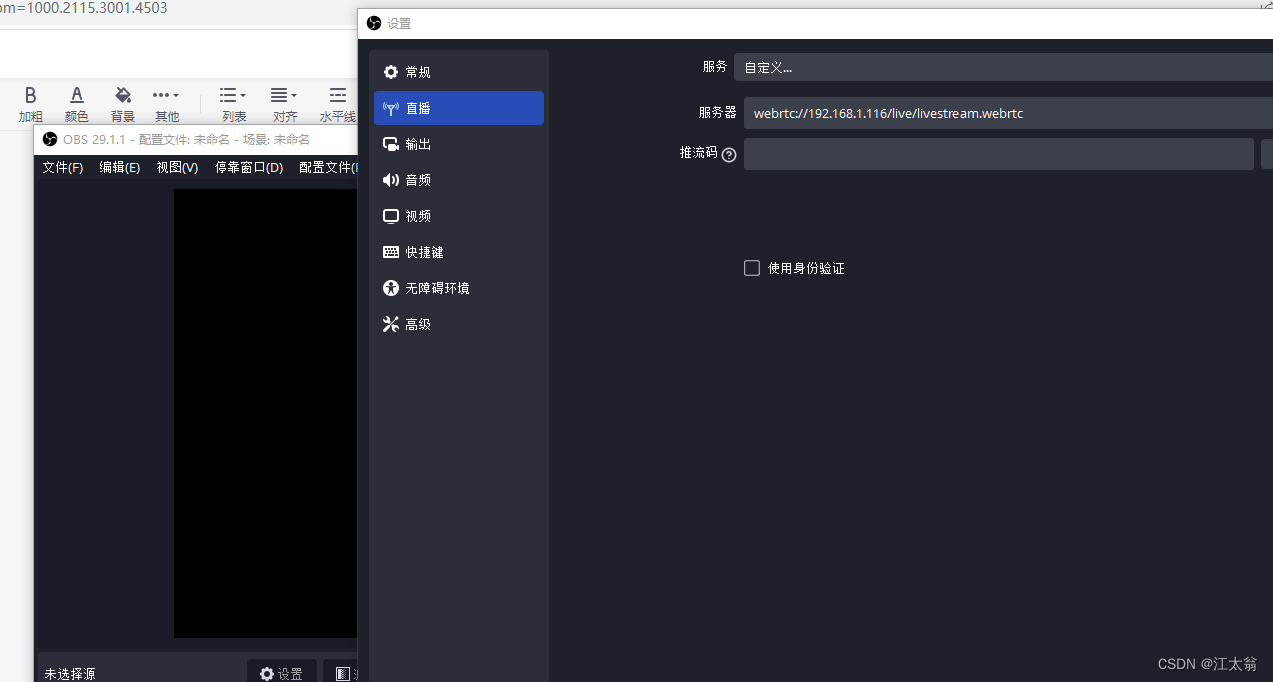
2 设置采集来源
设置本地文件媒体
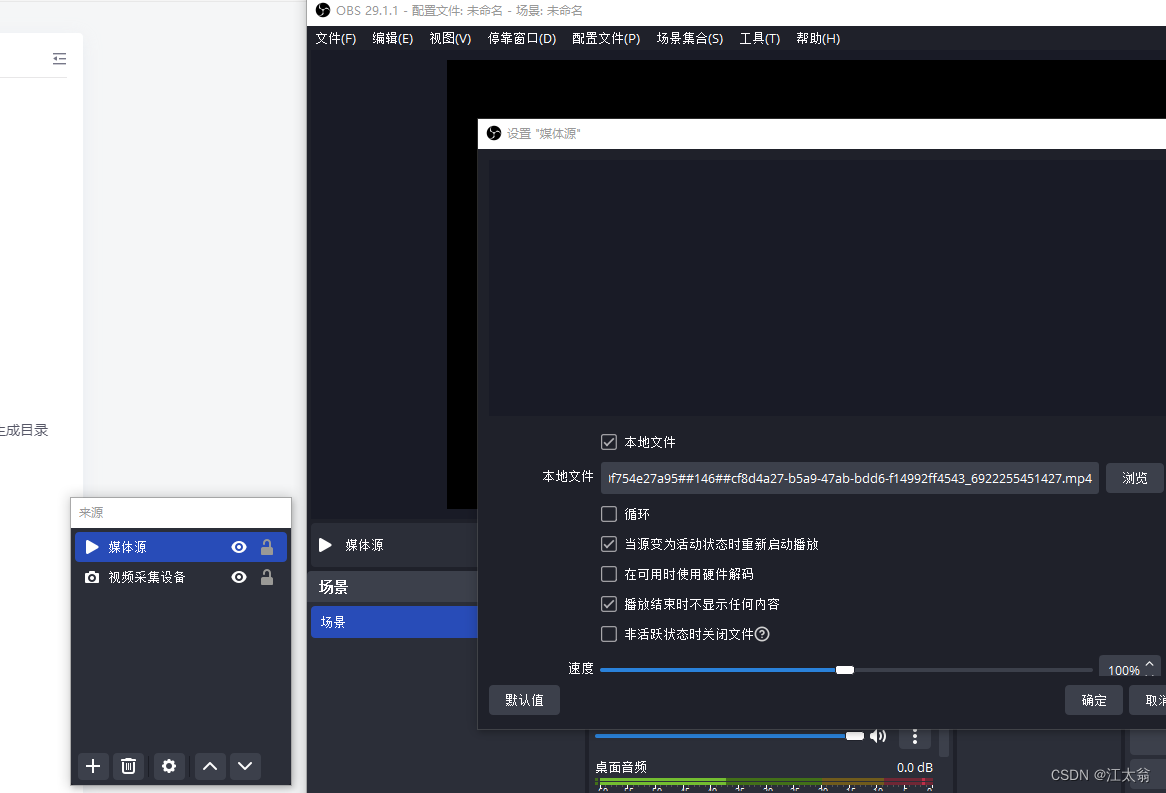
设置窗口来源
localhost 这里为192.168.1.116
3 开始直播
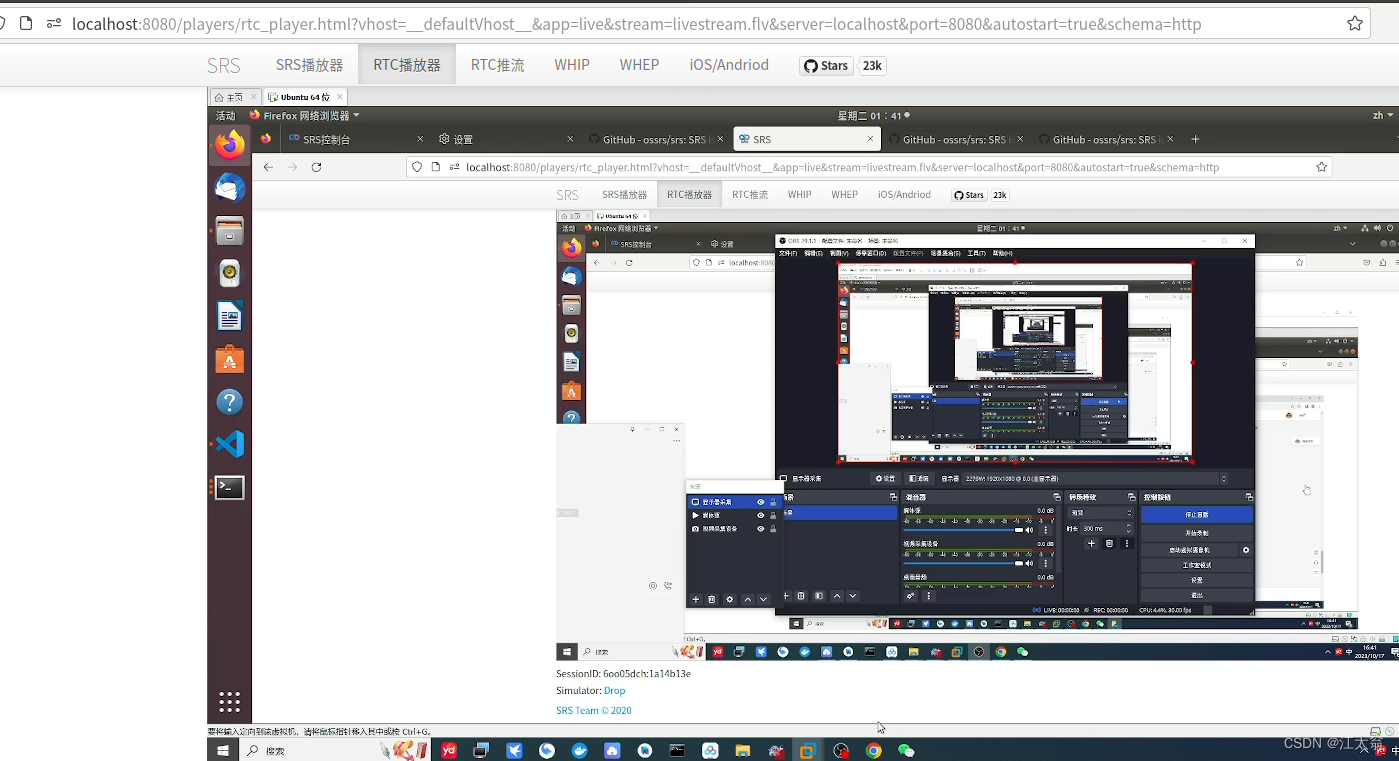
播放webrtc 流
4 rtmp->webrtc
rtmp_to_rtc on;
rtc {
        enabled     on;
        # @see https://ossrs.net/lts/zh-cn/docs/v4/doc/webrtc#rtmp-to-rtc
        rtmp_to_rtc on;
        # @see https://ossrs.net/lts/zh-cn/docs/v4/doc/webrtc#rtc-to-rtmp
        rtc_to_rtmp off;
    }
6 DVR
DVR的计划即决定什么时候关闭flv文件,打开新的flv文件,主要的录制计划包括:
- session:按照session来关闭flv文件,即编码器停止推流时关闭flv,整个session录制为一个flv。
- segment:按照时间分段录制,flv文件时长配置为dvr_duration和dvr_wait_keyframe。注意:若不按关键帧切flv(即dvr_wait_keyframe配置为off),所以会导致后面的flv启动时会花屏。
- time_jitter: 时间戳抖动算法。full使用完全的时间戳矫正;zero只是保证从0开始;off不矫正时间戳。
- dvr_path: 录制的路径,规则参考下一章。
参考conf/dvr.segment.conf和conf/dvr.session.conf配置实例。
# dvr

    dvr {
        enabled      on;
        dvr_path     ./objs/nginx/html/[app]/[stream].[timestamp].mp4;
        dvr_plan     segment;
           # the filter for dvr to apply to.
        #       all, dvr all streams of all apps.
        #       <app>/<stream>, apply to specified stream of app.
        # for example, to dvr the following two streams:
        #       live/stream1 live/stream2
        # default: all
        dvr_apply       all;
        # the dvr plan. canbe:
        #       session reap flv/mp4 when session end(unpublish).
        #       segment reap flv/mp4 when flv duration exceed the specified dvr_duration.
        # @remark The plan append is removed in SRS3+, for it's no use.
        # default: session

                # the duration for dvr file, reap if exceed, in seconds.
        #       segment apply it.
        #       session,append ignore.
        # default: 30
        dvr_duration    30;
        # whether wait keyframe to reap segment,
        # if off, reap segment when duration exceed the dvr_duration,
        # if on, reap segment when duration exceed and got keyframe.
        #       segment apply it.
        #       session,append ignore.
        # default: on
        dvr_wait_keyframe       on;
        # about the stream monotonically increasing:
        #   1. video timestamp is monotonically increasing,
        #   2. audio timestamp is monotonically increasing,
        #   3. video and audio timestamp is interleaved monotonically increasing.
        # it's specified by RTMP specification, @see 3. Byte Order, Alignment, and Time Format
        # however, some encoder cannot provides this feature, please set this to off to ignore time jitter.
        # the time jitter algorithm:
        #   1. full, to ensure stream start at zero, and ensure stream monotonically increasing.
        #   2. zero, only ensure stream start at zero, ignore timestamp jitter.
        #   3. off, disable the time jitter algorithm, like atc.
        # apply for all dvr plan.
        # default: full
        time_jitter             full;

        # on_dvr, never config in here, should config in http_hooks.
        # for the dvr http callback, @see http_hooks.on_dvr of vhost hooks.callback.srs.com
        # @see https://ossrs.net/lts/zh-cn/docs/v4/doc/dvr#http-callback
        # @see https://ossrs.net/lts/zh-cn/docs/v4/doc/dvr#http-callback
    }
这里设置 30S自动切片 等待关键帧 生成路径及命名规则
dvr_path ./objs/nginx/html/[app]/[stream].[timestamp].mp4; 年月日方式更直观
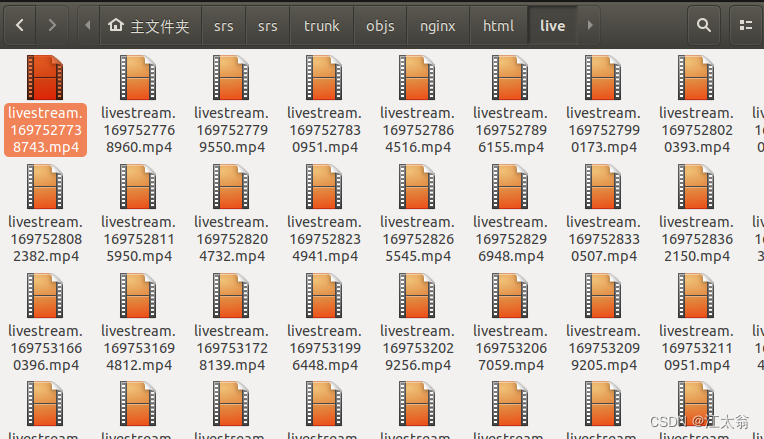
按流和年月日分目录,时间作为文件名: dvr_path /data/[vhost]/[app]/[stream]/[2006]/[01]/[02]/[15].[04].[05].[999].flv; => dvr_path /data/ossrs.net/live/livestream/2015/01/03/10.57.30.776.flv;
至此 self.conf
# main config for srs.
# @see full.conf for detail config.

listen              1935;
max_connections     1000;
#srs_log_tank        file;
#srs_log_file        ./objs/srs.log;
daemon              on;
http_api {
    enabled         on;
    listen          1985;
}
http_server {
    enabled         on;
    listen          8080;
    dir             ./objs/nginx/html;
}
rtc_server {
    enabled on;
    listen 8000; # UDP port
    # @see https://ossrs.net/lts/zh-cn/docs/v4/doc/webrtc#config-candidate
    candidate 192.168.1.116;
}
vhost __defaultVhost__ {
    hls {
        enabled         on;
    }
    http_remux {
        enabled     on;
        mount       [vhost]/[app]/[stream].flv;
    }
    rtc {
        enabled     on;
        # @see https://ossrs.net/lts/zh-cn/docs/v4/doc/webrtc#rtmp-to-rtc
        rtmp_to_rtc on;
        # @see https://ossrs.net/lts/zh-cn/docs/v4/doc/webrtc#rtc-to-rtmp
        rtc_to_rtmp off;
    }

    play{
        gop_cache_max_frames 2500;
    }

    # dvr

    dvr {
        enabled      on;
        dvr_path     ./objs/nginx/html/[app]/[stream].[timestamp].mp4;
        dvr_plan     segment;
           # the filter for dvr to apply to.
        #       all, dvr all streams of all apps.
        #       <app>/<stream>, apply to specified stream of app.
        # for example, to dvr the following two streams:
        #       live/stream1 live/stream2
        # default: all
        dvr_apply       all;
        # the dvr plan. canbe:
        #       session reap flv/mp4 when session end(unpublish).
        #       segment reap flv/mp4 when flv duration exceed the specified dvr_duration.
        # @remark The plan append is removed in SRS3+, for it's no use.
        # default: session

                # the duration for dvr file, reap if exceed, in seconds.
        #       segment apply it.
        #       session,append ignore.
        # default: 30
        dvr_duration    30;
        # whether wait keyframe to reap segment,
        # if off, reap segment when duration exceed the dvr_duration,
        # if on, reap segment when duration exceed and got keyframe.
        #       segment apply it.
        #       session,append ignore.
        # default: on
        dvr_wait_keyframe       on;
        # about the stream monotonically increasing:
        #   1. video timestamp is monotonically increasing,
        #   2. audio timestamp is monotonically increasing,
        #   3. video and audio timestamp is interleaved monotonically increasing.
        # it's specified by RTMP specification, @see 3. Byte Order, Alignment, and Time Format
        # however, some encoder cannot provides this feature, please set this to off to ignore time jitter.
        # the time jitter algorithm:
        #   1. full, to ensure stream start at zero, and ensure stream monotonically increasing.
        #   2. zero, only ensure stream start at zero, ignore timestamp jitter.
        #   3. off, disable the time jitter algorithm, like atc.
        # apply for all dvr plan.
        # default: full
        time_jitter             full;

        # on_dvr, never config in here, should config in http_hooks.
        # for the dvr http callback, @see http_hooks.on_dvr of vhost hooks.callback.srs.com
        # @see https://ossrs.net/lts/zh-cn/docs/v4/doc/dvr#http-callback
        # @see https://ossrs.net/lts/zh-cn/docs/v4/doc/dvr#http-callback
    }
}





 扫一扫
扫一扫


 762
762

 被折叠的 条评论
为什么被折叠?
被折叠的 条评论
为什么被折叠?
 到【灌水乐园】发言





