using System;
using System.Collections.Generic;
using System.ComponentModel;
using System.Data;
using System.Drawing;
using System.Linq;
using System.Text;
using System.Threading.Tasks;
using System.Windows.Forms;

namespace 人机猜拳
{
    public partial class Form1 : Form
    {
        public Form1()
        {
            InitializeComponent();
        }

        private void button1_Click(object sender, EventArgs e)
        {
            #region 01
            //int width = (int)PixelToMm(211*3);
            //int height = (int)PixelToMm(242*3);
            //Image image = Image.FromFile("石头.bmp");
            //Bitmap bmp = new Bitmap(image,width, height);
            //Graphics graphics = Graphics.FromImage(bmp);
            //Rectangle rectangle = new Rectangle(new Point(150, 150), new Size(width, height));
            //graphics.DrawImage(bmp,rectangle);
            //pictureBox1.Image = bmp;
            #endregion
            //玩家
            Graphics graphics1 = pictureBox1.CreateGraphics();
            graphics1.Clear(Color.White);
            Image[] image = { Image.FromFile("石头.bmp") , Image.FromFile("剪刀.bmp") , Image.FromFile("布.bmp") };
            Bitmap bitmap1 = new Bitmap(Image.FromFile("石头.bmp"), 105,121);
            pictureBox1.Image = bitmap1;
            //电脑玩家
            Graphics graphics2 = pictureBox2.CreateGraphics();
            graphics2.Clear(Color.White);
            Random rdm = new Random();
            int random = rdm.Next(0, 3);
            Bitmap bitmap2 = new Bitmap(image[random], 105, 121);
            pictureBox2.Image = bitmap2;
            if(random==0)
            {
                MessageBox.Show("DREW!");
            }
            else if(random==1)
            {
                MessageBox.Show("YOU WIN!");
            }
            else
            {
                MessageBox.Show("COMPUTER WIN!");
            }
        }
        public float MmToPixel(float mmValue)
        {
            float dpi = 300f;
            float pixelpermm = dpi / 25.4f;
            return mmValue * pixelpermm;
        }
        public float PixelToMm(float pixelValue)
        {
            float dpi = 300f;
            float pixelpermm = dpi / 25.4f;
            return pixelValue / pixelpermm;
        }

        private void button2_Click(object sender, EventArgs e)
        {
            //玩家
            Graphics graphics = pictureBox1.CreateGraphics();
            graphics.Clear(Color.White);
            Image[] image = { Image.FromFile("石头.bmp"), Image.FromFile("剪刀.bmp"), Image.FromFile("布.bmp") };
            Bitmap bitmap = new Bitmap(Image.FromFile("剪刀.bmp"), 105, 121);
            pictureBox1.Image = bitmap;
            //电脑玩家
            Graphics graphics2 = pictureBox2.CreateGraphics();
            graphics2.Clear(Color.White);
            Random rdm = new Random();
            int random=rdm.Next(0, 3);
            Bitmap bitmap2 = new Bitmap(image[random], 105, 121);
            pictureBox2.Image = bitmap2;
            if (random == 0)
            {
                MessageBox.Show("COMPUTER WIN!");
            }
            else if (random == 1)
            {
                MessageBox.Show("DREW!");
            }
            else
            {
                MessageBox.Show("YOU WIN!");
            }
        }

        private void button3_Click(object sender, EventArgs e)
        {
            //玩家
            Graphics graphics = pictureBox1.CreateGraphics();
            graphics.Clear(Color.White);
            Image[] image = { Image.FromFile("石头.bmp"), Image.FromFile("剪刀.bmp"), Image.FromFile("布.bmp") };
            Bitmap bitmap = new Bitmap(Image.FromFile("布.bmp"), 105, 121);
            pictureBox1.Image = bitmap;
            //电脑玩家
            Graphics graphics2 = pictureBox2.CreateGraphics();
            graphics2.Clear(Color.White);
            Random rdm = new Random();
            int random=rdm.Next(0, 3);
            Bitmap bitmap2 = new Bitmap(image[random], 105, 121);
            pictureBox2.Image = bitmap2;
            if (random == 0)
            {
                MessageBox.Show("YOU WIN!");
            }
            else if (random == 1)
            {
                MessageBox.Show("COMPUTER WIN!");
            }
            else
            {
                MessageBox.Show("DREW!");
            }
        }
    }

}
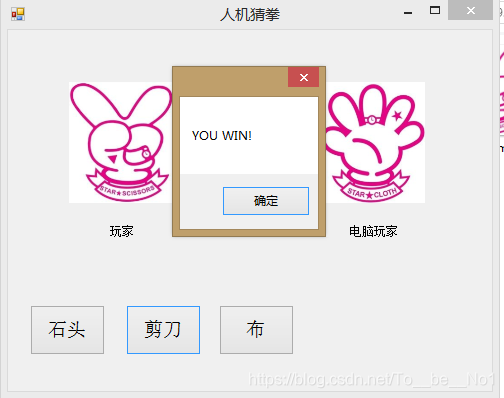



 本文介绍了一个简单的人机猜拳游戏实现,使用C#语言和Windows Forms进行开发。游戏包含玩家与电脑两个角色,通过随机数生成电脑的出拳方式,并根据双方的选择判断胜负。





 扫一扫
扫一扫


 2万+
2万+

 被折叠的 条评论
为什么被折叠?
被折叠的 条评论
为什么被折叠?
 到【灌水乐园】发言





