



大家好,我是walker
一个从文科自学转行的程序员~
爱好编程,偶尔写写编程文章和生活
欢迎关注公众号【I am Walker】,回复“电子书”,就可以获得200多本编程相关电子书哈~
我的gitee:https://gitee.com/shen-chuhao/walker.git 里面很多技术案例!
easy-captcha 图片验证码
使用
1、导入依赖
在maven仓库中查找,发现只有这个依赖,所以直接复制这个即可
    <dependency>
        <groupId>com.github.whvcse</groupId>
        <artifactId>easy-captcha</artifactId>
        <version>1.6.2</version>
    </dependency>
2、使用
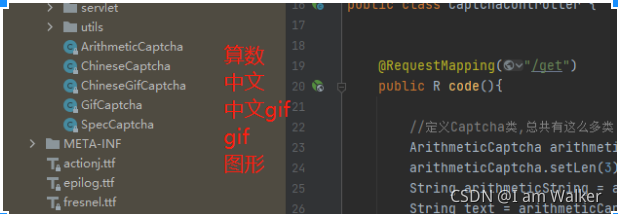
总共有这么多种验证类型
3、测试
public static void main(String[] args) {
    /**
     * 算数验证码
     */
    ArithmeticCaptcha arithmeticCaptcha = new ArithmeticCaptcha(138, 48);
    //定义几位数的运算,默认是2位数
    arithmeticCaptcha.setLen(3);
    //获取算数式
    String arithmeticString = arithmeticCaptcha.getArithmeticString();
    //获取返回结果
    String result = arithmeticCaptcha.text();
    //返回图片格式
    String imageUrl = arithmeticCaptcha.toBase64();
    System.out.println("arithmeticString:"+arithmeticString);
    System.out.println("text:"+result);
    System.out.println("图片:"+imageUrl);

    /**
     * 中文
     */
    ChineseCaptcha chineseCaptcha = new ChineseCaptcha();
    String chineseRes = chineseCaptcha.text();
    String chineseUrl = chineseCaptcha.toBase64();
    System.out.println("chineseRes:"+chineseRes);
    System.out.println("chineseUrl:"+chineseUrl);
}
返回结果:
//算数验证码返回结果
arithmeticString:3x6+5=?
text:23
图片:data:image/png;base64 …
//中文返回结果
chineseRes:个动来紧
chineseUrl:data:image/png;base64 …
4、最佳实践
可以结合redis,使用uuid作为key,结果作为value存储起来
@GetMapping(value = "/code")
public ResponseEntity<Object> getCode() {
    // 算术类型
    ArithmeticCaptcha captcha = new ArithmeticCaptcha(111, 36);
    // 几位数运算,默认是两位
    captcha.setLen(2);
    // 获取运算的结果
    String result = "";
    try {
        result = new Double(Double.parseDouble(captcha.text())).intValue() + "";
    } catch (Exception e) {
        result = captcha.text();
    }
    //生成uuid,用于判断
    String uuid = properties.getCodeKey() + IdUtil.simpleUUID();

	// 将结果和过期时间存起来,并设置过期时间
    redisUtils.set(uuid, result, expiration, TimeUnit.MINUTES);
    // 使用map或者对象存储验证码信息,并返回给前端
    Map<String, Object> imgResult = new HashMap<String, Object>(2) {{
        put("img", captcha.toBase64());
        put("uuid", uuid);
    }};
    return ResponseEntity.ok(imgResult);
}





 扫一扫
扫一扫


 712
712

 被折叠的 条评论
为什么被折叠?
被折叠的 条评论
为什么被折叠?
 到【灌水乐园】发言





